

Podman is a daemonless container engine for developing, managing, and running OCI Containers on your Linux System. It was created to replace Docker which requires a daemon running in the background. This guide will walk you through the installation of Podman on Debian Linux machines.
Podman uses container runtimes as well for example runc but the launched containers are direct descendants of the podman process. It is part of the libpod library
Step 1: Install depenednecies
Update package index:
sudo apt -y update && sudo apt -y upgradeAfter the upgrade we always recommend a system reboot if this is a requirement.
[ -f /var/run/reboot-required ] && sudo reboot -fIn this guide, we will use ansible role which automates the installation of Podman on Debian system. If ansible is already installed on the system please remove it.
sudo apt remove ansibleInstall other tools required for the installation to work.
sudo apt install vim git uidmap fuse3 fuse-overlayfsIf planning to build from source in future you can install all dev tools
sudo apt install \
  btrfs-progs \
  git \
  golang-go \
  go-md2man \
  iptables \
  libassuan-dev \
  libbtrfs-dev \
  libc6-dev \
  libdevmapper-dev \
  libglib2.0-dev \
  libgpgme-dev \
  libgpg-error-dev \
  libprotobuf-dev \
  libprotobuf-c-dev \
  libseccomp-dev \
  libselinux1-dev \
  libsystemd-dev \
  pkg-config \
  runc \
  uidmap
Install Python and pip tools on your Debian system
### Python 3 ###
sudo apt install python3 python3-pip
sudo  pip3 install --upgrade pip

### Python 2 ###
sudo apt install python2 python2-pip
sudo  pip install --upgrade pip
Step 2: Install Podman on Debian
We can install Ansible from APT repository or using ansible depending on your preference.
Method 1: Install Podman from APT repos
There are two main APT repositories containing Podman Deb packages.
Option 1) Using alvistack APT repository
An alternative Debian package installation option is from alvistack package repos. Start with repository key importation process.
source  /etc/os-release
wget http://downloadcontent.opensuse.org/repositories/home:/alvistack/Debian_$VERSION_ID/Release.key -O alvistack_key
cat alvistack_key | gpg --dearmor | sudo tee /etc/apt/trusted.gpg.d/alvistack.gpg  >/dev/null
Add the repo to your system.
echo "deb http://downloadcontent.opensuse.org/repositories/home:/alvistack/Debian_$VERSION_ID/ /" | sudo tee /etc/apt/sources.list.d/alvistack.listYou should be able to see the repository in the list when you run apt update command:
$ sudo apt update
Get:1 file:/etc/apt/mirrors/debian.list Mirrorlist [30 B]
Get:5 file:/etc/apt/mirrors/debian-security.list Mirrorlist [39 B]
Hit:2 https://deb.debian.org/debian bookworm InRelease
Hit:3 https://deb.debian.org/debian bookworm-updates InRelease
Hit:4 https://deb.debian.org/debian bookworm-backports InRelease
Hit:6 https://deb.debian.org/debian-security bookworm-security InRelease
Get:7 http://downloadcontent.opensuse.org/repositories/home:/alvistack/Debian_12  InRelease [1,541 B]
Get:8 http://downloadcontent.opensuse.org/repositories/home:/alvistack/Debian_12  Packages [357 kB]
Fetched 358 kB in 1s (586 kB/s)
Reading package lists... Done
Building dependency tree... Done
Reading state information... Done
Install Podman on Debian system using apt package manager
sudo apt install podman podman-netavark podman-composeWe can see the version of Podman installed by running the commands below:
$ podman version
Client:       Podman Engine
Version:      5.1.2
API Version:  5.1.2
Go Version:   go1.22.5
Built:        Thu Jan  1 00:00:00 1970
OS/Arch:      linux/amd64
Method 2: Install Podman on Debian using Ansible
Install Python and Pip
sudo apt install python3.11For Ansible automated way, start by cloning Ansible Role from Github using git command:
mkdir -p ~/.ansible/roles && cd ~/.ansible/roles
git clone https://github.com/alvistack/ansible-role-podman.git alvistack.podman
Use pip3/pip to install all requirements including ansible.
cd alvistack.podman
pip3 install --upgrade --ignore-installed --break-system-packages --requirement requirements.txt
Add ~/.local/bin to your PATH env
### Bash ###
echo 'export PATH=$PATH:~/.local/bin' >>~/.bashrc
source ~/.bashrc
echo $PATH

### Zsh ###
echo 'export PATH=$PATH:~/.local/bin' >>~/.zshrc
source ~/.zshrc
echo $PATH
Now execute the sequence necessary to converge the instances
molecule converge -s defaultSample execution output:
.....
TASK [alvistack.podman : include release specific variables] *******************
ok: [localhost] => (item=/root/.ansible/roles/alvistack.podman/vars/debian-12.yml)

TASK [alvistack.podman : include release specific tasks] ***********************
included: /root/.ansible/roles/alvistack.podman/tasks/debian.yml for localhost => (item=/root/.ansible/roles/alvistack.podman/tasks/debian.yml)

TASK [alvistack.podman : apt-key add] ******************************************
ok: [localhost] => (item={'keyring': '/etc/apt/trusted.gpg.d/home_alvistack.gpg', 'url': 'http://downloadcontent.opensuse.org/repositories/home:/alvistack/Debian_12/Release.key', 'id': '789CFFDE0295B8A1F4E5690C4BECC97550D0B1FD', 'state': 'present'})

TASK [alvistack.podman : apt-add-repository] ***********************************
ok: [localhost] => (item={'filename': 'home:alvistack', 'repo': 'deb http://downloadcontent.opensuse.org/repositories/home:/alvistack/Debian_12/ /', 'state': 'present'})

TASK [alvistack.podman : apt-get install] **************************************
ok: [localhost] => (item={'state': 'latest', 'name': 'containernetworking-dnsname'})
ok: [localhost] => (item={'state': 'latest', 'name': 'containernetworking-plugins'})
changed: [localhost] => (item={'state': 'latest', 'name': 'containernetworking-podman-machine'})
ok: [localhost] => (item={'state': 'latest', 'name': 'podman'})
changed: [localhost] => (item={'state': 'latest', 'name': 'podman-aardvark-dns'})
changed: [localhost] => (item={'state': 'latest', 'name': 'podman-docker'})
ok: [localhost] => (item={'state': 'latest', 'name': 'podman-gvproxy'})
changed: [localhost] => (item={'state': 'latest', 'name': 'podman-netavark'})
changed: [localhost] => (item={'state': 'latest', 'name': 'python3-podman-compose'})
ok: [localhost] => (item={'state': 'latest', 'name': 'uidmap'})

TASK [alvistack.podman : copy templates] ***************************************
changed: [localhost] => (item={'dest': '/etc/containers/nodocker'})

TASK [alvistack.podman : flush handlers] ***************************************

RUNNING HANDLER [alvistack.podman : podman | systemctl restart podman.service] ***
ok: [localhost] => (item=localhost)

TASK [alvistack.podman : systemctl start podman.service] ***********************
ok: [localhost]

PLAY RECAP *********************************************************************
localhost                  : ok=42   changed=2    unreachable=0    failed=0    skipped=0    rescued=0    ignored=0
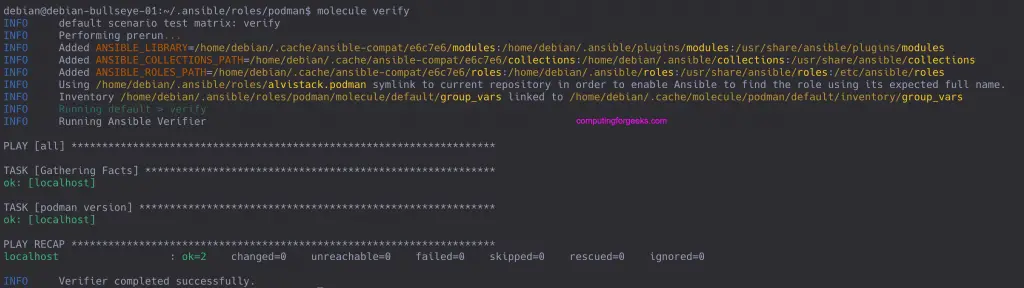
Once done finalize the installation by running the following command:
molecule verifyExecution output is as shared in screenshot below
Step 3: Confirm Podman installation
Check podman version
$ podman --version
podman version 5.1.2

$ podman version
Client:       Podman Engine
Version:      5.1.2
API Version:  5.1.2
Go Version:   go1.22.5
Built:        Thu Jan  1 00:00:00 1970
OS/Arch:      linux/amd64
You can display information pertaining to the host, current storage stats, and build of podman.
podman infoMain configuration files:
- /etc/containers/registries.conf – configuration file which specifies which container registries should be consulted when completing image names which do not include a registry or domain portion.
- /etc/containers/mounts.conf – specify volume mount directories that are automatically mounted inside containers when executing the
podman runorpodman buildcommands
Step 4: Test Podman installation
Lt’s start by pulling Alpine docker image.
$ podman pull alpine
Trying to pull docker.io/library/alpine...
Getting image source signatures
Copying blob 050382585609 done
Copying config b7b28af77f done
Writing manifest to image destination
Storing signatures
e66264b98777e12192600bf9b4d663655c98a090072e1bab49e233d7531d1294
Run docker container:
$ podman images
REPOSITORY                 TAG      IMAGE ID       CREATED       SIZE
docker.io/library/alpine  latest      e66264b98777  3 weeks ago  5.82 MB

$ podman run -ti docker.io/library/alpine /bin/sh
/ # cat /etc/os-release
NAME="Alpine Linux"
ID=alpine
VERSION_ID=3.16.0
PRETTY_NAME="Alpine Linux v3.16"
HOME_URL="https://alpinelinux.org/"
BUG_REPORT_URL="https://bugs.alpinelinux.org/
/# exit
If you get an “Error: AppArmor profile “container-default” specified but not loaded“, read the fix from CloudSpinx page.
Now that we have confirmed we can create a container, let’s remove it.
$ podman rm -f `podman ps -aq`
777f6e4921dea595c900fc22cb3d0ee7d1009cc0a7e74fa1d2b9dfa7412c371d
There you go. Check more examples on Podman tutorial available in Github and our guide.
More guides on Podman:
- How To run Docker Containers using Podman and Libpod
- Setup Docker Container Registry with Podman & Let’s Encrypt SSL
- Run FreeIPA Server in Docker / Podman Containers
- Set SELinux Context Label for Podman Custom graphroot Directory
Related guides:





Does not work for me.
The following commands
cd $GOPATH/src/github.com/containers/libpod
make
give the following error output
CGO_ENABLED=1 \
go build \
-mod=vendor \
-gcflags ‘all=-trimpath=/src/github.com/containers/libpod’ \
-asmflags ‘all=-trimpath=/src/github.com/containers/libpod’ \
-ldflags ‘-X github.com/containers/podman/v3/libpod/define.gitCommit=aaf02cfbd41e7d7fbd009a4f01a0fa45b3e49f61 -X github.com/containers/podman/v3/libpod/define.buildInfo=1627734930 -X github.com/containers/podman/v3/libpod/config._installPrefix=/usr/local -X github.com/containers/podman/v3/libpod/config._etcDir=/usr/local/etc ‘ \
-tags “apparmor exclude_graphdriver_btrfs btrfs_noversion selinux systemd exclude_graphdriver_devicemapper seccomp” \
-o bin/podman ./cmd/podman
# github.com/cyphar/filepath-securejoin
vendor/github.com/cyphar/filepath-securejoin/join.go:28:9: undefined: errors.Is
# github.com/hashicorp/go-multierror
vendor/github.com/hashicorp/go-multierror/multierror.go:115:9: undefined: errors.As
vendor/github.com/hashicorp/go-multierror/multierror.go:120:9: undefined: errors.Is
# github.com/moby/sys/mountinfo
vendor/github.com/moby/sys/mountinfo/mounted_unix.go:54:6: undefined: errors.Is
# github.com/spf13/cobra
vendor/github.com/spf13/cobra/bash_completions.go:22:24: undefined: io.StringWriter
vendor/github.com/spf13/cobra/bash_completions.go:383:26: undefined: io.StringWriter
vendor/github.com/spf13/cobra/bash_completions.go:425:24: undefined: io.StringWriter
vendor/github.com/spf13/cobra/bash_completions.go:437:27: undefined: io.StringWriter
vendor/github.com/spf13/cobra/bash_completions.go:475:25: undefined: io.StringWriter
vendor/github.com/spf13/cobra/bash_completions.go:486:20: undefined: io.StringWriter
vendor/github.com/spf13/cobra/bash_completions.go:501:38: undefined: io.StringWriter
vendor/github.com/spf13/cobra/bash_completions.go:529:21: undefined: io.StringWriter
vendor/github.com/spf13/cobra/bash_completions.go:566:28: undefined: io.StringWriter
vendor/github.com/spf13/cobra/bash_completions.go:591:29: undefined: io.StringWriter
vendor/github.com/spf13/cobra/bash_completions.go:591:29: too many errors
# github.com/checkpoint-restore/checkpointctl/lib
vendor/github.com/checkpoint-restore/checkpointctl/lib/metadata.go:182:46: syntax error: unexpected o600, expecting comma or )
# golang.org/x/term
vendor/golang.org/x/term/term_unix_linux.go:9:7: ioctlReadTermios redeclared in this block
previous declaration at vendor/golang.org/x/term/term_unix_aix.go:9:26
vendor/golang.org/x/term/term_unix_linux.go:10:7: ioctlWriteTermios redeclared in this block
previous declaration at vendor/golang.org/x/term/term_unix_aix.go:10:27
# github.com/containers/common/pkg/secrets/passdriver
vendor/github.com/containers/common/pkg/secrets/passdriver/passdriver.go:48:18: undefined: os.UserHomeDir
# github.com/containerd/containerd/errdefs
vendor/github.com/containerd/containerd/errdefs/errors.go:54:9: undefined: “github.com/pkg/errors”.Is
vendor/github.com/containerd/containerd/errdefs/errors.go:59:9: undefined: “github.com/pkg/errors”.Is
vendor/github.com/containerd/containerd/errdefs/errors.go:65:9: undefined: “github.com/pkg/errors”.Is
vendor/github.com/containerd/containerd/errdefs/errors.go:71:9: undefined: “github.com/pkg/errors”.Is
vendor/github.com/containerd/containerd/errdefs/errors.go:76:9: undefined: “github.com/pkg/errors”.Is
vendor/github.com/containerd/containerd/errdefs/errors.go:81:9: undefined: “github.com/pkg/errors”.Is
vendor/github.com/containerd/containerd/errdefs/errors.go:86:9: undefined: “github.com/pkg/errors”.Is
vendor/github.com/containerd/containerd/errdefs/errors.go:92:9: undefined: “github.com/pkg/errors”.Is
# github.com/jinzhu/copier
vendor/github.com/jinzhu/copier/copier.go:342:10: v.IsZero undefined (type reflect.Value has no field or method IsZero)
# k8s.io/apimachinery/pkg/util/errors
vendor/k8s.io/apimachinery/pkg/util/errors/errors.go:99:10: undefined: errors.Is
# github.com/rootless-containers/rootlesskit/pkg/port/builtin/parent
vendor/github.com/rootless-containers/rootlesskit/pkg/port/builtin/parent/parent.go:104:9: undefined: “github.com/pkg/errors”.Is
# k8s.io/apimachinery/pkg/api/resource
vendor/k8s.io/apimachinery/pkg/api/resource/quantity.go:470:34: invalid operation: int64(1) << (exponent * 10) (shift count type int, must be unsigned integer)
# github.com/containers/podman/v3/pkg/bindings/internal/util
pkg/bindings/internal/util/util.go:93:13: f.MapRange undefined (type reflect.Value has no field or method MapRange)
note: module requires Go 1.13# sigs.k8s.io/structured-merge-diff/v4/value
vendor/sigs.k8s.io/structured-merge-diff/v4/value/mapreflect.go:95:13: val.MapRange undefined (type reflect.Value has no field or method MapRange)
vendor/sigs.k8s.io/structured-merge-diff/v4/value/mapreflect.go:173:14: rhs.MapRange undefined (type reflect.Value has no field or method MapRange)
vendor/sigs.k8s.io/structured-merge-diff/v4/value/mapreflect.go:194:13: lhs.MapRange undefined (type reflect.Value has no field or method MapRange)
# k8s.io/apimachinery/pkg/util/net
vendor/k8s.io/apimachinery/pkg/util/net/http.go:67:5: undefined: errors.As
vendor/k8s.io/apimachinery/pkg/util/net/http.go:84:5: undefined: errors.As
vendor/k8s.io/apimachinery/pkg/util/net/util.go:43:5: undefined: errors.As
vendor/k8s.io/apimachinery/pkg/util/net/util.go:52:5: undefined: errors.As
make: *** [Makefile:295: bin/podman] Error 2
Do you know a way to install Podman 3.4 on Debian 11? The Debian repo only has 3.0.
I guess the Ansible role could be used, but it would sure be nicer to have packages.
We’ve updated the guide. Please follow along and let us know if it’s helpful.
The alvistack repo works on Ubuntu too. You just change the URL part /Debian_$VERSION_ID/ to be /xUbuntu_22.04/
wget http://downloadcontent.opensuse.org/repositories/home:/alvistack/Debian_$VERSION_ID/Release.key -O alvistack_key
404
Hello, I follow exactly all the steps and:
isudoajl@fdx:~$ podman info
Error: could not find “netavark” in one of {[/usr/local/libexec/podman /usr/local/lib/podman /usr/libexec/podman /usr/lib/podman] {}}. To resolve this error, set the helper_binaries_dir key in the `[engine]` section of containers.conf to the directory containing your helper binaries.
isudoajl@fdx:~$ podman version
Error: could not find “netavark” in one of {[/usr/local/libexec/podman /usr/local/lib/podman /usr/libexec/podman /usr/lib/podman] {}}. To resolve this error, set the helper_binaries_dir key in the `[engine]` section of containers.conf to the directory containing your helper binaries.
🙁
Thanks for the tip. I’m sure someone will benefit from this.