Six wall bricks, two power strips, and a nest of cords zip-tied to a rack leg. That is how most homelabs handle power until the day one brick works loose, half the rack drops, and you spend an evening tracing which plug fed what. A rack PDU (power distribution unit) fixes that: one rugged strip of outlets that mounts in the rack, feeds everything from a single cord, and, on the better models, tells you how many watts you are pulling or lets you power-cycle a hung box from your phone.
This guide picks the best rack PDU for a homelab across the tiers that actually matter: a basic strip, a metered unit that shows your real amps, a switched unit for remote power-cycling, a clean all-C13 unit for a server rack, and a DC PDU for the new wave of 10-inch mini racks. It also covers the one decision that trips people up before they even plug in, whether you want AC or DC distribution, and the gotcha that turns more PDU purchases into returns than anything else: the input plug.
Sourced in July 2026 from the manufacturer spec sheets and the listings on sale right now. The power and safety figures are cited to NEC, the EIA, and the IEC connector standards, not measured on my own bench.
The short list
If you just want the answer, here is where each pick lands. The reasoning and the specs are below.
- Best for most homelabs: Tripp Lite PDU1215. Thirteen outlets, plugs into any ordinary wall socket, no fuss.
- Best for seeing your real watts: CyberPower PDU15M2F12R. A front amp display so you know how loaded the circuit is.
- Best for remote power-cycling: CyberPower PDU41001. Per-outlet on/off over the network when a box wedges.
- Best for a clean all-server rack: StarTech PDU08C13H. Eight C13 outlets for tidy jumper cords, with one plug caveat.
- Best for a 10-inch mini rack: GeeekPi DC PDU Lite 7-CH. One 12V brick feeds a whole shelf of Pis and SBCs.
- The honest curveball: if you only need to meter or reboot one always-on box, a ~$20 Kasa smart plug does that for a fraction of any rack PDU. More on that below.
How I picked these
Every spec here comes from the manufacturer’s own page or datasheet, cross-checked against a live retail listing and a second source. I did not bench-test these units or measure their draw, so you will not find invented wattage graphs. What you will find is the stuff that decides whether a PDU is right for a home rack: the outlet type, the input plug, the real continuous current rating, and whether the metering or switching is worth paying for. The electrical rules (the 80% derating, the connector ratings, the running-cost math) are cited to NEC, IEC 60320, and the EIA so you can check them yourself.
The picks lean toward 120V North-American gear because that is what most home racks run. If you are on 230V, the same logic applies, just match the connectors and voltage to your region.
Rack PDUs compared
The table lines up the five picks on the specs that change the decision. “Continuous” is the 80% derated current you should actually plan to, explained further down.
| Model | Tier | Outlets | Input plug | Metering | Remote switch | Price band |
|---|---|---|---|---|---|---|
| Tripp Lite PDU1215 | Basic | 13x NEMA 5-15R | NEMA 5-15P (fits any US outlet) | None | No | ~$100-130 |
| CyberPower PDU15M2F12R | Metered | 14x NEMA 5-15R | NEMA 5-15P | Local amp display | No | ~$150-190 |
| CyberPower PDU41001 | Switched | 8x NEMA 5-15R | NEMA 5-15P | Networked (A/V/kW) | Yes (per outlet, web/SNMP) | ~$400-550 |
| StarTech PDU08C13H | Basic | 8x IEC C13 | NEMA 5-20P (needs a 20A outlet) | None | No | ~$90-120 |
| GeeekPi DC PDU Lite 7-CH | DC breakout | 7x DC barrel | DC input (needs a 12V brick) | None | No | ~$45-55 |
1. Tripp Lite PDU1215: the one most homelabs should buy
For a first rack PDU, the boring answer is the right one. The PDU1215 is a basic (unmetered) 1U strip with thirteen NEMA 5-15R outlets, and its input is a plain NEMA 5-15P: the same plug on your phone charger. That means it drops into any standard US wall outlet with no adapter, no dedicated circuit, no homework. Servers, switches, and a NAS all connect with the C13-to-5-15P cords they already ship with.
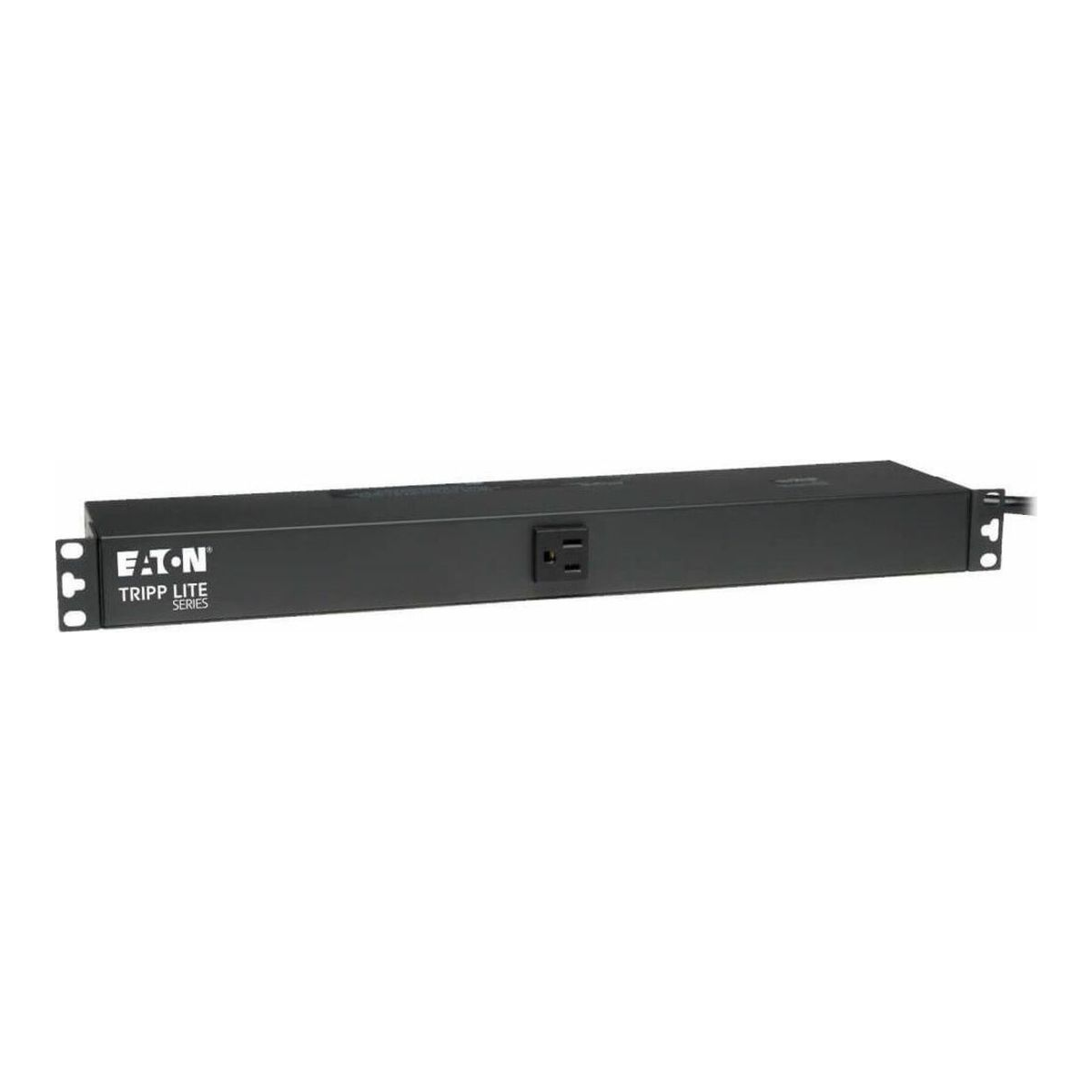
It rates 15A / 1800W with a single breaker, mounts horizontally in 1U or sideways as a 0U bar, and ships with a long 15-foot cord so the rack does not have to sit on top of the outlet. There is no power switch, which sounds like an omission until you realise a switch is one more thing to bump and drop your whole rack. Tripp Lite backs it with a long warranty, and it is the unit I would hand someone setting up their first homelab rack without a second thought.
Who it is for: anyone who wants clean, dense power and does not need to see watts or switch outlets remotely. Skip it if: you specifically want a load readout (go metered, next) or C13 outlets for the tidiest cabling (the StarTech, pick 4). If you want fewer outlets for less money, the CyberPower PDU15B10R is a ten-outlet basic unit on the same 5-15P plug.
2. CyberPower PDU15M2F12R: when you want to see your real watts
The single upgrade worth paying for in most homelabs is a meter. The PDU15M2F12R adds a front LED that reads the load in amps, so you can glance at the rack and know whether you are at 3A or creeping toward the limit. That one number does two useful jobs: it stops you overloading the circuit, and it tells you the draw you need to size a UPS and estimate the electricity bill.
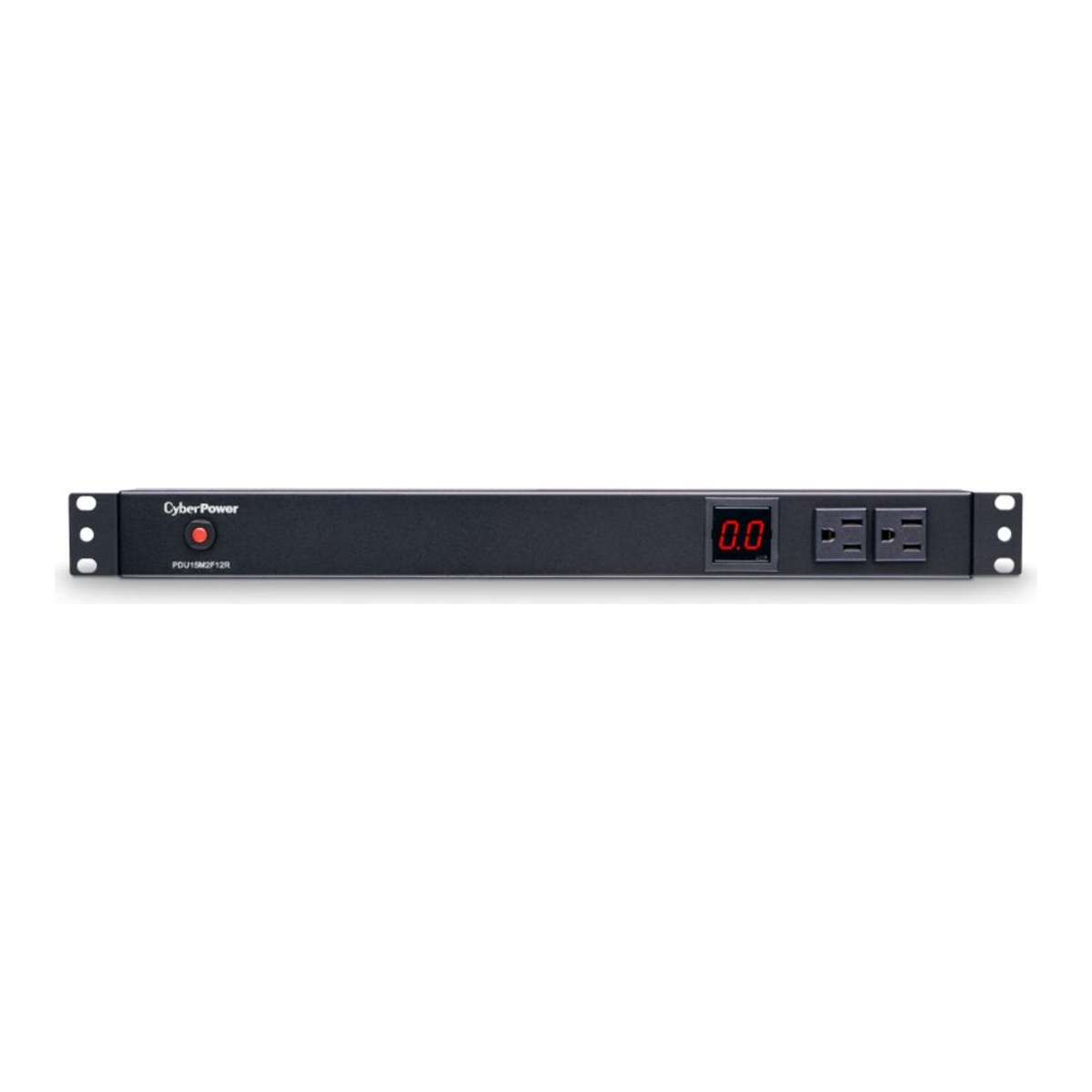
It carries fourteen 5-15R outlets on a 5-15P plug, and CyberPower prints the honest number on its own page: 15A derated to 12A continuous. This is a locally metered PDU, not a networked one, so you read the amps at the rack rather than over SNMP. For a homelab that is usually the right trade: you get the number that matters without paying for a management card you will poll twice and forget.
Who it is for: the builder who wants to know their real load and roughly size a UPS. Skip it if: you want that reading graphed on a dashboard from your desk (that is a networked/monitored PDU, which costs more) or you are happy metering with a cheap smart plug instead. The classic alternative here is the Tripp Lite PDUMH15, a long-running server-room favourite with the same local amp meter; it usually costs more than the CyberPower for the same job, so buy whichever is cheaper the day you look.
3. CyberPower PDU41001: remote power-cycle a box that hangs
A switched PDU is the one you buy for a specific pain: a mini-PC or Pi that locks up hard, with no out-of-band management, and you are tired of walking to the rack to pull its plug. The PDU41001 gives eight outlets you can turn on and off individually over a web UI or SNMP, plus an LCD and network port that report amps, volts, and kilowatts. Pair it with an IP-KVM and you have full lights-out control: see the screen, and cut the power, without being in the room.
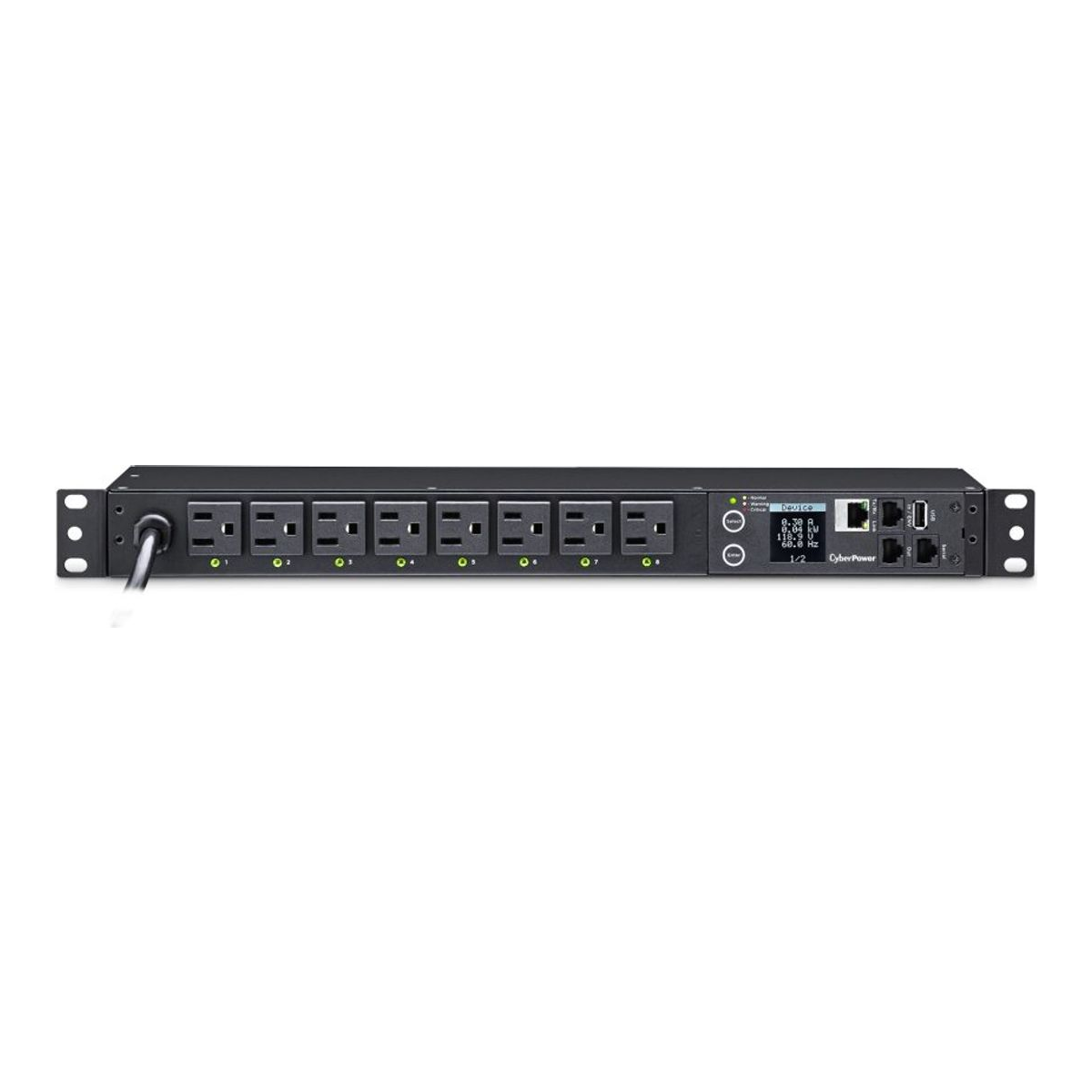
It runs on a normal 5-15P plug and is 15A derated to 12A, like the metered unit. The honest catch is price: a new switched PDU often costs more than the entire mini-rack it sits in, and some users report the SNMP side being fussy, so test it against your monitoring stack. This is why so many homelabbers get their switched PDU used: decommissioned data-center units like the APC AP7900B turn up on eBay for roughly $60 to $150, a fraction of new. If you go that route, buy the used APC off eBay rather than a new one; the savings are the whole point.
Who it is for: anyone who reboots hung gear often and wants to do it remotely, or who likes to stage power-on so the NAS spins up before the hypervisors. Skip it if: all your gear already has IPMI, iDRAC, or iLO (you can power-cycle from there for free) or you only need to control one device.
4. StarTech PDU08C13H: the tidiest all-server cabling
Read the input plug on this one before anything else. The PDU08C13H is a lovely unit for a pure server rack, eight IEC C13 outlets so every server and switch connects with a short C13-to-C14 jumper cord instead of a fat wall-brick cable, giving the cleanest cabling of any pick here. The catch is that it feeds through a C20 inlet with a cord that ends in a NEMA 5-20P plug, the one with the sideways neutral blade. That will not seat in a standard 5-15R living-room outlet.
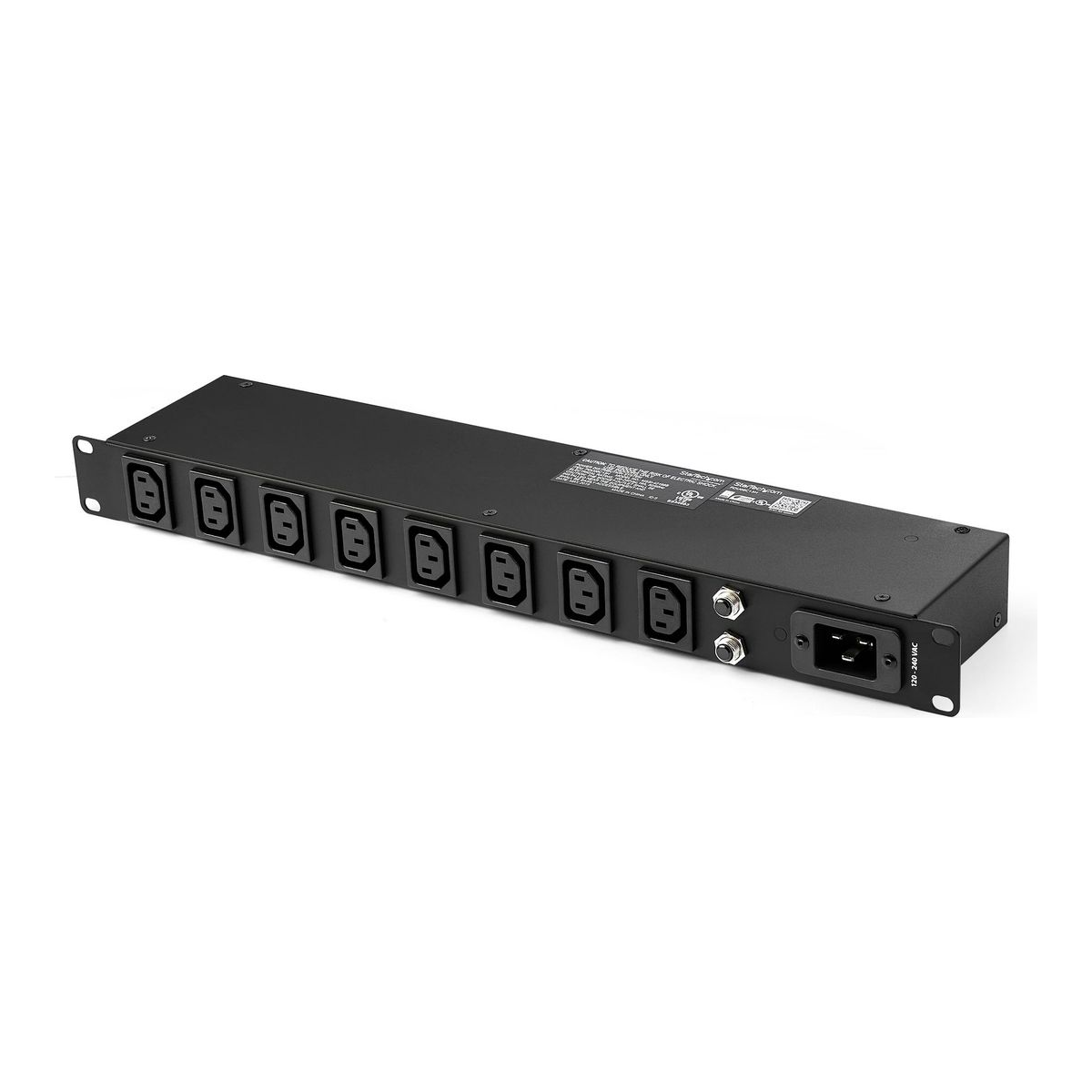
So this is the pick when your rack is all C14-inlet gear and you either have a 20A outlet with a 5-20R receptacle or you are willing to add one. It is rated 16A (1920VA) at 120V and has dual breakers. Do not “solve” the plug by forcing a 5-20P into a 15A circuit with an adapter; that defeats the breaker’s job. If you love the C13 look but only have 15A outlets, that is a real reason to pick one of the 5-15P units above and use C13-to-5-15P cords instead.
Who it is for: an all-server or all-switch rack where clean C13 jumpers matter and a 20A circuit exists or can be added. Skip it if: you only have ordinary 15A wall outlets, or your rack has consumer gear with wall bricks that want NEMA sockets.
5. GeeekPi DC PDU Lite 7-CH: power a 10-inch mini rack from one brick
Mini racks changed the power question. A shelf of Raspberry Pis, SBCs, and small switches is mostly 12V barrel-jack gear, and running six wall-warts for it is exactly the mess a rack was meant to kill. The GeeekPi DC PDU Lite (also sold as the DeskPi unit, same product) takes one DC input and splits it into seven fused channels of DC5521 barrel outputs, in half a rack U on a 10-inch rack. Each channel has a resettable fuse that trips at 5A and recovers on its own after a few seconds, so a single shorted $8 board trips only its own outlet instead of taking down the shelf.
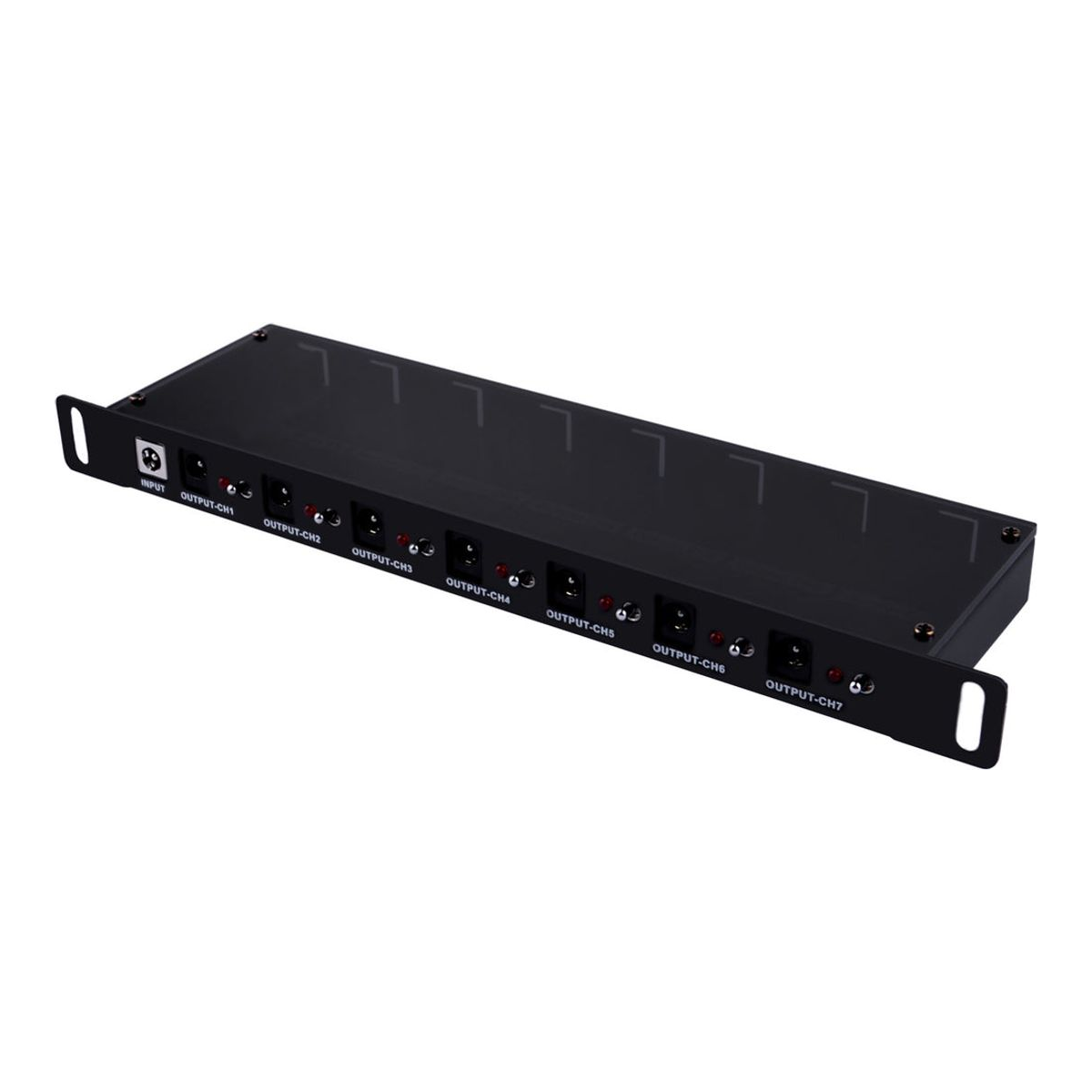
The number to lead with is the ceiling: the whole unit is capped at 8A total input, which is about 96W at 12V across all seven channels combined. That is plenty for a stack of Pis (a Pi 5 idles a few watts and peaks near 12W), but it is not enough for a couple of hungry 12V mini-PCs plus fans, so do the watt math first. It is a passive, fused breakout: no metering, no network switching, no per-channel switch. It also needs a separate brick, and because of that 8A cap the right feed is a 100W-to-150W 12V supply such as a Mean Well LRS-150-12, not the oversized 350W unit people reach for. Match the brick’s barrel connector to the PDU’s input jack, or use the first-party GeeekPi adapter which already fits.
Who it is for: a 10-inch mini rack of Pis and SBCs where one tidy brick beats a drawer of wall-warts. Skip it if: the rack holds anything with a real PSU or a 19V laptop-style brick (that needs AC, next section), or you need metering or remote switching (a DC PDU does neither).
AC or DC? How to actually choose
Pick DC distribution only when the whole rack is low-voltage barrel-jack or USB-C gear (Pis, SBCs, small switches, fans) with a modest total under about 96W for one DC PDU. That is the modern 10-inch mini rack exactly, and there a single 12V supply plus a fused DC PDU is genuinely tidier and can be more efficient than a pile of wall-warts, partly because each cheap always-plugged wart wastes a couple of watts doing nothing and a good enclosed supply runs near 88% efficient.
Pick AC the moment the rack has a real power supply. You cannot DC-distribute a 350W server PSU, a NAS, or anything with a C14 inlet or a 19V laptop brick; those need mains AC and a normal rack PDU or surge strip. Plenty of racks run both: a DC PDU for the small stuff and one short AC strip for the two odd bricks that refuse to conform. The honest trade with DC is that one brick becomes a single point of failure, so leave headroom or run two smaller bricks split across the shelf. And remember the DC PDU’s real limit, it is a fused breakout, not a smart PDU; if you need remote power-cycling or per-outlet monitoring, that is an AC switched PDU’s job.
There is a third path worth knowing for a pure Pi cluster: Power over Ethernet. A PoE switch plus a splitter at each node powers everything over the same cable you are already running, and removes the DC PDU and its brick entirely. It costs the most per port, and a Pi 5 needs 802.3at (PoE+) with a 5V/5A-class splitter rather than the common 5V/2.4A ones, but if you are already building around a managed PoE switch it is the cleanest cabling of all.
What to look for in a rack PDU
Match the input plug to your wall outlet first
This is the mistake that sends PDUs back. A standard US home has NEMA 5-15R wall receptacles, but a lot of “server” rack PDUs ship with a NEMA 5-20P input (the blade turned sideways) or an L5-30P twist-lock, because they were built for data centers on 20A or 30A circuits. A 5-20P will not enter a 5-15R at all, and an L5-30P is a different body entirely. Check the PDU’s input plug against your actual wall outlet before you buy. Want a 20A or 30A PDU for real? Have an electrician fit a matching dedicated circuit and receptacle, rather than adapting a high-amp plug onto a 15A circuit.
Match the outlet type to your gear
Servers, switches, and most UPSes have a C14 inlet, so a PDU with C13 outlets lets you use short C13-to-C14 jumper cords for the cleanest, densest cabling. A PDU with NEMA 5-15R outlets is more foolproof: it takes the C13-to-5-15P cords your gear already ships with and also handles wall-brick consumer kit. C13 is tidier for an all-server rack; 5-15R is the safer default for a mixed one. Reserve C19/C20 outlets for genuinely power-hungry boxes.
Plan to the 80% rule, not the nameplate
Under NEC 210.20(A), a circuit feeding a continuous load (anything running three hours or more, which is every homelab) must be planned to 80% of its rating. So a 15A PDU or circuit is really good for 12A / 1440W continuous, a 20A for 16A / 1920W, and a 30A for 24A. CyberPower even prints “derated to 12A” on its own product pages. Add up your gear’s real watts, divide by 120, and keep the total under that continuous cap with headroom for boot surges. A PDU never raises your circuit’s limit; it only splits it into more outlets.
Know the tiers before you overpay
Vendors use these words loosely, so pin them down. Basic is a rack power strip with no data. Metered adds a load readout you view locally at the rack. Monitored is the same measurement exposed over the network (SNMP or a web UI) with history and alerts. Switched adds remote on/off of each outlet. ATS has two inputs and fails over between them. Most homelabs are happiest on basic or metered; switched earns its keep only if you power-cycle hung gear remotely; and an ATS is pointless unless you actually have two independent power sources for it to switch between.
Form factor: 1U, 0U, or mini rack
A horizontal 1U PDU mounts like any device and eats one rack unit, with outlets on the front. A vertical 0U PDU mounts in the rear side channel and uses no rack U, carrying far more outlets, but those are a 19-inch-rack feature that assumes the depth and side space exist. A 10-inch mini rack has neither, roughly 8.75 inches of usable width, so mini-rack builds use a short horizontal AC strip and/or a DC PDU, not a full 0U bar.
Do you even need a rack PDU?
Buying the wrong one of these three first is a common mistake, so be honest about which problem you are solving. A UPS is the only one that keeps gear running through an outage, because it has a battery and inverter; it usually adds surge protection, a rough meter, and a few outlets too. A rack PDU has no battery. What it adds is outlet density, and on the metered or switched tiers, visibility and control. A smart plug like the Kasa KP125M meters real watts (with a bill estimate) and remotely switches one device; the linked two-pack runs around $20 to $30, so it is a fraction of any rack PDU per plug.
So the order that saves money: buy a UPS first for anything holding data, because the battery is what prevents corruption when the power blinks. Add a rack PDU when you need outlet density to feed a growing rack cleanly, or metered/switched visibility. Reach for a $20 smart plug when you only want to watch or power-cycle a single always-on box; it beats a switched PDU on cost until you have several devices to control. Two things people get wrong: a surge protector is not a UPS (it clamps spikes, it does not ride through an outage), and you plug the UPS straight into the wall, never into a PDU or another strip.
Metering is also where a PDU pays for itself. At the US average rate of about 18.8 cents per kilowatt-hour (EIA, April 2026), every 10 watts of always-on draw costs roughly $16 to $17 a year, and a rack idling at 300W runs close to $495 a year. Knowing your real idle number turns “the rack uses a lot” into a figure you can act on, and it is the number you feed into sizing a UPS.
Wire it to one wall outlet without tripping the breaker
The last thing that trips people up is not the PDU, it is the circuit behind it. A PDU splits one outlet into many, but the wall circuit still has one limit, so the whole rack has to live under it. On a common 15A household circuit that means 12A, about 1440W continuous, once you apply the 80% rule. Add up the real load of everything that will hang off the PDU, divide by 120, and if you are near that number, move to a 20A circuit or split the rack across two circuits rather than hoping.
And never chain power: no plugging the PDU into a surge strip, and no plugging a strip into the PDU. Relocatable power taps are listed to be connected straight to a permanently installed receptacle, and daisy-chaining them overloads the first link and is a documented fire cause. Grounded three-prong throughout, one PDU straight to a wall outlet that can carry the load, everything on the rack under the 80% cap. Get those three right and the power side of the rack becomes the part you never think about again, which is exactly what you want it to be. From here, the natural next buys are a UPS for the gear that holds data and, if you run enterprise boxes, the rackmount server the PDU is there to feed.