Every phone, laptop, and server on a private network needs to reach the internet, yet they all carry addresses the internet refuses to route. Network Address Translation is the fix. It rewrites the private source address on a packet as it leaves the network, swapping it for a public address the internet does accept, and reverses the swap on the way back. This guide shows how to configure NAT and PAT in all three forms a Cisco router supports, static NAT, dynamic NAT with a pool, and Port Address Translation, on a real lab, then reads the resulting translation table.
NAT sits on the boundary router or firewall, the device with one foot in the private network and one foot in the public internet. The CCNA 200-301 exam expects you to configure inside source NAT with both static mappings and pools, recognise PAT, and interpret the output of show ip nat translations. We cover each, with the real output from a Cisco IOS router.
Verified June 2026 on a Cisco IOS 15.2 router doing static NAT and PAT overload in GNS3.
Why NAT exists
IPv4 has about 4.3 billion addresses, and the internet ran out of fresh ones years ago. Private networks get around the shortage by using the reserved RFC 1918 private ranges (10.0.0.0/8, 172.16.0.0/12, and 192.168.0.0/16) internally. Those addresses are free and reusable in every network on the planet, but routers on the public internet drop them, precisely because they are not unique.
NAT bridges that gap. An inside host keeps its private address for local use, and the boundary router translates it to a routable public address whenever the host talks to the outside. One organisation might run thousands of devices on 10.0.0.0/8 behind a handful of public addresses, or even a single one. That last case, many private hosts sharing one public address, is PAT, and it is what almost every home and branch network runs.
Inside, outside, and the four NAT addresses
NAT terminology trips people up because every address has two names depending on which side of the router you stand. First you tell the router which interfaces face which way: ip nat inside on the private-facing interfaces, ip nat outside on the public-facing one. NAT only translates traffic crossing between an inside and an outside interface.
Then there are four address names, two for the inside host and two for the outside host. The split between local and global is simply “the address as seen from the inside network” versus “the address as seen from the outside network”:
| Address | What it is | In this lab |
|---|---|---|
| Inside local | The private address the inside host actually uses | 192.168.10.10 |
| Inside global | The public address that inside host is translated to | 203.0.113.9 (PAT) or 203.0.113.10 (static) |
| Outside local | The outside host as seen from inside the network | 198.51.100.1 |
| Outside global | The real public address of the outside host | 198.51.100.1 |
Outside local and outside global match here because nothing translates the outside host. They differ only when you also run NAT on the destination side, which is rare at this level. The pair that matters in everyday troubleshooting is inside local (private) versus inside global (public), because that is the swap NAT performs on outbound traffic.
The lab topology
The lab is one NAT router (R1) with two inside hosts on separate private subnets and an outside router (R2) standing in for the internet, advertising a public host at 198.51.100.1. Host A will use PAT, and the inside server gets a fixed static mapping.
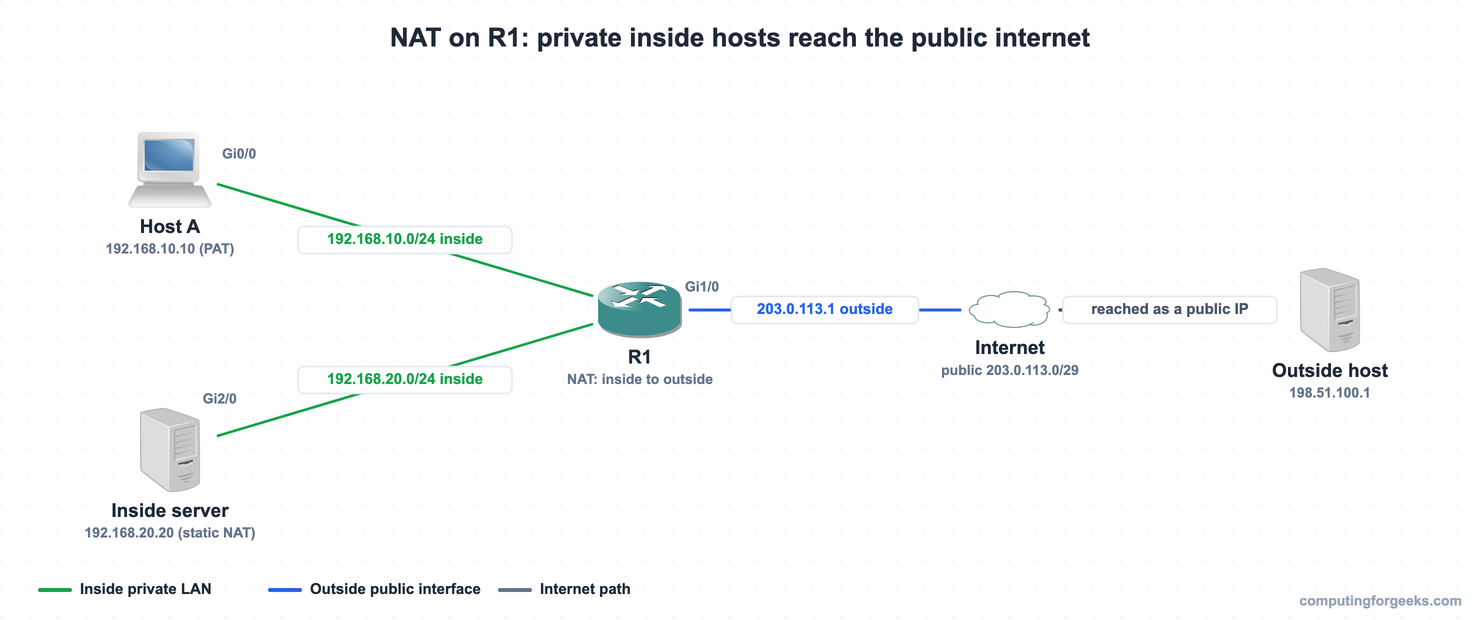
R1 carries ip nat inside on Gi0/0 (192.168.10.0/24) and Gi2/0 (192.168.20.0/24), and ip nat outside on Gi1/0 (203.0.113.1). R2 has a route for the public NAT block 203.0.113.8/29 pointing back at R1, so translated traffic returns correctly. Here is the same topology as it ran in GNS3:
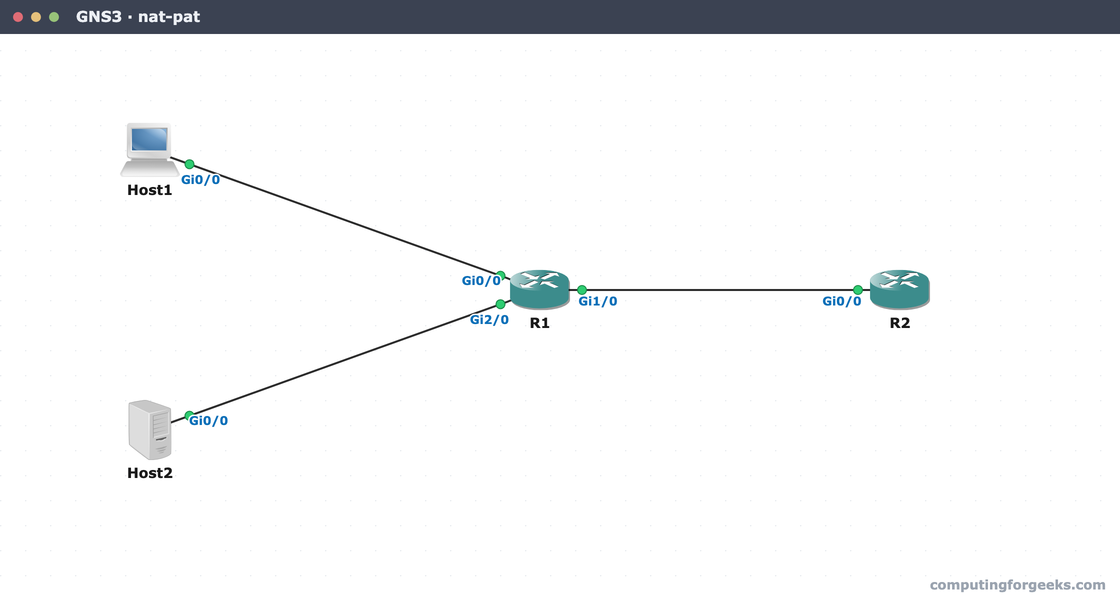
Every device config in this lab is paste-ready in the companion repo, c4geeks/ccna-labs/nat-pat. Designate the interfaces first, because no translation happens until the router knows which side is which:
interface GigabitEthernet0/0
 ip address 192.168.10.1 255.255.255.0
 ip nat inside
interface GigabitEthernet2/0
 ip address 192.168.20.1 255.255.255.0
 ip nat inside
interface GigabitEthernet1/0
 ip address 203.0.113.1 255.255.255.252
 ip nat outside
With the directions set, you add the translation rules themselves. Start with the simplest form, a fixed one-to-one mapping.
Static NAT: a fixed one-to-one mapping
Static NAT permanently ties one private address to one public address. Use it for anything the outside world must reach at a predictable address, a web server, a mail server, a camera. The mapping works in both directions: outbound traffic from the server is translated to the public address, and inbound traffic to the public address is translated back to the server.
Map the inside server 192.168.20.20 to the public address 203.0.113.10 with a single command:
ip nat inside source static 192.168.20.20 203.0.113.10That entry appears in the translation table immediately, before any traffic flows, because it is permanent. A static mapping consumes one public address for one host, so it does not scale, but it is the only form that lets the outside initiate a connection inward.
Dynamic NAT with a pool
Dynamic NAT hands out public addresses from a pool, one per inside host, on a first-come basis. It still maps one-to-one, so the pool needs as many public addresses as you expect concurrent translations. When the pool is empty, the next host is refused until an entry times out. You define the pool, an access list that selects which inside addresses may be translated, and the rule that binds them:
access-list 1 permit 192.168.10.0 0.0.0.255
ip nat pool PUBLIC 203.0.113.9 203.0.113.9 prefix-length 29
ip nat inside source list 1 pool PUBLIC
The access list here is a matcher, not a filter. A permit means “translate this source”, and anything the list does not permit is routed without translation. Pure dynamic NAT, one public address per host, has mostly given way to PAT, which serves a whole network from the same pool by adding ports.
PAT (NAT overload): many hosts, one address
PAT, configured with the overload keyword, lets many inside hosts share a single public address. The router tells flows apart by also translating the source port, so 192.168.10.10 and 192.168.10.11 can both use 203.0.113.9 at the same time, each on a different port. This is the form running on nearly every internet connection you have used. Add overload to the same pool rule:
ip nat inside source list 1 pool PUBLIC overloadYou rarely need a pool for PAT at all. The most common form overloads the outside interface address directly, so a branch router with one public IP needs no extra addresses:
ip nat inside source list 1 interface GigabitEthernet1/0 overloadThis lab runs the pool form above, so its translations use 203.0.113.9; the interface form would translate to the outside interface address, 203.0.113.1, instead. Either way, Host A on the inside now reaches the outside host at 198.51.100.1, its private source address translated on the way out and restored on the replies:

The ping succeeds, but the real confirmation is on R1, where the translation table records exactly how each host was translated.
Verify and read the NAT table
The command that proves NAT is working is show ip nat translations. After Host A (PAT) and the inside server (static) both reached 198.51.100.1, R1 shows three entries:

Read the columns left to right. The first line is the PAT entry: inside local 192.168.10.10 became inside global 203.0.113.9, and the :1024 after the global address is the translated port that makes overload possible. The second and third lines are the static server: a permanent --- mapping (203.0.113.10 to 192.168.20.20) plus the live ICMP flow using it. Notice the static entry carries no translated port, because a one-to-one mapping does not need one.
For a summary of what NAT is doing overall, show ip nat statistics reports the inside and outside interfaces, the hit count, and how the pool is allocated:
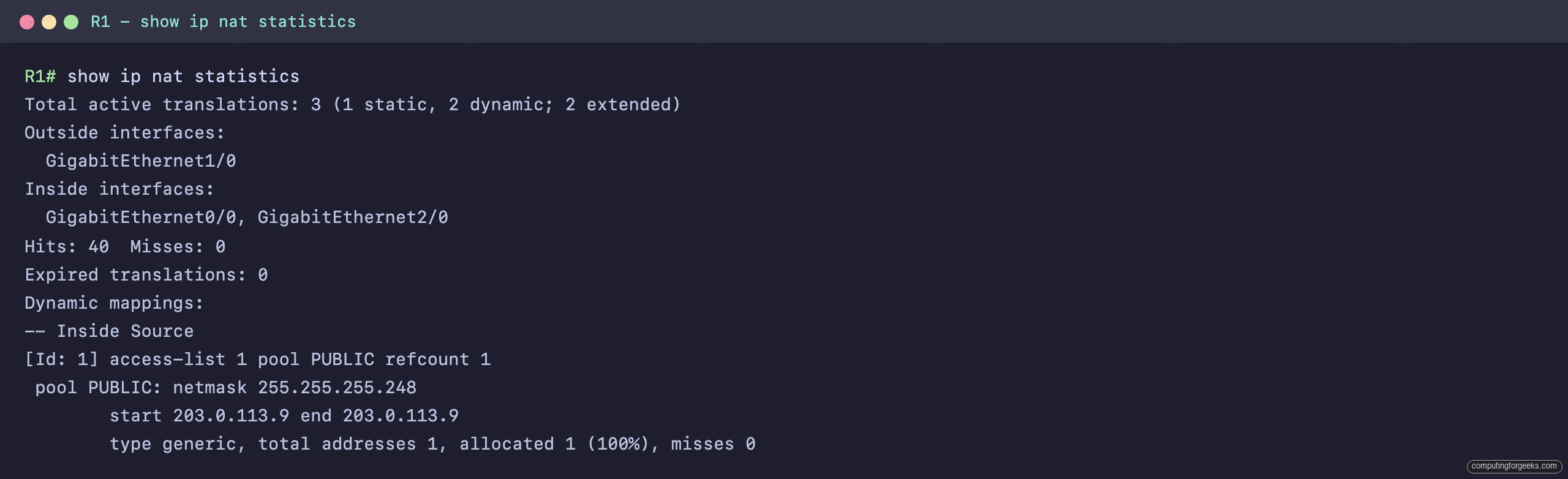
One static and two dynamic translations are active, the PUBLIC pool is 100 percent allocated to its single address, and every packet was a hit with zero misses. A climbing miss counter is the first sign that NAT is configured but not translating, which the troubleshooting section below covers. The three forms compare like this:
| Type | Mapping | Public addresses needed | Typical use |
|---|---|---|---|
| Static NAT | One-to-one, fixed | One per inside host | A server reachable from outside at a known address |
| Dynamic NAT | One-to-one, from a pool | As many as concurrent hosts | Outbound-only hosts needing a temporary public identity |
| PAT (overload) | Many-to-one, with ports | One (or a small pool) | A whole LAN behind a single public address |
Practice NAT and PAT
Run the quiz, then the flashcards, and read the explanation on anything you miss. The terms (inside local, inside global, overload) and the difference between the three forms are where exam questions concentrate.
Drill the four address names and the three NAT types until they are automatic:
When NAT translations do not appear
When traffic should be translating but is not, work this short list before anything else. Most NAT faults are one of these four, and the symptom is usually the same: pings fail and show ip nat statistics shows misses rising while the pool stays unallocated.
First, confirm the interface direction. Every inside interface needs ip nat inside and the public interface needs ip nat outside, and a packet only translates when it crosses from one to the other. A missing or swapped designation is the single most common cause. Second, check the access list actually matches the source. A show ip nat statistics with rising misses and zero allocations usually means the list permits the wrong subnet. Third, make sure the outside device has a route back for the public address or pool, because the inside host can send out fine while the replies have nowhere to return. Fourth, with a pool defined by a prefix length or netmask, do not let it start on the network or broadcast address of its own subnet; IOS reserves those two by default, so the router refuses to allocate them and every packet becomes a miss. Fix the direction, the match, and the return route, and the translation table fills on the next packet. The routing table on both routers, the boundary device roles, and the CCNA 200-301 study roadmap tie the rest of IP Services together.