Virtualization runs many isolated systems on one piece of hardware. It shows up at three levels that the CCNA treats as one topic: the server (virtual machines), the operating system (containers), and the router (VRFs). Each one slices a single physical resource into several logical ones that behave as if they were separate, and each isolates its tenants so they do not see or interfere with each other.
This guide defines all three, compares virtual machines against containers in a single table, and proves the network case with a real VRF-lite lab where the same IP subnet lives in two isolated routing tables on one router.
Verified the VRF output below on Cisco IOS 15.2 in June 2026.
Server virtualization: hypervisors and virtual machines
Server virtualization puts a layer called a hypervisor between the physical hardware and the operating systems running on it. The hypervisor carves the host’s CPU, memory, disk, and NIC into virtual machines, and each VM runs a full guest operating system that believes it owns real hardware. One server then runs many VMs, each isolated from the others.
Hypervisors come in two types, and the distinction comes up constantly:
| Type | Runs on | Examples | Where used |
|---|---|---|---|
| Type 1 (bare-metal) | Directly on the hardware | VMware ESXi, Microsoft Hyper-V, KVM, Xen | Data centers, production |
| Type 2 (hosted) | On top of a host OS | VirtualBox, VMware Workstation, Parallels | Desktops, labs, testing |
Each VM has a virtual NIC, and those vNICs connect to the physical network through a virtual switch (vSwitch) inside the hypervisor. The vSwitch behaves like a physical access-layer switch: it forwards frames between VMs on the same host and out the physical NIC to the rest of the network, which is how a VM on a hypervisor reaches devices on the wired LAN.
Containers versus virtual machines
A container virtualizes at the operating-system level instead of the hardware level. Containers share the host’s single kernel and isolate at the process level, packaging an application together with its libraries and dependencies but no guest OS of its own. That one difference, sharing the kernel rather than each booting a full OS, is what makes a container a fraction of the size of a VM and able to start in well under a second. Docker and containerd build and run containers; Kubernetes orchestrates them across many hosts.
The trade-off is isolation. A VM’s full guest OS gives stronger separation, while containers, sharing one kernel, trade some isolation for density and speed. The two are complementary, and many production stacks run containers inside VMs. The differences that matter:
| Property | Virtual machine | Container |
|---|---|---|
| Virtualizes | Hardware (via a hypervisor) | The operating system (shared kernel) |
| Guest OS | Full OS per VM | None; shares the host kernel |
| Size | Gigabytes | Megabytes |
| Start time | Tens of seconds | Sub-second |
| Isolation | Strong (full OS boundary) | Lighter (process level) |
| Density per host | Tens | Hundreds |
How virtualization reaches the network
The same idea applies to network functions. A Virtual Network Function (VNF) runs a role that used to need dedicated hardware, a router, firewall, or load balancer, as software on a VM or container instead of a physical appliance. This is the basis of Network Functions Virtualization (NFV): decouple the function from the box, so a firewall becomes an image you deploy rather than a chassis you rack. The vSwitch from the server section is what stitches these virtual functions into the data path.
VRF: many routing tables on one router
VRF (Virtual Routing and Forwarding) virtualizes the router itself. A normal router has one routing table; VRF gives it several independent ones, each with its own set of interfaces and its own routes. It is the Layer 3 equivalent of what a VLAN does at Layer 2: one physical device, several isolated logical networks that cannot see each other.
Because the tables are independent, the same IP subnet can exist in two VRFs at once with no conflict, which is impossible in a single routing table. That makes VRF the standard tool for multi-tenancy (two customers with overlapping address space on one router), and for separating management, guest, and production traffic on shared hardware. VRF-lite is VRF used on its own, without MPLS; the VRF names are locally significant to the router. Service-provider MPLS VPNs extend the same VRF concept across a backbone.
VRF-lite in action
The lab is one router, R1, with two VRFs named RED and BLUE. Each VRF owns one physical interface to a host plus a loopback, and both physical interfaces are deliberately given the same address, 10.10.10.1/24, something a single routing table could never allow. A host sits on each side, both also addressed 10.10.10.2. Here is the topology:
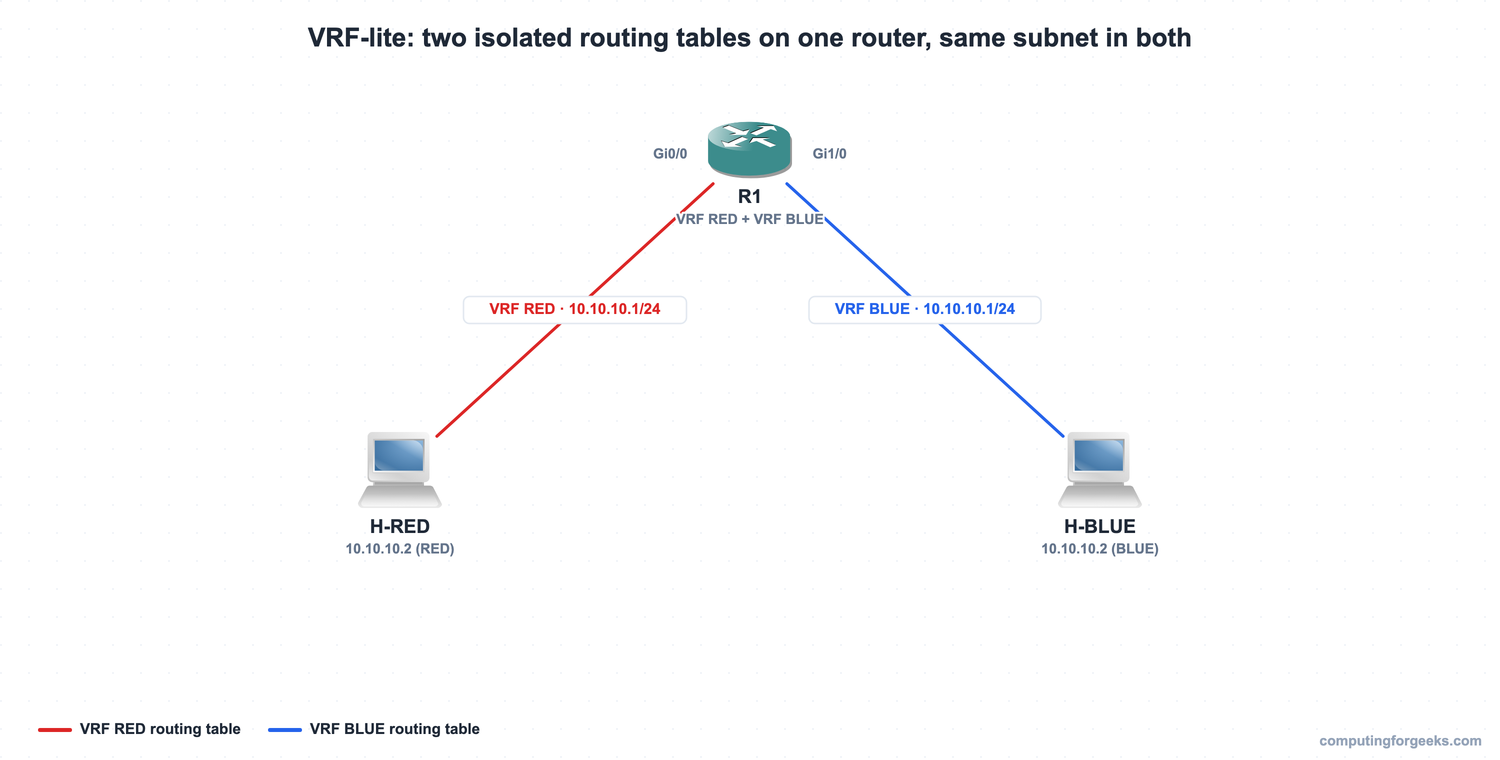
The two interfaces are assigned to their VRFs with one interface command each. The order matters: set ip vrf forwarding before the IP address, because moving an interface into a VRF clears any address already on it.
ip vrf RED
 rd 65000:1
ip vrf BLUE
 rd 65000:2
interface GigabitEthernet0/0
 ip vrf forwarding RED
 ip address 10.10.10.1 255.255.255.0
 no shutdown
interface GigabitEthernet1/0
 ip vrf forwarding BLUE
 ip address 10.10.10.1 255.255.255.0
 no shutdown
With that in place, the router reports two separate VRFs, each owning its own interfaces, and a routing table per VRF. The captured output shows the isolation directly:
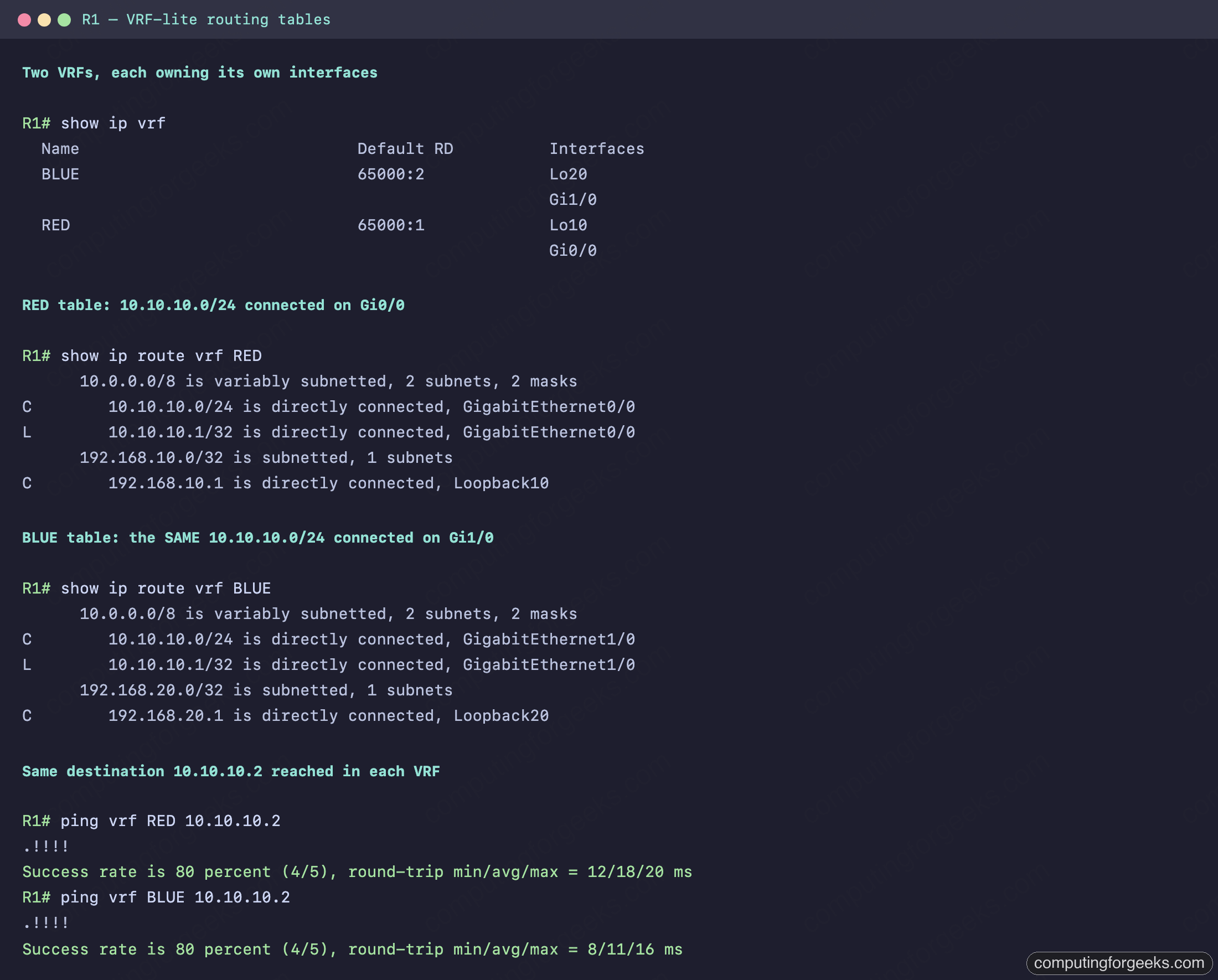
Read the two tables side by side. The RED table lists 10.10.10.0/24 as directly connected on Gi0/0; the BLUE table lists the identical 10.10.10.0/24 as directly connected on Gi1/0. The same subnet exists twice on one router with no conflict, because each VRF keeps its own table. The plain show ip route (the global table) is empty of those routes entirely, since every interface lives inside a VRF. Both pings to 10.10.10.2 then succeed at 80 percent, one reaching H-RED through the RED table and one reaching H-BLUE through the BLUE table. That is the same destination address resolved independently in two routing tables, which is exactly what isolation means. The 80 percent rate is normal: the first packet drops while the router resolves ARP on a cold interface, then the next four succeed.
Practice virtualization fundamentals
Flip the cards to lock in Type 1 versus Type 2, the VM-versus-container split, and what a VRF actually isolates, then take the quiz. The designs these technologies run inside are covered in the guide to network architectures, and the full path is the CCNA 200-301 study roadmap.
VMs, containers, and VRFs at a glance
The three virtualizations differ in what they slice up and where they are used, but the principle is identical: one physical resource, several isolated logical ones.
| Technology | What it virtualizes | Isolation unit | Typical use |
|---|---|---|---|
| Virtual machine | Physical hardware (hypervisor) | Full guest OS | Run many servers on one host |
| Container | The operating system | Process (shared kernel) | Package and scale applications |
| VRF | The router’s routing table | Independent route table + interfaces | Isolate networks on one router |
The VRF lab makes the abstract idea concrete: two routing tables, the same subnet in both, neither aware of the other, all on a single router. That is the same isolation a hypervisor gives two VMs and a kernel gives two containers, applied to Layer 3.