K3s is Kubernetes packaged as a single binary. It strips out the legacy and cloud-provider code, bundles containerd, and runs the whole control plane and a worker in one process, which makes it the fastest way to get a real cluster on a single openSUSE Leap 16 box. This guide installs K3s on openSUSE Leap 16, gets you a working kubectl, and deploys a real app you can reach over HTTP. Everything below was run on openSUSE Leap 16.0 in June 2026 with K3s v1.35.5.
Install K3s
The official installer detects the distribution and does the right thing. One command pulls the binary, creates a systemd service, and starts it:
curl -sfL https://get.k3s.io | sudo sh -On Leap 16 this does something worth calling out. Because SELinux runs in enforcing mode, the installer detects it and pulls in the k3s-selinux policy package automatically, so the host policy is in place with no manual policy work:
(1/1) Installing: k3s-selinux-1.6-1.sle.noarch
[INFO]  systemd: Enabling k3s unit
[INFO]  systemd: Starting k3s
Confirm the service is running:
sudo systemctl is-active k3sIt returns active within a few seconds. Installing the policy package puts the SELinux rules on disk, but it does not by itself run the cluster confined. To actually enforce the policy on containerd, reinstall or start the service with the --selinux flag; the default install leaves K3s running unconfined.
Access the cluster
The installer creates a kubectl symlink in /usr/local/bin, but that directory is not on sudo’s secure PATH, so sudo kubectl fails with command not found. Use the full path for a first check:
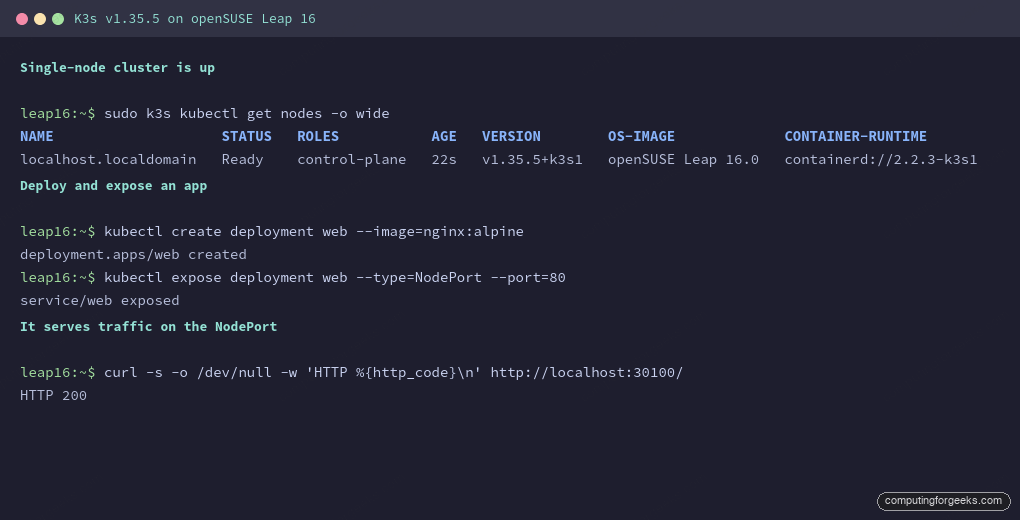
sudo /usr/local/bin/k3s kubectl get nodes -o wideThe single node reports Ready as a control-plane, running containerd rather than Docker:
NAME                    STATUS   ROLES           AGE   VERSION        OS-IMAGE             CONTAINER-RUNTIME
localhost.localdomain   Ready    control-plane   22s   v1.35.5+k3s1   openSUSE Leap 16.0   containerd://2.2.3-k3s1
Running everything through sudo gets old fast. K3s writes its admin kubeconfig to /etc/rancher/k3s/k3s.yaml, readable only by root, so copy it into your user’s home and take ownership. After that, plain kubectl works:
mkdir -p ~/.kube
sudo cp /etc/rancher/k3s/k3s.yaml ~/.kube/config
sudo chown $(id -u):$(id -g) ~/.kube/config
export KUBECONFIG=~/.kube/config
Add the KUBECONFIG export to your ~/.bashrc so it survives new shells. Now confirm the same node without sudo:
kubectl get nodesK3s ships a working cluster, not only the API server. CoreDNS, the Traefik ingress controller, the ServiceLB load balancer, a local-path storage provisioner, and metrics-server all come up in kube-system on first boot, which is why a fresh install is immediately usable.
Deploy an app
Run a real workload to prove the cluster works end to end. Create a deployment and expose it on a NodePort:
kubectl create deployment web --image=nginx:alpine
kubectl expose deployment web --type=NodePort --port=80
Wait for the rollout to finish, then look at what you got:
kubectl get pods,svc -l app=webThe pod is Running and the service has a NodePort in the 30000 to 32767 range, here 30100:
NAME                       READY   STATUS    RESTARTS   AGE
pod/web-5d4f7c4d94-hk7lp   1/1     Running   0          20s

NAME          TYPE       CLUSTER-IP     EXTERNAL-IP   PORT(S)        AGE
service/web   NodePort   10.43.222.47   <none>        80:30100/TCP   20s
Hit the NodePort on localhost and you get the nginx welcome page back:
curl -s -o /dev/null -w "HTTP %{http_code}\n" http://localhost:30100/The request returns HTTP 200. The cluster is routing traffic to the pod.
Reaching that same port from another machine takes one more step, because firewalld is in the way.
Open the firewall for external access
The curl above worked because it came from the host itself. Open the single port this service uses so other machines can reach it:
sudo firewall-cmd --permanent --add-port=30100/tcp
sudo firewall-cmd --reload
If you plan to use the bundled Traefik ingress instead of NodePorts, open the standard web ports and let Traefik route by hostname:
sudo firewall-cmd --permanent --add-service=http --add-service=https
sudo firewall-cmd --reload
With access sorted, a few defaults are worth tightening before this carries anything real.
Production notes and cleanup
A single-node K3s is perfect for a CI runner, a homelab, or a staging box, but a few defaults matter once it carries real load. The kubeconfig you copied has cluster-admin rights, so keep ~/.kube/config at mode 600 and do not commit it. In production you’ll want more than one server node with an embedded etcd datastore so the control plane survives a reboot of any single machine. And if you bring your own ingress or load balancer, disable the bundled Traefik and ServiceLB at install time with --disable=traefik --disable=servicelb rather than fighting them later. Note that once ServiceLB is gone, type=LoadBalancer services sit at EXTERNAL-IP: <pending> until your own load balancer fills them, so keep using NodePort or ingress until that is in place.
Removing K3s is a single script the installer left behind, which tears down the service, the containers, and the data:
sudo /usr/local/bin/k3s-uninstall.shFrom here you have a real Kubernetes API to build on. The bundled containerd runtime means you do not need a separate Docker or Podman install for the cluster, and if you would rather manage the host from a browser, Cockpit sits alongside K3s on the same machine.