Every cable in a network is one of two things: copper or glass. Copper twisted pair is cheap, easy to terminate, and runs to almost every desk and access point you will ever wire. Fiber costs more and is fussier to handle, but it goes distances copper cannot touch and shrugs off electrical noise entirely. The decision between copper vs fiber cabling comes down to three numbers: how far the link runs, how fast it needs to be, and how much electrical interference sits around it.
This guide compares the three media you actually choose between, copper UTP, multimode fiber, and single-mode fiber, with the exact distance and speed limits, the straight-through versus crossover rule that catches people out, and a placement diagram showing where each one belongs in a real network.
Current as of June 2026, checked against the IEEE 802.3 Ethernet cabling standards.
Copper: UTP twisted pair
Unshielded twisted pair (UTP) is the default for any link inside a wiring closet’s reach. Four pairs of copper wire are twisted to cancel interference, terminated in an RJ-45 connector, and rated by category for a maximum speed. The category is the spec that matters when you buy cable:
| Category | Max speed | Max distance | Typical use |
|---|---|---|---|
| Cat 5e | 1 Gbps | 100 m | Gigabit to the desk (the common floor) |
| Cat 6 | 10 Gbps to ~55 m, 1 Gbps to 100 m | 100 m (1 Gbps) | Gigabit now, short 10 Gig runs |
| Cat 6a | 10 Gbps | 100 m | Full 10 Gig over copper |
The number that never changes is the distance: every copper BASE-T standard, from 10BASE-T through 1000BASE-T (802.3ab) to 10GBASE-T (802.3an), is capped at 100 metres per link. That limit is electrical, not a vendor choice, so no category of UTP gets you past it. Copper is also susceptible to electromagnetic interference, which is why you do not run it next to fluorescent lights, motors, or power cabling. Where copper wins is everywhere short and cheap: the run from an access switch to PCs, IP phones, and access points.
Straight-through vs crossover cables
A UTP cable is wired one of two ways, and which one you need depends on the two devices at the ends. The rule is about whether the devices are alike or unlike at the wiring level:
- Straight-through connects unlike devices: PC to switch, router to switch, switch to a wall jack. The pins line up one to one.
- Crossover connects like devices: switch to switch, router to router, PC to PC, and PC directly to router. The transmit and receive pairs are swapped end to end.
The memory hook is that a switch port expects the opposite wiring of a PC port, so two devices of the same type need the crossover to swap their pairs. Modern Cisco switches support auto-MDIX, which detects the cable and adjusts internally, so a wrong cable often still works on current gear. The manual rule still bites on older equipment, and the Cisco CCNA 200-301 exam tests it, so it is worth knowing cold.
Multimode fiber
When a link outruns copper’s 100 metres but stays inside a building or campus, multimode fiber (MMF) is the usual answer. The glass core is relatively wide, around 50 or 62.5 microns, and an inexpensive LED or VCSEL light source bounces light down it along multiple paths. Those multiple paths are also its limit: the rays arrive slightly out of step (modal dispersion), so distance is bounded. A 1000BASE-SX multimode link reaches about 550 metres at gigabit speeds, and 10 Gig multimode is shorter still, roughly 300 to 400 metres. Multimode optics and the fiber itself are cheaper than single-mode, which is why MMF is the standard choice for switch-to-switch uplinks within one building.
Single-mode fiber
Single-mode fiber (SMF) is what you run when distance is the whole point. The core is tiny, about 9 microns, narrow enough that a laser sends light straight down a single path with almost no dispersion. That is why single-mode goes the distances copper and multimode cannot: a 1000BASE-LX link reaches around 5 kilometres, 10GBASE-LR reaches 10 kilometres, and with the right optics single-mode spans 40 or 80 kilometres between sites. The fiber is inexpensive but the laser optics are pricier, so single-mode is reserved for the links that need its reach: between buildings, across a large campus, and on WAN connections. Like all fiber it is immune to electromagnetic interference and provides electrical isolation between the two ends.
Connectors and transceivers
Copper UTP uses one connector, the familiar 8-pin RJ-45. Fiber has a few, and the one you meet most on modern switches is the LC connector, a small push-pull plug that fits the dense optics on a switch. You will also see SC (a square push-pull connector) and the older ST (a round bayonet). Fiber links are duplex, using two strands, one to transmit and one to receive.
The medium plugs into a switch through a transceiver, a hot-swappable module you match to the cable and distance. SFP modules carry 1 Gigabit, SFP+ carries 10 Gigabit, and QSFP modules carry 40 Gigabit and up. The same switch port can run copper or any fiber distance simply by changing the optic, which is why transceivers, not fixed ports, are how real switches uplink. Choosing the wrong optic for the fiber type (a single-mode optic on multimode glass, for example) is a common cause of a link that will not come up, which you would chase down with the interface status counters.
Here is where each medium sits in a typical network, with the distance limit that drives the choice at every tier:
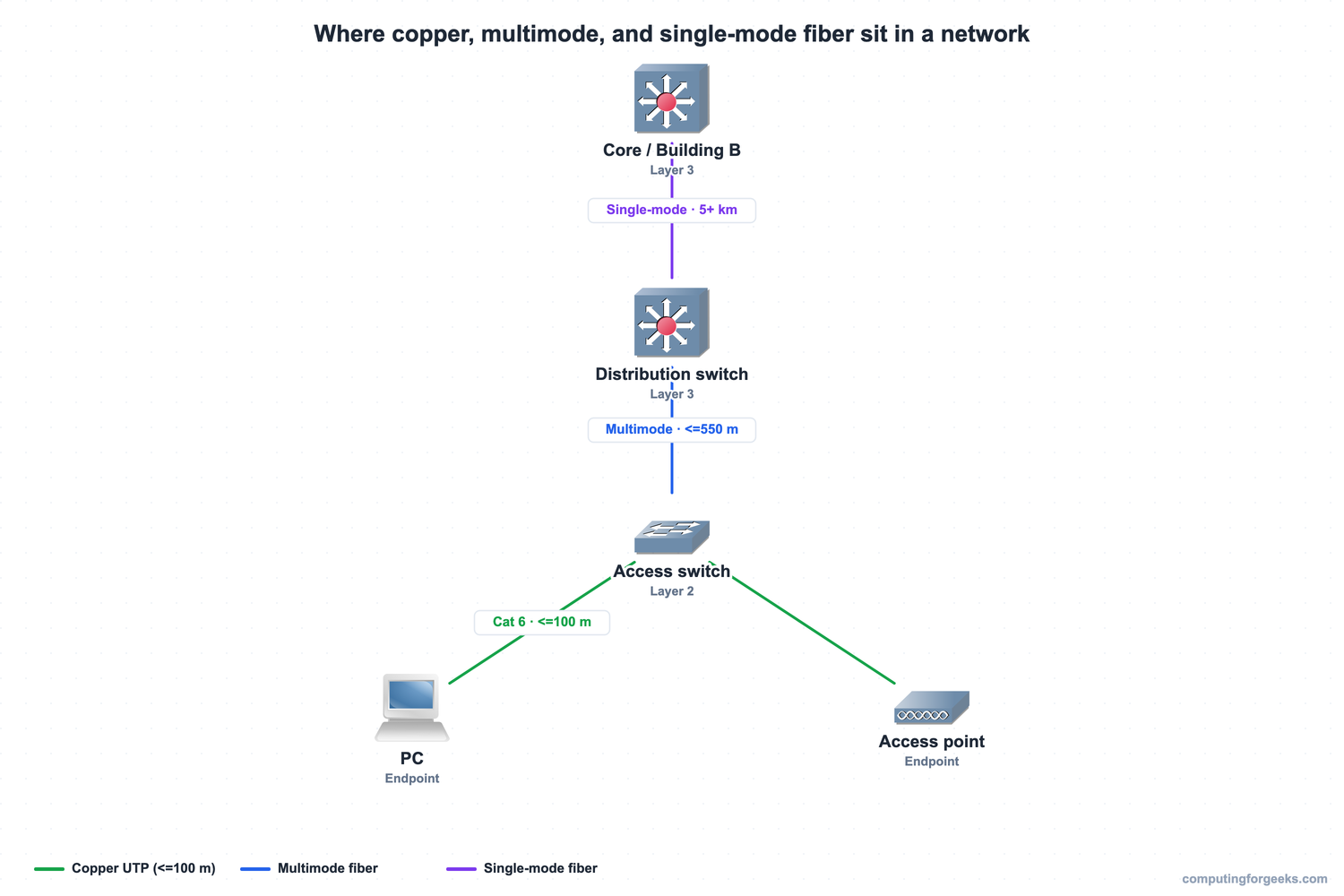
Copper carries the short access links, multimode handles the in-building uplinks, and single-mode crosses the long distances between buildings. The tiers are not arbitrary, they follow the distance limits above.
Practice network cabling
Flip the cards to lock in the distance limits, the fiber types, and the straight-through versus crossover rule, then take the quiz. The full path from here is the CCNA 200-301 study roadmap, and the devices these cables connect are covered in the guide to routers, switches, and firewalls.
Copper vs fiber: which to use
The decision collapses to one table. Match the link’s distance, speed, and environment to the row that fits:
| Medium | Max distance | Speed | Cost | EMI immune | Use it for |
|---|---|---|---|---|---|
| Copper UTP | 100 m | 1-10 Gbps | Lowest | No | Access links to endpoints |
| Multimode fiber | ~550 m (1G), 300-400 m (10G) | 1-10+ Gbps | Medium | Yes | In-building switch uplinks |
| Single-mode fiber | 5-80 km | 1-100+ Gbps | Highest optics | Yes | Between buildings, WAN, long campus |
For most links inside 100 metres, copper is the right answer and the cheapest. The moment a run exceeds 100 metres, fiber is not optional, and the only question left is multimode for in-building distances or single-mode for the long haul. Get the distance number first and the cable chooses itself.