Two graphics cards dominate every local-AI build thread in 2026: a secondhand RTX 3090 and a brand-new RTX 5090. Both are single cards that top out at a 32B model, so the real question is not which is faster on paper. It is whether the 5090’s extra speed and 8GB of headroom are worth three to four times the price of a used 3090 that fits the same models.
This RTX 3090 vs RTX 5090 comparison settles it with tested numbers, not spec-sheet guesses. Below you get a spec-by-spec table, the model sizes each card can actually hold, measured tokens per second on both cards, the real price gap, the power and used-market catches, and a plain verdict on which one to buy for your workload. If you want the broader field first, our roundup of the best GPUs for running LLMs ranks every tier from budget to workstation.
ComputingForGeeks is reader-supported. When you buy through links on this page we may earn an affiliate commission at no extra cost to you. As an Amazon Associate we earn from qualifying purchases.
Current as of June 2026; the token-per-second figures here were measured on a real RTX 3090 and RTX 5090.
The short answer: which card wins?
For most people running local LLMs, a used RTX 3090 is the smarter buy. It holds the same model sizes as a 5090 (anything up to a 32B at Q4) for a quarter to a third of the price, and an XDA test in 2026 reached the same value verdict. The 5090 earns its premium only in specific cases: you generate tokens all day, you fine-tune, you want the extra 8GB to dodge the 24GB context cliff, or you want a new card with a warranty and roughly double the prefill speed. Neither card runs a 70B model on its own, so if that is your goal, both are the wrong answer.
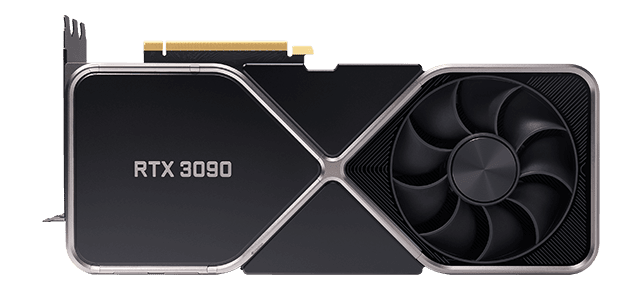
Line them up spec for spec and the gap looks narrower than the price does.
RTX 3090 vs RTX 5090 at a glance
The headline gap is memory technology, not capacity. The 5090 adds only 8GB but moves it at nearly twice the bandwidth, and that bandwidth is what governs how fast tokens come out.
| Spec | RTX 3090 (used) | RTX 5090 (new) |
|---|---|---|
| VRAM | 24GB GDDR6X | 32GB GDDR7 |
| Memory bandwidth | ~936 GB/s | ~1,792 GB/s |
| CUDA cores | 10,496 (Ampere) | 21,760 (Blackwell) |
| Power (TGP) | 350W (750W PSU) | 575W (1000W PSU) |
| Largest model at Q4 | 32B | 32B (more context room) |
| 8B generation (tested) | 119 tok/s | 250 tok/s |
| 32B generation (tested) | 37 tok/s | 71 tok/s |
| Street price | ~$800 to $1,150 (used) | ~$2,900 to $4,250 (new) |
Check live listings before you commit, since both prices move week to week: the used 3090 on Amazon tracks the secondhand market, and the 5090 on Amazon still sits far above its $1,999 MSRP because of the GDDR7 shortage.
What each card can actually run
Start with memory, because it decides everything else. A model’s weights have to fit in VRAM, and at the common Q4_K_M quantization a 7B needs about 5GB, a 13B about 8GB, and a 32B about 20GB. Both cards clear all of those with room to spare. A 70B needs roughly 40GB, which neither card has, so a 70B is off the table for both unless you add a second card or offload to slow system RAM.
So on raw capacity the two are closer than the price suggests. The 3090’s 24GB and the 5090’s 32GB run the same ladder of models. Where the extra 8GB matters is context. The KV cache (the model’s running memory of the conversation) grows with how much context you load, and on a 24GB card a long prompt against a 32B model can push the total past 24GB. When that happens, layers spill onto the CPU and generation slows to a crawl. The 5090’s 32GB absorbs that overflow, so it holds a longer conversation before hitting the wall. For a deeper breakdown of memory math by model size, see our guide on how much VRAM you need to run an LLM.
That context cliff is the single biggest practical reason to pay for the 5090. If you run short chats and tidy contexts, the 3090 never notices. If you feed models long documents or large code files, the 32GB card stops you falling off the edge.
Speed: tested tokens per second
Spec sheets say what fits; they do not say how fast it runs. We rented both cards by the hour and measured generation speed with Ollama at Q4_K_M and a fixed 4096-token context, warm with the model already loaded. The numbers are the eval rate (generation tokens per second), the figure you feel when a model is replying.
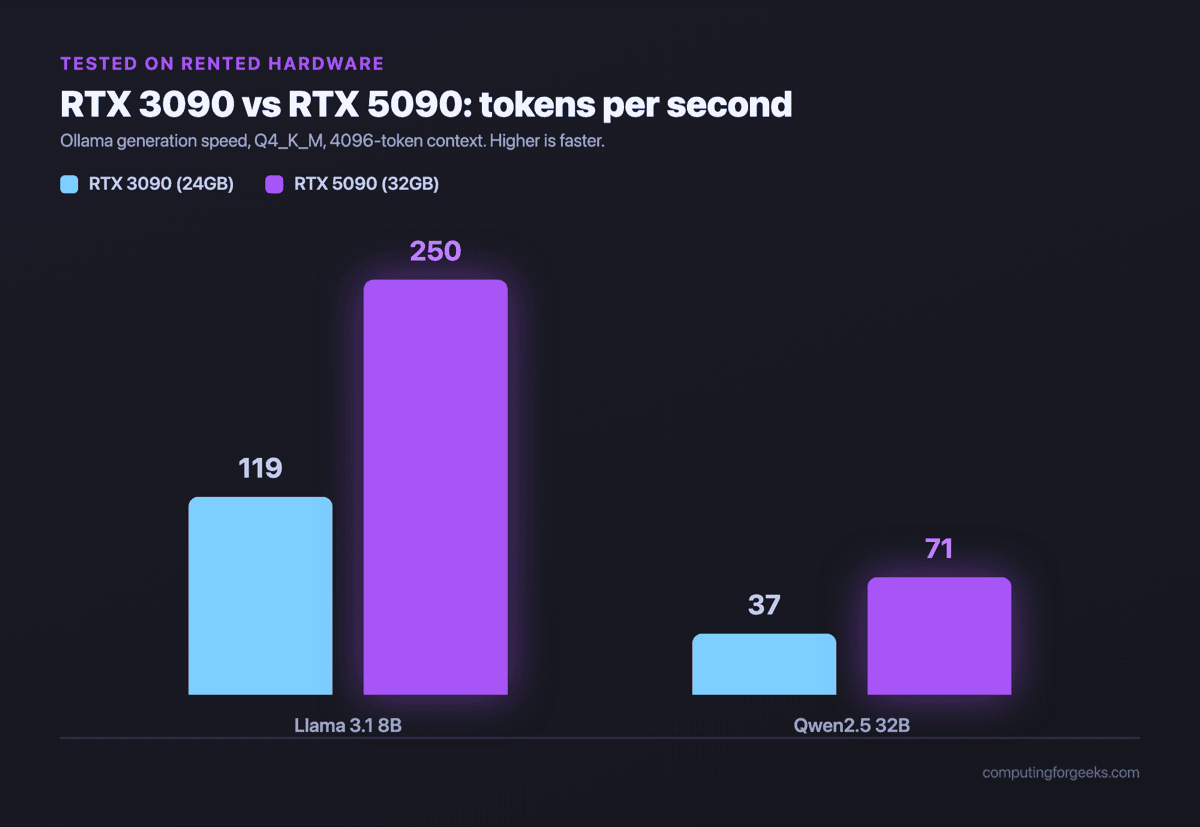
On an 8B model the 5090 hit 250 tokens per second to the 3090’s 119, more than twice as fast. On a 32B model the gap held: 71 tokens per second versus 37. Both cards clear 30-plus tokens per second on a 32B, which is faster than you can read, so for interactive chat on small and mid models the 3090 already feels instant. The 5090’s lead only becomes decisive when you generate in bulk, such as batch summarization, agent loops, or anything that streams thousands of tokens at a time.
Here is one verbose run on the faster card, so you can see the eval rate the table is built from:
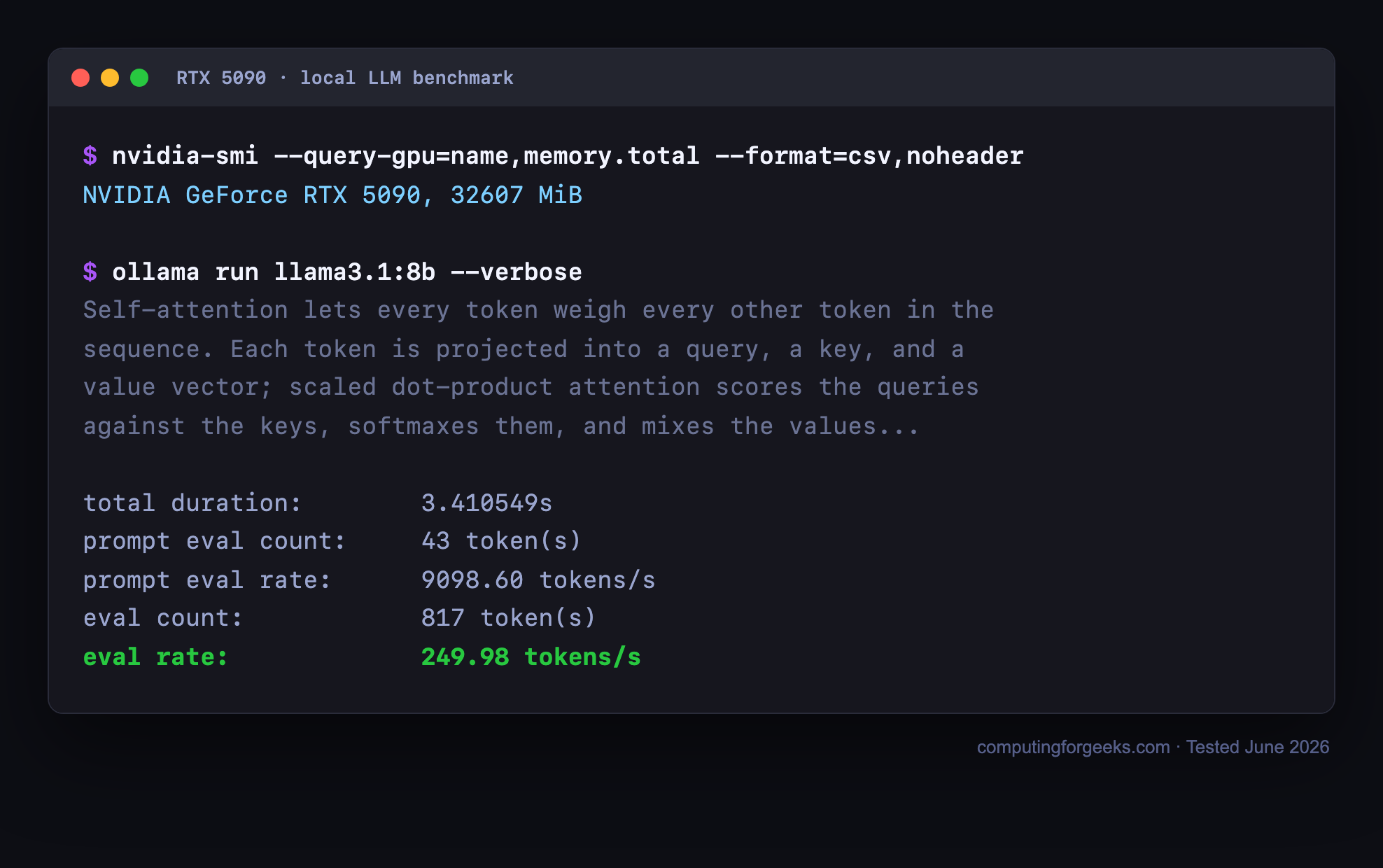
The reason the 5090 pulls so far ahead is bandwidth. Token generation is bound by how fast the card can read its own weights out of memory each step, and the 5090’s GDDR7 moves data at nearly twice the rate of the 3090’s GDDR6X. The extra CUDA cores help with prefill (chewing through the prompt), but for the stream of tokens you watch on screen, memory bandwidth is the lever, and that is where the generational gap is widest. You can reproduce any of this with a pull and a verbose run:
ollama pull llama3.1:8b
ollama run llama3.1:8b --verbose
The --verbose flag prints the eval rate after each response. Your own figures will shift with the backend, the quantization, and the context length, but the ranking between these two cards holds. If you would rather not buy at all, the same models run on CPU, covered in our notes on running local LLMs with Ollama on CPU.
Price and value: is the 5090 worth it?
This is where the 3090 makes its case. A used 3090 runs roughly $800 to $1,150. A 5090 runs roughly $2,900 to $4,250, and at the time of writing Amazon listed one near $4,249, more than double its $1,999 launch price thanks to a GDDR7 shortage and relentless AI demand. So you are paying three to four times as much for about twice the speed and 8GB more VRAM.
For steady, heavy token generation or fine-tuning, that trade can pay off, because the faster card finishes jobs sooner and the extra memory unlocks longer context. For learning, light daily use, or a home assistant that answers a few prompts an hour, it does not. The 3090 fits the same models, runs them faster than you read, and leaves two thousand dollars in your pocket for more RAM, storage, or a second card later. Value per dollar of usable VRAM is not close: the 3090 wins it outright, which is exactly why it keeps topping local-AI value rankings two GPU generations after it launched.
Power, heat, and the used-card catch
The 5090 draws 575W and wants a 1000W power supply, proper case airflow, and a 12V-2×6 connector. The 3090 draws 350W and runs on a solid 750W unit. If you are dropping a card into an existing desktop, the 3090 is far less likely to force a power-supply upgrade, and it runs cooler under a sustained inference load.
The catch on the 3090 is the used market itself. These are five-year-old cards with no manufacturer warranty, and many spent their early life mining, so you are buying unknown wear. Favor sellers with returns, inspect for fan and thermal-pad condition, and budget for a repaste. The 5090, for all its price, is new silicon with a warranty and years of driver support ahead of it. That peace of mind is part of what the premium buys, alongside the raw performance.
The two-3090 angle
There is a third option the head-to-head hides. Two used 3090s give you 48GB of combined VRAM for somewhere around $1,700 to $2,300, which is still less than one 5090. That 48GB is enough to run a 70B model at Q4, something neither a single 3090 nor a single 5090 can do. Ollama and llama.cpp split a model across both cards automatically, so the setup is mostly a matter of slots, power, and cooling.
The downside is a hotter, hungrier, bulkier build with two 350W cards, and per-card generation speed no better than one 3090. But if your real target is a 70B at home and not peak single-stream speed, two 3090s beat one 5090 on both capability and price. For a quieter route to big-model capacity, a unified-memory box is the other path, which we compare in the best mini PC for local AI guide.
Which one should you buy?
Work down this short path and you will land on the right card:
- Learning, light use, or a tight budget? A used RTX 3090. Same models up to 32B, a fraction of the cost, and faster than you read.
- Generating tokens all day, fine-tuning, or running long contexts? The RTX 5090. Double the speed, 8GB more headroom, and a warranty.
- Want to run a 70B at home above all else? Two used 3090s for 48GB, not a single 5090 that still cannot fit one.
- Only need a GPU now and then? Buy neither. Rent a cloud card by the hour and put the money toward the jobs that need it.
For most people building a local LLM rig in 2026, the honest pick is the used 3090. It is the rare case where the cheaper, older, secondhand option is also the smarter one. Step up to the 5090 when your workload, not the spec sheet, tells you the 3090 is holding you back.