The RAID level you pick when you create a ZFS pool on Proxmox is permanent for that group of disks. There is no rebuild-in-place button later, no “convert mirror to RAIDZ” command. You can grow a pool and, since recent ZFS, widen a RAIDZ group, but you cannot change a mirror into RAIDZ2 or re-stripe an existing vdev into a different shape. Get the choice right the first time and the pool serves you for years. Get it wrong and you either throw away half your disks to parity you did not need or run VMs on a layout that gives one disk worth of IOPS no matter how many spindles you bought.
This guide builds every ZFS RAID layout Proxmox offers, on a real node, and shows the capacity each one actually delivers, how it behaves when a disk dies, and how to grow it. Every pool below was created and measured on Proxmox VE 9.2 running OpenZFS 2.4 in June 2026, so the layouts, the byte counts, and the disk-failure drill are captures from the box, not nominal figures off a spec sheet.
How ZFS RAID differs from a hardware RAID card
ZFS does not sit on top of a RAID controller. It replaces it. You give ZFS the raw disks and it handles redundancy, checksums, and repair itself, which is why the Proxmox docs and ZFS both tell you to run an HBA in IT mode and never a RAID card in front of ZFS. A card that lies about cache flushes or hides disks behind a virtual volume takes away the exact information ZFS needs to heal data.
The unit ZFS protects with is the vdev. A vdev is one disk, or a mirror of disks, or a RAIDZ group of disks. A pool is one or more vdevs striped together. Redundancy lives inside each vdev, never across the pool, and this single fact drives every decision later: a pool of two mirror vdevs survives one disk failure per vdev, but a pool with one RAIDZ1 vdev plus one single-disk vdev dies the moment that lone disk fails. You never mix redundant and non-redundant vdevs in the same pool.
Two more properties are set at creation and frozen for the life of the vdev: the RAID level and the ashift (sector size). Neither can be changed afterward. Capacity you can add. Shape and sector size you cannot.
The RAID levels at a glance
ZFS gives you seven practical layouts. Proxmox builds all of them except the plain multi-disk stripe straight from its pool-creation dialog, and adds the dRAID variants for very large disk counts. Here is what each one costs and protects, for a pool built from N disks of size D:
| Layout | Min disks | Disks it survives | Usable space | Best for |
|---|---|---|---|---|
| Stripe (RAID0) | 2 | 0 | N x D (100%) | Scratch, caches, throwaway data |
| Mirror (2-way) | 2 | 1 per vdev | D (50%) | Boot pools, small high-IOPS pools |
| Three-way mirror | 3 | 2 per vdev | D (33%) | Critical data, fastest resilver |
| RAID10 (striped mirrors) | 4 | 1 per vdev | Half the disks | VMs and databases |
| RAIDZ1 | 3 | 1 | (N-1) x D | Small archival pools, 3 to 4 disks |
| RAIDZ2 | 4 | 2 | (N-2) x D | Bulk storage, backups, wide vdevs |
| RAIDZ3 | 5 | 3 | (N-3) x D | Large archival, maximum safety |
Those minimums are the sensible floors. ZFS will technically build a RAIDZ vdev with one disk more than its parity count, but parity-plus-one buys nothing a mirror does not do better, so nobody runs them. The “best for” column is the part people skip and regret, and the rest of this guide is the evidence behind it.
Identify the disks first
List the disks ZFS can see. The OS disk here is sda; the rest are blank and free to use:
lsblk -d -e7 -o NAME,SIZE,TYPEThe blank disks show up as a clean block of devices:
NAME  SIZE TYPE
sda    40G disk
sdb     8G disk
sdc     8G disk
sdd     8G disk
sde     8G disk
sdf     8G disk
You can build pools by passing sdb, sdc and so on, and the examples below do exactly that for readability. In production, create pools from the stable paths under /dev/disk/by-id/ instead. ZFS itself finds a pool by the GUID written into each disk’s label, so a pool created from sdb normally imports fine even after the kernel renames it to sdc. The reason to use by-id is that zpool status stays readable, you can match a faulted entry to a physical bay months later when “sdf” could be any drive in the chassis, and you sidestep the occasional import quirk that device-name churn still triggers. This guide targets one Proxmox node; for shared storage across several, the storage backends comparison covers where ZFS stops and Ceph or NFS begin.
Stripe: maximum space, zero safety
A stripe writes data across every disk with no parity and no mirror. Two 8 GB disks add their capacity into one pool. Create one:
zpool create -o ashift=12 tank sdb sdcThe status shows both disks sitting directly under the pool, with nothing wrapping them:
NAME        STATE     READ WRITE CKSUM
tank        ONLINE       0     0     0
  sdb       ONLINE       0     0     0
  sdc       ONLINE       0     0     0
The two disks report 14.5 GB usable, the full sum minus ZFS overhead. Lose either disk and the entire pool is gone, because half of every file lived on the dead drive. A stripe is the right call for a scratch dataset, a build cache, or anything you can recreate from somewhere else in seconds. It is never the right call for data you would miss. Tear a test pool down with zpool destroy tank before building the next layout.
Mirror and three-way mirror
A mirror writes the same blocks to every disk in the vdev. Two disks, one copy each, survives one failure:
zpool create -o ashift=12 tank mirror sdb sdcNow the disks sit under a mirror-0 vdev rather than directly under the pool:
NAME        STATE     READ WRITE CKSUM
tank        ONLINE       0     0     0
  mirror-0  ONLINE       0     0     0
    sdb     ONLINE       0     0     0
    sdc     ONLINE       0     0     0
Usable space is 7.27 GB, half the raw, the price of keeping a full second copy. Add a third disk to the same vdev and you get a three-way mirror that survives two simultaneous failures while still presenting the same 7.27 GB:
zpool create -o ashift=12 tank mirror sdb sdc sddMirrors have two properties that matter for busy pools. Read requests fan out across every member, so read IOPS scale with disk count. And when a disk dies, the replacement is rebuilt by copying from the surviving member, a fast and localized operation that finishes in minutes on disks that are not full. That short rebuild window is why mirrors are the safe choice when you cannot tolerate a long exposure period after a failure.
RAID10: striped mirrors for VMs and databases
Stripe two mirror vdevs together and you get what most people call RAID10. Four disks, two mirrors, the pool stripes writes across both:
zpool create -o ashift=12 tank mirror sdb sdc mirror sdd sdeThe two mirror vdevs appear side by side under the pool:
NAME        STATE     READ WRITE CKSUM
tank        ONLINE       0     0     0
  mirror-0  ONLINE       0     0     0
    sdb     ONLINE       0     0     0
    sdc     ONLINE       0     0     0
  mirror-1  ONLINE       0     0     0
    sdd     ONLINE       0     0     0
    sde     ONLINE       0     0     0
Four 8 GB disks give 14.5 GB usable, the same 50% as a single mirror, but now the pool has two vdevs. This is the layout to run for virtual machine disks and databases, and the reason is IOPS. A pool serves random writes at roughly the rate of its vdev count, not its disk count. Two mirror vdevs do twice the random IOPS of one; ten disks arranged as five mirror vdevs do roughly five times the random IOPS of those same ten disks in one wide RAIDZ2. Need more performance later, add another mirror pair and the pool gets wider and faster with no downtime. The containers and VMs you run on Proxmox feel this difference directly under load.
RAIDZ1: one parity disk
RAIDZ trades the simple copy of a mirror for distributed parity, the way RAID5 and RAID6 do, but without the write hole that plagues those. RAIDZ1 keeps one parity block per stripe, so any single disk can fail:
zpool create -o ashift=12 tank raidz sdb sdc sddThe three disks now sit under a raidz1-0 vdev:
NAME        STATE     READ WRITE CKSUM
tank        ONLINE       0     0     0
  raidz1-0  ONLINE       0     0     0
    sdb     ONLINE       0     0     0
    sdc     ONLINE       0     0     0
    sdd     ONLINE       0     0     0
Three 8 GB disks give 15.2 GB usable, two disks of data plus one of parity. RAIDZ1 is fine for three or four disks that resilver quickly. It becomes dangerous as disks get wider and larger, and the reason is the resilver window. Rebuilding a failed disk reads every other disk in the vdev in full, which on multi-terabyte drives can run for many hours or days, and a second failure any time during that window destroys the whole vdev. The probability of a second failure under rebuild stress is not negligible, which is why nobody who has lost a pool recommends an eight-disk RAIDZ1 anymore.
RAIDZ2 and RAIDZ3: the wide-vdev baseline
RAIDZ2 keeps two parity blocks per stripe and survives two failures; RAIDZ3 keeps three and survives three. They cover the resilver-window risk that sinks wide RAIDZ1. Build a RAIDZ2 from four disks:
zpool create -o ashift=12 tank raidz2 sdb sdc sdd sdeAnd a RAIDZ3 from five:
zpool create -o ashift=12 tank raidz3 sdb sdc sdd sde sdfOpenZFS recommends keeping a RAIDZ vdev between three and nine disks wide. RAIDZ2 at six or eight disks is the workhorse for bulk storage and backup targets, surviving a second failure while a replacement rebuilds. RAIDZ3 buys a third parity disk for archival pools where the data is cold and the priority is never losing it. What RAIDZ does not buy is random IOPS: a RAIDZ vdev of any width delivers roughly the random write IOPS of a single disk, because every write touches every data disk in the stripe. That is the entire reason VMs belong on mirrors and bulk data belongs on RAIDZ.
Read the real usable space
RAIDZ capacity confuses people because the two obvious commands disagree on purpose. zpool list reports the raw size including parity, while zfs list reports what you can actually store. On the RAIDZ2 pool above, the gap is large:
zpool list tank
zfs list tank
The raw number is 31.5 GB; the usable number is 14.8 GB:
NAME   SIZE  ALLOC   FREE   FRAG    CAP  HEALTH
tank  31.5G   996K  31.5G     0%     0%  ONLINE

NAME   USED  AVAIL  REFER  MOUNTPOINT
tank   506K  14.8G   140K  /tank
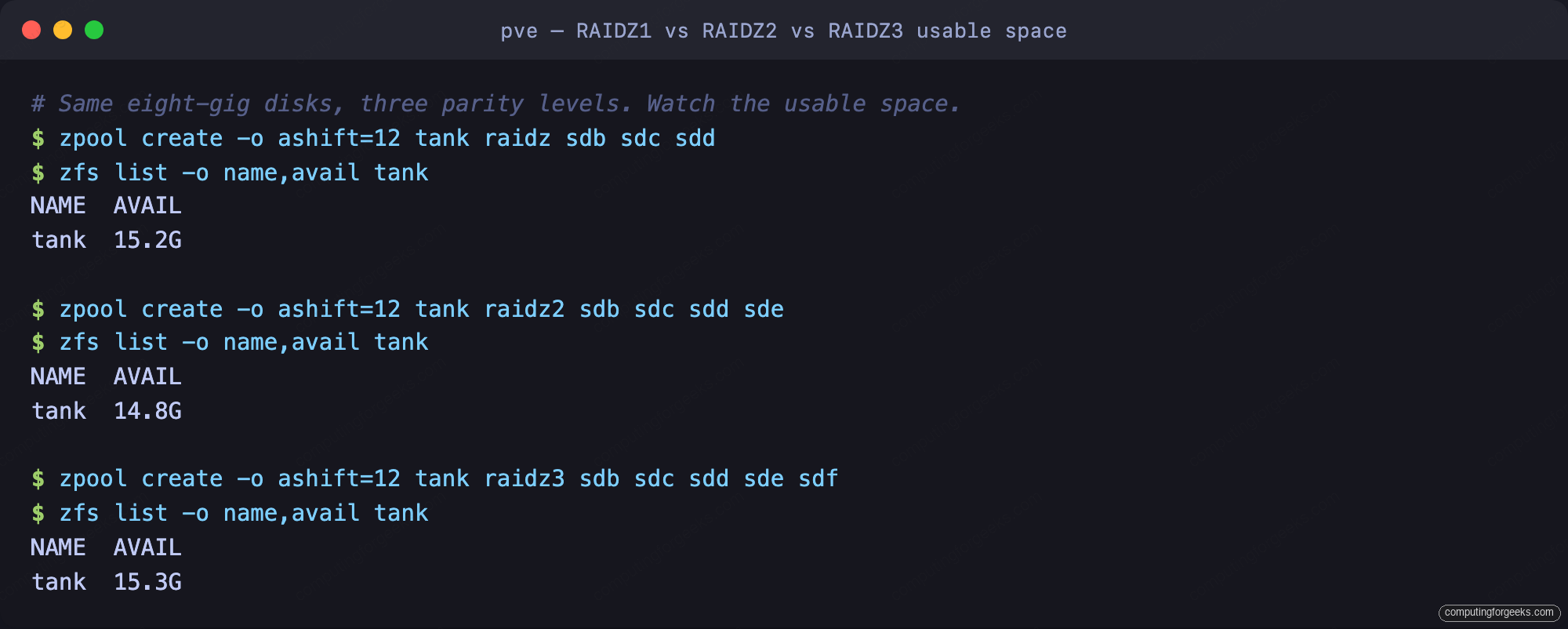
Run RAIDZ1, RAIDZ2 and RAIDZ3 across the same set of 8 GB disks and the zfs list available column tells the real story: each level here lands near 15 GB usable, but it took three, four, and five disks respectively to get there, because the extra disks went entirely to parity.
There is a second capacity trap that only bites VM storage on RAIDZ. Proxmox stores VM disks as ZFS volumes (zvols), and a zvol has a fixed volblocksize, 16 KB by default since OpenZFS 2.2. On a RAIDZ vdev with 4 KB sectors, small block sizes do not divide cleanly into data plus parity, so ZFS adds padding sectors and your VM disks consume noticeably more raw space than the tidy formula predicts. Mirrors have no such padding math. This space amplification, on top of the single-disk IOPS ceiling, is the concrete reason “put the VMs on a big RAIDZ to save space” usually saves nothing and costs performance.
Create the pool from the Proxmox web UI
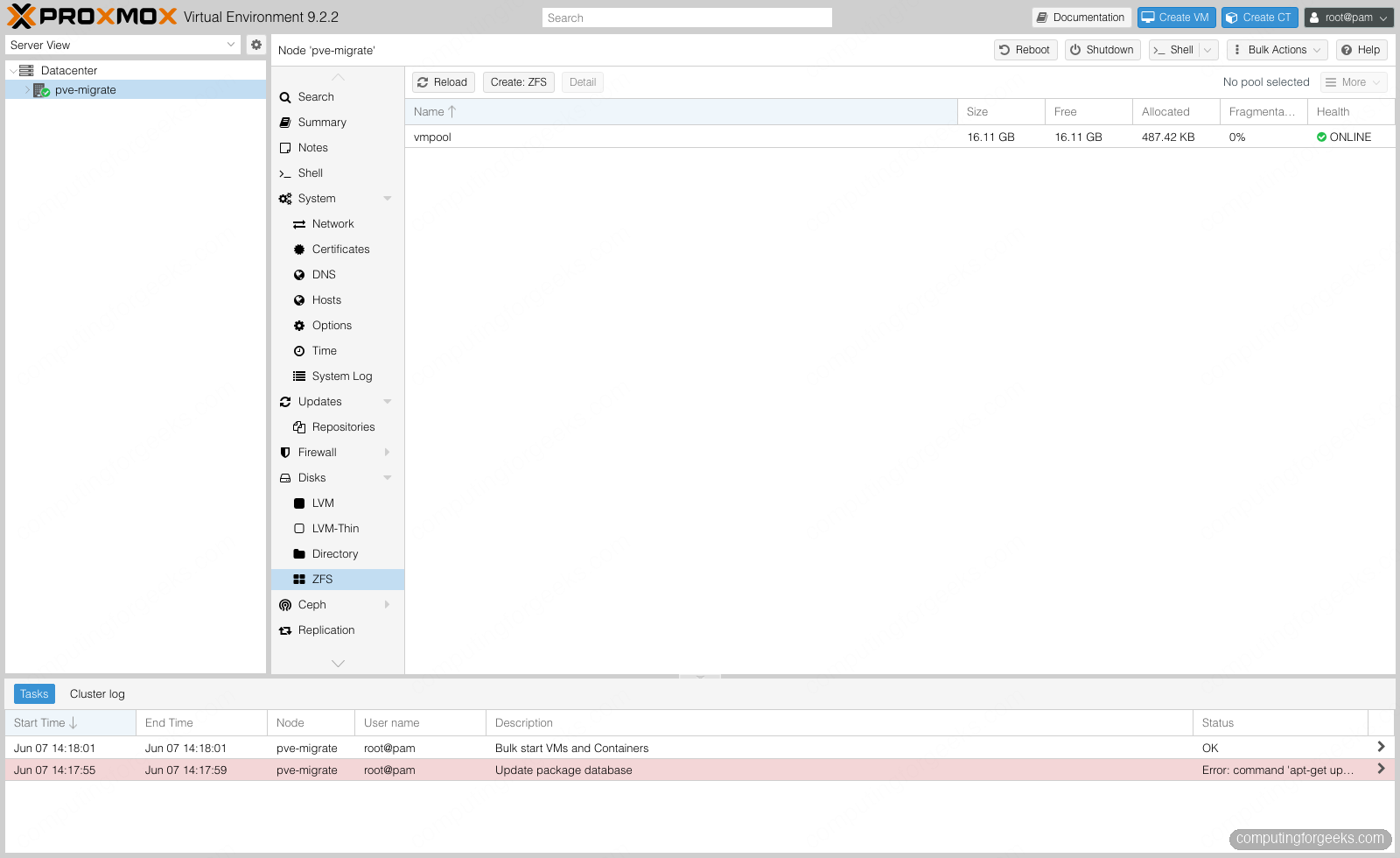
Everything above works from the GUI too. Under a node, open Disks then ZFS, and the panel lists every pool with its size and health:
Click Create: ZFS and the RAID Level dropdown carries every redundant layout from Mirror through RAIDZ3, plus the dRAID variants. The plain multi-disk stripe is the one layout it leaves to the command line:
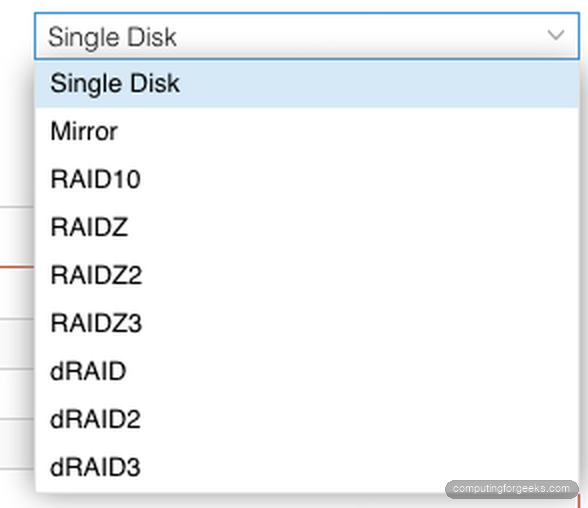
The dialog leaves Add Storage checked, which both creates the pool and registers it as Proxmox storage in one step. You can do the same to an existing pool from the command line with the zfspool plugin:
pvesm add zfspool vmpool --pool vmpool --content images,rootdirOnce registered, the pool shows up under Datacenter then Storage as type ZFS, ready to hold VM and container disks:
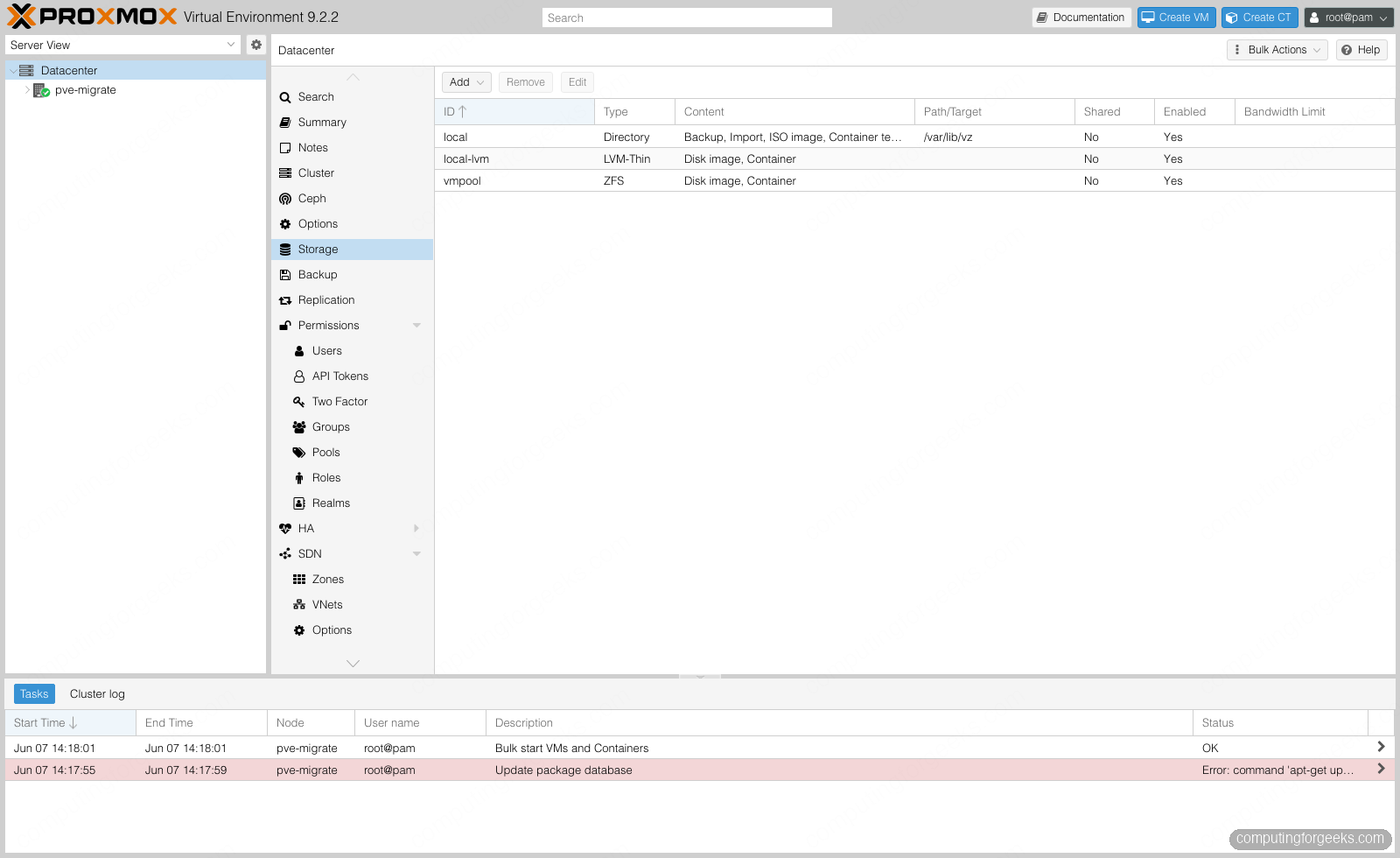
Allocate a disk on it and ZFS creates a zvol with the default 16 KB block size, which you can confirm directly:
zfs get volblocksize vmpool/vm-9999-disk-0The property reads back as expected:
NAME                   PROPERTY      VALUE
vmpool/vm-9999-disk-0  volblocksize  16K
That 16 KB default suits mirror-backed VM disks. On a RAIDZ pool it is the floor you want, for the padding reason above, and worth raising for large sequential volumes.
Replace a failed disk
This is the part that justifies running RAID at all, so it is worth seeing for real. Here a RAIDZ1 pool is holding live data when one of its disks is pulled. ZFS marks the pool DEGRADED, flags the missing disk as REMOVED, and keeps serving every byte:
zpool status tankThe pool reports the loss but also reports no data errors, because the remaining disks reconstruct everything from parity:
  pool: tank
 state: DEGRADED
status: One or more devices have been removed.
	Sufficient replicas exist for the pool to continue functioning.
config:
	NAME        STATE     READ WRITE CKSUM
	tank        DEGRADED     0     0     0
	  raidz1-0  DEGRADED     0     0     0
	    sdb     ONLINE       0     0     0
	    sdc     ONLINE       0     0     0
	    sdd     REMOVED      0     0     0

errors: No known data errors
Swap in a fresh disk and tell ZFS to rebuild onto it. One command:
zpool replace tank sdd sdgZFS resilvers the new disk from parity and returns the pool to ONLINE with zero data errors:
  pool: tank
 state: ONLINE
  scan: resilvered 752M in 00:00:03 with 0 errors
config:
	NAME        STATE     READ WRITE CKSUM
	tank        ONLINE       0     0     0
	  raidz1-0  ONLINE       0     0     0
	    sdb     ONLINE       0     0     0
	    sdc     ONLINE       0     0     0
	    sdg     ONLINE       0     0     0

errors: No known data errors
The whole degraded-then-healed cycle, captured from the pool as it happened:
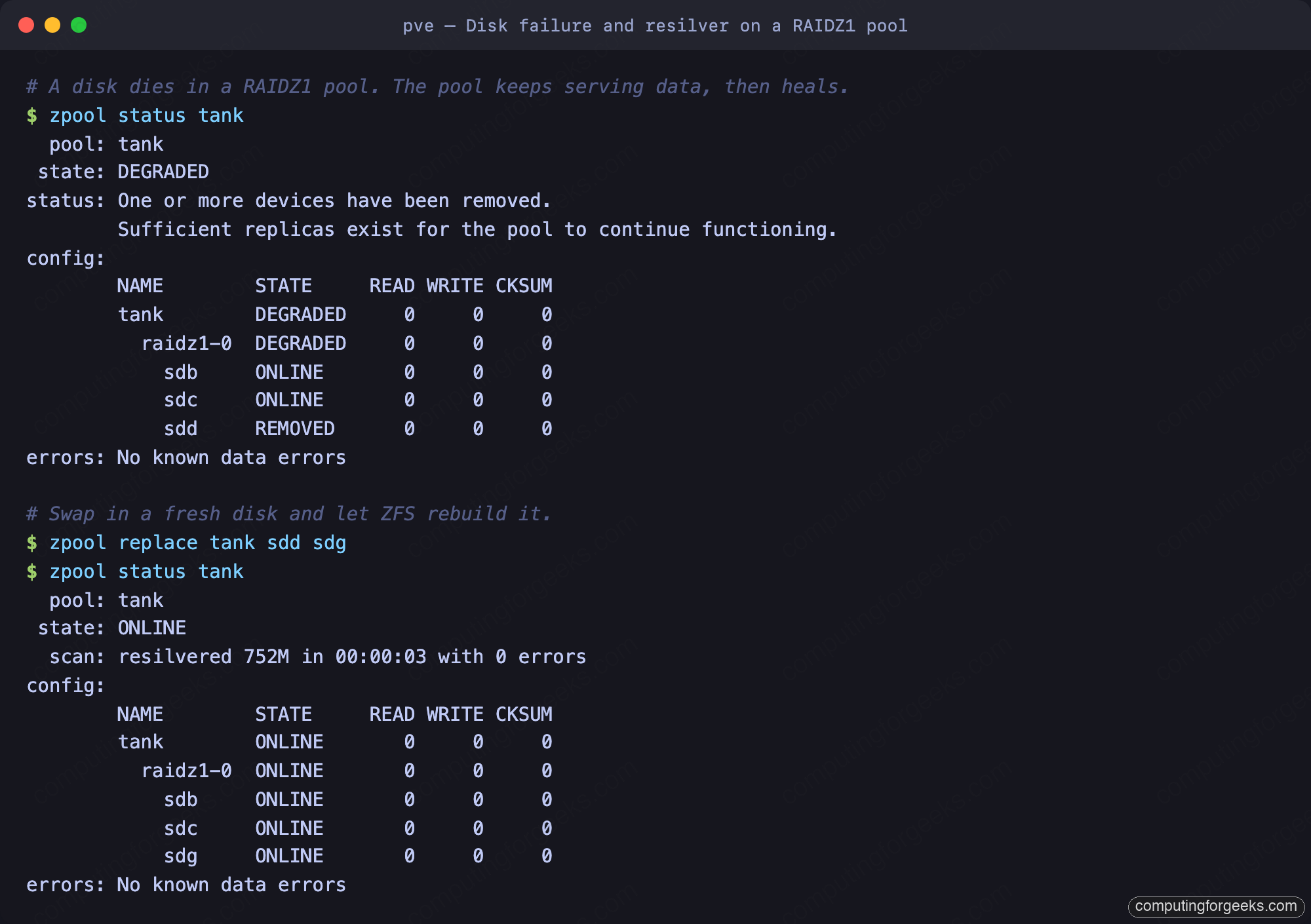
The resilver finished in seconds here because the pool held very little data. On a real disk that is most of the way full, expect that rebuild to run for hours, and remember that on RAIDZ1 you have no protection at all until it completes. That window is exactly the risk RAIDZ2 exists to cover.
Expand a RAIDZ vdev
For years the hard limit of RAIDZ was that you could not add a single disk to an existing vdev; you had to add a whole new vdev or rebuild the pool. RAIDZ expansion, added in OpenZFS 2.3 and present in every Proxmox VE 9 release, removes that limit. Start with a three-disk RAIDZ1 carrying some data and note its size:
zpool list -o name,size,free tankThe three-wide vdev reports 23.5 GB raw:
NAME   SIZE  FREE
tank  23.5G  22.0G
Attach a fourth disk to the existing raidz1-0 vdev. Note the command: it must be zpool attach with the vdev name. Running zpool add tank sdf instead would bolt on a new single-disk vdev with no redundancy and leave the entire pool one drive failure from gone, the exact trap described earlier. The pool stays online and usable the whole time while ZFS reflows the data across the wider layout:
zpool attach tank raidz1-0 sdfThe status shows the expansion in progress, with the new disk already part of the vdev:
expand: expansion of raidz1-0 in progress
	497M / 1.47G copied at 248M/s, 33.06% done, 00:00:04 to go
A few seconds later the reflow is done and the pool is wider:
NAME   SIZE  FREE
tank  31.5G  30.0G
The same data, a wider pool, and not a moment of downtime through the whole reflow:
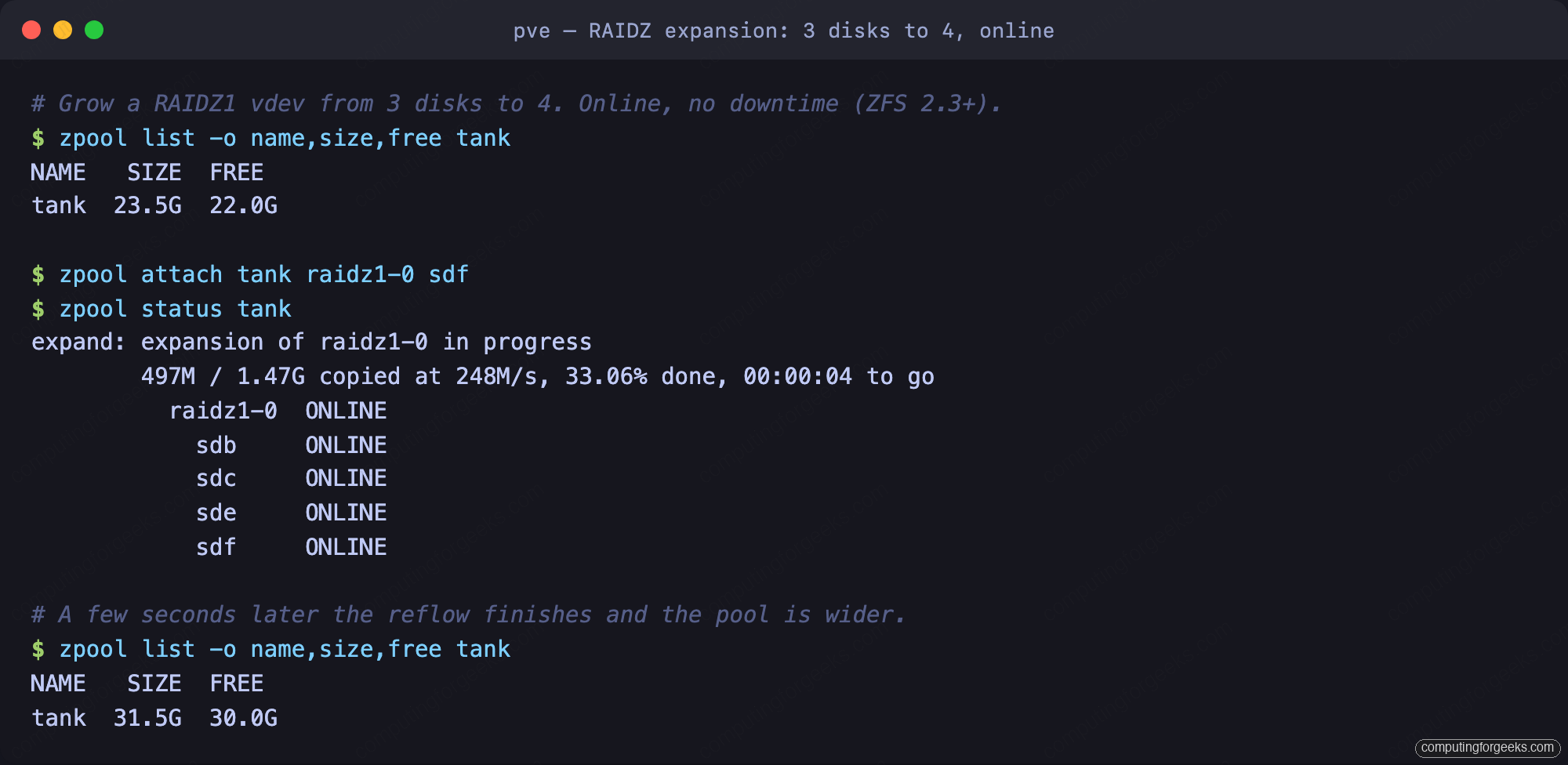
Two caveats keep this honest. The reflow finished in seconds here because the pool was nearly empty; on a full multi-terabyte pool it runs for hours or days as one long sequential pass, and because that pass does not re-check existing checksums, run a zpool scrub afterward. The second caveat is capacity: data written before the expansion keeps its old parity-to-data ratio, so the freshly reported free space is conservative until you rewrite that data, by copying it in place or sending the dataset to itself. Expansion is the right tool for growing a homelab pool a disk at a time. It is not a substitute for planning the vdev width you actually want.
Set ashift and ARC correctly
Two settings are worth getting right on day one. The first is ashift, the pool’s sector size, which you saw passed as -o ashift=12 on every command above. That value means 4 KB sectors, correct for effectively every modern HDD and SSD, and it is what the Proxmox installer and GUI default to. Confirm it on any pool:
zpool get ashift tankIt reports the value set at creation, which is permanent:
NAME  PROPERTY  VALUE   SOURCE
tank  ashift    12      local
Setting ashift too low on a 4 KB drive forces a read-modify-write on every operation and there is no way to fix it short of destroying and recreating the pool, so never leave it to chance on a production box.
The second is the ARC, ZFS’s in-memory read cache. The Proxmox VE 9 installer caps it at 10% of host RAM, to a maximum of 16 GiB, and writes that into /etc/modprobe.d/zfs.conf. On this node that produced a 794 MiB cap out of 8 GiB of RAM:
cat /etc/modprobe.d/zfs.confThe installer-written line is plain to read:
options zfs zfs_arc_max=832569344That conservative default leaves room for VMs, but a dedicated storage host with spare RAM benefits from a larger cache. ZFS likes roughly 1 GiB of ARC per terabyte of storage on top of a 2 GiB base. Edit the value in /etc/modprobe.d/zfs.conf, then refresh the initramfs and reboot for it to take effect:
update-initramfs -u -k allThree more device types exist for tuning and they are easy to misapply. A special vdev moves metadata and small blocks onto SSD and speeds up metadata-heavy pools, but it holds authoritative data, so mirror it or a single failure takes the whole pool. A SLOG accelerates synchronous writes only, the kind databases and NFS do; it does nothing for ordinary async writes. An L2ARC extends the read cache onto SSD but consumes RAM to index itself, so adding one to a memory-starved host hurts more than it helps. More RAM almost always beats all three.
Where people get ZFS RAID wrong
Most lost ZFS pools and disappointing benchmarks trace back to the same handful of bad assumptions. Worth naming them directly:
- “A wide RAIDZ1 is fine for eight big disks.” It is not. The multi-hour resilver window on large drives leaves a single-parity vdev one failure away from total loss for too long. RAIDZ2 is the minimum for any wide vdev.
- “Wider RAIDZ means more IOPS.” The opposite. A RAIDZ vdev gives one disk’s worth of random IOPS no matter how wide it is. IOPS scale with the number of vdevs, which is why mirrors win for VMs.
- “Put the VMs on RAIDZ to save space.” The zvol padding on RAIDZ usually eats the space you hoped to save, and the IOPS are wrong for VM workloads. Mirrors are the right home for VM disks.
- “RAIDZ expansion instantly gives full wider capacity.” Old data keeps the old parity ratio until you rewrite it, so the reported free space stays conservative right after expanding.
- “RAID protects my data, so I am backed up.” RAID survives disk failures, not a deleted dataset, a bad upgrade, or ransomware. Pair every pool with real backups; the Proxmox Backup Server integrates directly with these pools.
Pick mirrors for anything that serves random IO, RAIDZ2 for bulk and backups, and match ashift to your disks at creation. Start from a clean Proxmox VE 9 install with the no-subscription repository in place, and when one box of disks is no longer enough redundancy, Ceph spreads the same idea across nodes.