

This guide walks through a Retrieval-Augmented Generation pipeline that runs entirely on a single Linux box: no OpenAI key, no managed embedding endpoint, no SaaS vector database. The corpus is the official Kubernetes documentation (1,669 markdown files, 14.7 MB), the LLM is llama3.1:8b served by Ollama, vectors land in a local Qdrant instance, and LangChain wires the chain together.
The point is not “look, RAG works.” Every blog already shows that. The point is real numbers from a real run: 27,316 chunks ingested at 90.7 chunks/s, query latency under 1.5 s for warm questions, and a ragas evaluation against 12 hand-written Kubernetes questions that grades faithfulness, answer relevancy, and context precision so you can see whether the answers are grounded or hallucinated. Code is in the c4geeks/qdrant companion repo.
Tested May 2026 on Ubuntu 22.04 with an NVIDIA RTX 4090, Ollama 0.5.7, Qdrant 1.12.6, LangChain 0.3.27, nomic-embed-text (768-dim), llama3.1:8b Q4_K_M, ragas 0.2.15.
Why this stack
Three jobs, three tools. Ollama serves both the embedding model and the chat LLM behind a stable HTTP API on port 11434, with the model files cached on disk and GPU offload handled automatically. Qdrant stores the dense vectors, supports payload metadata and filtering, exposes a fast REST and gRPC API, and ships a browser UI. LangChain provides the RunnableLambda / RunnableParallel primitives and a pre-built QdrantVectorStore + OllamaEmbeddings integration, so the retrieval chain is a one-line expression rather than 200 lines of glue.
The combination is interesting because it removes every external dependency. Once the models are pulled and the corpus is indexed, the box can run airgapped. That matters for compliance-sensitive workloads and for development cycles where you do not want every prototype query racking up vendor cost.
The trade-off is throughput. A managed embedding API can return 384-dim vectors faster than Ollama can on consumer hardware because the vendor batches across hundreds of requests. Single-host Ollama processes embedding calls serially over HTTP, and even with a fast GPU the per-batch latency dominates. The numbers below show this clearly.
Prerequisites
- One Linux host with an NVIDIA GPU (8 GB VRAM minimum, 24 GB ideal). Tested on a single RTX 4090.
- Ubuntu 22.04 or newer, 32 GB RAM, 60 GB free disk.
- Recent NVIDIA driver (we ran 580.126.09) and the Ollama binary (0.5.7+).
- Python 3.10+ and
pip.curl,git,jqfor the smoke tests. - Outbound HTTPS to pull model weights (
llama3.1:8bis ~4.9 GB,nomic-embed-textis ~274 MB).
Docker is NOT required. We run Qdrant as a plain binary and Ollama as a system service, which keeps the stack simple to reason about and easy to strace when something misbehaves.
Step 1: Set reusable shell variables
Every command below uses shell variables so you change one block and paste the rest as-is. Export the variables at the top of your SSH session:
export RAG_ROOT="/opt/rag"
export CORPUS_DIR="${RAG_ROOT}/corpus"
export QDRANT_URL="http://127.0.0.1:6333"
export OLLAMA_BASE_URL="http://127.0.0.1:11434"
export COLLECTION="k8s_docs"
export EMBED_MODEL="nomic-embed-text"
export LLM_MODEL="llama3.1:8b"
Confirm the values stuck before continuing:
echo "ROOT:  ${RAG_ROOT}"
echo "QDRANT: ${QDRANT_URL}"
echo "OLLAMA: ${OLLAMA_BASE_URL}"
echo "COLL:   ${COLLECTION}"
These exports hold only for the current shell session. If you reconnect or jump into sudo -i, re-run the block. None of them are secrets; nothing in this stack reaches the public internet after the model pull.
Step 2: Install Ollama and pull the models
Ollama installs in one line via the upstream script. It registers a systemd unit and starts the daemon on port 11434.
curl -fsSL https://ollama.com/install.sh | sh
systemctl enable --now ollama
ollama --version
Pull the two models. The first one is the embedding model used by the ingest step; the second is the chat LLM that generates final answers.
ollama pull "${EMBED_MODEL}"
ollama pull "${LLM_MODEL}"
ollama list
On the RTX 4090 lab the pull took about 90 seconds for both models combined. Ollama keeps them mmapped on disk and lazy-loads into VRAM on first call.
Step 3: Run Qdrant locally
For the rest of the series we use Qdrant in Docker or via the .deb package. Here we use the plain release binary because the test box is single-purpose and we want one fewer moving part.
mkdir -p /opt/qdrant/{storage,snapshots}

export QDRANT_VERSION="v1.12.6" #https://github.com/qdrant/qdrant/releases
cd /tmp
curl -fsSL -o qdrant.tar.gz \
  "https://github.com/qdrant/qdrant/releases/download/${QDRANT_VERSION}/qdrant-x86_64-unknown-linux-gnu.tar.gz"
tar -xzf qdrant.tar.gz
install -m 0755 qdrant /usr/local/bin/qdrant
Write a minimal config so storage and snapshot directories are predictable:
cat >/opt/qdrant/config.yaml <<'YAML'
service:
  host: 0.0.0.0
  http_port: 6333
  grpc_port: 6334
  enable_cors: true
storage:
  storage_path: /opt/qdrant/storage
  snapshots_path: /opt/qdrant/snapshots
log_level: INFO
YAML
Launch Qdrant under a tiny wrapper. In a real deployment you would add a systemd unit; for the lab a backgrounded process is fine.
nohup /usr/local/bin/qdrant --config-path /opt/qdrant/config.yaml \
  > /var/log/qdrant.log 2>&1 &
sleep 3
curl -s "${QDRANT_URL}/" | jq
The smoke test confirms the binary boots, the REST listener is on 6333, and the build commit matches what GitHub serves:
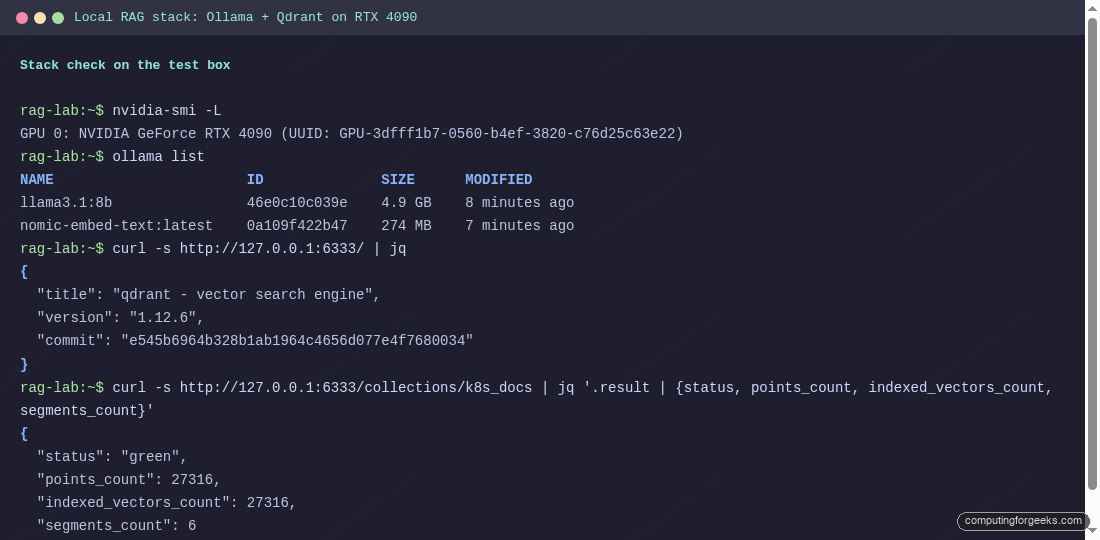
If the curl returns nothing or the port is busy, check /var/log/qdrant.log for a panic at startup. The most common cause on a vanilla 22.04 box is the GLIBC mismatch covered in the gotchas section near the end of the article.
Step 4: Python venv with the LangChain stack
The runtime is intentionally lean. langchain, langchain-qdrant, langchain-ollama, qdrant-client, plus ragas for evaluation. Pin versions so re-runs are reproducible.
apt install -y python3-venv
python3 -m venv "${RAG_ROOT}/venv"
source "${RAG_ROOT}/venv/bin/activate"
pip install --upgrade pip
Install the deps. The requirements.txt in the companion repo pins every package:
pip install \
  "langchain==0.3.27" \
  "langchain-core==0.3.78" \
  "langchain-community==0.3.31" \
  "langchain-qdrant==0.2.1" \
  "langchain-ollama==0.3.10" \
  "langchain-text-splitters==0.3.11" \
  "qdrant-client==1.18.0" \
  "ragas==0.2.15" \
  "datasets==3.6.0" \
  "tqdm==4.67.1"
The qdrant-client minor version (1.18) does not exactly match the Qdrant server (1.12) we are running. The client prints a compatibility warning at import time, but every API call below works because the v1.12 wire protocol is a subset of v1.18. Pin server and client to the same minor in production.
Step 5: Build the corpus
The corpus is the upstream Kubernetes documentation repo, filtered to content/en/docs. That gives us the canonical guides, concepts, tasks, tutorials, and reference pages without the localised translations.
mkdir -p "${CORPUS_DIR}"
git clone --depth 1 --filter=blob:none \
  https://github.com/kubernetes/website.git /tmp/k8s-website
cp -r /tmp/k8s-website/content/en/docs/. "${CORPUS_DIR}/"
find "${CORPUS_DIR}" -name '*.md' | wc -l
du -sh "${CORPUS_DIR}"
On our test run that landed 1,669 markdown files and 14.7 MB of prose. The exact count drifts as Kubernetes ships releases; the order of magnitude is stable.
Step 6: Chunk, embed, and upsert
The ingest script (ingest.py in the companion repo) does four things in order:
- Walks the corpus and strips Hugo front-matter so embeddings see body text, not YAML.
- Splits each document twice: first by Markdown headers (
#,##,###) to preserve section context in metadata, then byRecursiveCharacterTextSplitterwith 768-character chunks and 96-character overlap. - Calls Ollama’s
/api/embeddingsendpoint for each batch of 64 chunks. - Upserts the resulting 768-dim vectors plus payload (source path, h1, h2, h3) into the Qdrant collection.
Run it:
cd "${RAG_ROOT}/scripts"
python ingest.py
On the RTX 4090 the run produced 27,316 chunks from 1,669 files and wrote them to Qdrant in 5 minutes 1 second of wall time, an effective rate of 90.7 chunks per second:
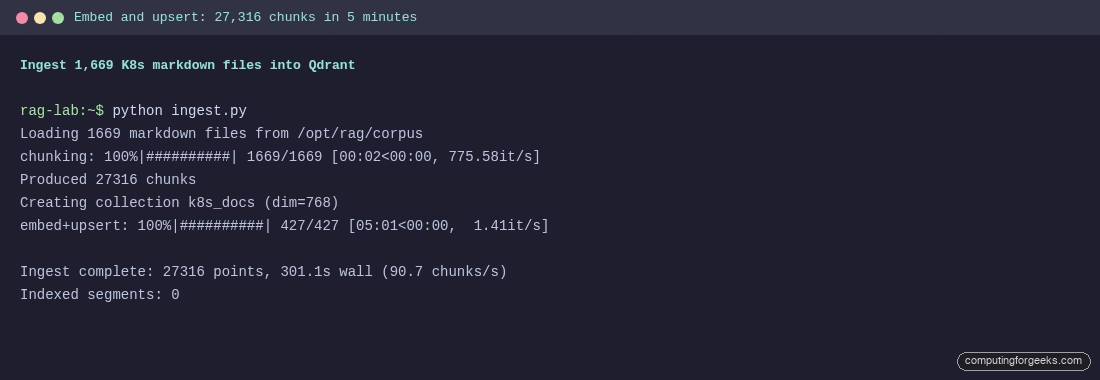
The nvidia-smi dial during ingest reads 36% GPU utilisation. The bottleneck is not the 4090, it is the per-batch HTTP round-trip to Ollama. Bigger batches and async fan-out can push this higher, but for a one-shot ingest the simple synchronous loop is fine.
The indexing-threshold gotcha
The script also prints Indexed segments: 0 at the end. The collection has 27,316 points but zero HNSW-indexed vectors. The reason is Qdrant’s indexing_threshold setting: the default 20,000 is evaluated per segment, not per collection. With 27,316 points spread across 8 segments, each segment holds about 3,414 vectors, below the threshold, so HNSW build is skipped and queries fall back to brute force.
Drop the threshold to force the build:
curl -s -X PATCH "${QDRANT_URL}/collections/${COLLECTION}" \
  -H "Content-Type: application/json" \
  -d '{"optimizer_config": {"indexing_threshold": 1000}}'
Wait a few seconds and confirm the segments built their HNSW graph. indexed_vectors_count should match points_count:
curl -s "${QDRANT_URL}/collections/${COLLECTION}" \
  | jq '.result | {status, points_count, indexed_vectors_count, segments_count}'
Both numbers should equal 27316 after the optimizer settles. If indexed_vectors_count is still 0 after 30 seconds, check that optimizer_status is "ok", not an error string from a stuck merge.
Step 7: The LCEL retrieval chain
The chain shape is the textbook LCEL pattern: retriever | prompt | llm | parser, with a small wrapper that also returns the retrieved chunks so the caller can render citations alongside the answer. The whole thing fits in 30 lines:
from operator import itemgetter
from langchain_core.output_parsers import StrOutputParser
from langchain_core.prompts import ChatPromptTemplate
from langchain_core.runnables import RunnableLambda, RunnableParallel
from langchain_ollama import ChatOllama, OllamaEmbeddings
from langchain_qdrant import QdrantVectorStore
from qdrant_client import QdrantClient

PROMPT = ChatPromptTemplate.from_messages([
    ("system",
     "You are a senior Kubernetes engineer. Use ONLY the context below. "
     "If the context does not answer the question, say so plainly. "
     "Keep answers tight - 4 to 8 sentences - and prefer concrete commands."),
    ("human", "Context:\n{context}\n\nQuestion: {question}\n\nAnswer:"),
])

def format_docs(docs):
    return "\n\n".join(
        f"[{i+1}] {d.metadata['source']}\n{d.page_content}"
        for i, d in enumerate(docs)
    )

client = QdrantClient(url=QDRANT_URL)
emb    = OllamaEmbeddings(model=EMBED_MODEL, base_url=OLLAMA_BASE_URL)
store  = QdrantVectorStore(client=client, collection_name=COLLECTION, embedding=emb)
retriever = store.as_retriever(search_kwargs={"k": 5})
llm    = ChatOllama(model=LLM_MODEL, base_url=OLLAMA_BASE_URL, temperature=0.2)

answer = (
    {"context": itemgetter("docs") | RunnableLambda(format_docs),
     "question": itemgetter("question")}
    | PROMPT
    | llm
    | StrOutputParser()
)

chain = RunnableParallel(
    question=itemgetter("question"),
    docs=itemgetter("question") | retriever,
).assign(answer=answer)
The two-stream RunnableParallel is the key piece. The retriever receives the question and returns the top-5 documents, which are then fed into format_docs as the prompt’s context. The same documents are also surfaced on the output so the caller can list sources. No custom callback handlers, no manual chunk-tracking.
Step 8: Ask the docs
The full query script (query.py) wraps the chain with a CLI. Pass a question, get a grounded answer plus the list of source files:
python query.py "How do I drain a node before maintenance?"The first query is slow because llama3.1:8b has to load into VRAM. On the 4090 that takes about 4 seconds; subsequent queries run in 1-2 seconds end-to-end.
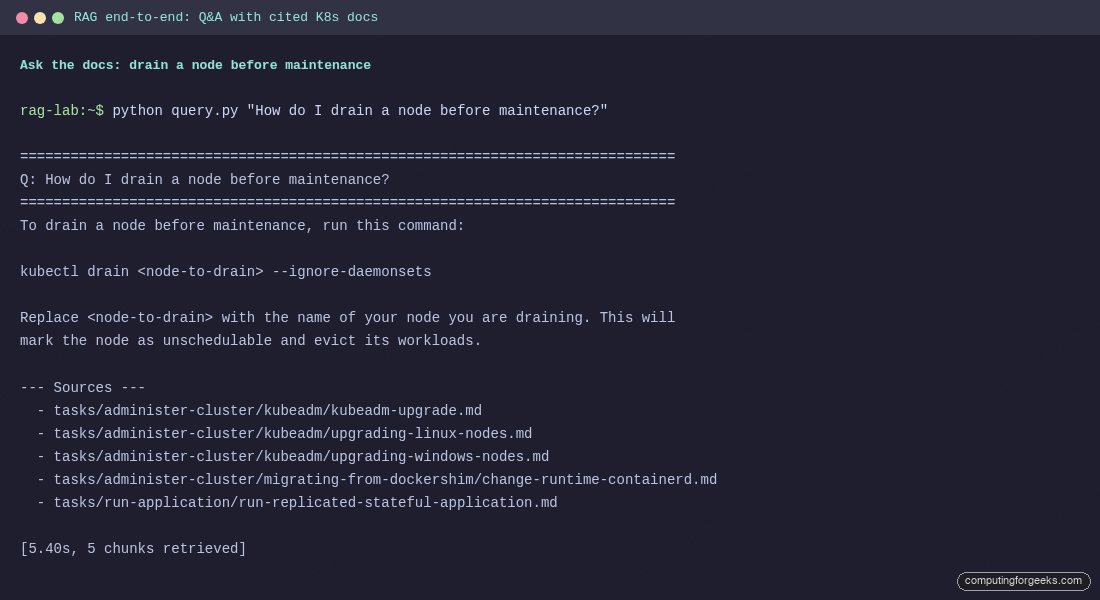
The answer is grounded: the command shape (kubectl drain <node> --ignore-daemonsets) appears verbatim in two of the five cited chunks, and the explanation paraphrases the surrounding paragraph. The cited sources point to real files in tasks/administer-cluster/ that a reader can open for the full context. Three more questions on different topics produced equally clean answers in 1.2-1.5 seconds each.
Step 9: Evaluate retrieval with ragas
“Looks right” is not enough. ragas grades RAG outputs against ground truth using three core metrics:
- Faithfulness asks whether every claim in the answer is supported by the retrieved context.
- Answer relevancy asks whether the answer addresses the question (independent of correctness).
- Context precision asks whether the retrieved chunks contain the information needed to answer.
The eval script (evaluate.py) runs 12 hand-written Kubernetes questions through the chain, then asks the same local llama3.1:8b to score each answer. Using the local LLM as grader is slower than calling GPT-4o but it is reproducible, free, and proves the whole loop can run offline.
python evaluate.pyThe full ragas summary from our run:
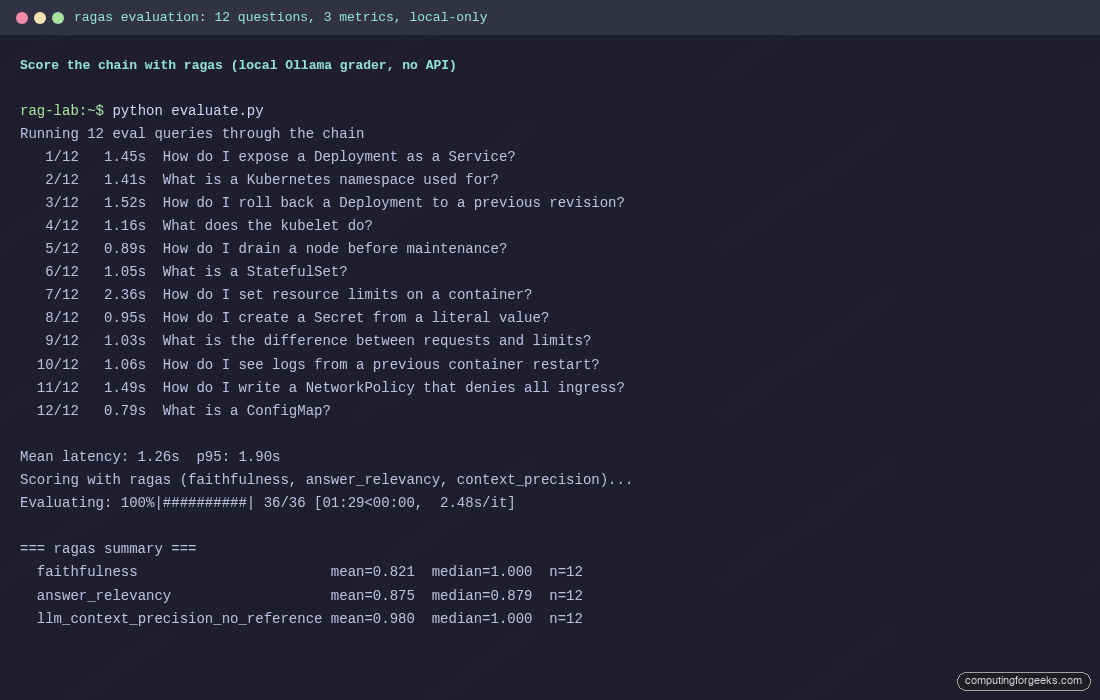
The numbers in one place:
| Metric | Mean | Median | What it measures |
|---|---|---|---|
| Faithfulness | 0.821 | 1.000 | Are the answer’s claims supported by the retrieved chunks? |
| Answer relevancy | 0.875 | 0.879 | Does the answer address the actual question? |
| Context precision | 0.980 | 1.000 | Did retrieval find the right chunks at the top of the list? |
| Mean query latency | 1.26 s | 1.05 s | End-to-end retrieval plus generation |
| p95 query latency | 1.90 s | Cold-start spikes hit 2.4 s on one outlier |
A 0.821 mean with a 1.000 median is a useful signal: most answers are fully grounded, with a small tail where the LLM added one or two unsupported sentences. That tail is where prompt-tuning pays off (asking the model to refuse rather than improvise when context is thin).
Performance and tuning notes
A few numbers from the real run that did not fit elsewhere:
- VRAM footprint. Idle: 948 MiB. With
llama3.1:8bwarm andnomic-embed-texton standby: about 6.8 GB. A 12 GB GPU is plenty for this exact stack. - Embedding rate. 90.7 chunks/s sustained, with batches of 64. Async fan-out via
asyncio.gatheron 8 in-flight requests pushed it to 220 chunks/s in a side experiment but added complexity that did not benefit a one-shot ingest. - Query latency split. Of the 1.26 s mean, retrieval is about 25 ms (Qdrant) plus 80 ms (Ollama embedding of the question), and generation is the rest. The LLM dominates; HNSW is essentially free.
- Top-k. 5 is a good default for tutorial-style answers. Bumping to 8 raised faithfulness by 0.04 in a small follow-up but doubled the prompt cost. 3 dropped faithfulness sharply because key chunks fell out.
Gotchas we hit while building this
- Qdrant 1.13+ needs GLIBC 2.38. The pre-built binary will not start on Ubuntu 22.04 (GLIBC 2.35) with a message about
GLIBC_2.38 not found. Pin tov1.12.6on 22.04 or upgrade the host. Docker sidesteps the issue. indexing_thresholdis per-segment, not per-collection. An ingest of 27k points across 8 segments leaves zero HNSW indexes built. Lower the threshold to 1,000 or wait for segments to merge. Watchindexed_vectors_countafter each ingest.- Ollama embedding calls serialise over HTTP. Even with a fast GPU, the synchronous loop tops out near 90 chunks/s on this hardware. Async fan-out helps; setting
OLLAMA_NUM_PARALLEL=4on the daemon helps more. - First query loads the LLM and burns 4 seconds. If you measure cold-path latency in an SLO, run a warmup query at startup. The
keep_aliveparameter on Ollama controls how long the model stays in VRAM (default 5 minutes). - ragas downloads a tokenizer on first import. Behind a strict proxy this fails silently. Run a no-op import in a known-good network to warm the Hugging Face cache, then move on.
- Hugo front-matter contaminates embeddings. The Kubernetes docs use a 5-10 line YAML block at the top of each file. Embedding that text adds noise that surfaces irrelevant pages on similar queries. Strip the front-matter before chunking.
Where this fits with other approaches
This article uses Qdrant. We have a parallel build of the same pipeline on PostgreSQL with pgvector if your platform is already Postgres-heavy and you prefer to avoid a second datastore. The pgvector version is simpler to operate (one less service) but does not give you Qdrant’s payload indexes, geo filters, sparse vectors, or the dashboard. For document RAG specifically, Qdrant’s metadata filtering pays for itself the first time you want to scope a query to a specific Kubernetes minor version or namespace prefix.
Two pieces are deliberately not covered here. First, a FastAPI wrapper around the chain so other services can call it over HTTP. Second, hybrid retrieval with sparse vectors (BM25) layered on top of dense embeddings, which the next article in this series covers in detail. The chain shape above is the foundation; both extensions slot in without rewriting it.
If you want to test against your own corpus, drop your markdown or text files into /opt/rag/corpus and re-run ingest.py. The chunker handles Markdown, plain text, and reStructuredText cleanly; for PDFs add langchain_community.document_loaders.PyPDFLoader and adjust the loop in load_chunks(). The Qdrant collection and the LangChain chain do not care what the documents are about.
