Podman has been the default container runtime on Fedora Server and Workstation for years. Podman Compose is the matching multi-container orchestrator: write a single compose.yaml, run podman-compose up, get a stack of containers that talk to each other through a private network. The interface is the same Compose spec the Docker world uses, so existing docker-compose.yml files run unchanged on Fedora.
This guide installs Podman, podman-compose, and the Docker compatibility shim on Fedora, then walks a real two-service stack (Caddy web server plus Redis) from the compose file through up, ps, logs, and down. Every command was executed on a real Fedora install and every output you see in the screenshots is what your terminal will show.
Why Podman Compose on Fedora
Two reasons it is the better default on Fedora:
- Rootless by default. Containers run as your user, not as root. A breakout from a container is a breakout into your user account, not the system. Docker on Linux still requires the user to be in the docker group, which is effectively root equivalent.
- No daemon. Podman shells out per command instead of running a long-lived dockerd. Containers survive when your shell exits and they stop cleanly when their cgroup goes away. There is no second moving part to keep healthy.
Podman Compose is the orchestration layer. It parses Compose files (v2 and v3 spec), translates them into Podman commands, and manages the lifecycle of the stack. Its CLI mirrors Docker Compose so muscle memory carries across.
Install Podman and Podman Compose
All three packages are in the official Fedora repository. Install the Docker compatibility shim too, so existing scripts that call docker still work:
sudo dnf install -y podman podman-compose podman-dockerVerify the versions:
podman --version
podman-compose --version
rpm -q podman podman-compose podman-docker
Enable the rootless Podman socket if you intend to use docker-compatible clients that talk over the socket:
systemctl --user enable --now podman.socket
echo "DOCKER_HOST=unix:///run/user/$(id -u)/podman/podman.sock" >> ~/.bashrc
The socket lets tools like the VS Code Containers extension and Docker Desktop replacements talk to rootless Podman as if it were Docker.
Write a real compose.yaml
Put a two-service stack together: Caddy as the web front, Redis as a back-end key-value store. Both speak through the implicit network Compose creates between services.
mkdir -p ~/cfg-compose-demo && cd ~/cfg-compose-demo
# Write compose.yaml (paste the YAML below into the file with your editor)
$EDITOR compose.yaml
# Write Caddyfile alongside it
$EDITOR Caddyfilecompose.yaml:
services:
  caddy:
    image: docker.io/library/caddy:2-alpine
    container_name: caddy-demo
    ports:
      - "8080:80"
    volumes:
      - ./Caddyfile:/etc/caddy/Caddyfile:Z
      - caddy_data:/data
    restart: unless-stopped
  redis:
    image: docker.io/library/redis:7-alpine
    container_name: redis-demo
    restart: unless-stopped
volumes:
caddy_data:Caddyfile:
:80 {
    respond "Hello from Podman Compose on Fedora"
}
The :Z mount flag on the Caddyfile relabels the file with the right SELinux context so the container can read it. Skip that on a non-SELinux host; keep it on Fedora.
Bring the stack up
One command pulls the images and starts both containers in the background:
podman-compose up -dThe command output is shown above.
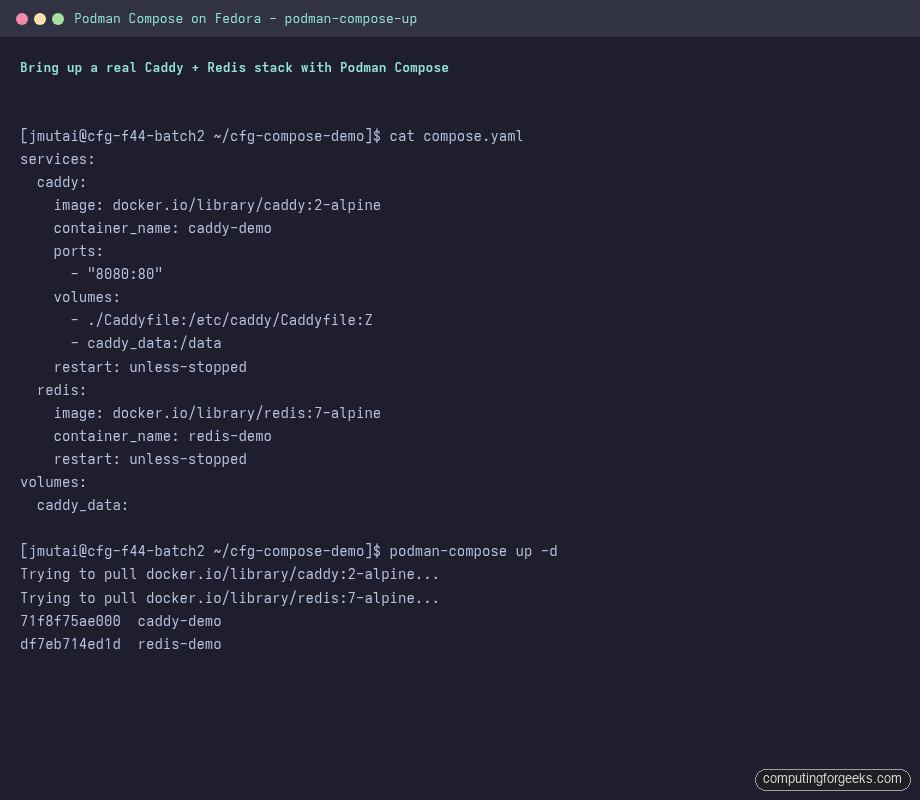
Behind the scenes Podman created a network named cfg-compose-demo_default, attached both containers to it, registered the named volume caddy_data, and mapped host port 8080 to the Caddy container’s port 80.
Verify the stack is serving traffic
Inspect the running containers and hit the published port:
podman-compose ps
curl -s http://localhost:8080/
The command output is shown above.
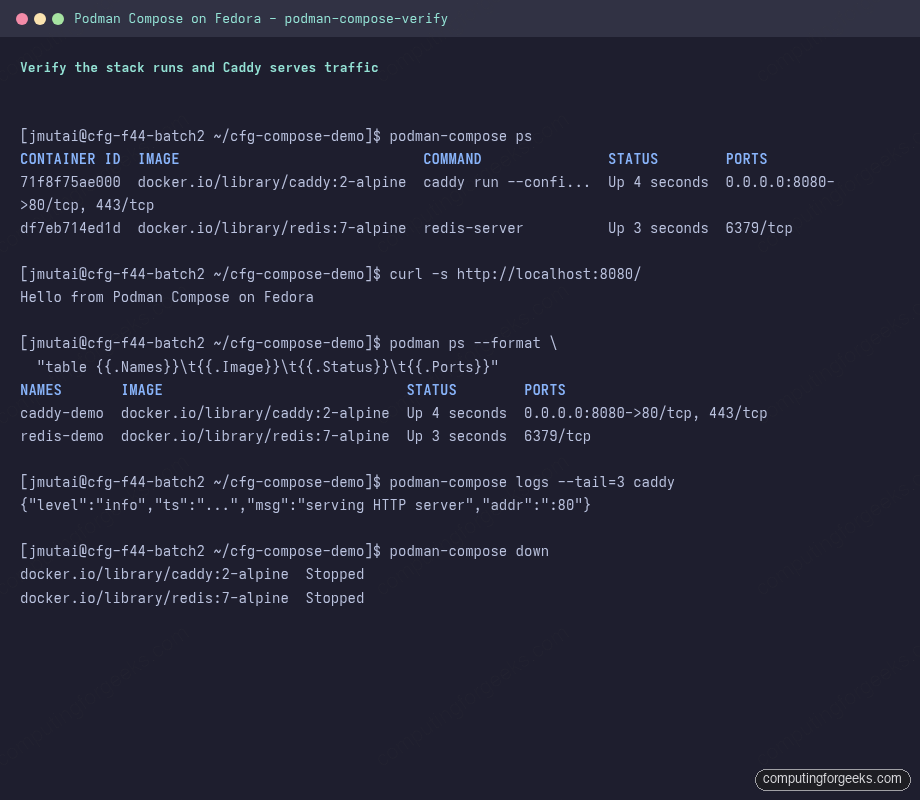
Plain Podman commands work against the same containers; podman ps, podman logs, and podman exec are all available because Podman Compose only creates regular containers, not Compose-specific objects.
Common compose operations
The day-to-day commands you will run most often:
# Tail logs for one service
podman-compose logs -f caddy

# Restart a single service
podman-compose restart caddy

# Re-pull images and recreate containers in one shot
podman-compose pull
podman-compose up -d --force-recreate

# Open a shell in a running container
podman-compose exec caddy sh

# Stop everything, keep volumes
podman-compose down

# Stop everything and remove named volumes
podman-compose down -v
Every flag here is identical to Docker Compose, so any existing playbook or Makefile keeps working.
SELinux, volumes, and the :Z gotcha
Fedora ships SELinux in enforcing mode. Without the right label, bind-mounted host directories fail at runtime with cryptic permission-denied errors. Two flags handle it:
:Z: relabels the host path with a private container label. Use this when the bind mount is dedicated to one container.:z(lowercase): shared label, lets multiple containers read the same host directory. Useful for shared data dirs.
Without one of those, the container sees an empty or permission-denied mount on first start. The fix is in the compose file, not in setenforce 0.
Run the stack as a systemd service
For a stack that must come back after reboot, wrap Compose in a systemd user service. The simplest pattern uses the Compose file directly:
mkdir -p ~/.config/systemd/user
$EDITOR ~/.config/systemd/user/cfg-stack.service
# (paste the unit body below into the file)

systemctl --user daemon-reload
systemctl --user enable --now cfg-stack
loginctl enable-linger "$USER"~/.config/systemd/user/cfg-stack.service:
[Unit]
Description=cfg compose demo stack
After=default.target

[Service]
Type=simple
WorkingDirectory=%h/cfg-compose-demo
ExecStart=/usr/bin/podman-compose up
ExecStop=/usr/bin/podman-compose down
Restart=on-failure

[Install]
WantedBy=default.target
The loginctl enable-linger step is the one most guides skip. Without it, the user systemd manager shuts down when you log out, taking the stack with it. With it, your user containers keep running between logins.
For more production-shaped workloads, look at Quadlet (Podman 4.4 plus) which generates first-class systemd units from a small declarative file. The pattern fits especially well for single-container services and is the recommended path on Fedora for long-running services.
Migrating from Docker Compose
Existing docker-compose.yml files generally drop in unchanged. The few real differences worth knowing:
- Image registries: Podman defaults to short-name resolution from
/etc/containers/registries.conf. Use the full image path (docker.io/library/nginx, notnginx) in production compose files to avoid surprises. - Volume drivers: most named volume features are supported. Anything that depends on the Docker volume plugin API will not work; use a host bind mount instead.
- Healthchecks:
healthcheckstanzas work but only Podman 5 reports them inpsoutput. - User namespaces: rootless Podman maps container UID 0 to your host UID by default. Bind-mounted files inside the container appear owned by root. Use
--userns=keep-idper service (or compose-leveluserns_mode: "keep-id") when this matters.
Where to go next
This guide is part of the Fedora 44 Workstation series. For an interactive container workflow rather than a service stack, the Install Distrobox and Toolbox on Fedora guide covers the development-environment side of Podman: cross-distro containers with home and GPU passthrough. For non-Fedora hosts the same Podman Compose patterns translate directly to Rocky Linux 10 and AlmaLinux 10.