A two-node Pacemaker and Corosync cluster is the cleanest way to give a single Apache web server a survivable identity. The same VIP keeps responding when the active node panics, gets rebooted, or simply needs a kernel patch on a Tuesday afternoon. This guide builds that cluster on Rocky Linux 10 with stock packages from the HighAvailability repo, an Apache resource agent that actually monitors the daemon, and two failover drills that prove the whole thing works.
The lab uses two Rocky Linux 10 VMs (node1, node2) plus a virtual IP that floats between them. We cover repo enablement, pcs cluster setup, two-node quorum settings, the IPaddr2 and ocf:heartbeat:apache resource pair, colocation and ordering constraints, a graceful standby failover, a hard power-off failover, and the production fencing decisions you cannot skip outside a lab.
Tested April 2026 on Rocky Linux 10.1 (Red Quartz, kernel 6.12) with Pacemaker 3.0.1, Corosync 3.1.9, pcs 0.12.1, and httpd 2.4 from the AppStream repo. SELinux enforcing throughout.
Lab topology
Two cluster members on the same Layer 2 network. The VIP is a third address on that subnet, owned by Pacemaker, never assigned statically anywhere. Apache and the VIP move together as a single failover unit because of a colocation constraint.
| Host | Role | IP | RAM / vCPU |
|---|---|---|---|
node1 | Cluster member | 10.0.2.10 | 2 GB / 1 |
node2 | Cluster member | 10.0.2.11 | 2 GB / 1 |
| WebVIP | Floating service IP | 10.0.2.100 | (virtual) |
Prerequisites
- Two Rocky Linux 10 hosts, fully updated, time synced (chrony works out of stock install).
- Network reachability between both nodes on the cluster subnet, and a free IP on that subnet for the VIP.
- Root or sudo access on both nodes.
- SELinux can stay enforcing. The
pacemakerandresource-agentspackages ship policy that handles the moves we make.
Step 1: Set reusable shell variables
Pull the addresses, the cluster name, and the hacluster password into shell variables so the same paste works on both nodes. Export them once at the top of each SSH session:
export NODE1_IP="10.0.2.10"
export NODE2_IP="10.0.2.11"
export VIP="10.0.2.100"
export CLUSTER_NAME="webcluster"
export HACLUSTER_PASS="STRONG_PASS_HERE"
Pick a real password before pasting. The hacluster account only authenticates between cluster daemons, so the value never travels over plaintext, but a weak password still gives anyone with shell access on either node the ability to reconfigure the cluster.
Step 2: Prepare both nodes
Run these steps on both node1 and node2. Same packages, same firewall rules, same hosts file.
Set distinct hostnames so Pacemaker can identify each member. Skip this if your image already has them:
# on node1
sudo hostnamectl set-hostname node1
# on node2
sudo hostnamectl set-hostname node2
Add reciprocal entries in /etc/hosts on both nodes so the cluster talks by name even if DNS hiccups:
echo "${NODE1_IP} node1
${NODE2_IP} node2" | sudo tee -a /etc/hosts
Confirm name resolution both ways. Each node should be able to ping the other by short hostname:
ping -c 2 node1
ping -c 2 node2
Time drift between cluster members causes spurious resource recovery. Make sure chrony is running on both:
sudo systemctl enable --now chronyd
chronyc tracking | head -5
The output of chronyc tracking should show a positive stratum and a healthy reference source. With both nodes synchronised, move on to the cluster repo.
Step 3: Enable the HighAvailability repo and install the cluster stack
Rocky Linux 10 ships the cluster packages in a separate highavailability repository that is disabled by default. Enable it on both nodes:
sudo dnf config-manager --set-enabled highavailability
sudo dnf repolist 2>/dev/null | grep -i high
You should see the repo listed as enabled:
highavailability Rocky Linux 10 - High AvailabilityInstall Pacemaker, the pcs command-line tool, and the full set of fence agents. We pull fence-agents-all now even though we disable STONITH for the lab. Production fencing covered in Step 11.
sudo dnf install -y pacemaker pcs fence-agents-allConfirm the versions match across both nodes. Mismatched releases are a frequent source of cluster setup failures:
rpm -qa | grep -E '^(pacemaker|corosync|pcs)-[0-9]'The output on both nodes should look like this:
corosync-3.1.9-2.el10.x86_64
pacemaker-3.0.1-3.1.el10_1.x86_64
pcs-0.12.1-1.el10_1.2.x86_64
Start and enable the pcs daemon, set the password for the hacluster account that pcs uses for inter-node auth, and confirm pcsd is up:
sudo systemctl enable --now pcsd
echo "${HACLUSTER_PASS}" | sudo passwd --stdin hacluster
sudo systemctl is-active pcsd
Open the cluster ports in firewalld. The high-availability service shipped with firewalld covers Corosync UDP/5404-5405, pcsd TCP/2224, the Pacemaker remote port TCP/3121, and the rest of the standard set:
sudo firewall-cmd --permanent --add-service=high-availability
sudo firewall-cmd --reload
sudo firewall-cmd --list-services
The output should include high-availability alongside ssh and cockpit:
cockpit dhcpv6-client high-availability sshWith repos enabled, packages installed, pcsd running, and the firewall opened on both nodes, the next step bootstraps the cluster itself.
Step 4: Authenticate the nodes and create the cluster
Run the next three commands on node1 only. Pacemaker will replicate the configuration to node2 automatically.
Authenticate to both nodes using the hacluster account. This step writes a shared token both pcsd daemons use for cluster operations:
sudo pcs host auth node1 node2 -u hacluster -p "${HACLUSTER_PASS}"You should see both nodes authorize:
node1: Authorized
node2: Authorized
Generate the corosync configuration and push it to both nodes in a single step:
sudo pcs cluster setup "${CLUSTER_NAME}" node1 node2Start the cluster on both nodes and enable it at boot so reboots do not need manual intervention:
sudo pcs cluster start --all
sudo pcs cluster enable --all
Check the cluster reached quorum and both members are online:
sudo pcs statusYou will see warnings about STONITH at this stage. We address them in the next step.
Step 5: Two-node specific cluster properties
A two-node cluster is the smallest possible HA topology and the trickiest from a quorum perspective, because losing one node means losing exactly half the votes. Tell Pacemaker to keep running resources even when only one vote remains:
sudo pcs property set no-quorum-policy=ignoreWithout that setting the surviving node would refuse to host resources, which defeats the point of a 2-node failover cluster. The trade-off is the well-known split-brain risk: if the corosync heartbeat fails but both nodes are alive, both will think they are the survivor and try to run the resource. Real fencing (Step 11) is the only correct answer to that risk in production.
Step 6: STONITH for the lab vs. production
STONITH stands for “Shoot The Other Node In The Head” and is Pacemaker’s mechanism for making sure a misbehaving node is reliably dead before the survivor takes over its resources. It is the only thing standing between you and corrupted data when corosync packets get dropped but both nodes keep running.
For this lab on Proxmox VMs we disable STONITH to keep the focus on the cluster mechanics. Never ship a production cluster with this setting; you trade a small operational simplification for a real risk of split-brain data corruption the moment the network blips.
sudo pcs property set stonith-enabled=falseConfirm both two-node settings landed:
sudo pcs property config | grep -E 'stonith-enabled|no-quorum-policy'The output should match:
no-quorum-policy=ignore
stonith-enabled=false
Both two-node properties are persistent across reboots because they live in the cluster CIB, not in any local config file. With those out of the way, the rest of the article focuses on resources.
Step 7: Add the floating VIP resource
The ocf:heartbeat:IPaddr2 agent is the standard way to manage a floating IPv4 address. Pacemaker assigns it as a secondary address on the active node’s primary NIC and runs gratuitous ARP so the local switch redirects traffic immediately on failover.
sudo pcs resource create WebVIP ocf:heartbeat:IPaddr2 \
  ip="${VIP}" cidr_netmask=24 \
  op monitor interval=30s
Watch the cluster mount the VIP within a few seconds. pcs status should now show one resource:
sudo pcs status
ip a show eth0 | grep inet
You should see WebVIP Started on the chosen node, plus the VIP listed as a secondary address on its eth0:
* WebVIP	(ocf:heartbeat:IPaddr2):	 Started node1
inet 10.0.2.10/24 brd 10.0.2.255 scope global dynamic eth0
inet 10.0.2.100/24 brd 10.0.2.255 scope global secondary eth0
From any host on the same subnet, ping the VIP to confirm it answers:
ping -c 2 "${VIP}"Two replies confirm the VIP is reachable from elsewhere on the LAN, not just from the cluster nodes themselves. Now add the service that uses it.
Step 8: Add the Apache resource and tie it to the VIP
Install Apache on both nodes. Do not start the service or enable it at boot. The cluster must own the daemon’s lifecycle, otherwise systemd and Pacemaker will fight over it:
sudo dnf install -y httpd
sudo systemctl disable --now httpd
The ocf:heartbeat:apache resource agent monitors Apache by polling mod_status on localhost. Apache ships with the module compiled in, but the /server-status URL is not enabled in the default config. Drop a small Apache config snippet on both nodes:
sudo vi /etc/httpd/conf.d/status.confPaste the following block, then save and exit:
<Location /server-status>
    SetHandler server-status
    Require local
</Location>
Drop a per-node index page so we can prove which member is serving traffic during failover. On node1:
echo "Apache served by node1" | sudo tee /var/www/html/index.htmlOn node2:
echo "Apache served by node2" | sudo tee /var/www/html/index.htmlOpen the HTTP port in firewalld on both nodes:
sudo firewall-cmd --permanent --add-service=http
sudo firewall-cmd --reload
Now create the Apache resource. The statusurl argument tells Pacemaker which URL to poll on localhost for liveness checks:
sudo pcs resource create WebSite ocf:heartbeat:apache \
  configfile=/etc/httpd/conf/httpd.conf \
  statusurl="http://localhost/server-status" \
  op monitor interval=1min
Two constraints turn the VIP and Apache into one inseparable unit. The colocation rule says they must run on the same node; the order rule says the VIP comes up first:
sudo pcs constraint colocation add WebSite with WebVIP score=INFINITY
sudo pcs constraint order WebVIP then WebSite
Verify the cluster has both resources started on the same node:
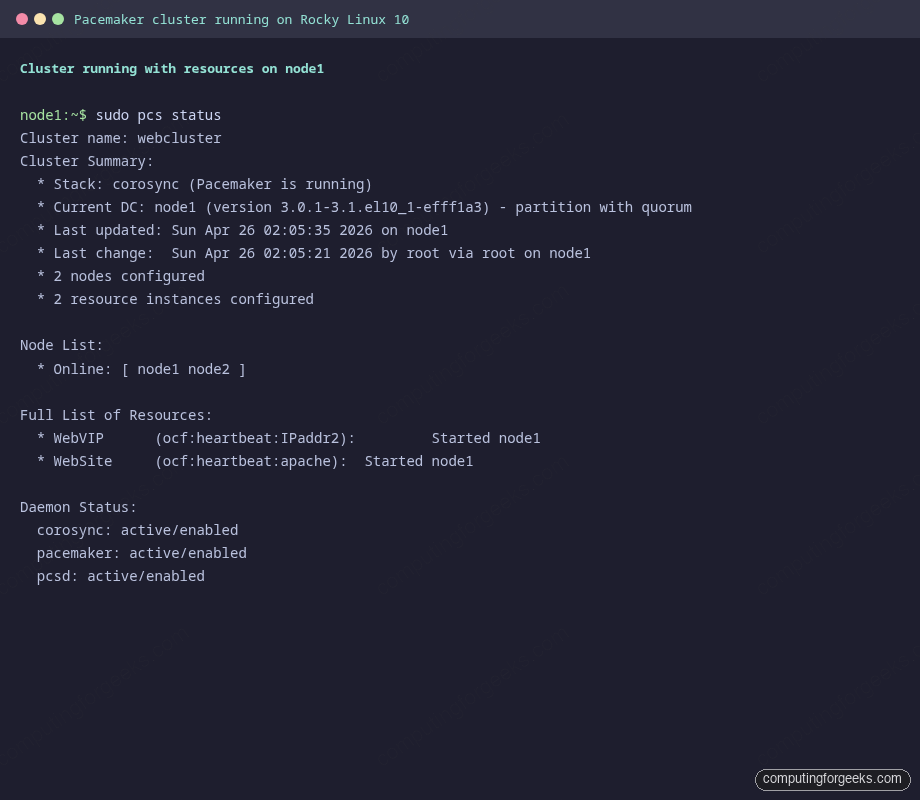
sudo pcs statusThe screenshot below shows a healthy 2-node cluster with both WebVIP and WebSite running on node1:
From a third host on the same subnet, hit the VIP with curl. The response identifies which member is currently serving:
curl -s "http://${VIP}"You should see:
Apache served by node1The cluster is up, the VIP is owned by Pacemaker, Apache is running under the cluster’s control, and external clients reach the service through the VIP. Time to break it on purpose.
Step 9: Test graceful failover with standby
The clean way to drain a node is to put it in standby. Pacemaker stops everything that node owns and migrates each resource to a peer. This is the failover path you use for kernel updates, hardware swaps, and routine maintenance.
From node1, place itself in standby:
sudo pcs node standby node1
sudo pcs status
Within a few seconds, both resources move to node2:
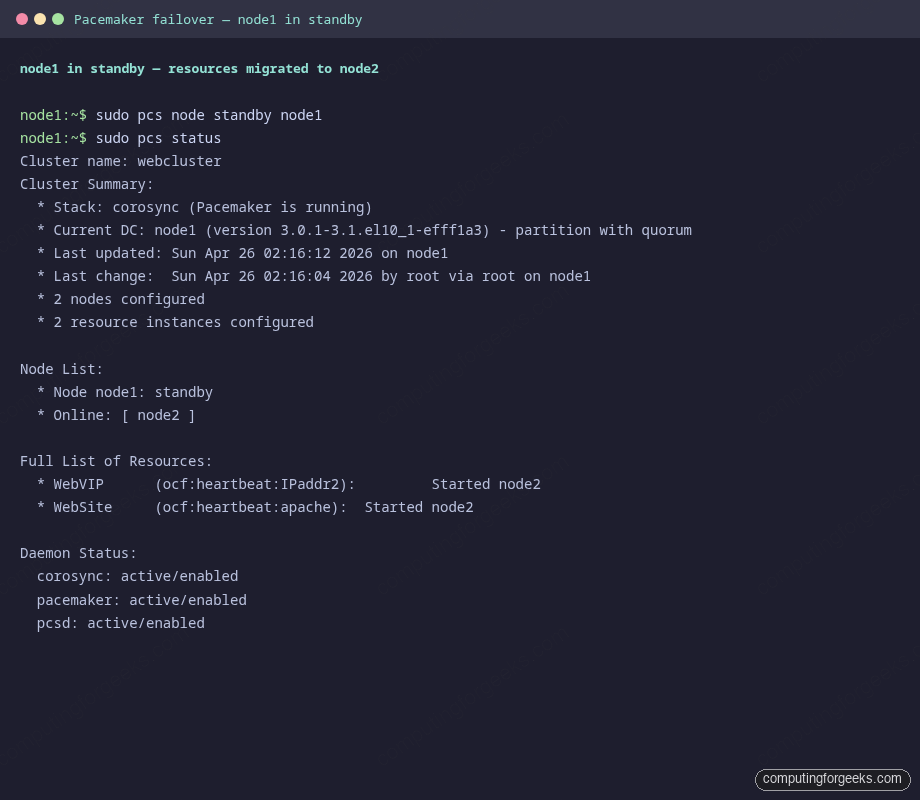
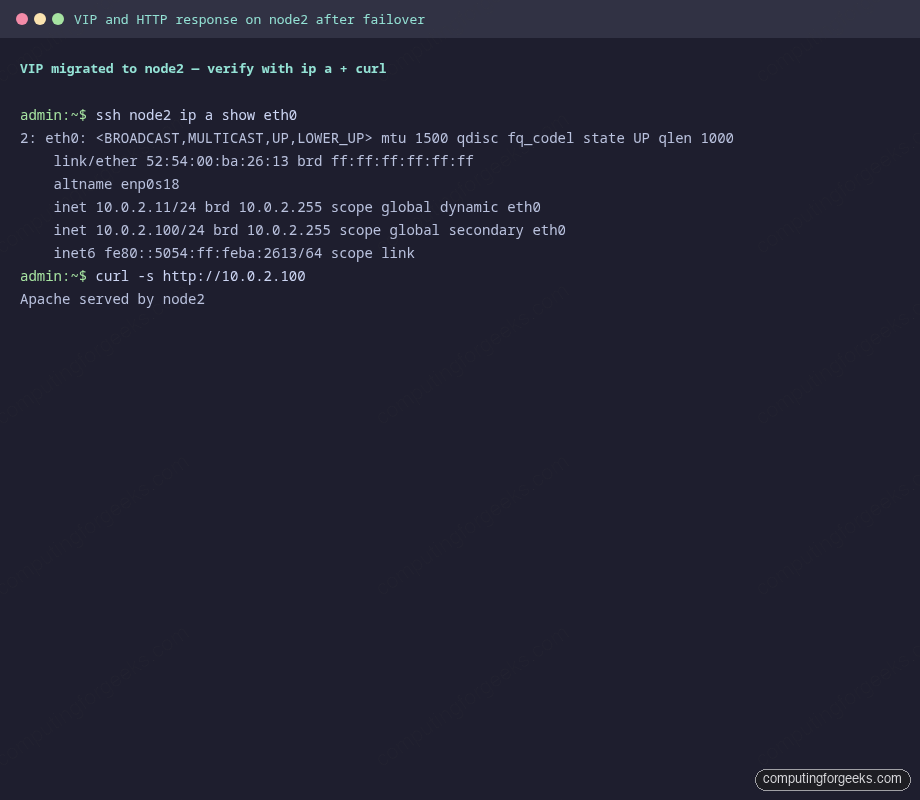
Confirm the VIP physically moved by checking the network interface on the surviving node, and that curl now returns the node2 banner:
Bring node1 back online when done. By default the resources stay where they are, so unstandby does not flip-flop traffic:
sudo pcs node unstandby node1
sudo pcs status
Graceful failover proves the colocation, ordering, and monitoring rules wire up correctly. The harder test is what happens when a node disappears without warning.
Step 10: Test crash failover with hard power-off
Standby is the polite way out. The real-world test is what happens when a node panics, the BMC ejects power, or someone trips over a cable. Simulate that from the Proxmox host by stopping the VM directly. Substitute your own VMID:
ssh root@proxmox-host "qm stop 110"On node2, watch pcs status in a loop. Within roughly 10 to 20 seconds (default token timeout plus monitor interval), corosync declares node1 lost and Pacemaker starts the resources on node2:
watch -n1 'sudo pcs status | tail -20'The post-crash pcs status output looks like this:
Cluster name: webcluster
Cluster Summary:
  * Stack: corosync (Pacemaker is running)
  * Current DC: node2 (version 3.0.1-3.1.el10_1-efff1a3) - partition with quorum
  * 2 nodes configured
  * 2 resource instances configured

Node List:
  * Online: [ node2 ]
  * OFFLINE: [ node1 ]

Full List of Resources:
  * WebVIP	(ocf:heartbeat:IPaddr2):	 Started node2
  * WebSite	(ocf:heartbeat:apache):	 Started node2
Curl confirms the VIP keeps responding and traffic is now served from node2:
curl -s "http://${VIP}"The expected response:
Apache served by node2In our test the failover took 10 seconds from the qm stop command to the first successful curl on the VIP. That number depends on corosync’s token timeout (1 second by default), token_retransmits_before_loss_const (4), and the resource monitor intervals you configured. Tune them down if your SLO demands faster recovery, but understand the trade-off: a more aggressive timeout creates more spurious failovers when the network gets jittery.
Bring node1 back from the Proxmox side and watch it rejoin the cluster. Pacemaker does not move resources back automatically, which is the right default for production:
ssh root@proxmox-host "qm start 110"
# wait a few seconds, then on node2:
sudo pcs status
Both nodes report Online again, but the resources stay on node2 until you explicitly move them back. That is the safe default; a chatty cluster that ping-pongs resources on every flap is worse than one that lets a human decide.
Step 11: Production fencing notes
Disabling STONITH was acceptable for the lab because the test had no real data behind it. Real production clusters need real fencing because a network partition with both nodes alive will, given enough time, corrupt any shared resource you put behind the cluster. Pacemaker on Rocky Linux 10 ships agents for the common fencing methods:
| Environment | Fence agent | Notes |
|---|---|---|
| Bare metal with IPMI/iLO/iDRAC/BMC | fence_ipmilan | The reliable default. Needs the BMC reachable from both nodes. |
| Proxmox VE | fence_proxmox | Talks to the Proxmox API to power off the peer VM. |
| VMware vSphere | fence_vmware_rest | Uses the vCenter REST API; works for both ESXi and vCenter-managed hosts. |
| AWS EC2 | fence_aws | Stops the peer instance via the EC2 API; needs IAM permissions. |
| Azure | fence_azure_arm | Uses the Azure ARM API; needs a service principal. |
| KVM/libvirt with shared storage | fence_xvm | Uses the libvirt fence_virtd daemon on the hypervisor. |
| SBD with shared storage or watchdog | fence_sbd | Disk-based fencing, useful when no out-of-band power exists. |
Once the fence device is configured, flip stonith back on and verify the cluster status reports a healthy fencing path:
sudo pcs property set stonith-enabled=true
sudo pcs status
If you are co-locating Apache with replicated storage (a common pattern when the docroot is more than a static index page), pair this cluster with a DRBD volume on RHEL 10 / Rocky Linux 10 and add a ocf:linbit:drbd primary/secondary resource. The same colocation pattern keeps Apache on the node that owns the DRBD primary.
Common misconceptions
The two-node Pacemaker pattern picks up specific footguns that did not apply on the single-server articles you may have read first.
“Two nodes is enough quorum.” It is not. no-quorum-policy=ignore is a workaround, not a fix. The recommended production answer for high-stakes data is a third quorum-only node (qdevice) or a corosync quorum disk. Without one, your cluster trades quorum safety for two-node simplicity.
“Disabling STONITH is fine if the network is reliable.” Networks fail. The whole point of STONITH is to handle the case where corosync stops hearing the peer but the peer is still running. Without fencing, both nodes can come online with the VIP at the same time, both write to a shared filesystem, and you discover the corruption days later.
“Pacemaker will move resources back when the original node returns.” It will not, by default. resource-stickiness=0 would allow it to flip back, which causes ping-pong on flapping networks. The safer default (and what Rocky Linux 10 ships) is to keep resources where they are and require an operator to pcs resource move them back during a maintenance window.
“systemctl enable httpd still makes sense as a backup.” It does not. The cluster owns the daemon’s lifecycle. Enabling httpd at boot means systemd starts Apache before pcsd has decided which node is supposed to host the resource. The result is two nodes both binding to port 80 on the VIP, with predictable consequences.
“Apache failover takes seconds, so I can survive without a load balancer.” A 10-second outage on every failover is acceptable for an internal app, painful for a public site, and unacceptable for an API tier. If you need single-digit-second recovery and zero dropped TCP sessions, put an HAProxy load balancer in front of two always-on Apache backends, and keep Pacemaker for the layer below (such as a database master VIP).
For locking down the cluster nodes themselves, see the firewalld guide on RHEL family distros, and verify your SELinux mode is set the way you intend on Rocky Linux 10 (the answer is enforcing). If you have to change the SSH port with SELinux enforcing, the same semanage port pattern applies to any non-default service port the cluster needs.