Jails were the original container, shipped in FreeBSD 4.0 in March 2000, eight years before LXC and thirteen before Docker. The kernel primitives have not changed much because they did not need to. What changed is the tooling around them. The base system gives you raw jail.conf and a hand-rolled mental model of every release tree, fstab, devfs ruleset, and epair pair. That is fine for one jail, painful for ten.
Bastille is the 2026 wrapper. It is a single shell script that owns the whole lifecycle: bootstrap a release, create a jail with VNET or shared IP, apply templates, snapshot via ZFS, clone for fast spin-up, redirect traffic, and tear down with one command. iocage’s commit cadence has slowed, ezjail is unmaintained, and raw jail.conf still works but you write a lot of boilerplate. Bastille fits between “I want jails to feel like containers” and “I do not want to abandon FreeBSD’s primitives.”
This guide walks through Bastille on a fresh FreeBSD 15 box with ZFS. You bootstrap the release tree, create a VNET jail with a real network namespace, install nginx inside it, snapshot it via Bastille’s ZFS integration, and cap its CPU and memory with rctl so a misbehaving jail cannot starve the host. Sibling articles cover the ZFS pool layout and pf firewall rules this guide builds on.
Tested April 2026 on FreeBSD 15.0-RELEASE-p6 with Bastille 1.4.1 and ZFS 2.4
Prerequisites
- FreeBSD 15.0-RELEASE on ZFS. The Proxmox FreeBSD install walkthrough covers a fresh ZFS-backed VM end to end.
- A ZFS pool you are willing to dedicate to jails. Bastille uses a child dataset under your pool, so a clean
zrootwith at least 5 GB free is enough to start. - An IP range for the jails. We use
10.99.0.0/24in the examples because it does not collide with the LAN. Substitute your own range if you have one already routed. - Working sudo or root access. The sudo configuration guide covers the wheel-based setup if you have not done it yet.
- The
vtnet0interface name as your physical NIC. If yours isem0origc0, substitute throughout.
Step 1: Set reusable shell variables
Bastille jail commands repeat the jail name, IP, and physical interface five or six times across this article. Export them once at the top of your SSH session and the rest of the steps run as-is.
export JAIL_NAME="web1"
export JAIL_IP="10.99.0.10"
export JAIL_NET="10.99.0.0/24"
export INTERFACE="vtnet0"
Confirm the values land in the shell before running anything destructive:
echo "Jail:      ${JAIL_NAME}"
echo "Address:   ${JAIL_IP}"
echo "Subnet:    ${JAIL_NET}"
echo "Interface: ${INTERFACE}"
The values hold for the current shell only. If you reconnect or jump into su -, re-export them.
Step 2: Install Bastille
Bastille is in the official package set, so the install is a single command. The package itself is small (around 100 KB) because it is essentially a shell script plus templates:
pkg install -y bastilleConfirm the version and binary path:
pkg info bastille | grep -E '^(Name|Version)'
which bastille
You should see version 1.4.1 or newer:
Name           : bastille
Version        : 1.4.1.260315
/usr/local/bin/bastille
Enable the service so jails come up after a reboot:
sysrc bastille_enable=YESThis single line in /etc/rc.conf is what reads jail definitions on boot and starts every jail tagged for autostart.
Step 3: Configure ZFS integration
Bastille can run on UFS, but the ZFS path is where the real value sits because every jail is its own dataset, snapshots are cheap and atomic, and clones produce new jails in milliseconds rather than minutes. Edit /usr/local/etc/bastille/bastille.conf and set two values:
sed -i '' 's|^bastille_zfs_enable=.*|bastille_zfs_enable="YES"|' /usr/local/etc/bastille/bastille.conf
sed -i '' 's|^bastille_zfs_zpool=.*|bastille_zfs_zpool="zroot"|' /usr/local/etc/bastille/bastille.conf
FreeBSD’s sed needs the empty '' argument after -i; GNU users on Linux will trip over this every time. If your pool is named something other than zroot (the default for FreeBSD installer ZFS layouts), substitute the actual pool name. Verify the change:
grep -E '^bastille_zfs' /usr/local/etc/bastille/bastille.confThe two lines should now read YES and your pool name:
bastille_zfs_enable="YES"
bastille_zfs_zpool="zroot"
bastille_zfs_prefix="bastille"
bastille_zfs_options="-o compress=on -o atime=off"
The default compress=on and atime=off options are sane for jail datasets. Bastille creates the parent dataset (zroot/bastille) on first use, so you do not need to pre-create anything.
Step 4: Bootstrap a release
Before you can create jails, Bastille needs an extracted FreeBSD release tree to use as the base filesystem. The bootstrap step downloads base.txz from the FreeBSD project mirror, validates its checksum against the signed MANIFEST, and extracts it into a release dataset:
bastille bootstrap 15.0-RELEASEThe download is around 160 MB and takes a few minutes on a typical connection. The output is verbose and ends with one line:
Fetching distfile: base.txz
/usr/local/bastille/cache/15.0-RELEASE/base.txz   157 MB  378 kBps  07m07s
Validating checksum for archive: base.txz
MANIFEST: ac0c933cc02ee8af4da793f551e4a9a15cdcf0e67851290b1e8c19dd6d30bba8
DOWNLOAD: ac0c933cc02ee8af4da793f551e4a9a15cdcf0e67851290b1e8c19dd6d30bba8
Extracting archive: base.txz
Bootstrap successful.
The release lives at /usr/local/bastille/releases/15.0-RELEASE/ and is what every jail copies (thick) or shares (thin) from. List what is bootstrapped:
bastille list releasesThe output names every release Bastille has cached locally:
15.0-RELEASEYou can bootstrap multiple releases on the same host. A 14.2 jail and a 15.0 jail can coexist for migration testing.
Step 5: Pick shared-IP or VNET
Bastille supports two networking modes and they have very different operational characteristics.
Shared-IP jails use the host’s network stack and bind to an alias on the host’s NIC. They are simple, lightweight, and cannot run their own routing or firewall rules because the kernel sees them as the host. Use shared-IP for stateless services that need a public IP and a reverse proxy, where the host’s pf rules can speak for the jail.
VNET jails get their own kernel network stack: a virtual interface, their own routing table, their own pf instance if you want one. Bastille creates an epair pair, attaches one end to a host bridge and the other to the jail. VNET costs a tiny amount of extra memory and an extra hop through the bridge, but you gain real isolation. Use VNET unless you have a specific reason not to.
The rest of this guide uses VNET because it is the better default in 2026.
Step 6: Set up host networking for VNET jails
VNET jails attach to a bridge that Bastille auto-creates the first time you run bastille create -V. The bridge needs an IP for the host to talk to its jails and to act as their default gateway. You also need pf NAT rules so jail traffic egresses through the physical NIC. Enable IP forwarding and gateway mode:
sysctl net.inet.ip.forwarding=1
sysrc gateway_enable=YES
Write a minimal pf config that NATs jail traffic to the outside world. Open /etc/pf.conf:
vi /etc/pf.confPaste the following ruleset. The placeholders EXT_IF_HERE and JAIL_NET_HERE are substituted from your shell variables in the next step:
ext_if = "EXT_IF_HERE"
jail_net = "JAIL_NET_HERE"

nat on $ext_if from $jail_net to any -> ($ext_if)
pass all
Substitute the placeholders with your real values:
sed -i '' "s|EXT_IF_HERE|${INTERFACE}|; s|JAIL_NET_HERE|${JAIL_NET}|" /etc/pf.confEnable and start pf, then load the rules:
sysrc pf_enable=YES
sysrc pflog_enable=YES
service pf start
service pf reload
You should see the rules accepted with no parse errors:
Enabling pf.
Reloading pf rules.
The pass all rule is intentionally permissive for first-jail testing. Once you have one jail working, replace it with a default-deny ruleset that explicitly allows the protocols your jails need. The pf article linked above covers production-grade rule design.
Step 7: Create your first VNET jail
With Bastille configured and pf forwarding the way out, you are ready for the actual jail. The -V flag selects VNET:
bastille create -V "${JAIL_NAME}" 15.0-RELEASE "${JAIL_IP}" "${INTERFACE}"Bastille walks through the four phases of the create lifecycle: dataset creation, fstab and resolv.conf wiring, default template application (which disables sendmail and tunes cron jitter), and epair creation. The output ends with three lines:
Template applied: default/base
Template applied: default/thin
[web1]:
e0a_web1
e0b_web1
web1: created
The e0a_web1 and e0b_web1 names are the host and jail ends of the VNET epair. The host end joins the bridge, the jail end becomes vnet0 inside the jail.
Confirm the jail is up:
bastille listThe list view shows JID, name, boot setting, priority, current state, jail type (thin or thick), IP, and release:
 JID  Name  Boot  Prio  State  Type   IP Address  Published Ports  Release       Tags
 2    web1  on    99    Up     thin   10.99.0.10  -                15.0-RELEASE  -
The screenshot below shows the same view with two jails running and the underlying ZFS dataset layout Bastille created:
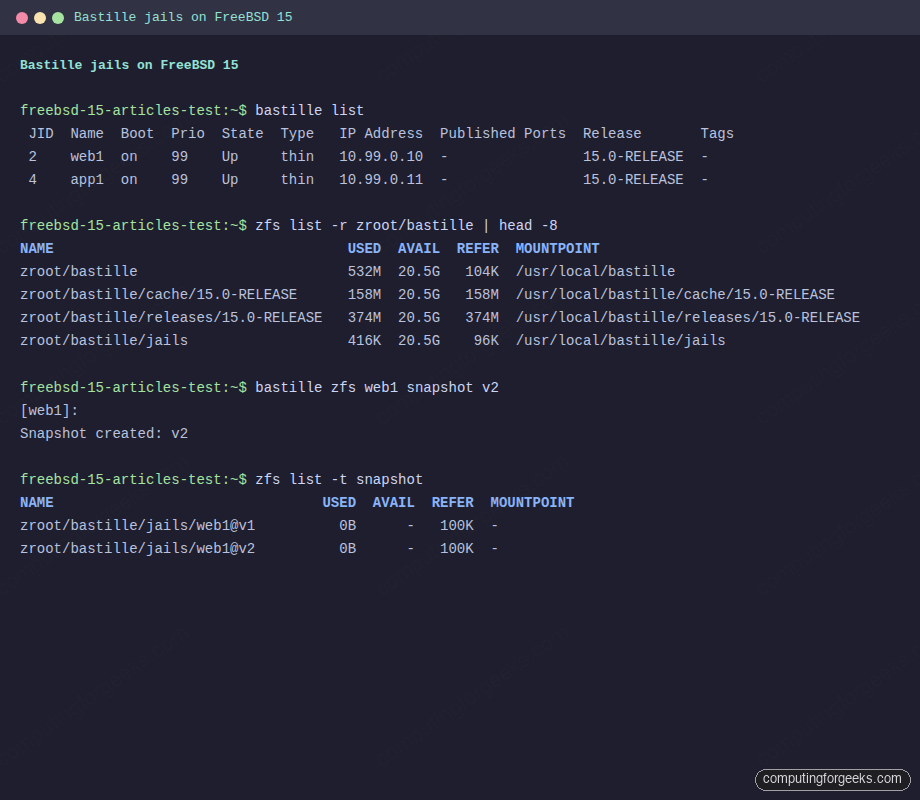
Each jail is its own ZFS dataset under zroot/bastille/jails/, which is what makes the snapshot and clone operations cheap.
Step 8: Wire up jail networking
The fresh VNET jail has its own interface and IP, but no default gateway and no DNS. Set both via Bastille’s cmd subcommand, which runs commands inside the jail:
bastille cmd "${JAIL_NAME}" sh -c 'echo nameserver 1.1.1.1 > /etc/resolv.conf'
bastille cmd "${JAIL_NAME}" sh -c 'route -n add default 10.99.0.1'
Add a permanent IP alias on the bridge so the host plays default gateway for the jail subnet:
ifconfig vtnet0bridge inet 10.99.0.1/24 aliasThe vtnet0bridge name is what Bastille auto-created the moment you ran bastille create -V; if your physical NIC is named differently, the bridge name follows the same pattern. Make the alias persistent across reboots by adding it to /etc/rc.conf:
sysrc ifconfig_vtnet0bridge_alias0="inet 10.99.0.1/24"Test connectivity from inside the jail:
bastille cmd "${JAIL_NAME}" ping -c 3 1.1.1.1You should see three replies with single-digit packet loss:
PING 1.1.1.1 (1.1.1.1): 56 data bytes
64 bytes from 1.1.1.1: icmp_seq=0 ttl=55 time=29.9 ms
64 bytes from 1.1.1.1: icmp_seq=1 ttl=55 time=31.7 ms
64 bytes from 1.1.1.1: icmp_seq=2 ttl=55 time=32.6 ms
3 packets transmitted, 3 packets received, 0.0% packet loss
If the ping fails, the most common cause is the missing alias on the bridge interface. The second most common is forgetting to enable net.inet.ip.forwarding earlier.
Step 9: Install software inside the jail
Bastille proxies pkg into the jail with one subcommand, so you do not bastille console and remember to type pkg install by hand:
bastille pkg "${JAIL_NAME}" install -y nginxThe package and its dependencies install entirely inside the jail’s filesystem, never touching the host’s /usr/local. Enable the service so it starts on every jail boot:
bastille sysrc "${JAIL_NAME}" nginx_enable=YES
bastille service "${JAIL_NAME}" nginx start
Verify nginx is listening inside the jail:
bastille cmd "${JAIL_NAME}" sockstat -l4Two nginx processes own the listener, the master as root and the worker as www:
USER COMMAND     PID FD PROTO LOCAL ADDRESS         FOREIGN ADDRESS
www  nginx      9794  6 tcp4  *:80                  *:*
root nginx      9793  6 tcp4  *:80                  *:*
Curl the jail from the host. fetch ships in base FreeBSD, so you do not need to pkg install curl just for this:
fetch -qo - "http://${JAIL_IP}/"The output is the standard nginx welcome page:
<!DOCTYPE html>
<html>
<head>
<title>Welcome to nginx!</title>
You can also drop into the jail directly with bastille console, which is the equivalent of jexec -u root jid /bin/sh but works by jail name:
bastille console "${JAIL_NAME}"The screenshot below shows a console session inside the running jail with nginx serving on port 80 and the VNET interface holding its own IP:
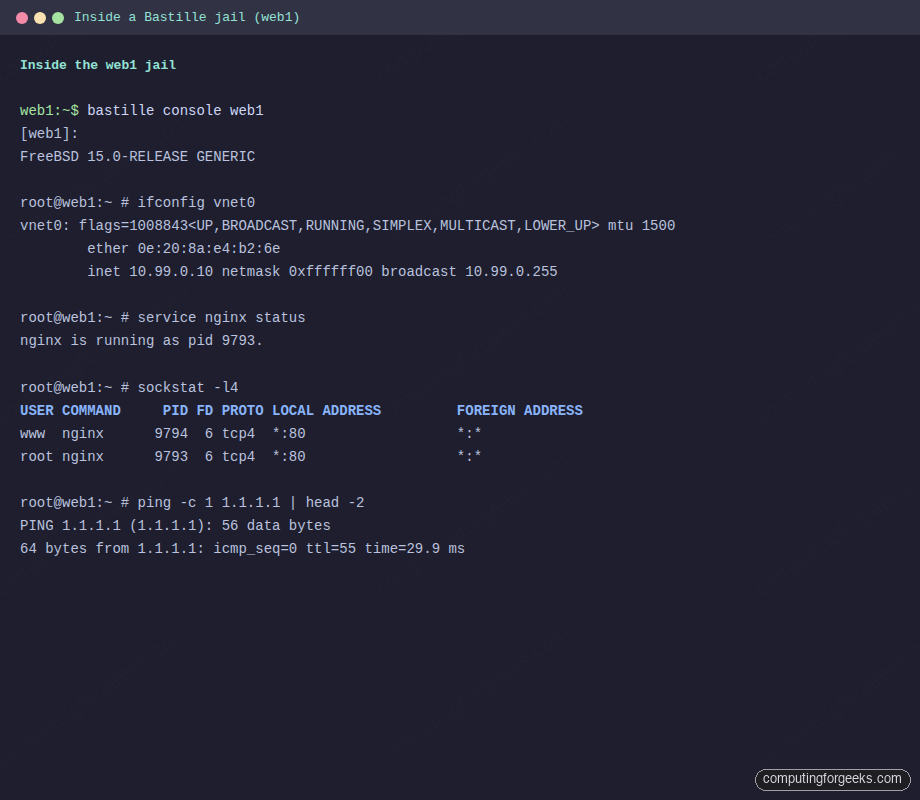
The jail’s vnet0 interface holds 10.99.0.10, nginx listens on port 80, and the route to 1.1.1.1 confirms NAT egress through the host’s pf rules works.
Step 10: Snapshot and clone via ZFS
Because Bastille uses ZFS, snapshots cost effectively nothing. Take one before you make a risky change and you have a one-command rollback:
bastille zfs "${JAIL_NAME}" snapshot v1The output confirms the snapshot:
[web1]:
Snapshot created: v1
Confirm with native ZFS:
zfs list -t snapshotThe snapshot itself uses zero bytes because no data has changed yet:
NAME                                USED  AVAIL  REFER  MOUNTPOINT
zroot/bastille/jails/web1@v1          0B      -   100K  -
zroot/bastille/jails/web1/root@v1     0B      -  76.7M  -
Clone the snapshot into a new jail named web1-staging for blue/green testing:
bastille clone "${JAIL_NAME}" web1-staging 10.99.0.20The clone is a copy-on-write snapshot, so it spins up in milliseconds and shares blocks with the parent until divergence. This is the operational pattern that ezjail and iocage cannot match without an extra layer of plumbing.
Step 11: Manage jail lifecycle
The day-to-day verbs are stop, start, restart, console, list, destroy. They all take the jail name as the target:
bastille stop "${JAIL_NAME}"
bastille start "${JAIL_NAME}"
bastille restart "${JAIL_NAME}"
bastille console "${JAIL_NAME}"
bastille destroy "${JAIL_NAME}"
The destroy verb removes the jail dataset and its snapshots. There is no soft-delete, so pair it with an export first if you want a backup:
bastille export "${JAIL_NAME}"Exports land in /usr/local/bastille/backups/ as compressed ZFS streams. bastille import on another host re-creates the jail end-to-end from that file, which is how you migrate jails between machines without rsync.
Step 12: Templates
Templates are reusable scripts that apply pkg installs, sysrc changes, and config files to a jail. Bastille ships with a small library of community templates and you can write your own:
bastille template "${JAIL_NAME}" bastillebsd-templates/nginxThe template runs a sequence of pkg installs, file copies, and service enables, then prints a summary of what changed. Building your own template is one Bastillefile per role:
mkdir -p /usr/local/bastille/templates/cfg/web
printf 'PKG nginx\nSYSRC nginx_enable=YES\nSERVICE nginx start\n' > /usr/local/bastille/templates/cfg/web/Bastillefile
Apply it to any jail:
bastille template "${JAIL_NAME}" cfg/webTemplates are how you keep jail provisioning declarative without dragging in Ansible or Terraform.
Step 13: Troubleshooting
Error: “Missing ZFS parameters. See bastille_zfs_enable”
You ran bastille bootstrap with zfs_enable=YES in /etc/rc.conf but never set the matching keys in bastille.conf. Edit /usr/local/etc/bastille/bastille.conf and set bastille_zfs_enable="YES" and bastille_zfs_zpool="zroot" (or your pool name). Step 3 walks through the exact sed edit.
Error: “VNET jails do not support rdr”
You ran bastille rdr against a VNET jail. The redirect verb only works for shared-IP jails because it edits the host’s pf table to forward host-port to jail-port. VNET jails do not share the host’s address, so the host has no destination address to rewrite. For VNET jails, write the rdr rule yourself in /etc/pf.conf targeting the jail’s IP, or run a reverse proxy on the host that passes traffic to the jail’s IP.
Error: epair leaks after stop
If ifconfig | grep epair shows old e0a_* interfaces hanging around after a jail stop, Bastille’s poststop hook did not run cleanly. Destroy the orphans manually:
ifconfig | grep -oE 'e0a_[a-z0-9]+' | sort -u | xargs -n1 ifconfig destroy 2>/dev/nullKernel epairs survive crashes and ungraceful shutdowns; this command sweeps them up in one pass.
Error: “pf_load=YES” missing on boot
The pf rules apply but jails lose connectivity after every reboot. Without pf_load="YES" in /boot/loader.conf, the pf module loads late, after Bastille’s bring-up. Add it:
echo 'pf_load="YES"' >> /boot/loader.confThis loads pf at boot before any jail brings up its VNET interface.
Step 14: Production hardening with rctl
FreeBSD’s rctl framework caps a jail’s CPU, memory, and I/O. A noisy neighbour pattern is the most common production failure for jails on shared hosts, and rctl is the one tool that prevents it. Enable rctl support at boot by setting it in /boot/loader.conf:
echo 'kern.racct.enable=1' >> /boot/loader.confReboot for the kernel module to load. After the reboot, set per-jail caps. The pattern is jail:NAME:RESOURCE:ACTION=LIMIT:
rctl -a jail:${JAIL_NAME}:memoryuse:deny=1G
rctl -a jail:${JAIL_NAME}:pcpu:deny=50
rctl -a jail:${JAIL_NAME}:openfiles:deny=4096
The first rule caps the jail’s resident memory at 1 GB. The second caps its CPU usage at 50%. The third caps open file descriptors at 4096, useful for jails running databases or web servers that fork heavily. Confirm the rules took effect:
rctl -hl jail:${JAIL_NAME}Each rule appears with the action and limit:
jail:web1:memoryuse:deny=1G
jail:web1:pcpu:deny=50
jail:web1:openfiles:deny=4096
Persist them across reboots by appending to /etc/rctl.conf:
printf 'jail:%s:memoryuse:deny=1G\njail:%s:pcpu:deny=50\njail:%s:openfiles:deny=4096\n' "${JAIL_NAME}" "${JAIL_NAME}" "${JAIL_NAME}" >> /etc/rctl.conf
sysrc rctl_enable=YES
Pair this with a ZFS quota on the jail dataset so a runaway process cannot fill the host’s pool:
zfs set quota=10G zroot/bastille/jails/${JAIL_NAME}Memory plus CPU plus disk caps give you the three-axis isolation that production jail hosts need. The ZFS snapshot and send/recv guide covers the off-host backup story for these jail datasets, and the VNET jail networking guide explains how to scale this single-jail bridge into a routed multi-jail setup.
From here, the natural next step is replicating jail snapshots off-box on a schedule and writing a watchdog rule that alerts when any rctl deny fires. Both belong on a production jail host before you put traffic on it.