Standing up WordPress by hand is the kind of task that gets done a thousand times across a sysadmin’s career, every time with the same eight commands and at least one detail that gets missed. Ansible is what turns those eight commands into a single repeatable role that runs in two minutes, never forgets the SELinux context, and produces an identical environment whether you are deploying to a fresh Rocky 10 box or six of them. This guide builds that role end-to-end and proves it works by serving a real WordPress install from a live Apache process. The same role also handles the LEMP variant on Debian-family hosts, with one task file swap.
Tested April 2026 on Rocky Linux 10.1 with Ansible 2.18.16, Apache 2.4.63, MariaDB 10.11.x, PHP 8.3.x, WordPress latest. SELinux enforcing throughout.
What you need
- A control host with Ansible installed. The install guide for Rocky 10 and Ubuntu covers the bootstrap.
- One Rocky Linux 10 managed node reachable over SSH key auth. The inventory guide covers the basics.
- Comfort with Ansible roles. This piece writes a non-trivial one.
- Outbound HTTPS from the managed node to
wordpress.orgfor the tarball.
Source for the role and the playbook lives at c4geeks/ansible/projects/ansible-lamp-lemp-stack. Clone it if you want to skip the typing.
Step 1: Set reusable shell variables
Three values appear in every command. Pin them once at the top:
export LAB_DIR="$HOME/molecule-lab/lamplemp-lab"
export TARGET_IP="10.0.1.50"
export SITE_DOMAIN="example.test"
Re-run those exports if you reconnect or open a new shell.
Step 2: Why one role for both LAMP and LEMP
Most Ansible LAMP tutorials hard-code Apache and MariaDB. Most LEMP tutorials hard-code Nginx and MariaDB. The difference between the two is genuinely small: one task installs httpd, the other installs nginx and php-fpm; one renders an Apache vhost, the other renders an Nginx vhost. Everything else (database setup, WordPress download, wp-config rendering) is identical. A single role with two include files for the OS-specific bits is cleaner than two roles that share 80 percent of their tasks. The role name is cfg_webstack and it picks the variant from ansible_os_family:
- name: Pick variant by OS family (lamp = RHEL, lemp = Debian)
  ansible.builtin.set_fact:
    webstack_variant: "{{ 'lamp' if ansible_os_family == 'RedHat' else 'lemp' }}"

- name: Install OS-family packages
  ansible.builtin.include_tasks: "install_{{ webstack_variant }}.yml"

- name: Configure web server
  ansible.builtin.include_tasks: "web_{{ webstack_variant }}.yml"
The dispatcher is short on purpose. Adding a third variant (Debian Apache, anyone?) is a one-line change to the lookup expression and a new install_X.yml file.
Step 3: Layout of the role
The companion repo holds the full source. The directory tree:
roles/cfg_webstack/
├── defaults/main.yml         # site_domain, db creds, wp admin user/email
├── handlers/main.yml         # Reload httpd / Reload nginx / Reload web (alias)
├── meta/main.yml             # galaxy metadata
├── tasks/
│   ├── main.yml              # dispatcher
│   ├── install_lamp.yml      # Rocky 10 packages
│   ├── install_lemp.yml      # Ubuntu packages + apt cache
│   ├── db.yml                # MariaDB root password + WP db + WP user
│   ├── web_lamp.yml          # Apache vhost + SELinux context
│   ├── web_lemp.yml          # Nginx vhost + sites-enabled symlink
│   └── wordpress.yml         # tarball download + extract + wp-config + install probe
└── templates/
    ├── site_apache.conf.j2   # Apache vhost
    ├── site_nginx.conf.j2    # Nginx vhost (php-fpm passthrough)
    └── wp-config.php.j2      # WordPress config from defaults
The two pieces that surprise people the first time are the SELinux context fix and the WordPress install probe. Both are below.
Step 4: Database setup that survives the first run
MariaDB on Rocky 10 ships with no root password. The classic mistake is to set the root password with mysql_secure_installation by hand once, then write a playbook that assumes a password is already in place. Idempotent setup needs to handle both cases. community.mysql.mysql_user with login_unix_socket works for both: when no password is set, the socket auth gets you in; when a password is set, the credentials in ~/.my.cnf take over:
- name: Set root password (idempotent via socket auth)
  community.mysql.mysql_user:
    name: root
    host_all: true
    password: "{{ db_root_password }}"
    login_unix_socket: "{{ '/var/lib/mysql/mysql.sock' if ansible_os_family == 'RedHat' else '/run/mysqld/mysqld.sock' }}"
  no_log: true

- name: Drop default ~/.my.cnf so subsequent tasks use our creds
  ansible.builtin.copy:
    dest: /root/.my.cnf
    owner: root
    group: root
    mode: "0600"
    content: |
      [client]
      user=root
      password={{ db_root_password }}
After the credentials file lands, the WordPress database and user creation use it directly. no_log: true on the password task is non-negotiable because Ansible’s default output logs the full task call, including the password. Skip it once and the password ends up in your CI artifacts forever.
Step 5: SELinux context that nobody documents
Apache on Rocky 10 with SELinux enforcing cannot read or write a directory under /var/www/ unless that directory carries the httpd_sys_rw_content_t context. Most LAMP tutorials silently sidestep this by either disabling SELinux (do not do this) or by skipping the demo step where Apache writes to disk (then WordPress media uploads fail). The role applies the right context permanently with chcon, and uses a marker file to keep the task idempotent:
- name: Permit Apache to read/write the site root (SELinux)
  ansible.builtin.command: chcon -R -t httpd_sys_rw_content_t {{ site_root }}
  args:
    creates: "{{ site_root }}/.cfg_chcon_marker"

- name: Drop SELinux marker so the chcon is idempotent
  ansible.builtin.copy:
    dest: "{{ site_root }}/.cfg_chcon_marker"
    content: "managed by cfg_webstack\n"
    owner: "{{ web_user }}"
    group: "{{ web_group }}"
    mode: "0644"
For a longer-term fix, swap the chcon call for a community.general.sefcontext rule plus command: restorecon -R. That survives a relabel; chcon alone does not. The tradeoff is a couple more lines and a slightly slower first run. The role uses chcon by default to keep the demo readable; the README in the companion repo documents the sefcontext upgrade.
Step 6: WordPress install via the REST API
WordPress ships an install.php endpoint that accepts the standard 5-minute install form. Posting to it is the fastest way to bootstrap an admin user and site title without the wp-cli dependency. The catch is that the endpoint also returns 200 OK when the site is already installed (it just shows “Already Installed”), which means a naive uri task always reports changed. The fix is a probe: check whether wp-config.php already exists, and only fire the install when it does not:
- name: Check whether WordPress is already extracted
  ansible.builtin.stat:
    path: "{{ site_root }}/wp-config.php"
  register: wp_present

- name: Run the WordPress 5-minute install via REST (only once)
  ansible.builtin.uri:
    url: "http://{{ ansible_host }}:{{ site_listen_port }}/wp-admin/install.php?step=2"
    method: POST
    body_format: form-urlencoded
    body:
      weblog_title: "{{ wp_site_title }}"
      user_name: "{{ wp_admin_user }}"
      admin_password: "{{ wp_admin_password }}"
      admin_password2: "{{ wp_admin_password }}"
      pw_weak: "1"
      admin_email: "{{ wp_admin_email }}"
      blog_public: "0"
      Submit: "Install WordPress"
    status_code: [200, 302]
    follow_redirects: none
  delegate_to: localhost
  when: not wp_present.stat.exists
delegate_to: localhost matters: the controller hits the managed node’s HTTP endpoint, which is what real users would also do. pw_weak: "1" bypasses WordPress’s password strength check during the bootstrap; rotate the password to a strong one immediately after.
Step 7: Inventory and the play
Inventory pins the target host. web is the parent group, with lamp and lemp as children so a future Ubuntu host can join without a playbook change:
[lamp]
lamp1 ansible_host=10.0.1.50

[lemp]
# lemp1 ansible_host=10.0.1.51

[web:children]
lamp
lemp

[web:vars]
ansible_user=root
ansible_python_interpreter=/usr/bin/python3
The play is a one-liner that calls the role:
---
- name: Deploy WordPress on either LAMP or LEMP
  hosts: web
  become: false
  gather_facts: true

  pre_tasks:
    - name: Confirm target distribution
      ansible.builtin.debug:
        msg: "{{ inventory_hostname }} is {{ ansible_distribution }} {{ ansible_distribution_version }}"

  roles:
    - role: cfg_webstack
Run it. The first run touches everything that is not already in the desired state. --limit lamp targets just the LAMP children; drop the limit to deploy to LAMP and LEMP hosts in one shot:
cd "${LAB_DIR}"
ANSIBLE_ROLES_PATH="${LAB_DIR}/roles" \
  ansible-playbook -i inventory.ini --limit lamp deploy_wordpress.yml
The PLAY RECAP at the end is the at-a-glance health check: 26 tasks, 11 changes, none failed. Apache is started, MariaDB is configured, WordPress is downloaded and installed, the role’s handlers reloaded the web service to pick up the new vhost:
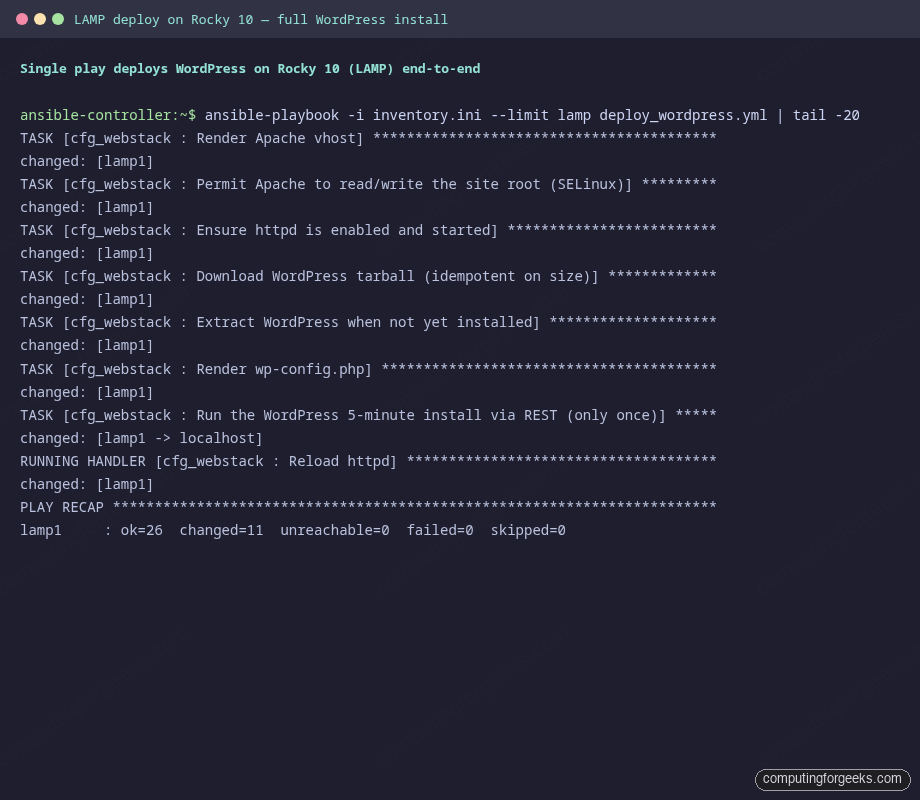
Two minutes from a clean Rocky 10 box to a working WordPress install. Now prove the role is also idempotent.
Step 8: Idempotence and verification
Re-run the same play with no edits. A correct role makes zero changes on the second pass:
ANSIBLE_ROLES_PATH="${LAB_DIR}/roles" \
  ansible-playbook -i inventory.ini --limit lamp deploy_wordpress.yml
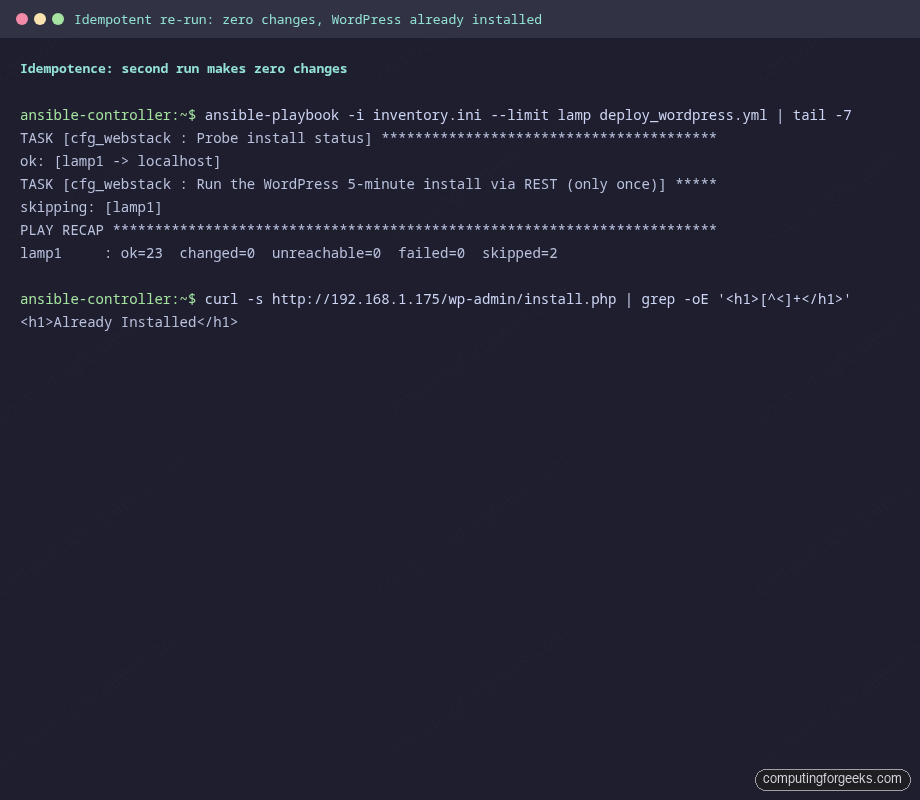
The recap shows 23 tasks evaluated, 0 changed, 2 skipped (the WordPress install task and one other where the install probe short-circuited). The install endpoint returns “Already Installed” the second time the role hits it, which is what idempotent infrastructure looks like:
The browser-facing proof is a working WordPress front page served from Apache on the managed node. The default Twenty Twenty-Five theme renders, the site title is what we set in defaults/main.yml, and the canonical “Hello world!” post is there:
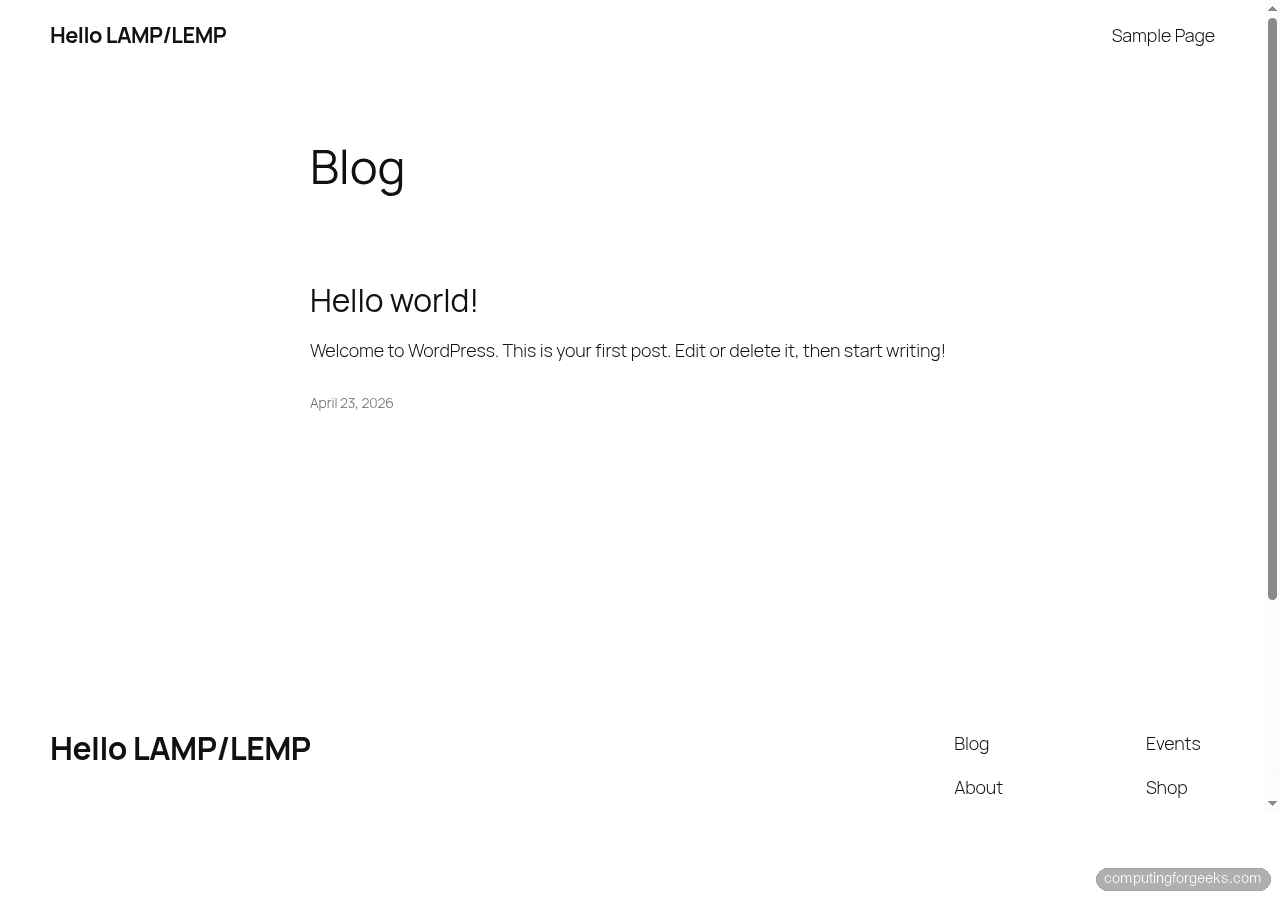
If your browser screenshot does not match, the most common cause is the WordPress siteurl option pointing at a hostname your client cannot resolve. Override it in wp_options if you are testing without DNS, or add the site domain to /etc/hosts on the test client. The companion repo’s README covers both flips.
Step 9: The LEMP variant
The role’s LEMP path is identical except for the install and web tasks. install_lemp.yml swaps dnf for apt and the package list to Nginx + php-fpm; web_lemp.yml renders an Nginx vhost and a sites-enabled symlink:
- name: Render Nginx vhost
  ansible.builtin.template:
    src: site_nginx.conf.j2
    dest: /etc/nginx/sites-available/{{ site_domain }}.conf
    owner: root
    group: root
    mode: "0644"
  notify: Reload nginx

- name: Enable Nginx vhost
  ansible.builtin.file:
    src: /etc/nginx/sites-available/{{ site_domain }}.conf
    dest: /etc/nginx/sites-enabled/{{ site_domain }}.conf
    state: link
  notify: Reload nginx

- name: Disable Debian default vhost
  ansible.builtin.file:
    path: /etc/nginx/sites-enabled/default
    state: absent
  notify: Reload nginx
The Nginx vhost template auto-detects the installed php-fpm version (Ubuntu 24.04 ships PHP 8.3, Ubuntu 26.04 ships 8.5) and points fastcgi_pass at the matching socket. Add a host to the [lemp] group, drop the --limit lamp flag, and the same playbook deploys both stacks in one run.
Real pitfalls hit during testing
| Symptom | What it means | Fix |
|---|---|---|
chcon: cannot access '/var/www/example.test' |
The SELinux context task ran before the site-root directory was created. | Create the site root in tasks/main.yml before the OS-family web_* include runs. Both LAMP and LEMP need it. |
WordPress install task always reports changed |
install.php?step=2 returns 200 OK on every call, including “Already Installed”. |
Probe wp-config.php with the stat module first; only run the install when it does not exist. |
| Browser shows “redirected too many times” | WordPress’s siteurl option points at a hostname your client cannot resolve, so every page redirects. |
Update siteurl and home in wp_options to the IP you are actually hitting, OR add the site domain to your client’s /etc/hosts. |
| MariaDB tasks fail with “Access denied for user ‘root'” | You set the root password earlier, but the role still tries socket auth. | Use login_unix_socket only on the password-set task. After that, drop a ~/.my.cnf and the rest of the tasks read credentials from it. |
| php-fpm socket path is wrong on Ubuntu | Different Ubuntu releases ship different php-fpm versions, so the socket path differs (php8.3-fpm.sock vs php8.5-fpm.sock). |
Detect the version with a tiny shell task and template the socket path. The companion role does this in web_lemp.yml. |
| Apache cannot connect to MariaDB despite the right credentials | SELinux denied the network connection from httpd_t to mysqld_t because both are local but not on the default port. |
If you moved MariaDB off port 3306, also run setsebool -P httpd_can_network_connect_db 1 or add the new port to mysqld_port_t. |
Source code and going further
The role, the playbook, and the inventory are at c4geeks/ansible/projects/ansible-lamp-lemp-stack. Clone the repo, edit the inventory to point at your own Rocky 10 (and optionally Ubuntu) host, and the same play that produced these screenshots will deploy WordPress for you.
Three next steps fit naturally on top of this. First, wrap the role into a Molecule scenario so the next deploy never regresses on idempotence. Second, harden the host with the CIS Level 1 baseline role before the WordPress role runs; the two compose cleanly. Third, store the database and admin passwords in Ansible Vault rather than plaintext defaults. The full series index lives at the automation guide, and the cheat sheet is the quick lookup for the playbook flags you forgot.