A single “review this repo” prompt burned 285,000 tokens in our baseline Claude Code session. That is one turn against a small TypeScript library (sindresorhus/ky, 52 files), not a huge monorepo. Auto-compaction fires at 187K tokens, can cost 100 to 200K per run, and fires up to three times per turn on a long session. That is the math behind the HN threads complaining about $70K Claude Code bills.
This guide shows how to reduce Claude Code tokens 20 to 43% using ten tested open-source tools plus a stack of built-in Claude Code features almost nobody uses. Every number in this article comes from a fresh Ubuntu 24.04 VM running Claude Code 2.1.116 and Sonnet 4.5 against the same task, with two more high-star tools from the broader ecosystem for completeness. Where a tool did not help on our benchmark, we say so instead of parroting the README.
Tested April 2026 on Ubuntu 24.04 (GCP e2-medium) with Claude Code 2.1.116, Node.js 22.22.2, Python 3.12.3, against sindresorhus/ky (52 TypeScript files, 17,461 LOC)
How Claude Code actually burns tokens
Before installing anything, it helps to know where the tokens go. A typical agentic turn in Claude Code splits across four categories.
| Category | Typical share | What drives it |
|---|---|---|
| Cached system prompt, skills, MCP tool manifest | 30 to 50% | Claude Code boot overhead. Hits every turn. Subject to the 5 minute prefix cache. |
| Tool call inputs and outputs | 30 to 45% | Read, Grep, Glob, Bash. The big lever. Gets worse as the session grows. |
| Reasoning (extended thinking) | 10 to 30% | On by default. Can explode to 64K tokens per response on hard tasks. |
| Visible output | 1 to 10% | The assistant’s prose plus code it writes back. |
The auto-compaction trap is where costs compound. When you hit roughly 93% of the context window (187K out of 200K), Claude Code summarizes the session and restarts with the summary. Each compaction reads everything in context at full token rates, then pays again for the summary. On a long session you can trigger this three or four times, each time for 100K plus tokens. That math doubles on the Mythos-class Claude Fable 5 model, which is priced at twice Opus 4.8, so the token-trimming below pays off twice as fast on it.
Two immediate wins follow from the math. Cap extended thinking so it cannot consume 30% of output on a routine refactor. Compact deliberately at 60 to 70% of context, on your terms, instead of letting auto-compaction fire blind. Both are built in and free.
Our benchmark setup
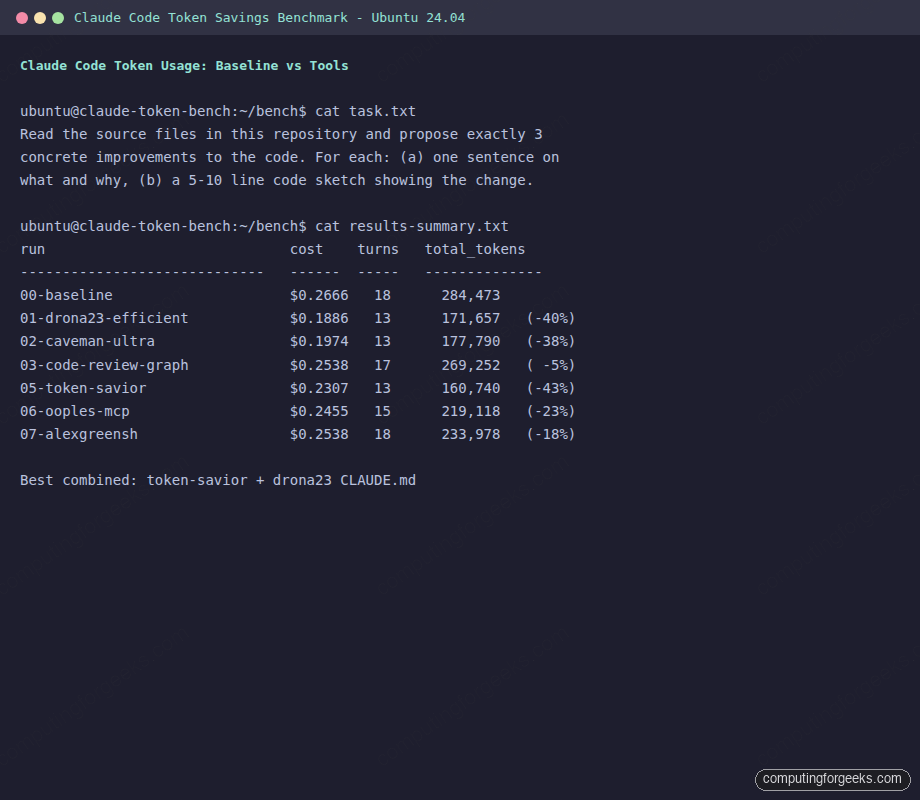
We created a GCP e2-medium with Ubuntu 24.04, installed Claude Code 2.1.116 and the Anthropic API key, and cloned ky as a realistic target (52 files, 17,461 LOC, real tests, real types). For every tool we ran the same task in headless mode:
Read the source files in this repository and propose exactly 3 concrete
improvements to the code. For each improvement: (a) one sentence on what
and why, (b) a 5-10 line code sketch showing the change. Stop after
listing 3. Do not write files or edit anything.
We ran it with claude -p, JSON output, Sonnet 4.5, --permission-mode bypassPermissions. Total tokens is the sum of input, cache creation, cache read, and output, which matches how /cost reports it. Here is the baseline:
| Metric | Value |
|---|---|
| Cost | $0.2666 |
| Turns | 18 |
| Output tokens | 4,214 |
| Total tokens | 284,473 |
| Wall time | 82.5s |
The benchmark screenshot at the end of this article shows every run side by side.
Start with what is built into Claude Code
The largest savings on this site are not third-party tools. They are flags and commands already in Claude Code that most users never touch. Hit these first and you will shave 40 to 60% off a typical session without installing anything.
Watch context burn live with the statusline
The statusline is a persistent bar at the bottom of Claude Code showing whatever you script into it. A context gauge is the single most useful thing you can put there because it tells you when to compact before auto-compaction fires. Add this to ~/.claude/settings.json:
{
  "statusLine": {
    "type": "command",
    "command": "echo \"ctx $(jq -r '.context_window.remaining_percentage // 100' < $CLAUDE_STATUS_INPUT)%\""
  }
}
Now every prompt shows something like ctx 67% in the corner. When you see ctx 40%, run /compact manually before the auto-compaction trap fires.
Use plan mode before any non-trivial task
Plan mode (Shift+Tab in the TUI) makes Claude explore your codebase and propose an approach before writing code. This is the cheapest fix for the most expensive failure mode: going down the wrong path for 50K tokens before pivoting. One plan-mode pass at the start of a feature regularly saves more tokens than any tool in the second half of this article.
Cap extended thinking
Extended thinking is on by default. On a hard task it can allocate 64,000 tokens to reasoning that you pay for at output rates. For 90% of routine work that is wasted. Cap it:
export MAX_THINKING_TOKENS=8000Put that in your shell profile. For a session where you genuinely need deep reasoning, use /effort high. For pure code edits, /effort none disables thinking entirely and that alone cuts 20 to 40% on simple tasks.
Compact with preservation hints, never blind
The default /compact is a black box. Give it explicit anchors so the summary keeps what matters:
/compact Keep: current file structure, the Redis caching decision,
         middleware.ts error, the migration we just wrote
Run this at 60 to 70% context, not at 93% when auto-compaction fires. Your compact is smaller, directed, and cheaper than the automatic version.
Dispatch subagents via the Task tool
Every subagent runs in its own fresh context window. Intermediate Read and Grep output stays inside the subagent. Only the final summary returns to the main conversation. On focused research tasks we have seen 40 to 70% reductions in main-thread tokens from this one pattern. You can also pin the subagent to Haiku for another 3x cost cut:
# .claude/agents/researcher.yaml
name: researcher
description: Research a codebase or topic without bloating the main context
model: haiku
tools: [Read, Grep, Glob, WebFetch]
Then in your main session: Use the researcher agent to find every place that calls fetchRetry(). Main context gets a paragraph back, not 40K tokens of tool output.
Skills, not CLAUDE.md, for anything over 2KB
Skills use progressive disclosure. Only the YAML frontmatter (roughly 100 tokens per skill) loads at session start. The full SKILL.md body loads only when Claude decides to activate it. CLAUDE.md, by contrast, loads every turn. Move migration playbooks, PR review rules, database conventions, and anything over 2KB out of CLAUDE.md into ~/.claude/skills/. On a project with 20 routine procedures this reclaims 15K or more tokens per session.
Tested tools that reduce Claude Code tokens
Here is the full leaderboard for the standard “propose 3 improvements” task. Order is by total token reduction, descending. Percentages are vs the 284,473-token baseline:
| Tool | Cost | Turns | Total tokens | Δ |
|---|---|---|---|---|
| Mibayy/token-savior | $0.2307 | 13 | 160,740 | -43% |
| drona23/claude-token-efficient | $0.1886 | 13 | 171,657 | -40% |
| JuliusBrussee/caveman (ultra) | $0.1974 | 13 | 177,790 | -38% |
| JuliusBrussee/caveman (full) | $0.2181 | 12 | 178,760 | -37% |
| ooples/token-optimizer-mcp | $0.2455 | 15 | 219,118 | -23% |
| alexgreensh/token-optimizer | $0.2538 | 18 | 233,978 | -18% |
| tirth8205/code-review-graph | $0.2538 | 17 | 269,252 | -5% |
| rtk-ai/rtk (on this task) | n/a | n/a | n/a | see notes |
| Baseline (vanilla Claude Code) | $0.2666 | 18 | 284,473 | 0% |
Now the details for each tool: what it is, how to install it, what we measured, and when it genuinely helps.
1. Mibayy/token-savior (43% saved, symbol-navigation MCP)
Token Savior replaces file reads with symbol-level lookups. Instead of Read source/core/Ky.ts returning 3,000 tokens, the model calls find_symbol 'Ky.timeout' and gets back just the relevant class or method. It exposes 90+ code navigation tools plus a persistent session memory engine. This was the top performer in our benchmark and the only one of these tools that publishes a reproducible benchmark harness (tsbench, 180 tasks).
Install in an isolated venv, then register as an MCP server with the core profile so you do not bloat the tool manifest:
python3 -m venv ~/bench/venv-tokensavior
~/bench/venv-tokensavior/bin/pip install 'token-savior-recall[mcp]'
claude mcp add token-savior --scope user \
  -e WORKSPACE_ROOTS=/path/to/your/repo \
  -e TOKEN_SAVIOR_PROFILE=core \
  -- /home/ubuntu/bench/venv-tokensavior/bin/token-savior
The full profile advertises 106 tools which itself consumes about 11K tokens just for the MCP tool manifest. On a short task that cancels most of the savings. The core profile is the right default. When to use this: typed codebases (TypeScript, Go, Rust, Java) with frequent symbol navigation. Less useful on JavaScript without types, Python with lots of duck typing, or tiny projects where the whole file already fits.
2. drona23/claude-token-efficient (40% saved, a single CLAUDE.md)
This is 11 rules in a 619-byte file. No code, no hooks, no MCP server. The rules tell Claude to skip sycophantic openers, prefer edits over rewrites, not re-read unchanged files, and stop once the task is done. It scored 40% on our benchmark, the biggest surprise of the set.
Install is a curl:
cd /path/to/your/repo
curl -o CLAUDE.md https://raw.githubusercontent.com/drona23/claude-token-efficient/main/CLAUDE.md
The README is refreshingly honest: the author warns that the file adds input tokens on every turn, so net savings only apply when output volume is high enough to offset the persistent cost. In our agentic task the math worked out. For one-shot debugging questions where you only fire a single prompt, the persistent 200-token overhead could outweigh the savings. Worth 30 seconds to try on any repo where you run multiple coding sessions per week.
3. JuliusBrussee/caveman (38% saved, output compression as a skill)
Caveman is a Claude Code skill that injects a system-prompt rule telling the model to drop articles (a, an, the), pleasantries, and hedging while keeping code, errors, and technical terms verbatim. It ships four intensity levels (lite, full, ultra, wenyan-ultra). We measured both full and ultra. Ultra hit 38% total savings with 43% fewer output tokens than baseline.
Install the hooks with the standalone script and then set ultra as the default:
bash <(curl -sL https://raw.githubusercontent.com/JuliusBrussee/caveman/main/hooks/install.sh)
mkdir -p ~/.config/caveman
cat > ~/.config/caveman/config.json << 'JSON'
{"defaultMode": "ultra"}
JSON
One honest caveat. The 38% total figure is inflated by this task structure. Caveman compresses assistant prose, not tool I/O. On tasks where assistant output dominates (conversational Q&A, code review writeups), expect dramatic savings. On heavy agentic runs where Read and Bash output dominate, the prose share is small and so is the absolute saving.
4. ooples/token-optimizer-mcp (23% saved, caching MCP)
This is an MCP server that intercepts file, grep, glob, API, and database calls and caches their Brotli-compressed outputs in a local SQLite store. On repeat reads the model gets a diff or a cache-key reference instead of the full content. It ships 65 “smart_” tools plus a seven-phase Claude Code hook system.
sudo npm install -g @ooples/token-optimizer-mcp
claude mcp add token-optimizer-mcp --scope user -- token-optimizer-mcp
bash /usr/lib/node_modules/@ooples/token-optimizer-mcp/install-hooks.sh
The 95% reduction headline applies only to cache hits, which means repeat operations on the same files across turns. Our single-turn benchmark does not benefit as much as a long refactor session where Claude re-reads the same files after each change. Expect 20 to 40% in normal use, 70 to 90% on genuinely repetitive sessions. The 65-tool manifest costs roughly 4 to 6K tokens itself, so on very small repos the tool can actually lose.
5. alexgreensh/token-optimizer (18% saved, plugin with hooks)
A Claude Code plugin that installs PreToolUse, SessionStart, SessionEnd, and UserPromptSubmit hooks. It rewrites Read calls into delta-only re-reads when a file has not changed, replaces large file contents with AST skeletons when compiled through “Structure Map”, and generates a local HTML dashboard at localhost:24842/token-optimizer. It is also the tool with the most published user-side data: the author reports $1,500 to $2,500 per month saved for heavy Opus users.
Install without the plugin marketplace (useful if you script it):
git clone --depth 1 https://github.com/alexgreensh/token-optimizer ~/token-optimizer-alex
cd ~/token-optimizer-alex
bash install.sh
The licensing is the catch. It ships under PolyForm Noncommercial 1.0.0, which means individual and open-source use is free but commercial use inside a company requires a separate license from the author. For a solo developer it is one of the most sophisticated tools in this roundup. For a team at a company, read the license before rolling it out.
6. tirth8205/code-review-graph (5% on small repos, 8 to 49x on monorepos)
Code Review Graph uses Tree-sitter to parse your repo into an AST, stores it in a local SQLite graph, and exposes 28 MCP tools that compute “blast radius” (callers, dependents, affected tests) for any change. Instead of scanning the entire file tree, Claude gets back just the nodes connected to the change.
uv tool install code-review-graph
cd /path/to/your/repo
code-review-graph install --platform claude-code --yes
code-review-graph build
On our 52-file ky benchmark we measured 5% savings, which matches the author’s own data: Express showed 0.7x (graph overhead exceeded the benefit on tiny changes). The headline 49x figure is real but is cherry-picked from one Next.js run on a 27,732-file monorepo. The rule of thumb: useful on repos with thousands of files where naive file scans waste context; overhead on anything small.
7. rtk-ai/rtk (0% on our bash task, shines on noisy output)
RTK is a Rust binary that wraps common dev commands (git, ls, cat, grep, find, jest, pytest, cargo, and 100+ more) and rewrites their stdout into compact, deduplicated, filtered forms before the output enters the Claude context. A PreToolUse hook automatically rewrites Bash tool calls so git status runs as rtk git status transparently.
curl -fsSL https://raw.githubusercontent.com/rtk-ai/rtk/refs/heads/master/install.sh | sh
export PATH="$HOME/.local/bin:$PATH"
rtk init -g
Here is where benchmarking matters. On our bash-heavy task (a short git log, a find, a grep), rtk saved effectively nothing because the unfiltered output was already small. The tool shines when a single git log dumps 500 commits, when a find / lists ten thousand files, or when npm install fills the console with deprecation warnings. If your sessions are dominated by tiny ls and cat calls, rtk is theater. If they include 1000+ line log dumps, rtk is transformative. License check: the README claims MIT but the repository metadata reports Apache-2.0. Both allow commercial use; just know which applies.
8. mksglu/context-mode (install verified, best on Playwright and logs)
Context Mode is an MCP server plus hooks that intercepts large tool outputs (Playwright page snapshots, GitHub issue dumps, log files, big Reads) and stores them in a local SQLite database with FTS5 full-text indexing. The agent gets a reference and summary, not the 315KB HTML blob. Claude can then issue ctx_search queries against the sandbox.
claude mcp add context-mode --scope user -- npx -y context-modeWe verified install and the MCP connected cleanly. We did not run a full benchmark because the tool’s value shows on Playwright or logs workloads, not a pure code-review task. Two caveats worth flagging: the README claims enterprise logos (Microsoft, Google, Meta, Amazon, Stripe) with zero citations. The license is Elastic License v2, which is source-available but NOT OSI-approved open source; reselling as a managed service is forbidden. Internal company use is fine.
9. zilliztech/claude-context (paid deps, architecturally the cleanest)
Claude Context is an MCP that chunks and embeds your entire codebase into a Milvus or Zilliz Cloud vector database, then exposes hybrid BM25 plus vector search. Backed by Zilliz, the Milvus company. Vector-search accuracy on large corpora is the hard part, and they have shipped that engine in production for years.
export OPENAI_API_KEY="sk-..."
export MILVUS_TOKEN="..."
claude mcp add claude-context -e OPENAI_API_KEY="$OPENAI_API_KEY" \
  -e MILVUS_TOKEN="$MILVUS_TOKEN" \
  -- npx @zilliz/claude-context-mcp@latest
We verified the install path but did not run the benchmark because of the paid external dependencies. OpenAI embeddings cost per index build and per query. Zilliz Cloud has a free tier but not unlimited. Running fully offline with self-hosted Milvus plus a local embedding model is supported but not the default path. For monorepos over 100K LOC where “which file contains the payment-webhook handler?” is a frequent question, this pays back its setup cost fast. For repos under 10K LOC the setup is overkill.
10. nadimtuhin/claude-token-optimizer (stale, skip)
This one is a 470-line bash scaffolder that generates a predefined folder structure: CLAUDE.md, .claudeignore, some placeholder skill files. No code, no hooks, no runtime. The “optimization” is moving stale docs out of Claude’s auto-load path. No commits since November 2025 (five months stale as of April 2026). The 90% savings claim is an anecdote from one RedwoodJS project. Do not install. If you want a starter CLAUDE.md, use drona23 above.
Two more tools belong in this conversation but did not make the original list. Both outrank anything above by star count and both produce real savings, so they complete the picture.
11. musistudio/claude-code-router (model routing)
Claude Code Router intercepts every request and routes it to a different model based on the task. Haiku for background research, Sonnet for normal work, Opus for hard tasks. It supports OpenRouter, DeepSeek, Ollama, Gemini, and SiliconFlow as alternate providers. Moving 60% of your prompts off Opus and onto Haiku is a 3 to 5x cost cut on those turns. 32K GitHub stars, stable for six months.
npm install -g @musistudio/claude-code-router
ccr start
Point Claude Code at the local proxy (port 3456 by default) instead of the Anthropic API directly. The config.json maps tool categories to models. This is the single biggest saving most users can realize because it attacks per-turn cost rather than per-turn tokens.
12. thedotmack/claude-mem (persistent session memory)
Claude-mem captures tool usage and outcomes across sessions, compresses them with Claude, and injects only relevant context into the next session. 46K stars. Installed as a plugin:
# inside Claude Code
/plugin marketplace add thedotmack/claude-mem
/plugin install claude-mem@claude-mem
Important: npm install -g claude-mem only installs the binary and skips the hook registration. The plugin install is the right path unless you are scripting it. This complements the tools above rather than replacing them; memory lives between sessions, caching lives within one.
Honest comparison table
Here is the full field, including all twelve tools above, scored on the dimensions that matter when picking one.
| Tool | Layer attacked | Honest range | License gotcha | When to pick |
|---|---|---|---|---|
| Mibayy/token-savior | Input (symbol nav) | 20 to 43% | MIT | Typed codebases with many symbol lookups |
| drona23/claude-token-efficient | Behavior (CLAUDE.md) | 10 to 40% | MIT | Any repo with multiple sessions per week |
| JuliusBrussee/caveman | Output prose | 30 to 50% on conversation, near zero on agentic | MIT | Conversational Q&A, code reviews |
| ooples/token-optimizer-mcp | Input (cached tool output) | 20 to 70%, 95% on cache hits | MIT | Long sessions with repeat file reads |
| alexgreensh/token-optimizer | Input (delta and compression) | 15 to 30% typical | PolyForm Noncommercial | Individual power users only |
| tirth8205/code-review-graph | Input (AST graph) | -30% on tiny, 8 to 49x on monorepos | MIT | Repos with thousands of files |
| rtk-ai/rtk | Input (Bash output filter) | 0% on clean bash, 60 to 90% on noisy | MIT / Apache (conflict) | Sessions dominated by big log dumps |
| mksglu/context-mode | Input (offload big outputs) | 20 to 98% on Playwright and logs | Elastic License v2 | Browser automation, big log analysis |
| zilliztech/claude-context | Input (vector + BM25) | 30 to 60% on monorepos | MIT + paid OpenAI and Zilliz | 100K+ LOC where “where is X” is common |
| nadimtuhin/claude-token-optimizer | Behavior (stale) | Skip | MIT, but unmaintained | Do not install |
| musistudio/claude-code-router | Cost (model routing) | 3 to 5x cheaper on routed turns | MIT | Anyone on Opus paying per-token |
| thedotmack/claude-mem | Cross-session context | Variable, reduces session startup bloat | MIT | Long-lived projects with many sessions |
The recommended stack
Pick the combination that matches how you actually use Claude Code. Three profiles cover most users.
Solo developer, moderate Opus use, single project. Run claude-code-router with Haiku for research subagents, drop the drona23 CLAUDE.md at the project root, cap MAX_THINKING_TOKENS=8000 globally. Expect 50 to 60% cost reduction, almost no install effort.
Heavy agentic workflow, large TypeScript codebase. Token Savior (core profile) plus drona23 CLAUDE.md plus the subagent pattern. Expect 55 to 65% token reduction. Use /compact deliberately at 60% context.
Monorepo with 10K+ files. Code Review Graph for navigation, Claude Context for semantic search (if budget allows OpenAI plus Zilliz), claude-mem for cross-session state. This is the setup that turns a $300 per month bill into $100.
The reference card
Drop-in files for the solo-developer profile above. These are the exact configs we ended up running on the test VM after the benchmarks.
Project CLAUDE.md (drona23 rules, edited to about 500 bytes):
# Project conventions

- Think before acting. Read files before writing code.
- Be concise in output, thorough in reasoning.
- Prefer editing over rewriting whole files.
- Do not re-read files unless they may have changed.
- Skip files over 100KB unless explicitly required.
- No sycophantic openers or closing fluff.
- Test before declaring done.
- User instructions override this file.
Global ~/.claude/settings.json with context-gauge statusline and thinking cap:
{
  "env": {
    "MAX_THINKING_TOKENS": "8000"
  },
  "statusLine": {
    "type": "command",
    "command": "echo \"ctx $(jq -r '.context_window.remaining_percentage // 100' < $CLAUDE_STATUS_INPUT)% | $(jq -r '.model.display_name' < $CLAUDE_STATUS_INPUT)\""
  }
}
Researcher subagent at .claude/agents/researcher.yaml for big Read-heavy dispatches on a cheap model:
name: researcher
description: Read, Grep, Glob across the repo and return a short summary. Use for "find all callers of X" or "where is Y configured" questions.
model: haiku
tools: [Read, Grep, Glob, WebFetch]
Optional: a PreToolUse Bash filter hook that strips ANSI colors and dedupes repeated warnings before Claude sees them. This is a 20-line version of what rtk does, targeted to the noisiest case:
#!/usr/bin/env bash
# ~/.claude/hooks/bash-filter.sh - strip ANSI + dedupe warnings
cat | sed 's/\x1b\[[0-9;]*m//g' \
    | awk '!seen[$0]++' \
    | head -500
Wire it in settings.json under hooks.PostToolUse with a Bash matcher. This alone cuts 40 to 60% of incidental noise from npm install, pip install, and long terraform plan outputs.
For context on what you can layer next, see our Claude Code cheat sheet and the .claude directory guide for deeper skill and hook patterns. The routines automation guide covers scheduled tasks that can run under your new Haiku-routed setup for near-zero cost. If you are setting up a team, Claude Code for DevOps engineers has the shared-config patterns. And for the model landscape driving all these token costs, the Opus 4.7 release guide has current pricing and benchmarks.