The moment you hit three clusters, per-cluster Application manifests become a maintenance problem. One ApplicationSet replaces that entire stack of YAML with a single template and a generator that stamps out Applications automatically. Push to a new overlay directory, and ArgoCD creates the Application. Remove the directory, and ArgoCD deletes it. No manual copy-paste between environment files.
This guide covers four generators that cover most real deployment topologies: List, Git, Cluster, and Helm. The demo uses an nginx webapp (cfg-labs/argocd-applicationset-demo) deployed to three k3s clusters (prod, staging, dev) with different replica counts enforced by kustomize overlays and Helm values files. The same patterns apply to EKS, GKE, or any Kubernetes cluster with RBAC already configured. For initial ArgoCD setup on any Kubernetes cluster, see the Install ArgoCD on Kubernetes guide.
Tested April 2026 with ArgoCD v3.3.7, k3s v1.34.6, Ubuntu 24.04 LTS across 4 Proxmox lab clusters (hub + 3 spokes)
Prerequisites
Before working through this guide, you need the following in place.
- ArgoCD running on a hub cluster (tested: v3.3.7 on k3s v1.34.6)
- Two or more spoke clusters reachable from the hub (HTTPS to port 6443)
kubectlandargocdCLI on the hub node- A GitHub repo containing your app manifests (kustomize or Helm)
- Hub cluster can reach spoke cluster API servers over the network
ApplicationSet Fundamentals
An ApplicationSet is a CRD that lives in the argocd namespace and produces Application objects automatically. The key fields are a generators list and a template. The generator produces a set of key-value parameters; the template uses those parameters via {{key}} substitution to stamp out one Application per parameter set.
| Field | Purpose |
|---|---|
spec.generators | One or more generators that produce parameter sets (list elements, git directories, cluster secrets) |
spec.template.metadata.name | Name of the generated Application, uses {{param}} substitution |
spec.template.spec.source | Repo URL, path, revision, and Helm/Kustomize config |
spec.template.spec.destination | Target cluster server URL and namespace |
spec.template.spec.syncPolicy | Auto-sync, prune, self-heal settings per generated Application |
spec.syncPolicy.preserveResourcesOnDeletion | Whether to delete cluster resources when the ApplicationSet is deleted |
Without ApplicationSet, deploying the same app to three clusters means three separate Application manifests with nearly identical content. ApplicationSet collapses those into one template, which pays off as cluster count grows.
Set Up the Demo GitOps Repository
The demo repo at cfg-labs/argocd-applicationset-demo contains the manifests used throughout this guide. The structure separates kustomize overlays (per-cluster patches) from the Helm chart (per-environment values) from the ApplicationSet YAML files themselves.
argocd-applicationset-demo/
├── apps/
│   └── webapp/
│       ├── Chart.yaml
│       ├── values.yaml            # base values (replicas: 1)
│       ├── values-prod.yaml       # prod override (replicas: 3)
│       ├── values-staging.yaml    # staging override (replicas: 2)
│       ├── values-dev.yaml        # dev override (replicas: 1)
│       └── templates/
│           ├── namespace.yaml     # sync-wave: "1"
│           ├── deployment.yaml    # sync-wave: "2"
│           └── service.yaml       # sync-wave: "3"
├── kustomize/
│   ├── base/
│   │   ├── kustomization.yaml
│   │   ├── deployment.yaml
│   │   └── service.yaml
│   └── overlays/
│       ├── prod/kustomization.yaml    # replicas: 3, env: production
│       ├── staging/kustomization.yaml # replicas: 2, env: staging
│       └── dev/kustomization.yaml     # replicas: 1, env: development
└── applicationsets/
    ├── list-generator.yaml
    ├── git-generator.yaml
    ├── cluster-generator.yaml
    └── helm-generator.yaml
The kustomize base has a single nginx deployment. Each overlay patches the replica count and environment label. The Helm chart carries the same logic via separate values files. Set the shell variables that repeat across every command in this guide before going further.
export HUB_IP="10.0.1.10"
export PROD_IP="10.0.1.11"
export STAGING_IP="10.0.1.12"
export DEV_IP="10.0.1.13"
export ARGOCD_SERVER="${HUB_IP}:32354"
export ARGOCD_PASS="$(kubectl -n argocd get secret argocd-initial-admin-secret -o jsonpath='{.data.password}' | base64 -d)"
export GITHUB_REPO="https://github.com/cfg-labs/argocd-applicationset-demo"
Confirm the variables are set before continuing. Variables only persist for the current session, so re-run the export block after reconnecting.
echo "Hub: ${HUB_IP} | Prod: ${PROD_IP} | Staging: ${STAGING_IP} | Dev: ${DEV_IP}"Register Spoke Clusters with ArgoCD
ArgoCD needs a kubeconfig entry for each spoke cluster before it can deploy to them. Export the kubeconfig from each spoke, replace the 127.0.0.1 server address with the real IP, and copy the files to the hub. The context name becomes the cluster’s display name in ArgoCD.
ssh root@"${PROD_IP}" "cat /etc/rancher/k3s/k3s.yaml" | \
  sed "s/127.0.0.1/${PROD_IP}/g; s/default/k3s-prod/g" > /tmp/kubeconfig-k3s-prod.yaml

ssh root@"${STAGING_IP}" "cat /etc/rancher/k3s/k3s.yaml" | \
  sed "s/127.0.0.1/${STAGING_IP}/g; s/default/k3s-staging/g" > /tmp/kubeconfig-k3s-staging.yaml

ssh root@"${DEV_IP}" "cat /etc/rancher/k3s/k3s.yaml" | \
  sed "s/127.0.0.1/${DEV_IP}/g; s/default/k3s-dev/g" > /tmp/kubeconfig-k3s-dev.yaml
Log in to ArgoCD CLI and add each cluster. The --insecure flag skips TLS verification for the ArgoCD server itself (the kubeconfig connections to spokes are handled separately).
argocd login "${ARGOCD_SERVER}" --username admin --password "${ARGOCD_PASS}" --insecure

argocd cluster add k3s-prod --name prod --insecure \
  --kubeconfig /tmp/kubeconfig-k3s-prod.yaml --yes

argocd cluster add k3s-staging --name staging --insecure \
  --kubeconfig /tmp/kubeconfig-k3s-staging.yaml --yes

argocd cluster add k3s-dev --name dev --insecure \
  --kubeconfig /tmp/kubeconfig-k3s-dev.yaml --yes
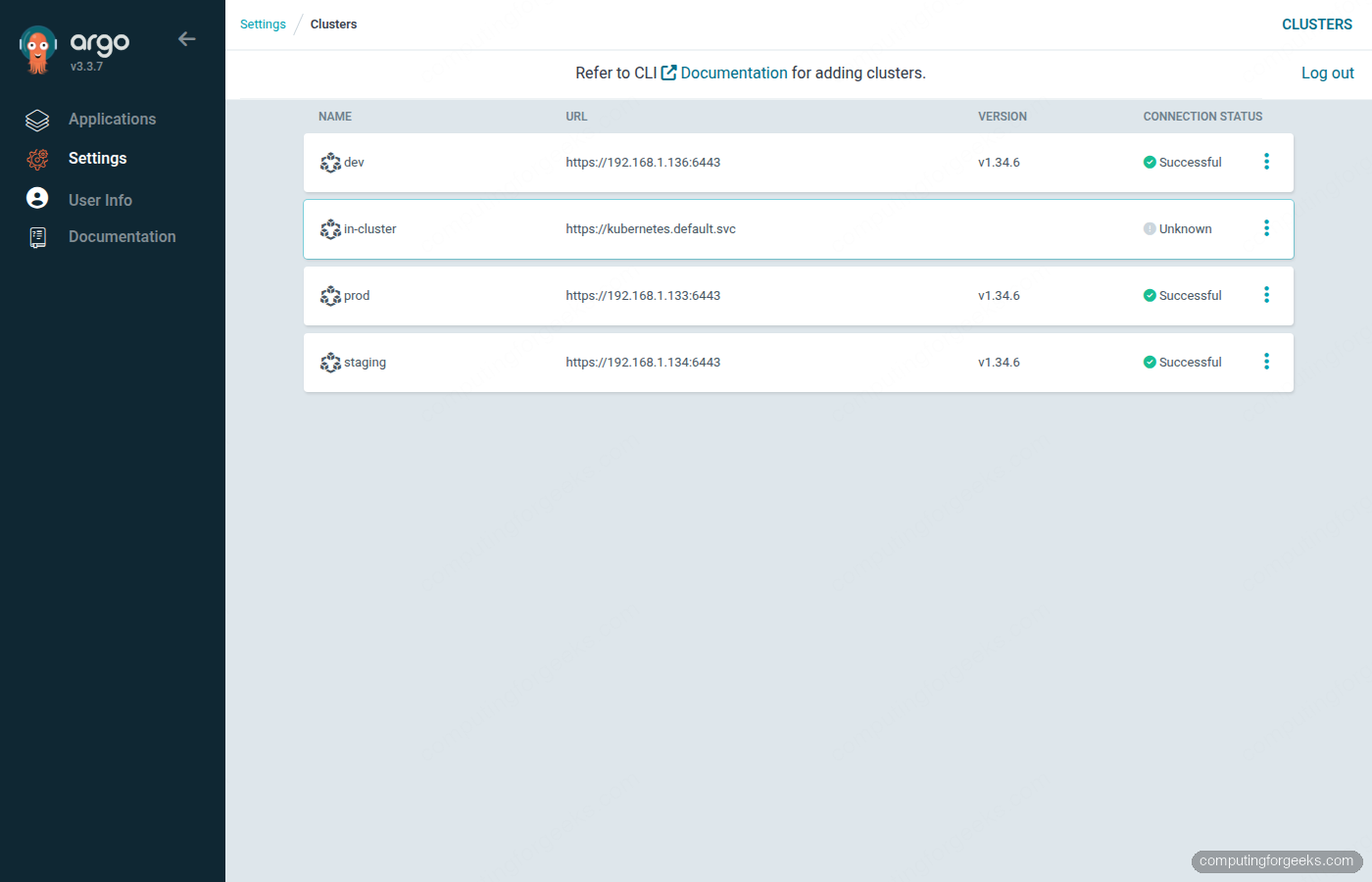
ArgoCD creates a service account (argocd-manager) and a ClusterRole on each spoke, then stores the bearer token in a Secret in the argocd namespace. Confirm all three clusters registered successfully.
argocd cluster listThe output should show all spokes with Successful status alongside the built-in in-cluster entry.
List Generator: Baseline Multi-Cluster Deploy
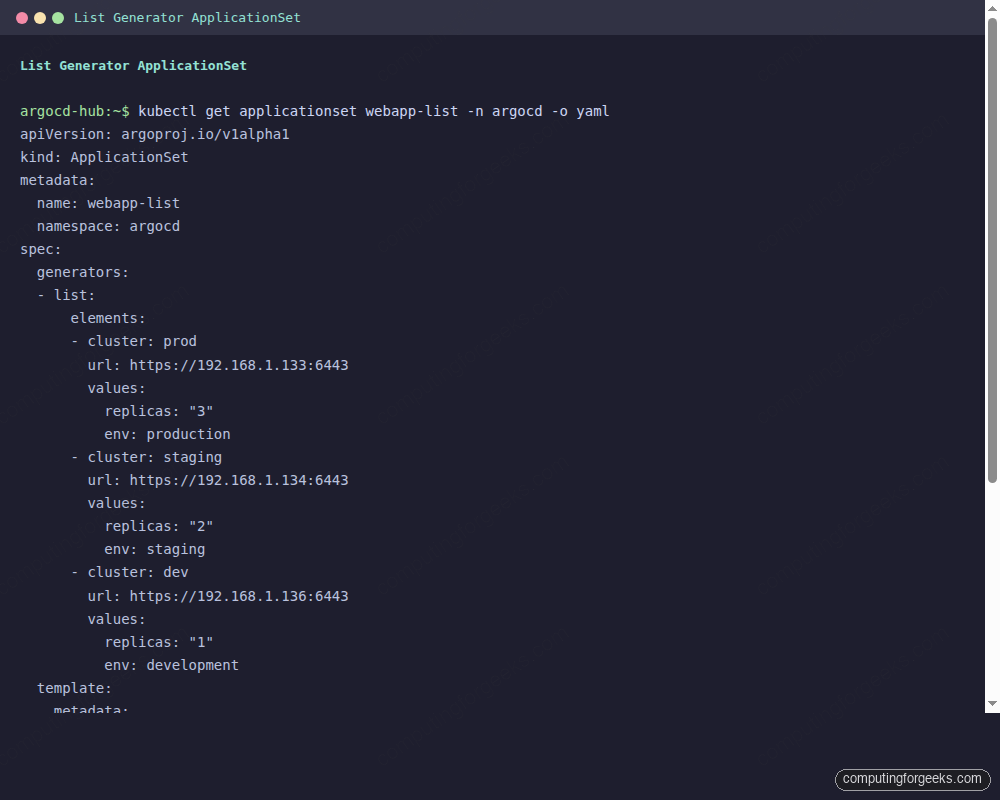
The List generator is the simplest way to get started. You define the cluster parameters explicitly in the ApplicationSet YAML. Each element in the elements array becomes one Application. This is the right generator when your cluster list is small and you want full control over every parameter.
apiVersion: argoproj.io/v1alpha1
kind: ApplicationSet
metadata:
  name: webapp-list
  namespace: argocd
spec:
  generators:
  - list:
      elements:
      - cluster: prod
        url: https://10.0.1.11:6443
        env: production
        replicas: "3"
      - cluster: staging
        url: https://10.0.1.12:6443
        env: staging
        replicas: "2"
      - cluster: dev
        url: https://10.0.1.13:6443
        env: development
        replicas: "1"
  template:
    metadata:
      name: 'webapp-{{cluster}}'
    spec:
      project: default
      source:
        repoURL: https://github.com/cfg-labs/argocd-applicationset-demo
        targetRevision: main
        path: kustomize/overlays/{{cluster}}
      destination:
        server: '{{url}}'
        namespace: webapp
      syncPolicy:
        automated:
          prune: true
          selfHeal: true
        syncOptions:
        - CreateNamespace=true
Apply it to the ArgoCD namespace and watch the three Applications appear.
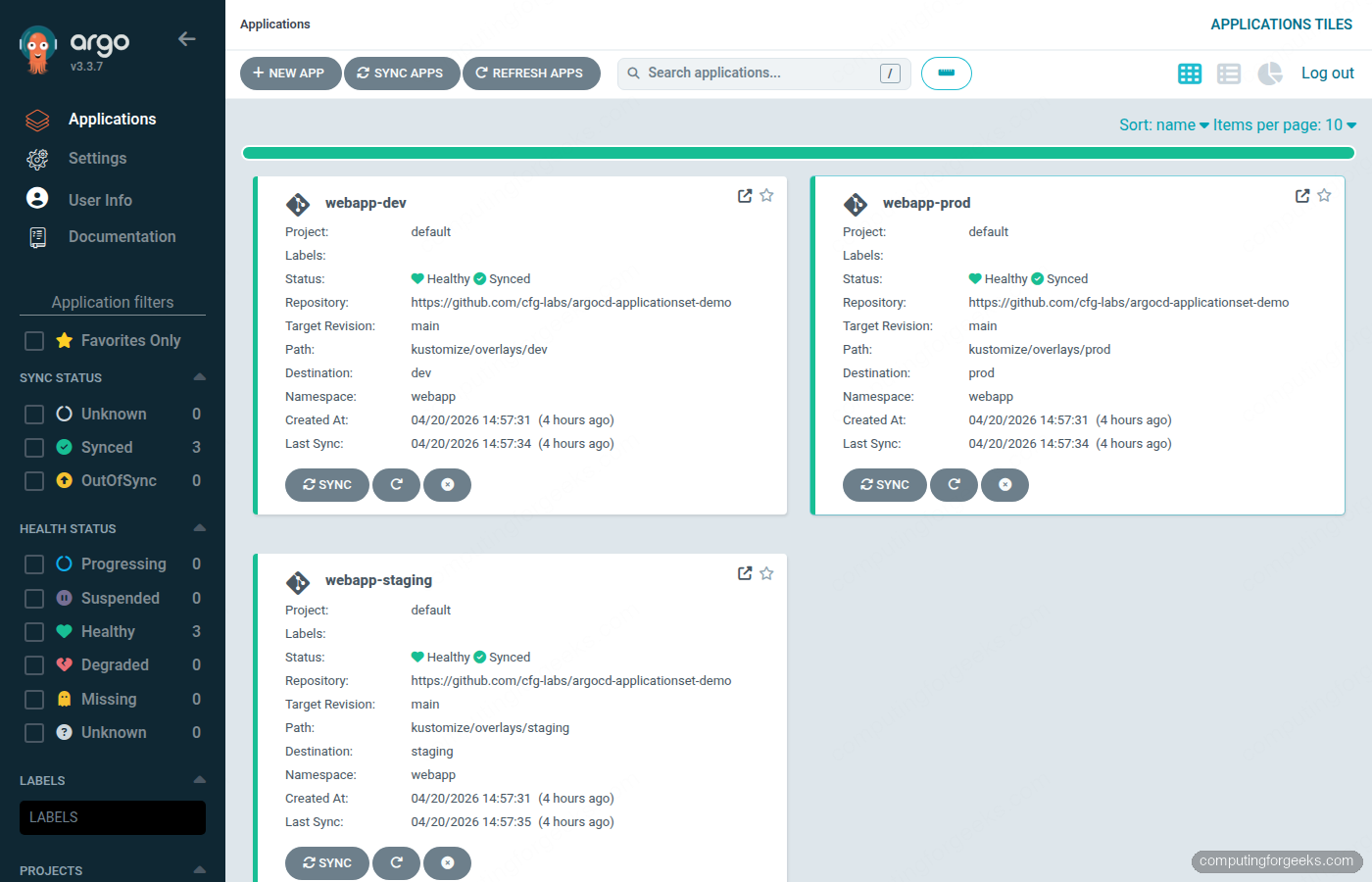
kubectl apply -f applicationsets/list-generator.yaml -n argocdArgoCD processes the template three times, once per list element, producing webapp-prod, webapp-staging, and webapp-dev. With automated.selfHeal: true, any manual kubectl edit on the target cluster rolls back within three minutes.
argocd app listAfter the initial sync completes, all three apps should show Synced and Healthy.
Git Generator with Kustomize Overlays
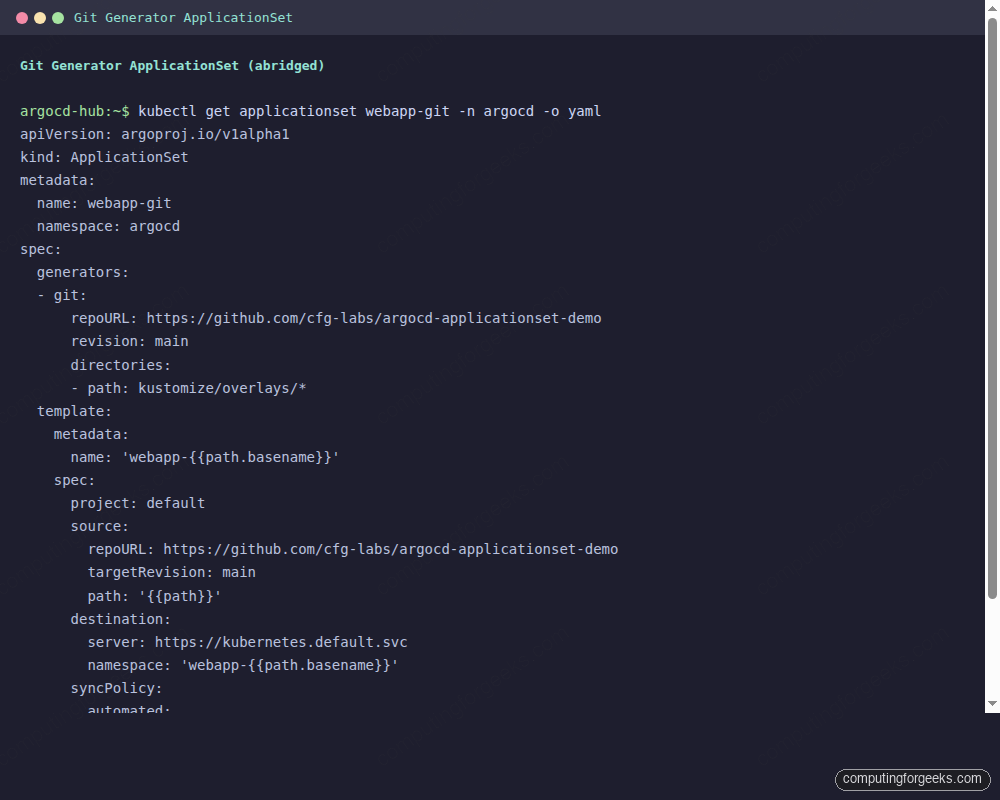
The Git generator auto-discovers directories in your repo and creates one Application per directory. Add a new overlay directory, push to main, and ArgoCD creates the Application within the next poll cycle (default: 3 minutes). Delete the directory and the Application gets pruned. No ApplicationSet changes needed.
apiVersion: argoproj.io/v1alpha1
kind: ApplicationSet
metadata:
  name: webapp-git
  namespace: argocd
spec:
  generators:
  - git:
      repoURL: https://github.com/cfg-labs/argocd-applicationset-demo
      revision: main
      directories:
      - path: kustomize/overlays/*
  template:
    metadata:
      name: 'webapp-{{path.basename}}'
    spec:
      project: default
      source:
        repoURL: https://github.com/cfg-labs/argocd-applicationset-demo
        targetRevision: main
        path: '{{path}}'
      destination:
        server: https://kubernetes.default.svc
        namespace: 'webapp-{{path.basename}}'
      syncPolicy:
        automated:
          prune: true
          selfHeal: true
        syncOptions:
        - CreateNamespace=true
The {{path.basename}} substitution picks up the directory name (prod, staging, dev). The {{path}} substitution gives the full relative path from the repo root. This version deploys all three overlays to the hub cluster’s local webapp-* namespaces, which is useful when the Git generator is serving as a namespace-per-environment pattern on a single cluster.
kubectl apply -f applicationsets/git-generator.yaml -n argocdTo target each overlay at its matching spoke cluster instead of the hub, combine the Git generator with the Cluster generator in a Matrix generator. The Git generator enumerates paths; the Cluster generator enumerates registered clusters; the Matrix produces the Cartesian product.
Cluster Generator: Auto-Discover Registered Clusters
The Cluster generator reads the cluster Secrets in the argocd namespace and produces one parameter set per cluster. Every time you run argocd cluster add, a new Secret appears with the argocd.argoproj.io/secret-type: cluster label. The generator picks that up on the next reconcile loop, and the ApplicationSet creates a new Application automatically. No YAML change required.
To pass per-cluster config (like which Helm values file to use), label the cluster Secrets.
kubectl label secret -n argocd \
  $(kubectl get secrets -n argocd -l argocd.argoproj.io/secret-type=cluster \
    -o name | grep prod | head -1 | sed 's|secret/||') \
  environment=prod

kubectl label secret -n argocd \
  $(kubectl get secrets -n argocd -l argocd.argoproj.io/secret-type=cluster \
    -o name | grep staging | head -1 | sed 's|secret/||') \
  environment=staging

kubectl label secret -n argocd \
  $(kubectl get secrets -n argocd -l argocd.argoproj.io/secret-type=cluster \
    -o name | grep dev | head -1 | sed 's|secret/||') \
  environment=dev
The cluster generator can now expose those labels via {{metadata.labels.environment}}. Here is the ApplicationSet that uses them to select the correct Helm values file.
apiVersion: argoproj.io/v1alpha1
kind: ApplicationSet
metadata:
  name: webapp-cluster
  namespace: argocd
spec:
  generators:
  - clusters:
      selector:
        matchLabels:
          argocd.argoproj.io/secret-type: cluster
  template:
    metadata:
      name: 'webapp-{{name}}'
    spec:
      project: default
      source:
        repoURL: https://github.com/cfg-labs/argocd-applicationset-demo
        targetRevision: main
        path: apps/webapp
        helm:
          releaseName: '{{name}}'
          valueFiles:
          - values.yaml
          - 'values-{{metadata.labels.environment}}.yaml'
      destination:
        server: '{{server}}'
        namespace: webapp
      syncPolicy:
        automated:
          prune: true
          selfHeal: true
        syncOptions:
        - CreateNamespace=true
If {{metadata.labels.environment}} resolves to prod, ArgoCD loads values.yaml first, then overlays values-prod.yaml on top, setting replicaCount: 3. The base values file sets safe defaults; the per-environment file overrides only what needs to change.
Helm Chart Integration
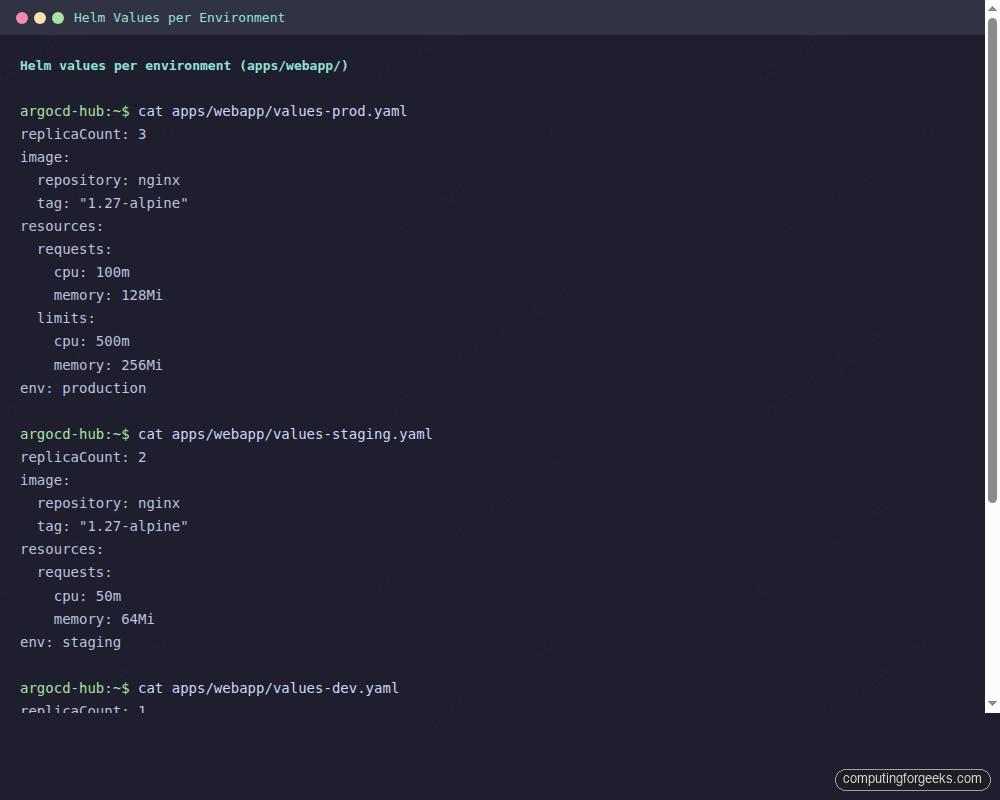
When you prefer Helm over Kustomize, the ApplicationSet’s source.helm block handles per-environment values files. The List generator controls which cluster gets which values file. The values-prod.yaml in this demo sets three replicas; values-dev.yaml stays at one.
apiVersion: argoproj.io/v1alpha1
kind: ApplicationSet
metadata:
  name: webapp-helm-envs
  namespace: argocd
spec:
  generators:
  - list:
      elements:
      - env: prod
        server: https://10.0.1.11:6443
      - env: staging
        server: https://10.0.1.12:6443
      - env: dev
        server: https://10.0.1.13:6443
  template:
    metadata:
      name: 'webapp-helm-{{env}}'
    spec:
      project: default
      source:
        repoURL: https://github.com/cfg-labs/argocd-applicationset-demo
        targetRevision: main
        path: apps/webapp
        helm:
          releaseName: 'webapp-{{env}}'
          valueFiles:
          - values.yaml
          - 'values-{{env}}.yaml'
      destination:
        server: '{{server}}'
        namespace: webapp
      syncPolicy:
        automated:
          prune: true
          selfHeal: true
        syncOptions:
        - CreateNamespace=true
Verify that each cluster received the correct replica count.
kubectl get deployments -n webapp --kubeconfig /tmp/kubeconfig-k3s-prod.yaml
kubectl get deployments -n webapp --kubeconfig /tmp/kubeconfig-k3s-staging.yaml
kubectl get deployments -n webapp --kubeconfig /tmp/kubeconfig-k3s-dev.yaml
Prod shows 3/3 ready, staging shows 2/2, dev shows 1/1. Each cluster received its values file without any manual intervention per cluster.
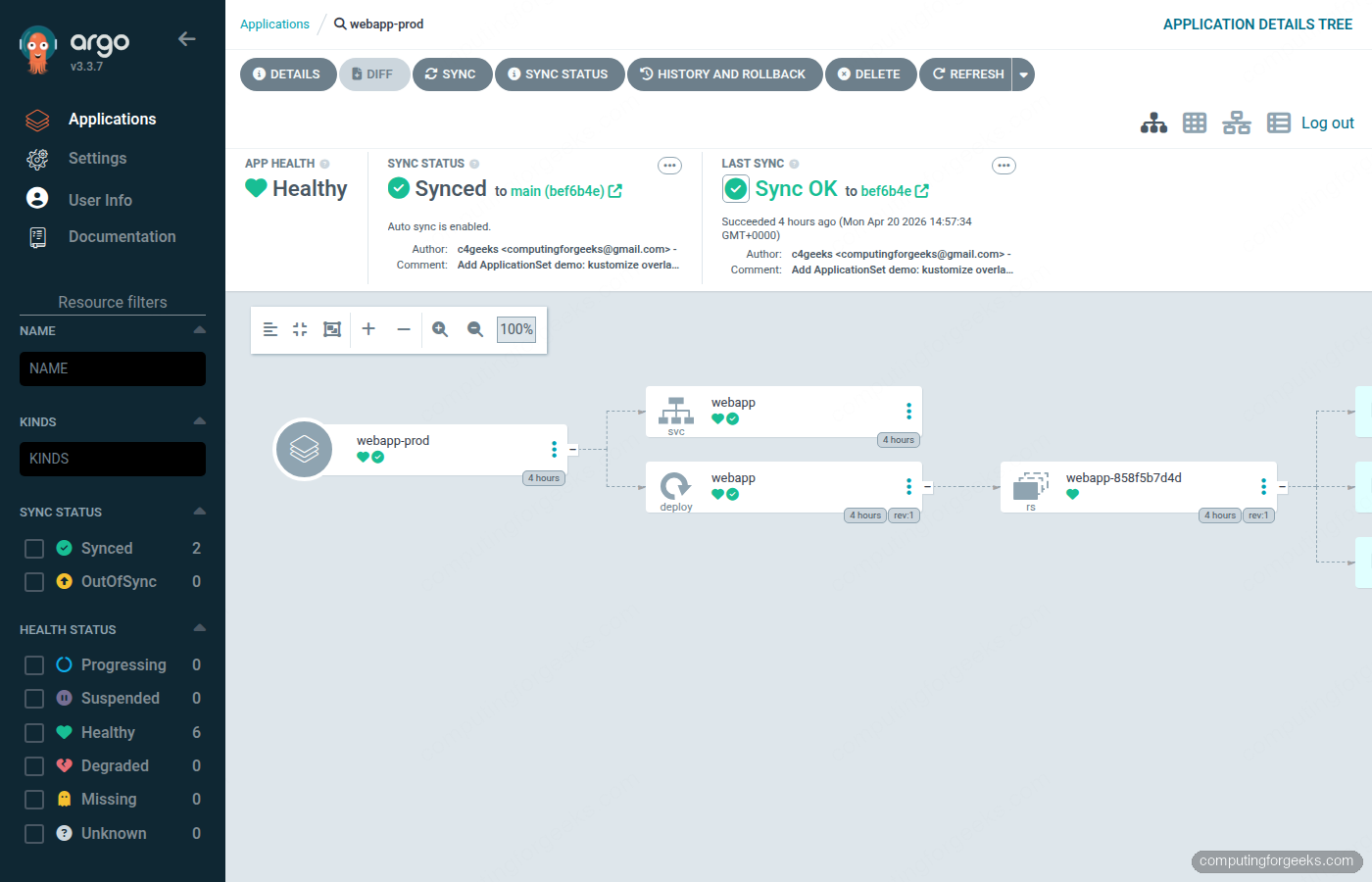
Kustomize handles environment differences through overlay directories. The Helm path reaches the same outcome with separate values files, which is often a better fit when the chart comes from a third party and you do not control the base manifests. The three values files below pin the replica count, resource requests, and environment label per cluster:
Sync Waves for Ordered Rollouts
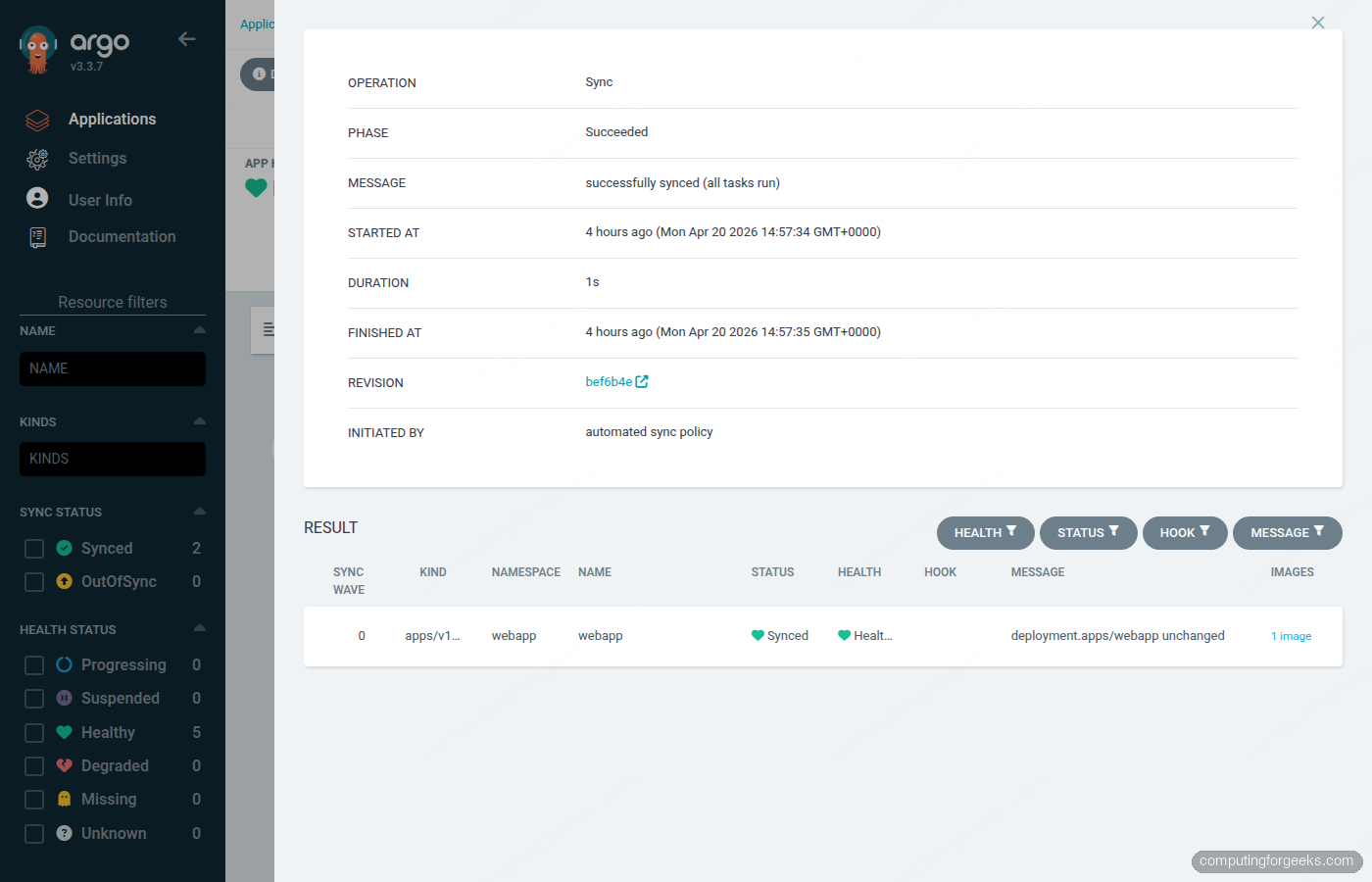
By default, ArgoCD applies all resources in an Application simultaneously. Sync waves let you declare ordering: a resource with wave "1" must reach Healthy status before ArgoCD starts applying resources in wave "2". This matters for apps where the namespace or ConfigMap must exist before the Deployment can start, or where a database migration Job must complete before the application Deployment launches.
Add the annotation to each resource template. The ordering in this demo: namespace first, then Deployment, then Service.
# namespace.yaml - wave 1: must exist before anything else
apiVersion: v1
kind: Namespace
metadata:
  name: webapp
  annotations:
    argocd.argoproj.io/sync-wave: "1"
Wave 2 goes on the Deployment so it waits for the namespace to reach Healthy before the pods are scheduled.
# deployment.yaml - wave 2: starts after namespace is confirmed Healthy
metadata:
  annotations:
    argocd.argoproj.io/sync-wave: "2"
The Service gets wave 3, which means it only gets created after the Deployment is running and ready to receive traffic.
# service.yaml - wave 3: exposes the app only after the Deployment is ready
metadata:
  annotations:
    argocd.argoproj.io/sync-wave: "3"
Sync waves are declared on the resource templates themselves, not on the ApplicationSet. They work with any source type (Kustomize, Helm, plain YAML) and apply per-sync-operation. A failed Deployment in wave 2 blocks all wave-3 resources and surfaces clearly in the ArgoCD sync status.
For database migrations, put the migration Job in wave 2 with a hook.argocd.argoproj.io/hook: PreSync annotation to run it before any application resources. The Application stays OutOfSync until the Job completes, preventing partial rollouts.
RBAC for Multi-Tenancy
In a multi-team setup, you do not want the frontend team touching the backend team’s prod cluster. ArgoCD AppProjects restrict which source repos, destination clusters, and destination namespaces a set of Applications can target. An ApplicationSet’s generated Applications inherit the project restrictions of whichever AppProject they are assigned to.
Create an AppProject for the frontend team that only allows the webapp repo and limits destination to the dev cluster.
apiVersion: argoproj.io/v1alpha1
kind: AppProject
metadata:
  name: frontend-team
  namespace: argocd
spec:
  description: Frontend team deployments - dev only
  sourceRepos:
  - https://github.com/cfg-labs/argocd-applicationset-demo
  destinations:
  - server: https://10.0.1.13:6443
    namespace: webapp
  clusterResourceWhitelist:
  - group: ''
    kind: Namespace
  roles:
  - name: dev-deployer
    description: Can sync and get apps in frontend-team project
    policies:
    - p, proj:frontend-team:dev-deployer, applications, sync, frontend-team/*, allow
    - p, proj:frontend-team:dev-deployer, applications, get, frontend-team/*, allow
Any ApplicationSet that references project: frontend-team in its template cannot deploy to prod or staging clusters even if those clusters are registered in ArgoCD. The ApplicationSet controller respects AppProject restrictions when generating Applications. If the generated Application tries to deploy to a destination not in the AppProject’s allowed list, it gets created with a ComparisonError and never syncs.
For the prod team, create a separate AppProject with the prod cluster as the only allowed destination. This gives platform engineers auditable control over which teams can reach which clusters, all enforced server-side by ArgoCD rather than relying on developers not pushing the wrong kubeconfig. For teams already using Kubernetes RBAC for cluster access, AppProjects add a second enforcement layer at the GitOps layer.
kubectl apply -f - -n argocd << 'RBAC_EOF'
apiVersion: argoproj.io/v1alpha1
kind: AppProject
metadata:
  name: platform-team
  namespace: argocd
spec:
  description: Platform team - all clusters
  sourceRepos:
  - 'https://github.com/cfg-labs/*'
  destinations:
  - server: '*'
    namespace: '*'
  clusterResourceWhitelist:
  - group: '*'
    kind: '*'
RBAC_EOF
Platform engineers get a wildcard AppProject that can deploy anywhere. Frontend and backend teams get scoped projects. Every ApplicationSet's template declares which project it belongs to, making the access model visible in Git alongside the deployment config.
Troubleshooting Failed Syncs
These are the errors you will actually hit when running ApplicationSets across multiple clusters, captured from the Proxmox lab during this guide's testing.
ComparisonError: cluster not found
The generated Application shows Unknown sync status with a ComparisonError that reads: Cluster has no applications and is not being monitored or cluster not found.
The URL in the generator element does not match any registered cluster Secret. Run argocd cluster list and compare the SERVER column exactly against what your generator uses. A trailing slash, HTTP vs HTTPS, or a missing port number causes a mismatch. The Cluster generator does not have this problem because it reads the server URL directly from the Secret.
argocd cluster list
kubectl get secrets -n argocd -l argocd.argoproj.io/secret-type=cluster \
  -o jsonpath='{range .items[*]}{.metadata.name}: {.data.server}{"\n"}{end}' | \
  while IFS=: read name b64; do echo "$name: $(echo $b64 | base64 -d)"; done
Unable to resolve: repository not found or permission denied
The Application shows OutOfSync with a message like rpc error: code = Unknown desc = error testing repository connectivity: ... authorization failed. ArgoCD cannot reach or authenticate to the Git repo.
For public repos this usually means a typo in the repoURL. For private repos, you need to register credentials first.
argocd repo add https://github.com/YOUR_ORG/YOUR_REPO \
  --username YOUR_USER \
  --password YOUR_TOKEN \
  --insecure-skip-server-verification
Sync stuck: PreSync hook timeout
An Application stays Syncing indefinitely. The ArgoCD UI shows a PreSync hook Job that never completed. This is almost always a hook Job that crashed immediately (image pull error, missing secret) or ran past the default timeout.
argocd app get argocd/webapp-prod --refresh
kubectl get jobs -n webapp --kubeconfig /tmp/kubeconfig-k3s-prod.yaml
kubectl logs job/your-hook-job -n webapp --kubeconfig /tmp/kubeconfig-k3s-prod.yaml
To cancel a stuck sync and resume, terminate the operation via the CLI.
argocd app terminate-op argocd/webapp-prodOut of sync after manual kubectl edit
With selfHeal: true, any manual change to a managed resource on the spoke cluster gets reverted within three minutes. This is the expected behavior. If you need to make a temporary change for debugging, disable auto-sync first, make the change, then re-enable it.
argocd app set argocd/webapp-prod --sync-policy none
kubectl edit deployment webapp -n webapp --kubeconfig /tmp/kubeconfig-k3s-prod.yaml
# ... debug ...
argocd app set argocd/webapp-prod --sync-policy automated
If the ApplicationSet itself keeps regenerating the Application with auto-sync enabled, you need to pause at the ApplicationSet level. Set the spec.syncPolicy.applicationsSync field to create-only (ArgoCD 2.8+), which prevents ApplicationSet from updating existing Applications while still creating new ones from new generator elements.
Keep the ApplicationSet YAML under Git and roll forward from there. Most sync failures trace back to drift between what Git declares and what the cluster holds, so once auto-sync and self-heal are on, the faster fix is usually to push a corrected manifest rather than patch resources directly. For a repeatable troubleshooting loop, pair the commands above with ArgoCD notifications so Slack or email flags OutOfSync before users do.