Running your own DNS is rarely about replacing your domain registrar’s NS servers. It is usually about giving a lab, a homelab, or a corporate subnet authoritative records that public DNS never sees: db01.c4geeks.local, metrics.c4geeks.local, private reverse records for internal IPs. A small BIND install on Ubuntu 26.04 LTS does all of that, plus forwards everything else out to Cloudflare or Google.
This guide sets up BIND 9.20 as an authoritative server for a private zone (c4geeks.local), configures the matching reverse zone, opens UFW, validates zone files with named-checkconf and named-checkzone, and then proves it works by running dig, nslookup, and host from a second Ubuntu 26.04 VM. Every command ran on two freshly cloned Ubuntu 26.04 servers, so no config was reused.
Tested April 2026 on Ubuntu 26.04 LTS (Resolute Raccoon), kernel 7.0.0-10, BIND 9.20.18
Prerequisites
Two freshly installed Ubuntu 26.04 LTS servers on the same /24. The DNS server in this guide lives at 192.168.1.173 with hostname ns1.c4geeks.local, and the test client lives at 192.168.1.170. Both boxes were built from the Ubuntu 26.04 cloud image with root SSH and UFW in its default state. If you are starting from scratch, run the initial server setup first so you have a sudo user and SSH keys.
Set FQDN and reusable shell variables
Name the DNS box after its role. This shows up in every rndc status and log line, so consistent naming pays off later:
sudo hostnamectl set-hostname ns1.c4geeks.local
hostname -f
Define the zone, reverse zone, and subnet once so later config blocks stay readable:
export DNS_ZONE="c4geeks.local"
export DNS_REVERSE="1.168.192.in-addr.arpa"
export DNS_SERVER_IP="192.168.1.173"
export DNS_SUBNET="192.168.1.0/24"
export DNS_ADMIN_EMAIL="admin.${DNS_ZONE}"
echo "Zone:     ${DNS_ZONE}"
echo "Reverse:  ${DNS_REVERSE}"
echo "NS IP:    ${DNS_SERVER_IP}"
echo "Subnet:   ${DNS_SUBNET}"
The admin email uses the DNS convention of a dot instead of an @ sign. admin.c4geeks.local in SOA means [email protected] in human form.
Install BIND 9 on the name server
The Ubuntu 26.04 archive ships BIND 9.20.18 along with the diagnostic tools (dig, nslookup, host, named-checkzone). Install everything in one shot:
sudo apt-get update
sudo apt-get install -y bind9 bind9-utils bind9-dnsutils
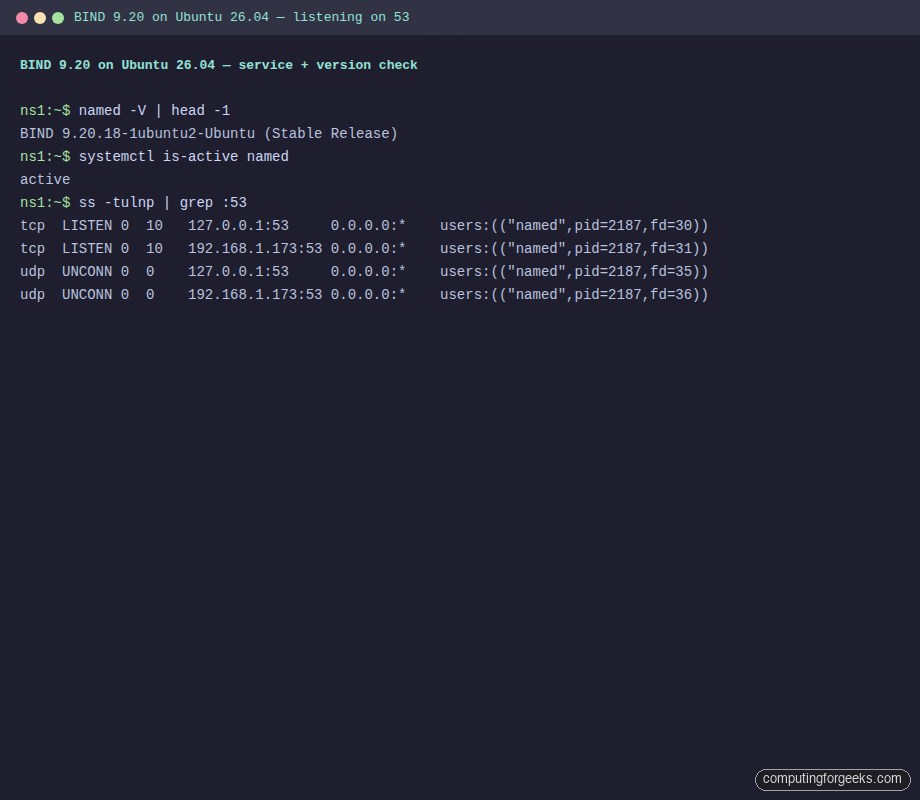
Confirm the version and that the service starts automatically:
named -V | head -1
systemctl is-active named
sudo ss -tulnp | grep :53
Clean output on a fresh 26.04 install:
BIND 9.20.18-1ubuntu2-Ubuntu (Stable Release) <id:>
active
Here is that check captured on the name server, with both port 53 TCP and UDP sockets visible:
Configure named.conf.options
The default named.conf.options binds only to localhost and has no allow-query list. Replace it with a LAN-facing config that listens on the server’s private IP, only answers queries from the internal subnet, and forwards non-authoritative lookups out to Cloudflare and Google:
sudo tee /etc/bind/named.conf.options > /dev/null <<CONF
options {
    directory "/var/cache/bind";
    listen-on port 53 { 127.0.0.1; ${DNS_SERVER_IP}; };
    listen-on-v6 { none; };
    allow-query { 127.0.0.1; ${DNS_SUBNET}; };
    recursion yes;
    allow-recursion { 127.0.0.1; ${DNS_SUBNET}; };
    forwarders { 1.1.1.1; 8.8.8.8; };
    forward only;
    dnssec-validation auto;
    auth-nxdomain no;
};
CONF
allow-query limits who can ask the server anything, and allow-recursion separately controls who can ask for recursive lookups. Keeping both restricted to the internal subnet is the right default; an open resolver on the public internet will be abused for amplification attacks within hours.
Create the authoritative forward zone
Declare the zone in named.conf.local, then write the zone file with the SOA, the NS delegation, and A records for every internal host:
sudo tee /etc/bind/named.conf.local > /dev/null <<CONF
zone "${DNS_ZONE}" {
    type master;
    file "/etc/bind/db.${DNS_ZONE}";
    allow-query { any; };
};

zone "${DNS_REVERSE}" {
    type master;
    file "/etc/bind/db.192.168.1";
    allow-query { any; };
};
CONF

sudo tee /etc/bind/db.${DNS_ZONE} > /dev/null <<ZONE
\$TTL    604800
@       IN      SOA     ns1.${DNS_ZONE}. ${DNS_ADMIN_EMAIL}. (
                              3         ; Serial
                         604800         ; Refresh
                          86400         ; Retry
                        2419200         ; Expire
                         604800 )       ; Negative Cache TTL
;
@       IN      NS      ns1.${DNS_ZONE}.
ns1     IN      A       192.168.1.173
web     IN      A       192.168.1.174
db      IN      A       192.168.1.175
mail    IN      A       192.168.1.176
client  IN      A       192.168.1.170
ZONE
Every time you change a zone file the serial must increase. BIND uses the serial number to decide whether secondaries need to re-sync, so forgetting to bump it is the single most common cause of “my change did not take effect.”
Create the reverse zone
Reverse DNS exists so that tools like mail servers and SSH can turn an IP back into a hostname for logging and authentication. Write PTR records matching the A records above:
sudo tee /etc/bind/db.192.168.1 > /dev/null <<ZONE
\$TTL    604800
@       IN      SOA     ns1.${DNS_ZONE}. ${DNS_ADMIN_EMAIL}. (
                              3         ; Serial
                         604800
                          86400
                        2419200
                         604800 )
;
@       IN      NS      ns1.${DNS_ZONE}.
173     IN      PTR     ns1.${DNS_ZONE}.
174     IN      PTR     web.${DNS_ZONE}.
175     IN      PTR     db.${DNS_ZONE}.
176     IN      PTR     mail.${DNS_ZONE}.
170     IN      PTR     client.${DNS_ZONE}.
ZONE
Validate zones with named-checkconf and named-checkzone
A typo in a zone file does not fail gracefully. BIND refuses to start and the service enters a restart loop, so catch mistakes before reloading:
sudo named-checkconf && echo "conf OK"
sudo named-checkzone ${DNS_ZONE} /etc/bind/db.${DNS_ZONE}
sudo named-checkzone ${DNS_REVERSE} /etc/bind/db.192.168.1
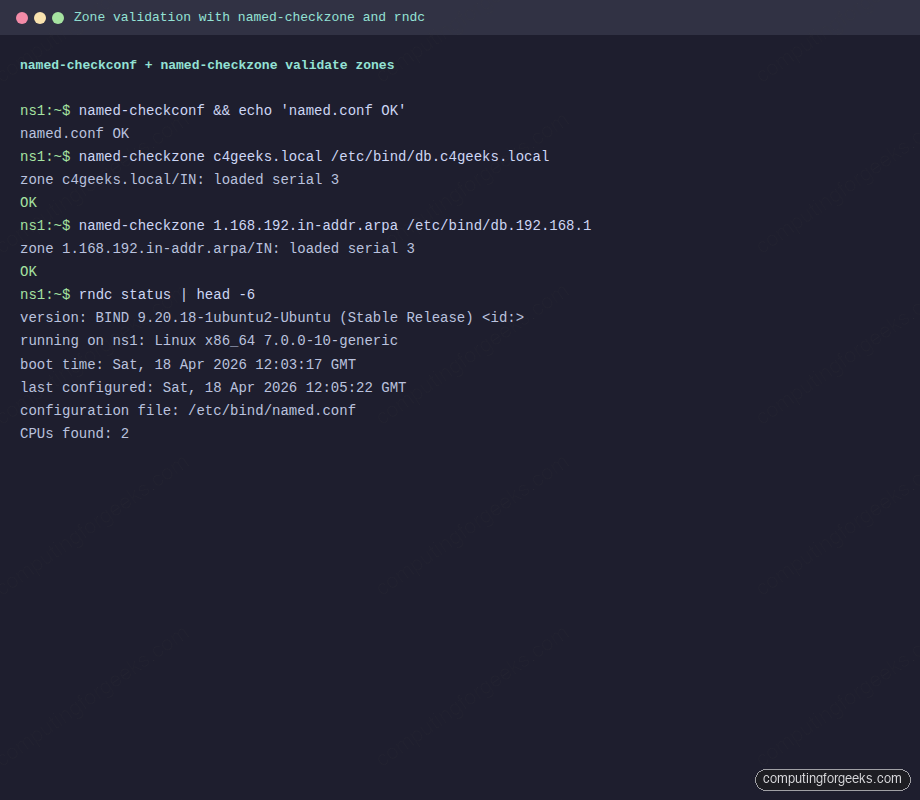
Clean output confirms both zones parse:
conf OK
zone c4geeks.local/IN: loaded serial 3
OK
zone 1.168.192.in-addr.arpa/IN: loaded serial 3
OK
Reload BIND and check its live status with rndc:
sudo systemctl restart named
sudo rndc status | head -6
The validation + rndc sequence as run on the name server:
Open UFW firewall rules
DNS needs both TCP and UDP on port 53. UDP handles the overwhelming majority of queries; TCP kicks in for zone transfers and for answers larger than 512 bytes (common once DNSSEC is in play):
sudo ufw allow 22/tcp
sudo ufw allow 53/tcp
sudo ufw allow 53/udp
sudo ufw --force enable
sudo ufw status numbered
If this server is a public-facing authoritative DNS, restrict the 53/tcp rule to the secondary name servers that need zone transfers; never leave it open globally.
Query the server from a client VM
Switch to the client and install the DNS diagnostic tools (they are not in the minimal cloud image by default):
sudo apt-get install -y dnsutils bind9-dnsutilsAsk for a forward lookup against the authoritative server. +short strips everything except the answer, which makes output easy to grep:
dig @192.168.1.173 web.c4geeks.local +short
dig @192.168.1.173 ns1.c4geeks.local +noall +answer +authority
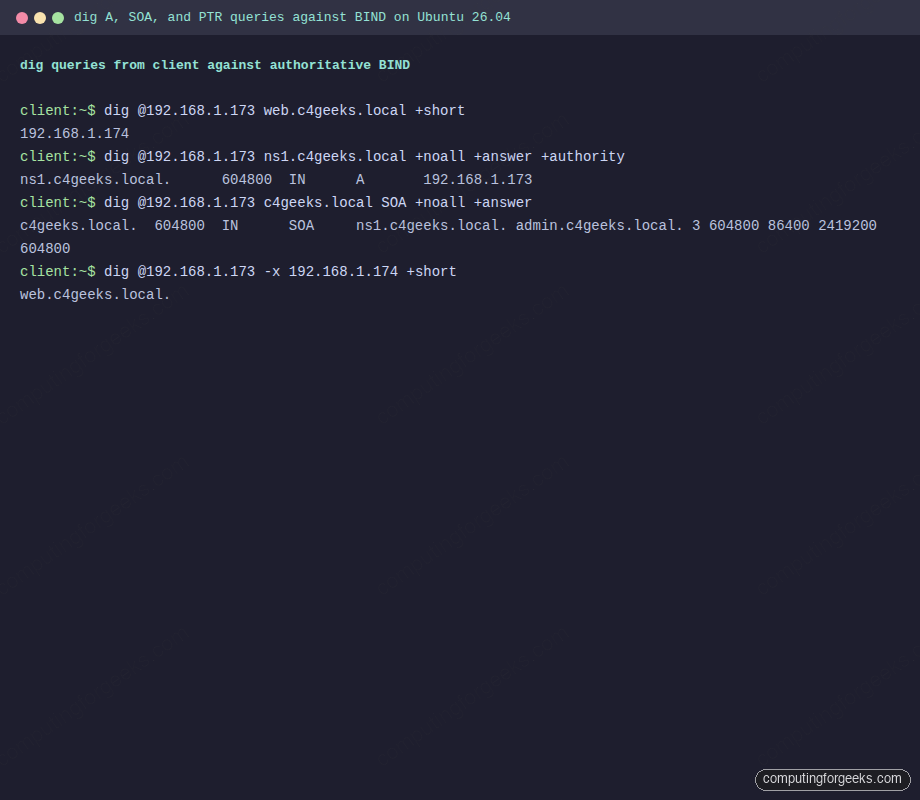
Answer sections come straight from the zone file, not recursion:
192.168.1.174
ns1.c4geeks.local.	604800	IN	A	192.168.1.173
Reverse lookups use dig -x:
dig @192.168.1.173 -x 192.168.1.173 +short
dig @192.168.1.173 -x 192.168.1.174 +short
Both return the matching FQDN, proving the reverse zone loaded correctly:
ns1.c4geeks.local.
web.c4geeks.local.
Confirm the SOA record looks right (serial number, admin email, TTLs):
dig @192.168.1.173 c4geeks.local SOA +noall +answerOne clean SOA line tells you the serial, the admin mailbox, and the refresh/retry/expire TTLs in one place:
c4geeks.local. 604800 IN SOA ns1.c4geeks.local. admin.c4geeks.local. 3 604800 86400 2419200 604800Terminal capture of the dig session running on the client VM against the authoritative server:
Also verify recursive forwarding works. The server should answer for google.com even though it is not in the local zones, because forwarders { 1.1.1.1; 8.8.8.8; } forwards the query upstream:
dig @192.168.1.173 google.com +short | head -3nslookup and host produce more human-friendly output when you want to confirm DNS from a terminal without memorizing dig flags:
nslookup ns1.c4geeks.local 192.168.1.173
nslookup 192.168.1.175 192.168.1.173
host -t MX c4geeks.local 192.168.1.173
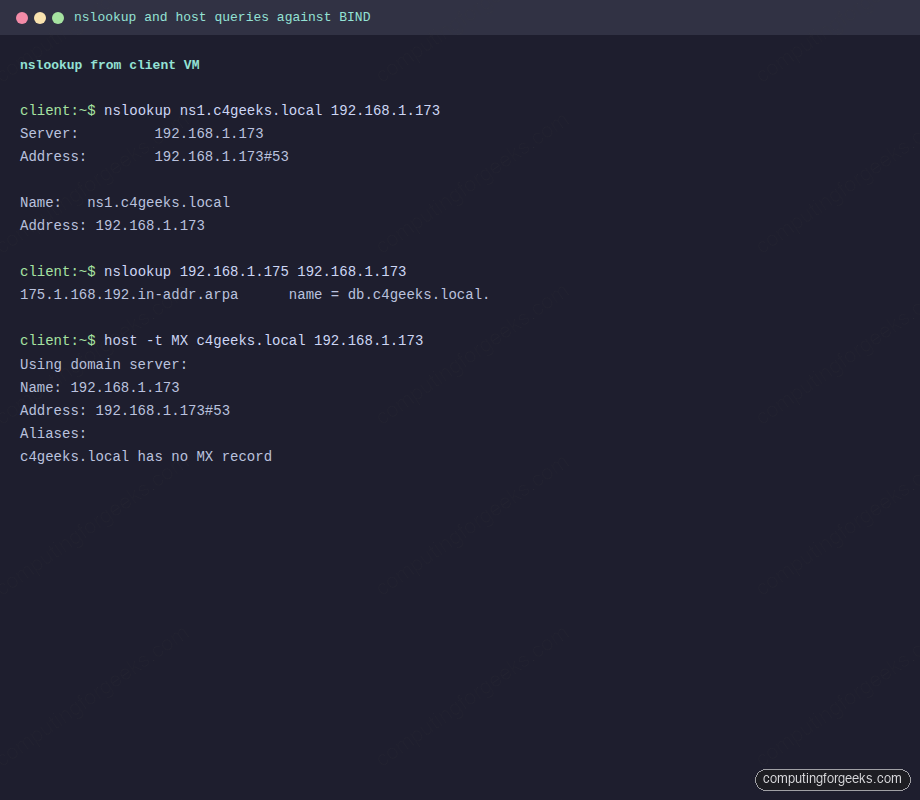
The forward answer, reverse PTR, and the “no MX record” signal all come from the same authoritative server:
Server:		192.168.1.173
Address:	192.168.1.173#53

Name:	ns1.c4geeks.local
Address: 192.168.1.173

175.1.168.192.in-addr.arpa	name = db.c4geeks.local.

c4geeks.local has no MX record
The same nslookup and host queries rendered from the client VM terminal:
Make the client use BIND permanently with netplan
Specifying @192.168.1.173 on every query is fine for debugging, not for daily use. Point the client’s resolver at BIND by editing the cloud-init or the dedicated netplan file:
sudo tee /etc/netplan/60-bind-resolver.yaml > /dev/null <<'YAML'
network:
  version: 2
  ethernets:
    ens18:
      dhcp4: true
      dhcp4-overrides:
        use-dns: false
      nameservers:
        search: [c4geeks.local]
        addresses: [192.168.1.173, 1.1.1.1]
YAML
sudo chmod 600 /etc/netplan/60-bind-resolver.yaml
sudo netplan apply
resolvectl status ens18 | head -10
Once applied, plain hostname queries work without specifying the server:
ping -c1 web
dig db.c4geeks.local +short
Troubleshoot common BIND issues
Error: “zone c4geeks.local/IN: NS ‘ns1.c4geeks.local’ has no address records”
The NS record references a hostname that has no matching A record in the same zone. Add an ns1 IN A 192.168.1.173 line inside the zone file (not in named.conf.local). This is the most common zone-load failure on first boot.
Error: “named: loading configuration: permission denied”
The named process runs as the bind user. Zone files under /etc/bind must be readable by that user. Fix with sudo chown root:bind /etc/bind/db.* && sudo chmod 644 /etc/bind/db.*.
dig returns SERVFAIL even though named is running
Check the journal with journalctl -u named -n 50. Most often this is a zone-file syntax error BIND rejected silently, or DNSSEC validation failing because the system clock is wrong. NTP sync first, then re-run named-checkzone.
“Could not find nameservers” from netplan
The netplan YAML must end with a newline and use spaces, not tabs. YAML parsing failures print a helpful ^ pointer. Apply with sudo netplan --debug apply for the full trace.
Error: “connection timed out; no servers could be reached”
Either UFW is blocking 53/udp, BIND is only listening on 127.0.0.1, or iptables on a cloud provider is dropping the traffic. Check each in order:
sudo ufw status | grep 53
sudo ss -tulnp | grep :53
sudo iptables -L INPUT -n | grep 53
Once the internal zone resolves, the same BIND instance can serve the DNS for a full Ubuntu server fleet. Feed it into the Postfix mail server as the hostname resolver, use it to power Prometheus service discovery via DNS SRV records, and harden the host with the Ubuntu 26.04 hardening guide.