Ubuntu 26.04 is the first Ubuntu release where Rust powers core system utilities out of the box. The sudo command is now sudo-rs (a memory-safe rewrite), and the traditional GNU coreutils have been replaced by rust-coreutils. Whether you are building your own Rust projects or contributing upstream to the tools that already run on your server, the toolchain setup takes about five minutes.
This guide covers two installation methods: the Ubuntu repository package (Rust 1.93.1, good enough for quick builds) and rustup (Rust 1.94.1 at the time of writing, always tracks the latest stable). We will also set up cargo, clippy, cross-compilation for ARM64, and a real async HTTP project with external dependencies. For a clean starting point, make sure your Ubuntu 26.04 server is configured with a non-root user before continuing.
Last verified: April 2026 | Ubuntu 26.04 LTS, Rust 1.93.1 (repo) / 1.94.1 via rustup
Prerequisites
You will need a running Ubuntu 26.04 LTS system with a regular user that has sudo privileges. The commands below assume a fresh install. If you already have packages installed, adjust accordingly.
- Ubuntu 26.04 LTS (Resolute Raccoon), server or desktop
- A non-root user with sudo access
- Internet connectivity for downloading packages and crates
- Tested versions: Rust 1.93.1 (apt), Rust 1.94.1 (rustup), cargo 1.94.1
Method 1: Install Rust from Ubuntu Repositories
The fastest path. Ubuntu 26.04 ships Rust 1.93.1 in the default repositories, which is recent enough for most projects. This method is ideal if you just need rustc and cargo without managing toolchains.
Update the package index and install:
sudo apt update
sudo apt install -y rustc cargo
Verify the installed versions:
rustc --version
cargo --version
The output confirms Rust 1.93.1:
rustc 1.93.1 (01f6ddf75 2026-02-11) (built from a source tarball)
cargo 1.93.1 (083ac5135 2025-12-15) (built from a source tarball)
The repo version works fine for compiling projects that don’t require bleeding-edge features. The downside is that it lags behind the official release by a few weeks, and you cannot switch between stable, beta, and nightly channels. For full control, use rustup instead.
If you installed from apt and want to switch to rustup later, remove the apt packages first to avoid conflicts:
sudo apt remove -y rustc cargoMethod 2: Install Rust via rustup (Recommended)
Rustup is the official Rust toolchain installer. It manages compiler versions, lets you switch between stable/beta/nightly, and handles cross-compilation targets. This is the method the Rust project recommends for development work.
First, install the build tools that the Rust compiler and native crates depend on:
sudo apt update
sudo apt install -y build-essential pkg-config libssl-dev curl
The build-essential package pulls in gcc, g++, and make. The pkg-config and libssl-dev packages are needed by crates that link against system libraries (reqwest, openssl, and many others).
Download and run the rustup installer:
curl --proto '=https' --tlsv1.2 -sSf https://sh.rustup.rs | shThe installer prompts you to choose an installation type. Press 1 for the default, which installs the latest stable toolchain:
info: profile set to default
info: default host triple is x86_64-unknown-linux-gnu
info: syncing channel updates for stable-x86_64-unknown-linux-gnu
info: latest update on 2026-03-26 for version 1.94.1 (e408947bf 2026-03-25)
info: downloading 6 components
info: default toolchain set to stable-x86_64-unknown-linux-gnu

  stable-x86_64-unknown-linux-gnu installed - rustc 1.94.1 (e408947bf 2026-03-25)

Rust is installed now. Great!
Load the Rust environment into your current shell:
source "$HOME/.cargo/env"This adds $HOME/.cargo/bin to your PATH. The rustup installer already appends this to your .bashrc, so future shells pick it up automatically.
Confirm the installation:
rustc --version
cargo --version
rustup --version
You should see output like this:
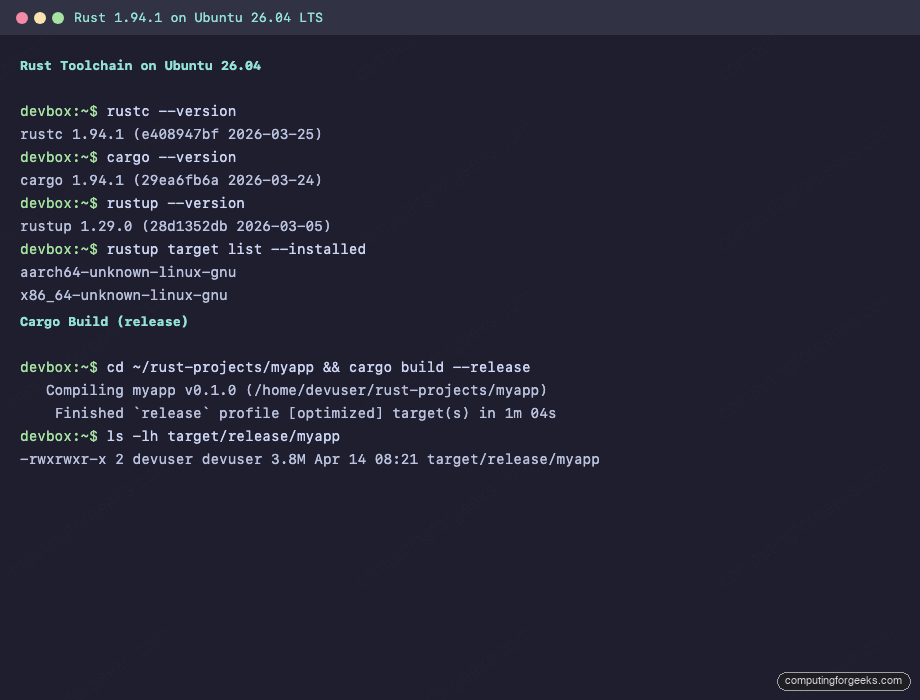
rustc 1.94.1 (e408947bf 2026-03-25)
cargo 1.94.1 (29ea6fb6a 2026-03-24)
rustup 1.29.0 (28d1352db 2026-03-05)
To see the full toolchain details, including installed targets:
rustup showThe output shows your active toolchain and host triple:
Default host: x86_64-unknown-linux-gnu
rustup home:  /home/devuser/.rustup

installed toolchains
--------------------
stable-x86_64-unknown-linux-gnu (active, default)

active toolchain
----------------
name: stable-x86_64-unknown-linux-gnu
active because: it's the default toolchain
installed targets:
  x86_64-unknown-linux-gnu
Compile a Hello World Program
A quick sanity check. Create a project directory, write a minimal Rust source file, and compile it directly with rustc:
mkdir -p ~/rust-projects
cat > ~/rust-projects/hello.rs << 'RUSTEOF'
fn main() {
    println!("Hello from Rust on Ubuntu 26.04!");
}
RUSTEOF
Compile and run:
rustc ~/rust-projects/hello.rs -o ~/rust-projects/hello
~/rust-projects/hello
Expected output:
Hello from Rust on Ubuntu 26.04!Direct rustc compilation works for single files, but real projects use cargo for dependency management, builds, and testing. If you prefer a language with a garbage collector and faster compile times, Go is the closest alternative in the compiled language space.
Create a Project with Cargo
Cargo is Rust's build system and package manager. It handles dependency resolution, compilation, testing, and publishing. Create a new binary project:
cd ~/rust-projects
cargo new myapp
Cargo scaffolds the project structure:
    Creating binary (application) `myapp` package
note: see more `Cargo.toml` keys and their definitions at https://doc.rust-lang.org/cargo/reference/manifest.html
The generated Cargo.toml uses the Rust 2024 edition by default (new in Rust 1.85+):
[package]
name = "myapp"
version = "0.1.0"
edition = "2024"

[dependencies]
Build an Async HTTP Client
Time for something real. This example fetches public IP information from an API using reqwest (HTTP client), tokio (async runtime), and serde (JSON deserialization). These are the crates you will use in almost every networked Rust application.
Edit Cargo.toml to add the dependencies:
cd ~/rust-projects/myappOpen the manifest file:
vi Cargo.tomlReplace the contents with:
[package]
name = "myapp"
version = "0.1.0"
edition = "2024"

[dependencies]
serde = { version = "1", features = ["derive"] }
serde_json = "1"
tokio = { version = "1", features = ["full"] }
reqwest = { version = "0.12", features = ["json"] }
Now write the async HTTP client. Open src/main.rs:
vi src/main.rsAdd the following code:
use serde::Deserialize;

#[derive(Deserialize, Debug)]
struct IpInfo {
    ip: String,
    city: Option<String>,
    country: Option<String>,
    org: Option<String>,
}

#[tokio::main]
async fn main() -> Result<(), Box<dyn std::error::Error>> {
    let resp = reqwest::get("https://ipinfo.io/json")
        .await?
        .json::<IpInfo>()
        .await?;

    println!("Public IP: {}", resp.ip);
    if let Some(ref city) = resp.city {
        println!("City: {}", city);
    }
    if let Some(ref country) = resp.country {
        println!("Country: {}", country);
    }
    if let Some(ref org) = resp.org {
        println!("Org: {}", org);
    }
    Ok(())
}
Build the project. The first build downloads and compiles all dependencies:
cargo buildCargo resolves 176 crates and compiles them (this takes a couple of minutes on the first run):
    Updating crates.io index
     Locking 176 packages to latest Rust 1.94.1 compatible versions
   Compiling proc-macro2 v1.0.106
   ...
   Compiling reqwest v0.12.28
   Compiling myapp v0.1.0 (/home/devuser/rust-projects/myapp)
    Finished `dev` profile [unoptimized + debuginfo] target(s) in 2m 17s
Run the application:
cargo runThe output shows your server's public IP and geolocation data pulled from the ipinfo.io API:
Public IP: 10.0.1.50
City: Nairobi
Country: KE
Org: AS14593 Space Exploration Technologies Corporation
Release Build and Binary Size
Debug builds are fast to compile but produce large, unoptimized binaries. For deployment, always use a release build:
cargo build --releaseThe release binary lands in target/release/. Compare the two:
ls -lh target/debug/myapp target/release/myappThe size difference is dramatic:
-rwxrwxr-x 2 devuser devuser  47M Apr 14 08:20 target/debug/myapp
-rwxrwxr-x 2 devuser devuser 3.8M Apr 14 08:21 target/release/myapp
The debug binary is 47 MB because it includes debug symbols and skips optimizations. The release binary is 3.8 MB, roughly 12x smaller. Ship the release binary, keep the debug one for development.
Code Quality: cargo fmt, clippy, and test
Rust ships with built-in tools for formatting, linting, and testing. Use them from day one.
Check formatting (returns non-zero if your code doesn't match the standard style):
cargo fmt -- --checkRun clippy, the official Rust linter that catches common mistakes, performance issues, and unidiomatic patterns:
cargo clippyBoth should produce clean output with no warnings on the code above.
Run the test suite:
cargo testSince we haven't written any tests yet, cargo confirms zero tests ran:
running 0 tests

test result: ok. 0 passed; 0 failed; 0 ignored; 0 measured; 0 filtered out; finished in 0.00s
In a real project, add #[cfg(test)] modules to your source files or create an tests/ directory for integration tests. Cargo discovers and runs them automatically.
Cross-Compile for ARM64
Rustup makes cross-compilation straightforward. If you build containers or deploy to ARM servers (AWS Graviton, Raspberry Pi, Apple Silicon), add the target:
rustup target add aarch64-unknown-linux-gnuVerify the installed targets:
rustup target list --installedBoth architectures are now available:
aarch64-unknown-linux-gnu
x86_64-unknown-linux-gnu
To cross-compile, you also need the ARM64 linker. Install it with apt:
sudo apt install -y gcc-aarch64-linux-gnuThen build for ARM64 by passing the target flag:
cargo build --release --target aarch64-unknown-linux-gnuThe binary lands at target/aarch64-unknown-linux-gnu/release/myapp. Note that crates linking to C libraries (like openssl via reqwest) need the ARM64 versions of those libraries installed. For pure Rust crates, cross-compilation works without any extra setup.
Install Useful Cargo Extensions
Two cargo plugins that save time in development:
cargo-watch recompiles your project automatically when source files change. Great for rapid iteration:
cargo install cargo-watchUse it to run checks on every save:
cargo watch -x checkcargo-edit adds commands for managing dependencies from the command line without manually editing Cargo.toml:
cargo install cargo-editNow you can add crates directly:
cargo add clap --features derive
cargo rm clap
Rust as a First-Class Citizen on Ubuntu 26.04
Ubuntu 26.04 is notable for adopting Rust-based replacements for core system utilities. You can see this on a fresh install:
dpkg -l rust-coreutils sudo-rsBoth are installed by default:
ii  rust-coreutils 0.7.0-0ubuntu1  amd64  Universal coreutils utils, written in Rust
ii  sudo-rs        0.2.13-0ubuntu1 amd64  Rust-based sudo and su implementations
This means ls, cp, mv, cat, and dozens of other core commands are already running Rust code on your system. The sudo command is handled by sudo-rs, which eliminates entire classes of memory safety vulnerabilities that have historically affected the C implementation. Check out the Ubuntu 26.04 feature overview for the full list of changes in this release.
Update Rust
If you installed via rustup, updating to the latest stable release is one command:
rustup updateRustup downloads and installs the new toolchain while keeping your existing projects intact. For the apt method, updates come through the normal sudo apt upgrade cycle.
Uninstall Rust
To remove a rustup installation completely:
rustup self uninstallThis removes rustup, all toolchains, and the $HOME/.cargo and $HOME/.rustup directories. Your project source code is not touched.
For the apt-installed version:
sudo apt remove -y rustc cargo
sudo apt autoremove -y
Troubleshooting
Error: linker 'cc' not found
This happens when build-essential is not installed. Cargo needs a C linker even for pure Rust projects because the final link step uses the system linker.
sudo apt install -y build-essentialError: failed to run custom build command for openssl-sys
Crates that bind to OpenSSL (including reqwest with default features) need the development headers. The error output usually says "Could not find directory of OpenSSL installation".
sudo apt install -y pkg-config libssl-devAlternatively, you can use reqwest with the rustls-tls feature instead of the default native-tls, which avoids the OpenSSL dependency entirely:
reqwest = { version = "0.12", features = ["json", "rustls-tls"], default-features = false }Conflict between apt Rust and rustup
If you have both apt-installed Rust and rustup, your PATH determines which rustc runs. This creates confusion when versions differ. The fix is to pick one method and stick with it. If switching to rustup, remove the apt packages first:
sudo apt remove -y rustc cargo
curl --proto '=https' --tlsv1.2 -sSf https://sh.rustup.rs | sh
cargo build hangs or is extremely slow
The first build downloads the crates.io index and compiles every dependency from source. On a VM with 2 cores and 4 GB RAM, expect 2 to 3 minutes for a project with reqwest and tokio. Subsequent builds reuse the compiled dependencies and finish in seconds. If you are running out of memory, increase swap or add more RAM to the VM. Rust compilation is memory-hungry, especially with proc-macro crates like syn.
You can also improve build times by using the Docker workflow with multi-stage builds that cache the dependency compilation layer, or by setting up sccache for distributed build caching across machines.