Go 1.26 ships in the Ubuntu 26.04 LTS repositories. For most use cases, apt install golang-go is all you need. If you want to pin a specific patch version or stay ahead of what the distro repos offer, the official tarball from go.dev works better.
This guide covers both installation methods, then walks through workspace setup, modules, building a real CLI tool, cross-compilation, and linting. Everything was tested on a fresh Ubuntu 26.04 LTS server with no prior Go installation.
Verified working: April 2026 on Ubuntu 26.04 LTS, Go 1.26
Prerequisites
Before starting, make sure your system is updated and has basic build tools. If this is a fresh install, run through the Ubuntu 26.04 initial server setup first.
- Ubuntu 26.04 LTS server or desktop (fresh or existing)
- Root or sudo access
- Tested on: Ubuntu 26.04 (Resolute Raccoon), Go 1.26.0 (repo), Go 1.26.2 (tarball)
Method 1: Install Go from Ubuntu Repositories
The fastest path. Ubuntu 26.04 ships Go 1.26 in the default repos, so a single apt command handles everything.
Update the package index and install Go:
sudo apt update
sudo apt install -y golang-go
Verify the installation:
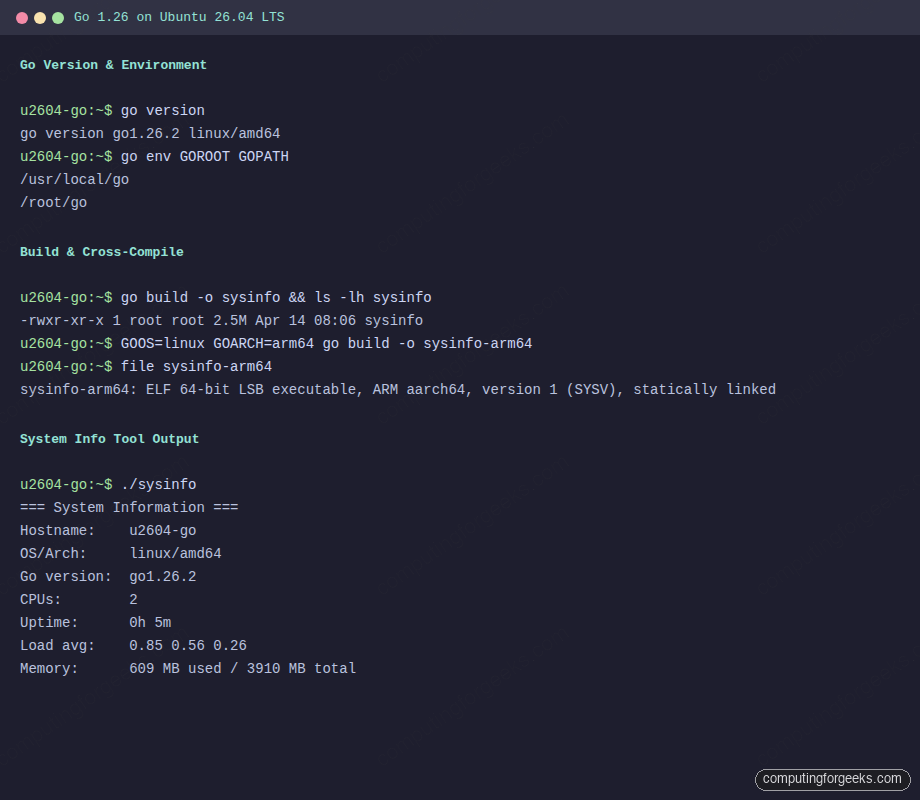
go versionThe output confirms Go 1.26.0 from the Ubuntu repos:
go version go1.26.0 linux/amd64The repo version works for most development workflows. If you need a newer patch release (1.26.2 at the time of writing), use Method 2 instead.
Method 2: Install Go from the Official Tarball
The official tarball from go.dev gives you the latest patch version. This method uses a version detection command so the instructions stay valid when Go 1.26.3 or later ships.
If you have a previous Go installation from the repos, remove it first:
sudo apt remove -y golang-go && sudo apt autoremove -yDetect the latest Go version and download the tarball:
VER=$(curl -sL https://go.dev/VERSION?m=text | head -1 | sed "s/go//")
echo "Latest Go version: $VER"
You should see the detected version string:
Latest Go version: 1.26.2Download and extract to /usr/local:
curl -sL "https://go.dev/dl/go${VER}.linux-amd64.tar.gz" -o /tmp/go.tar.gz
sudo rm -rf /usr/local/go
sudo tar -C /usr/local -xzf /tmp/go.tar.gz
Check that the binary is in place:
/usr/local/go/bin/go versionThe tarball ships the latest patch:
go version go1.26.2 linux/amd64Configure GOPATH and Environment Variables
Go needs GOROOT (where Go is installed) and GOPATH (where your workspace lives) in the shell environment. Setting these system-wide in /etc/profile.d/ ensures every user and login shell picks them up automatically.
Create the environment file:
sudo tee /etc/profile.d/go.sh > /dev/null << 'ENDSCRIPT'
export GOROOT=/usr/local/go
export GOPATH=$HOME/go
export PATH=$GOROOT/bin:$GOPATH/bin:$PATH
ENDSCRIPT
Load the new environment into your current session:
source /etc/profile.d/go.shConfirm the paths are set correctly:
go version
echo "GOROOT=$GOROOT"
echo "GOPATH=$GOPATH"
All three should report clean values:
go version go1.26.2 linux/amd64
GOROOT=/usr/local/go
GOPATH=/root/go
If you installed via apt (Method 1), set GOROOT=/usr/lib/go-1.26 instead and skip the GOROOT/bin in PATH since /usr/bin/go is already on the default path.
Write and Run a Hello World Program
Every Go project starts with go mod init. This creates a go.mod file that tracks the module name and dependencies.
mkdir -p ~/goproject && cd ~/goproject
go mod init goproject
Go initializes the module:
go: creating new go.mod: module goprojectCreate the main Go source file:
cat > main.go << 'GOEOF'
package main

import "fmt"

func greet(name string) string {
	return fmt.Sprintf("Hello, %s! Welcome to Go on Ubuntu 26.04.", name)
}

func main() {
	fmt.Println(greet("World"))
}
GOEOF
Run it directly with go run:
go run main.goYou should see the greeting:
Hello, World! Welcome to Go on Ubuntu 26.04.Build a Compiled Binary
The go build command compiles your code into a single, statically linked binary with no external dependencies. This is one of Go's strongest features for deployment.
go build -o goproject main.go
ls -lh goproject
The binary weighs about 2.3 MB and runs on any Linux x86_64 system without needing Go installed:
-rwxr-xr-x 1 root root 2.3M Apr 14 08:06 goprojectExecute the compiled binary:
./goprojectSame output, but this time from a standalone executable:
Hello, World! Welcome to Go on Ubuntu 26.04.Write and Run Unit Tests
Go has a built-in testing framework. Test files end in _test.go and live alongside the code they test. No third-party test runner needed.
Create a test file for the greet function:
cat > main_test.go << 'GOEOF'
package main

import "testing"

func TestGreet(t *testing.T) {
	got := greet("Gopher")
	want := "Hello, Gopher! Welcome to Go on Ubuntu 26.04."
	if got != want {
		t.Errorf("greet() = %q, want %q", got, want)
	}
}
GOEOF
Run the tests with verbose output:
go test -v ./...The test passes:
=== RUN   TestGreet
--- PASS: TestGreet (0.00s)
PASS
ok  	goproject	0.004s
Build an HTTP Server
Go's net/http package is production-grade out of the box. Many companies run Go HTTP servers directly in production without a reverse proxy. Here is a minimal example that reports the Go version and platform.
Create the server file in a separate directory to avoid the multiple main conflict:
mkdir -p ~/httpserver && cd ~/httpserver
go mod init httpserver
Write the server code:
cat > main.go << 'GOEOF'
package main

import (
	"fmt"
	"log"
	"net/http"
	"runtime"
)

func handler(w http.ResponseWriter, r *http.Request) {
	fmt.Fprintf(w, "Go %s on %s/%s\n", runtime.Version(), runtime.GOOS, runtime.GOARCH)
}

func main() {
	http.HandleFunc("/", handler)
	log.Println("Listening on :8080")
	log.Fatal(http.ListenAndServe(":8080", nil))
}
GOEOF
Start the server in the background and test it with curl:
go run main.go &
curl -s http://localhost:8080/
kill %1
The server responds with the Go runtime info:
Go go1.26.2 on linux/amd64For a production deployment, you would typically put Nginx with TLS in front of the Go binary and manage it with a systemd unit file.
Build a System Info CLI Tool
A more realistic project. This CLI tool reads from /proc to report hostname, CPU count, memory usage, uptime, and load average. It demonstrates Go's standard library for file I/O and string parsing.
mkdir -p ~/sysinfo && cd ~/sysinfo
go mod init sysinfo
Write the tool:
cat > main.go << 'GOEOF'
package main

import (
	"fmt"
	"os"
	"runtime"
	"strings"
	"time"
)

func getHostname() string {
	name, err := os.Hostname()
	if err != nil {
		return "unknown"
	}
	return name
}

func getUptime() string {
	data, err := os.ReadFile("/proc/uptime")
	if err != nil {
		return "unknown"
	}
	var seconds float64
	fmt.Sscanf(string(data), "%f", &seconds)
	d := time.Duration(seconds) * time.Second
	hours := int(d.Hours())
	minutes := int(d.Minutes()) % 60
	return fmt.Sprintf("%dh %dm", hours, minutes)
}

func getLoadAvg() string {
	data, err := os.ReadFile("/proc/loadavg")
	if err != nil {
		return "unknown"
	}
	fields := strings.Fields(string(data))
	if len(fields) >= 3 {
		return fmt.Sprintf("%s %s %s", fields[0], fields[1], fields[2])
	}
	return "unknown"
}

func getMemInfo() (total, used string) {
	data, err := os.ReadFile("/proc/meminfo")
	if err != nil {
		return "unknown", "unknown"
	}
	var memTotal, memAvail int64
	for _, line := range strings.Split(string(data), "\n") {
		if strings.HasPrefix(line, "MemTotal:") {
			fmt.Sscanf(line, "MemTotal: %d kB", &memTotal)
		}
		if strings.HasPrefix(line, "MemAvailable:") {
			fmt.Sscanf(line, "MemAvailable: %d kB", &memAvail)
		}
	}
	totalMB := memTotal / 1024
	usedMB := (memTotal - memAvail) / 1024
	return fmt.Sprintf("%d MB", totalMB), fmt.Sprintf("%d MB", usedMB)
}

func main() {
	fmt.Println("=== System Information ===")
	fmt.Printf("Hostname:    %s\n", getHostname())
	fmt.Printf("OS/Arch:     %s/%s\n", runtime.GOOS, runtime.GOARCH)
	fmt.Printf("Go version:  %s\n", runtime.Version())
	fmt.Printf("CPUs:        %d\n", runtime.NumCPU())
	fmt.Printf("Uptime:      %s\n", getUptime())
	fmt.Printf("Load avg:    %s\n", getLoadAvg())
	total, used := getMemInfo()
	fmt.Printf("Memory:      %s used / %s total\n", used, total)
}
GOEOF
Build and run:
go build -o sysinfo
./sysinfo
The tool reports live system data:
=== System Information ===
Hostname:    u2604-go
OS/Arch:     linux/amd64
Go version:  go1.26.2
CPUs:        2
Uptime:      0h 5m
Load avg:    0.85 0.56 0.26
Memory:      609 MB used / 3910 MB total
Cross-Compilation
Go cross-compiles to any supported platform with two environment variables. No extra toolchains, no Docker, no QEMU. This is one of the reasons Go is popular for CLI tools and microservices that need to run on ARM servers or different operating systems. For even stricter memory safety guarantees without a garbage collector, Rust is the other compiled language gaining traction in systems programming.
Build the sysinfo tool for ARM64 Linux (common on AWS Graviton, Raspberry Pi, Oracle Cloud):
cd ~/sysinfo
GOOS=linux GOARCH=arm64 go build -o sysinfo-arm64
Compare the two binaries:
file sysinfo sysinfo-arm64The file command confirms different architectures:
sysinfo:       ELF 64-bit LSB executable, x86-64, version 1 (SYSV), statically linked, ...
sysinfo-arm64: ELF 64-bit LSB executable, ARM aarch64, version 1 (SYSV), statically linked, ...
Other useful targets include GOOS=darwin GOARCH=arm64 for macOS Apple Silicon and GOOS=windows GOARCH=amd64 for Windows. Run go tool dist list for the full list of supported platform combinations.
Install and Run golangci-lint
golangci-lint bundles dozens of Go linters into one fast runner. It catches bugs, style issues, and performance problems that the compiler misses. Most Go projects use it in CI pipelines.
Install the latest version:
curl -sSfL https://raw.githubusercontent.com/golangci/golangci-lint/HEAD/install.sh | sh -s -- -b $(go env GOPATH)/binThe installer downloads the binary to your GOPATH:
golangci/golangci-lint info checking GitHub for latest tag
golangci/golangci-lint info found version: 2.11.4 for v2.11.4/linux/amd64
golangci/golangci-lint info installed /root/go/bin/golangci-lint
Check the version:
golangci-lint --versionConfirms it was built with Go 1.26:
golangci-lint has version 2.11.4 built with go1.26.1 from 8f3b0c7e on 2026-03-22T17:35:14ZRun the linter on the sysinfo project:
cd ~/sysinfo
golangci-lint run
The default linters flag unchecked error returns from fmt.Sscanf:
main.go:25:12: Error return value of `fmt.Sscanf` is not checked (errcheck)
	fmt.Sscanf(string(data), "%f", &seconds)
main.go:52:14: Error return value of `fmt.Sscanf` is not checked (errcheck)
	fmt.Sscanf(line, "MemTotal: %d kB", &memTotal)
main.go:55:14: Error return value of `fmt.Sscanf` is not checked (errcheck)
	fmt.Sscanf(line, "MemAvailable: %d kB", &memAvail)
3 issues:
* errcheck: 3
These are valid findings. In production code, you would handle the error return from Sscanf or explicitly discard it with _ = to signal intent. This is exactly the kind of issue that golangci-lint is designed to catch before code reaches production.
Go Toolchain Quick Reference
Here is a quick summary of the core go subcommands you will use regularly. If you are coming from Node.js or Python, go mod is the equivalent of npm/pip for dependency management.
| Command | Purpose |
|---|---|
go mod init <module> | Initialize a new module (creates go.mod) |
go get <package> | Add or update a dependency |
go mod tidy | Remove unused dependencies, add missing ones |
go run . | Compile and run without producing a binary |
go build -o <name> | Compile to a standalone binary |
go test -v ./... | Run all tests recursively |
go vet ./... | Find subtle bugs the compiler misses |
go fmt ./... | Auto-format code to Go standard style |
Go 1.26 vs Go 1.22 (Ubuntu 26.04 vs 24.04)
If you are upgrading from Ubuntu 24.04 LTS (which shipped Go 1.22), here are the key differences. Go's backwards compatibility guarantee means your existing code will compile without changes, but the newer toolchain brings real improvements.
| Feature | Go 1.22 (Ubuntu 24.04) | Go 1.26 (Ubuntu 26.04) |
|---|---|---|
| Default repo version | 1.22 | 1.26 |
| Range-over-func | Experimental (GOEXPERIMENT) | Stable, production-ready |
| Loop variable scoping | New per-iteration scoping introduced | Fully enforced, old behavior removed |
| Toolchain management | Basic toolchain directive | Mature auto-download and version switching |
| Build performance | Baseline | Faster compilation, improved linker |
| Standard library | Pre-structured logging maturity | Enhanced log/slog, new iterator patterns |
| golangci-lint compat | v1.x series | v2.x series (major rewrite) |
The loop variable fix alone is worth the upgrade. In Go 1.22 and earlier, loop variables in goroutines were a common source of race conditions. Go 1.26 closes that chapter entirely. If you are containerizing Go applications, you can build Docker images on Ubuntu 26.04 with the same Go binary for minimal container sizes.