Do you want to kill a long running task in RHEV / oVirt Virtualization environment?. In oVirt/RHEV, a task is an operation that has state. If an operation can begin, process something and finish it is a Task.
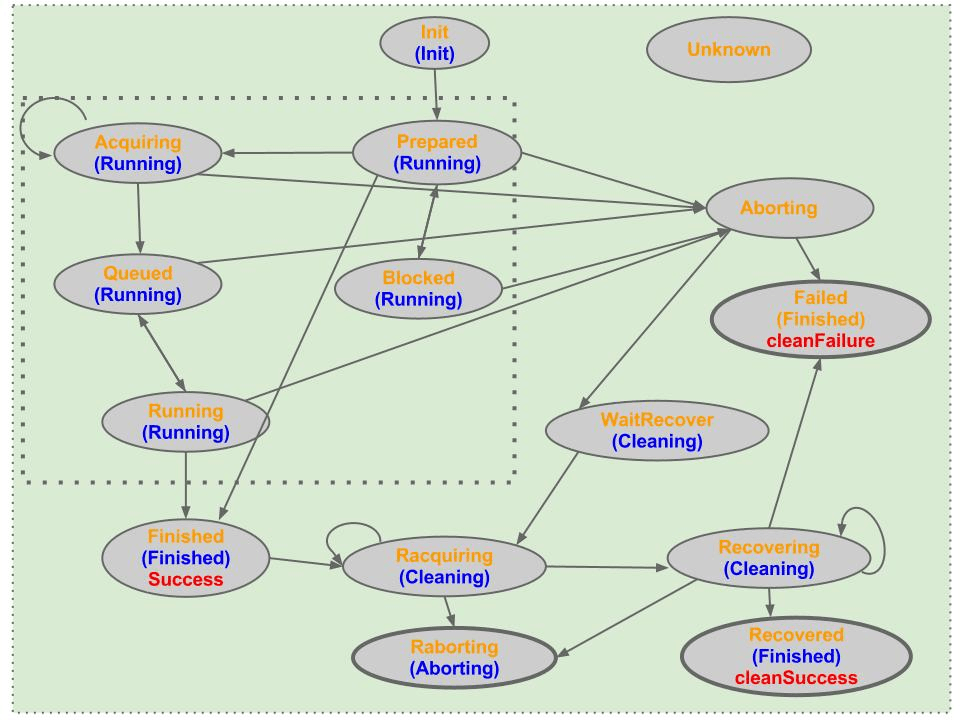
There are two major types of operations in oVirt:
- Sync operations – This is not a task from the engine. It returns immediately after the request from Vdsm. The operation fails if failure occurred before the response is retrieved.
- Async Operations – The Vdsm and engine contain states for these operations. The states implies that the operation needs to pass some actions before returns. Most of those operations are storage related. Engine should correlate with Vdsm task’s IDs and states to distinguish the result by polling the information.
You can check a list of currently running tasks vdsm-client command.
$ sudo vdsm-client Host getAllTasksInfo
{
    "9022a6e0-06cf-4066-b9f7-cbe23ffe851e": {
        "verb": "copyImage",
        "id": "9022a6e0-06cf-4066-b9f7-cbe23ffe851e"
    },
    "954d8ea4-6ab6-4ec5-9d1a-3374ec106a8c": {
        "verb": "prepareMerge",
        "id": "954d8ea4-6ab6-4ec5-9d1a-3374ec106a8c"
    },
    "c3fb509c-0554-4f10-9f73-32d346ccf012": {
        "verb": "copyImage",
        "id": "c3fb509c-0554-4f10-9f73-32d346ccf012"
    }
}
Once you get the ID of a task, you can get task status with the command:
sudo vdsm-client Task getStatus taskID=<TASKID>See example below.
$ sudo vdsm-client Task getStatus taskID=c3fb509c-0554-4f10-9f73-32d346ccf012
{
    "message": "running job 1 of 1",
    "code": 0,
    "taskID": "c3fb509c-0554-4f10-9f73-32d346ccf012",
    "taskResult": "",
    "taskState": "running"
}
To kill a Task in oVirt / RHEV, use:
sudo vdsm-client Task stop taskID=<TaskID>
sudo vdsm-client Task clear taskID=<TaskID>
Confirm if the task is still running or has been killed/terminated.
sudo vdsm-client Host getAllTasksInfoCheck other oVirt related guides: