

Cinnamon is a free and open-source desktop environment for the X Window System. Cinnamon is derived from GNOME 3 but follows traditional desktop metaphor conventions. It strives to be the best desktop environment for Linux by offering speed, flexibility, and a slew of features.
The default installation of Fedora comes with a Gnome Desktop Environment. For some, Gnome is slow and doesn’t have a clean look. Cinnamon could be the snappy Desktop Environment you’re looking for your Fedora desktop installation. The Cinnamon Control Center gives you centralized access to many of the desktop configuration options.
Install Cinnamon Desktop Environment
Installing Cinnamon Desktop Environment on Fedora is as easy as running a few dnf install commands:
Fedora 41+:
sudo dnf group install cinnamon-desktopFedora 40 and below:
sudo dnf group install "Cinnamon Desktop"Be informed that this installs a number of packages and the process may take longer depending on your internet speed.
...
Transaction Summary
======================================================================================================================================================================================================
Install  1032 Packages

Total download size: 1.2 G
Installed size: 3.4 G
Is this ok [y/N]: y
Boot to Cinnamon Desktop Environment
After finishing installation of Cinnamon group packages, you should be ready to boot into your new Cinnamon Desktop Environment.
Reboot your system or logout.
sudo rebootOn the login screen, select “Cinnamon” under the list of Desktop sessions available.
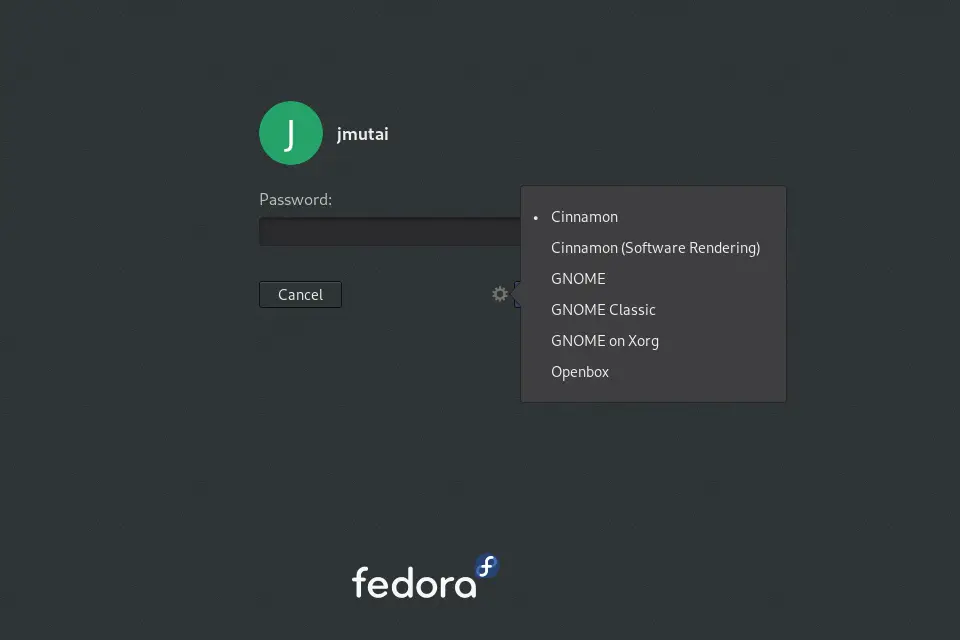
For server editions, you can edit ~/.xinitrc to set Cinnamon session.
echo "exec /usr/bin/cinnamon-session" >> ~/.xinitrcAfter adding the line, you can reboot your Desktop instance or switch to Cinnamon Desktop Environment using the startxcommand:
startxThe Cinnamon Desktop Environment on Fedora should look like below on the first launch.

You can check the version of Cinnamon installed from the system information panel. Enjoy using Cinnamon Desktop Environment on Fedora and keep watching for other articles on Fedora.
KDE Desktop Environment on Fedora: Install KDE Plasma Desktop Environment on Fedora
Similar articles.

Long time ago, installing several different desktops was very common but it was know that some compatibilities appear, specially if the different desktops are based on the same main desktop like in this case GNOME and Cinnamon. Are there any caveats for installing both? Work the OS and all the updates smoothly after installing both?
I have both installed and I haven’t noticed any issues so far.
We are happy to hear that @Gianni