

In this article we are going to cover the process of installing and using CakePHP framework on Ubuntu 24.04. If this word is new to you, CakePHP is a widely used open source application framework written in PHP for use in the development of web applications. It is similar to Laravel. Its design pattern follows the MVC (Model-View-Controller) ensuring the code is well organized and easy to maintain. Just so you know, MVC pattern has three defined separated logics – Application logic (Model), Presentation (View), and User interaction control (Controller).
Anyone can download, customize and use CakePHP since it’s free and open source. By adopting CakePHP your web development process is streamlined as it gives you access to hundreds of pre-build functionalities and libraries that you don’t need to build from scratch. For functions such as user authentication and database interactions, they are available for use by default. CakePHP is also secure by design and it prevents common web attacks like SQL injection and cross-site scripting (XSS).
[ebook product=”2″ theme=”dark”]
Here is the process used to install and use CakePHP PHP Framework on Ubuntu 24.04.
Step 1 – Install PHP
CakePHP is written on PHP and for use when creating web applications in PHP programming language. Install PHP and all other components by running the following commands.
sudo apt update
apt install php php-cli php-intl php-json php-pdo php-mysql php-zip php-gd  php-mbstring php-curl php-xml php-pear php-bcmath
Check the version of PHP
$ php --version
PHP 8.3.6 (cli) (built: Apr 15 2024 19:21:47) (NTS)
Copyright (c) The PHP Group
Zend Engine v4.3.6, Copyright (c) Zend Technologies
    with Zend OPcache v8.3.6, Copyright (c), by Zend Technologies
Loaded PHP modules can be checked with the following commands.
php -mStep 2 – Install PHP Composer
Composer is a command line tool used to manage application dependencies in PHP. Think of it as exact alternatives to pip used in Python, and npm used in Node.js. The main work of Composer is to simplify management of external libraries with versions required by your application to run.
Run the following commands to install Composer on your Ubuntu 24.04 system.
php -r "copy('https://getcomposer.org/installer', 'composer-setup.php');"
php composer-setup.php
sudo mv composer.phar /usr/local/bin/composer
Step 3 – Install CakePHP on Ubuntu 24.04
We can now perform the installation of CakePHP on our Ubuntu 24.04 using Composer.
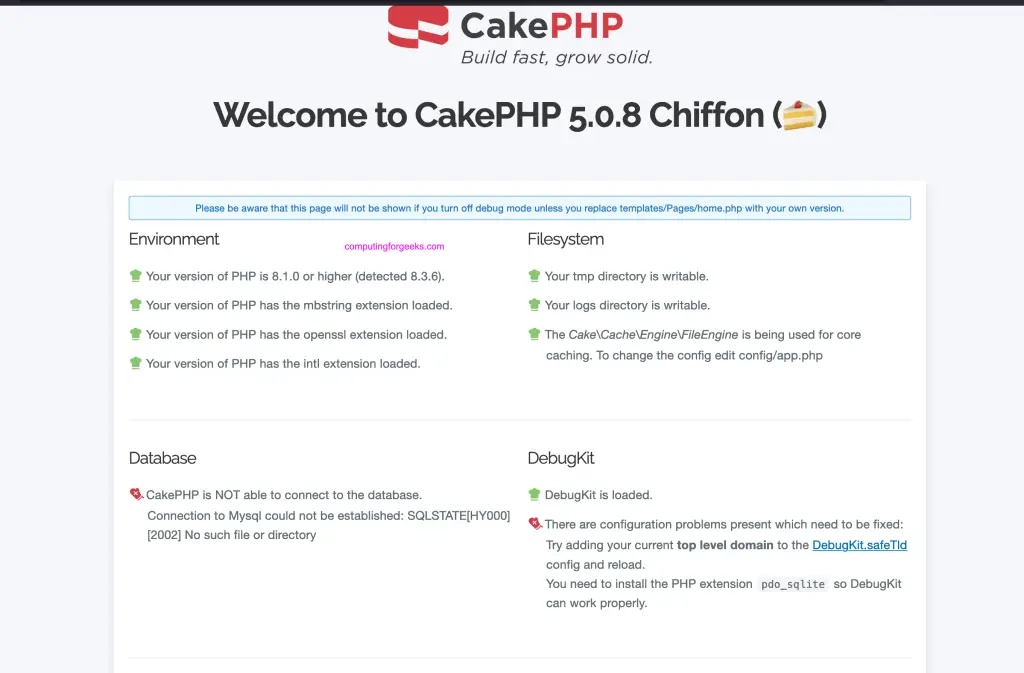
Check if composer CLI tool is working on the system.
$ composer --version
Composer version 2.7.7 2024-06-10 22:11:12
PHP version 8.3.6 (/usr/bin/php8.3)
Create a new directory for your CakePHP test project – Run as non root user.
mkdir cakephp_projectsNavigate to the created directory.
cd cakephp_projectsInstall CakePHP using composer by initializing new project. Here we call it mycake-app.
composer create-project cakephp/app mycake-appSample output from command execution.
.....
  - Installing mobiledetect/mobiledetectlib (3.74.3): Extracting archive
  - Installing sebastian/version (4.0.1): Extracting archive
  - Installing sebastian/type (4.0.0): Extracting archive
  - Installing sebastian/recursion-context (5.0.0): Extracting archive
  - Installing sebastian/object-reflector (3.0.0): Extracting archive
  - Installing sebastian/object-enumerator (5.0.0): Extracting archive
  - Installing sebastian/global-state (6.0.2): Extracting archive
  - Installing sebastian/exporter (5.1.2): Extracting archive
  - Installing sebastian/environment (6.1.0): Extracting archive
  - Installing sebastian/diff (5.1.1): Extracting archive
  - Installing sebastian/comparator (5.0.1): Extracting archive
  - Installing sebastian/code-unit (2.0.0): Extracting archive
  - Installing sebastian/cli-parser (2.0.1): Extracting archive
  - Installing phpunit/php-timer (6.0.0): Extracting archive
  - Installing phpunit/php-text-template (3.0.1): Extracting archive
  - Installing phpunit/php-invoker (4.0.0): Extracting archive
  - Installing phpunit/php-file-iterator (4.1.0): Extracting archive
  - Installing theseer/tokenizer (1.2.3): Extracting archive
  - Installing sebastian/lines-of-code (2.0.2): Extracting archive
  - Installing sebastian/complexity (3.2.0): Extracting archive
  - Installing sebastian/code-unit-reverse-lookup (3.0.0): Extracting archive
  - Installing phpunit/php-code-coverage (10.1.14): Extracting archive
  - Installing phar-io/version (3.2.1): Extracting archive
  - Installing phar-io/manifest (2.0.4): Extracting archive
  - Installing myclabs/deep-copy (1.12.0): Extracting archive
  - Installing phpunit/phpunit (10.5.20): Extracting archive
17 package suggestions were added by new dependencies, use `composer suggest` to see details.
Generating autoload files
58 packages you are using are looking for funding.
Use the `composer fund` command to find out more!
PHP CodeSniffer Config installed_paths set to ../../cakephp/cakephp-codesniffer,../../slevomat/coding-standard
No security vulnerability advisories found.
> App\Console\Installer::postInstall
Created `config/app_local.php` file
....
To access CakePHP web interface, run the commands below.
$ cd  mycake-app
$ ./bin/cake server -H 0.0.0.0 -p 8099
Welcome to CakePHP v5.0.8 Console
-------------------------------------------------------------------------------
App : src
Path: /home/dev/cakephp_projects/mycake-app/src/
DocumentRoot: /home/dev/cakephp_projects/mycake-app/webroot
Ini Path:
-------------------------------------------------------------------------------
built-in server is running in http://0.0.0.0:8099/
You can exit with `CTRL-C`
[Fri Jun 14 07:45:48 2024] PHP 8.3.6 Development Server (http://0.0.0.0:8099) started
Access CakePHP web console on http://ServerIP:8099
Press CTRL+C to exit the terminal console.
Step 4 – Create sample application
Create new controller code.
tee  src/Controller/HelloController.php<<EOF
<?php

namespace App\Controller;

class HelloController extends AppController
{
    public function index()
    {
    }
}
EOF
Create template
mkdir templates/Hello
tee templates/Hello/index.php<<EOF
<!DOCTYPE html>
<html lang="en">
<head>
<meta http-equiv="Content-Type" content="text/html; charset=UTF-8" />
<title>Hello World from CakePHP</title>
</head>
<body>
<div style="width: 100%; font-size: 40px; font-weight: bold; text-align: center;">
Hello to everyone using CakePHP Framework!
</div>
</body>
</html>
EOF
Test your code.
./bin/cake server -H 0.0.0.0 -p 8099Access your test app on http://ServerIP:8099/Hello
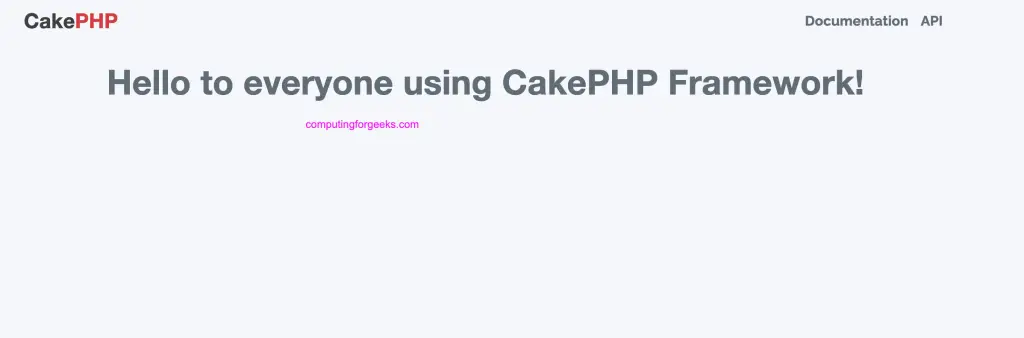
We have successfully installed and tested CakePHP in this article. The next steps will be to read through CakePHP project documentation pages to get better understanding on what it does, and available functionalities that you can take advantage of.
