Two name servers, one zone, and a TSIG key to glue them together. That is the smallest authoritative DNS lab that still resembles the real thing, and it is worth standing up before you ever touch a public registrar. This guide builds it on Rocky Linux 10 with BIND 9.18, walks the master and slave through their first zone transfer, and then proves the NOTIFY → IXFR loop works by editing a record on the master and watching it propagate.
Rocky Linux 10 ships BIND in the AppStream repo with a mostly sensible named.conf template, SELinux enforcing by default, and firewalld already there to stand in front of port 53. The work is in the zone files, the TSIG key shared between the two boxes, and the allow-transfer stanza that gates AXFR. Everything below was tested on Rocky Linux 10.1 with BIND 9.18.33 on a flat /24 lab, with the slave pulling both a forward and a reverse zone over a TSIG-signed channel.
Verified April 2026 on Rocky Linux 10.1 (kernel 6.12), BIND 9.18.33 ESV, SELinux enforcing, firewalld active
Lab topology
Two Rocky Linux 10 VMs on the same Layer 2 network. ns1 holds the master zone files; ns2 acts as a slave and pulls AXFR/IXFR over TSIG. A third “admin” host on the same subnet runs dig against both servers to confirm answers match.
| Role | Hostname | IP | RAM / vCPU / Disk |
|---|---|---|---|
| Master | ns1 | 10.0.1.10 | 1.5 GB / 1 / 15 GB |
| Slave | ns2 | 10.0.1.11 | 1.5 GB / 1 / 15 GB |
| Domain | example.lab (forward) and 1.0.10.in-addr.arpa (reverse) | ||
BIND 9.18 is the Extended Support Version, current through mid-2027, which makes it the right choice for a server build that should survive a couple of EL10 minor bumps without re-platforming.
Prerequisites
- Two Rocky Linux 10 (or AlmaLinux 10) servers, sudo user, SSH access
- Static IPs and matching
/etc/hostsentries on both nodes - SELinux in enforcing mode (default) and firewalld installed
- Outbound DNS allowed if you want the recursive root hints to refresh
- Tested on: Rocky Linux 10.1, BIND 9.18.33, kernel 6.12.0-124
If you are starting from a stock cloud-init image, the Rocky Linux 10 post-install checklist covers timezone, hostname, and SSH baseline. Run that on both nodes before you start.
Step 1: Set reusable shell variables
The IPs, zone name, and TSIG key name show up dozens of times in commands and config files. Pull them into shell variables once so you change one block and paste the rest:
export NS1_IP="10.0.1.10"
export NS2_IP="10.0.1.11"
export ZONE_NAME="example.lab"
export REVERSE_ZONE="1.0.10.in-addr.arpa"
export TSIG_NAME="transfer-key"
export ADMIN_EMAIL="admin.example.lab."
Confirm they are populated before going further. An empty variable in a later sed step will silently corrupt your named.conf:
echo "ns1=${NS1_IP} ns2=${NS2_IP} zone=${ZONE_NAME} rev=${REVERSE_ZONE} tsig=${TSIG_NAME}"Re-run the export block whenever you reconnect or jump into sudo -i because root’s environment does not inherit your unprivileged user’s exports.
Step 2: Prepare both VMs
Set hostnames, sync time, and write cross-references into /etc/hosts so the two boxes can resolve each other even when DNS itself is the thing you are debugging.
On ns1:
sudo hostnamectl set-hostname ns1.example.lab
sudo timedatectl set-timezone UTC
sudo systemctl enable --now chronyd
On ns2:
sudo hostnamectl set-hostname ns2.example.lab
sudo timedatectl set-timezone UTC
sudo systemctl enable --now chronyd
On both nodes, append host entries so each name server knows the other by name regardless of DNS state:
echo "${NS1_IP} ns1.example.lab ns1" | sudo tee -a /etc/hosts
echo "${NS2_IP} ns2.example.lab ns2" | sudo tee -a /etc/hosts
Confirm SELinux is still enforcing. Disabling it to make BIND work is the wrong fix on Rocky 10, the policy that ships with the bind package already covers everything we need:
getenforceExpected output:
EnforcingIf getenforce reports Permissive or Disabled, switch back to enforcing with sudo setenforce 1 and confirm SELINUX=enforcing in /etc/selinux/config. The BIND policy module assumes enforcing mode.
Step 3: Install BIND on both nodes
The bind package brings the named daemon, rndc, and the SELinux policy module. bind-utils gives you dig, host, and nslookup for testing:
sudo dnf install -y bind bind-utilsCheck the installed version. The ESV channel matters because long-lived DNS infrastructure should not chase the latest non-LTS BIND release:
rpm -q bind
named -v
You should see something like:
bind-9.18.33-10.el10_1.3.x86_64
BIND 9.18.33 (Extended Support Version) <id:>
Both nodes now have an identical BIND build, the daemon binary, and the diagnostic tools you will lean on for the rest of this guide.
Step 4: Generate the TSIG key for zone transfers
Allowing zone transfers based on IP alone is a 2003 pattern. Anyone who can spoof the source address gets your full zone. TSIG signs every AXFR/IXFR with a shared HMAC secret, so the slave can prove it is the slave before any record leaves the master.
On ns1, generate an HMAC-SHA256 key:
sudo tsig-keygen -a hmac-sha256 "${TSIG_NAME}" | sudo tee /etc/named.tsig.key
sudo chown root:named /etc/named.tsig.key
sudo chmod 640 /etc/named.tsig.key
The output looks like this and is what gets written to the file:
key "transfer-key" {
    algorithm hmac-sha256;
    secret "ELpnyip6LqJ3VRmcE9JOupVGWPvWvwgceSVVnLrAl50=";
};
Copy the same file to ns2. Both servers must present an identical secret for the signed transfer to succeed:
sudo scp /etc/named.tsig.key rocky@${NS2_IP}:/tmp/transfer-key
ssh rocky@${NS2_IP} 'sudo install -o root -g named -m 640 /tmp/transfer-key /etc/named.tsig.key && rm /tmp/transfer-key'
Group named needs read access. Mode 640 with owner root and group named is the smallest permission set that still lets named load the key on startup.
Step 5: Configure the master (ns1)
The master serves the authoritative zone, signs outbound AXFR/IXFR with TSIG, and sends NOTIFY messages to the slave whenever the serial bumps. Open /etc/named.conf in your editor:
sudo vi /etc/named.confReplace the contents with the following. The NS2_IP_HERE placeholders get rewritten in the next step:
include "/etc/named.tsig.key";

acl trusted {
    10.0.1.0/24;
    127.0.0.1;
};

options {
    listen-on port 53 { any; };
    listen-on-v6 port 53 { ::1; };
    directory       "/var/named";
    dump-file       "/var/named/data/cache_dump.db";
    statistics-file "/var/named/data/named_stats.txt";

    allow-query     { trusted; };
    allow-transfer  { key "transfer-key"; };
    recursion       no;

    notify          yes;
    also-notify     { NS2_IP_HERE; };

    dnssec-validation no;

    pid-file        "/run/named/named.pid";
    session-keyfile "/run/named/session.key";

    managed-keys-directory "/var/named/dynamic";
};

logging {
    channel default_debug {
        file "data/named.run";
        severity dynamic;
    };
    channel query_log {
        file "/var/named/data/queries.log" versions 3 size 5m;
        severity info;
        print-time yes;
    };
    category queries  { query_log; };
    category xfer-in  { default_debug; };
    category xfer-out { default_debug; };
    category notify   { default_debug; };
};

zone "." IN {
    type hint;
    file "named.ca";
};

zone "example.lab" IN {
    type master;
    file "/var/named/example.lab.db";
    allow-update   { none; };
    allow-transfer { key "transfer-key"; };
    notify         yes;
};

zone "1.0.10.in-addr.arpa" IN {
    type master;
    file "/var/named/1.0.10.in-addr.arpa.db";
    allow-update   { none; };
    allow-transfer { key "transfer-key"; };
};

include "/etc/named.rfc1912.zones";
include "/etc/named.root.key";
Substitute the slave IP into the placeholder using the shell variable:
sudo sed -i "s/NS2_IP_HERE/${NS2_IP}/g" /etc/named.conf
grep also-notify /etc/named.conf
Two important choices in this config: recursion no turns off open-resolver behavior because this box is authoritative, not a cache for clients, and allow-transfer { key "transfer-key"; } means an AXFR request without a valid TSIG signature gets refused. The also-notify stanza tells the master to push NOTIFY messages to the slave’s IP after a zone reload, which is what makes IXFR feel instant in normal operation.
Step 6: Write the forward zone file
Open the forward zone file:
sudo vi /var/named/example.lab.dbPaste the zone definition. The YYYYMMDDnn serial format is conventional and human-debuggable, anything monotonically increasing works as long as you remember to bump it on every change:
$TTL 86400
@   IN  SOA ns1.example.lab. admin.example.lab. (
            2026042501  ; Serial (YYYYMMDDnn)
            3600        ; Refresh
            1800        ; Retry
            604800      ; Expire
            86400 )     ; Minimum TTL
;
; Name servers
@           IN  NS      ns1.example.lab.
@           IN  NS      ns2.example.lab.
;
; A records for name servers
ns1         IN  A       10.0.1.10
ns2         IN  A       10.0.1.11
;
; Mail
@           IN  MX  10  mail.example.lab.
mail        IN  A       10.0.1.50
;
; Service hosts
www         IN  A       10.0.1.20
web         IN  A       10.0.1.20
db          IN  A       10.0.1.30
app         IN  A       10.0.1.40
;
; Aliases
ftp         IN  CNAME   www.example.lab.
Now the reverse zone for the same /24:
sudo vi /var/named/1.0.10.in-addr.arpa.dbAdd PTR records for every host that has an A record in the forward zone. Mismatches between forward and reverse trip up mail servers, certificate validation, and security tools:
$TTL 86400
@   IN  SOA ns1.example.lab. admin.example.lab. (
            2026042501  ; Serial
            3600        ; Refresh
            1800        ; Retry
            604800      ; Expire
            86400 )     ; Minimum TTL
;
@           IN  NS      ns1.example.lab.
@           IN  NS      ns2.example.lab.
;
10          IN  PTR     ns1.example.lab.
11          IN  PTR     ns2.example.lab.
20          IN  PTR     www.example.lab.
30          IN  PTR     db.example.lab.
40          IN  PTR     app.example.lab.
50          IN  PTR     mail.example.lab.
Fix ownership so named can read the zone files and SELinux honors the named_zone_t context the package shipped:
sudo chown root:named /var/named/example.lab.db /var/named/1.0.10.in-addr.arpa.db
sudo chmod 640 /var/named/example.lab.db /var/named/1.0.10.in-addr.arpa.db
sudo restorecon -v /var/named/*.db
The restorecon step puts the SELinux file context back to named_zone_t after editing, which is the label the policy expects on every file under /var/named/.
Step 7: Validate the config before starting named
BIND ships two checkers. named-checkconf parses named.conf and complains about syntax errors, missing files, or broken includes. named-checkzone validates an individual zone file against its own SOA and answers a few common operational questions (“does every NS have a matching A record?”).
sudo named-checkconf
sudo named-checkzone "${ZONE_NAME}" /var/named/example.lab.db
sudo named-checkzone "${REVERSE_ZONE}" /var/named/1.0.10.in-addr.arpa.db
A clean run prints the loaded serial and OK:
zone example.lab/IN: loaded serial 2026042501
OK
zone 1.0.10.in-addr.arpa/IN: loaded serial 2026042501
OK
If named-checkconf exits silently it means no error, no news is good news. If it prints anything, fix that first because named will refuse to start.
Step 8: Open the firewall and start named on the master
DNS uses 53/udp for normal queries and 53/tcp for responses larger than 512 bytes (which includes every AXFR). The dns firewalld service opens both:
sudo firewall-cmd --add-service=dns --permanent
sudo firewall-cmd --reload
sudo firewall-cmd --list-services
Start named and ask rndc for a status report:
sudo systemctl enable --now named
sudo systemctl is-active named
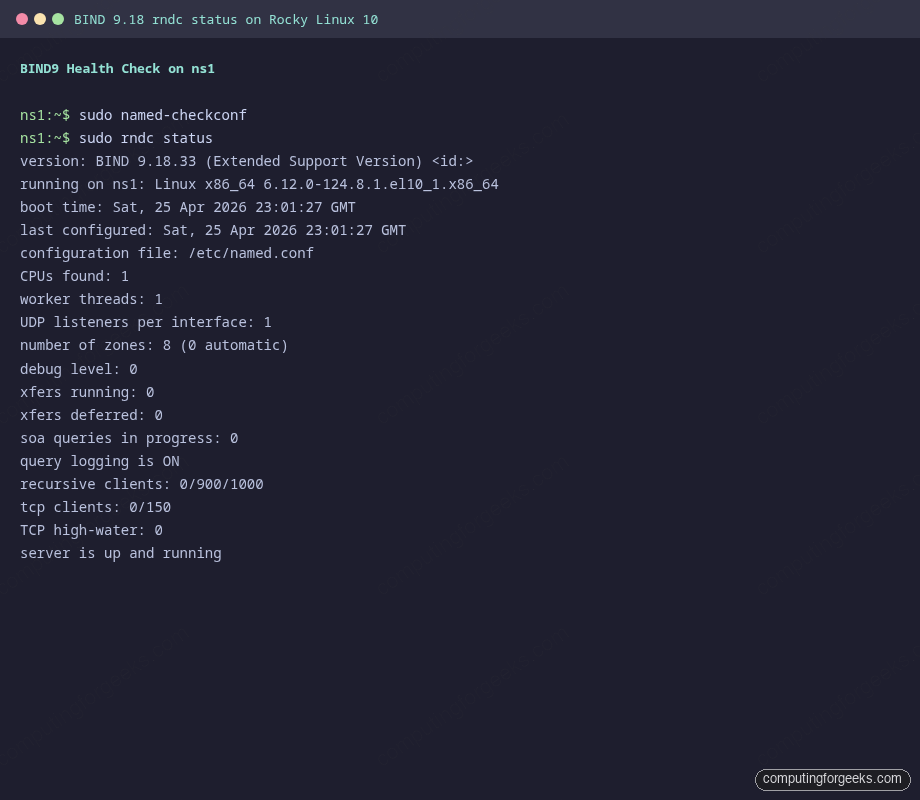
sudo rndc status
The rndc status output should show “server is up and running” along with the zone count, configuration file, and query logging state. This is the canonical “did it actually start” check.
Run a local query against the master to confirm authoritative answers come back. Use the +aaonly flag to make the AA bit clearly visible in the response header:
dig @127.0.0.1 web.example.lab +noall +answer +authority
dig @127.0.0.1 example.lab SOA +short
The first command returns the A record plus the NS rrset, the second returns the SOA on a single line. If either query times out, named is bound to the wrong interface or the firewall is blocking 53.
Step 9: Configure the slave (ns2)
The slave config is shorter because it owns no zone data, only a pointer to the master and the TSIG key required to authenticate the transfer. Open named.conf on ns2:
sudo vi /etc/named.confReplace the contents with this slave configuration. The NS1_IP_HERE placeholder gets substituted in the next step:
include "/etc/named.tsig.key";

acl trusted {
    10.0.1.0/24;
    127.0.0.1;
};

server NS1_IP_HERE {
    keys { "transfer-key"; };
};

options {
    listen-on port 53 { any; };
    listen-on-v6 port 53 { ::1; };
    directory       "/var/named";
    dump-file       "/var/named/data/cache_dump.db";

    allow-query     { trusted; };
    allow-transfer  { key "transfer-key"; };
    recursion       no;
    dnssec-validation no;

    pid-file        "/run/named/named.pid";
    session-keyfile "/run/named/session.key";
};

logging {
    channel default_debug {
        file "data/named.run";
        severity dynamic;
    };
    channel xfer_log {
        file "/var/named/data/xfer.log" versions 3 size 5m;
        severity info;
        print-time yes;
    };
    category xfer-in { xfer_log; };
    category notify  { xfer_log; };
};

zone "." IN {
    type hint;
    file "named.ca";
};

zone "example.lab" IN {
    type slave;
    file "slaves/example.lab.db";
    masters       { NS1_IP_HERE key "transfer-key"; };
    allow-notify  { NS1_IP_HERE; };
};

zone "1.0.10.in-addr.arpa" IN {
    type slave;
    file "slaves/1.0.10.in-addr.arpa.db";
    masters       { NS1_IP_HERE key "transfer-key"; };
    allow-notify  { NS1_IP_HERE; };
};

include "/etc/named.rfc1912.zones";
include "/etc/named.root.key";
The server stanza at the top tells BIND to sign every outbound query to the master with the TSIG key, including the AXFR request itself. Without it the slave would happily request an unsigned transfer and the master would refuse.
Substitute the real IP and validate:
sudo sed -i "s/NS1_IP_HERE/${NS1_IP}/g" /etc/named.conf
sudo named-checkconf
sudo firewall-cmd --add-service=dns --permanent
sudo firewall-cmd --reload
sudo systemctl enable --now named
The slave starts cold, no zone files yet. Watch the next step closely because that is where the master and slave first talk to each other.
Step 10: Verify the zone transfer
After the slave starts, named requests an AXFR for every slave zone listed in its config. Check the slaves/ directory on ns2 and the dedicated transfer log:
sudo ls -la /var/named/slaves/
sudo tail -20 /var/named/data/xfer.log
You should see the two slave zone files written with owner named, and log entries showing the TSIG-authenticated transfer succeeded:
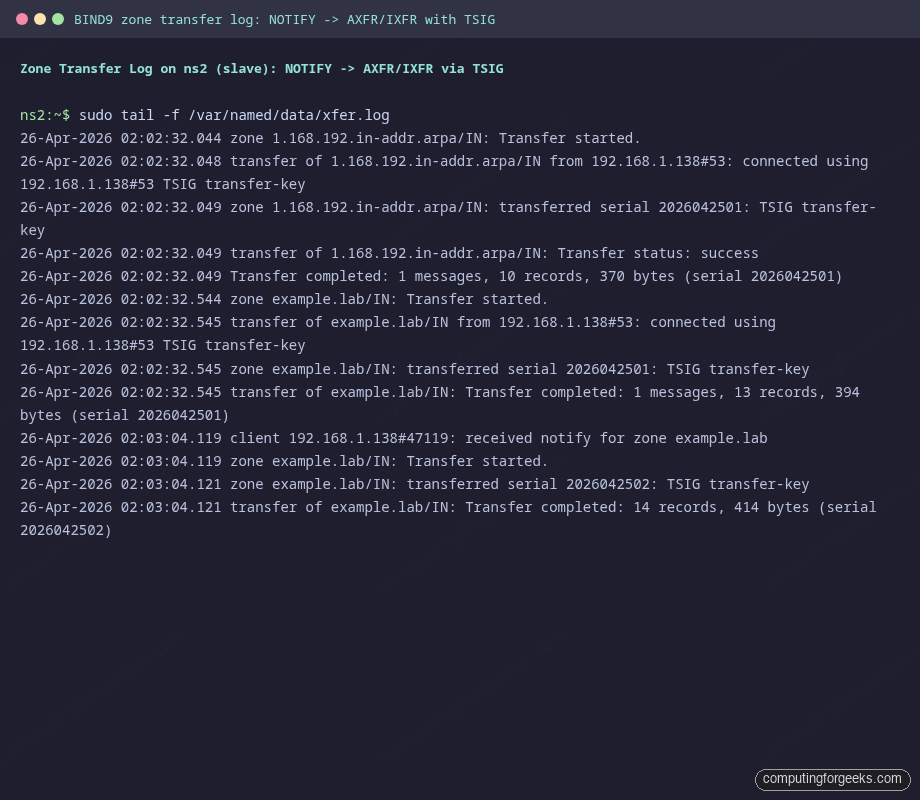
Each successful transfer log line includes the source IP, the TSIG key name, and the serial that was loaded. If you see “REFUSED” or “TSIG verify failure” instead, the secret on the slave does not match the master, or the server stanza is missing from the slave config.
Cross-check from a third host. Querying both servers should return identical answers:
dig @${NS1_IP} web.example.lab +noall +answer +authority
dig @${NS2_IP} web.example.lab +noall +answer +authority
dig @${NS1_IP} example.lab SOA +short
dig @${NS2_IP} example.lab SOA +short
Both SOA queries should return the exact same serial. Anything else means the slave failed to refresh and is serving stale data:
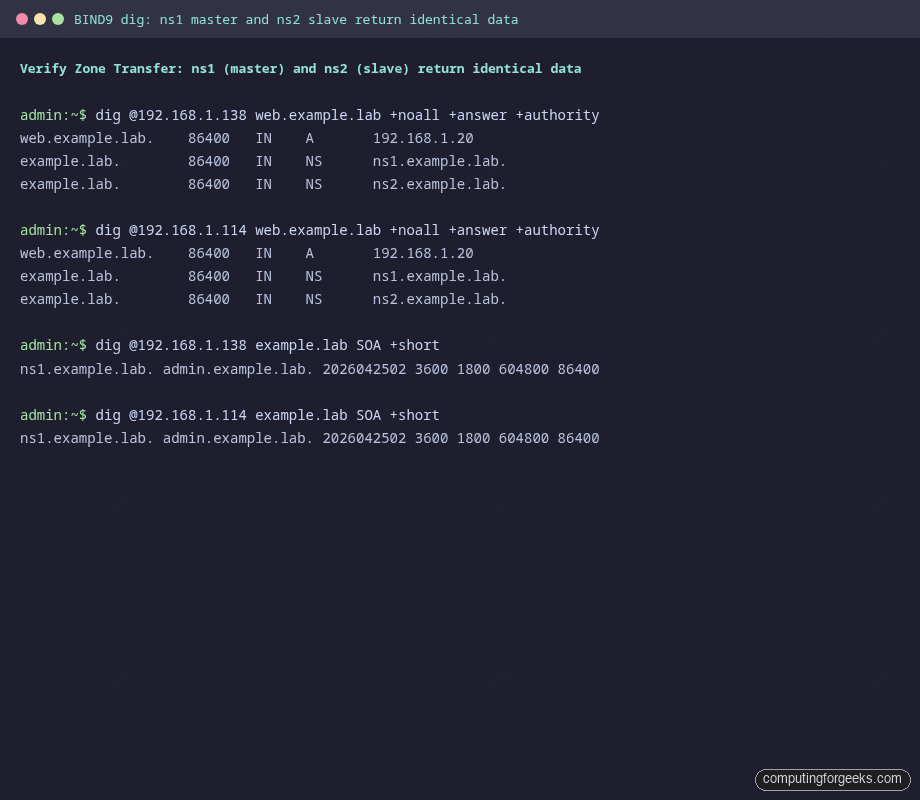
Initial AXFR is the easy part. The harder test is whether subsequent edits propagate without manual intervention.
Step 11: Add records and watch propagation
The interesting test is whether NOTIFY → IXFR actually works. Add a new A record on the master, bump the SOA serial by one, then ask the slave for it within a few seconds.
On ns1, edit the forward zone:
sudo vi /var/named/example.lab.dbChange the serial from 2026042501 to 2026042502 and add a new line at the bottom:
git IN A 10.0.1.60Reload the zone and confirm the master picked up the new serial:
sudo named-checkzone "${ZONE_NAME}" /var/named/example.lab.db
sudo rndc reload "${ZONE_NAME}"
dig @${NS1_IP} example.lab SOA +short
The reload triggers a NOTIFY to ns2. Within a second or two, the slave issues an IXFR and updates its local copy:
dig @${NS2_IP} git.example.lab +short
dig @${NS2_IP} example.lab SOA +short
Both should return the new data. If the slave is still on the old serial, watch /var/named/data/xfer.log on ns2, you will either see a NOTIFY arriving or you will not. If NOTIFY never lands, firewalld on the slave is blocking inbound 53/udp from the master, or also-notify on the master points at the wrong IP.
Step 12: Logging and operational checks
The config above writes per-channel logs to /var/named/data/. The two files worth knowing about:
queries.logon the master records every inbound query with timestamp, client IP, and answered RR. Useful for capacity planning and for catching misconfigured clients hammering a single namexfer.logon the slave records every transfer attempt with the TSIG result. The first place to look when a record stops propagating
Tail the master query log under load to see what your clients are actually asking for:
sudo tail -f /var/named/data/queries.logQuery logging is verbose. On a busy authoritative server, leave it off in production and turn it on only when troubleshooting, otherwise the channel rotates fast and burns disk. Toggle without a restart:
sudo rndc querylog off
sudo rndc querylog on
For a quick statistics dump while diagnosing odd behavior:
sudo rndc stats
sudo head -50 /var/named/data/named_stats.txt
The stats file gives you queries per type, success/refused counts, and recursion stats (which should stay at zero on this authoritative-only setup).
Annotated named.conf reference
Most of the noise in named.conf comes from a handful of stanzas that everyone copies and nobody re-reads. Here is what each does in this lab and where the trade-offs sit.
| Directive | What it does | Trade-off |
|---|---|---|
listen-on port 53 { any; } | Bind to every IPv4 interface on port 53 | Use a specific IP if the host has multiple interfaces and only one should answer DNS |
allow-query { trusted; } | Refuse queries from clients outside the trusted ACL | Set to any when this server fronts a public zone, but combine with rate limiting |
allow-transfer { key "..."; } | Require TSIG signature on AXFR/IXFR | The only safe default. Never use IP-only ACLs for transfers |
recursion no | Disable recursive resolution | Required for authoritative-only servers. Open recursion is a DDoS amplification vector |
also-notify { NS2_IP; } | Push NOTIFY to the slave on every reload | Only needed when the slave is not listed as an NS in the zone, otherwise BIND notifies it implicitly |
notify yes | Generate NOTIFY messages on serial bump | Default, leave it on. The whole point of this setup is that propagation is event-driven, not polled |
dnssec-validation no | Skip validating chain-of-trust on recursive answers | Set to auto when the server is a recursive resolver. Authoritative-only does not validate |
directory "/var/named" | Base path for relative zone file paths | Do not change. SELinux contexts only know /var/named |
file "slaves/example.lab.db" | Path under directory for slave-side zone copies | The slaves/ subdirectory is owned by group named with mode 770 by default, leave it alone |
masters { NS1_IP key "..."; } | Where to AXFR from, with which TSIG | For a slave with multiple masters, list them in preference order |
allow-notify { NS1_IP; } | Accept NOTIFY only from listed masters | Without this, anyone who can reach the slave on 53 can force a refresh check |
The shape of the file matters less than knowing which lines you can change without consulting the BIND ARM. The directives in the table cover roughly 90% of operational tweaks for an authoritative pair, the rest of named.conf can stay at distro defaults.
Two follow-ups are worth wiring in once the basic pair is working: securing the zone with DNSSEC keys for cryptographic answer integrity, and pointing Prometheus and Grafana at named for query metrics. If you would rather drive the same authoritative role from a SQL backend with a Web UI, the PowerDNS on Rocky Linux walkthrough is the natural alternative, and the BIND vs dnsmasq vs PowerDNS comparison covers when each one earns its keep. Ubuntu shop? The same authoritative pattern lives in the BIND9 install on Ubuntu 26.04 guide. With the master-slave pair healthy, the next responsible step is moving the secondary to a different rack or region so a single power loss does not take down both authoritative answers.