When the primary link drops, a backup route has to take over, and on a Cisco router that backup is usually a floating static route. Static routing is the first thing you configure in Domain 3, and it is deceptively deep: there are three ways to write the next hop, a default route that behaves differently from the rest, and a floating static that deliberately hides from the routing table until it is needed. This guide configures each one on a live two-router lab, then fails the primary link and watches the backup install.
Every route here lands in the table you learned to read in the Cisco routing table guide, and the router forwards along it exactly as the packet forwarding walkthrough describes. Here you configure the routes that fill it.
Tested in June 2026 on Cisco IOS 15.2 with a primary path and a backup path between two routers.
Static route syntax and the three next-hop forms
Every static route is one global-config command:
ip route <network> <mask> <next-hop-ip | exit-interface | exit-interface next-hop-ip> [AD]The trailing number is an optional administrative distance. The middle part has three valid forms, and choosing the right one matters:
| Form | Example | When to use |
|---|---|---|
| Next-hop | ip route 192.168.2.0 255.255.255.0 10.0.12.2 | Most common. The router does a recursive lookup to reach the next hop. |
| Exit-interface | ip route 192.168.2.0 255.255.255.0 Gi0/0 | True point-to-point links only. On Ethernet it leans on proxy ARP. |
| Fully-specified | ip route 192.168.2.0 255.255.255.0 Gi0/0 10.0.12.2 | Multi-access (Ethernet) links. Names both interface and next hop. |
| Default | ip route 0.0.0.0 0.0.0.0 10.0.12.2 | The gateway of last resort, for everything not matched elsewhere. |
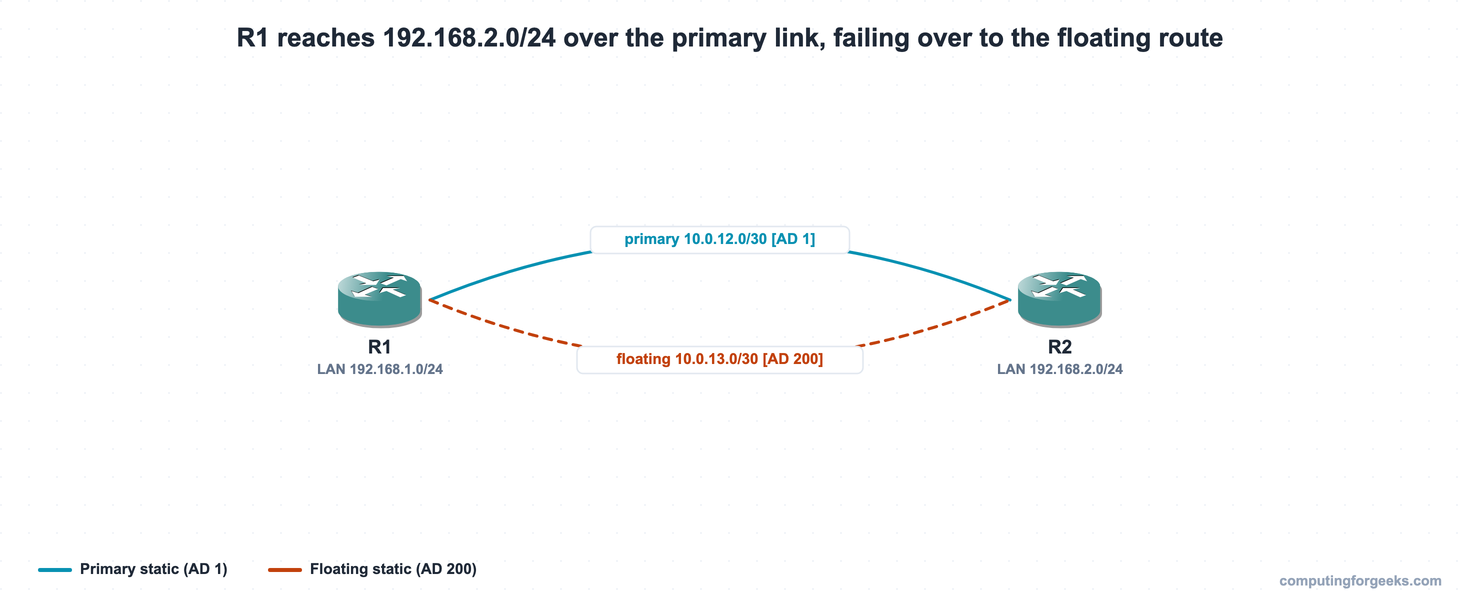
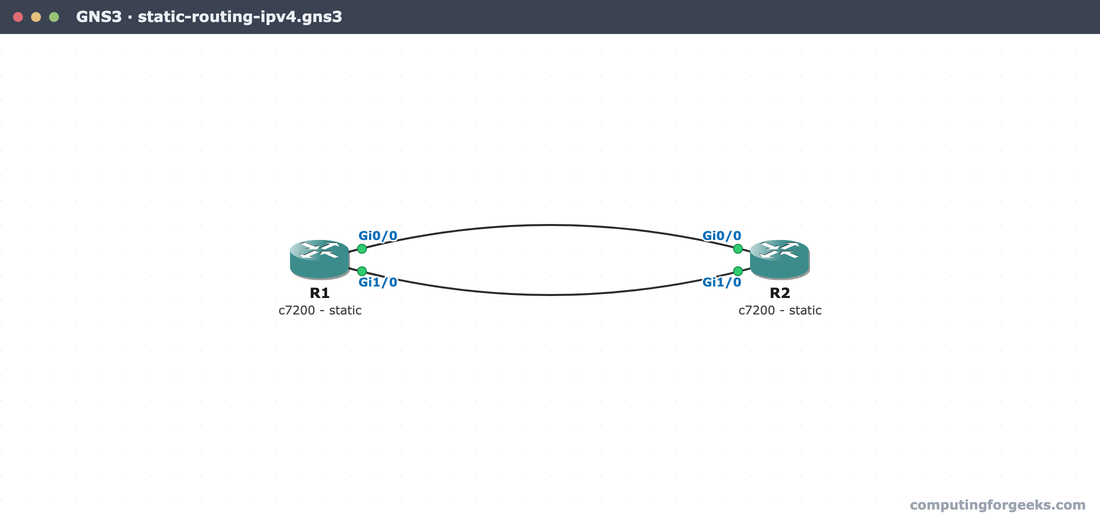
The lab is two routers with two links between them: a primary on 10.0.12.0/30 and a backup on 10.0.13.0/30. R1 has the LAN 192.168.1.0/24, R2 has 192.168.2.0/24, and the goal is for R1 to reach R2’s LAN over the primary, falling back to the backup automatically.
Configure a next-hop static route
Point R1 at R2’s LAN through the primary next hop. From global config:
configure terminal
ip route 192.168.2.0 255.255.255.0 10.0.12.2
Confirm it landed with show ip route. The static route appears with an S code and the bracket [1/0], the administrative distance and metric:
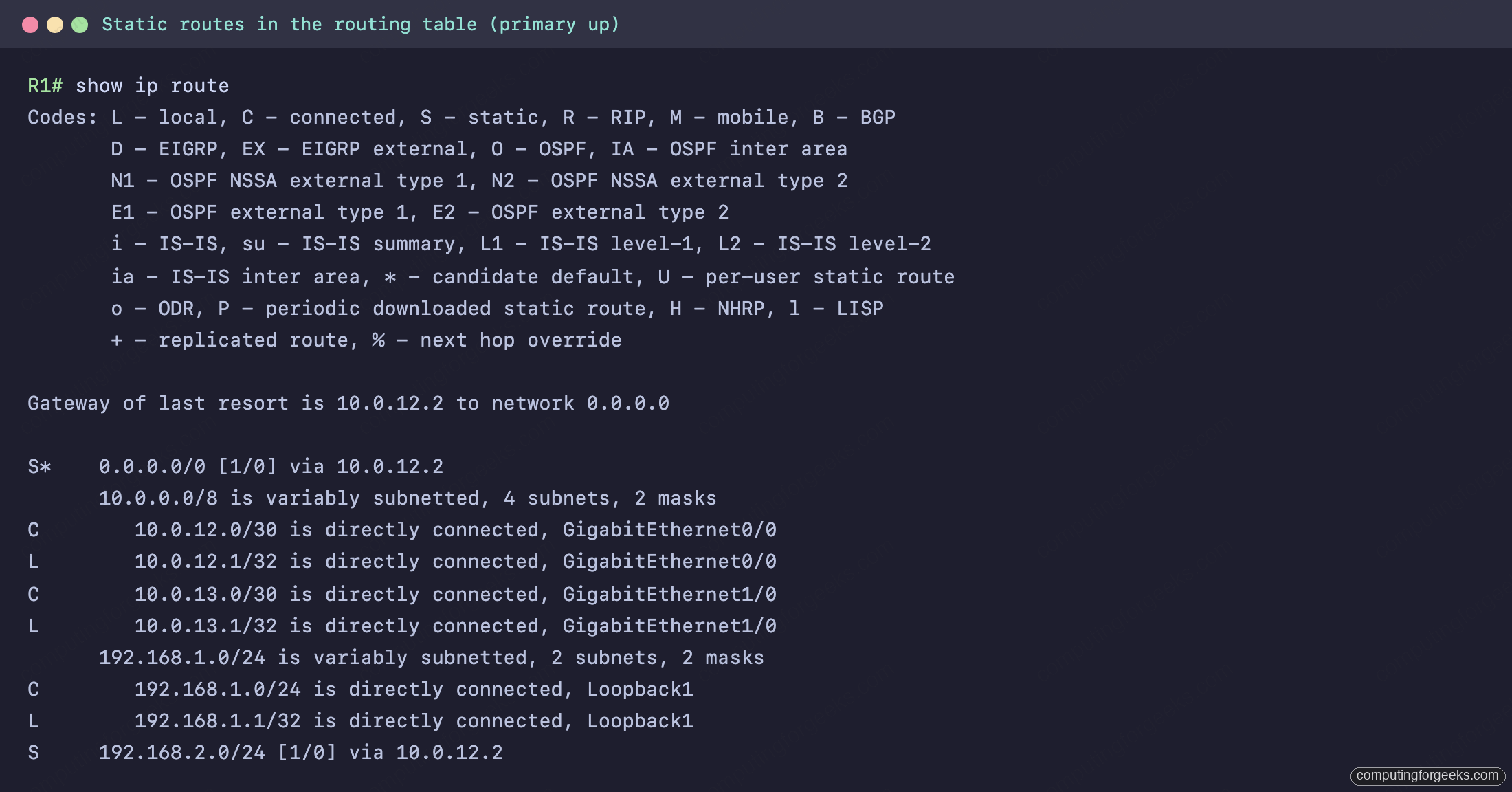
The line S 192.168.2.0/24 [1/0] via 10.0.12.2 is the route doing the work, alongside the connected (C) and local (L) entries for the two links. This exact topology runs on a clean GNS3 canvas, two c7200 routers joined on both Gi0/0 and Gi1/0:
Add a default route (the gateway of last resort)
A default route catches everything that no more-specific route matches. Its network and mask are both all-zeros, which is a /0, the least specific match possible:
ip route 0.0.0.0 0.0.0.0 10.0.12.2In the table it shows as S* with a header line, Gateway of last resort is 10.0.12.2 to network 0.0.0.0. The asterisk marks it as the candidate default. Because longest-prefix match always prefers a more specific route, the router only falls back to this one when nothing else fits.
Configure a floating static route for failover
A floating static is a backup route with a deliberately high administrative distance. Give R1 a second path to R2’s LAN over the backup link, with an AD of 200:
ip route 192.168.2.0 255.255.255.0 10.0.13.2 200Now check the routing table again, and the floating route is nowhere in it. That is correct, not a mistake. Its AD of 200 loses to the primary’s AD of 1, so while the primary is up the floating route waits in the configuration without being installed. You can prove it is configured with a quick grep of the running config, then drill into the active route:
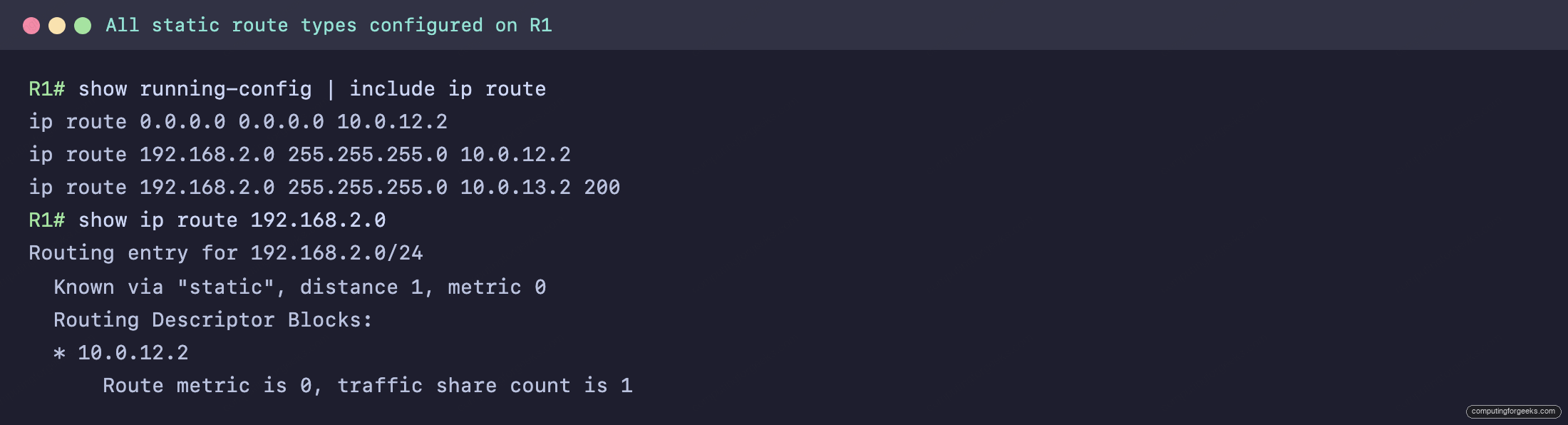
All three statics are present in show running-config | include ip route: the default, the primary, and the floating route with its 200. But show ip route 192.168.2.0 reports distance 1 via 10.0.12.2, the primary. The floating route exists; it just is not winning yet.
Fail the primary and watch the floating route install
This is the part worth seeing for yourself. Shut the primary interface on R1 (and on R2, so the return path fails over too):
configure terminal
interface GigabitEthernet0/0
 shutdown
With the primary link down, its connected route disappears, so the primary static (which recursed through that link) is withdrawn. The floating route is now the best remaining path, so it installs:
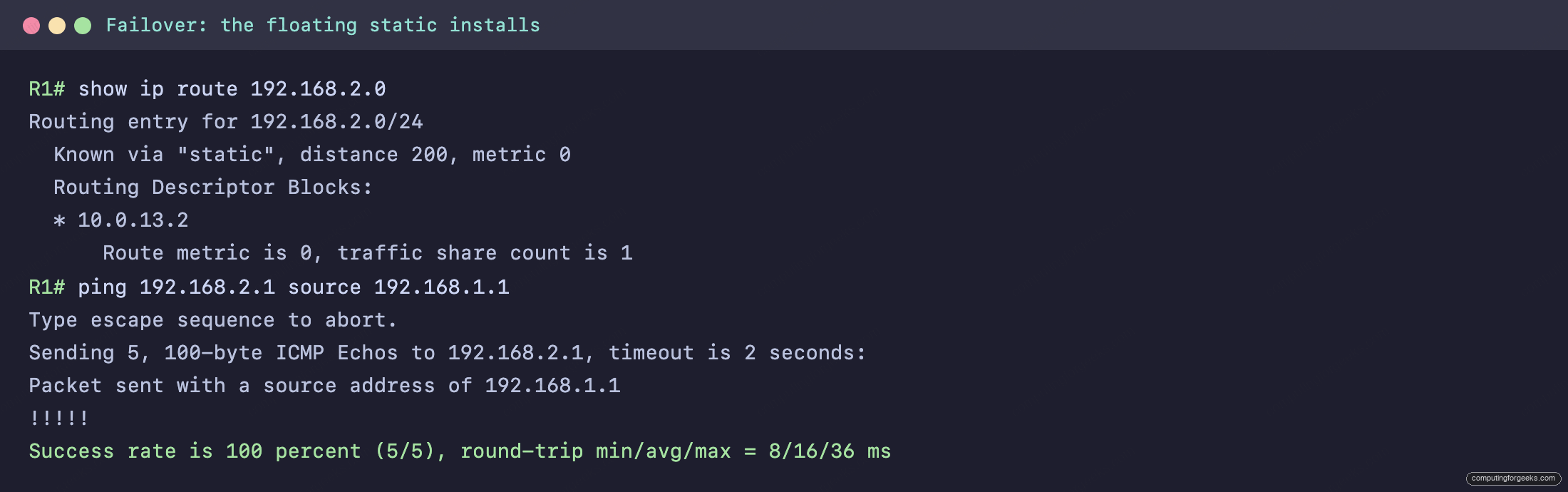
The route now reads Known via "static", distance 200 via 10.0.13.2, and the ping from R1’s LAN to R2’s LAN still succeeds, now over the backup link. The failover happened with no routing protocol involved, just two static routes and the administrative distance between them.
One detail worth catching: the default route did not recover. It pointed at the primary next hop, so when that link dropped its recursive lookup failed and the header now reads Gateway of last resort is not set. Only the per-prefix floating static came back. That is a classic gotcha. A default route through a single failed link disappears with it, so a network that depends on a default route needs its own floating backup default, not just a backup for the specific prefixes.
Verify static routes
Four commands cover the verification you actually need:
| Command | What it tells you |
|---|---|
show ip route | The full table: is the route installed, with what code and [AD/metric]. |
show ip route static | Only the static entries, including the S* default. |
show ip route 192.168.2.0 | One route’s detail: source, distance, and next hop. |
show running-config | include ip route | What is configured, including a floating route that is not currently installed. |
The pairing of the last two is the trick for floating routes: the running config proves the route exists, while the routing table shows whether it is currently winning. After that, a ping sourced from the LAN confirms the path forwards end to end.
Practice on your own lab
Paste-ready R1 and R2 configurations, plus the failover steps, are in the ccna-labs repository. Build the two routers with both links, load the configs, confirm the primary route, then shut the primary interface on each side and watch the [200/0] floating route take over. The CCNA 200-301 study roadmap shows where static routing sits in Domain 3, and the broader IP routing overview covers how dynamic protocols compare. The same forms apply to IPv6 static routes, with a few syntax differences.
When to use a static route, and when to hand it to OSPF
Static routes are the right tool for a handful of cases: a stub network with one way out, a single default route toward the internet, a host route to one address, and a deliberate backup path with a floating static. They are predictable, take no CPU to compute, and never flap. The cost is that you maintain every one by hand, and that does not scale: a dozen routers with changing links would mean dozens of manual edits every time the topology shifts. That is where a dynamic protocol earns its place, learning and re-learning paths on its own. The practical rule is to use a static route when the path is fixed and you want it fixed, and to reach for OSPF when the network is large enough that you would rather it route itself.