CachyOS ships its own kernel, its own optimized package repos, and a small GUI called cachyos-kernel-manager for swapping between kernel variants. That stack is what separates CachyOS from every other Arch derivative, and it is the layer most worth understanding if you want CachyOS to actually outperform stock Arch on the same hardware. This guide covers what the CachyOS kernel changes, when to pick BORE over EEVDF over LTS, how to install and roll back kernels safely with Limine, and the small set of system-wide tunables (x86-64-v3 repos, ZRAM, BTRFS mount options) that make the most measurable difference.
The article is laptop-flavoured because that is the audience most likely to care about scheduler choice for interactive responsiveness, but everything applies equally to a desktop or VM. All commands were tested end to end on a fresh CachyOS install with linux-cachyos, KDE Plasma, BTRFS, and Limine as the bootloader. If you have not done the basics yet, walk through things to do after installing CachyOS first. Real captured output is inline.
Tested May 2026 on the CachyOS 260426 desktop ISO with linux-cachyos 7.0.8 (EEVDF default), KDE Plasma on Wayland, and a BTRFS root using zstd compression. Test box: 4 vCPU host CPU passthrough, 16 GB RAM. Benchmarks ran inside a Proxmox VM, so absolute numbers do not translate to bare metal, but the verification commands are the same on any laptop.
What the CachyOS kernel actually changes
Stock Arch ships linux, the vanilla upstream kernel with Arch’s default config. CachyOS replaces it with linux-cachyos, a kernel rebuilt from the same upstream tree but with three substantive differences:
- A different default scheduler. The current default
linux-cachyosuses EEVDF (Earliest Eligible Virtual Deadline First). EEVDF replaced CFS upstream in Linux 6.6 and is what mainline ships too; CachyOS just builds it with tuned defaults. Separate variants are available for BORE, BMQ, and other schedulers. - Performance-oriented build flags. The package is GCC-compiled with Thin LTO. A separate
linux-cachyos-ltovariant uses Clang Thin LTO with AutoFDO and Propeller profiling. - Patches that have not landed upstream yet. Things like the BORE scheduler patches and various small performance tweaks live in CachyOS-PKGBUILDS and ride a few weeks ahead of mainline.
That is the whole story. The shipped kernel is mainline Linux with extra patches and tuned build flags. There is no fork, no proprietary code, no out-of-tree drivers you cannot find anywhere else. Confirm exactly which kernel is running and which CachyOS scheduler features are compiled in:
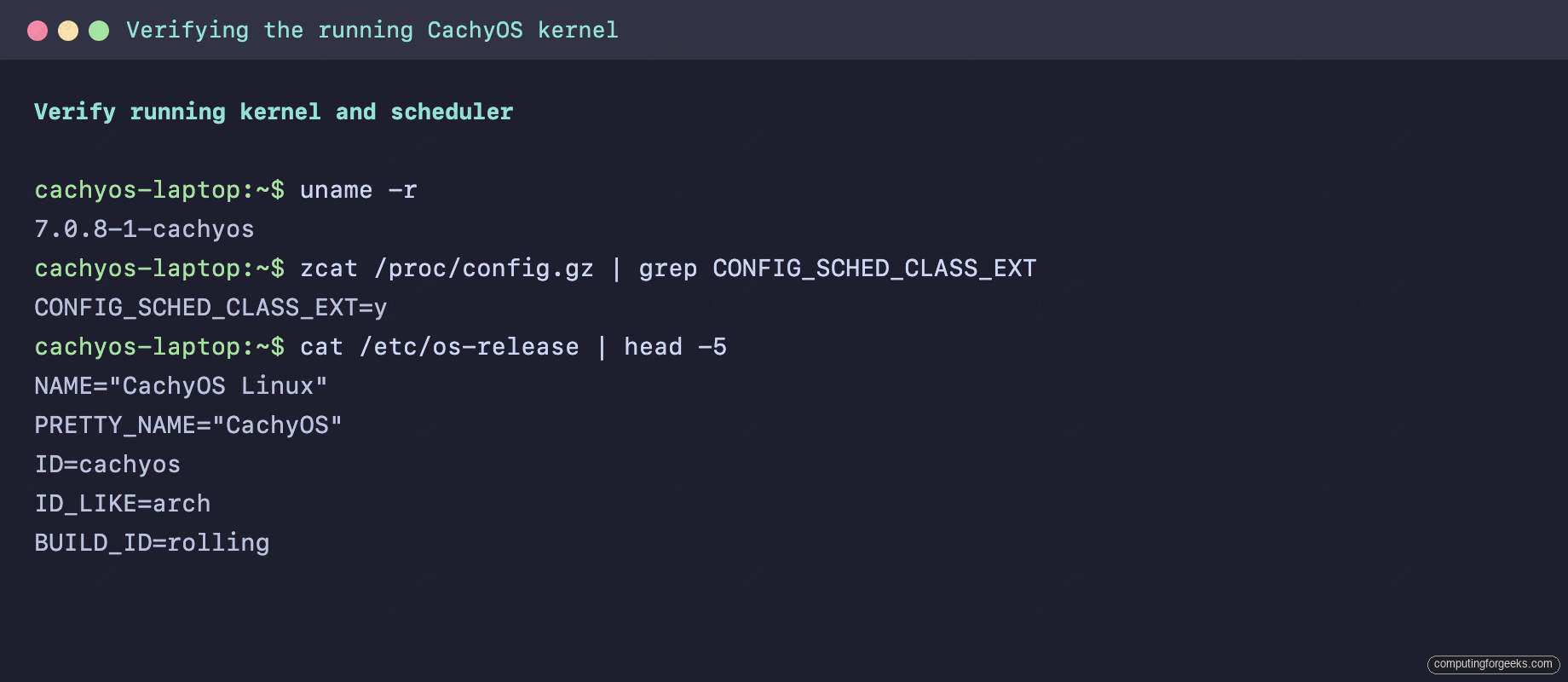
The kernel string ends in -cachyos for the default, -cachyos-bore for the BORE variant, -cachyos-lts for the LTS series. CONFIG_SCHED_CLASS_EXT=y means the kernel was built with sched_ext (the BPF scheduler framework) enabled, which is one of the CachyOS extras over a vanilla Arch build.
CachyOS kernel variants and when to pick which
The CachyOS repo ships every variant of the kernel as a separate package. cachyos-kernel-manager is just a GUI on top of pacman that installs, swaps, and removes them. The list as of this writing:
| Package | Scheduler | When to pick it |
|---|---|---|
linux-cachyos | EEVDF | The default. General-purpose desktop and developer use. |
linux-cachyos-bore | BORE | Interactive workloads and gaming. Favours I/O-bound tasks that yield CPU often. |
linux-cachyos-eevdf | EEVDF | Explicit EEVDF build alongside the default. Use when you want EEVDF pinned in case the default changes. |
linux-cachyos-bmq | BMQ | BitMap Queue scheduler. Niche; pick only if a specific workload prefers it. |
linux-cachyos-rt-bore | BORE + PREEMPT_RT | Real-time workloads (pro audio, robotics control loops) that need bounded latency. |
linux-cachyos-lts | EEVDF | Long-term support kernel. Use as the fallback / second kernel when chasing kernel regressions. |
linux-cachyos-hardened | EEVDF | Security-focused kernel with linux-hardened patches applied. |
linux-cachyos-deckify | BORE | Steam Deck-style tuning and gaming hardware patches. |
linux-cachyos-server | EEVDF | Server-tuned config; longer timeslices, different IO defaults. |
linux-cachyos-lto | EEVDF | Clang Thin LTO build with AutoFDO + Propeller. The most aggressively optimised variant for raw throughput. |
The practical short answer for most laptop owners: stay on linux-cachyos unless you have a specific reason to move. The reason will usually be one of: gaming responsiveness (try linux-cachyos-bore), the default kernel has a regression on your hardware (move to linux-cachyos-lts until upstream catches up), or you actually need real-time scheduling (linux-cachyos-rt-bore).
What BORE does that EEVDF does not
EEVDF is fair-by-design: tasks accumulate “lag” and the scheduler picks whoever has the earliest deadline among the eligible set. It is a clean, well-behaved scheduler that replaced CFS upstream.
BORE (Burst-Oriented Response Enhancer) sits on top of EEVDF and adds a “burstiness” score per task. A task that voluntarily yields the CPU often (waiting on I/O, sleeping, blocking on the keyboard) accumulates a low burst score and gets scheduled preferentially. A task that burns CPU continuously gets a higher score and is penalised. The practical effect is that interactive workloads (typing into a terminal, scrolling a browser, the foreground game thread) feel more responsive while a parallel compile or AI inference run is in the background.
BORE exposes a handful of /proc/sys/kernel/ tunables that the daring can tweak (defaults shown). Note these only exist when running a BORE kernel; on a stock linux-cachyos they will not appear in sysctl.
| Sysctl | Default | Effect |
|---|---|---|
kernel.sched_bore | 1 | Enable / disable BORE entirely |
kernel.sched_burst_penalty_offset | 24 | Threshold below which a task is treated as “short burst” |
kernel.sched_burst_penalty_scale | 1536 | How aggressively BORE discriminates against long-burst tasks |
kernel.sched_burst_smoothness | 1 | Smoothing factor on burst score transitions |
Leave the defaults alone unless you have a measurable workload that benefits from a change. The defaults are what the BORE author and the CachyOS team test against.
Use cachyos-kernel-manager to swap kernels safely
cachyos-kernel-manager is a Qt6 GUI that wraps pacman. It lists every CachyOS kernel package available in the repo, shows which are currently installed, and exposes install / remove buttons. Behind the scenes it runs pacman -S linux-cachyos-bore (or similar) with polkit authentication. It does not build kernels from source. Launch it from the application menu or from a terminal:
cachyos-kernel-managerThe kernel manager opens to a list of all available kernel packages with checkboxes for install:
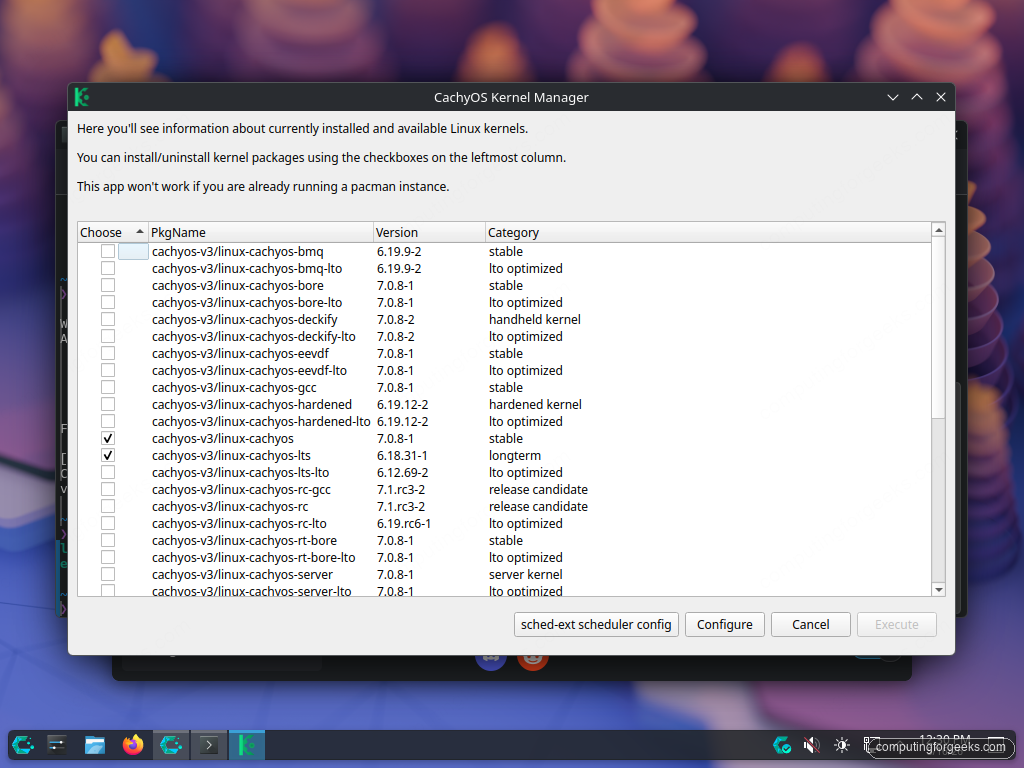
The pattern that actually works on a daily-driver laptop is to install at least two kernels and keep the second one as a known-good fallback. Best pairing: the default linux-cachyos plus linux-cachyos-lts. Switch to the LTS entry from the bootloader whenever a kernel update breaks something, file an upstream bug, and switch back when the regression is fixed.
You can install kernels straight from the terminal too, which is faster than walking the GUI when you already know which one you want:
sudo pacman -S linux-cachyos-bore linux-cachyos-bore-headers
sudo pacman -S linux-cachyos-lts linux-cachyos-lts-headers
On Limine (the CachyOS default bootloader), the install hook auto-regenerates the bootloader entries and adds the new kernel to /boot/limine.conf. No grub-mkconfig step is needed. On the GRUB variant of the install, regenerate with sudo grub-mkconfig -o /boot/grub/grub.cfg after every kernel install.
The Limine boot menu with multiple kernels
After installing a second and third kernel, the Limine menu on the next boot lists all of them under the CachyOS entry. Press a key during the 5-second countdown to stop the auto-boot, arrow up or down to pick a kernel, and press Enter:
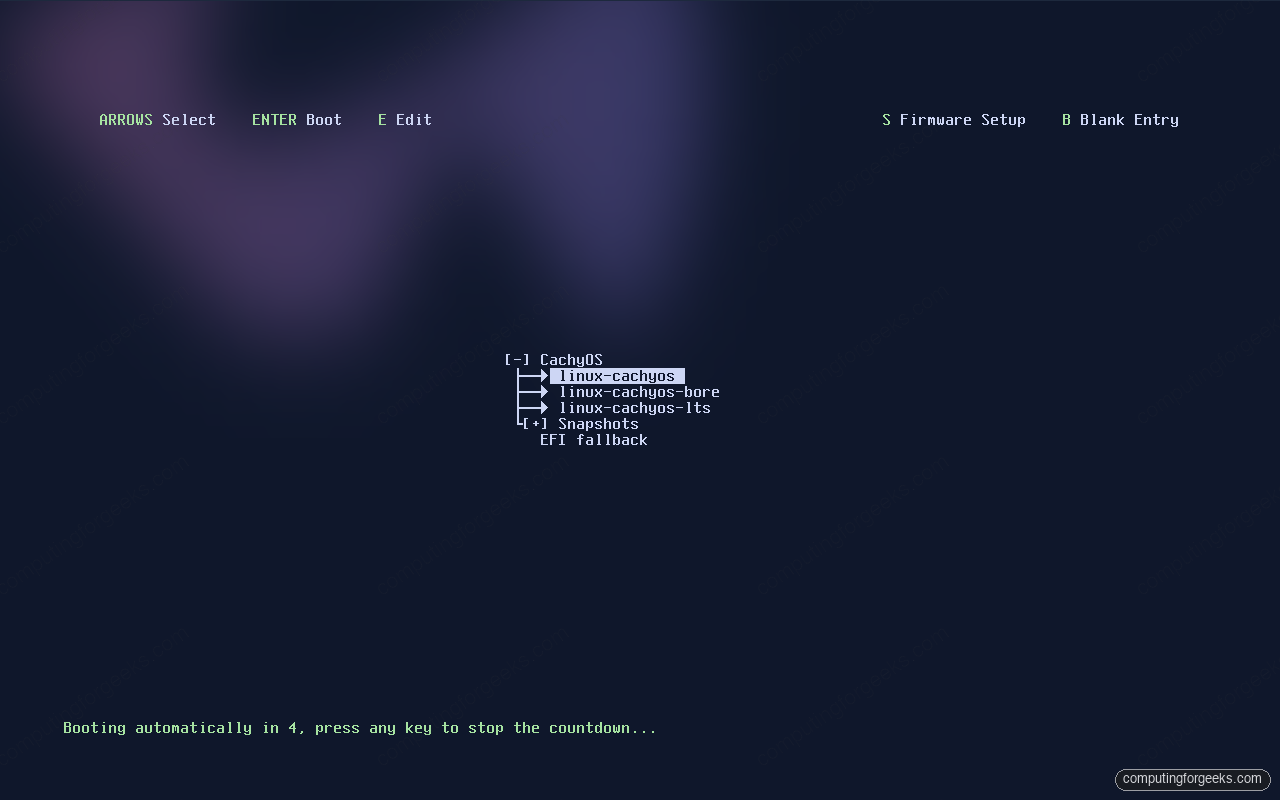
The [+] Snapshots submenu is the snapper integration. CachyOS ships limine-snapper-sync, which adds every BTRFS snapshot snapper takes as a bootable entry. When a pacman update breaks the system, you reboot, pick a pre-update snapshot from the Snapshots submenu, and you are back in a working state in under thirty seconds. That side of the workflow is the topic of a separate Day-2 guide on BTRFS snapshots and rollback.
Confirm the x86-64-v3 optimised repos are enabled
CachyOS ships parallel package repos compiled for the x86-64-v3 microarchitecture level (roughly Haswell and newer, ~2013+) and x86-64-v4 (AVX-512 era CPUs). On supported hardware, the installer enables the v3 repo automatically. Verify with:
/lib/ld-linux-x86-64.so.2 --help | grep -A2 "supported, searched"
grep -E '^\[' /etc/pacman.conf
ls /etc/pacman.d/cachyos-*mirrorlist
On a v3-eligible CPU the dynamic linker and pacman repos look like this:
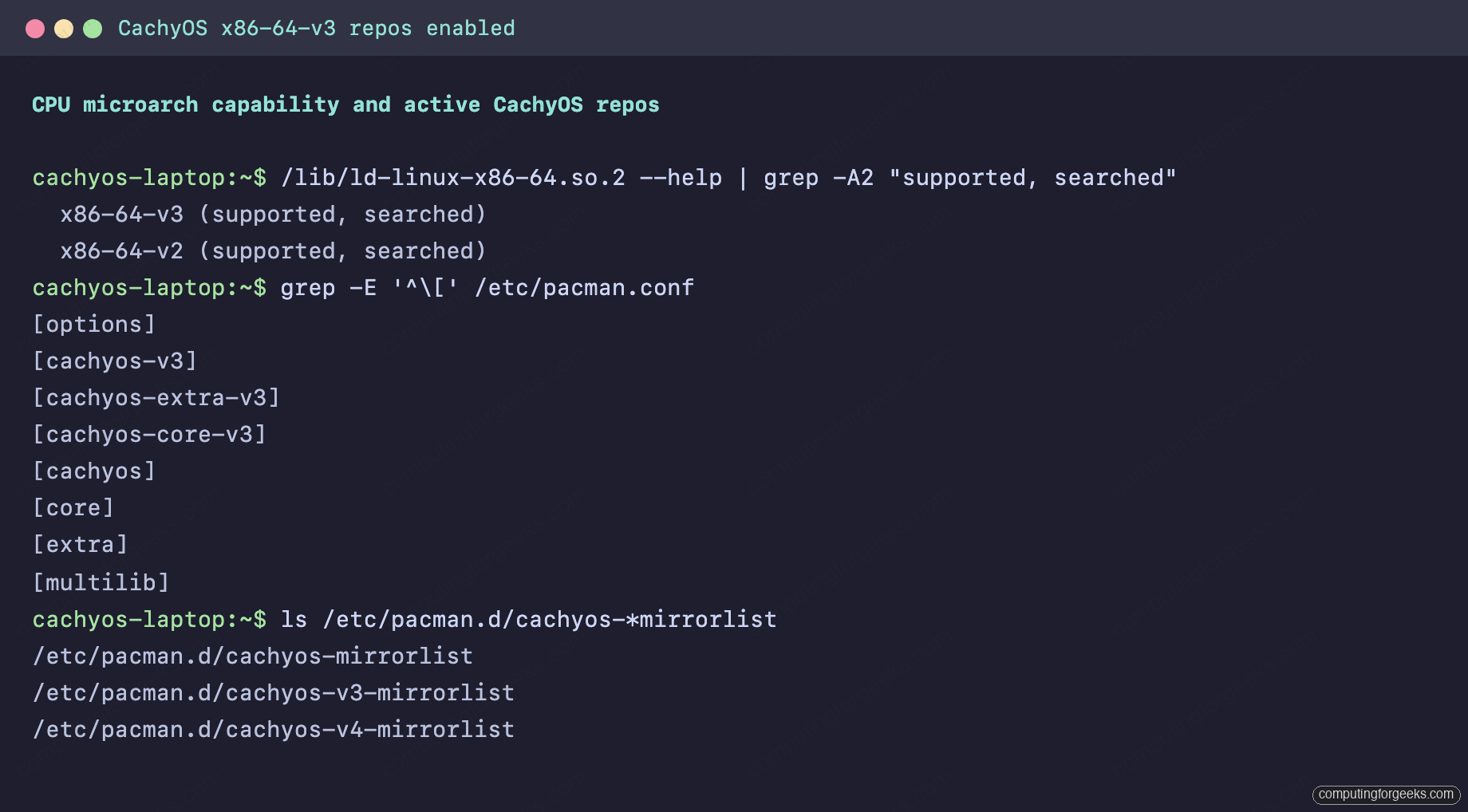
If you see [cachyos-v3], [cachyos-extra-v3], and [cachyos-core-v3] in pacman.conf, the v3 repos are wired up: pacman pulls v3-compiled packages where they exist and falls back to the plain [cachyos] repo otherwise. The v4 mirrorlist file exists too but is only used if your CPU advertises AVX-512.
If your CPU is v3-capable but you only see the plain [cachyos] repo, the installer missed it. Enable v3 manually:
sudo pacman -S --noconfirm cachyos-v3-mirrorlistThen add the v3 repo entries to /etc/pacman.conf above the plain cachyos repo so it wins resolution. Run sudo pacman -Syu and pacman will replace any v1-built package with its v3 sibling where one exists. The benefit varies by workload. Codec-heavy and crypto-heavy paths see the largest wins; most desktop apps see single-digit percent improvements.
ZRAM is already configured
CachyOS enables ZRAM by default via systemd-zram-generator. ZRAM is a compressed in-memory swap device; on a laptop with 8-16 GB of RAM it lets you push past memory pressure without touching the SSD. Confirm it is running:
zramctl
swapon --show
sysctl vm.swappiness vm.page-cluster
On a clean CachyOS install you should see ZRAM, swap, and the swappiness sysctl already set:
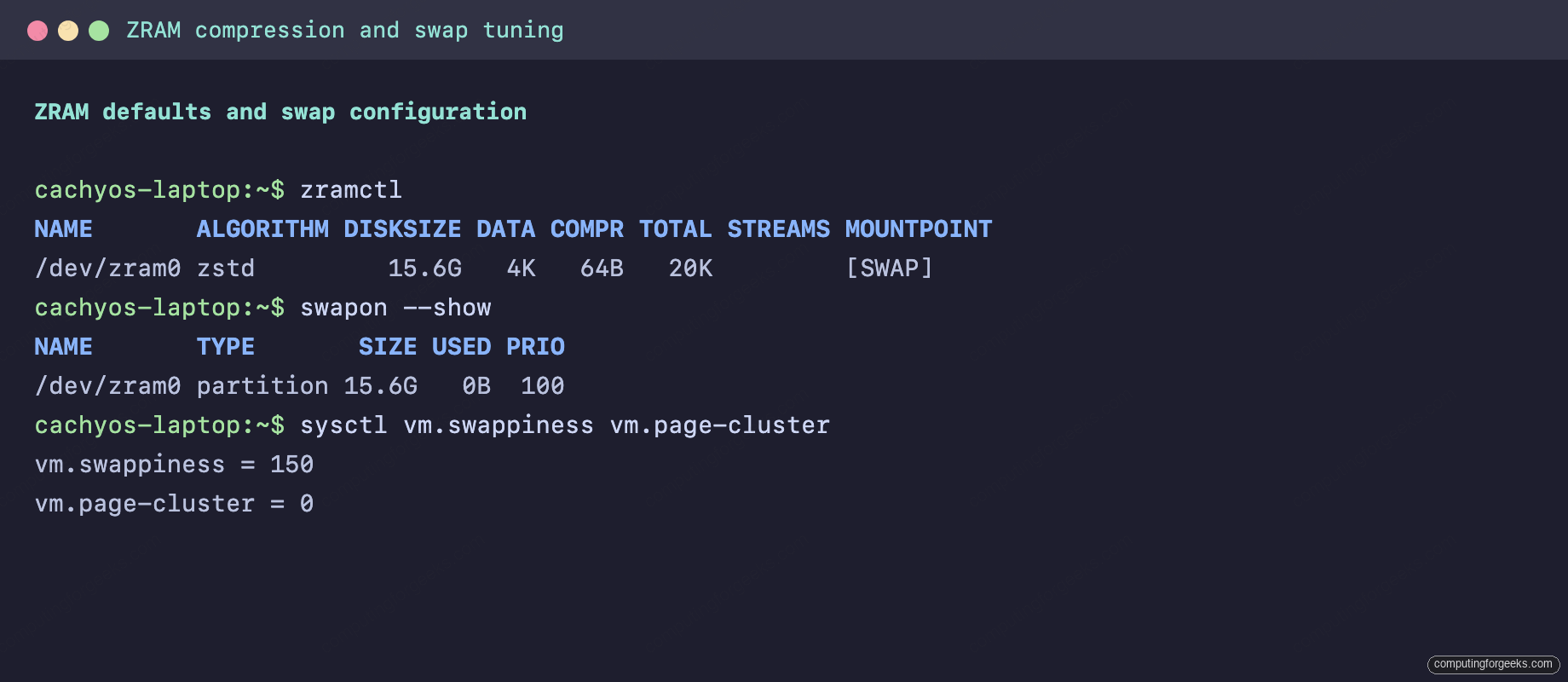
The default config uses zstd compression and sizes ZRAM to half of RAM (15.6 G on this 16 GB test box). cachyos-settings pairs that with vm.swappiness=150, which sounds extreme but is correct for ZRAM-only swap: you want the kernel to prefer compressed RAM over evicting page cache. vm.page-cluster=0 means single-page reads from swap (good for ZRAM, bad for spinning disks).
You can keep ZRAM as the only swap on a laptop with at least 8 GB of RAM. If you also want suspend-to-disk, add a small swap file or swap partition for hibernation only. ZRAM cannot resume from suspend-to-disk because the compressed pages live in volatile memory.
BTRFS mount options that matter
The Calamares “Erase disk → btrfs” path lays out subvolumes that snapper and grub-btrfs/limine-snapper-sync expect, with sensible mount options preset in /etc/fstab. Look at the actual mount lines:
findmnt -t btrfs
grep btrfs /etc/fstab
The mounted subvolume layout on a fresh BTRFS install looks like this:
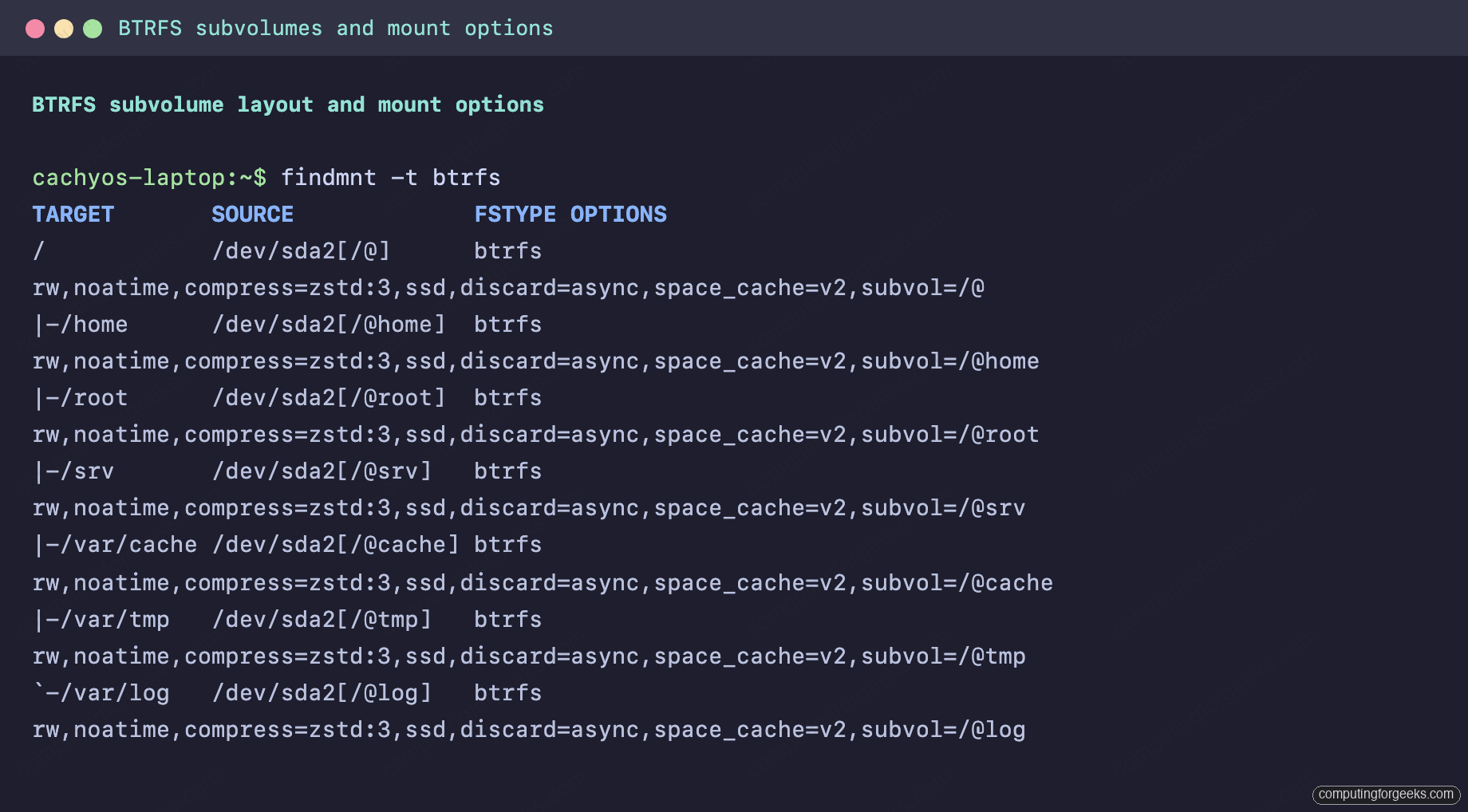
The defaults are noatime, compress=zstd:3, space_cache=v2, discard=async, ssd, and per-subvolume subvol= entries. That is already the production-ready mount set for an SSD-backed laptop, and it gives snapper the @-prefixed subvolume layout it expects. Notes on each option:
noatimeavoids writing an updated atime on every file read, a measurable IO reduction.compress=zstd:3picks zstd level 3, the sweet spot between compression ratio and CPU cost. Bump tocompress=zstd:6if you have CPU headroom and want smaller writes.space_cache=v2is the modern free-space tree, much faster on large filesystems than the legacy v1 cache.discard=asynctrims freed blocks in the background instead of synchronously, the right default on every modern SSD.
cachyos-settings is the secret sauce
Every CachyOS install pulls in the cachyos-settings package automatically. It applies a curated set of sysctls, udev rules, modprobe defaults, and systemd tweaks that mainline Arch users would otherwise wire up by hand. Inspect what it actually installs:
pacman -Qi cachyos-settings | head -6
pacman -Ql cachyos-settings | grep -E '\.(conf|rules|sh)$'
The package metadata and the slice of config files it installs:
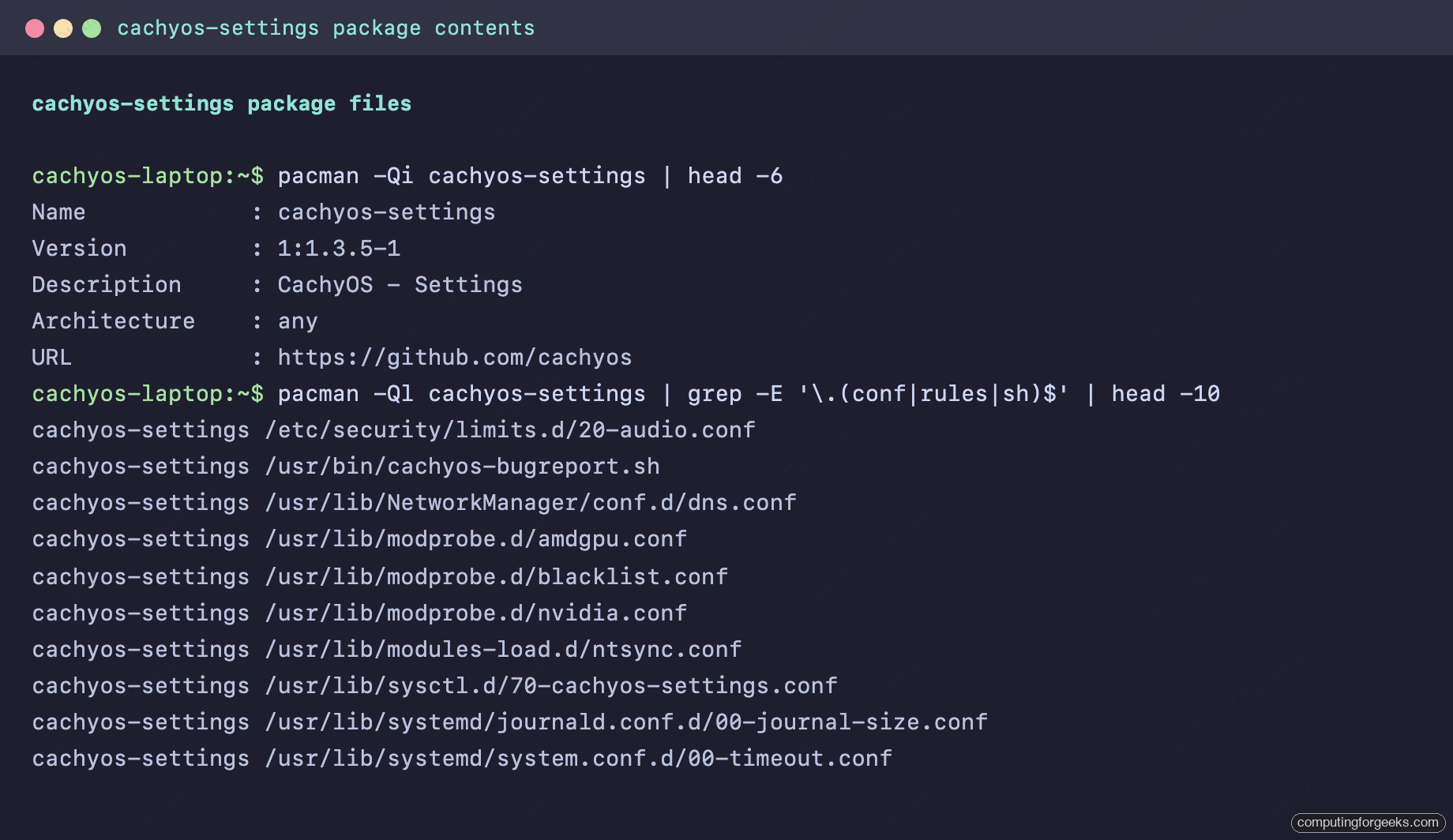
The headline values applied by cachyos-settings are worth knowing because they are what differentiates a CachyOS box from a stock Arch box on the same hardware:
- Sysctl:
vm.swappiness=150(tuned for ZRAM),vm.page-cluster=0, adjusteddirty_bytesanddirty_background_bytesfor SSD writeback, NMI watchdog disabled. - I/O scheduler udev rules:
bfqfor spinning HDDs,mq-deadlinefor SATA SSDs,nonefor NVMe. CachyOS applies these via udev; vanilla Arch leaves the kernel default everywhere. - ZRAM:
zstdcompression withswap-priority=100, half-of-RAM size by default. - Systemd:
DefaultTimeoutStartSec=15sandDefaultTimeoutStopSec=10sto keep boot and shutdown snappy; journal size capped to 50 MB. - GPU: forces
amdgpufor compatible AMD GPUs (blacklists the legacyradeondriver); applies NVIDIA module params includingNVreg_UsePageAttributeTable=1for CPU performance andNVreg_DynamicPowerManagement=0x02for laptop NVIDIA GPUs.
None of this is mandatory. If you ever want stock Arch behaviour back, sudo pacman -Rns cachyos-settings removes the lot. But the defaults are good and there is rarely a reason to undo them.
A small honest benchmark on the default kernel
To put numbers on the performance discussion, I installed stress-ng, p7zip, and rt-tests (for hackbench) and ran three quick benchmarks on the default linux-cachyos 7.0.8 kernel:
sudo pacman -S --noconfirm stress-ng p7zip rt-tests
stress-ng --matrix 0 --metrics-brief --timeout 30s
7z b -mmt4
hackbench -l 1000 -g 16
The captured output from those three commands on the default kernel:
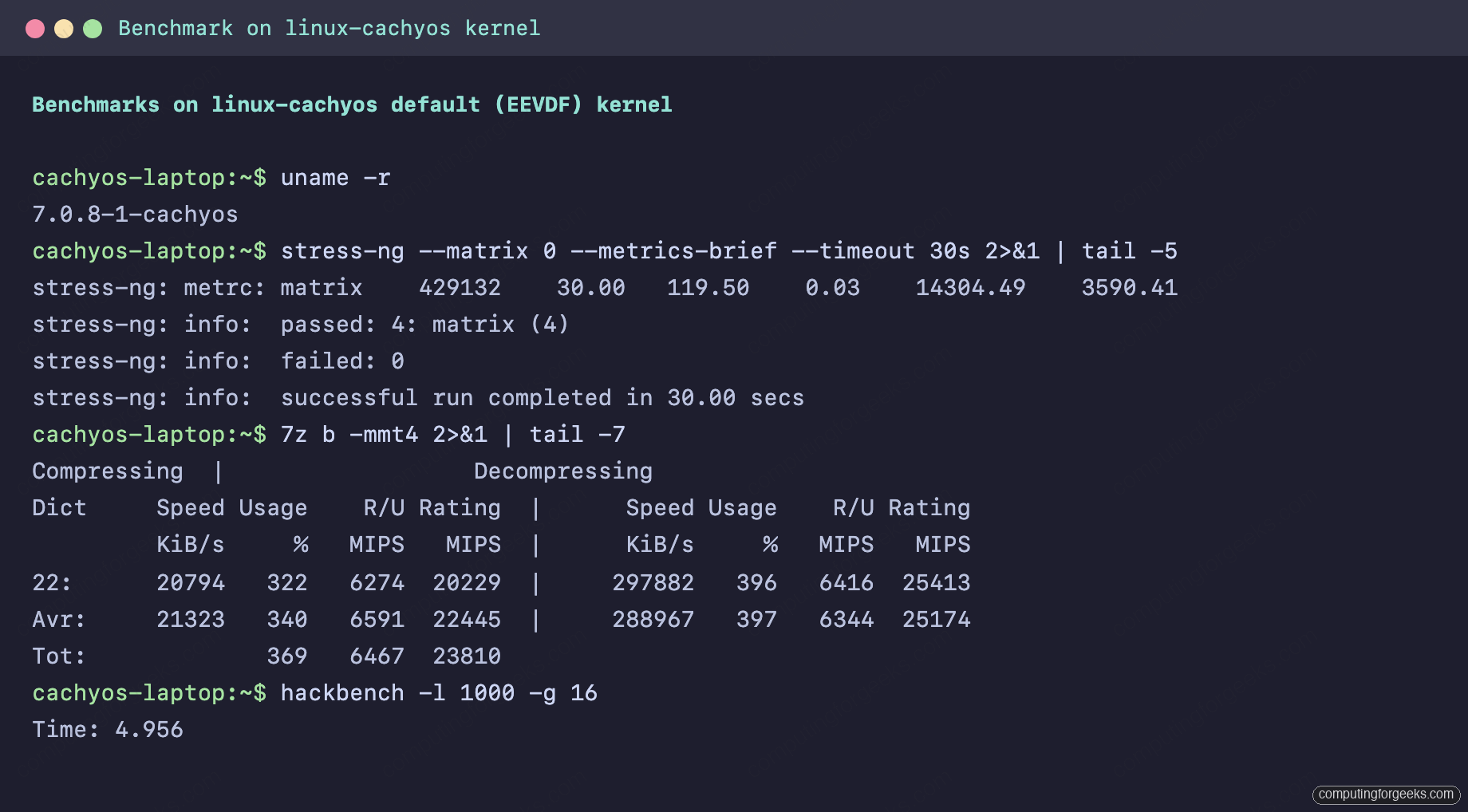
Real numbers from this test box (4 vCPU Intel Core i7-6700 passthrough, 16 GB RAM, BTRFS root, default kernel):
| Benchmark | linux-cachyos 7.0.8 (EEVDF) |
|---|---|
| stress-ng matrix (bogo-ops/s, real time) | 14,304 |
| 7z b total MIPS (Tot Avr) | 23,810 |
| hackbench (seconds, lower is better) | 4.956 |
The honest caveat: these ran inside a VM, so the absolute numbers do not translate cleanly to bare metal. What the numbers do prove is that stress-ng, 7z b, and hackbench are the right cheap tools to reach for if you want to see whether a kernel swap on your hardware moves the needle. Pick one workload that mirrors what you actually do, capture three runs on the current kernel, install the candidate kernel, reboot from the Limine menu, and capture three runs there. If the means do not move by at least 5%, the scheduler choice is not your bottleneck.
What to do day one, day thirty, and day ninety
Day one is simple. Stay on the default linux-cachyos kernel and let it run. Confirm ZRAM and the BTRFS mount options look right. Do nothing else.
Day thirty, install linux-cachyos-lts as a second kernel and confirm it shows up in the Limine menu. This is the cheap insurance that pays for itself the first time a kernel update breaks suspend on your specific laptop.
Day ninety, if you game on this laptop, try linux-cachyos-bore for a week and see whether the input feel actually changes. If yes, keep it. If you cannot tell the difference, switch back. The scheduler that “feels right” is the right one; trust your fingers over the benchmark table above.
For the laptop-specific things this kernel post does not cover (battery life, suspend-then-hibernate, thermal monitoring), the next article in this series digs into the power management stack: TLP versus auto-cpufreq versus power-profiles-daemon, the suspend/hibernate combo on BTRFS, and how to actually measure what is draining the battery.