Every internal service you run on TLS needs a certificate, and every certificate needs to renew before it expires. The two ways most teams handle this are wrong in opposite directions: self-signed certs that trigger browser warnings forever, or Let’s Encrypt certs that demand a public DNS record and an exposed port 80. FreeIPA 4.12 ships a built-in ACMEv2 server that solves both problems at once. Your internal services get real, chain-of-trust certificates from your own CA, issued and renewed by the same certbot or acme.sh tooling you already know.
This walkthrough enables ACME on a fresh IPA realm, registers two enrolled clients, and issues certificates with both certbot (the Python reference implementation) and acme.sh (the shell-only alternative). It covers the RSA-only profile gotcha that bites everyone using certbot 4.x, the HTTP-01 challenge wiring, auto-renewal via systemd timers and cron, and the operational shape of running your own internal ACME directory. Every command was run against a real lab and every output you see was captured from that lab, not invented.
If you followed the FreeIPA server plus clients lab guide or the RSNv3 verification article, you already have most of the pieces. This one closes the loop from “the CA can issue certs” to “every host renews its own certificate automatically without anyone noticing”.
What FreeIPA’s ACMEv2 implementation gives you
FreeIPA 4.12 includes the Dogtag PKI ACMEv2 responder, exposed at https://your-ipa.example.com/acme/directory. It implements RFC 8555 end to end: account creation, order, authorization, HTTP-01 and DNS-01 challenges, finalization, and certificate retrieval. The responder runs inside the same pki-tomcat JVM that hosts the rest of the CA, with no extra ports, no extra daemon, and no extra firewall holes. One command enables the whole thing.
The certificates ACME issues come from the same Dogtag CA that issues every other cert in your IdM realm, so they chain to /etc/ipa/ca.crt exactly the same way. Every enrolled IPA client already trusts that CA. Your existing Kerberos hosts, your SSH cert principals, and your ACME-issued TLS certs all share the same trust root. There is nothing extra to install on the consumer side.
Compared to running Let’s Encrypt against public DNS for internal services, the wins are: no public DNS exposure required, no port 80 reachable from the internet required, no 90-day rate limit (Dogtag has none), no .local or split-horizon DNS workarounds, and your audit log stays inside your own LDAP. The cost is that browsers and OS trust stores outside your realm do not trust your CA, which is exactly what you want for internal-only services.
The lab
Three Rocky Linux 10.1 VMs on Proxmox:
- ipa.cfg-lab.local at 192.168.1.141, 4 GB RAM, full FreeIPA 4.12.2 server with integrated DNS
- web01.cfg-lab.local at 192.168.1.142, 2 GB RAM, enrolled IPA client, nginx + certbot
- web02.cfg-lab.local at 192.168.1.143, 2 GB RAM, enrolled IPA client, nginx + acme.sh
Both client VMs were enrolled with ipa-client-install --enable-dns-updates so their A records exist in IPA DNS automatically. Both have port 80 open on firewalld for HTTP-01 challenge validation. Both have nginx serving from the Rocky default root /usr/share/nginx/html, not the Debian-style /var/www/html, which is the first gotcha most tutorials miss.
Enable ACME on the IPA server
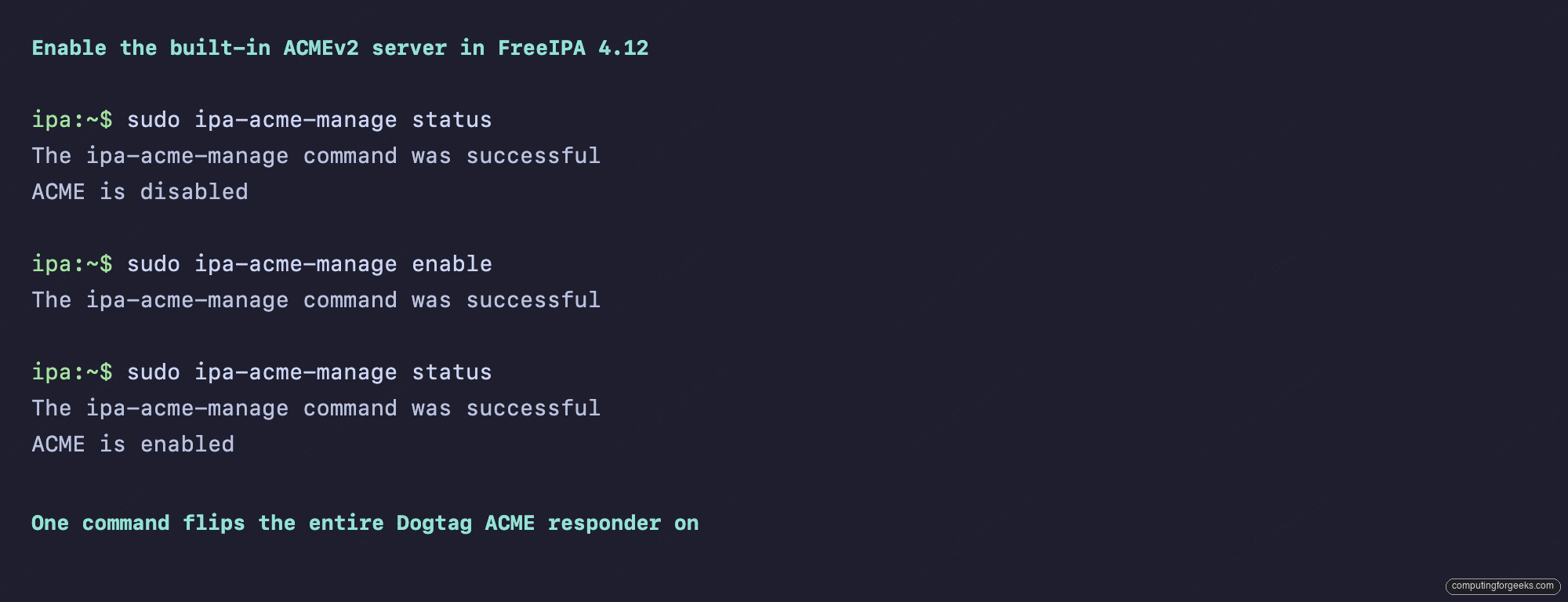
On a fresh 4.12 install ACME is disabled by default. You enable it on any single IPA server (it only needs to run on one CA replica) with ipa-acme-manage enable. The status check before and after confirms the flip.
sudo ipa-acme-manage status
sudo ipa-acme-manage enable
sudo ipa-acme-manage status
The three calls produce the transcript below. The middle command writes a flag into the Dogtag config under cn=acmeAuthority,cn=services,cn=etc,$BASEDN in LDAP, which the PKI subsystem reads at request time.
If you have multiple CA replicas, only enable on one. The flag replicates via LDAP. Disabling later is ipa-acme-manage disable, which removes the LDAP flag and immediately rejects new ACME requests with HTTP 503.
How the HTTP-01 challenge actually flows
Before chasing config errors, it helps to understand what is on the wire. The HTTP-01 challenge is a five-step dance between the client (certbot on web01) and the IPA ACME server.
- Client POSTs to
/acme/new-orderwith the domain list. IPA responds with an authorization URL. - Client GETs the authorization, picks the HTTP-01 challenge, computes a key authorization string (the account public key thumbprint signed over the challenge token), and drops the result at
/.well-known/acme-challenge/<token>on its local webroot. - Client POSTs to the challenge URL telling IPA “I’m ready, come check”.
- IPA’s pki-tomcat process opens an outbound HTTP connection to
http://<domain>/.well-known/acme-challenge/<token>on port 80, reads the file, and compares it to what it expected. If it matches, the authorization flips tovalid. - Client POSTs the CSR to
/acme/order/<id>/finalize. IPA signs the cert with the acmeIPAServerCert profile and returns the PEM via the order’scertificatefield.
The single requirement that breaks most setups is step 4: the IPA server must be able to reach port 80 on the client by DNS name. Behind NAT, on an air-gapped subnet, or with firewalld blocking outbound from the IPA host, the validation will time out. The fix is either to open the route or switch to the DNS-01 challenge, which uses your IPA-managed DNS instead of an HTTP fetch.
Hit the ACMEv2 directory endpoint
The directory URL is what every ACME client starts from. Fetch it with curl and pipe through python3 -m json.tool for readability:
curl -sk https://ipa.cfg-lab.local/acme/directory | python3 -m json.toolThe response is a small JSON document listing the four endpoints any RFC 8555 client needs. The meta block is hard-coded to example.com placeholders in this Dogtag release, which you can ignore. The important field is externalAccountRequired: false, meaning any client can register an account without pre-shared credentials.
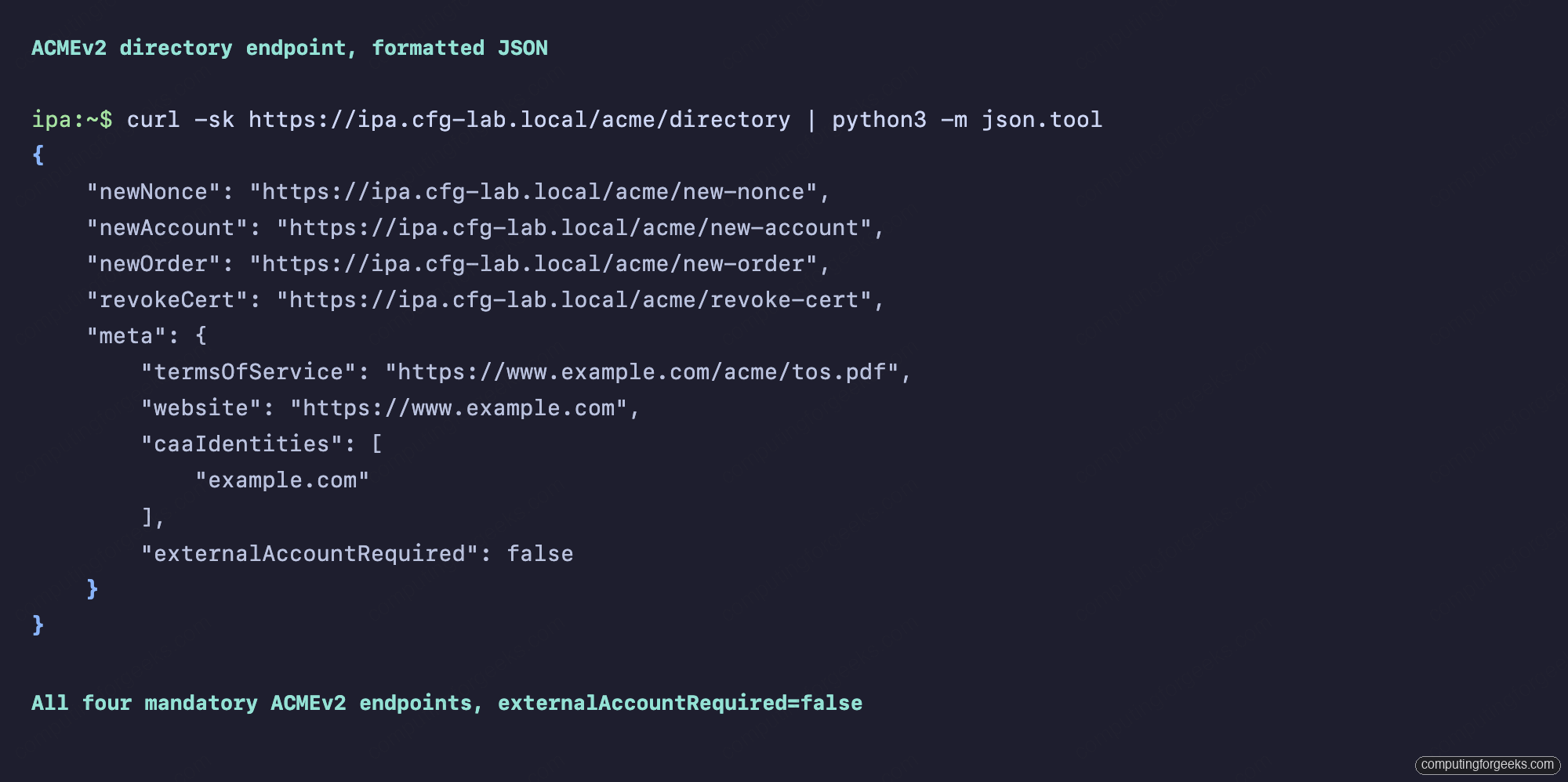
The -k flag in the curl above is only because the lab uses a self-signed-by-IPA cert that the host running curl does not yet trust. Once you install /etc/ipa/ca.crt into the system trust store (we do that for both clients below), the flag goes away.
Client prep: trust the IPA CA, open ports, serve a webroot
On both web01 and web02, three prerequisites have to land before ACME will work:
sudo curl -sk https://ipa.cfg-lab.local/ipa/config/ca.crt
  -o /etc/pki/ca-trust/source/anchors/ipa-ca.crt
sudo update-ca-trust

sudo dnf -y install epel-release
sudo dnf -y install nginx firewalld certbot python3-certbot-nginx

sudo systemctl enable --now firewalld nginx
sudo firewall-cmd --add-service=http --add-service=https --permanent
sudo firewall-cmd --reload
The CA trust step is the one that catches people. Without it, certbot calls to https://ipa.cfg-lab.local/acme/directory fail with a TLS verification error. Note also that certbot on Rocky 10 lives in EPEL, not the base repo, so the epel-release install is mandatory. For web02 we replace certbot with the acme.sh git clone shown later.
Issue a certificate with certbot (and the RSA gotcha)
This is where the first non-obvious thing happens. Run certbot the way every tutorial shows and it fails with a 500 error. The IPA pki-tomcat debug log reveals why: SEVERE: Invalid key type: RSA, which is misleading wording for “your key did not match my profile constraints”. The FreeIPA acmeIPAServerCert profile only accepts RSA 2048, 3072, 4096, or 8192. Certbot 4.x defaults to ECDSA P-256. Force RSA explicitly:
sudo certbot certonly --webroot
  --webroot-path=/usr/share/nginx/html
  --server https://ipa.cfg-lab.local/acme/directory
  --domain web01.cfg-lab.local
  --email [email protected]
  --agree-tos --non-interactive --no-eff-email
  --key-type rsa --rsa-key-size 2048
Certbot writes a fresh account key, posts a new order, gets back an HTTP-01 authorization, drops the challenge file under /usr/share/nginx/html/.well-known/acme-challenge/, waits for the IPA server to fetch it via plain HTTP on port 80, then submits the CSR and writes the cert under /etc/letsencrypt/live/. The whole flow is about three seconds on the lab.
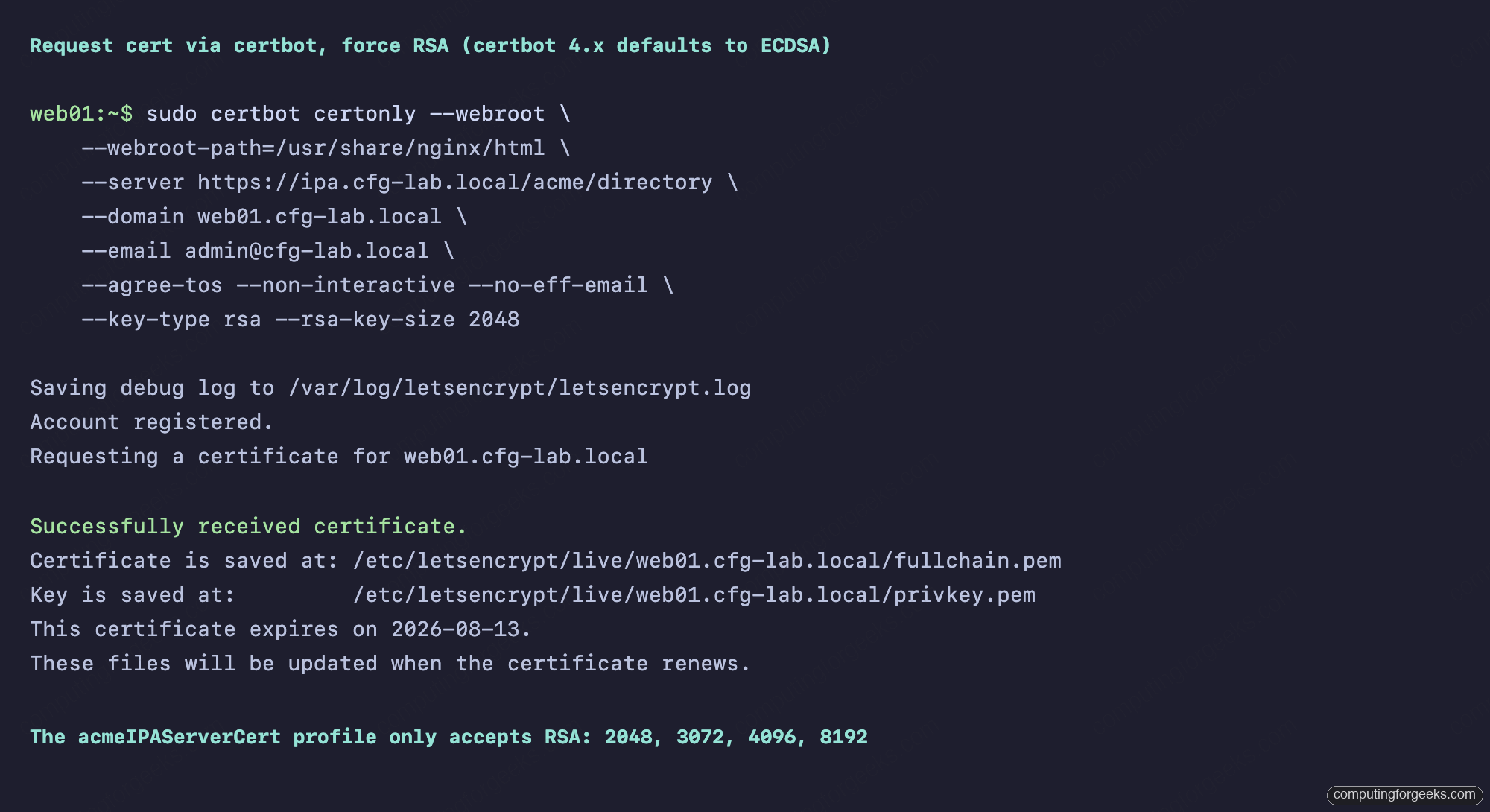
If you forget the --key-type rsa flag, certbot will post an ECDSA CSR, Dogtag will reject it during finalization, and the resulting letsencrypt.log entry will say acme.errors.ClientError: <Response [500]> with no further context. The error in the IPA-side debug log is on the pki-tomcat side: SEVERE: Invalid key type: RSA. Add the flag and the same command succeeds first try.
Decode and verify the cert
The issued cert is a standard PEM under the certbot live directory. Decode it with openssl to confirm the serial, subject, issuer, and validity:
openssl x509 -in /etc/letsencrypt/live/web01.cfg-lab.local/cert.pem
  -noout -serial -subject -issuer -dates

openssl verify -CAfile /etc/pki/ca-trust/source/anchors/ipa-ca.crt
  /etc/letsencrypt/live/web01.cfg-lab.local/fullchain.pem
The decoded cert shows a 128-bit hex serial (RSNv3, default on FreeIPA 4.12 with the LMDB backend), the right CN and SAN, an issuer of O=CFG-LAB.LOCAL, CN=Certificate Authority matching the realm CA, and a 90-day validity. The chain verifies against the IPA CA, which means it will be trusted by any host with /etc/ipa/ca.crt in its trust store.
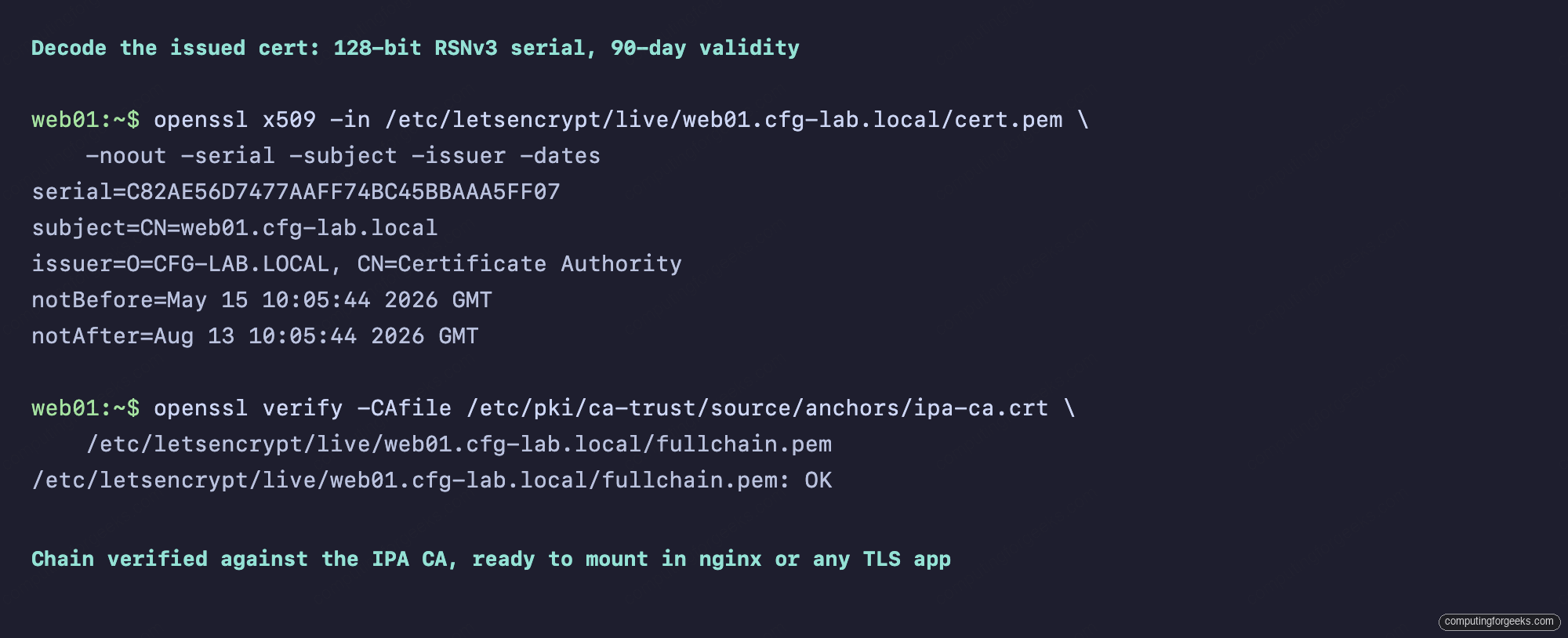
The 90-day validity is hard-coded in the acmeIPAServerCert profile and matches the Let’s Encrypt convention. You can clone the profile and adjust the validity if your operational story needs it, but the upstream guidance is to keep cert lifetimes short and renew often.
Issue a certificate with acme.sh
acme.sh is the shell-only alternative to certbot. It has zero Python dependencies, runs on anything with bash and curl, and registers + issues in two commands. Install it from git (the upstream “curl | sh” install pattern is fine, but a sandboxed CI may prefer the git path):
sudo git clone --depth=1
  https://github.com/acmesh-official/acme.sh.git /opt/acme.sh
cd /opt/acme.sh && sudo ./acme.sh --install
  --home /root/.acme.sh
  --accountemail [email protected]

sudo /root/.acme.sh/acme.sh --register-account
  --server https://ipa.cfg-lab.local/acme/directory
  --accountemail [email protected]

sudo /root/.acme.sh/acme.sh --issue
  --server https://ipa.cfg-lab.local/acme/directory
  -d web02.cfg-lab.local
  -w /usr/share/nginx/html
  --keylength 2048
The --keylength 2048 flag is the acme.sh equivalent of certbot’s RSA forcing. Without it acme.sh defaults to an ECDSA prime256v1 key (acme.sh calls it ec-256), which the IPA profile will reject for the same reason certbot fails. With --keylength 2048 it generates RSA-2048, Dogtag accepts the CSR, and the cert appears under /root/.acme.sh/web02.cfg-lab.local/.
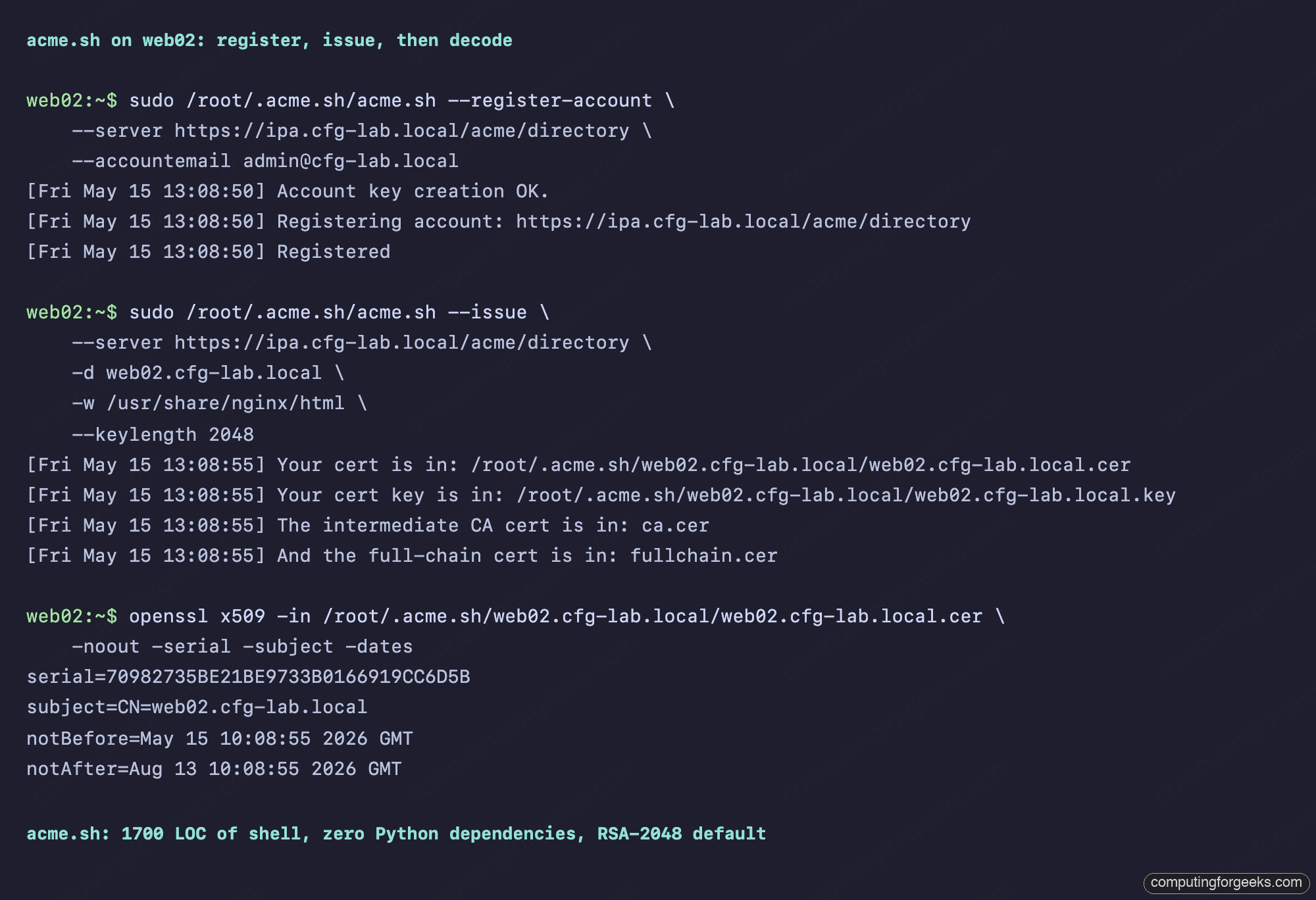
The acme.sh installer also drops a cron entry that runs acme.sh --cron daily and renews anything that has fewer than 30 days left. No systemd timer, no separate hook scripts, just one cron line.
certbot or acme.sh: pick by deployment shape
Both tools issue identical certs against the same FreeIPA ACME directory. The differences are operational.
- certbot is Python-based, ~30 packages including
python3-cryptography, ships with systemd timer units, lives in/etc/letsencrypt/, integrates with nginx and apache via plugins that rewrite their config blocks. Best when the host is already running Python services and you want OS-managed renewal timers. - acme.sh is pure shell, ~1700 lines, lives in
~/.acme.sh/, uses cron for renewal, supports more DNS-01 providers than certbot, and runs identically on Alpine, BusyBox, and FreeBSD. Best when the host should stay minimal, for containers, edge routers, or anywhere you don’t want to maintain a Python toolchain.
Both have the same RSA gotcha against the FreeIPA profile. Both default to ECDSA, both need the explicit RSA flag (--key-type rsa --rsa-key-size 2048 for certbot, --keylength 2048 for acme.sh).
Auto-renewal: systemd timer and cron
Both tools ship working auto-renewal out of the box. Certbot uses a systemd timer with a 12-hour interval and a 12-hour random delay, so renewals are spread out across the cluster instead of stampeding the ACME server. acme.sh uses one cron entry running daily at a randomized minute. View both:
systemctl cat certbot-renew.timer
sudo crontab -l
cat /etc/letsencrypt/renewal/web01.cfg-lab.local.conf
The certbot renewal config is plain INI under [renewalparams], capturing every flag from the original certbot certonly call so subsequent renewals reuse the same options. The acme.sh state is in ~/.acme.sh/web02.cfg-lab.local/web02.cfg-lab.local.conf, which is shell variables sourced at renew time.
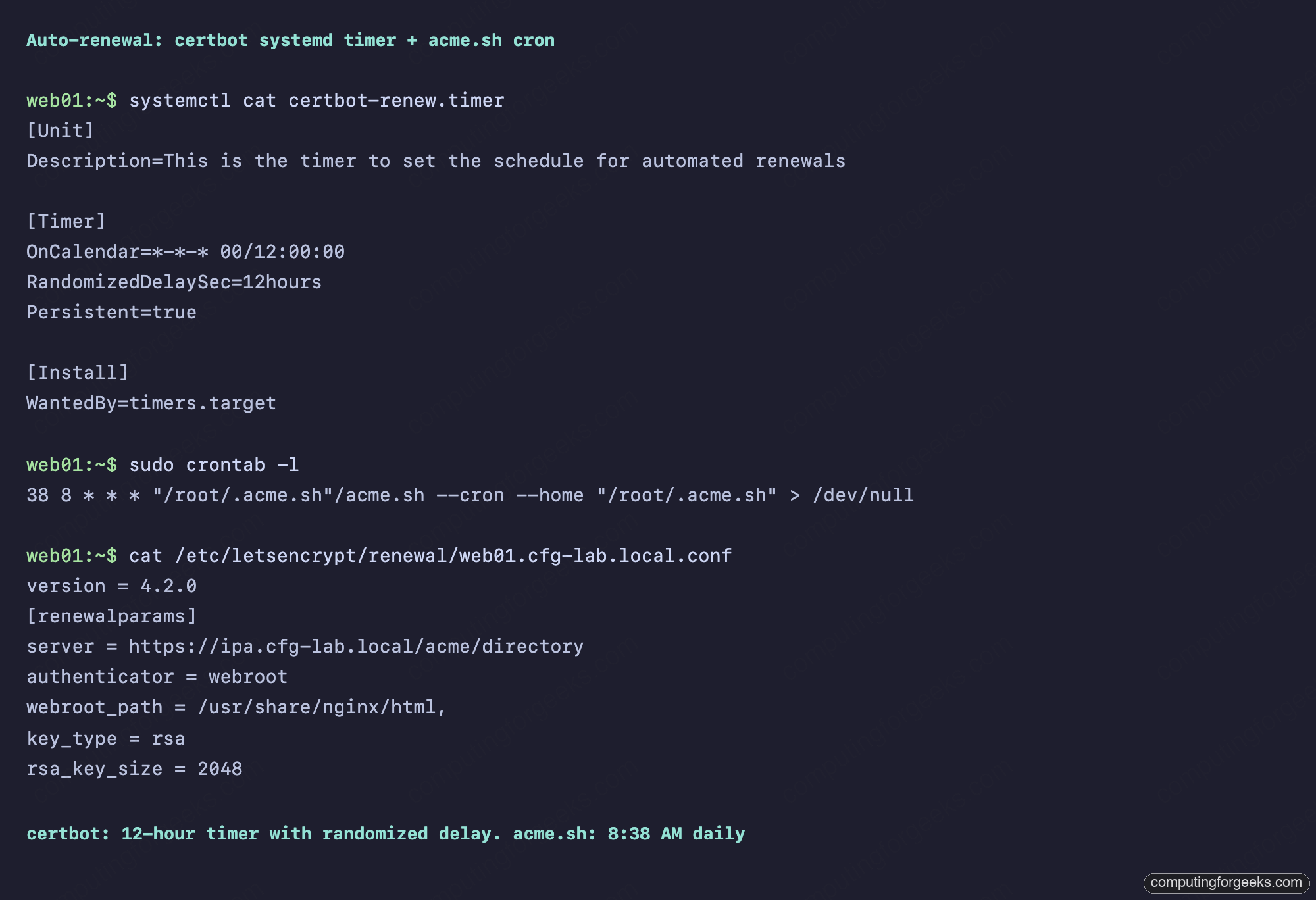
To force a renewal without waiting for the timer or cron, use certbot renew --force-renewal or acme.sh --renew -d web02.cfg-lab.local --force --server .... The force flag tells the tool to renew even when the existing cert is nowhere near expiry, which is the right test for a freshly-set-up host.
The WebUI side: ACME-issued certs in IPA
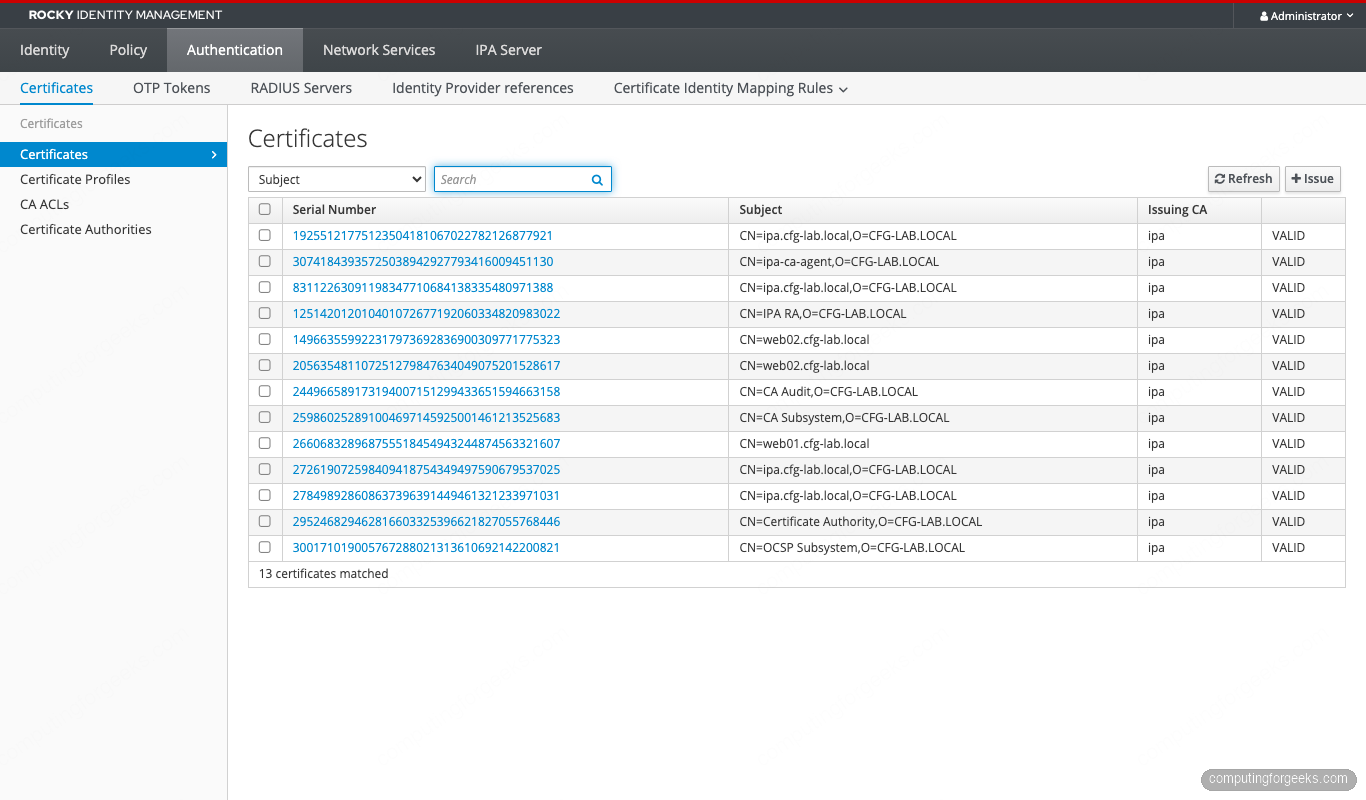
Every cert issued through the ACME directory appears in the regular IPA Certificates view, indistinguishable from certs issued through ipa cert-request or certmonger. Log into the IPA WebUI, go to Authentication, Certificates, and look for your client hostnames:
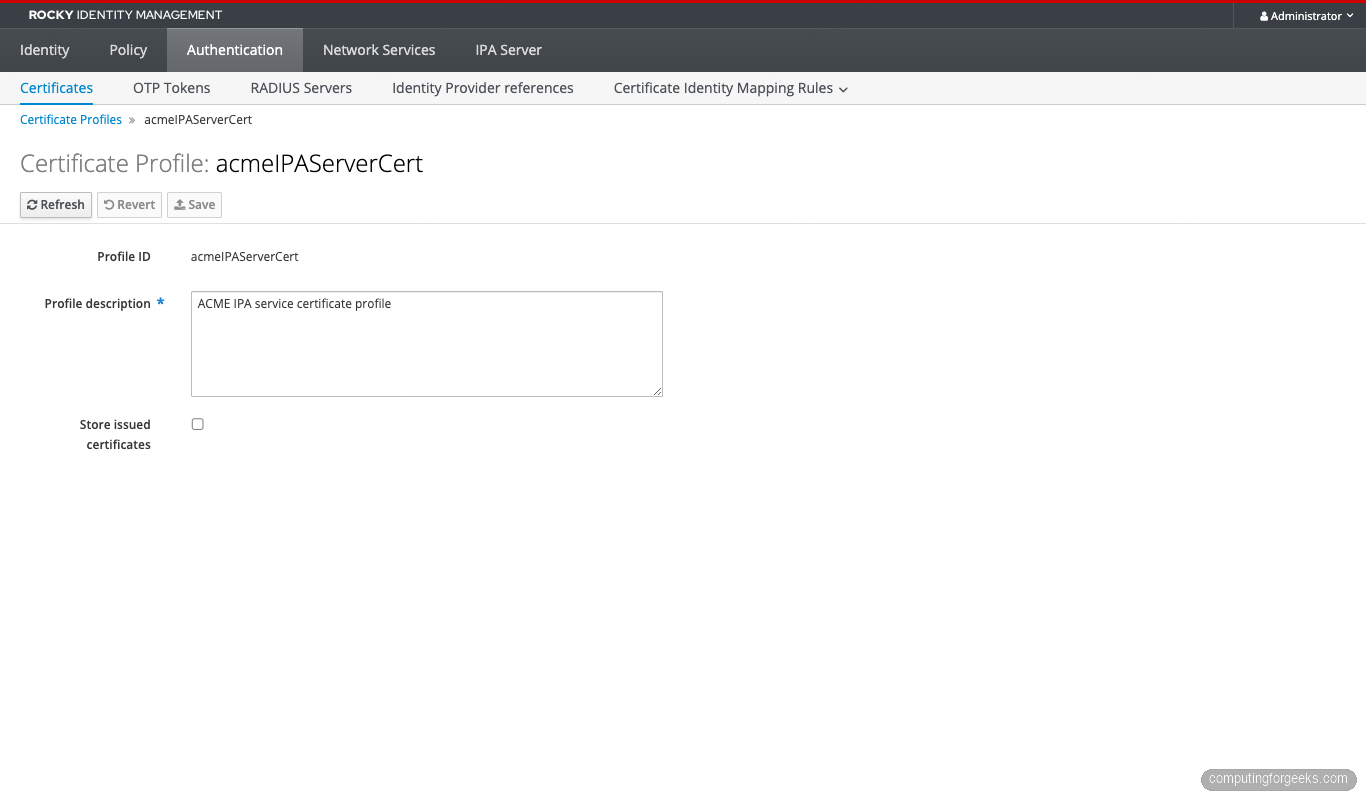
The profile used for ACME certs is acmeIPAServerCert, which is visible under Authentication, Certificate Profiles. The profile detail shows the key constraint and the validity defaults that the article opens with:
Revocation also goes through the regular IPA path. ipa cert-revoke <serial> on any client works for ACME-issued certs. The corresponding ACME revocation endpoint at /acme/revoke-cert is also exposed for clients that want to revoke programmatically.
Mounting the cert in nginx
Once a cert exists under /etc/letsencrypt/live/, point nginx at it the same way you would for any Let’s Encrypt cert. The full fullchain.pem goes to ssl_certificate, the privkey.pem to ssl_certificate_key:
server {
    listen 443 ssl;
    server_name web01.cfg-lab.local;

    ssl_certificate     /etc/letsencrypt/live/web01.cfg-lab.local/fullchain.pem;
    ssl_certificate_key /etc/letsencrypt/live/web01.cfg-lab.local/privkey.pem;

    ssl_protocols       TLSv1.2 TLSv1.3;
    ssl_ciphers         HIGH:!aNULL:!MD5;
    ssl_prefer_server_ciphers on;

    root /usr/share/nginx/html;
}
Reload with nginx -s reload. Any client with the IPA CA in its trust store will see a green padlock. For services that don’t use the system trust store (Java apps, some Go binaries with custom transports), point them at /etc/ipa/ca.crt explicitly. The cert path itself is stable across renewals because certbot updates the symlinks under /etc/letsencrypt/live/<domain>/ in place.
Multi-SAN certs and revocation
A single cert can cover multiple Subject Alternative Names. For services that expose more than one DNS name (a public name plus an internal name, an apex plus a wildcard alias, multiple cluster ingresses), request all the names in one call:
sudo certbot certonly --webroot
  --webroot-path=/usr/share/nginx/html
  --server https://ipa.cfg-lab.local/acme/directory
  -d web01.cfg-lab.local
  -d api.cfg-lab.local
  -d static.cfg-lab.local
  --key-type rsa --rsa-key-size 2048
  --email [email protected] --agree-tos --non-interactive
Each -d name gets its own HTTP-01 authorization, all of which have to pass before the order finalizes. Every name has to be reachable on port 80 from the IPA server, every name has to have a DNS A record IPA can resolve, and every name has to live in the IPA realm (or at least be resolvable from IPA’s view). The resulting cert has one Subject CN (the first name) and all the names listed under X509v3 Subject Alternative Name.
Revoke an ACME-issued cert through either the standard ipa cert-revoke path or the ACME revoke endpoint:
# Get the decimal serial from the cert
SERIAL=$(openssl x509 -in /etc/letsencrypt/live/web01.cfg-lab.local/cert.pem
  -noout -serial | cut -d= -f2)
DECIMAL=$(python3 -c "print(int('$SERIAL', 16))")

echo rockypass2026 | kinit admin
ipa cert-revoke $DECIMAL --revocation-reason=4

# Or via ACME directly
sudo certbot revoke
  --server https://ipa.cfg-lab.local/acme/directory
  --cert-path /etc/letsencrypt/live/web01.cfg-lab.local/cert.pem
The IPA path takes the decimal form of the serial and a revocation reason code (0 unspecified, 1 keyCompromise, 4 superseded, 5 cessationOfOperation, and the rest from RFC 5280 section 5.3.1). The ACME path is more ergonomic if you have the cert file locally, because it figures out the serial from the cert and uses the account key for authorization without a kerberos ticket.
Revoked certs land in the IPA CA’s CRL, which both clients fetch through http://ipa-ca.cfg-lab.local/ipa/crl/MasterCRL.bin on a configurable schedule. OCSP also works: clients with OCSP stapling configured against the IPA OCSP responder get near-instant revocation propagation.
Observability: who is issuing certs against your ACME
Every ACME interaction lands in two log files on the IPA server. The Apache access log shows the HTTP traffic, the Dogtag debug log shows the issuance decisions:
sudo tail -f /var/log/httpd/access_log | grep acme

sudo tail -f /var/log/pki/pki-tomcat/ca/debug.$(date +%Y-%m-%d).log
  | grep -E "ACME|CertProcessor|profile"
For real production observability, ship the Apache log to your log aggregator and alert on three patterns: any 5xx response from /acme/* (indicates a misconfigured client or a Dogtag bug), any unusual jump in /acme/new-order volume (indicates a client misbehaving in a loop), and any /acme/revoke-cert hit (every revocation is worth a notification). A simple Loki query {job="httpd"} |~ "/acme/" | status >= 500 catches the first category.
When things go wrong
The errors you will actually see in the wild, ranked by frequency.
HTTP 500 on finalization. Almost always the ECDSA vs RSA mismatch. Re-run with the explicit RSA flag. Cross-check by tailing /var/log/pki/pki-tomcat/ca/debug.$(date +%Y-%m-%d).log on the IPA server and grepping for SEVERE: Invalid key type.
“Some challenges have failed” with 404 on the challenge file. Your nginx root is not the directory certbot is writing to. On Rocky, Alma, and RHEL the default nginx root is /usr/share/nginx/html. On Debian and Ubuntu it is /var/www/html. Match your --webroot-path to whatever nginx -T | grep -m1 root reports.
“Domain name does not end with a valid public suffix (TLD)”. You ran certbot renew --dry-run and certbot quietly switched to the Let’s Encrypt staging server, which refuses .local domains. The fix is to either drop the --dry-run (and accept that you are renewing for real), or pass --server https://ipa.cfg-lab.local/acme/directory explicitly to the renew call.
“Another instance of Certbot is already running”. A previous certbot run died without releasing /var/lib/letsencrypt/.certbot.lock. Remove the file by hand: sudo rm /var/lib/letsencrypt/.certbot.lock. Same applies to /var/log/letsencrypt/.certbot.lock in some packaging.
TLS verification failures from the client to IPA. The IPA CA is not yet in your system trust store. The fix is the curl + update-ca-trust block at the top of the client prep section. For containers, mount /etc/ipa/ca.crt from a configmap and run update-ca-trust inside the container.
Where this fits in the FreeIPA series
This article assumes the IdM realm already exists. If you are bootstrapping, start with the FreeIPA server install and then the clients enrollment lab. The serials you see on every ACME-issued cert are 128-bit random, explained in detail in the RSNv3 article.
The next step from here is automating cert distribution to Kubernetes workloads through cert-manager. That deserves its own article because the cluster-issuer wiring, the ACME account secret, and the Pod Identity flow all need their own setup. For now, the two enrolled clients in this lab can carry a cert each, renew on their own, and serve TLS for any internal service you run on them.



![Install Kali Linux 2026.1 Step by Step [Full Guide]](https://computingforgeeks.com/wp-content/uploads/2026/03/install-kali-linux-20261-step-by-step-768x403.png "Install Kali Linux 2026.1 Step by Step [Full Guide] 11")