Istio adds three things to a Kubernetes cluster that the API server does not give you for free: encrypted service-to-service traffic without modifying any application, fine-grained traffic routing for canary and blue-green deploys, and end-to-end observability of every HTTP and gRPC call. The cost is an Envoy sidecar in every pod and a control plane (istiod) to push configuration to those sidecars.
This guide installs Istio on a real Kubernetes 1.34 cluster, deploys a two-version sample app, enables strict mTLS between every pod, splits traffic 90/10 between v1 and v2 with a VirtualService, then verifies the split with 100 real curls and a Kiali topology graph. Every command and every output below is captured from the test cluster.
Tested April 2026 on Kubernetes 1.34.7 (kubeadm), Istio 1.29.2, podinfo 6.7.x as the sample workload, MetalLB providing LoadBalancer IPs, Cilium 1.19.3 as the CNI.
What Istio actually adds to your cluster
Istio is a service mesh, which is a vague term that means three concrete things in practice. First, an Envoy proxy is injected as a sidecar into every application pod. Application traffic flows through the sidecar instead of directly to the network, which lets the mesh terminate mTLS, enforce policy, and emit metrics without the application knowing. Second, a control plane (istiod) watches Kubernetes resources for traffic-routing CRDs (VirtualService, DestinationRule, Gateway) and pushes the resulting Envoy configuration to every sidecar over xDS. Third, an ingress gateway (a dedicated Envoy at the cluster edge) handles north-south traffic the same way sidecars handle east-west.
The two-line summary: every pod’s traffic is routed by an Envoy that knows what istiod tells it. Everything else is plumbing.
Istio competes most directly with Linkerd (simpler, faster, fewer features) and Cilium service mesh (no sidecars, runs in eBPF, paired with the Cilium CNI). Pick Istio when you need the full traffic-management vocabulary (per-header routing, fault injection, multi-cluster mesh) and can absorb the sidecar overhead. Pick Linkerd when simplicity matters more than feature surface. Pick Cilium mesh when you are already running Cilium and want to skip sidecars entirely.
Step 1: Set reusable shell variables
Three values repeat throughout the guide. Export them once at the top of the kubectl shell:
export ISTIO_VERSION="1.29.2" #https://github.com/istio/istio/releases
export DEMO_NS="demo"
export INGRESS_LB_IP="10.0.1.203"   # any free MetalLB IP
The ingress IP must come from a free range in the LoadBalancer pool. The MetalLB on Kubernetes guide covers IP pool setup; if you are on a managed cluster, your cloud provider’s LoadBalancer assigns it automatically.
Step 2: Install the istioctl CLI
The official downloader pulls the matching CLI for your OS and architecture, then installs it. Run on the workstation or control plane node:
curl -sL https://istio.io/downloadIstio | ISTIO_VERSION=${ISTIO_VERSION} sh -
sudo mv istio-${ISTIO_VERSION}/bin/istioctl /usr/local/bin/
istioctl version --remote=false
The output should match the version you downloaded:
client version: 1.29.2The downloader leaves the rest of the Istio release (sample apps, addons, raw manifests) in istio-${ISTIO_VERSION}/. Keep that directory; you will use the addon manifests for Kiali and Jaeger in Step 8.
Step 3: Install Istio on the cluster (demo profile)
Istio ships several install profiles. The demo profile installs everything needed to follow this guide (istiod, ingress gateway, egress gateway). For production, the default profile is leaner; for ambient mode (no sidecars), use ambient:
istioctl install --set profile=demo -yThe install prints progress as it brings up each component. Wait for the success messages:
✔ Istiod installed 🧠
✔ Egress gateways installed 🛫
✔ Ingress gateways installed 🛬
✔ Installation complete
Verify the control plane and gateways are running in the istio-system namespace:
kubectl -n istio-system get pods
kubectl -n istio-system get svc istio-ingressgateway
The ingress gateway should pick up an external IP from MetalLB:
NAME                                    READY   STATUS    RESTARTS   AGE
istio-egressgateway-5999478b6d-9r65h    1/1     Running   0          15s
istio-ingressgateway-584467857d-h8gtc   1/1     Running   0          15s
istiod-6c4f4b85b7-7sn4b                 1/1     Running   0          29s

NAME                   TYPE           CLUSTER-IP      EXTERNAL-IP   PORT(S)
istio-ingressgateway   LoadBalancer   10.98.50.247    10.0.1.203    15021:31920/TCP,80:32724/TCP,443:30614/TCP
Step 4: Create the demo namespace and enable sidecar injection
Sidecar injection is opt-in per namespace via a label. When a pod is created in a labelled namespace, the Istio admission webhook patches the pod spec to add the Envoy sidecar container:
kubectl create namespace ${DEMO_NS}
kubectl label namespace ${DEMO_NS} istio-injection=enabled
kubectl get namespace ${DEMO_NS} --show-labels
The istio-injection=enabled label is what triggers the webhook. Without it, pods in this namespace would run without sidecars and would not be part of the mesh.
Step 5: Deploy a two-version sample app
The article uses podinfo in two versions for the canary demo. Each version has its own Deployment with a distinct version label, plus a single Service that fronts both:
cat > podinfo-v1.yaml <<'YAML'
apiVersion: apps/v1
kind: Deployment
metadata:
  name: podinfo-v1
  namespace: demo
  labels: {app: podinfo, version: v1}
spec:
  replicas: 1
  selector:
    matchLabels: {app: podinfo, version: v1}
  template:
    metadata:
      labels: {app: podinfo, version: v1}
    spec:
      containers:
        - name: podinfo
          image: ghcr.io/stefanprodan/podinfo:6.7.1
          ports: [{containerPort: 9898}]
YAML

cat > podinfo-v2.yaml <<'YAML'
apiVersion: apps/v1
kind: Deployment
metadata:
  name: podinfo-v2
  namespace: demo
  labels: {app: podinfo, version: v2}
spec:
  replicas: 1
  selector:
    matchLabels: {app: podinfo, version: v2}
  template:
    metadata:
      labels: {app: podinfo, version: v2}
    spec:
      containers:
        - name: podinfo
          image: ghcr.io/stefanprodan/podinfo:6.7.0
          ports: [{containerPort: 9898}]
YAML

cat > podinfo-svc.yaml <<'YAML'
apiVersion: v1
kind: Service
metadata:
  name: podinfo
  namespace: demo
  labels: {app: podinfo}
spec:
  selector: {app: podinfo}   # selects BOTH v1 and v2 pods
  ports:
    - {name: http, port: 80, targetPort: 9898}
YAML

kubectl apply -f podinfo-v1.yaml -f podinfo-v2.yaml -f podinfo-svc.yaml
Two design notes that matter for the canary that comes next. The Service selector matches app: podinfo on both Deployments; without Istio, kube-proxy would round-robin between v1 and v2 pods (50/50 by default). With Istio, the DestinationRule and VirtualService take over routing decisions and the Service selector is just a member-list. The version label is what DestinationRule subsets reference.
Confirm both pods are Running with the Envoy sidecar attached. The READY column shows 2/2 when the sidecar is injected (one for the app container, one for Envoy):
kubectl -n ${DEMO_NS} get podsBoth pods come up with two containers each (the app plus the Envoy sidecar):
NAME                          READY   STATUS    RESTARTS   AGE
podinfo-v1-d57b7c9fd-7swjb    2/2     Running   0          47s
podinfo-v2-7dd4c48986-b985l   2/2     Running   0          17s
If READY shows 1/1, the sidecar was not injected. Check that the namespace has the istio-injection=enabled label and that the pod was created after the label was applied (existing pods do not retroactively get sidecars).
Step 6: Enable strict mTLS for the namespace
The Envoy sidecars in the mesh can speak mTLS to each other automatically, but they default to PERMISSIVE mode (accept both plain HTTP and mTLS) so the mesh works during gradual rollout. To require mTLS, apply a PeerAuthentication resource:
cat > peer-authentication.yaml <<'YAML'
apiVersion: security.istio.io/v1
kind: PeerAuthentication
metadata:
  name: default
  namespace: demo
spec:
  mtls:
    mode: STRICT
YAML

kubectl apply -f peer-authentication.yaml
kubectl -n ${DEMO_NS} get peerauthentication
The output confirms STRICT mode is active for the namespace:
NAME      MODE     AGE
default   STRICT   3s
From this point, any pod that talks to a podinfo pod from outside the mesh (no sidecar) will be rejected at the Envoy layer. Pods inside the mesh negotiate mTLS automatically using identity certificates issued by istiod.
Step 7: Route 90/10 traffic with VirtualService and DestinationRule
Three resources work together. The Gateway attaches to the istio-ingressgateway and accepts HTTP on port 80. The DestinationRule defines named subsets (v1 and v2) of the podinfo Service based on pod labels. The VirtualService binds them: 90% of traffic for the gateway hostname goes to subset v1, 10% to subset v2.
cat > gateway.yaml <<'YAML'
apiVersion: networking.istio.io/v1
kind: Gateway
metadata:
  name: podinfo-gw
  namespace: demo
spec:
  selector:
    istio: ingressgateway
  servers:
    - port: {number: 80, name: http, protocol: HTTP}
      hosts: ["*"]
YAML

cat > destination-rule.yaml <<'YAML'
apiVersion: networking.istio.io/v1
kind: DestinationRule
metadata:
  name: podinfo
  namespace: demo
spec:
  host: podinfo.demo.svc.cluster.local
  subsets:
    - {name: v1, labels: {version: v1}}
    - {name: v2, labels: {version: v2}}
YAML

cat > virtualservice-canary.yaml <<'YAML'
apiVersion: networking.istio.io/v1
kind: VirtualService
metadata:
  name: podinfo
  namespace: demo
spec:
  hosts: ["*"]
  gateways: ["podinfo-gw"]
  http:
    - route:
        - destination: {host: podinfo.demo.svc.cluster.local, subset: v1}
          weight: 90
        - destination: {host: podinfo.demo.svc.cluster.local, subset: v2}
          weight: 10
YAML

kubectl apply -f gateway.yaml -f destination-rule.yaml -f virtualservice-canary.yaml
Verify all three resources:
kubectl -n ${DEMO_NS} get gateway,virtualservice,destinationruleAll three CRDs should be present, with the VirtualService bound to the new Gateway:
NAME                                     AGE
gateway.networking.istio.io/podinfo-gw   3s

NAME                                         GATEWAYS         HOSTS   AGE
virtualservice.networking.istio.io/podinfo   ["podinfo-gw"]   ["*"]   3s

NAME                                          HOST                             AGE
destinationrule.networking.istio.io/podinfo   podinfo.demo.svc.cluster.local   3s
Now hit the ingress IP 100 times and count which version each request hit. The /version endpoint on podinfo returns the running version, which makes the split easy to verify:
for i in $(seq 1 100); do
  curl -s "http://${INGRESS_LB_IP}/version" | jq -r .version
done | sort | uniq -c
Captured from the test cluster: 91 hits to v1 (which is podinfo 6.7.1) and 9 hits to v2 (which is podinfo 6.7.0). Within statistical noise, this is the 90/10 split the VirtualService asked for:
     91 6.7.1
      9 6.7.0
To shift more traffic to v2, edit the VirtualService and change the weights. To roll back, set v1 to 100 and v2 to 0. To do a canary by header (only requests with x-canary: true go to v2), use a match clause in the VirtualService instead of weights.
Step 8: Install Kiali for the topology graph
Istio ships several addons in the release tarball you downloaded in Step 2. The most useful for production is Kiali, which gives you a real-time topology graph of every mesh request. Install it (plus Prometheus and Jaeger that Kiali depends on) from the samples folder:
cd istio-${ISTIO_VERSION}
kubectl apply -f samples/addons/prometheus.yaml
kubectl apply -f samples/addons/kiali.yaml
kubectl apply -f samples/addons/jaeger.yaml
kubectl -n istio-system rollout status deploy kiali
Expose the Kiali Service so a browser can reach it. In a homelab, change to LoadBalancer and let MetalLB hand out an IP:
kubectl -n istio-system patch svc kiali \
  -p '{"spec":{"type":"LoadBalancer","loadBalancerIP":"10.0.1.204"}}'
kubectl -n istio-system get svc kiali
In production, put Kiali behind an Ingress with the Gateway API or NGINX Ingress and put it behind your SSO of choice. Then open the Kiali graph view filtered to the demo namespace:
open "http://10.0.1.204:20001/kiali/console/graph/namespaces/?namespaces=demo"The graph shows the istio-ingressgateway pushing traffic into the podinfo Service which fans out to v1 and v2, with the actual percentage split labelled on each edge. Live RPS, success rate, and error rate are visible on the right panel:
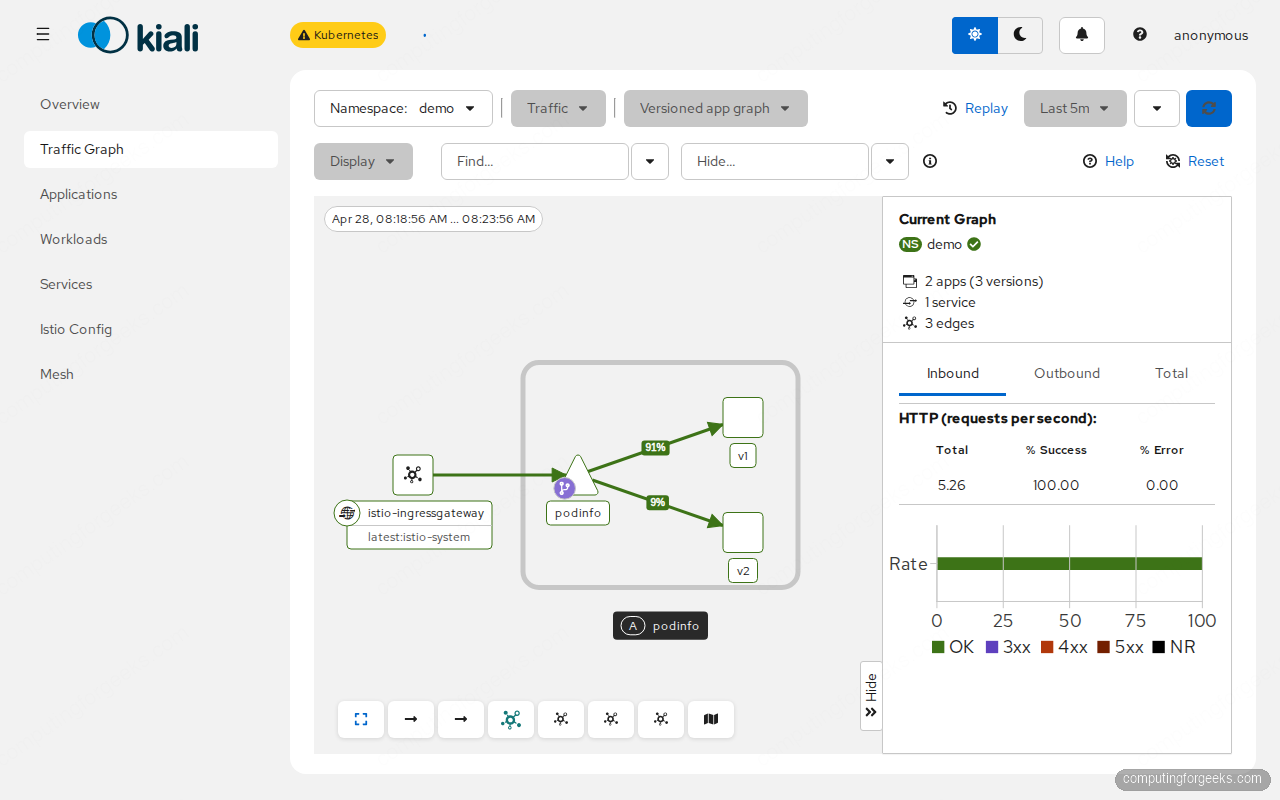
This view is the operator’s primary debug tool. When something goes wrong (red edges, high latency, error spikes), this graph tells you which pair of services is the source. Clicking any node opens the workload detail with metrics, traces, and Envoy config dumps.
Step 9: Debug Envoy config with istioctl
The first command to learn for any Istio issue is istioctl analyze. It runs config validation across the cluster and reports issues:
istioctl analyze -n ${DEMO_NS}On a clean install with the manifests from this guide, the analyzer reports no issues:
✔ No validation issues found when analyzing namespace: demo.When you do hit issues (DestinationRule for a non-existent Service, VirtualService routing to a subset that does not exist, sidecar not injected), this command flags them with the exact resource and the fix.
The next command for traffic-routing problems is istioctl proxy-config cluster <pod>.<ns>, which dumps the Envoy cluster config that the sidecar received from istiod. Inspect what destinations a podinfo pod knows about:
istioctl proxy-config cluster $(kubectl -n ${DEMO_NS} \
  get pod -l app=podinfo,version=v1 -o jsonpath="{.items[0].metadata.name}").${DEMO_NS} \
  | grep podinfo
The Envoy in the v1 pod knows about three clusters for the podinfo Service: an unsubsetted one and one per DestinationRule subset:
podinfo.demo.svc.cluster.local    80    -    outbound    EDS    podinfo.demo
podinfo.demo.svc.cluster.local    80    v1   outbound    EDS    podinfo.demo
podinfo.demo.svc.cluster.local    80    v2   outbound    EDS    podinfo.demo
Three clusters: one for the unsubsetted Service (used when no DestinationRule subset matches) and one for each named subset from the DestinationRule. The Envoy uses these to make routing decisions whenever the sidecar’s local app talks to podinfo.
Other useful proxy-config subcommands:
istioctl proxy-config listeners <pod>.<ns>: every port the sidecar listens on and what filter chain runs on each.istioctl proxy-config routes <pod>.<ns>: every HTTP route the sidecar knows. This is where you confirm a VirtualService landed.istioctl proxy-config endpoints <pod>.<ns>: actual pod IPs the sidecar will load-balance to. Confirms EDS is delivering the right backends.istioctl x precheck: pre-upgrade health check; run before bumping Istio versions.
The most common failures and their fixes
The four issues that account for most Istio support tickets, with the exact symptom and the fix.
Sidecar not injected (READY 1/1 instead of 2/2)
The namespace label is missing or was applied after the pod was created. Fix:
kubectl label namespace ${DEMO_NS} istio-injection=enabled --overwrite
kubectl -n ${DEMO_NS} rollout restart deploy
UPSTREAM_RESET / connection refused after enabling mTLS
A client outside the mesh is trying to reach a pod inside it. PeerAuthentication strict requires both endpoints to have sidecars. Either move the client into a labelled namespace or change the PeerAuthentication mode to PERMISSIVE during the migration.
VirtualService weights are not respected
The DestinationRule subsets do not match labels on actual pods. Run:
kubectl -n ${DEMO_NS} get pods -l version=v2
istioctl proxy-config endpoints $(kubectl -n ${DEMO_NS} \
  get pod -l app=podinfo,version=v1 -o jsonpath="{.items[0].metadata.name}").${DEMO_NS} \
  | grep podinfo
Both should return at least one pod for each subset. Empty output means the labels in the DestinationRule do not match the labels on the pods.
503 NR (no route) at the ingress gateway
The Gateway hostname does not match what the client sent. Either change the VirtualService hosts to ["*"] for testing, or set a real hostname and pass -H "Host: example.com" on the curl. istioctl proxy-config routes on the ingress gateway pod is the source of truth for what hostnames are matched.
Performance and footprint
Each Envoy sidecar adds memory (~40MB per pod) and a small CPU overhead (1-3% on light traffic, more under load). On the test cluster, measured request latency through Envoy added about 1-2ms p50 and 5-8ms p99 over plain Kubernetes Service routing. The istiod control plane uses ~150MB regardless of cluster size for clusters under ~200 services; beyond that it grows with the number of distinct services and routes.
The bigger operational cost is mental overhead. Every traffic problem now has two layers (Service plus Envoy), every TLS issue has a PeerAuthentication and a DestinationRule mode, every observability question routes through Kiali. For a team with 10 services, this is overkill; for a team with 100 services, it is the only way to maintain sanity. The decision usually comes when manual kubectl exec debugging stops scaling.
Failure drill: what happens when istiod goes down
One question every team asks before adopting Istio: what is the blast radius if the control plane crashes? The answer is reassuring. Existing Envoy sidecars keep their last-known config in memory and continue routing traffic; only new pods cannot get Envoy configuration until istiod recovers. Verify on the test cluster:
kubectl -n istio-system scale deploy istiod --replicas=0
sleep 10
# Existing pods should still serve traffic
curl -s "http://${INGRESS_LB_IP}/version" | jq .
The curl still returns the podinfo response because the ingress-gateway Envoy and the podinfo sidecars all have their last-known routing config cached. Restore istiod and new pods can join the mesh again:
kubectl -n istio-system scale deploy istiod --replicas=1
kubectl -n istio-system rollout status deploy istiod
The lesson: istiod is recoverable, the data plane is resilient, and a control-plane outage degrades capacity (no new pods join the mesh) but does not stop traffic. In production, run istiod with at least 2 replicas and a PodDisruptionBudget so node maintenance never takes both at once.
Cleaning up
Remove the demo workloads and Istio itself when you are done with the lab:
kubectl delete ns ${DEMO_NS}
istioctl uninstall --purge -y
kubectl delete ns istio-system
Service mesh is one layer of cluster networking; the foundation is the CNI. The Cilium CNI guide covers eBPF-based pod networking and NetworkPolicies. For ingress traffic specifically, the Gateway API migration guide explains the new ingress standard that Istio, Cilium, and most service meshes have started supporting natively. Production observability beyond Kiali ties into the Prometheus and Grafana on Kubernetes stack, and the Kubernetes RBAC guide covers who can edit VirtualServices and DestinationRules in production multi-tenant clusters.