FreeBSD ships without sudo or doas by default, which surprises Linux admins on day one. The base system uses su against the wheel group, and that is the entire privilege story until you install something else from ports or packages. For multi-admin boxes that pattern falls apart quickly. Audit trails are thin, password sharing creeps in, and there is no way to give one user permission to run a single backup script as root without handing them the whole shell.
This guide walks through both options on a fresh FreeBSD 15 install. We set up sudo from pkg, wire it to the wheel group through visudo, drop in per-task rules under sudoers.d/, then build the same setup with doas for readers who want a smaller, BSD-native tool. The SSH hardening guide assumes you already have a working sudo, so finish here first.
Verified working: April 2026 on FreeBSD 15.0-RELEASE-p6, sudo 1.9.17p2, doas 6.4
Prerequisites
- FreeBSD 15.0-RELEASE installed and reachable. The Proxmox install walkthrough covers a fresh box end to end.
- Root access via console, serial, or SSH key. We log in as root for the install and switch to the unprivileged user once sudo is configured.
- A non-root user account already created. If not,
pw useradd jane -m -G wheel -s /bin/shcreates one and adds them towheelin one shot. - Working network with package mirrors reachable.
pkg updateshould return cleanly before you start.
Step 1: Set reusable shell variables
Every step in this guide uses two reader-specific values: the username receiving sudo rights and a name for the per-user sudoers drop-in file. Export them once at the top of your SSH session and the rest of the article runs as-is.
export ADMIN_USER="jane"
export DROPIN_NAME="10-${ADMIN_USER}-backup"
Confirm both values before you run anything destructive:
echo "Admin user: ${ADMIN_USER}"
echo "Drop-in:    /usr/local/etc/sudoers.d/${DROPIN_NAME}"
The values hold for the current shell only. If you reconnect or jump into su -, re-export them.
Step 2: Install sudo from pkg
FreeBSD does not include sudo in the base system. Install it from the quarterly package set, which is the default repository on a fresh box:
pkg install -y sudoThe pkg subsystem pulls sudo plus two small dependencies, indexinfo and gettext-runtime:
Number of packages to be installed: 3
The process will require 10 MiB more space.
[1/3] Installing indexinfo-0.3.1_1...
[2/3] Installing gettext-runtime-1.0...
[3/3] Installing sudo-1.9.17p2_2...
Confirm the binary path and version. Sudo on FreeBSD lives under /usr/local/bin, separate from base system binaries:
which sudo visudo
sudo -V | head -3
You should see the binary location and Sudo version 1.9.17 line:
/usr/local/bin/sudo
/usr/local/sbin/visudo
Sudo version 1.9.17p2
Sudoers policy plugin version 1.9.17p2
Sudoers file grammar version 50
The grammar version line confirms which sudoers dialect the parser expects, useful when you copy rules from a different release.
Step 3: Add the user to the wheel group
FreeBSD’s wheel group is the conventional gateway to root, used by su and by the default sudoers rule we are about to enable. The base system uses pw to manage users and groups, not useradd or usermod, which catches Linux admins out:
pw groupmod wheel -m "${ADMIN_USER}"The -m flag appends to the group’s member list rather than replacing it, so existing wheel members stay in place. Verify:
pw groupshow wheelThe output lists every wheel member separated by commas:
wheel:*:0:root,freebsd,janeIf ${ADMIN_USER} already had a primary group, that does not change. Wheel is supplementary.
Step 4: Edit sudoers safely with visudo
Never edit /usr/local/etc/sudoers with a regular text editor. A typo there can lock everyone out of root because sudo refuses to load a file with a syntax error and the only fix is single-user mode. Always use visudo, which writes to a temp file, runs the parser, and only swaps the real file in if the syntax check passes.
visudoFind the wheel rule, around line 132. It is commented by default:
## Uncomment to allow members of group wheel to execute any command
# %wheel ALL=(ALL:ALL) ALL
Remove the leading # and the space, leaving:
%wheel ALL=(ALL:ALL) ALLSave and exit. Visudo runs the parser and prints “parsed OK” before swapping the file. If you prefer a non-interactive edit driven by automation, do it with sed and re-validate explicitly:
sed -i '' 's/^# %wheel ALL=(ALL:ALL) ALL/%wheel ALL=(ALL:ALL) ALL/' /usr/local/etc/sudoers
visudo -c
FreeBSD’s sed requires the empty '' argument after -i, unlike GNU sed on Linux. Forgetting it creates a backup file you did not ask for. The visudo -c step parses the live file and exits non-zero if anything is broken:
/usr/local/etc/sudoers: parsed OKThat single line is the entire success indicator. Anything else means the file is broken and the swap was rejected.
Step 5: Use drop-in files for per-task rules
Editing the main sudoers file every time you grant a permission is fragile because every change goes through the same review and pulls the entire file into a single diff. The cleaner pattern is to drop one file per task into /usr/local/etc/sudoers.d/. The default @includedir /usr/local/etc/sudoers.d directive at the bottom of the main file pulls every file in that directory into the configuration.
A typical use case is letting an admin run a backup script as root with no password prompt. Create the drop-in:
printf '# Allow %s to run the backup script without a password prompt\n%s ALL=(root) NOPASSWD: /usr/local/bin/zfs-backup.sh\n' "${ADMIN_USER}" "${ADMIN_USER}" | tee "/usr/local/etc/sudoers.d/${DROPIN_NAME}"
chmod 440 "/usr/local/etc/sudoers.d/${DROPIN_NAME}"
The printf step expands ${ADMIN_USER} on the shell side and writes the literal username into the file, so the rule names a real account rather than a variable string. Mode 440 is required by sudo, which refuses world-readable rule files.
Validate every drop-in before trusting it:
visudo -cThe check parses the main file plus every drop-in and lists each one. A failed parse on any drop-in keeps the rule out of effect:
/usr/local/etc/sudoers: parsed OK
/usr/local/etc/sudoers.d/10-jane-backup: parsed OK
Naming convention: prefix files with two digits so the load order is predictable when rules might overlap. 10- for normal rules, 50- for shared defaults, 90- for overrides.
Step 6: Test sudo as the unprivileged user
Switch to the user account and verify the rule chain. The -l flag lists what the user is allowed to run, which is the safest first test because it never executes anything privileged:
su -m "${ADMIN_USER}"
sudo -l
You will be prompted for the user’s own password (not root’s), then sudo prints the inherited defaults plus the rules that apply:
User jane may run the following commands on freebsd-15-articles-test:
    (ALL : ALL) ALL
    (root) NOPASSWD: /usr/local/bin/zfs-backup.sh
Run an actual command as root to confirm the password prompt and the privilege escalation work:
sudo whoamiThe output should be root:
Password:
root
Sudo caches your authentication for fifteen minutes by default, scoped to the current TTY. To clear the cache mid-session, run sudo -k.
Step 7: Configure sudo I/O logging
For shared production boxes the question “what did the on-call run last night?” needs a real answer. Sudo can record every keystroke and every byte of terminal output for sessions it spawns, written to /var/log/sudo-io/ in a replay-friendly format.
printf 'Defaults log_input, log_output\nDefaults iolog_dir=/var/log/sudo-io\n' | tee /usr/local/etc/sudoers.d/20-iolog
chmod 440 /usr/local/etc/sudoers.d/20-iolog
mkdir -p /var/log/sudo-io
visudo -c
From now on, every sudo invocation creates a new session directory under /var/log/sudo-io/. List recent sessions:
sudoreplay -lThe output names every captured session with a TSID you can replay:
Apr 25 15:27:41 2026 : jane : HOST=freebsd-15-articles-test ; CWD=/root ; USER=root ; TSID=000001 ; COMMAND=/usr/bin/whoami
Apr 25 15:27:41 2026 : jane : HOST=freebsd-15-articles-test ; CWD=/root ; USER=root ; TSID=000002 ; COMMAND=/usr/bin/uptime
Replay a session character-for-character, in real time:
sudoreplay 000001The standard sudo log goes to /var/log/auth.log via syslog. FreeBSD’s default /etc/syslog.conf ships with the right routing already in place:
grep -i sudo /var/log/auth.log | tail -3Each invocation produces one line in syslog with the user, working directory, target user, and command:
Apr 25 15:26:19 freebsd-15-articles-test sudo[2184]: jane : PWD=/root ; USER=root ; COMMAND=/usr/bin/whoami
Apr 25 15:27:41 freebsd-15-articles-test sudo[2277]: jane : PWD=/root ; USER=root ; TSID=000001 ; COMMAND=/usr/bin/whoami
The TSID field links a syslog line to its full I/O recording.
Step 8: Install and configure doas as an alternative
OpenBSD’s doas exists for admins who consider sudo too large and too configurable for what should be a small, auditable tool. The FreeBSD port tracks the OpenBSD source and ships as a standalone package:
pkg install -y doasDoas drops a sample /usr/local/etc/doas.conf on install. It contains worked examples for common patterns. Replace it with a minimal working config that mirrors what we built with sudo:
printf '# Members of wheel can run any command, password required, cached per session\npermit persist :wheel\n\n# %s may run the backup script as root without a password\npermit nopass %s as root cmd /usr/local/bin/zfs-backup.sh\n' "${ADMIN_USER}" "${ADMIN_USER}" | tee /usr/local/etc/doas.conf
chmod 600 /usr/local/etc/doas.conf
Validate the config:
doas -C /usr/local/etc/doas.confDoas exits 0 silently on a valid config. Test from the user account:
su -m "${ADMIN_USER}"
doas whoami
You will be prompted once per shell session because of persist, and root is the result:
doas (jane@freebsd-15-articles-test) password:
root
Doas logs to /var/log/auth.log through syslog like sudo, but produces a single line per invocation rather than the structured TSID format.
The screenshot below shows both tools side by side on the test box, including binary sizes, version output, the wheel group membership, the visudo parse confirmation, and the user’s effective sudo rules:
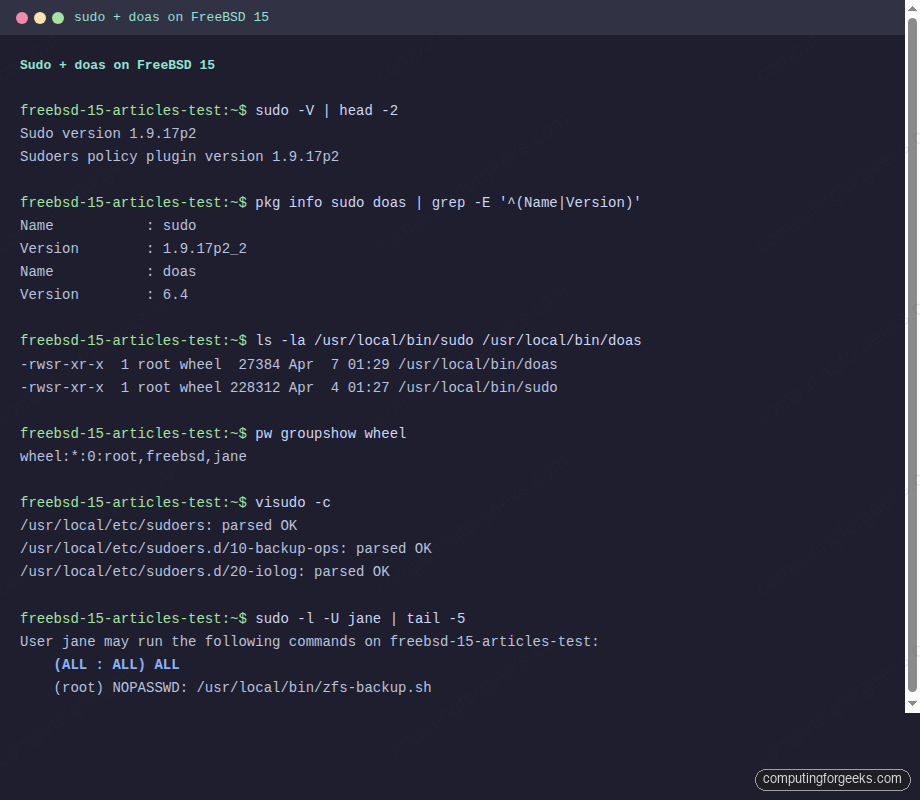
The size difference is the headline: 27 KB for doas versus 228 KB for sudo. The feature gap is also wide. Which one fits depends on what your team values, covered in the next section.
Step 9: sudo vs doas, how to pick
The choice is not really about features alone. It is about the operational surface area you want to maintain.
| Criterion | sudo 1.9 | doas 6.4 |
|---|---|---|
| Binary size | 228 KB | 27 KB |
| Default config lines (effective) | ~5 (wheel-style template) | 0 (you write the whole file) |
| Config grammar | Rich: aliases, runas lists, env_keep, defaults, tag combinations | Minimal: permit / deny with a small set of qualifiers |
| I/O session recording | Yes, via log_input and log_output | No, syslog line only |
| Per-command rules | Yes, with arg matching and globs | Yes, via cmd and args |
| Drop-in directory | Yes, /usr/local/etc/sudoers.d/ | No, single file |
| LDAP / SSSD integration | Yes | No |
| Default password cache | 15 minutes per TTY | 5 minutes with persist |
| Audit module | BSM audit on FreeBSD | syslog only |
| Upstream cadence | Frequent, security-focused | Slow, security-focused |
Pick sudo when you need any of: I/O recording, LDAP-backed rules, a config that spans multiple admins with different scopes, or compatibility with existing Linux infrastructure where everyone already speaks sudoers grammar.
Pick doas when the box is single-purpose, the admin team is small, you want the smallest possible TCB for privilege escalation, or you are following an OpenBSD-style minimalist convention. On a hardened bastion or a personal workstation, doas is often the better fit.
Mixing the two on the same box is legal but pointless. Pick one, stick with it, and document the choice in your runbook so the next admin does not install both and produce a confusing audit trail.
Step 10: Troubleshoot common errors
Error: “user is not in the sudoers file”
Sudo prints this when the calling user has no matching rule, regardless of password:
alice is not in the sudoers file.
This incident has been reported to the administrator.
The user is not in the wheel group. Add them with pw groupmod wheel -m alice, then have them log out and back in so the new group membership takes effect in the new shell.
Error: visudo “syntax error” with line and column
Save a malformed file via visudo and the parser refuses the swap, printing the offending line:
/tmp/bad-sudoers:1:44: syntax error
jane ALL=(root) NOPASSWORD: /usr/bin/uptime
                                           ^
The keyword is NOPASSWD, not NOPASSWORD. Sudo lists every reserved word in man 5 sudoers. The ^ column pointer in the error gives you the position of the first invalid token, which often arrives a few characters past the actual mistake.
Error: doas “Authorization required”
Doas prints this when the rule chain does not match, often because the file mode is wrong:
doas: Authorization requiredCheck that /usr/local/etc/doas.conf is mode 600 and owned by root. Check that the user is a member of wheel if the rule references :wheel. Run doas -C /usr/local/etc/doas.conf user with the username argument to see exactly which rules apply to that user, and where the chain stops.
Error: sudo refuses to start, “/usr/local/etc/sudoers is mode 0660”
Sudo refuses any sudoers file that is not mode 440 (or 0440):
chmod 440 /usr/local/etc/sudoers
chmod 440 /usr/local/etc/sudoers.d/*
This is a deliberate safety measure. A world-writable sudoers file is an instant root for any local user.
Step 11: Production hardening
Once sudo or doas is working, three changes harden the privilege story for production:
Disable direct root SSH login. If wheel members can sudo, root SSH should be off. Edit /etc/ssh/sshd_config and set PermitRootLogin no, then service sshd reload. The SSH hardening walkthrough covers the full set of recommended sshd options and the test plan to verify them safely.
Force sudo through wheel. Remove or comment any direct user grants in sudoers and rely on group membership instead. The single rule %wheel ALL=(ALL:ALL) ALL is easier to audit than ten per-user grants because adding or removing an admin is a one-line change to pw groupmod, never a change to sudoers.
Centralise sudo logs. Local /var/log/auth.log entries are useful but vanish if the box is compromised. Forward sudo events to a remote syslog or to an audit collector. /etc/syslog.conf takes a remote target with the @host syntax, and the FreeBSD service management guide shows how to reload syslogd cleanly after the change.
If you are running multi-tenant boxes with several admin teams, also add a Defaults lecture=always entry to sudoers so users see the standard privilege banner on every fresh authentication, and audit drop-ins quarterly with find /usr/local/etc/sudoers.d/ -mtime -90 to check what changed in the last quarter. The full picture of layered host hardening, including pf firewall rules and ZFS pool layout, lives in the sibling guides.