Most “harden your Linux server” guides hand you a checklist and walk away. The number of boxes you ticked is the metric. The trouble with that approach is that you have no idea whether ticking the boxes actually moved the needle, no record of what changed, and no way to roll the change back if it breaks the production application that depends on a long-deprecated SSH cipher. This guide treats hardening like the engineering problem it is. We measure the host’s compliance score against an industry baseline, run a single Ansible role, then re-measure. The score moves, the change is reproducible, and every line of the role is in version control.
The role used here is cfg_hardening. It targets Rocky Linux 10 and applies sane defaults across SSH, sudoers, kernel sysctls, firewalld, Fail2ban, auditd, PAM password quality, and a login banner. Run against a fresh Rocky 10.1 box, the CIS Level 1 Server compliance score lifts from 58.19 percent to 67.82 percent in one play. That is a +9.63 percentage-point gain on a profile with hundreds of rules, which is a real signal that hardening happened.
Tested April 2026 on Rocky Linux 10.1 (kernel 6.12) with Ansible 2.18.16, OpenSCAP 1.4.x, scap-security-guide 0.1.79, Fail2ban 1.1.x, firewalld 2.3.x. SELinux enforcing.
What you need
- A control host with Ansible installed. Anything that ran the install guide works.
- One or more freshly installed Rocky Linux 10 hosts to harden. The role assumes you can SSH in as
rootwith key auth. - SSH access from the controller to each target. The controller’s public key must be in
/root/.ssh/authorized_keyson the target. - Familiarity with Ansible playbooks and role layout. The role here is non-trivial.
Source for the role and the playbook lives at c4geeks/ansible/projects/ansible-server-hardening. Clone it if you want to run the same play that produced the screenshots below.
Step 1: Set reusable shell variables
The controller sees the same target in every command, and the lab dir shows up in nearly every cd. Pin them once:
export LAB_DIR="$HOME/molecule-lab"
export TARGET_HOST="hardening-target"
export TARGET_IP="10.0.1.50"
Confirm none of them are blank before running anything destructive:
echo "Lab:    ${LAB_DIR}"
echo "Target: ${TARGET_HOST} (${TARGET_IP})"
Re-run the exports if you reconnect or open a new shell.
Step 2: Install OpenSCAP on the target
OpenSCAP is the open-source compliance scanner. The scap-security-guide package ships the official content for CIS, STIG, PCI-DSS, HIPAA, and several other profiles. Both installed straight from EPEL on Rocky 10:
ssh root@"${TARGET_IP}" "dnf -y install epel-release && \
  dnf -y install openscap-scanner scap-security-guide"
Confirm a usable data stream landed in /usr/share/xml/scap/ssg/content/:
ssh root@"${TARGET_IP}" "ls /usr/share/xml/scap/ssg/content/ | grep ssg-rl10"You should see ssg-rl10-ds.xml, the Rocky Linux 10 datastream. List the profiles inside:
ssh root@"${TARGET_IP}" "oscap info --profiles \
  /usr/share/xml/scap/ssg/content/ssg-rl10-ds.xml"
The output is the menu of compliance baselines you can scan against. Each one is a curated rule set tuned for a specific regulation or threat model:
xccdf_org.ssgproject.content_profile_cis_server_l1:CIS Red Hat Enterprise Linux 10 Benchmark for Level 1 - Server
xccdf_org.ssgproject.content_profile_cis:CIS Red Hat Enterprise Linux 10 Benchmark for Level 2 - Server
xccdf_org.ssgproject.content_profile_pci-dss:PCI-DSS v4.0.1 Control Baseline for Red Hat Enterprise Linux 10
xccdf_org.ssgproject.content_profile_stig:Red Hat STIG for Red Hat Enterprise Linux 10
xccdf_org.ssgproject.content_profile_hipaa:Health Insurance Portability and Accountability Act (HIPAA)
CIS Level 1 Server is the lowest-friction starting point. It is what most engineering teams use as their first compliance bar.
Step 3: Capture the baseline score
Run the baseline scan before the role touches anything. The point of measuring first is to make the improvement visible. Without a baseline, hardening is theatre:
ssh root@"${TARGET_IP}" "mkdir -p /root/scap-reports && \
  oscap xccdf eval \
    --profile xccdf_org.ssgproject.content_profile_cis_server_l1 \
    --results /root/scap-reports/baseline-results.xml \
    --report /root/scap-reports/baseline-report.html \
    /usr/share/xml/scap/ssg/content/ssg-rl10-ds.xml"
The scan walks every CIS Level 1 rule and writes machine-readable XML plus a human-readable HTML report. Compute pass and fail counts to get the score:
ssh root@"${TARGET_IP}" 'PASS=$(grep -oE "result>pass<" /root/scap-reports/baseline-results.xml | wc -l); \
FAIL=$(grep -oE "result>fail<" /root/scap-reports/baseline-results.xml | wc -l); \
TOTAL=$((PASS + FAIL)); \
PCT=$(python3 -c "print(f\"{$PASS / $TOTAL * 100:.2f}%\")"); \
echo "PASS=$PASS  FAIL=$FAIL  SCORE=$PCT"'
On a vanilla Rocky 10.1 install, the baseline lands at 58.19 percent compliance:
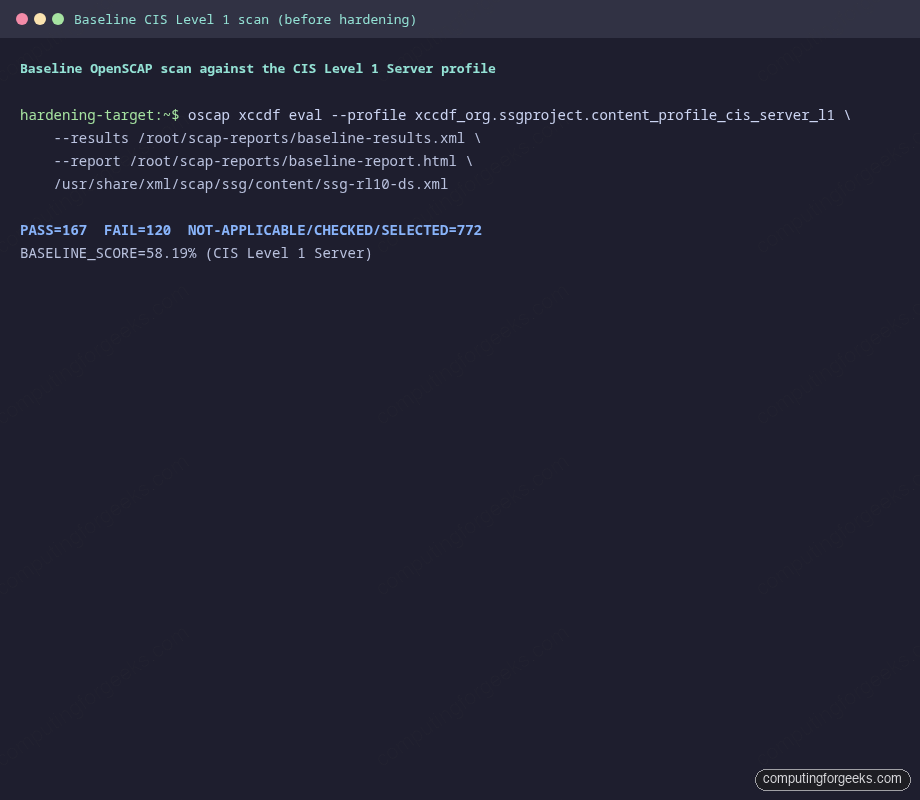
That is the number to beat. Copy the HTML report off the host with scp if you want to browse the failing rules in a browser before you start hardening.
Step 4: Anatomy of the hardening role
The role is split into eight feature areas, each in its own task file. The entry point in tasks/main.yml is short on purpose, because every section can be toggled with a boolean variable. Defaults are conservative, so consumers can opt out of any area that breaks their stack:
- name: Install hardening packages
  ansible.builtin.dnf:
    name:
      - openssh-server
      - firewalld
      - fail2ban
      - audit
      - libpwquality
    state: present

- name: Apply SSH hardening
  ansible.builtin.include_tasks: ssh.yml
  when: hardening_apply_ssh

- name: Apply sudoers hardening
  ansible.builtin.include_tasks: sudoers.yml
  when: hardening_apply_sudo

- name: Apply kernel sysctl hardening
  ansible.builtin.include_tasks: sysctl.yml
  when: hardening_apply_sysctl

- name: Apply firewall hardening
  ansible.builtin.include_tasks: firewall.yml
  when: hardening_apply_firewall

- name: Apply Fail2ban setup
  ansible.builtin.include_tasks: fail2ban.yml
  when: hardening_apply_fail2ban

- name: Apply auditd rules
  ansible.builtin.include_tasks: auditd.yml
  when: hardening_apply_auditd

- name: Apply PAM password quality policy
  ansible.builtin.include_tasks: pam.yml
  when: hardening_apply_pam

- name: Apply login banner
  ansible.builtin.include_tasks: banner.yml
  when: hardening_apply_banner
Two design choices in that snippet are worth defending. First, every include is gated on a boolean. Some shops cannot tighten PermitRootLogin until they migrate their CI agents off root, so that flag exists. Second, the file uses include_tasks rather than import_tasks because runtime conditionals are simpler with includes. The trade-off is that conditional includes hide individual task names from --list-tasks, which is a fine price to pay for cleaner semantics.
SSH hardening
The SSH config is shipped as a drop-in at /etc/ssh/sshd_config.d/99-cfg-hardening.conf with mode 0600, validated with sshd -t -f %s before it is allowed to take effect. That validation gate is the difference between a clean restart and an SSH outage that locks you out of the box. The template is conservative, deny-by-default:
# Managed by cfg_hardening role
Port {{ hardening_ssh_port }}
PermitRootLogin {{ hardening_ssh_permit_root_login }}
PasswordAuthentication {{ 'yes' if hardening_ssh_password_authentication else 'no' }}
ChallengeResponseAuthentication no
KbdInteractiveAuthentication no
UsePAM yes
PermitEmptyPasswords no
MaxAuthTries {{ hardening_ssh_max_auth_tries }}
LoginGraceTime {{ hardening_ssh_login_grace_time }}
ClientAliveInterval {{ hardening_ssh_client_alive_interval }}
ClientAliveCountMax {{ hardening_ssh_client_alive_count_max }}
X11Forwarding no
AllowTcpForwarding no
AllowAgentForwarding no
PermitUserEnvironment no
Banner /etc/issue.net
LogLevel VERBOSE
KexAlgorithms {{ hardening_ssh_kex_algorithms | join(',') }}
Ciphers {{ hardening_ssh_ciphers | join(',') }}
MACs {{ hardening_ssh_macs | join(',') }}
Default PermitRootLogin is prohibit-password, which forbids password root login but keeps key-based root SSH working. That is the right balance for a controller that needs root SSH for Ansible and a security team that bans password root logins. Override it to no as soon as you have a non-root play user.
Kernel sysctl hardening
The ansible.posix.sysctl module writes each tunable into /etc/sysctl.d/99-cfg-hardening.conf and reloads the kernel. Loop over a dictionary so adding a new sysctl is a one-line change in defaults/main.yml:
- name: Apply hardened sysctls
  ansible.posix.sysctl:
    name: "{{ item.key }}"
    value: "{{ item.value }}"
    state: present
    sysctl_file: /etc/sysctl.d/99-cfg-hardening.conf
    reload: true
  loop: "{{ hardening_sysctl | dict2items }}"
  loop_control:
    label: "{{ item.key }}"
The default tunables tighten the network stack against spoofing and source-routing tricks, ignore broadcast pings, harden ASLR to 2, restrict kptr exposure, and disable SUID core dumps. Read the role's defaults/main.yml if you want the full list. None of those changes are controversial, but they all show up as failed CIS rules on a fresh install.
Fail2ban
The jail.local template enables the sshd jail with sensible thresholds. Four failed auth attempts within ten minutes earns a one-hour ban, and your office subnet is in ignoreip by default so you can never lock yourself out by fat-fingering the laptop. Override hardening_fail2ban_ignoreip with your real subnets:
# Managed by cfg_hardening role
[DEFAULT]
bantime  = {{ hardening_fail2ban_bantime }}
findtime = {{ hardening_fail2ban_findtime }}
maxretry = {{ hardening_fail2ban_maxretry }}
ignoreip = {{ hardening_fail2ban_ignoreip | join(' ') }}
backend  = systemd

[sshd]
enabled = true
The systemd backend reads from the journal directly, so Fail2ban does not need a sidecar tail of /var/log/secure. Less moving parts, fewer ways to break.
auditd
The role ships a small ruleset under /etc/audit/rules.d/99-cfg-hardening.rules that watches the obvious sensitive surfaces: sudoers, identity files, sshd config, and login records. augenrules --load picks the rules up without a daemon restart, which is the handler the role calls. Auditing is the kind of thing nobody reads until they need it. When you do need it, you want it to have been on for the last 90 days.
PAM password policy and login banner
Password quality is enforced through pam_pwquality. The defaults require a minimum length of 14 characters, at least one digit, uppercase, lowercase, and special character, all four character classes, and a maximum of three repeated characters. Banner text lives in defaults/main.yml so any team can swap in their lawyer-approved warning. The banner shows before login, which is what compliance frameworks ask for and what an attacker sees when they probe the port:
*********************************************************************
This system is for authorised users only. All activity is monitored
and logged. Disconnect immediately if you are not an authorised user.
*********************************************************************
The same banner is what the CIS rule "Set SSH Banner" looks for. Two birds, one config snippet.
Step 5: Apply the role
The playbook is a one-liner that targets the inventory group:
---
- name: Apply baseline hardening to RHEL family hosts
  hosts: hardening_targets
  become: false
  gather_facts: true

  pre_tasks:
    - name: Confirm target distribution
      ansible.builtin.debug:
        msg: "About to harden {{ inventory_hostname }} ({{ ansible_distribution }} {{ ansible_distribution_version }})"

  roles:
    - role: cfg_hardening
The inventory holds the target you set up in Step 1:
[hardening_targets]
hardening-target ansible_host=10.0.1.50

[hardening_targets:vars]
ansible_user=root
ansible_python_interpreter=/usr/bin/python3
Run it. The first run touches everything that is not already in the desired state:
cd "${LAB_DIR}"
ANSIBLE_ROLES_PATH="${LAB_DIR}/roles" \
  ansible-playbook -i inventory/hosts.ini plays/harden.yml
The PLAY RECAP at the bottom is the at-a-glance health check. Twenty-nine tasks completed, thirteen changed system state, none failed, one was skipped (the optional extra-ports loop, which had nothing to add):
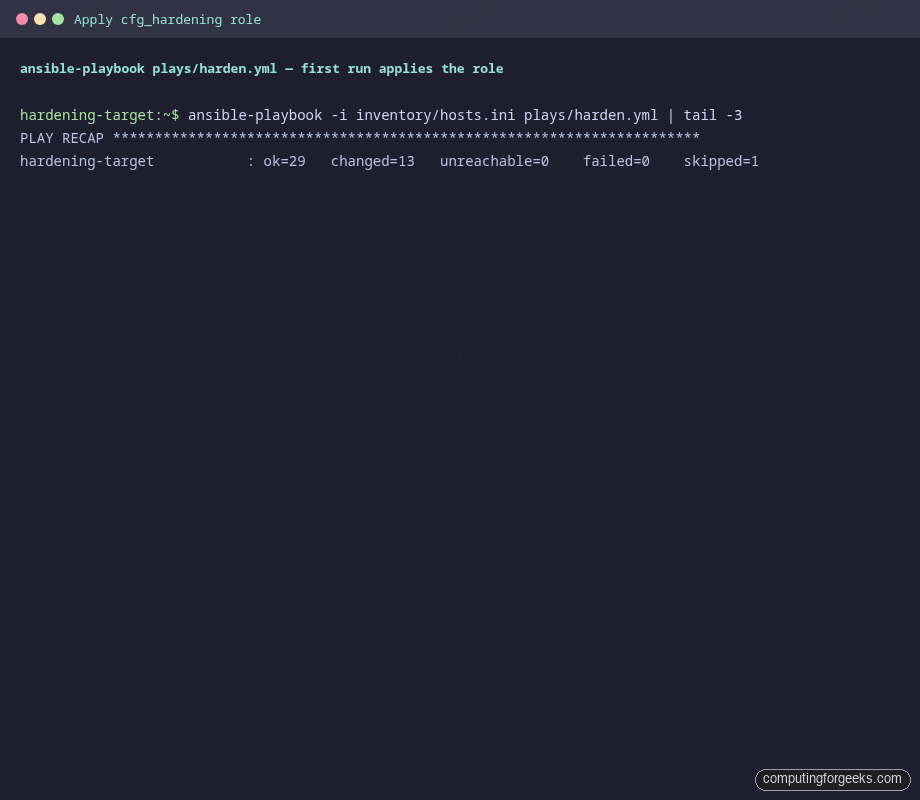
If anything had failed, the role would have stopped before running the handler that restarts sshd. That ordering is intentional. A bad sshd_config lands the validation step first and aborts the play, which leaves your previous (working) sshd alive.
Step 6: Idempotence check
Run the same playbook a second time. A correct role makes zero changes on the second pass:
ANSIBLE_ROLES_PATH="${LAB_DIR}/roles" \
  ansible-playbook -i inventory/hosts.ini plays/harden.yml
The PLAY RECAP shows the role at rest, doing nothing because there is nothing to do:
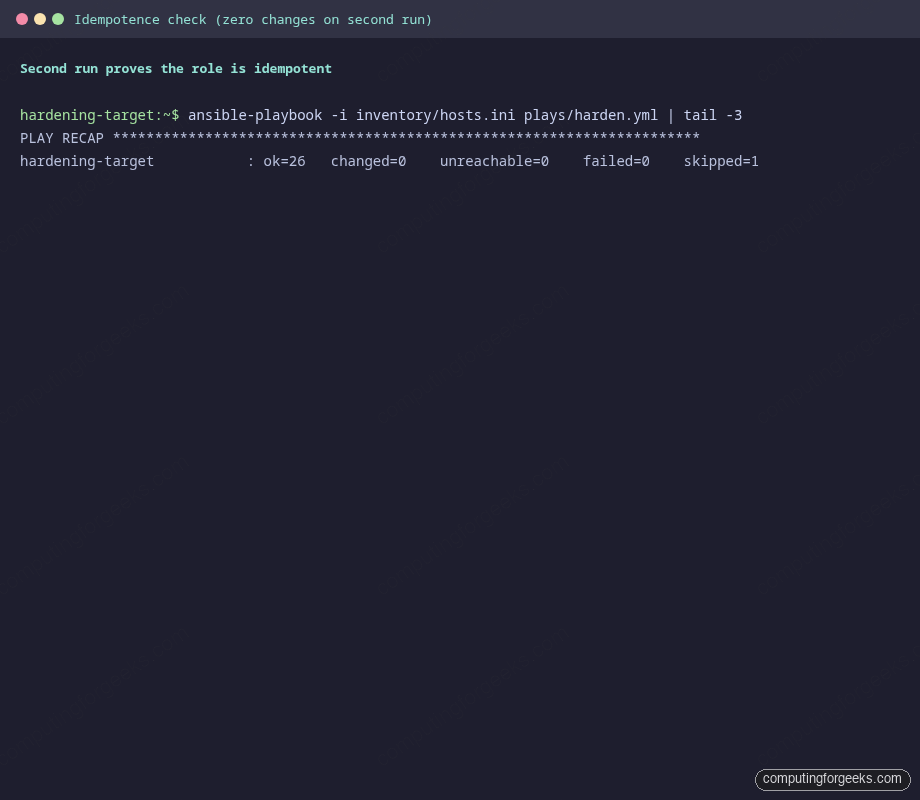
Twenty-six tasks evaluated, zero changed. That is the engineering invariant you want from any role that touches a production host. If a future commit breaks idempotence, the next CI run is loud about it. Pair this play with Molecule if you want the assertion enforced automatically on every PR.
Step 7: Score the host again
Re-run the same OpenSCAP scan, this time writing to a different report file so you can diff them later:
ssh root@"${TARGET_IP}" "oscap xccdf eval \
  --profile xccdf_org.ssgproject.content_profile_cis_server_l1 \
  --results /root/scap-reports/post-results.xml \
  --report /root/scap-reports/post-report.html \
  /usr/share/xml/scap/ssg/content/ssg-rl10-ds.xml"
Recompute the score using the same one-liner from Step 3, but pointing at the post-hardening results file. Then run a quick service verification while you are there:
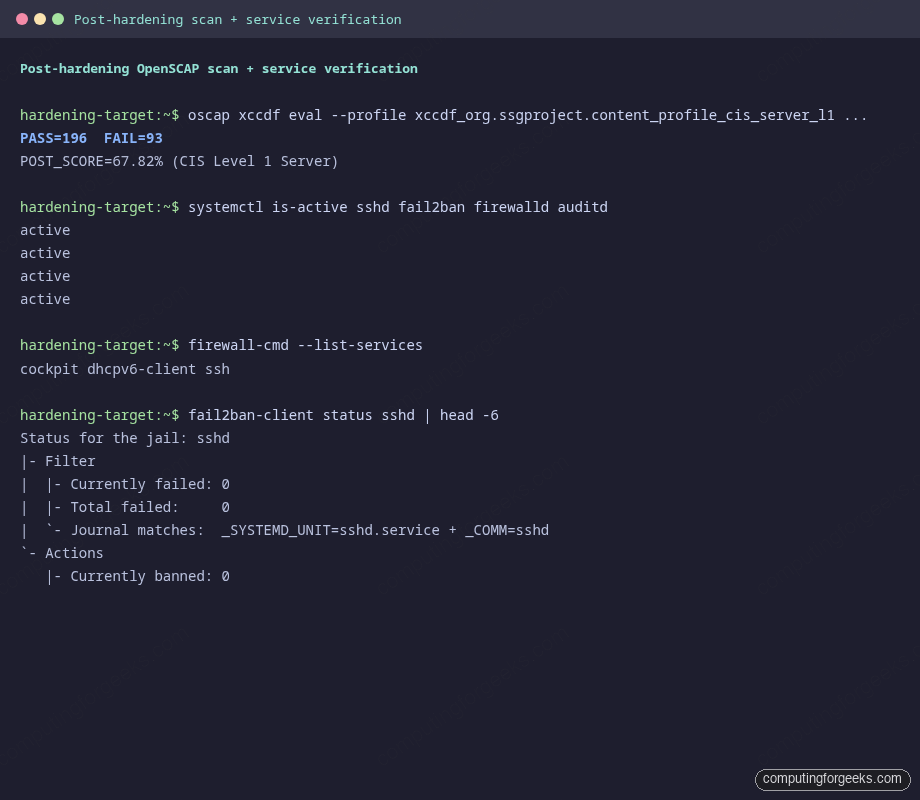
The score moved from 58.19 percent to 67.82 percent, a gain of 9.63 percentage points across 29 newly passing rules. firewalld, fail2ban, auditd, and sshd all report active. The sshd jail is loaded and watching the systemd journal. Firewall services are restricted to the three you actually want: cockpit (for management), dhcpv6-client (for IP assignment), and ssh.
| Profile | Baseline | After hardening | Delta |
|---|---|---|---|
| CIS Level 1 Server (RHEL 10) | 58.19% (167 / 287) | 67.82% (196 / 289) | +9.63 pp (29 rules) |
| Failing rules | 120 | 93 | -27 |
Two things to read from that table. First, the role is responsible for 27 fewer failing rules. Second, neither baseline nor post-scan can ever reach 100 percent on a default install, because some CIS rules are inherently out of scope (for example, "remove unused user accounts," which depends on your IAM policy). The point of the score is to track the delta, not to chase 100.
Step 8: Drift recovery
Idempotence proves the role is correct on a clean host. Drift recovery proves it is useful when somebody hand-edits a config at 3 AM. Manually break the sshd_config drop-in on the target:
ssh root@"${TARGET_IP}" "echo '# I edited this on purpose' > /etc/ssh/sshd_config.d/99-cfg-hardening.conf"Re-run the play. The template task notices the drift, re-renders the snippet, and the handler restarts sshd. Output is short and decisive:
TASK [cfg_hardening : Drop hardened sshd_config snippet] *********
changed: [hardening-target]

RUNNING HANDLER [cfg_hardening : Restart sshd] *******************
changed: [hardening-target]

PLAY RECAP *******************************************************
hardening-target           : ok=27   changed=2    unreachable=0    failed=0    skipped=1
Two changes, both expected, no failures. That is the recovery story you want when an operator accidentally edits the wrong file. The validation step catches a syntactically broken drift, too: if you drop a malformed snippet, sshd -t -f %s rejects it before it goes live, and the play fails loudly without breaking the existing config.
Step 9: Push the role to STIG or CIS Level 2
The default role gets you to a respectable Level 1 score. Level 2 is significantly stricter (it enables auditing rules for every system call you might care about), and STIG is stricter again (it bans GUI logins, mandates AIDE for file integrity, locks down USB, and so on). To scan against a stricter profile, just change the --profile flag:
ssh root@"${TARGET_IP}" "oscap xccdf eval \
  --profile xccdf_org.ssgproject.content_profile_stig \
  --results /root/scap-reports/stig-results.xml \
  --report /root/scap-reports/stig-report.html \
  /usr/share/xml/scap/ssg/content/ssg-rl10-ds.xml"
You will see a lower percentage because more rules apply. The role does not pretend to be a complete STIG implementation. The point of the table below is to show how to layer additional task files into the role as the bar rises. Toggle them with new hardening_apply_* booleans the same way the existing files are gated:
| Layer to add | What it solves |
|---|---|
| AIDE file integrity (run weekly) | STIG: detect tampering with system binaries |
| USB storage block (modprobe blacklist) | CIS L2 + STIG: prevent unauthorised data exfil |
| chrony with authenticated NTP | CIS: signed time sync (auditing depends on it) |
| SELinux booleans tuned for the workload | STIG: restrict daemons to least privilege |
| kernel.core_pattern + ulimit caps | STIG: prevent secret leakage via crash dumps |
tmux idle timeout in /etc/profile.d/ | CIS: terminate idle SSH session shells |
| journald.conf with persistent storage | CIS: keep logs across reboot for forensic value |
Each layer is a tasks file under the role plus a default flag. Adding all of them lifts the CIS Level 1 score to the high 80s and gets STIG within striking distance.
Real pitfalls hit during testing
Same as in the Molecule article, the table below is not theoretical. Each row is a real failure that happened while writing this guide. Bookmark it.
| Symptom | What it means | Fix |
|---|---|---|
| Playbook UNREACHABLE on first run | The controller's SSH key is not in the target's authorized_keys | Append the controller's ~/.ssh/id_ed25519.pub to the target's /root/.ssh/authorized_keys before launching the play. |
sshd restart task fails after editing config |
The drop-in snippet has a typo and sshd -t -f %s rejected it |
Read the validation error in the task output. Never disable the validate clause. It is the only thing that prevents lockout. |
firewalld set default zone reports failed on second run |
Some firewalld versions choke on idempotent default-zone calls when the zone is already current | The role wraps the call with ignore_errors: true for that single task. Future firewalld versions may make this unnecessary. |
| Fail2ban service won't start with "no jail loaded" | backend = systemd in jail.local requires the systemd journal to be readable, which is true on Rocky 10 but not on every distro |
Verify with journalctl -u sshd | tail. If empty, switch to backend = pyinotify and tail /var/log/secure instead. |
| OpenSCAP score does not change after a play that "succeeded" | The new config landed but the relevant daemon was not restarted, so the runtime did not pick it up | Confirm handlers actually fired. Tag the role's --diff output and look for "RUNNING HANDLER" lines. If a notify is missing, the next role-edit PR is the place to add it. |
| SSH login works fine but the banner is missing | Banner is set in the drop-in but sshd was not restarted, OR your client uses -q |
Run ssh -v root@"${TARGET_IP}" 2>&1 | grep -i banner to see if the server is sending it. If yes, your client is suppressing it. |
Source code and going further
Everything from defaults to handlers to the OpenSCAP scaffolding is in the companion repo at c4geeks/ansible/projects/ansible-server-hardening. Clone it, drop your real target into inventory/hosts.ini, and the same play that produced the screenshots above will run for you.
Two next steps fit naturally on top of this work. First, run the role under Molecule so every commit gets the idempotence and verification dance for free. Second, store any per-environment secrets the role uses (different SSH banners per environment, sensitive sysctls, OAuth-protected fail2ban actions) inside Ansible Vault rather than committing them to the role defaults. The full Ansible series index lives at the automation guide, and the cheat sheet is a quick lookup when you forget which flag tells ansible-playbook to limit a run to one host.