BIND 9 remains the de facto DNS server for the internet, ISC’s reference implementation, now in its 9.18 long-term support branch. On FreeBSD 15, it ships as a first-class ports package and integrates cleanly with the base system without the kernel patches or SELinux policies that complicate Linux deployments. One command to install, a handful of config files, and you have a fully functional recursive resolver and authoritative server running under the bind user with chroot disabled by default in the modern pkg builds.
This guide walks through a complete BIND 9 setup: recursive caching with forwarders, an authoritative primary zone for lab.local, a reverse zone, DNSSEC signing with ECDSAP256SHA256 keys, ACL-based query controls, and query logging. All steps tested on FreeBSD 15.0-RELEASE with BIND 9.18.48. If you’re new to FreeBSD, see the guide on installing FreeBSD 15 on Proxmox/KVM first, then come back here.
Verified working: April 2026 on FreeBSD 15.0-RELEASE (kernel releng/15.0-n280995), BIND 9.18.48 from the FreeBSD ports tree.
Prerequisites
- FreeBSD 15.0-RELEASE with root access
- Working internet connection for pkg and upstream DNS forwarding
- Firewall open on UDP/TCP port 53 for DNS clients; TCP 953 for rndc (localhost only)
- Tested on: BIND 9.18.48, FreeBSD 15.0-RELEASE, amd64
Install BIND 9
The FreeBSD ports tree offers several BIND versions. BIND 9.18 is the current extended support version (ESV) with security fixes through mid-2026:
pkg search bind9You’ll see bind918, bind916, and others. Install the 9.18 ESV package:
pkg install -y bind918Confirm the installed version:
named -vThe output confirms the installed build:
BIND 9.18.48 (Extended Support Version) <id:>The package installs named, rndc, named-checkconf, named-checkzone, dnssec-keygen, and dnssec-signzone under /usr/local/sbin. Zone data and configuration live in /usr/local/etc/namedb/.
Enable named in rc.conf
Enable the service and disable the legacy chroot mode. Modern BIND on FreeBSD runs fine without it, and chroot adds complexity without meaningful security benefit when the daemon already drops privileges to the bind user:
sysrc named_enable=YES
sysrc named_chrootdir=""
Both settings are confirmed in the sysrc output:
named_enable: YES -> YES
named_chrootdir:  ->
Configure named.conf
The default config at /usr/local/etc/namedb/named.conf listens only on localhost. Replace it with a configuration that opens the listener, defines ACLs, adds forwarders, and declares the authoritative zones. Open the file:
vi /usr/local/etc/namedb/named.confReplace the options section and add the zone stanzas:
// ACL for trusted clients
acl "trusted_clients" {
    localhost;
    192.168.1.0/24;
};

options {
    directory        "/usr/local/etc/namedb/working";
    pid-file         "/var/run/named/pid";
    dump-file        "/var/dump/named_dump.db";
    statistics-file  "/var/stats/named.stats";

    listen-on        { any; };
    listen-on-v6     { any; };

    allow-query      { trusted_clients; };
    allow-recursion  { trusted_clients; };

    forwarders {
        1.1.1.1;   // Cloudflare
        9.9.9.9;   // Quad9
    };
    forward first;

    dnssec-validation auto;
};

logging {
    channel query_log {
        file "/var/log/named/queries.log" versions 3 size 5m;
        severity dynamic;
        print-time yes;
        print-severity yes;
        print-category yes;
    };

    category queries { query_log; };
    category default { default_syslog; default_debug; };
};

// Root hints
zone "." { type hint; file "/usr/local/etc/namedb/named.root"; };

// Standard RFC zones
zone "localhost"        { type primary; file "/usr/local/etc/namedb/primary/localhost-forward.db"; };
zone "127.in-addr.arpa" { type primary; file "/usr/local/etc/namedb/primary/localhost-reverse.db"; };
zone "255.in-addr.arpa" { type primary; file "/usr/local/etc/namedb/primary/empty.db"; };

// Authoritative zone: lab.local
zone "lab.local" {
    type primary;
    file "/usr/local/etc/namedb/primary/lab.local.db";
    allow-update  { none; };
    allow-transfer { none; };
};

// Reverse zone for 192.168.1.0/24
zone "1.168.192.in-addr.arpa" {
    type primary;
    file "/usr/local/etc/namedb/primary/192.168.1.rev";
    allow-update  { none; };
};
forward first lets BIND try forwarders first and fall back to recursive resolution if they fail. Use forward only if you want to force all queries through the forwarders without any fallback.
Create the Authoritative Zone for lab.local
Create the zone file at /usr/local/etc/namedb/primary/lab.local.db. This zone includes A, AAAA, CNAME, MX, and TXT (SPF) records for a typical lab environment:
vi /usr/local/etc/namedb/primary/lab.local.dbPaste in the zone data:
$TTL 3600
@   IN  SOA ns1.lab.local. Admin.lab.local. (
            2026041501  ; Serial YYYYMMDDNN
            3600        ; Refresh
            900         ; Retry
            604800      ; Expire
            300 )       ; Negative TTL

@       IN  NS      ns1.lab.local.
@       IN  NS      ns2.lab.local.

; A records
ns1     IN  A       192.168.1.10
ns2     IN  A       192.168.1.11
web01   IN  A       192.168.1.20
db01    IN  A       192.168.1.30
mail    IN  A       192.168.1.40
monitor IN  A       192.168.1.50

; AAAA records
ns1     IN  AAAA    fd00::1
web01   IN  AAAA    fd00::20

; CNAME records
www     IN  CNAME   web01.lab.local. Ftp     IN  CNAME   web01.lab.local.

; MX record
@       IN  MX  10  mail.lab.local.

; TXT - SPF policy
@       IN  TXT "v=spf1 mx ip4:192.168.1.40 -all"
The SOA serial format YYYYMMDDNN makes it easy to track when the zone was last modified. Bump the serial every time you change the zone file. Skipping this is a common source of “zone lab.local/IN: loaded serial 0” log messages when the serial was accidentally left at zero, causing secondaries to ignore the update.
Create the Reverse Zone
PTR records let BIND answer reverse DNS lookups for the 192.168.1.0/24 subnet. Create /usr/local/etc/namedb/primary/192.168.1.rev:
vi /usr/local/etc/namedb/primary/192.168.1.revAdd the SOA, NS, and PTR records:
$TTL 3600
@   IN  SOA ns1.lab.local. Admin.lab.local. (
            2026041501
            3600
            900
            604800
            300 )

@   IN  NS  ns1.lab.local.
@   IN  NS  ns2.lab.local.

10  IN  PTR ns1.lab.local.
11  IN  PTR ns2.lab.local.
20  IN  PTR web01.lab.local.
30  IN  PTR db01.lab.local.
40  IN  PTR mail.lab.local.
50  IN  PTR monitor.lab.local.
Fix the log directory permissions before starting the service. The named daemon runs as bind:bind:
mkdir -p /var/log/named
chown bind:bind /var/log/named
chown bind:bind /usr/local/etc/namedb/primary/lab.local.db
chown bind:bind /usr/local/etc/namedb/primary/192.168.1.rev
Syntax Check and Start
Validate the configuration before starting. A silent exit confirms no errors:
named-checkconf /usr/local/etc/namedb/named.conf && echo "Configuration OK"Then validate both zone files:
named-checkzone lab.local /usr/local/etc/namedb/primary/lab.local.dbBoth zones should report a clean load with their serial numbers:
zone lab.local/IN: loaded serial 2026041501
OK
Then check the reverse zone:
named-checkzone 1.168.192.in-addr.arpa /usr/local/etc/namedb/primary/192.168.1.revThe reverse zone should pass cleanly as well:
zone 1.168.192.in-addr.arpa/IN: loaded serial 2026041501
OK
Start the service and verify it’s running:
service named start
service named status
The service reports its PID when running:
named is running as pid 1984.Check that BIND reports healthy with rndc:
rndc statusrndc should report the zone count and confirm the server is healthy:
version: BIND 9.18.48 (Extended Support Version) <id:>
running on localhost: FreeBSD amd64 15.0-RELEASE
boot time: Wed, 15 Apr 2026 21:48:25 GMT
number of zones: 103 (93 automatic)
query logging is ON
recursive clients: 0/900/1000
server is up and running
The screenshot below confirms the named-checkconf pass, zone load confirmation, and rndc status output from this test system:
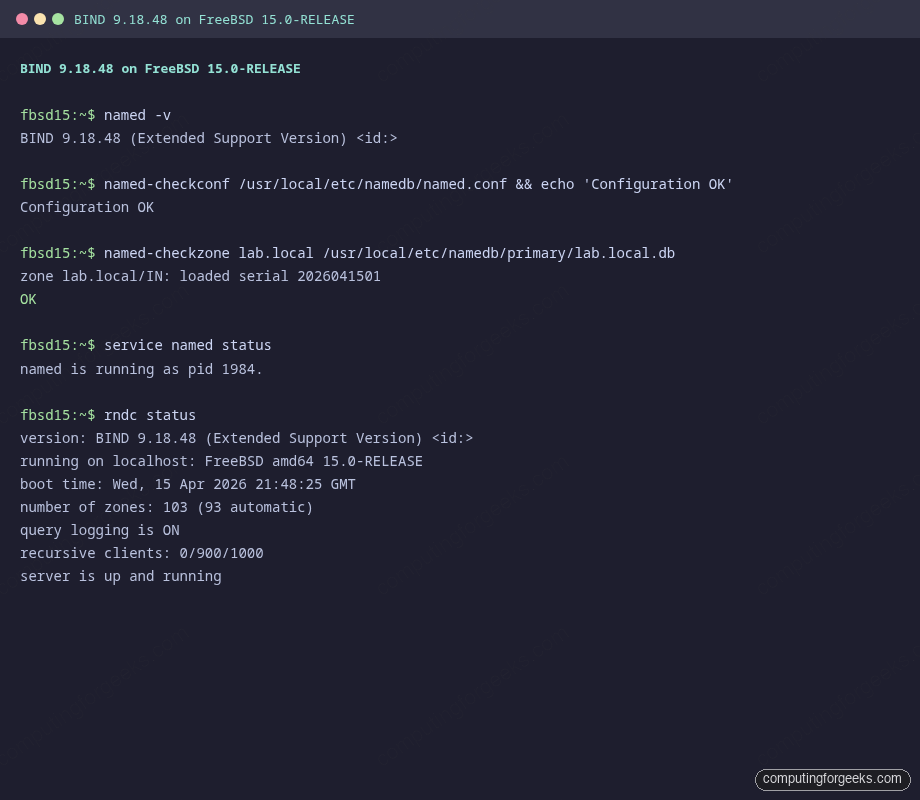
If rndc fails with “connect failed: 127.0.0.1#953: connection refused”, the rndc.key was not generated. Run rndc-confgen -a to generate it, then restart named.
Test DNS Resolution
Query the forward zone to confirm authoritative answers. The aa flag in the response flags confirms BIND is answering authoritatively:
dig @127.0.0.1 SOA lab.localThe aa flag confirms an authoritative answer from the local server:
;; flags: qr aa rd ra; QUERY: 1, ANSWER: 1, AUTHORITY: 0, ADDITIONAL: 1

;; ANSWER SECTION:
lab.local.  3600  IN  SOA  ns1.lab.local. Admin.lab.local. 2026041501 3600 900 604800 300
Test individual record types:
dig @127.0.0.1 +short www.lab.localBIND follows the CNAME and returns the resolved A record in one response:
web01.lab.local.
192.168.1.20
The CNAME resolves to the A record in the same response. Test forwarded external resolution:
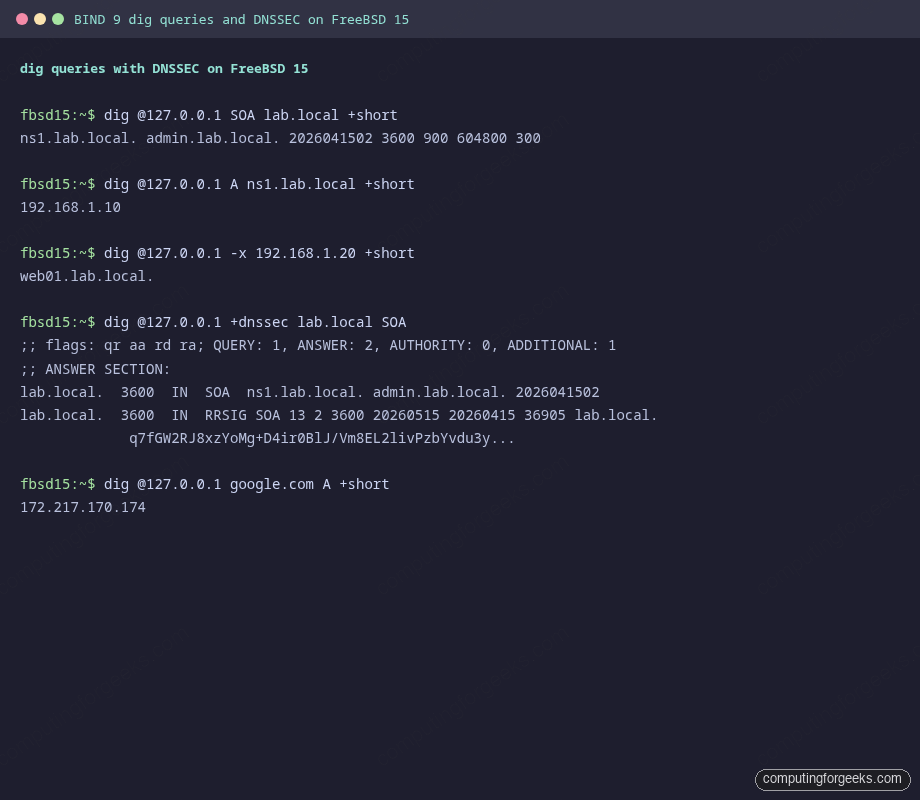
dig @127.0.0.1 google.com A +shortThe forwarder returns a real public address, confirming upstream resolution works:
172.217.170.174Test reverse DNS with a PTR query:
dig @127.0.0.1 -x 192.168.1.20 +shortThe PTR record resolves correctly to the hostname:
web01.lab.local.Configure DNSSEC
DNSSEC signing protects zones against cache poisoning by attaching cryptographic signatures to every record set. For a lab zone this is optional, but it’s the right habit to build. FreeBSD 15’s BIND 9.18 uses ECDSAP256SHA256 by default, which is ISC’s recommended algorithm for new deployments.
Generate a ZSK (Zone Signing Key) and a KSK (Key Signing Key) for lab.local:
cd /usr/local/etc/namedb/primary

dnssec-keygen -a ECDSAP256SHA256 -b 256 -n ZONE lab.local
dnssec-keygen -a ECDSAP256SHA256 -b 256 -f KSK -n ZONE lab.local
Each command prints the key tag for the generated key pair:
Klab.local.+013+36905
Klab.local.+013+52185
Each keygen call creates a .key and a .private file. Include both public keys at the bottom of the zone file, then sign it:
echo '$INCLUDE Klab.local.+013+36905.key' >> lab.local.db
echo '$INCLUDE Klab.local.+013+52185.key' >> lab.local.db

dnssec-signzone -A -3 $(head -c 6 /dev/random | md5 | cut -c1-16) \
  -N INCREMENT -o lab.local -t lab.local.db
A successful signing run reports the algorithm and signature count:
Verifying the zone using the following algorithms:
- ECDSAP256SHA256
Zone fully signed:
Algorithm: ECDSAP256SHA256: KSKs: 1 active, 0 stand-by, 0 revoked
                            ZSKs: 1 active, 0 stand-by, 0 revoked
lab.local.db.signed
Signatures generated:                       27
Update named.conf to load the signed zone file instead of the plain one:
zone "lab.local" {
    type primary;
    file "/usr/local/etc/namedb/primary/lab.local.db.signed";
    allow-update  { none; };
    allow-transfer { none; };
};
Reload and verify RRSIG records appear in responses:
rndc reload
dig @127.0.0.1 +dnssec lab.local SOA
The answer section now contains two records: the SOA and its RRSIG signature:
;; flags: qr aa rd ra; QUERY: 1, ANSWER: 2, AUTHORITY: 0, ADDITIONAL: 1

;; ANSWER SECTION:
lab.local.  3600  IN  SOA   ns1.lab.local. Admin.lab.local. 2026041502 3600 900 604800 300
lab.local.  3600  IN  RRSIG SOA 13 2 3600 20260515204856 20260415204856 36905 lab.local. Q7fGW2RJ8xzYoMg+D4ir0BlJ/Vm8EL2livPzbYvdu3y...
The RRSIG record confirms the SOA is signed with the ZSK (key tag 36905, ECDSAP256SHA256):
For production DNSSEC deployments, schedule zone re-signing before signatures expire. The default signature validity is 30 days. Add a cron job to run dnssec-signzone weekly and rndc reload afterward.
ACL Groups for Client Control
The ACL defined at the top of named.conf controls which clients can query the server. You can define multiple ACLs for different access tiers: allow recursion only to internal clients while permitting authoritative queries from anywhere:
acl "internal" {
    127.0.0.0/8;
    192.168.0.0/16;
    10.0.0.0/8;
};

acl "monitoring" {
    192.168.1.50;    // Zabbix/Prometheus host
};

options {
    allow-query     { any; };          // Authoritative: open
    allow-recursion { internal; };     // Recursion: internal only
    allow-query-cache { internal; };   // Cache access: internal only
};
This pattern lets you run an open authoritative server for public zones while restricting recursive resolution to internal clients. The monitoring host can query the server from the monitoring ACL for health checks. For the FreeBSD jail environments described in the FreeBSD jails with VNET networking guide, set the jail subnet in the internal ACL.
rndc Operations
rndc communicates with named over a local control channel. Three commands you’ll use regularly:
rndc reloadReloads configuration and zone files without restarting. Named re-reads named.conf and picks up any zone serial changes. Use this after editing zone files.
rndc flushFlushes the resolver cache. Useful when an upstream record changed and you need clients to see the new value immediately rather than waiting for TTL expiry.
rndc statusThe output shows runtime counters and confirms the server is healthy:
version: BIND 9.18.48 (Extended Support Version) <id:>
running on localhost: FreeBSD amd64 15.0-RELEASE
number of zones: 103 (93 automatic)
query logging is ON
recursive clients: 0/900/1000
server is up and running
The “recursive clients” counter is useful for spotting DNS amplification abuse. If it spikes to near the limit under normal conditions, tighten the allow-recursion ACL.
Query Logging
The logging stanza in named.conf directs query logs to /var/log/named/queries.log with rotation at 5 MB (3 versions kept). The log shows client IPs, query names, and record types in real time. Watch it during testing to confirm queries are reaching the right server:
tail -f /var/log/named/queries.logEach query logs the client address, query name, record type, and the server interface that handled it:
15-Apr-2026 21:49:10.230 queries: info: client @0x3351 127.0.0.1#39037 (ns1.lab.local): query: ns1.lab.local IN A +E(0)K (127.0.0.1)
15-Apr-2026 21:49:10.240 queries: info: client @0x3351 127.0.0.1#17693 (web01.lab.local): query: web01.lab.local IN A +E(0)K (127.0.0.1)
15-Apr-2026 21:49:10.250 queries: info: client @0x3351 127.0.0.1#51197 (mail.lab.local): query: mail.lab.local IN A +E(0)K (127.0.0.1)
The flags after the query name decode as: + (RD bit set, recursion desired), E (EDNS present), K (TSIG/SIG). The parenthesized IP at the end is the listening address that received the query.
To disable query logging temporarily without restarting named (useful during high query rates to reduce disk I/O):
rndc querylog off
rndc querylog on
Firewall Configuration
Open port 53 for DNS clients. FreeBSD uses pf or ipfw depending on your setup. With pf, add to /etc/pf.conf:
pass in on vtnet0 proto { tcp udp } from 192.168.1.0/24 to any port 53Port 953 (rndc) should stay bound to localhost only, which is the default. Never expose rndc to the network without a TSIG key protecting it.
Troubleshooting
Error: “zone lab.local/IN: loaded serial 0”
The SOA serial in your zone file is set to 0. This is valid but means any secondary server that already has the zone loaded will ignore future transfers until the serial increases. Set it to the current date format: 2026041501. Run named-checkzone and you’ll see it report the serial. If it says 0, edit the SOA.
Error: “rndc: connect failed: 127.0.0.1#953: connection refused”
The rndc.key doesn’t exist or the control channel isn’t listening. Generate the key and restart:
rndc-confgen -a
service named restart
Error: “permission denied on /var/log/named/queries.log”
Named runs as the bind user and can’t create the log file if the directory is owned by root. Fix it with:
mkdir -p /var/log/named
chown bind:bind /var/log/named
rndc reload
DNSSEC validation failure for external zones
With dnssec-validation auto, BIND validates using the built-in trust anchor for the root zone (stored in /usr/local/etc/namedb/bind.keys). If you see validation failures for .com or other TLDs, the trust anchor may be outdated. Run rndc managed-keys status to check, and update the BIND package to get a current bind.keys file.
BIND 9 on FreeBSD vs Linux: Key Differences
The same bind918 package installs identically across FreeBSD, Ubuntu, and Rocky Linux, but paths, service names, and default behaviors differ enough to cause confusion when you cross environments:
| Item | FreeBSD 15 | Ubuntu 24.04 | Rocky Linux 10 |
|---|---|---|---|
| Package name | bind918 | bind9 | bind |
| Config directory | /usr/local/etc/namedb/ | /etc/bind/ | /etc/named/ |
| Zone directory | /usr/local/etc/namedb/primary/ | /var/lib/bind/ | /var/named/ |
| Service name | named (rc.conf) | named (systemd) | named (systemd) |
| Named user | bind | bind | named |
| Default chroot | None (disabled by default) | None | /var/named/chroot (optional pkg) |
| Firewall tool | pf / ipfw | ufw / nftables | firewalld / nftables |
| SELinux/AppArmor | Not present | AppArmor (usually permissive for bind) | SELinux enforcing. Requires named_write_master_zones boolean |
| Start service | service named start | systemctl start named | systemctl start named |
| Enable on boot | sysrc named_enable=YES | systemctl enable named | systemctl enable named |
On Rocky Linux 10, the biggest gotcha is SELinux: if named can’t write zone files, check ausearch -m avc -ts recent and run setsebool -P named_write_master_zones 1. FreeBSD skips this entirely. The FreeBSD 15 improvements over 14.x also include updated OpenSSL (used by BIND for DNSSEC), which means the ECDSAP256SHA256 performance is marginally better than on older FreeBSD versions.
For related FreeBSD server setups, see the guides on setting a static IP on FreeBSD, PostgreSQL on FreeBSD, and the Nginx with SSL on FreeBSD 15 guide for a complete web stack alongside DNS.