The pool layout you choose on day one is almost impossible to change without a full backup-restore cycle. Pick raidz1 on eight-terabyte drives and you’ll spend three days watching a rebuild every time a disk fails, the entire time praying a second disk doesn’t quit. Pick a stripe and one disk failure wipes everything. These decisions haunt systems for years, so it pays to understand the tradeoffs before running zpool create.
This guide covers every meaningful pool layout in FreeBSD 15 ZFS 2.4: stripe, mirror, raidz1, raidz2, striped mirrors, and dRAID. Each layout is built, measured with fio, and torn down on real disks. The result is a comparison table with actual IOPS numbers, not guesses. FreeBSD 15 ships with ZFS 2.4.0-rc4, which brings dRAID to stable use and the long-awaited raidz expansion feature.
Tested April 2026 on FreeBSD 15.0-CURRENT with ZFS 2.4.0-rc4-FreeBSD_g099f69ff5, fio 3.41. Six 8 GB virtual disks on a Proxmox KVM instance.
Prerequisites
You need a FreeBSD 15 system with at least three raw block devices not already in a pool. The guide uses da1 through da6. For KVM or Proxmox installations, add virtual disks before the session: each pool layout requires a fresh set so you can destroy and recreate without contamination. Verify your devices:
camcontrol devlistEach line ending in (pass#,da#) is a disk you can use. The OS disk is typically da0. Leave it alone.
The vdev is the fundamental unit
ZFS pools are built from vdevs (virtual devices). A pool can have one vdev or many, and the vdev type determines redundancy and performance. A pool with multiple vdevs stripes data across them, so a two-vdev pool of mirrors gives you both redundancy (per-mirror) and striped throughput across the pair.
The key mental model: redundancy lives inside a vdev, performance scales with the number of vdevs. You cannot change a vdev’s redundancy level after creation without destroying it. You can add new vdevs to an existing pool.
Pool layouts
Stripe (no redundancy)
A striped pool has no redundancy. Any single disk failure destroys all data. Use it only for scratch space or caches where data loss is acceptable.
zpool create -o ashift=12 -O compression=zstd -O atime=off tank /dev/da1 /dev/da2Capacity is the sum of all disks. On two 8 GB disks:
zpool list tankBoth disks show up as raw data devices, no parity overhead:
NAME   SIZE  ALLOC   FREE  CKPOINT  EXPANDSZ   FRAG    CAP  DEDUP    HEALTH  ALTROOT
tank    15G   552K  15.0G        -         -     0%     0%  1.00x    ONLINE  -
Failure tolerance: zero disks. Don’t use this for data you care about.
Mirror
A mirror vdev duplicates every block across all member disks. Two-way mirrors are the most common, but three-way mirrors exist for extra safety. Usable capacity is one disk’s worth regardless of how many disks mirror it.
zpool create -o ashift=12 -O compression=zstd -O atime=off tank mirror /dev/da1 /dev/da2Status confirms the mirror vdev structure:
zpool status tankThe output shows mirror-0 with both member disks ONLINE:
  pool: tank
 state: ONLINE
config:

        NAME        STATE     READ WRITE CKSUM
        tank        ONLINE       0     0     0
          mirror-0  ONLINE       0     0     0
            da1     ONLINE       0     0     0
            da2     ONLINE       0     0     0

errors: No known data errors
Usable: 7.5 GB from two 8 GB disks. Reads can be served from either disk (ZFS balances across them), so read throughput can approach 2x a single disk. Failure tolerance: one disk per mirror vdev.
RAIDZ1 (single parity)
RAIDZ1 distributes one parity block across all disks in the vdev. Three disks is the practical minimum. Usable capacity is (N-1) disks.
zpool create -o ashift=12 -O compression=zstd -O atime=off tank raidz /dev/da1 /dev/da2 /dev/da3Three 8 GB disks yields roughly 15.7 GB usable (ZFS overhead consumes some space for metadata):
NAME   SIZE  ALLOC   FREE  CKPOINT  EXPANDSZ   FRAG    CAP  DEDUP    HEALTH  ALTROOT
tank  23.5G  1.27M  23.5G        -         -     0%     0%  1.00x    ONLINE  -
Failure tolerance: one disk. The word of caution here is rebuild time. On modern 8 TB or 16 TB drives, a raidz1 rebuild can take 24-48 hours during which a second failure loses all data. For drives above 4 TB, raidz2 is the safer default.
RAIDZ2 (double parity)
RAIDZ2 carries two parity blocks per stripe. Minimum four disks. Usable capacity is (N-2) disks.
zpool create -o ashift=12 -O compression=zstd -O atime=off tank raidz2 /dev/da1 /dev/da2 /dev/da3 /dev/da4Four 8 GB disks yields roughly 23.5 GB usable (similar to 3-disk raidz1, but with double the fault tolerance):
NAME   SIZE  ALLOC   FREE  CKPOINT  EXPANDSZ   FRAG    CAP  DEDUP    HEALTH  ALTROOT
tank  31.5G  1.88M  31.5G        -         -     0%     0%  1.00x    ONLINE  -
Failure tolerance: two disks simultaneously. For any production system with drives over 4 TB, raidz2 should be the floor. The extra disk cost is cheap compared to the downtime risk during a long raidz1 rebuild.
Striped mirrors (RAID10 equivalent)
Multiple mirror vdevs in a single pool stripe data across them. Four disks becomes two mirror vdevs of two disks each. This gives you the read performance and low write overhead of mirrors, plus the throughput benefit of striping across two vdevs.
zpool create -o ashift=12 -O compression=zstd -O atime=off tank mirror /dev/da1 /dev/da2 mirror /dev/da3 /dev/da4The pool status shows both mirror vdevs clearly:
        NAME        STATE     READ WRITE CKSUM
        tank        ONLINE       0     0     0
          mirror-0  ONLINE       0     0     0
            da1     ONLINE       0     0     0
            da2     ONLINE       0     0     0
          mirror-1  ONLINE       0     0     0
            da3     ONLINE       0     0     0
            da4     ONLINE       0     0     0
Usable capacity is 50%: 15 GB from four 8 GB disks. Failure tolerance: one disk per mirror vdev. This layout is the best choice when random read performance and low write overhead both matter, such as database workloads.
dRAID (distributed spare)
dRAID, introduced in ZFS 2.1 and stable in ZFS 2.4, embeds distributed spare capacity across all disks. Unlike a traditional hot spare that sits idle, dRAID’s spare space is spread evenly. When a disk fails, the rebuild uses all remaining disks simultaneously rather than just one replacement disk.
The notation draid2:2d:6c:1s means: double parity (2), two data columns per stripe (2d), six disks total (6c), one logical spare (1s). Use dRAID for arrays of 24 disks or more, where traditional raidz rebuild times become dangerously long. On smaller arrays the overhead isn’t worth it.
zpool create -o ashift=12 -O compression=zstd -O atime=off tank draid2:2d:6c:1s /dev/da1 /dev/da2 /dev/da3 /dev/da4 /dev/da5 /dev/da6The spare shows up as a virtual device, not a physical one:
        NAME                 STATE     READ WRITE CKSUM
        tank                 ONLINE       0     0     0
          draid2:2d:6c:1s-0  ONLINE       0     0     0
            da1              ONLINE       0     0     0
            da2              ONLINE       0     0     0
            da3              ONLINE       0     0     0
            da4              ONLINE       0     0     0
            da5              ONLINE       0     0     0
            da6              ONLINE       0     0     0
        spares
          draid2-0-0         AVAIL
Six 8 GB disks yields 39.5 GB usable. One logical spare is embedded. Rebuild after failure is dramatically faster than raidz because all remaining disks contribute bandwidth.
fio benchmark: 4K random write
These numbers are from real tests on FreeBSD 15 ZFS 2.4.0-rc4 using virtual disks on KVM. Real HDDs will score 1-2 orders of magnitude lower. SSDs will be similar in ordering but compressed into a narrower band. The point is the relative difference between layouts, not the absolute numbers.
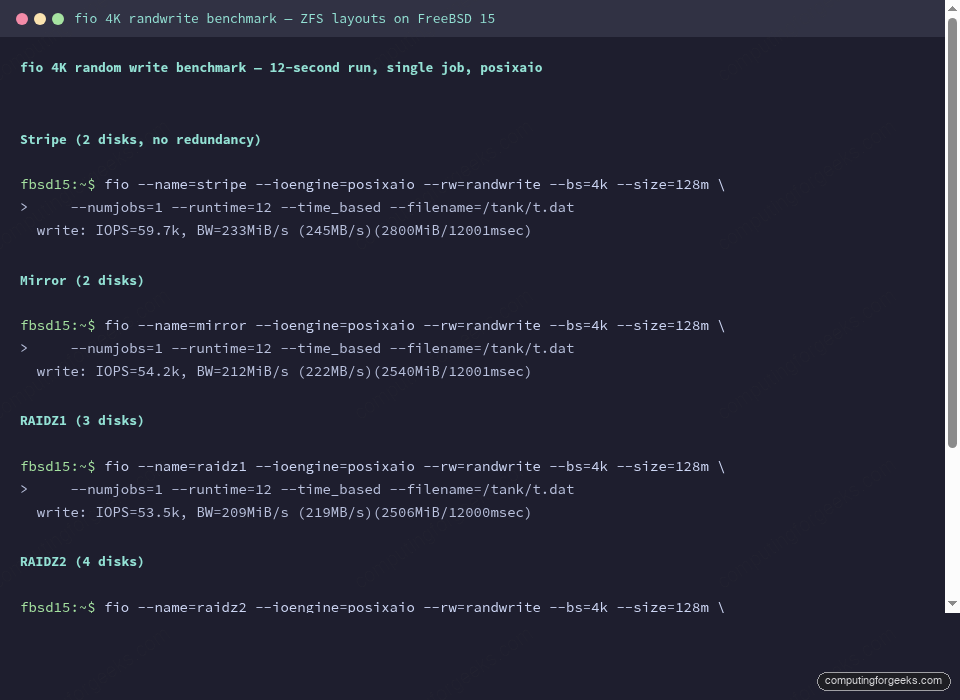
The test command for each layout:
fio --name=bench --ioengine=posixaio --rw=randwrite --bs=4k --size=128m \
    --numjobs=1 --runtime=12 --time_based --filename=/tank/t.dat
Results:
| Layout | Disks used | Usable (from 8 GB disks) | Fault tolerance | 4K write IOPS | Write BW |
|---|---|---|---|---|---|
| Stripe | 2 | 15 GB (100%) | 0 disks | 59,700 | 233 MiB/s |
| Mirror | 2 | 7.5 GB (50%) | 1 disk | 54,200 | 212 MiB/s |
| RAIDZ1 | 3 | 15.7 GB (66%) | 1 disk | 53,500 | 209 MiB/s |
| RAIDZ2 | 4 | 23.5 GB (50%) | 2 disks | 50,600 | 198 MiB/s |
| Striped mirrors | 4 | 15 GB (50%) | 1 disk/vdev | 54,300 | 212 MiB/s |
On these virtual disks, raidz2 costs about 15% write throughput versus a stripe. On real spinning rust that gap widens because parity computation on large writes creates I/O serialization that didn’t show up as strongly with fast virtual storage. Mirror layouts have better small random write latency because ZFS doesn’t have to compute parity on the write path.
Special vdevs: SLOG, L2ARC, and dedup
Beyond data vdevs, ZFS supports several special-purpose vdevs. These are additive: you create the pool first, then add them.
SLOG (separate intent log) moves the ZFS Intent Log to a dedicated fast device. It only helps synchronous writes (databases with fsync(), NFS with sync=always). On async workloads it does nothing. Add a mirrored SLOG if you have a couple of small SSDs and your workload is database-heavy:
zpool add tank log mirror /dev/da5 /dev/da6L2ARC extends the ARC (main memory read cache) onto a fast disk. It helps read-heavy workloads with working sets larger than RAM. The ARC metadata for L2ARC consumes about 1 GB of RAM per 10 GB of L2ARC on FreeBSD 15, so don’t add a 1 TB L2ARC on a 16 GB box.
zpool add tank cache /dev/da6The special vdev (added in OpenZFS 2.0) is the most powerful and most dangerous. It stores small blocks and metadata on a fast device while large data blocks go to the main pool. Use it only with mirrors: if a special vdev fails and has no mirror, the entire pool is lost. The dedup vdev stores deduplication tables. Unless you have a specific dedup-heavy workload (backup servers, VM hosting), skip it. Dedup on ZFS has a significant RAM cost: the dedup table lives in memory.
Hot spares
A hot spare sits idle in the pool config and ZFS automatically uses it when a disk fails and is taken offline. Add one with:
zpool add tank spare /dev/da5The spare shows in the pool status as AVAIL. When you offline a failed disk, ZFS kicks in the spare automatically and begins resilvering. Remove the bad disk, pop in a new one, and replace:
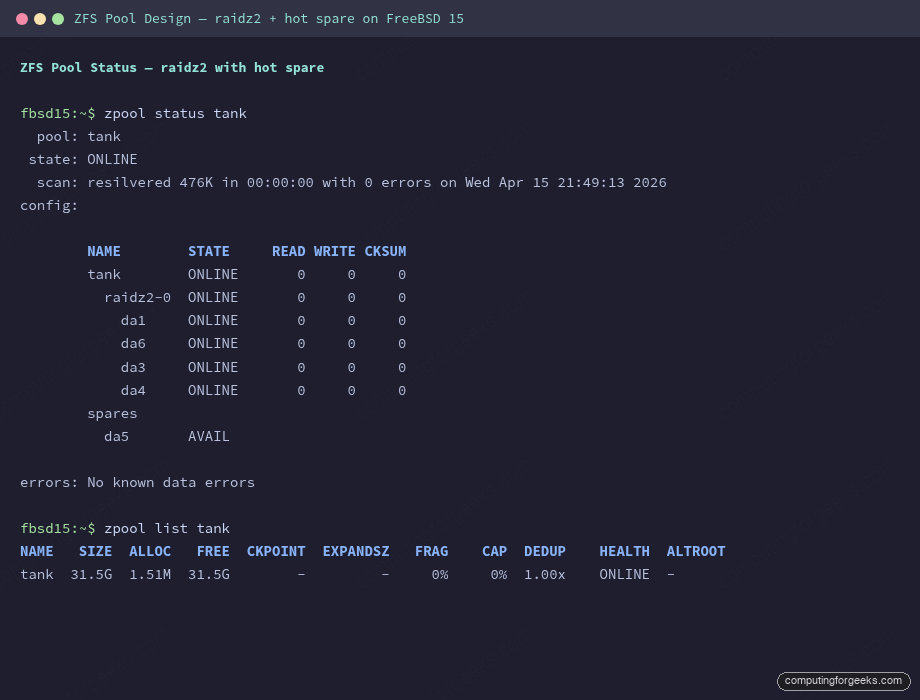
zpool status tankAfter a resilver completes, the replaced disk appears in the config and the spare returns to AVAIL:
  pool: tank
 state: ONLINE
  scan: resilvered 476K in 00:00:00 with 0 errors on Wed Apr 15 21:49:13 2026
config:

        NAME        STATE     READ WRITE CKSUM
        tank        ONLINE       0     0     0
          raidz2-0  ONLINE       0     0     0
            da1     ONLINE       0     0     0
            da6     ONLINE       0     0     0
            da3     ONLINE       0     0     0
            da4     ONLINE       0     0     0
        spares
          da5       AVAIL

errors: No known data errors
The screenshot below shows this exact state: raidz2-0 healthy, da5 still available as spare.
Disk replacement workflow
When a disk fails, the standard sequence is: offline the bad disk, physically replace it, then run zpool replace with the new device name. ZFS starts resilvering immediately.
zpool offline tank da2After swapping the physical disk (same device path in most cases, or a new path if the system reordered devices):
zpool replace tank da2 da6During the resilver you’ll see the replacing-N entry in the status:
          raidz2-0       DEGRADED     0     0     0
            da1          ONLINE       0     0     0
            replacing-1  DEGRADED     0     0     0
              da2        OFFLINE      0     0     0
              da6        ONLINE       0     0     0  (resilvering)
            da3          ONLINE       0     0     0
            da4          ONLINE       0     0     0
Monitor progress with zpool status. On spinning rust with large amounts of data, resilver completion time is the critical number to know before you commit to a pool layout. For a snapshot-based backup strategy to work during the resilver window, you need raidz2 or mirrors so the pool stays healthy through the process.
Key properties to set on creation
These go on zpool create and cannot be easily changed afterward. Set them right the first time.
ashift=12 tells ZFS to use 4K sector alignment. Modern drives (everything made in the last decade) have 4K physical sectors even if they advertise 512B. Without ashift=12, ZFS aligns to 512 bytes, which causes write amplification on 4K-native drives. Always set it:
zpool create -o ashift=12 tank mirror /dev/da1 /dev/da2After creation, zpool get ashift tank should return 12. If you see 9, the pool was created with 512-byte alignment and you can’t fix it without destroying and recreating.
compression=zstd versus compression=lz4: lz4 is faster at compression and decompression, close to memcpy speed. zstd achieves significantly better compression ratios (often 2-4x on text/logs versus 1.5-2x for lz4) at the cost of slightly more CPU. For general-purpose storage, zstd is the better default in 2026. For NVMe arrays where I/O is never the bottleneck and compression time adds measurable latency, lz4 is still the safer choice.
atime=off eliminates the access-time write on every read. On a busy dataset that’s read frequently, atime doubles the write load for no benefit unless you have something that specifically uses file access times (uncommon). Set it off at pool creation and at the dataset level:
zpool create -o ashift=12 -O compression=zstd -O atime=off tank mirror /dev/da1 /dev/da2recordsize is dataset-level and can be changed after creation. The default is 128K, good for general use. For databases that use their own block size (PostgreSQL uses 8K pages, MySQL InnoDB uses 16K), set recordsize to match:
zfs set recordsize=16k tank/mysqlMismatched recordsize causes write amplification because ZFS reads a full record, modifies the small part the database touched, and writes the whole record back. The PostgreSQL guide for FreeBSD covers the ZFS dataset settings in more detail.
OS and filesystem comparisons
| Property | RHEL / Rocky Linux | FreeBSD 15 |
|---|---|---|
| ZFS version (Apr 2026) | OpenZFS 2.2 (DKMS) | OpenZFS 2.4.0-rc4 (in-kernel) |
| dRAID support | 2.2+ (backported) | 2.4 (stable in 2.4) |
| raidz expansion | 2.2+ | 2.4 (tested) |
| Boot from ZFS | Limited (grub workaround) | Native (loader) |
| ZFS as root pool | Installer support varies | Fully supported out of box |
Migration notes
raidz1 to raidz2: there is no direct upgrade path
You cannot convert a raidz1 vdev to raidz2. The parity geometry is baked into the vdev at creation. The only migration path is backup-then-restore:
zfs send -R tank/data | zfs recv newpool/dataCreate the destination pool with raidz2, then zfs send everything across. This is covered in detail in the ZFS send/receive guide. The practical implication: if you think you might want raidz2 later, build raidz2 now. Disk capacity is cheaper than unplanned downtime for a migration.
raidz expansion in ZFS 2.4
ZFS 2.4 adds the ability to expand an existing raidz vdev by one disk at a time. This is not the same as converting raidz1 to raidz2: it adds a disk to the same parity scheme, increasing capacity without changing the redundancy level.
zpool attach tank raidz1-0 /dev/da4The expand triggers a long rewrite of all data in the vdev (called raidz expansion, similar to a resilver in duration). During this window the pool is healthy and accessible, but throughput drops while the rewrite proceeds. The caveats: you can only add one disk at a time, and you cannot shrink a vdev. For production systems that need to grow capacity incrementally, this feature finally makes raidz viable for long-term storage without the “you’ll need a backup-restore to expand” penalty that existed before ZFS 2.2. The feature landed in upstream in 2.2; FreeBSD 15 gets it in 2.4 with improved stability.
dRAID vs raidz for migrations
dRAID is not a drop-in replacement for raidz. The data format is different and there is no in-place conversion. If you’re running a large raidz2 array and want the faster rebuild times of dRAID, the path is the same backup-restore approach: build a new dRAID pool, send the data across, decommission the old pool. The rebuild time advantage of dRAID only shows up at scale (24+ disks), so for arrays under 20 disks, raidz2 with a hot spare remains the simpler and more predictable choice. Use zpool scrub regularly on any layout to catch silent data corruption early, before you need a rebuild under pressure.
Setting up ZFS replication alongside any of these layouts is covered in the ZFS snapshots and send/recv guide. For network-attached storage built on top of these pools, the FreeBSD NFS server guide covers the ZFS dataset configuration. Initial server setup and network config is in the static IP and hostname guide.