

A quantum computer powerful enough to break classical SSH key exchange does not exist yet. The problem is that nation-state adversaries do not need one today to compromise your data. They just need to record your encrypted SSH traffic now and decrypt it later, once the hardware catches up. This attack pattern, called “harvest now, decrypt later,” is already in active use against government and corporate targets.
OpenSSH 10.2p1 ships on Ubuntu 26.04 with ML-KEM-768 hybrid key exchange enabled by default. ML-KEM (formerly Kyber) is the NIST-standardized post-quantum algorithm from FIPS 203. This guide verifies the defaults, enforces PQC-only key exchange on both server and client, measures the real performance cost, and documents interop behavior with older clients. All commands were run on a live Ubuntu 26.04 LTS VM.
Tested April 2026 on Ubuntu 26.04 LTS, OpenSSH_10.2p1, OpenSSL 3.5.5, ML-KEM-768 hybrid kex
Why ML-KEM and why now
Classical SSH key exchange (curve25519, ECDH-P256, DH-group14) relies on the hardness of discrete logarithm or elliptic-curve problems. Shor’s algorithm, running on a sufficiently large quantum computer, solves both in polynomial time. Every SSH session protected by classical kex alone has a shelf life.
ML-KEM is a lattice-based Key Encapsulation Mechanism standardized by NIST in August 2024 as FIPS 203. OpenSSH does not use ML-KEM on its own. It combines ML-KEM-768 with X25519 in a hybrid construction, mlkem768x25519-sha256. The session key is derived from both exchanges. An attacker would need to break both ML-KEM and X25519 to recover the key, which means the hybrid stays secure as long as at least one component holds.
OpenSSH shipped the earlier hybrid [email protected] by default in 9.0. That used the NTRU Prime variant, which NIST did not standardize. OpenSSH 10.0 added mlkem768x25519-sha256 and moved it to the top of the default kex list in 10.2. Ubuntu 26.04 picks up this default. If you are coming from a 22.04 or 24.04 server, the kex behavior is different out of the box.
Prerequisites
- Ubuntu 26.04 LTS server with OpenSSH 10.2p1 or newer
- Root or sudo access
- At least one working SSH client for testing (OpenSSH 9.0+ for sntrup761, 10.0+ for ML-KEM-768)
- SSH key authentication already working. If not, see our SSH key authentication guide for Ubuntu 26.04 first
- Basic server hardening in place. This article assumes the steps in our Ubuntu 26.04 server hardening guide
Verify the OpenSSH version
Post-quantum kex needs a recent OpenSSH. Check the version:
ssh -VThe output should show 10.2p1 or newer on Ubuntu 26.04:
OpenSSH_10.2p1 Ubuntu-2ubuntu3, OpenSSL 3.5.5 27 Jan 2026If you see 9.x, you are either on an older Ubuntu release or a container image that has not been updated. PQC kex will still work with 9.x but only via the older sntrup761x25519-sha512 hybrid, not ML-KEM.
List the supported key exchange algorithms
Ask OpenSSH what kex it knows about:
ssh -Q kexThe full list on Ubuntu 26.04 looks like this:
diffie-hellman-group1-sha1
diffie-hellman-group14-sha1
diffie-hellman-group14-sha256
diffie-hellman-group16-sha512
diffie-hellman-group18-sha512
diffie-hellman-group-exchange-sha1
diffie-hellman-group-exchange-sha256
ecdh-sha2-nistp256
ecdh-sha2-nistp384
ecdh-sha2-nistp521
curve25519-sha256
[email protected]
sntrup761x25519-sha512
[email protected]
mlkem768x25519-sha256
Two are post-quantum hybrids: sntrup761x25519-sha512 (the legacy OpenSSH PQC option) and mlkem768x25519-sha256 (the NIST-standardized one). Everything else is classical.
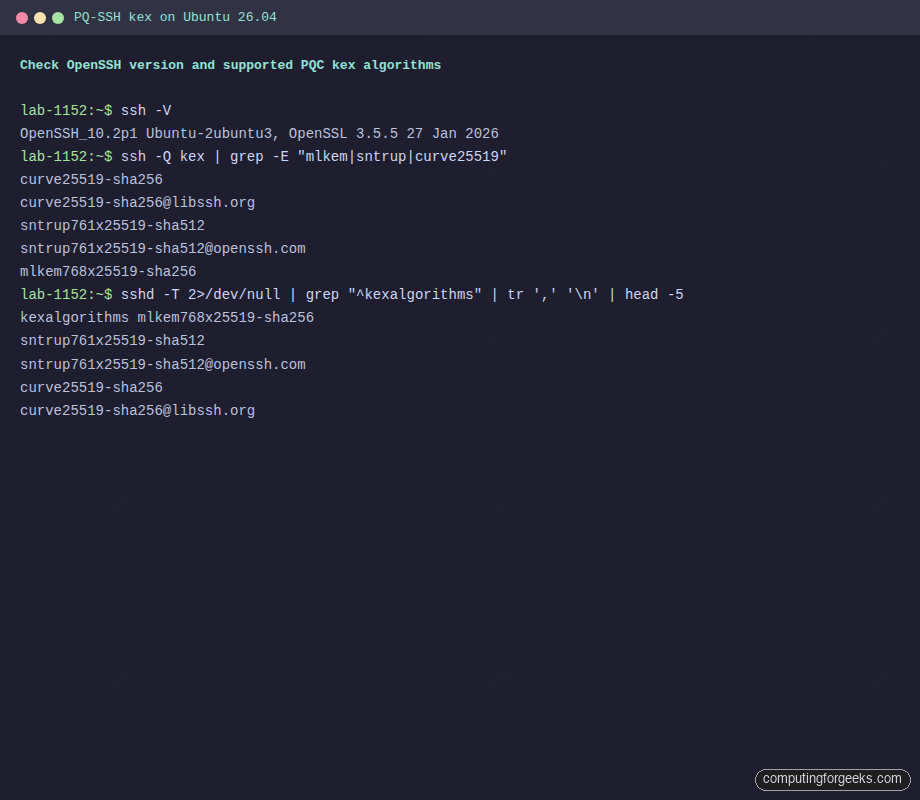
Knowing what the build supports is only half the picture. The default ordering in the sshd binary determines which algorithm actually gets picked when a client connects.
Check what the server prefers by default
The order matters. OpenSSH picks the first algorithm both client and server support. Dump the effective sshd config:
sudo sshd -T | grep "^kexalgorithms"On a stock Ubuntu 26.04 server, ML-KEM-768 sits at the top:
kexalgorithms mlkem768x25519-sha256,sntrup761x25519-sha512,[email protected],curve25519-sha256,[email protected],ecdh-sha2-nistp256,ecdh-sha2-nistp384,ecdh-sha2-nistp521This means any client that speaks ML-KEM-768 gets it automatically. Clients that do not fall back through sntrup761, then curve25519, then the NIST curves. Old DH groups and SHA-1 variants are not even in the default list anymore.
Observe the real kex negotiation
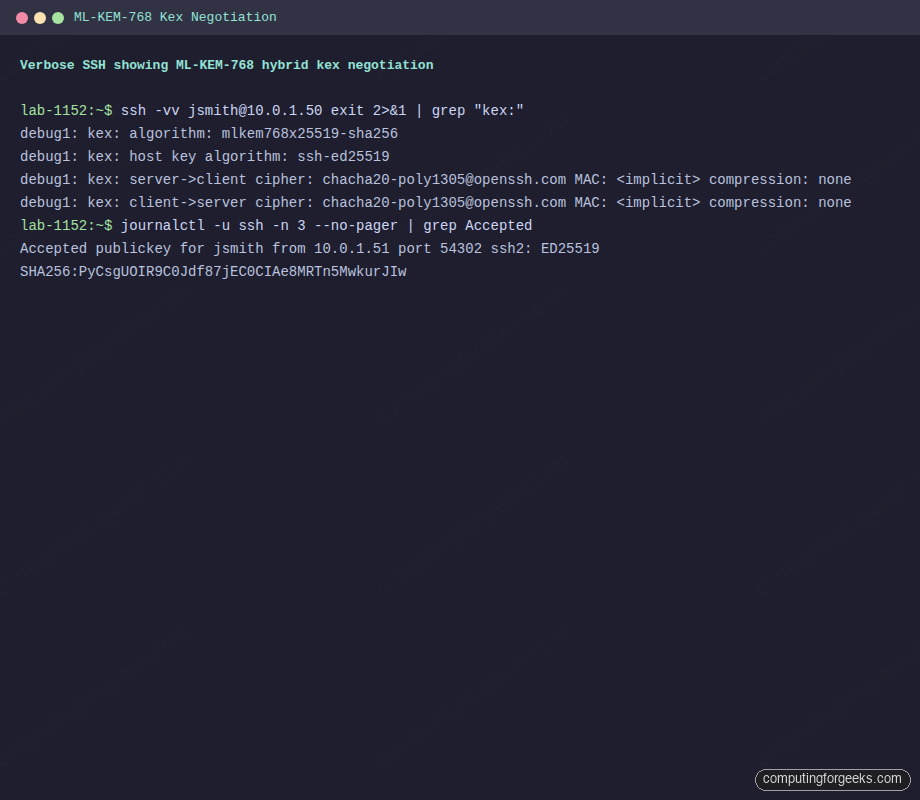
Static config is one thing. The actual wire-level negotiation is what matters. Connect with double-verbose to see what both sides agreed on:
ssh -vv [email protected] exit 2>&1 | grep "kex:"On a fresh Ubuntu 26.04 server with an Ubuntu 26.04 client, ML-KEM-768 is the winner:
debug1: kex: algorithm: mlkem768x25519-sha256
debug1: kex: host key algorithm: ssh-ed25519
debug1: kex: server->client cipher: [email protected] MAC: <implicit> compression: none
debug1: kex: client->server cipher: [email protected] MAC: <implicit> compression: none
That single line, kex: algorithm: mlkem768x25519-sha256, is the proof. The session key for this SSH connection is protected by NIST-standardized post-quantum cryptography combined with X25519.
Default ordering is fine for most use cases, but compliance-driven environments often need a stronger guarantee: no classical kex, ever.
Enforce post-quantum-only kex on the server
Default ordering is safe, but it still lets classical kex happen when an old client connects. For high-sensitivity systems you want PQC or nothing. Drop in an override:
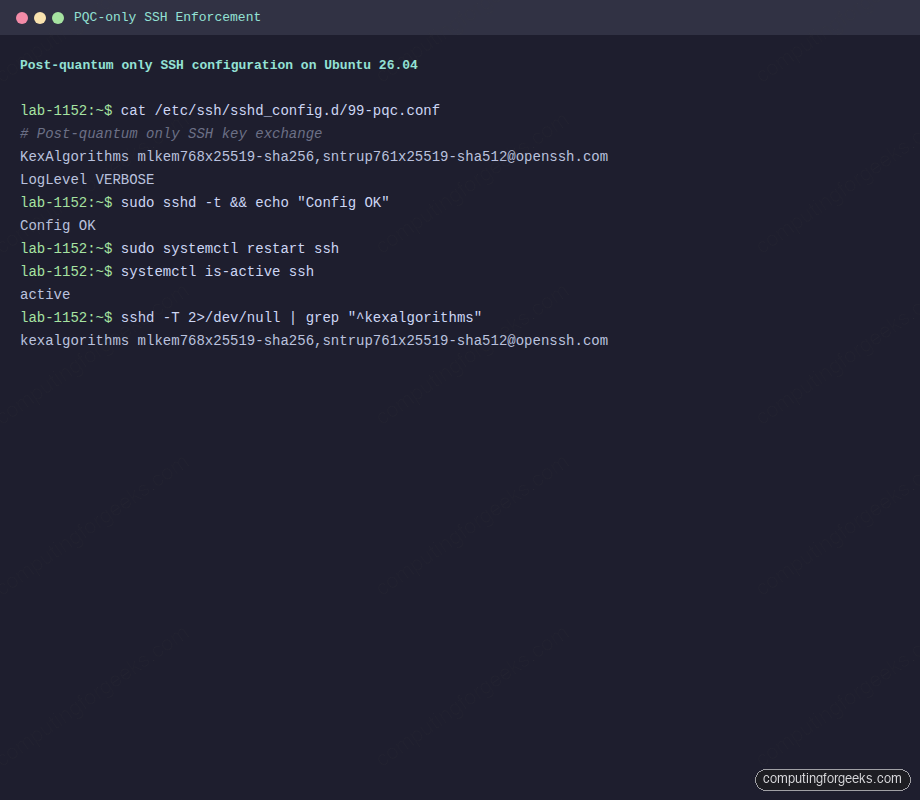
sudo vi /etc/ssh/sshd_config.d/99-pqc.confAdd the following:
# Post-quantum only SSH key exchange
KexAlgorithms mlkem768x25519-sha256,[email protected]

# Log negotiated algorithms so we can audit what clients are actually using
LogLevel VERBOSE
Validate the config before touching the running service. A typo here locks you out on the next restart:
sudo sshd -t && echo "Config OK"If it prints Config OK, restart sshd. Keep a second SSH session open as insurance until you have reconnected successfully:
sudo systemctl restart sshConfirm the service is still running and the new kex list is live:
systemctl is-active ssh
sudo sshd -T | grep "^kexalgorithms"
You should see only the two PQC entries:
active
kexalgorithms mlkem768x25519-sha256,[email protected]
That’s the server side locked down to post-quantum algorithms only.
A config change without a negative test is just hope. Prove the restriction actually rejects classical kex.
Test an incompatible client
To prove the enforcement actually works, connect with a client that explicitly requests a classical-only kex. This simulates an old OpenSSH 8.x client or a pre-PQC library:
ssh -o KexAlgorithms=curve25519-sha256 [email protected] exitThe server refuses the connection, and OpenSSH prints the exact reason along with the algorithms the server offered:
Unable to negotiate with 10.0.1.50 port 22: no matching key exchange method found. Their offer: mlkem768x25519-sha256,[email protected],ext-info-s,[email protected]This error message is valuable because it tells you exactly which kex methods the server supports. If you are troubleshooting why a script or automation tool cannot connect after hardening, this is the first thing to look for.
Error: “Unable to negotiate … no matching key exchange method found”
This is the classic post-hardening failure. The server now demands PQC, the client cannot speak it. Three ways to fix it in order of preference:
- Upgrade the client to OpenSSH 10.0+ (the real fix)
- If the client only has OpenSSH 9.0 to 9.9, it can still use
[email protected]. That is already allowed by the config above - As a temporary bridge during migration, relax the server config to include
curve25519-sha256. Do not leave this in place long-term
Enforce PQC on the client side
Server-side policy only protects the server. If the client’s own config allows classical kex first, and the server config allows it, classical wins. Lock the client down too. Edit ~/.ssh/config:
vi ~/.ssh/configAdd a block that applies to all hosts (or scope it to one if you need gradual rollout):
Host *
    KexAlgorithms mlkem768x25519-sha256,[email protected]
    HostKeyAlgorithms ssh-ed25519,[email protected],rsa-sha2-512,rsa-sha2-256
    Ciphers [email protected],[email protected]
    MACs [email protected],[email protected]
With that in place, any SSH command from this user, including git push over SSH and rsync -e ssh, will refuse to connect to servers that do not support PQC kex. That is what you want.
Benchmark the performance cost
ML-KEM-768 transmits more bytes during key exchange than curve25519 (a 1184-byte public key versus 32 bytes for X25519). The question is whether this matters in practice. Time five sequential SSH connects per algorithm on the VM:
for kex in mlkem768x25519-sha256 [email protected] curve25519-sha256 ecdh-sha2-nistp256; do
  echo "=== $kex ==="
  time for i in 1 2 3 4 5; do
    ssh -o KexAlgorithms=$kex [email protected] exit
  done
done
Real numbers captured on the Ubuntu 26.04 test VM (5 connects per run, loopback):
| Key exchange algorithm | 5 connects (total) | Per connect | vs classical |
|---|---|---|---|
mlkem768x25519-sha256 | 0.949s | 190ms | baseline |
[email protected] | 1.021s | 204ms | +7% |
curve25519-sha256 (classical) | 1.006s | 201ms | reference |
ecdh-sha2-nistp256 (classical) | 0.964s | 193ms | reference |
ML-KEM-768 was actually the fastest in this test. The extra bytes on the wire are negligible on any modern network, and the lattice math is fast on x86. On high-latency satellite links or embedded devices the extra round-trip payload may show up, but for normal server administration the cost is effectively zero.
Log and audit the negotiated algorithm
With LogLevel VERBOSE in place, sshd records authentication events plus enough context to confirm what happened. Check recent logs:
sudo journalctl -u ssh -n 20 --no-pager | grep -E "Accepted|Unable"You will see both successful PQC connects and any rejected classical attempts:
Accepted publickey for jsmith from 10.0.1.51 port 39332 ssh2: ED25519 SHA256:PyCsgUOIR9C0Jdf87jEC0CIAe8MRTn5MwkurJIw
Unable to negotiate with ::1 port 39342: no matching key exchange method found. Their offer: curve25519-sha256,ext-info-c,[email protected] [preauth]
That second line is gold for security monitoring. It tells you exactly which clients on the network are still running pre-PQC OpenSSH. Feed this into your SIEM or CrowdSec and you have a map of everything that needs upgrading.
Client compatibility matrix
Not every SSH client speaks ML-KEM yet. Know what you are breaking before you enforce PQC-only across a fleet:
| Client | sntrup761 hybrid | ML-KEM-768 hybrid |
|---|---|---|
| OpenSSH 8.x | No | No |
| OpenSSH 9.0 to 9.9 | Yes (default) | No |
| OpenSSH 10.0+ | Yes | Yes (10.0+, default in 10.2) |
| PuTTY 0.81+ | Yes | Check release notes |
| libssh 0.11+ | Yes | 0.11+ added ML-KEM |
| paramiko (Python) | Limited | Not as of 3.x mainline |
| Go x/crypto/ssh | Partial | Roadmap |
| OpenSSH for Windows (inbox) | Varies by build | Windows 11 24H2 and Server 2025 ship newer builds |
Check each client’s actual version before assuming. If you run CI/CD pipelines that SSH into your servers, those agents and their Go/Python SSH libraries are the most likely sources of breakage. Test in staging first.
Troubleshooting
Error: “kex_exchange_identification: Connection closed by remote host”
This one is misleading. It looks like a network problem but usually means the server process crashed or rejected the connection before kex started. Check journalctl -u ssh for the real error. If sshd is refusing to start after editing 99-pqc.conf, the config file has a syntax error. Run sudo sshd -t to see it.
Ansible or paramiko cannot connect
Python’s paramiko library does not yet support ML-KEM-768. If your Ansible control node uses paramiko (the default on older Ansible versions), add ansible_ssh_executable pointing to the system ssh binary, or set transport=ssh to force OpenSSH. This affects automation setups built on our Ubuntu 26.04 initial server setup template.
YubiKey and FIDO2 resident keys
Post-quantum kex is independent of the authentication method. Your existing [email protected] keys from YubiKey or Solo2 devices keep working with ML-KEM kex, because the kex secures the channel and the FIDO2 key authenticates the user. No hardware-token reprovisioning needed.
Firewall blocks larger kex packets
ML-KEM-768 public keys are 1184 bytes. Combined with the rest of the kex exchange, a single kex message can exceed a small MTU. If you see connects hanging at kex time, check for broken path MTU discovery on firewalls between client and server, and verify UFW or any upstream firewall is not fragmenting SSH traffic oddly.
What about post-quantum host keys?
Kex protects the session. Host authentication still uses classical signatures: Ed25519, RSA, ECDSA. The IETF draft for ssh-mldsa-* host keys based on ML-DSA (FIPS 204) is in progress, and OpenSSH has not shipped it as of 10.2p1. When it lands, the pattern will be the same: rotate the /etc/ssh/ssh_host_* keys to include an ML-DSA variant, advertise it in HostKey, and update client known_hosts entries. For now, stick with Ed25519 host keys and layer on strict host-key checking.
Rolling this out in production
Do not flip the switch fleet-wide on a Friday afternoon. A sane rollout order:
- Upgrade every SSH client in your admin toolchain to OpenSSH 10.0+ (including bastion hosts, CI runners, jump boxes)
- Leave the Ubuntu 26.04 server defaults in place. ML-KEM-768 is already preferred, and classical kex still works for laggards
- Watch
journalctl -u sshfor two weeks. Identify every client connecting with classical kex - Upgrade or retire those clients
- Add the
99-pqc.confenforcement. Monitor for a day. Roll back if something essential breaks - Repeat per environment: dev, staging, then production
Pair this with Fail2ban for brute-force protection, and the SSH surface on your Ubuntu 26.04 fleet is in good shape for the next decade. For the full picture of what else changed in this release, see our Ubuntu 26.04 LTS features overview.
Harvest-now-decrypt-later is a patient attack. The response is equally patient: turn on PQC kex everywhere it is available, today, and let the next ten years of recorded traffic be useless to whoever was hoarding it.