

Fail2ban has been the default answer for “block brute-force attempts” on Linux servers for over a decade. It works, but it is a lonely tool. Every server bans in isolation, every ruleset is hand-maintained, and every attacker gets 100+ fresh IPs to burn through before anyone notices. CrowdSec flips that model. It parses the same logs Fail2ban does, but the decisions it makes feed into a global community blocklist shared across thousands of servers. Your server benefits from bans other servers already issued, and vice versa.
This guide installs CrowdSec v1.7 on Ubuntu 26.04 LTS, enables the SSH brute-force collection, triggers a real attack to show detection in action, then deploys the nftables bouncer so offending IPs are dropped at the kernel layer. It also covers enrolling the engine in the free CrowdSec Console, subscribing to community blocklists, and the most useful cscli commands to keep in your terminal history. Every command below was run on a fresh Ubuntu 26.04 LTS VM with real output captured.
Tested April 2026 on Ubuntu 26.04 LTS (kernel 7.0.0-10-generic), CrowdSec v1.7.7, firewall bouncer v0.0.34 with nftables backend
How CrowdSec differs from Fail2ban
Both tools read logs and block IPs. The differences show up once traffic scales.
| Aspect | Fail2ban | CrowdSec |
|---|---|---|
| Detection | Regex on logs, per-host | YAML scenarios + leaky buckets, per-host |
| Enforcement | Same process writes iptables rules | Separate bouncers consume decisions (firewall, Nginx, Cloudflare, etc.) |
| Threat intel | Local only | Decisions optionally shared with central API, community blocklist pushed back |
| Scenarios | Jails you write | Hub: 780+ scenarios maintained by community |
| Language | Python | Go (lower RAM/CPU, single binary) |
| Firewall backend | iptables, nftables, firewalld | nftables, iptables, ipset, pf, Cloudflare, AWS WAF, many more |
The split between detection (engine) and enforcement (bouncers) is the part that matters. You can run CrowdSec on a log aggregator that has no internet-facing traffic, and push decisions to bouncers on edge servers.
Prerequisites
- Ubuntu 26.04 LTS, x86_64 or arm64, with root or sudo access
- Outbound HTTPS to
api.crowdsec.net(for hub installs and community pull) - At least 512 MB RAM (CrowdSec idles around 80 MB)
- nftables available (default on Ubuntu 26.04, no action needed)
If you are coming from a stripped setup, sort out basic hardening first. See initial server setup for Ubuntu 26.04 LTS and the companion server hardening guide.
Add the official CrowdSec repository
CrowdSec ships a one-shot script that adds their packagecloud repo and imports the signing key. It is safe to read before running, it does exactly what the docs say.
curl -s https://install.crowdsec.net | sudo shThe script imports the GPG key to /etc/apt/keyrings/crowdsec_crowdsec-archive-keyring.gpg and writes /etc/apt/sources.list.d/crowdsec_crowdsec.list. Update the package index and pull the engine:
sudo apt update
sudo apt install -y crowdsec
The post-install hook registers the local machine with the embedded Local API (LAPI), creates a machine ID, and starts the crowdsec service. It also installs a default collection based on what it detects in /var/log. On a fresh Ubuntu 26.04 box that means the crowdsecurity/linux and crowdsecurity/sshd collections.
Verify the install
Check the version and service state:
cscli version
systemctl status crowdsec --no-pager
You should see version v1.7.7 (or newer) and the service in active (running) state:
version: v1.7.7-debian-pragmatic-amd64-027974f2
Codename: alphaga
BuildDate: 2026-03-30_14:47:55
GoVersion: 1.25.8
Platform: linux
CrowdSec listens on two local ports by default: 8080 for the Local API (where bouncers and cscli talk to it) and 6060 for Prometheus metrics. Both bind to 127.0.0.1. Confirm with ss:
sudo ss -tlnp | grep crowdsecThe output confirms the engine is bound locally:
LISTEN 0 4096 127.0.0.1:8080 0.0.0.0:* users:(("crowdsec",pid=8988,fd=15))
LISTEN 0 4096 127.0.0.1:6060 0.0.0.0:* users:(("crowdsec",pid=8988,fd=19))
CrowdSec does not need inbound ports open. Bouncers connect outbound to the LAPI, which is why it works fine behind firewalls and NAT.
Understand the moving parts
Before installing more pieces, it helps to know what you already have.
- Engine / LAPI: the
crowdsecprocess. Reads logs, applies parsers, runs scenarios, stores alerts and decisions in a local SQLite database, exposes the LAPI on port 8080. - Agent: the detection side of the engine. Same binary, same process. In multi-server setups the agent runs separately and ships alerts to a central LAPI.
- cscli: the admin CLI. You will use this constantly.
- Bouncers: separate programs that pull decisions from the LAPI and enforce them. nftables, Nginx, Traefik, Cloudflare, AWS WAF, many others.
- Hub: the online catalog of parsers, scenarios, collections, and postoverflows at
hub.crowdsec.net. cscli installs from the hub.
The detection pipeline is: log line arrives, acquisition module reads it, parser turns it into a structured event, scenario counts events into a leaky bucket, when the bucket overflows an alert fires, the alert creates a decision, the decision is what bouncers enforce.
List installed collections
A collection is a bundle of parsers and scenarios for a given service. The sshd collection installed automatically because the installer detected /var/log/auth.log.
cscli collections listYou should see the linux core plus sshd:
NAME                                 📦 STATUS   VERSION  LOCAL PATH
---------------------------------------------------------------------
crowdsecurity/linux                  ✔️  enabled  0.4      core linux support: syslog + geoip + ssh
crowdsecurity/sshd                   ✔️  enabled  0.9      sshd support: parser and brute-force detection
crowdsecurity/whitelist-good-actors  ✔️  enabled  0.3      whitelist for known-good scanners
If you run other services (Nginx, Apache, Postfix, MySQL), pull their collections now:
sudo cscli collections install crowdsecurity/nginx
sudo cscli collections install crowdsecurity/base-http-scenarios
sudo systemctl reload crowdsec
Reload is enough; a full restart is only needed when you change /etc/crowdsec/config.yaml.
A note on the private IP whitelist
CrowdSec ships with crowdsecurity/whitelists enabled, and it whitelists RFC1918 ranges (10/8, 172.16/12, 192.168/16) plus localhost. That is the right default for production. If all your traffic comes from the internet, the whitelist does exactly what you want: it prevents friendly-fire bans from an office IP or a load balancer.
For a lab demonstration where you want to trigger detection from a private subnet, temporarily narrow the whitelist in /etc/crowdsec/parsers/s02-enrich/whitelists.yaml. Restore it before going to production. The file is a YAML list under whitelist.cidr.
Inspect runtime metrics
The cscli metrics command is your first stop when something does not look right. It shows what the engine is reading, parsing, and bucketing.
cscli metricsKey sections to watch: Acquisition Metrics (files being tailed, lines read, lines parsed), Parser Metrics (which parsers are hitting), and Bucket Metrics (which scenarios are actively filling):
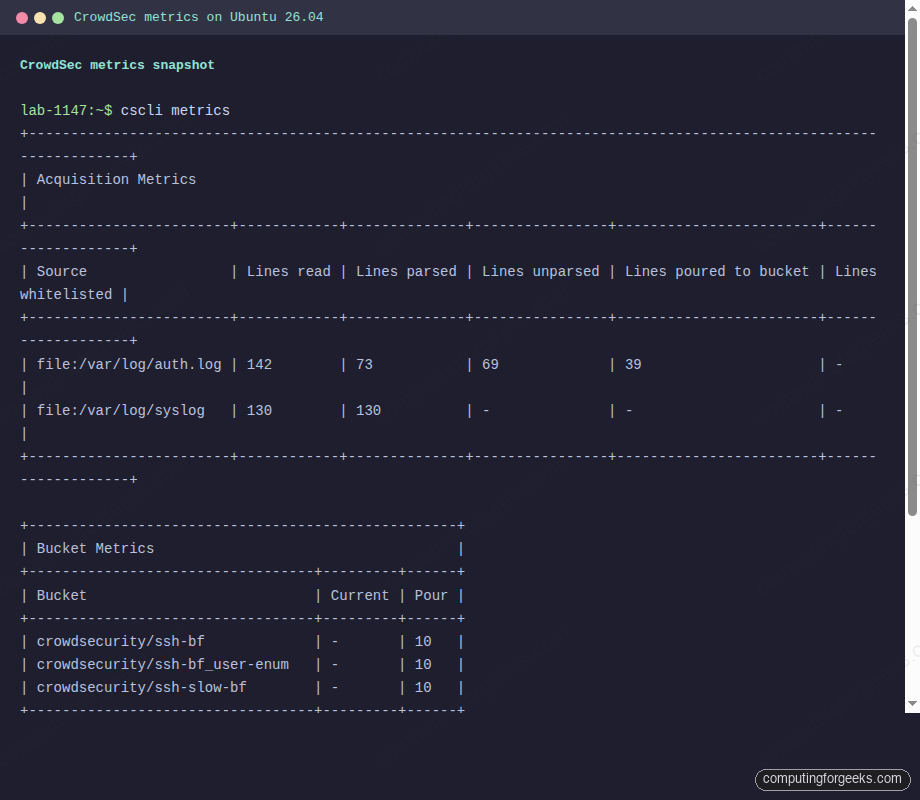
If Lines parsed is zero for a source you expect to parse, the collection is either missing or the log format does not match. For sshd on Ubuntu 26.04 this happens if systemd journal is the only log sink. Check that rsyslog is installed and writing to /var/log/auth.log.
Trigger a real brute-force to see detection fire
From a second host on the network, run a batch of failed SSH logins against the CrowdSec server. Eight to ten attempts in under a minute is enough to overflow every sshd bucket:
for i in 1 2 3 4 5 6 7 8 9 10; do
  sshpass -p "wrong${i}" ssh -o StrictHostKeyChecking=no \
    -o PreferredAuthentications=password -o PubkeyAuthentication=no \
    -o ConnectTimeout=3 baduser${i}@10.0.1.50 true
done
Back on the CrowdSec server, list the alerts and decisions that fired. Three distinct scenarios should match: ssh-bf (classic brute force), ssh-slow-bf (slower-paced probing), and ssh-bf_user-enum (attacker cycling through usernames).
cscli alerts list
cscli decisions list
The attacker IP now has three bans pending, each valid for four hours by default:
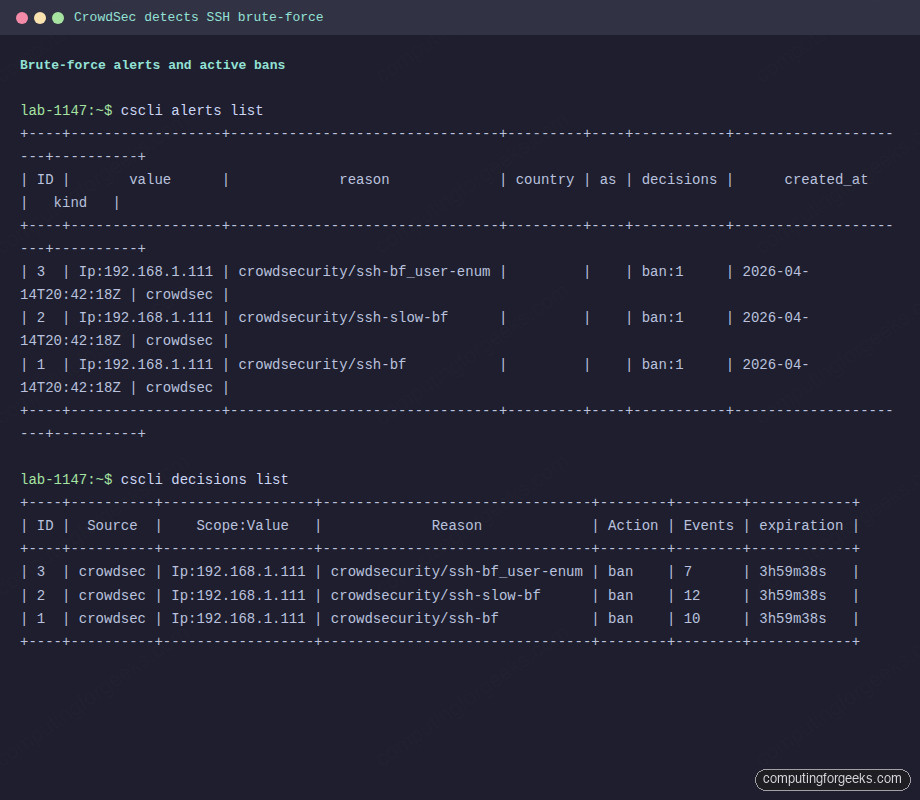
At this point CrowdSec has decided to ban the IP, but nothing is actually dropping the packets. The engine does not touch iptables or nftables on its own. That is the bouncer’s job.
Install the nftables firewall bouncer
Ubuntu 26.04 uses nftables as the default packet filter, so the crowdsec-firewall-bouncer-nftables package is the right fit. There is an iptables variant if you have legacy rules you are not ready to migrate.
sudo apt install -y crowdsec-firewall-bouncer-nftablesThe post-install step tries to register the bouncer with the LAPI automatically. On some installs the API key is not substituted into the config and the service fails to start. If systemctl status crowdsec-firewall-bouncer shows bouncer stream halted, register manually:
API_KEY=$(sudo cscli bouncers add cs-firewall-bouncer -o raw)
sudo sed -i "s|\${API_KEY}|${API_KEY}|" /etc/crowdsec/bouncers/crowdsec-firewall-bouncer.yaml
sudo systemctl restart crowdsec-firewall-bouncer
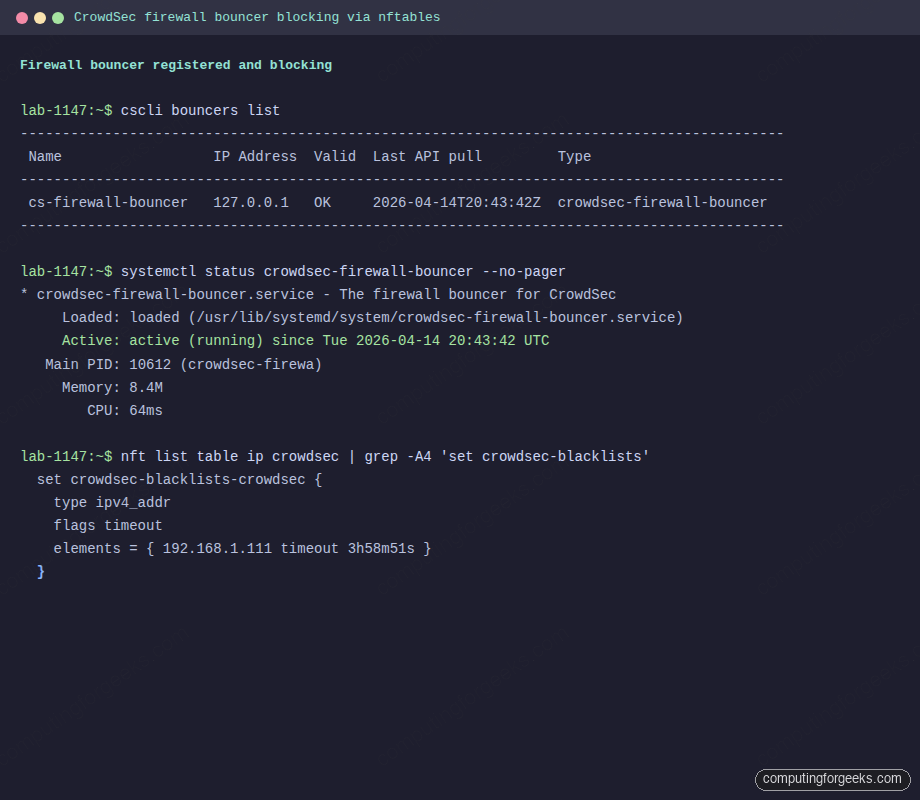
Verify the bouncer is registered and actively pulling decisions:
sudo cscli bouncers list
sudo systemctl status crowdsec-firewall-bouncer --no-pager
A healthy bouncer shows a recent Last API pull timestamp and a non-empty IP Address field:
Confirm nftables is actually dropping traffic
The bouncer creates two tables, ip crowdsec for IPv4 and ip6 crowdsec6 for IPv6. Each has a named set that bouncer populates from LAPI decisions.
sudo nft list table ip crowdsecLook for the offending IP in the crowdsec-blacklists-crowdsec set, and a non-zero crowdsec-blacklists-crowdsec counter showing packets have actually been dropped:
table ip crowdsec {
    counter processed {
        packets 192 bytes 56295
    }

    counter crowdsec-blacklists-crowdsec {
        packets 2 bytes 144
    }

    set crowdsec-blacklists-crowdsec {
        type ipv4_addr
        flags timeout
        elements = { 10.0.1.75 timeout 3h58m51s expires 3h58m22s }
    }

    chain crowdsec-chain-input {
        type filter hook input priority filter - 10; policy accept;
        counter name "processed"
        ip saddr @crowdsec-blacklists-crowdsec counter name "crowdsec-blacklists-crowdsec" drop
    }
}
Try to SSH again from the banned source. The connection should time out at the packet-filter layer, not just fail at the authentication layer. This is the visible difference between “CrowdSec knows you are bad” and “CrowdSec is actively blocking you.”
Unban and ban manually
To remove a decision (useful after accidentally banning yourself from an office IP):
sudo cscli decisions delete --ip 10.0.1.75To issue a manual ban, for example when your WAF caught something before CrowdSec did:
sudo cscli decisions add --ip 203.0.113.42 --duration 24h --reason "manual ban, web WAF hit"Both changes propagate to bouncers within update_frequency seconds (10 by default).
Enroll in the CrowdSec Console
The Console is a free web dashboard at app.crowdsec.net. It gives you per-engine alert history, a world map of attack sources, and access to community blocklists. It is optional, but the blocklists are genuinely useful.
Create an account, then on the “Engines” page generate an enrollment key. Back on the server:
sudo cscli console enroll YOUR_ENROLL_KEY
sudo systemctl restart crowdsec
After restart, click “Accept” next to the pending engine in the Console UI. Within a minute the engine starts shipping anonymized alert metadata and pulling subscribed blocklists.
Subscribe to the community blocklist
The real value of the Console free tier is the CrowdSec Community Blocklist (CTI), a list of IPs reported by the whole CrowdSec network within the last few hours. Enable it from the Console under “Blocklists” -> “Free blocklists” -> “CrowdSec Community Blocklist” -> subscribe. Within seconds the engine pulls tens of thousands of IPs and the firewall bouncer installs them into the nftables set:
sudo cscli decisions list --origins lists | head -20
sudo nft list set ip crowdsec crowdsec-blacklists-crowdsec | head -10
Most of those IPs have been attacking other servers in the last few hours. Your server now drops them before they reach sshd or nginx.
The cscli commands you will actually use
After the initial setup, day-to-day CrowdSec work reduces to a handful of commands:
| Command | Purpose |
|---|---|
cscli alerts list | Recent alerts, newest first |
cscli alerts inspect ID | Full event timeline for one alert |
cscli decisions list | Active bans right now |
cscli decisions delete --ip X.X.X.X | Unban an IP |
cscli decisions add --ip X.X.X.X --duration 24h | Manual ban |
cscli bouncers list | Health of each bouncer (last pull time) |
cscli collections list | Installed collections |
cscli hub update && cscli hub upgrade | Update hub index and upgrade installed items |
cscli metrics | Full runtime stats |
cscli explain --file /var/log/auth.log | Dry-run what would have fired against a log file |
The last one is gold when you are writing or tuning a scenario. Pipe a saved log sample through it and CrowdSec tells you what it would have done.
Troubleshooting
Error: “bouncer stream halted”
This is the nftables bouncer failing to authenticate with LAPI. The cause is almost always an unsubstituted ${API_KEY} in /etc/crowdsec/bouncers/crowdsec-firewall-bouncer.yaml. Register the bouncer with cscli bouncers add, paste the returned key into the config, restart the service.
Logs show “Lines parsed: 0” despite activity
The acquisition source is reading the file but no parser is matching. Ubuntu 26.04 minimal installs sometimes ship without rsyslog, which means /var/log/auth.log does not exist. Install it:
sudo apt install -y rsyslog
sudo systemctl enable --now rsyslog
sudo systemctl reload crowdsec
Alternative: configure CrowdSec to read sshd events directly from the journal. Add a block to /etc/crowdsec/acquis.yaml:
source: journalctl
journalctl_filter:
  - "_SYSTEMD_UNIT=ssh.service"
labels:
  type: syslog
Bouncer shows last pull “never”
The bouncer is installed but not reaching the LAPI. Check journalctl -u crowdsec-firewall-bouncer -n 50. If you see connection refused to 127.0.0.1:8080, the engine is not listening. Confirm with ss -tlnp | grep 8080. If the engine is up and the bouncer still cannot pull, the API key in the bouncer config does not match any registered bouncer. Regenerate with cscli bouncers delete NAME followed by cscli bouncers add NAME.
Bans issued but nothing dropped
The bouncer is pulling decisions but the nftables set is empty. This happens when another firewall tool (ufw with an aggressive ruleset, Docker reloading iptables) flushes CrowdSec’s chains. Either add CrowdSec’s tables to the managed set, or bump its hook priority in /etc/crowdsec/bouncers/crowdsec-firewall-bouncer.yaml. A priority of -100 puts CrowdSec before most things.
Running both CrowdSec and Fail2ban
You can, but there is no good reason to. They will happily issue duplicate bans against the same logs. Pick one. If the server already runs Fail2ban and you do not want to migrate immediately, disable the sshd jail in Fail2ban before enabling the equivalent CrowdSec collection, otherwise you will burn CPU on two parsers analysing the same file. For a separate guide on the Fail2ban side, see the upcoming Fail2ban on Ubuntu 26.04 walkthrough.
Integrations worth setting up next
Now that the engine and firewall bouncer are in place, a few additions turn CrowdSec into a proper layered defense:
- Nginx bouncer: if the server runs a web stack (see Nginx with Let’s Encrypt on Ubuntu 26.04), install
crowdsec-nginx-bouncerto block malicious requests before they hit your app - UFW coexistence: if you rely on UFW for baseline rules, CrowdSec’s bouncer runs alongside it without conflict because both target nftables at different priorities
- WireGuard-only admin: reduce attack surface further by requiring WireGuard VPN for SSH, so CrowdSec only sees scan noise hitting the public surface
- Appsec component: CrowdSec 1.7 ships with an Application Security component that sits in front of web apps and applies WAF-style rules pulled from the hub. Worth a second article of its own.
For broader context on what Ubuntu 26.04 brings to the table, the Ubuntu 26.04 LTS features overview covers the kernel, systemd, and packaging changes you will run into while building this stack.
At this point the server detects, decides, and drops SSH brute force with per-IP bans, shares signal with the community, and pulls known-bad IPs from a continuously-updated blocklist. That is a meaningful upgrade over a Fail2ban jail file, for roughly the same operational effort.






This is a most excellent guide and it was very useful for me getting Pangolin up and running with crowdsec. I got an error which your post install step fixed and would have taken me ages to resolve otherwise.
Keep up the good work!
Mike
Glad the post-install step unblocked you. CrowdSec with Pangolin is a solid combo, especially once you wire the bouncer to your reverse proxy.