A single wildcard cert covering every service on a shared LB is what turns cert sprawl from a standing problem into a thing you barely think about. On GCP the mechanism that makes that possible is Certificate Manager with DNS authorization. This article provisions *.cfg-lab.computingforgeeks.com against the DNSSEC-signed zone from the previous article, using Terraform, and walks through the ACME CNAME choreography that proves domain control to Google Trust Services.
You finish with a Google-managed cert in ACTIVE state, the exact timing of a real provisioning run, the reusable Terraform module that every later article in the series leans on, and the sub-subdomain gotcha that bites everyone the first time they deploy a wildcard.
Tested April 2026 on Google Cloud Certificate Manager (global), Cloud DNS (cfg-lab zone), Terraform 1.9.8 + google provider 6.12, OpenTofu 1.10
Why Certificate Manager, Not ManagedCertificate
The older pattern in GKE was google_compute_managed_ssl_certificate, or its Kubernetes equivalent, the ManagedCertificate CRD. Both are still supported, both still work, and both are on borrowed time for anyone running more than a handful of services. They attach directly to a target HTTPS proxy, which caps cert fan-out at 15 certs per proxy and offers no way to share one cert across multiple LBs or across projects.
Certificate Manager is the modern replacement. It decouples the cert from the load balancer entirely. A cert lives in its own namespace (global or regional), gets referenced by a cert map, and the cert map attaches to the LB. One cert can feed many LBs. One LB can serve hundreds of certs via a cert map. More importantly for this series, Certificate Manager supports DNS-01 authorization, which is the only path to a valid wildcard.
DNS-01 vs HTTP-01 (Why Wildcards Need DNS)
Google Trust Services and Let’s Encrypt both follow the ACME protocol. Before issuing a cert, the CA demands proof that you control the domain. Two common challenges exist:
- HTTP-01: the CA fetches a file at
http://example.com/.well-known/acme-challenge/TOKEN. Simple, fast, but only works for names the CA can reach over HTTP. No good for private names, no good for wildcards. - DNS-01: the CA looks up a TXT record at
_acme-challenge.example.com. Works for any name the public DNS can answer for, including names that don’t have a web server. Required for wildcards.
A wildcard like *.cfg-lab.computingforgeeks.com can’t be HTTP-validated because the wildcard covers an infinite set of hostnames; the CA has no single hostname to hit. DNS-01 is the only option.
Google Certificate Manager goes one step further: instead of rotating TXT records on every renewal, it pre-publishes a stable CNAME under _acme-challenge.<domain> that points at a per-authorization subdomain under authorize.certificatemanager.goog. Google writes to that subdomain internally, and your CNAME delegates proof-of-control to them. Set it once, renewals happen forever without touching DNS again.
Prerequisites
- A Cloud DNS managed zone you can write records to. This series uses
cfg-lab.computingforgeeks.comfrom the previous article. - The Certificate Manager API enabled:
gcloud services enable certificatemanager.googleapis.com - A GCP service account (or user) with
roles/certificatemanager.editorandroles/dns.admin - Terraform or OpenTofu 1.5+, google provider 6.x
The Terraform Module
The series-wide module lives at modules/certificate-manager/. One authorization per apex domain, one CNAME per authorization placed in the delegated Cloud DNS zone, one or more certs referencing one or more authorizations.
resource "google_certificate_manager_dns_authorization" "this" {
  for_each = var.dns_auth_domains

  project     = var.project_id
  name        = "dns-auth-${each.key}"
  location    = var.location
  domain      = each.value
  description = "DNS-01 authorization for ${each.value}"
  labels      = var.common_labels
}
The authorization resource is a shell. Its real output is a DNS record that Google tells you to publish: a CNAME name and target. Read it back and write it to Cloud DNS in the same Terraform run:
resource "google_dns_record_set" "acme_cname" {
  for_each = google_certificate_manager_dns_authorization.this

  project      = var.project_id
  managed_zone = var.dns_zone_name
  name         = each.value.dns_resource_record[0].name
  type         = each.value.dns_resource_record[0].type
  ttl          = 300
  rrdatas      = [each.value.dns_resource_record[0].data]
}
The cert itself references one or more authorizations via their resource IDs. A single managed cert can cover wildcard + apex + arbitrary SANs, as long as every name is covered by an authorization:
resource "google_certificate_manager_certificate" "this" {
  for_each = var.certificates

  project     = var.project_id
  name        = each.key
  location    = var.location
  description = "Managed cert: ${join(", ", each.value.domains)}"
  labels      = var.common_labels

  managed {
    domains = each.value.domains
    dns_authorizations = [
      for k in each.value.dns_auth_keys :
      google_certificate_manager_dns_authorization.this[k].id
    ]
  }

  depends_on = [google_dns_record_set.acme_cname]
}
The depends_on is important. Without it, Terraform happily creates the cert before the CNAME has propagated, which makes the first authorization attempt fail and then retry, adding minutes to provisioning.
Terragrunt Invocation
One call wires the module against the delegated DNS zone and asks for a wildcard + apex cert:
dependency "dns" {
  config_path = "../dns-cfg-lab"
}

inputs = {
  dns_zone_name = dependency.dns.outputs.zone_name

  dns_auth_domains = {
    lab = "cfg-lab.computingforgeeks.com"
  }

  certificates = {
    "cfg-lab-wildcard" = {
      domains       = ["*.cfg-lab.computingforgeeks.com", "cfg-lab.computingforgeeks.com"]
      dns_auth_keys = ["lab"]
    }
  }
}
Both the wildcard and apex live on a single cert. This matters for cert maps later: if wildcard and apex were separate certs, the cert map would need two entries. One cert, one map entry.
Applying and Waiting
Run the apply:
cd live/article-lab/europe-west1/certs-cfg-lab
terragrunt apply -auto-approve
Three resources get created in sequence. Real timings captured during testing:
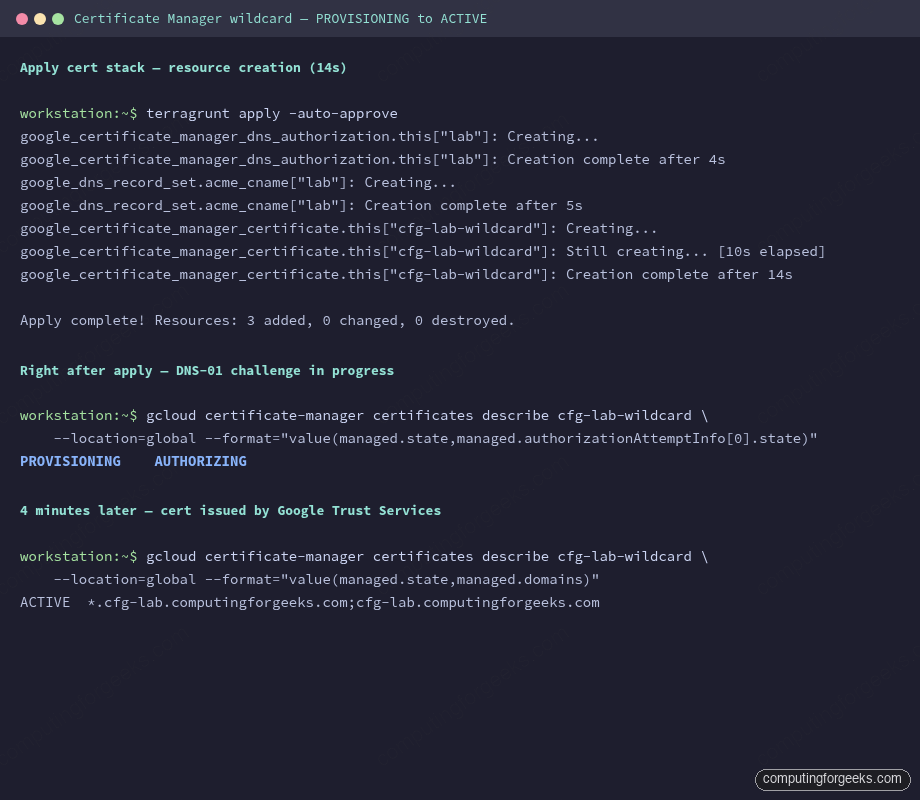
- DNS authorization resource: 4 seconds
- ACME CNAME record in Cloud DNS: 5 seconds
- Certificate resource (API accepted): 14 seconds
- Background DNS-01 validation and issuance: ~4 minutes to ACTIVE
Terraform returns as soon as the API accepts the certificate resource; it does not block until the cert is actually usable. Query the state explicitly:
gcloud certificate-manager certificates describe cfg-lab-wildcard \
  --location=global \
  --format="value(managed.state,managed.authorizationAttemptInfo[0].state)"
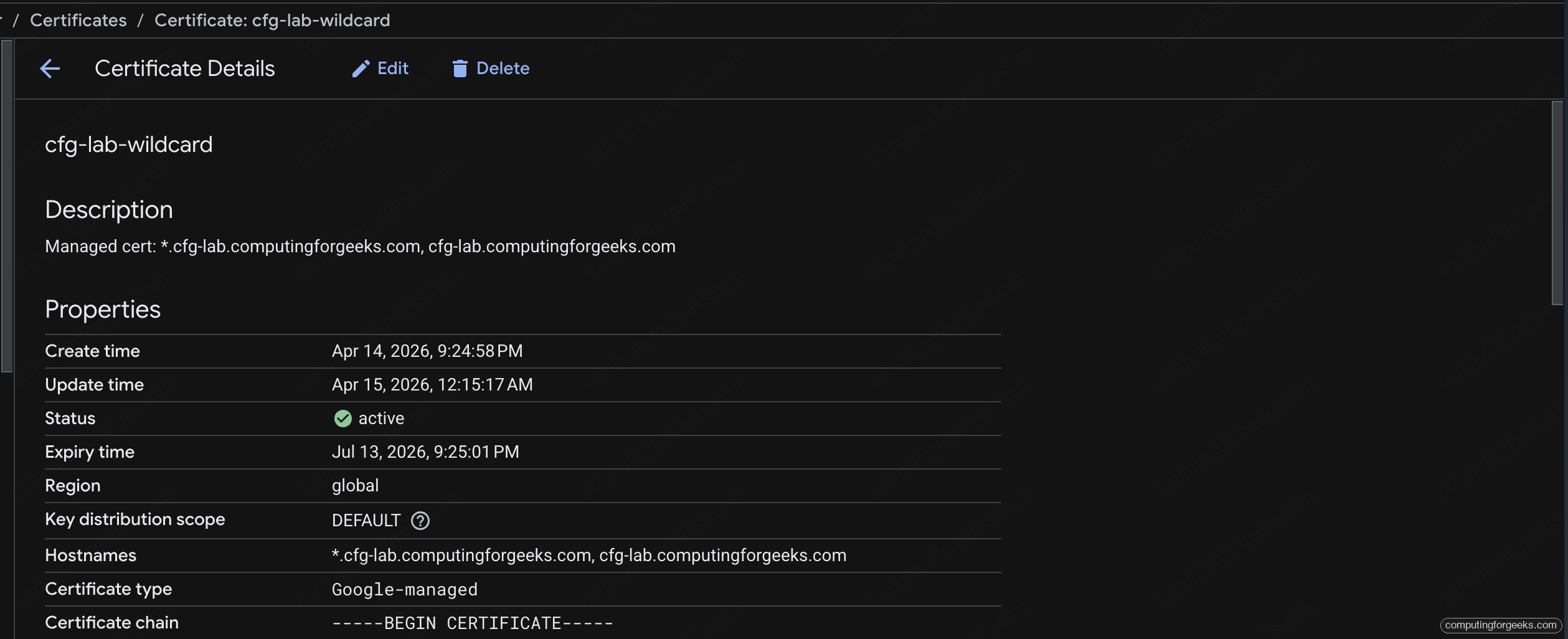
The output immediately after apply reports PROVISIONING / AUTHORIZING. A few minutes later it flips to ACTIVE / AUTHORIZED. Only at that point is the cert attachable to a load balancer.
The Certificate Manager page in the Cloud console shows the same status, plus the SANs, expiry, and the full managed-cert chain. Bookmark this URL for every platform engineer on the team:
Verifying the ACME CNAME
The CNAME is the entire mechanism. If it’s missing or wrong, provisioning stalls at AUTHORIZING forever. Check it:
dig +short CNAME _acme-challenge.cfg-lab.computingforgeeks.com @1.1.1.1You should see the per-authorization subdomain under authorize.certificatemanager.goog. That record is the delegation of control; Google writes the TXT answer on the target subdomain during every renewal.
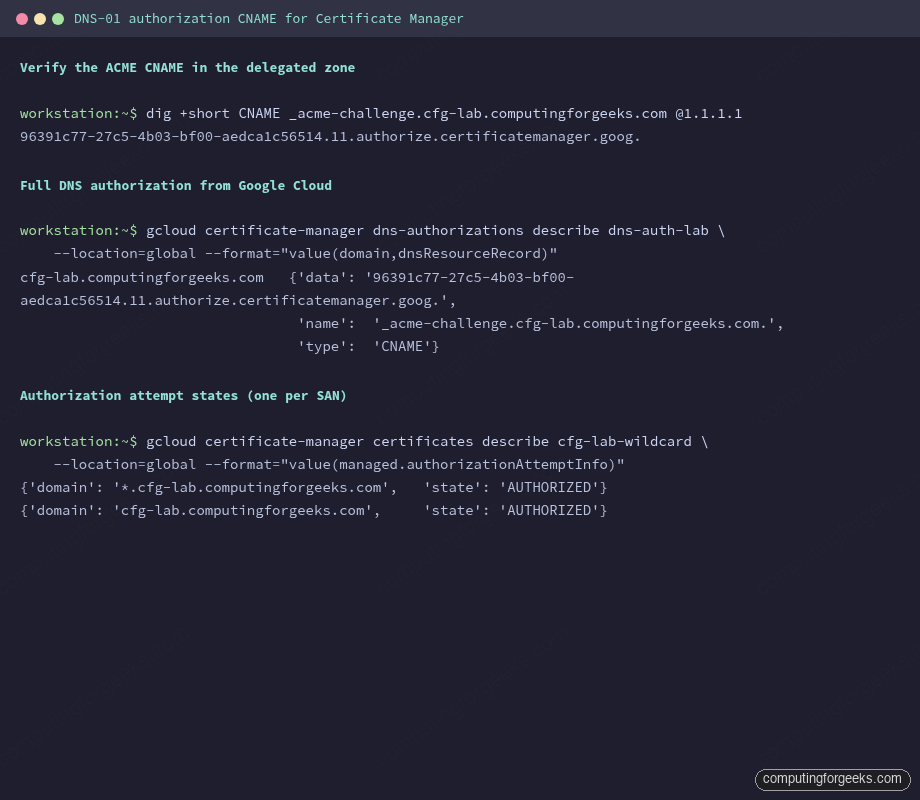
The gcloud certificate-manager dns-authorizations describe command returns the same data, useful for reconciling what Google expects against what Cloud DNS actually holds.
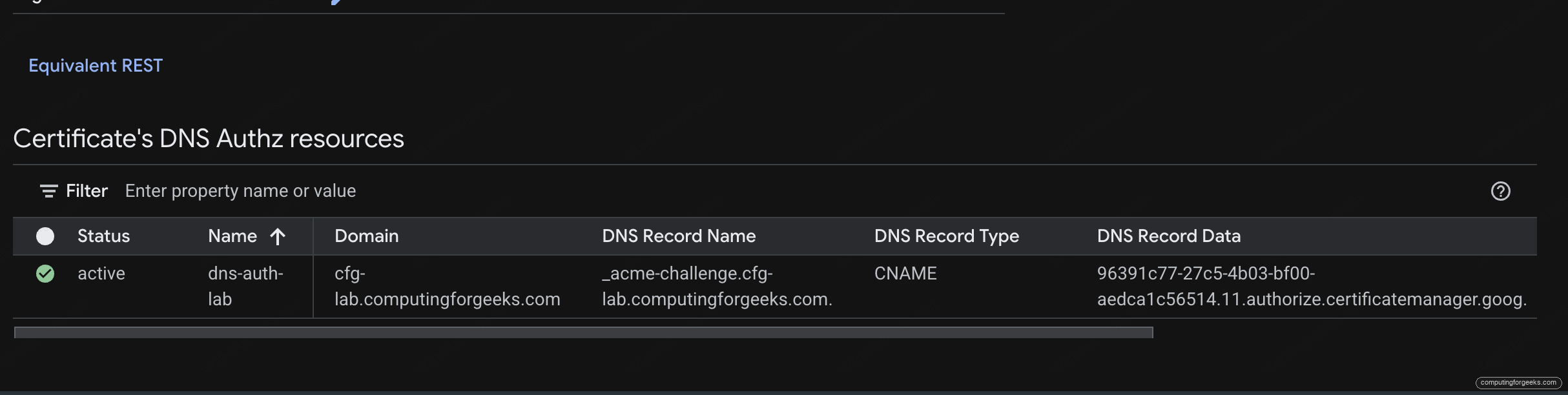
The cert’s detail page in the console has a “DNS Authz resources” panel that ties the authorization, the domain, and the CNAME name and target into one row. Matching this against the Cloud DNS record sets from the previous article is the fastest way to spot a propagation mismatch:
Authorization Attempts per SAN
Each Subject Alternative Name on the cert goes through its own DNS-01 check. The cert resource records an authorizationAttemptInfo block per SAN:
gcloud certificate-manager certificates describe cfg-lab-wildcard \
  --location=global \
  --format="value(managed.authorizationAttemptInfo)"
Both the wildcard and the apex return AUTHORIZED. If one SAN fails and the other succeeds, the cert as a whole stays in PROVISIONING. Common causes: CAA policy missing the pki.goog issuer, CNAME propagation lag, or DNSSEC validation failing because the DS record hasn’t been published at the parent.
The Sub-Subdomain Gotcha
RFC 6125 is clear on this point, and it trips up every platform team at least once. A wildcard *.cfg-lab.computingforgeeks.com matches exactly one label:
food.cfg-lab.computingforgeeks.commatches ✓api.cfg-lab.computingforgeeks.commatches ✓api.food.cfg-lab.computingforgeeks.comdoes NOT match ✗
A sub-subdomain needs either its own explicit cert, or you shift the wildcard one level down: *.food.cfg-lab.computingforgeeks.com. The consolidation plan for this series handles both: most services live one level under cfg-lab and share the wildcard; anything deeper gets an explicit entry in the cert map, which is the topic of the next article.
Error: “The SSL certificate does not match the server name”
When you hit a sub-subdomain with a wildcard that doesn’t cover it, browsers render this exact error (Chrome) or NET::ERR_CERT_COMMON_NAME_INVALID. openssl s_client -connect api.food.cfg-lab.computingforgeeks.com:443 shows the wildcard in the CN/SAN and the client compares it against the hostname you dialled. The mismatch is strict. No browser or client silently accepts a two-label wildcard match.
Google-Managed vs Self-Managed Certs
Certificate Manager supports both. Google-managed certs (what this article uses) are the default: Google Trust Services issues them, Google renews them, you don’t touch keys or CSRs ever. Self-managed certs are for cases where you already have a cert from a commercial CA or Let’s Encrypt and want to upload it to Certificate Manager for cert-map attachment. The ergonomics are the same from the cert-map side; the difference is who holds the private key.
For the consolidation pattern this series builds, Google-managed is the right default. Self-managed is worth reaching for in one scenario: when you want a specific CA (for example because compliance mandates DigiCert) or when you’re migrating an existing cert inventory without re-issuing. Article 7 in the series covers Private CA for the financial-services isolation case, which is structurally different again.
Issuing a Second Cert on the Same Authorization
One DNS authorization can back many certs. This matters when you want a cert-per-environment or a cert-per-compliance-boundary without publishing a separate CNAME each time. Add another entry to the certificates map:
certificates = {
  "cfg-lab-wildcard" = {
    domains       = ["*.cfg-lab.computingforgeeks.com", "cfg-lab.computingforgeeks.com"]
    dns_auth_keys = ["lab"]
  }
  "cfg-lab-apex-only" = {
    domains       = ["cfg-lab.computingforgeeks.com"]
    dns_auth_keys = ["lab"]
  }
}
The same CNAME authorizes both. Google issues two separate certs with independent rotation lifecycles. Use this pattern when one cert is for the shared LB and another is for a narrow use case (internal service exposing only the apex, say).
Rotation Without DNS Changes
Google-managed certs auto-renew 30 days before expiry. Because the authorization is CNAME-based, renewal reuses the existing record and no DNS write happens. Every cert rotation from now on is a no-op from the DNS side. This is the step-change that Certificate Manager brings over the older ManagedCertificate: rotation is boring, invisible, and doesn’t touch Terraform state.
Cleanup
The cert is cheap (no forwarding rule until a cert map + LB exists), so leaving it in place between articles in the series is fine. When you do destroy, order matters:
terragrunt destroyTerraform removes the cert first, then the CNAME, then the authorization. If the cert is attached to a cert map (from a later article), destroy blocks with a dependency error until the cert map entry is removed. That’s deliberate: it prevents you from accidentally yanking a cert out from under a live LB.
What’s Next
With a wildcard cert in ACTIVE state, the next article builds a shared Global External HTTPS LB and attaches the cert via a Certificate Map. That’s where cert sprawl actually collapses: three per-service LBs + three certs become one LB + one cert map, and the sub-subdomain gotcha gets its explicit fix.