

Every Linux system has sudo. It’s the single binary standing between your unprivileged user account and full root access, which makes it one of the most security-critical programs on any server. The problem? Traditional sudo is written in C, and after 30+ years of patches, the codebase has accumulated its share of memory safety vulnerabilities. CVE-2021-3156 (Baron Samedit) let any local user gain root. CVE-2023-22809 hit sudoedit. In July 2025, CVE-2025-32462 and CVE-2025-32463 were disclosed, both targeting features that sudo-rs intentionally never implemented.
sudo-rs is a ground-up rewrite of sudo and su in Rust, built by the Trifecta Tech Foundation under the Internet Security Research Group’s Prossimo memory safety initiative. It became the default sudo in Ubuntu 26.04 LTS, making it the first major distribution to ship a memory-safe privilege escalation tool by default. Debian 13 packages it alongside the original. Arch Linux, Fedora, NixOS, Alpine, and FreeBSD all have packages available.
Verified working: April 2026. Tested on Ubuntu 26.04 LTS (sudo-rs 0.2.13), Debian 13 Trixie (sudo-rs 0.2.5), and Rocky Linux 10.1 (built from source, v0.2.13). All commands run on real VMs with SELinux enforcing on Rocky.
What sudo-rs Actually Changes (and What It Doesn’t)
From a user’s perspective, nothing changes. You still type sudo apt update and it works. The syntax, the sudoers file format, and the PAM integration are all the same. What changes is everything underneath: Rust’s ownership model eliminates entire classes of buffer overflows, use-after-free, and double-free vulnerabilities that have plagued the C implementation for decades.
The project passed two independent security audits (versions 0.2.0 in August 2023 and 0.2.8 in August 2025), and the audit reports are public in the project repository.
There are some deliberate omissions. sudo-rs strips out legacy features that expand the attack surface without benefiting most users:
- No LDAP backend for sudoers (use SSSD/PAM instead)
- No sendmail integration for notifications
- No
sudo -E(environment preservation bypassesenv_reset, which sudo-rs always enforces) - No INTERCEPT shell escape prevention (NOEXEC is supported)
- Wildcards restricted to final arguments only in sudoers rules
- PAM is mandatory (no shadow-file fallback)
The philosophy is “less is more.” If a feature doesn’t serve modern Linux deployments, it doesn’t get reimplemented. Todd Miller, the original sudo maintainer for 30+ years, collaborated on the project and endorsed this approach.
sudo-rs on Ubuntu 26.04 LTS (Default)
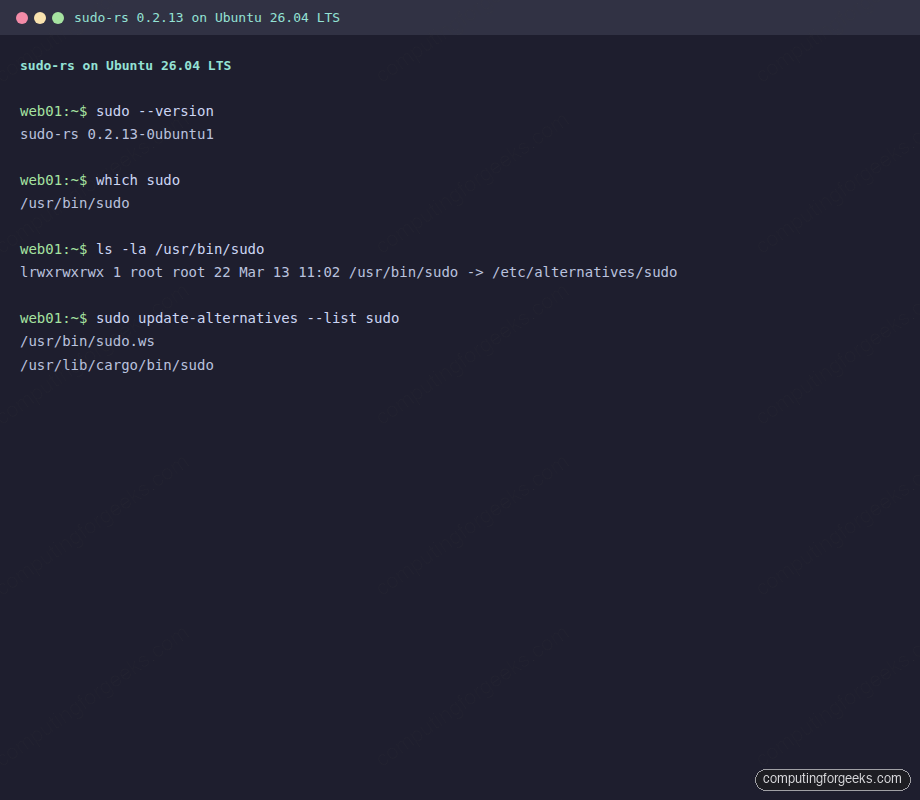
Ubuntu 26.04 ships sudo-rs as the default sudo implementation. The original C-based sudo is still installed as sudo.ws (named after the original sudo website, sudo.ws). Both coexist through Debian’s alternatives system.
Confirm which implementation is active:
sudo --versionOn a fresh Ubuntu 26.04 install, this returns:
sudo-rs 0.2.13-0ubuntu1The binary at /usr/bin/sudo is a symlink managed by update-alternatives:
ls -la /usr/bin/sudoThe output confirms the alternatives chain:
lrwxrwxrwx 1 root root 22 Mar 13 11:02 /usr/bin/sudo -> /etc/alternatives/sudoBoth implementations are registered in the alternatives system. List them with:
sudo update-alternatives --list sudoYou’ll see two entries:
/usr/bin/sudo.ws
/usr/lib/cargo/bin/sudo
Here’s the full version and alternatives output captured from a real Ubuntu 26.04 system:
The actual sudo-rs binaries live in /usr/lib/cargo/bin/, which includes sudo, su, and visudo:
ls -la /usr/lib/cargo/bin/All three are present:
-rwsr-xr-x 1 root root  611616 Mar 11 13:27 su
-rwsr-xr-x 1 root root 1082656 Mar 11 13:27 sudo
-rwxr-xr-x 1 root root  795936 Mar 11 13:27 visudo
Note the setuid bit (-rwsr-xr-x) on sudo and su. visudo doesn’t need setuid because it runs as root already.
Switching Between sudo-rs and Original sudo
Canonical designed the transition so you can fall back to original sudo at any time during the Ubuntu 26.04 LTS lifecycle. This is useful if you hit an edge case with a sudoers configuration that sudo-rs doesn’t support yet.
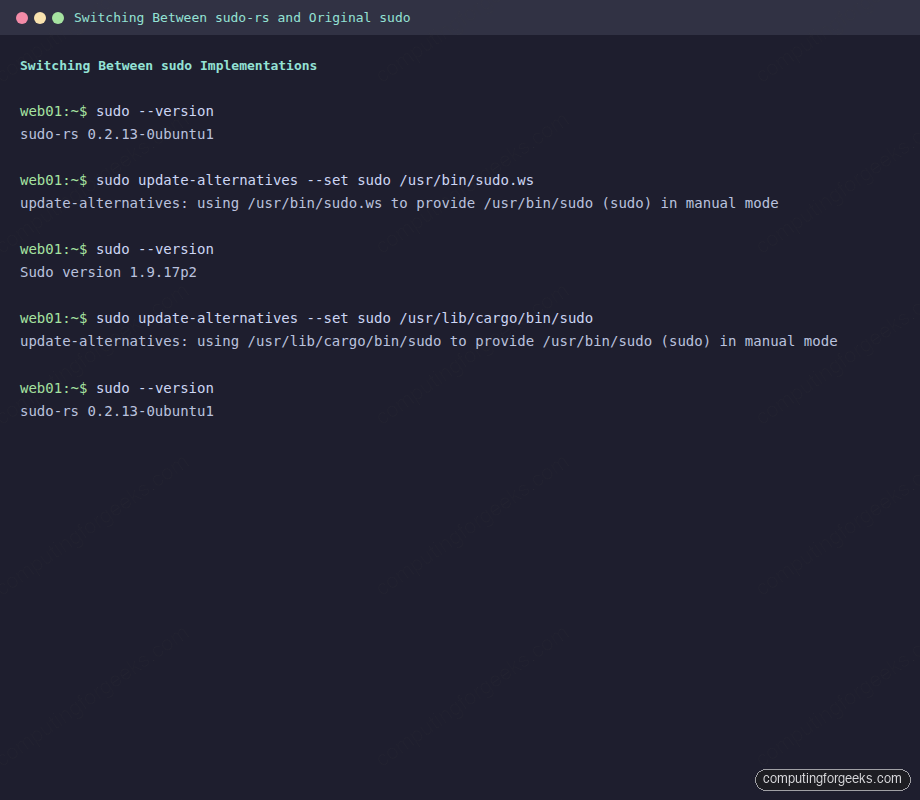
Switch to the original C-based sudo:
sudo update-alternatives --set sudo /usr/bin/sudo.wsThe system confirms the change:
update-alternatives: using /usr/bin/sudo.ws to provide /usr/bin/sudo (sudo) in manual modeVerify the switch:
sudo --versionNow it reports the original version:
Sudo version 1.9.17p2Switch back to sudo-rs:
sudo update-alternatives --set sudo /usr/lib/cargo/bin/sudoThe transition is instant. No reboot, no service restart. The screenshot below shows the full round-trip:
Canonical plans to remove the original sudo fallback in Ubuntu 26.10, making sudo-rs the sole implementation. If you rely on features that sudo-rs doesn’t support (LDAP sudoers, sendmail integration), now is the time to migrate your configuration.
Install sudo-rs on Debian 13 (Trixie)
Debian 13 packages sudo-rs but doesn’t make it the default. The original sudo stays in place, and sudo-rs installs alongside it with -rs suffixed commands.
apt install sudo-rsThis installs three binaries: sudo-rs, su-rs, and visudo-rs, all symlinked from /usr/lib/cargo/bin/:
dpkg -L sudo-rs | grep binThe output shows all installed files:
/usr/lib/cargo/bin/su
/usr/lib/cargo/bin/sudo
/usr/lib/cargo/bin/visudo
/usr/bin/su-rs
/usr/bin/sudo-rs
/usr/bin/visudo-rs
Test it directly without changing your default sudo:
sudo-rs --version
sudo-rs whoami
The version on Debian 13 is 0.2.5 (older than Ubuntu’s 0.2.13 because Debian froze packages earlier in the release cycle):
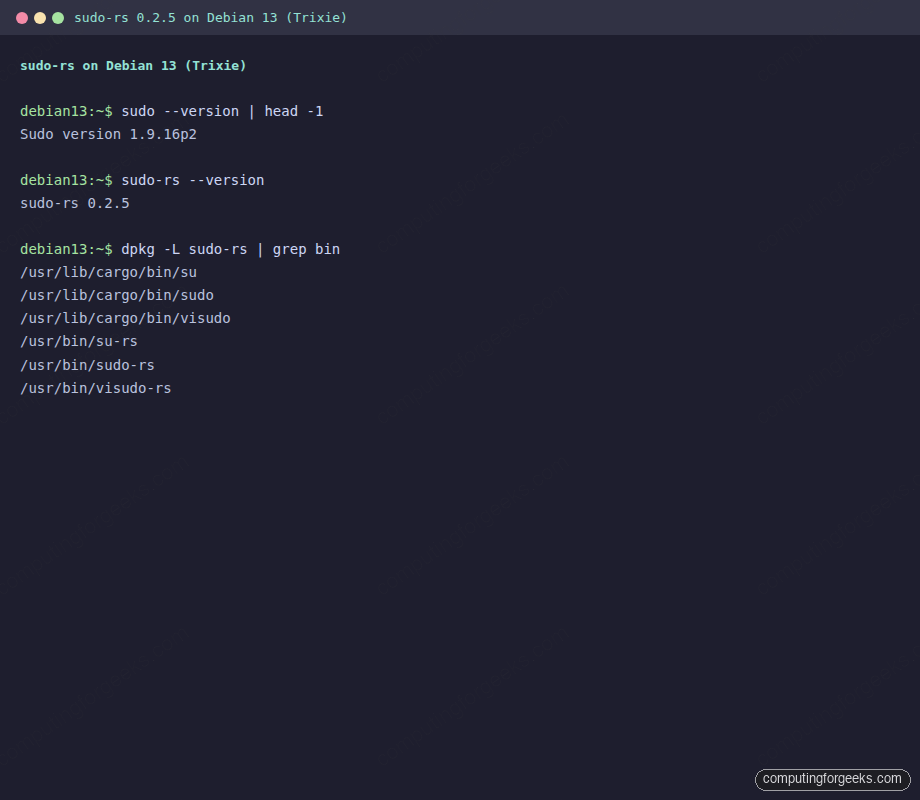
Debian 13 ships sudo-rs 0.2.5, which lacks some features added in later releases (notably sudoedit support arrived in 0.2.9 and AppArmor profile selection in 0.2.10). The Ubuntu 26.04 package at 0.2.13 is more feature-complete.
Install sudo-rs on Arch Linux
Arch packages sudo-rs in the Extra repository. Install it with:
pacman -S sudo-rsLike Debian, Arch installs the -rs suffixed binaries alongside the original sudo. The package version tracks upstream closely (0.2.13 at the time of writing). Arch lists sudo as an optional dependency for its default configuration files, since sudo-rs reads the same /etc/sudoers and /etc/sudoers.d/ directory.
Build sudo-rs from Source on Rocky Linux 10 / RHEL
RHEL-family distributions don’t package sudo-rs yet. On Rocky Linux 10, AlmaLinux 10, or RHEL 10, you’ll need to build from source. The build is straightforward because sudo-rs has minimal dependencies: just Rust and PAM development headers.
Install the Rust toolchain:
curl --proto '=https' --tlsv1.2 -sSf https://sh.rustup.rs | sh -s -- -y
source $HOME/.cargo/env
Verify the Rust installation:
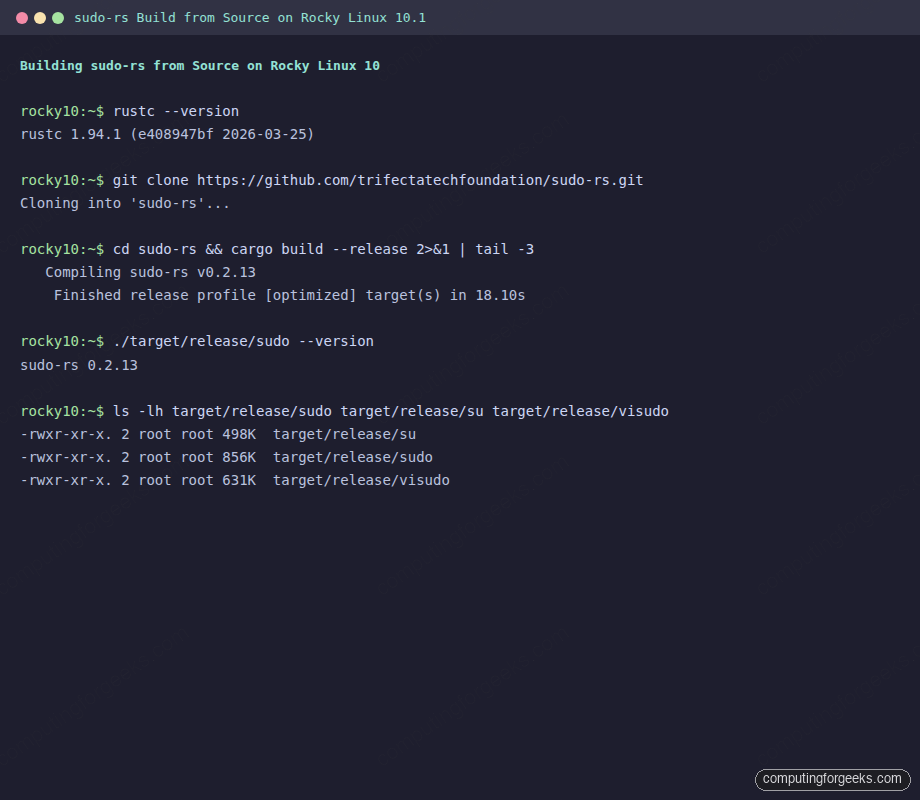
rustc --versionOn our test system, this returned rustc 1.94.1 (e408947bf 2026-03-25). sudo-rs requires Rust 1.85 or newer.
Install the build dependencies:
dnf install -y pam-devel gcc make gitClone and build:
cd /tmp
git clone https://github.com/trifectatechfoundation/sudo-rs.git
cd sudo-rs
cargo build --release
The build completed in about 18 seconds on a 2-vCPU VM. The resulting binaries are in target/release/:
ls -lh target/release/sudo target/release/su target/release/visudoThree binaries, all under 1 MB each:
-rwxr-xr-x. 2 root root 498K target/release/su
-rwxr-xr-x. 2 root root 856K target/release/sudo
-rwxr-xr-x. 2 root root 631K target/release/visudo
Install the binaries alongside the original sudo (don’t replace it yet):
cp target/release/sudo /usr/local/bin/sudo-rs
cp target/release/su /usr/local/bin/su-rs
cp target/release/visudo /usr/local/bin/visudo-rs
chmod u+s /usr/local/bin/sudo-rs /usr/local/bin/su-rs
The chmod u+s sets the setuid bit, which sudo needs to elevate privileges. Without it, sudo-rs can’t switch to root.
Test the build:
/usr/local/bin/sudo-rs --version
/usr/local/bin/sudo-rs whoami
Both should confirm sudo-rs 0.2.13 and root. This build worked with SELinux enforcing on Rocky Linux 10.1, no policy changes needed:
sudo-rs Sudoers Compatibility
sudo-rs reads the standard /etc/sudoers file and the /etc/sudoers.d/ include directory. Most configurations work without changes. There are a few enforced defaults that differ from the original and cannot be overridden:
| Setting | sudo-rs | Original sudo |
|---|---|---|
env_reset | Always ON (not configurable) | ON by default (can be turned off) |
visiblepw | Always OFF | OFF by default (can be turned on) |
timestamp_type | Fixed at tty | Configurable (global, ppid, tty) |
use_pty | ON by default (configurable) | OFF by default on most distros |
pwfeedback | ON by default (shows asterisks) | OFF by default (silent typing) |
sudoedit_checkdir | Always ON | ON by default (can be turned off) |
sudoedit_follow | Always OFF | OFF by default (can be turned on) |
The pwfeedback default is the most visible change for users. sudo-rs shows asterisks when you type your password, while original sudo shows nothing. This is actually a security improvement: the silent prompt confused users into thinking their keyboard input wasn’t being registered, which led to leaked passwords in shared terminal sessions.
The timestamp_type = tty lock is worth understanding. Original sudo offers global timestamps, where authenticating in one terminal grants sudo access in all terminals. sudo-rs forces per-TTY timestamps, which means each terminal session requires its own authentication. This prevents a rogue process from piggybacking on a sudo session you authenticated in a different window.
Testing Access Control Rules
Create a restricted user to test sudoers rules with sudo-rs. On Ubuntu 26.04:
sudo useradd -m -s /bin/bash testuser
echo "testuser:TestPass123" | sudo chpasswd
Grant limited sudo access through a sudoers.d drop-in file:
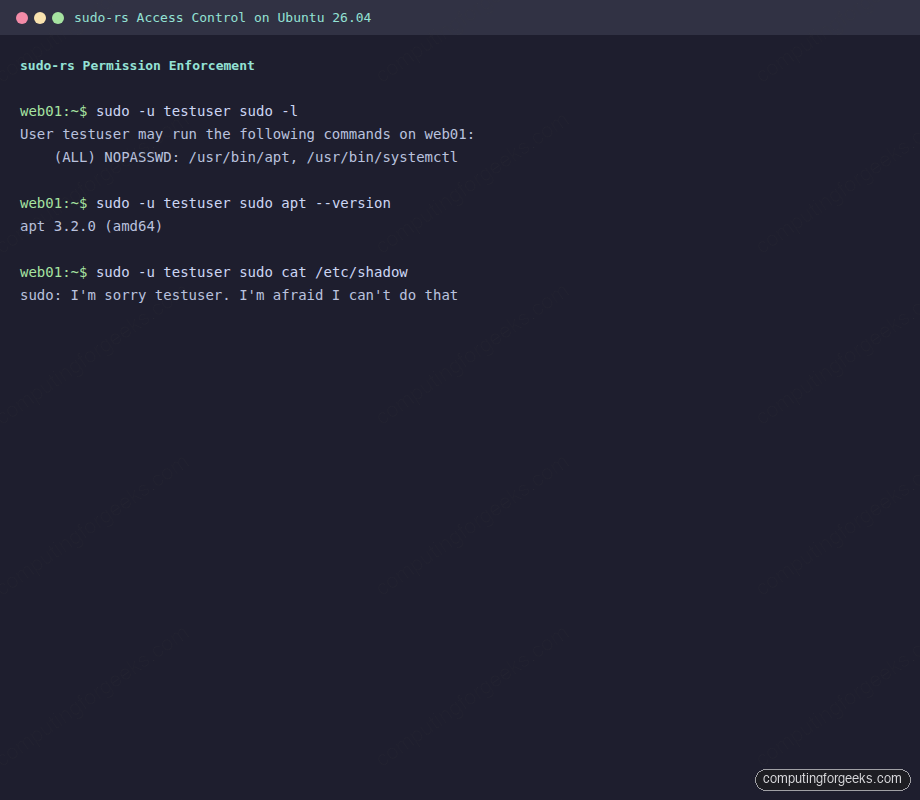
echo "testuser ALL=(ALL) NOPASSWD: /usr/bin/apt, /usr/bin/systemctl" | sudo tee /etc/sudoers.d/testuserVerify the permissions are parsed correctly:
sudo -u testuser sudo -lsudo-rs reports the allowed commands:
User testuser may run the following commands on web01:
    (ALL) NOPASSWD: /usr/bin/apt, /usr/bin/systemctl
The allowed command works as expected:
sudo -u testuser sudo apt --versionReturns apt 3.2.0 (amd64) without prompting for a password. Now try a command that’s not in the allowed list:
sudo -u testuser sudo cat /etc/shadowsudo-rs responds with a nod to HAL 9000:
sudo: I'm sorry testuser. I'm afraid I can't do thatThe original sudo prints “Sorry, user testuser is not allowed to execute…” which is functional but boring. The sudo-rs developers had some fun with the denial message. Here’s the full access control test captured in one place:
Clean up the test user and drop-in file when done:
sudo rm -f /etc/sudoers.d/testuser
sudo userdel -r testuser
Audit Logging
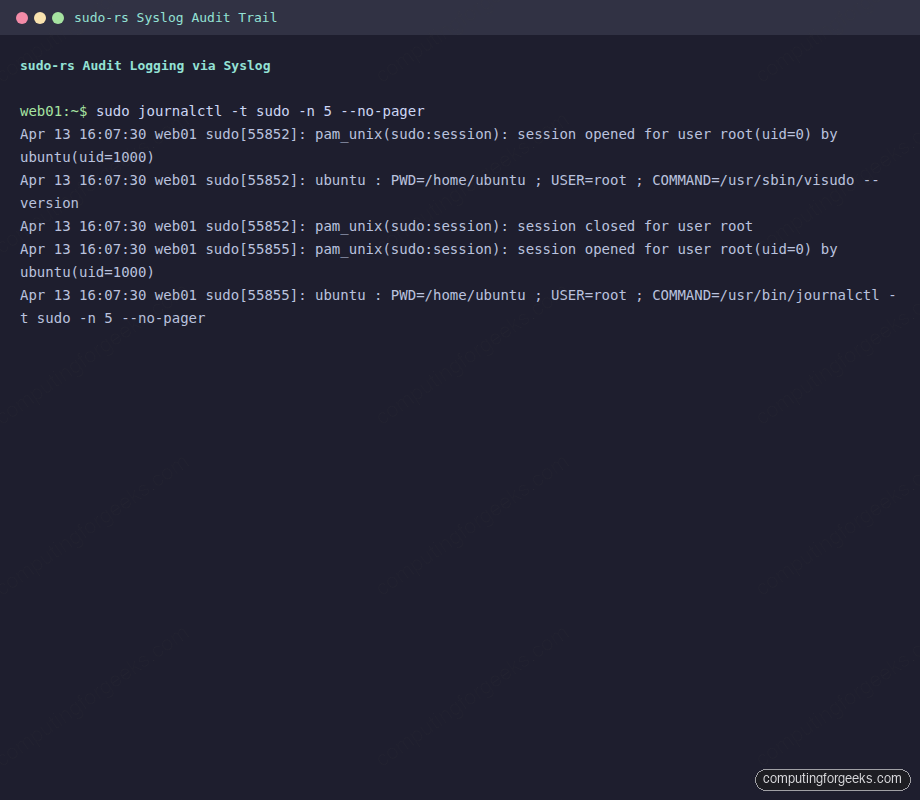
sudo-rs logs to syslog, the same way the original does. Every privileged command execution is recorded with the calling user, working directory, target user, and full command. Check recent sudo activity with:
sudo journalctl -t sudo -n 10 --no-pagerThe log entries look identical to original sudo, which means your existing log parsing, SIEM rules, and monitoring integrations continue to work without changes:
One difference: sudo-rs does not support the Logfile directive for writing to a separate log file. It uses syslog exclusively. If you were using Defaults logfile="/var/log/sudo.log" in your sudoers, that directive will be ignored. Use journald or rsyslog to route the logs instead.
sudo-rs vs Original sudo: Side-by-Side Comparison
| Feature | sudo-rs 0.2.13 | sudo 1.9.17 (C) |
|---|---|---|
| Language | Rust | C |
| License | Apache 2.0 + MIT | ISC |
| Memory safety | Guaranteed by Rust compiler | Manual (30 years of CVEs) |
| sudoers parsing | Yes (most features) | Yes (full) |
| PAM authentication | Yes (mandatory) | Yes (optional) |
| sudoedit | Yes (since 0.2.9) | Yes |
| visudo | Yes | Yes |
| NOEXEC | Yes | Yes |
| INTERCEPT | No | Yes |
| LDAP backend | No | Yes |
| Sendmail | No | Yes |
sudo -E | No | Yes |
| AppArmor profiles | Yes (since 0.2.10) | Yes |
| SELinux RBAC | No | Yes |
| Password feedback | Asterisks (default) | Silent (default) |
| Syslog | Yes | Yes |
| Logfile directive | No | Yes |
| Security audits | 2 public audits | Ongoing (but more CVEs) |
| Binary size | ~1 MB (stripped) | ~290 KB |
The binary size difference is notable. sudo-rs at ~1 MB is roughly 3.5x larger than the original’s ~290 KB. This is typical of Rust binaries that statically link parts of the standard library. In practice, the size difference is irrelevant on modern systems.
CVEs That Would Not Have Affected sudo-rs
The strongest argument for sudo-rs isn’t theoretical. These are real vulnerabilities in original sudo that stem from memory safety issues that Rust prevents at compile time:
- CVE-2021-3156 (Baron Samedit): Heap buffer overflow in command-line argument parsing. Any local user could gain root. CVSS 7.8. This vulnerability existed undetected for 10 years. In Rust, buffer overflows are a compile-time error.
- CVE-2023-22809: sudoedit bypassed path restrictions. A user could edit arbitrary files. Caused by improper handling of the
--argument separator. sudo-rs’s sudoedit was reimplemented from scratch with stricter path validation. - CVE-2025-32462: Privilege escalation through a feature sudo-rs never implemented.
- CVE-2025-32463: Another privilege escalation in a feature absent from sudo-rs.
- CVE-2019-14287: User ID -1 was mishandled, letting a restricted user run commands as root. An integer handling bug that Rust’s type system would flag.
This doesn’t mean sudo-rs is vulnerability-free. Logic bugs can exist in any language. But the entire class of memory corruption vulnerabilities (the most dangerous kind, because they’re exploitable for arbitrary code execution) is eliminated by design.
Distribution Packaging Status (April 2026)
| Distribution | Package | Version | Default? | Install Method |
|---|---|---|---|---|
| Ubuntu 26.04 LTS | sudo-rs | 0.2.13 | Yes | Pre-installed |
| Ubuntu 24.04 LTS | sudo-rs | Available in universe | No | apt install sudo-rs |
| Debian 13 (Trixie) | sudo-rs | 0.2.5 | No | apt install sudo-rs |
| Arch Linux | sudo-rs | 0.2.13 | No | pacman -S sudo-rs |
| Fedora 42 | sudo-rs | Available | No | dnf install sudo-rs |
| Alpine Linux | sudo-rs | Community repo | No | apk add sudo-rs |
| NixOS | Configured | Tracks upstream | No | security.sudo-rs.enable = true |
| FreeBSD | sudo-rs | Available | No | pkg install sudo-rs |
| Rocky/Alma/RHEL | Not packaged | Build from source | No | See build section above |
Ubuntu is the first major distribution to ship sudo-rs as default. Expect other distributions to follow as the project matures. The RHEL family is likely the last to adopt because Red Hat maintains its own security infrastructure and moves conservatively on core system tooling.
When to Stick with Original sudo
sudo-rs covers the vast majority of use cases, but there are legitimate reasons to keep the original:
- LDAP-based sudoers: If your organization distributes sudoers rules via LDAP rather than SSSD/PAM, sudo-rs won’t work. Migrate to SSSD before switching.
- SELinux RBAC transitions: If you use
sudo -rfor SELinux role transitions, this isn’t supported yet. Standard SELinux enforcing works fine (tested on Rocky 10), but role-based transitions need the original. - Custom
Logfiledirective: If your log pipeline depends on sudo writing to a dedicated file rather than syslog, you’ll need to restructure your logging first. - Complex wildcard rules: sudo-rs restricts wildcards to final arguments only. Rules like
user ALL=(ALL) /usr/bin/find * -exec *won’t parse. This is intentional because wildcard expansion in sudoers has been a source of privilege escalation bugs.
For most server deployments, none of these apply. If you’re running a standard web server, database host, or container host, sudo-rs works out of the box.
Migrating an Existing Server
For servers running Ubuntu 24.04 or Debian 12 that you plan to upgrade to Ubuntu 26.04, the transition happens automatically. Your existing /etc/sudoers and /etc/sudoers.d/ files are read by sudo-rs without modification.
Before upgrading, validate your sudoers configuration against sudo-rs’s stricter parser:
visudo -cIf this passes on the original sudo, it will almost certainly work with sudo-rs. The only exceptions are the features listed in the comparison table above (LDAP directives, complex wildcards, Logfile).
For Rocky Linux and other RHEL-family systems where you’ve built from source, test sudo-rs alongside the original before replacing it. Install to /usr/local/bin/sudo-rs as shown in the build section, run your daily commands through it for a week, and verify your sudoers rules work correctly before making it the default.
The Rust rewrite of sudo is one piece of a broader trend. Projects like Rust programming are reshaping system-level software: uutils (coreutils rewrite), Rustls (TLS library), and Hickory DNS (formerly Trust-DNS) are all moving critical infrastructure away from C. sudo-rs is notable because it’s the first to ship as a distribution default, proving this approach works at scale. With Ubuntu 26.04 LTS supported until 2031, tens of millions of servers will be running memory-safe privilege escalation within the next year.
