


What Are Blue/Green Deployments?
Blue/green deployment is a software change management and release strategy. Also referred to as A/B deployment, it requires two hardware environments with the exact same configuration. One of the environments stays active and serves end users, while the other stays idle.
Blue/green deployments are commonly used for consumer-facing applications with critical uptime needs. Here is the general flow of this deployment strategy:
- Deploy new code to the idle environment first and test thoroughly
- Once adequately tested, make the idle environment the active one (typically by changing router specifications so that all incoming traffic is redirected to this server)
- Repeat when new code needs to be deployed
If problems get discovered after the environments are switched, the team can route traffic back to the idle environment without the new code. Code is updated in this environment only when the team is confident about its performance in production. With two environments set up identically, recovery in a disaster scenario also becomes possible.
What Is AWS Application Load Balancer?
AWS Elastic Load Balancing (ELB) distributes inbound traffic across different destinations like EC2 instances, IP addresses, containers, or different availability zones. Since it monitors each registered destination’s health, it can route the traffic to healthy ones. It can scale itself to adapt to multiple workload levels and also scales the load balancer based on the changing incoming over time.
The ELB service can be useful for many use cases, including application modernization and hybrid cloud network scalability – most of these use cases involve migration to AWS. However, presently we are interested in the use of ELB for implementation of blue-green deployment.
ELB supports the load balancers mentioned below:
- Application load balancers
- Network load balancers
- Gateway load balancers
- Classic load balancers
Application Load Balancer Elements
A load balancer is clients’ single contact point. It distributes incoming traffic across different targets to increase the application’s availability.
What is a listener?
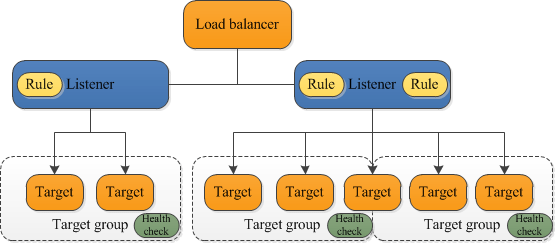
Every load balancer has one or more listeners. Every listener looks for incoming connection requests from clients through the specified port and protocol. Each listener has at least one associated rule that decides how the load balancer directs requests to targets.
A listener’s rule consists of the following:
- A priority
- One or more actions
- One or more conditions
The actions are triggered whenever the conditions for a rule get satisfied. A listener might have multiple rules defined for it. When setting up a load balancer, you can create one or several listeners, configuring the rules so traffic gets directed to your target group.
What is a target group?
A target group is useful for directing requests to one or multiple registered targets, like EC2 instances, based on the configured protocol and port number. A target can be associated with different target groups. You can configure health checks for each target group specified in the load balancer’s listener rule.
The following diagram shows an example load balancer. Every listener has a default rule, with one listener having an additional rule for directing requests to some different target group. Note how one of the targets is part of two target groups.
Fine-Tuning Blue/Green Deployments on Application Load Balancer
The AWS Application Load Balancer allows for weighted traffic routing to target groups. It supports adding multiple target groups to a listener rule’s forward action and associating a weight with each group. For example, suppose there are two target groups, the first given a weight of 8 and the second given 2. Then, the load balancer routes 80% of incoming traffic to the first target group and 20% to the second.
You can configure the “stickiness” of each target group to ensure clients are only served certain target groups for a modifiable duration. One thing to note is that target group stickiness differs from load balancer stickiness, also called sticky sessions. Sticky sessions ensure that a client’s requests get routed to a specific target in a group, while target group stickiness ensures the same for a target group.
To perform a blue-green deployment with weighted target groups using AWS Application Load Balancer:
- Create two weighted target groups and name each “blue” and “green,” respectively. Initially configure their weights as shown below:

- Whenever the time for deployment comes, use the following AWS CLI command to change the weights and shift the traffic entirely to the second target group:
aws elbv2 modify-listener \

    --listener-arn "<DEMO-LISTENER-ARN>" \

    --default-actions \

    '[{

       "Type": "forward",

       "Order": 1,

       "ForwardConfig": {

          "TargetGroups": [

             {"TargetGroupArn": "<Demo Blue Target Group>", "Weight": 0}, \

             {"TargetGroupArn": "<Demo Green Target Group>", "Weight": 100}, \

          ]

       }

    }]'
The command switches the weights for both target groups to those shown below:

It isn’t recommended to create sticky target groups when implementing blue-green deployments with weighted target groups so that the traffic switches immediately. Hence, the CLI command above doesn’t mention target group stickiness.
However, if target group stickiness needs to be enabled, the duration should be kept as short as possible (preferably under five minutes). It will ensure a smooth transition from the “blue” target group to the “green” target group.
To enable target group stickiness while performing a blue-green deployment with weighted target groups:
Use the following command to enable stickiness at the target group level for three minutes:
aws elbv2 modify-listener \

    --listener-arn "<DEMO-LISTENER-ARN> " \

    --default-actions \

    '[{

       "Type": "forward",

       "Order": 1,

       "ForwardConfig": {

          "TargetGroups": [

             {"TargetGroupArn": "<Demo Blue Target Group>", "Weight": 0}, \

             {"TargetGroupArn": "<Demo Green Target Group>", "Weight": 100}, \

          ],

          "TargetGroupStickinessConfig": {

             "Enabled": true,

             "DurationSeconds": 180

          }

       }

    }]'
Now, clients with sticky connections to the blue group will continue with it until three minutes have passed since the previous request.
However, the stickiness still impacts the traffic’s shift from to the green group from the blue one. Hence, it is recommended that the duration be kept even lower, preferably one minute, depending on the use case. It will help ensure clients shift to the green target group as soon as possible.
Conclusion
In this article, I explained the blue-green deployment pattern and why it requires a robust load balancing strategy. I went on to show how to implement load balancing in AWS using the Amazon Elastic Load Balancing (ELB) service.
The basic steps include:
- Create two weighted target groups and name each “blue” and “green.”
- When the time comes to deploy, use an AWS CLI command to change the weights and shift the traffic to the second target group.
- ELB switches the weights for both target groups, shifting traffic from the blue to the green version.
I hope this will be useful as you improve your skills in progressive deployment strategies.
Author Bio: Gilad David Maayan

Gilad David Maayan is a technology writer who has worked with over 150 technology companies including SAP, Imperva, Samsung NEXT, NetApp and Check Point, producing technical and thought leadership content that elucidates technical solutions for developers and IT leadership. Today he heads Agile SEO, the leading marketing agency in the technology industry.
