

OpenStack flavors define the hardware profile for virtual machine instances – how many vCPUs, how much RAM, root disk size, ephemeral disk, and swap. Every instance you launch requires a flavor. Since OpenStack ships with no default flavors, you need to create them before anyone can launch VMs.
This guide covers creating, managing, and optimizing OpenStack compute flavors from the CLI. We include ready-to-use flavor sets for different workload types – general purpose, compute-optimized, memory-optimized, and storage-heavy instances.
Prerequisites
- A running OpenStack deployment with Nova compute configured
- Admin credentials sourced (
source admin-openrc.sh) - The
openstackCLI client installed (setup guide)
Understanding Flavor Parameters
Each flavor is defined by these properties:
| Parameter | Flag | Description |
|---|---|---|
| Name | (positional) | Human-readable name (e.g. gp.small, c.2xlarge) |
| ID | --id | Unique identifier. Use auto to let OpenStack generate a UUID |
| RAM | --ram | Memory in MB |
| vCPUs | --vcpus | Number of virtual CPU cores |
| Root Disk | --disk | Root disk size in GB. Use 0 for “use image size” |
| Ephemeral Disk | --ephemeral | Temporary disk in GB (lost on instance delete). Default: 0 |
| Swap | --swap | Swap space in MB. Default: 0 |
| Public | --public/--private | Public flavors are visible to all projects. Private are assigned per-project |
Create General Purpose Flavors
General purpose flavors have a balanced ratio of CPU, RAM, and disk. Good for web servers, development environments, and small databases. This set follows a naming convention similar to AWS instance types:
openstack flavor create --id auto --ram 512   --vcpus 1 --disk 10  gp.tiny
openstack flavor create --id auto --ram 1024  --vcpus 1 --disk 20  gp.small
openstack flavor create --id auto --ram 2048  --vcpus 2 --disk 40  gp.medium
openstack flavor create --id auto --ram 4096  --vcpus 2 --disk 80  gp.large
openstack flavor create --id auto --ram 8192  --vcpus 4 --disk 160 gp.xlarge
openstack flavor create --id auto --ram 16384 --vcpus 8 --disk 320 gp.2xlarge
Verify they were created:
$ openstack flavor list
+--------------------------------------+------------+-------+------+-----------+-------+-----------+
| ID                                   | Name       |   RAM | Disk | Ephemeral | VCPUs | Is Public |
+--------------------------------------+------------+-------+------+-----------+-------+-----------+
| 1a2b3c4d-...                         | gp.tiny    |   512 |   10 |         0 |     1 | True      |
| 2b3c4d5e-...                         | gp.small   |  1024 |   20 |         0 |     1 | True      |
| 3c4d5e6f-...                         | gp.medium  |  2048 |   40 |         0 |     2 | True      |
| 4d5e6f7a-...                         | gp.large   |  4096 |   80 |         0 |     2 | True      |
| 5e6f7a8b-...                         | gp.xlarge  |  8192 |  160 |         0 |     4 | True      |
| 6f7a8b9c-...                         | gp.2xlarge | 16384 |  320 |         0 |     8 | True      |
+--------------------------------------+------------+-------+------+-----------+-------+-----------+
Create Compute-Optimized Flavors
Higher vCPU-to-RAM ratio. For CI/CD workers, batch processing, encoding, and scientific computing:
openstack flavor create --id auto --ram 2048  --vcpus 4  --disk 40  c.large
openstack flavor create --id auto --ram 4096  --vcpus 8  --disk 80  c.xlarge
openstack flavor create --id auto --ram 8192  --vcpus 16 --disk 160 c.2xlarge
openstack flavor create --id auto --ram 16384 --vcpus 32 --disk 320 c.4xlarge
Create Memory-Optimized Flavors
Higher RAM-to-vCPU ratio. For databases (PostgreSQL, MySQL, Elasticsearch), caching (Redis, Memcached), and in-memory analytics:
openstack flavor create --id auto --ram 8192  --vcpus 2 --disk 80  m.large
openstack flavor create --id auto --ram 16384 --vcpus 4 --disk 160 m.xlarge
openstack flavor create --id auto --ram 32768 --vcpus 8 --disk 320 m.2xlarge
openstack flavor create --id auto --ram 65536 --vcpus 16 --disk 500 m.4xlarge
Create Storage-Optimized Flavors
Large root disk plus ephemeral storage. For log aggregation, data warehousing, and distributed storage nodes:
openstack flavor create --id auto --ram 4096  --vcpus 2 --disk 200 --ephemeral 500  s.large
openstack flavor create --id auto --ram 8192  --vcpus 4 --disk 200 --ephemeral 1000 s.xlarge
openstack flavor create --id auto --ram 16384 --vcpus 8 --disk 200 --ephemeral 2000 s.2xlarge
The ephemeral disk is available as an additional block device inside the instance (usually /dev/vdb). It’s fast local storage but is deleted when the instance is terminated – don’t store anything you can’t afford to lose.
Create Flavors with Swap
Add swap space for workloads that occasionally exceed their RAM allocation:
openstack flavor create --id auto --ram 2048 --vcpus 2 --disk 40 --swap 1024 gp.medium-swapCreate Private (Project-Specific) Flavors
Private flavors are only visible to projects you explicitly grant access to. Useful for giving specific teams access to larger or specialized hardware:
# Create a private flavor
openstack flavor create --id auto --ram 65536 --vcpus 16 --disk 500 --private gpu.xlarge

# Grant access to a specific project
openstack flavor set --project data-science-team gpu.xlarge

# Verify access
openstack flavor show gpu.xlarge
openstack flavor access list gpu.xlarge
Set Extra Specs (Advanced Properties)
Extra specs let you pin flavors to specific hardware, enable CPU features, or enforce NUMA topology:
# Pin to a specific compute aggregate (e.g. SSD nodes)
openstack flavor set gp.large --property aggregate_instance_extra_specs:ssd=true

# Set CPU pinning (dedicated cores, no overcommit)
openstack flavor set c.xlarge --property hw:cpu_policy=dedicated

# Set NUMA topology (1 NUMA node, all vCPUs on same socket)
openstack flavor set m.2xlarge --property hw:numa_nodes=1

# Enable hugepages (for databases, DPDK)
openstack flavor set m.4xlarge --property hw:mem_page_size=large

# Set disk I/O limits (QoS)
openstack flavor set s.xlarge --property quota:disk_read_bytes_sec=209715200
openstack flavor set s.xlarge --property quota:disk_write_bytes_sec=209715200

# View all extra specs on a flavor
openstack flavor show c.xlarge -f json | python3 -m json.tool
Manage Existing Flavors
# List all flavors
openstack flavor list

# List only public flavors with details
openstack flavor list --long

# Show details of a specific flavor
openstack flavor show gp.large

# Delete a flavor (instances using it continue running but new launches fail)
openstack flavor delete gp.tiny

# List instances using a specific flavor
openstack server list --flavor gp.medium
Verify from Horizon Dashboard
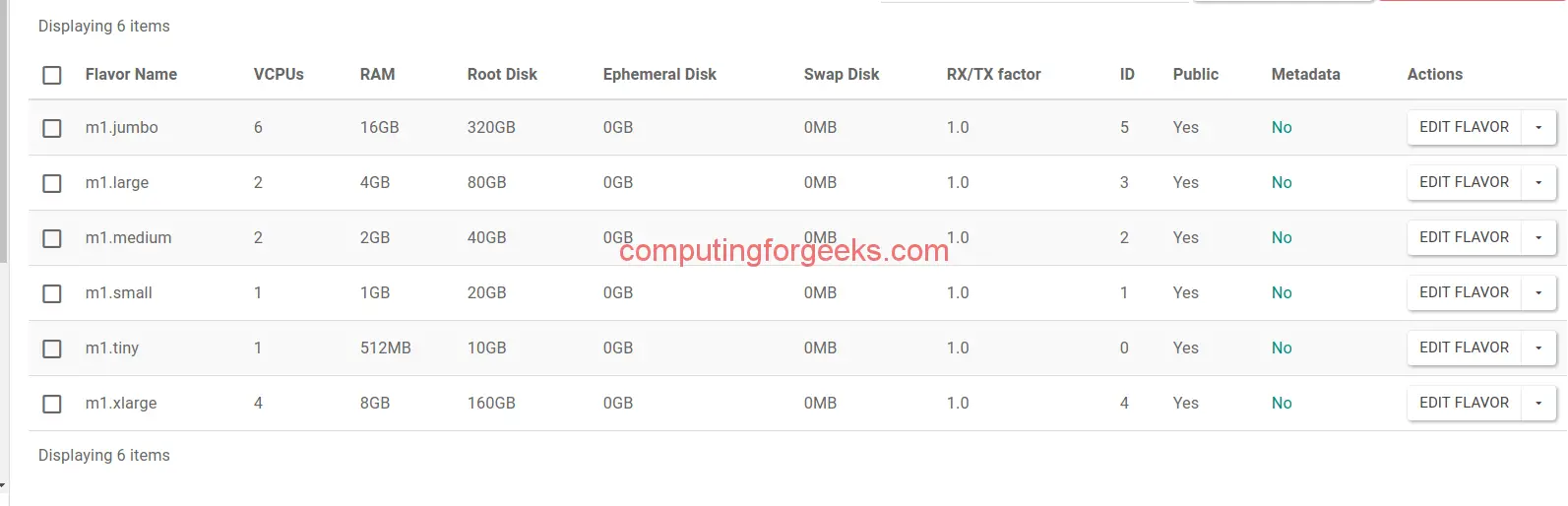
Log in to Horizon and navigate to Admin > Compute > Flavors to see all created flavors with their specifications.
Flavor Naming Conventions
Pick a naming scheme and stick with it across your cloud. Common patterns:
| Pattern | Example | Meaning |
|---|---|---|
| AWS-style | m5.xlarge | Memory-optimized, generation 5, extra large |
| Type.size | gp.large | General purpose, large |
| Resources | 2c-4g-40d | 2 vCPUs, 4GB RAM, 40GB disk |
| Descriptive | web-standard | Standard web server profile |
The type.size pattern (gp.small, c.xlarge, m.2xlarge, s.large) works well because it’s short, sortable, and immediately tells you the workload type.
Overcommit Ratios and Capacity Planning
OpenStack allows CPU and RAM overcommit on compute nodes. The defaults in nova.conf are:
# /etc/nova/nova.conf on compute nodes
[DEFAULT]
cpu_allocation_ratio = 16.0    # 16 vCPUs per physical core
ram_allocation_ratio = 1.5     # 1.5x physical RAM
disk_allocation_ratio = 1.0    # No disk overcommit
With a 16:1 CPU ratio, a 32-core compute node can host instances totaling 512 vCPUs. This works for low-CPU workloads but hurts performance for CPU-intensive tasks. For production databases and CI runners, set cpu_allocation_ratio = 1.0 and use compute-optimized flavors with hw:cpu_policy=dedicated.
Calculate how many instances of each flavor fit on a node:
# Check compute node capacity
openstack hypervisor show compute-01 -f value -c vcpus -c memory_mb -c local_gb
openstack hypervisor stats show
Quick Setup Script
Create all recommended flavors in one shot:
#!/bin/bash
# create-flavors.sh - Create standard OpenStack flavor set
source /root/admin-openrc.sh

echo "Creating general purpose flavors..."
openstack flavor create --id auto --ram 512   --vcpus 1 --disk 10  gp.tiny
openstack flavor create --id auto --ram 1024  --vcpus 1 --disk 20  gp.small
openstack flavor create --id auto --ram 2048  --vcpus 2 --disk 40  gp.medium
openstack flavor create --id auto --ram 4096  --vcpus 2 --disk 80  gp.large
openstack flavor create --id auto --ram 8192  --vcpus 4 --disk 160 gp.xlarge
openstack flavor create --id auto --ram 16384 --vcpus 8 --disk 320 gp.2xlarge

echo "Creating compute-optimized flavors..."
openstack flavor create --id auto --ram 2048  --vcpus 4  --disk 40  c.large
openstack flavor create --id auto --ram 4096  --vcpus 8  --disk 80  c.xlarge
openstack flavor create --id auto --ram 8192  --vcpus 16 --disk 160 c.2xlarge

echo "Creating memory-optimized flavors..."
openstack flavor create --id auto --ram 8192  --vcpus 2 --disk 80  m.large
openstack flavor create --id auto --ram 16384 --vcpus 4 --disk 160 m.xlarge
openstack flavor create --id auto --ram 32768 --vcpus 8 --disk 320 m.2xlarge

echo "Creating storage-optimized flavors..."
openstack flavor create --id auto --ram 4096 --vcpus 2 --disk 200 --ephemeral 500  s.large
openstack flavor create --id auto --ram 8192 --vcpus 4 --disk 200 --ephemeral 1000 s.xlarge

echo "Done. Total flavors:"
openstack flavor list -f value | wc -l
Troubleshooting
“No valid host was found” when launching with a flavor:
The flavor requires more resources than any compute node can provide. Check available capacity:
openstack hypervisor stats showEither reduce the flavor size or add compute nodes.
Flavor not visible to a project:
If you created a private flavor, you need to grant access:
openstack flavor set --project PROJECT_NAME FLAVOR_NAMECannot delete a flavor in use:
OpenStack allows deleting flavors even when instances use them. Running instances keep working, but no new instances can be created with the deleted flavor. To migrate, resize instances to a different flavor first:
openstack server resize --flavor gp.medium INSTANCE_NAMEExtra specs not taking effect:
Most extra specs require a matching scheduler filter in nova.conf. For aggregate_instance_extra_specs, enable the AggregateInstanceExtraSpecsFilter. For CPU pinning, the compute node needs vcpu_pin_set configured.
Conclusion
Start with the general purpose set for most deployments, then add compute/memory/storage optimized flavors as workload needs become clear. Use extra specs for hardware pinning and QoS when you need guaranteed performance. Next step: upload cloud images to Glance and launch your first instance.
Related guides:
