

Apache Spark 4.1 is the current stable line and it’s a noticeable jump from the 3.5.x series. Native support for Java 21, Scala 2.13 as the default binary, the stabilized Spark Connect interface, and meaningful performance work on the Catalyst optimizer are the headline items. For a fresh cluster on a modern Debian or Ubuntu host, that means fewer workarounds and cleaner systemd units.
This guide walks through a full standalone Spark cluster on Debian 13 (trixie) and also runs cleanly on Ubuntu 24.04 LTS. We install OpenJDK 21, download the latest Spark tarball with dynamic version detection, wire it up as a systemd service, put an Nginx reverse proxy with a Let’s Encrypt certificate in front of the master UI, and finish by running a real Spark job so the dashboard shows something to look at.
Tested April 2026 on Debian 13.1 (trixie), kernel 6.12.74, OpenJDK 21.0.10, Apache Spark 4.1.1, Scala 2.13.17
Prerequisites
- A Debian 13 or Ubuntu 24.04 LTS server with at least 2 vCPUs and 4 GB RAM
- A user with sudo privileges
- Outbound internet access to
dlcdn.apache.organd the distro repos - A domain name pointed at the server for the web UI SSL section (optional but recommended)
- Ports 7077 (master RPC), 8080 (master UI), 8081 (worker UI), 443 (Nginx) open between the nodes
Step 1: Install Java 21 and build essentials
Spark 4.1 supports Java 17 and Java 21. Debian 13 ships Java 21 in the default repositories so there’s no third-party repo needed:
sudo apt update
sudo apt install -y openjdk-21-jdk-headless curl wget
On Ubuntu 24.04 LTS the same command works because OpenJDK 21 is in the main pocket. Verify the install:
java -versionThe runtime banner confirms the JVM, build info, and server VM mode:
openjdk version "21.0.10" 2026-01-20
OpenJDK Runtime Environment (build 21.0.10+7-Debian-1deb13u1)
OpenJDK 64-Bit Server VM (build 21.0.10+7-Debian-1deb13u1, mixed mode, sharing)
Set JAVA_HOME so Spark scripts can find the JVM consistently:
echo 'export JAVA_HOME=/usr/lib/jvm/java-21-openjdk-amd64' | sudo tee /etc/profile.d/java.sh
source /etc/profile.d/java.sh
echo $JAVA_HOME
Step 2: Create a dedicated spark system user
Running Spark as a dedicated non-login user keeps ownership clean and plays well with systemd. The home directory doubles as SPARK_HOME:
sudo useradd -r -m -U -d /opt/spark -s /bin/bash spark
id spark
The new service account has its own UID/GID in the 900-999 system range:
uid=999(spark) gid=989(spark) groups=989(spark)Step 3: Download Spark with dynamic version detection
Rather than hardcoding a version, let the script resolve the latest stable Spark tarball from the Apache download mirror. This way the commands still work when a new release ships:
SPARK_VER=$(curl -sL https://dlcdn.apache.org/spark/ \
  | grep -oE 'spark-[0-9]+\.[0-9]+\.[0-9]+/' \
  | sort -V | tail -1 | tr -d /)
echo "Latest stable: $SPARK_VER"
On the day this guide was tested the detector resolved to:
Latest stable: spark-4.1.1Grab the Hadoop 3 bundle and verify the SHA-512 checksum against Apache’s published signature. Never trust a Spark tarball you haven’t verified:
cd /tmp
curl -sSLO "https://dlcdn.apache.org/spark/${SPARK_VER}/${SPARK_VER}-bin-hadoop3.tgz"
curl -sSLO "https://downloads.apache.org/spark/${SPARK_VER}/${SPARK_VER}-bin-hadoop3.tgz.sha512"
sha512sum -c ${SPARK_VER}-bin-hadoop3.tgz.sha512
The verification line should end with OK. Then extract the archive into /opt/spark (the spark user’s home directory) and hand over ownership:
sudo tar -xzf ${SPARK_VER}-bin-hadoop3.tgz -C /opt/
sudo cp -a /opt/${SPARK_VER}-bin-hadoop3/. /opt/spark/
sudo rm -rf /opt/${SPARK_VER}-bin-hadoop3
sudo chown -R spark:spark /opt/spark
Step 4: Set environment variables
Drop a profile snippet so spark-shell, spark-submit, and pyspark resolve from any user’s shell:
sudo tee /etc/profile.d/spark.sh <<'EOF'
export SPARK_HOME=/opt/spark
export PATH=$SPARK_HOME/bin:$SPARK_HOME/sbin:$PATH
export JAVA_HOME=/usr/lib/jvm/java-21-openjdk-amd64
EOF
sudo chmod 644 /etc/profile.d/spark.sh
source /etc/profile.d/spark.sh
Spark also reads its own spark-env.sh for daemon configuration. Copy the template and pin the master host and local IP (replace the address below with your own):
sudo -u spark cp /opt/spark/conf/spark-env.sh.template /opt/spark/conf/spark-env.sh
sudo -u spark tee -a /opt/spark/conf/spark-env.sh <<'EOF'
export JAVA_HOME=/usr/lib/jvm/java-21-openjdk-amd64
export SPARK_MASTER_HOST=10.0.1.50
export SPARK_LOCAL_IP=10.0.1.50
EOF
Step 5: Run Spark as a systemd service
The start-master.sh and start-worker.sh scripts fork the JVM so systemd needs Type=forking. Create two units, one for the master and one for the worker:
sudo vi /etc/systemd/system/spark-master.servicePaste this in:
[Unit]
Description=Apache Spark Master
After=network.target

[Service]
Type=forking
User=spark
Group=spark
Environment=JAVA_HOME=/usr/lib/jvm/java-21-openjdk-amd64
Environment=SPARK_HOME=/opt/spark
ExecStart=/opt/spark/sbin/start-master.sh
ExecStop=/opt/spark/sbin/stop-master.sh
Restart=on-failure

[Install]
WantedBy=multi-user.target
Create the worker unit the same way:
sudo vi /etc/systemd/system/spark-worker.servicePaste the worker unit below:
[Unit]
Description=Apache Spark Worker
After=network.target spark-master.service
Requires=spark-master.service

[Service]
Type=forking
User=spark
Group=spark
Environment=JAVA_HOME=/usr/lib/jvm/java-21-openjdk-amd64
Environment=SPARK_HOME=/opt/spark
ExecStart=/opt/spark/sbin/start-worker.sh spark://10.0.1.50:7077
ExecStop=/opt/spark/sbin/stop-worker.sh
Restart=on-failure

[Install]
WantedBy=multi-user.target
Reload systemd, then bring up master first and worker second:
sudo systemctl daemon-reload
sudo systemctl enable --now spark-master.service
sudo systemctl enable --now spark-worker.service
systemctl is-active spark-master spark-worker
Both services should report as active:
active
active
Spark listens on three ports. Confirm they are bound:
sudo ss -tlnp | grep -E '7077|8080|8081'All three ports are bound to the master IP and owned by the Java process:
LISTEN 0 4096 [::ffff:10.0.1.50]:7077 *:* users:(("java",pid=1743,fd=307))
LISTEN 0 1    [::ffff:10.0.1.50]:8081 *:* users:(("java",pid=1859,fd=309))
LISTEN 0 1    [::ffff:10.0.1.50]:8080 *:* users:(("java",pid=1743,fd=309))
Step 6: Reverse proxy the web UI with Nginx and Let’s Encrypt
The Spark master UI on port 8080 is plain HTTP and will happily report internal cluster state to anyone who can reach it. Put Nginx in front with a real certificate and restrict access to the proxy. Install both packages:
sudo apt install -y nginx certbot python3-certbot-nginxPoint a DNS A record at the server and obtain a certificate. The simplest path is the HTTP-01 challenge via the nginx plugin:
sudo certbot --nginx -d spark.example.com --agree-tos -m [email protected] --non-interactiveCertbot drops a working server block in /etc/nginx/sites-enabled/default. Replace its location / stanza with the Spark proxy config below. One gotcha: the Spark master’s embedded Jetty is strict about the Host header and returns HTTP 400 Bad HostPort if Nginx forwards the external name, so you must rewrite it to the internal IP and port.
sudo vi /etc/nginx/sites-available/spark.example.comPaste the full vhost below (replace the server name and upstream IP with yours):
server {
    listen 80;
    server_name spark.example.com;
    return 301 https://$host$request_uri;
}

server {
    listen 443 ssl;
    http2 on;
    server_name spark.example.com;

    ssl_certificate /etc/letsencrypt/live/spark.example.com/fullchain.pem;
    ssl_certificate_key /etc/letsencrypt/live/spark.example.com/privkey.pem;
    ssl_protocols TLSv1.2 TLSv1.3;
    ssl_ciphers HIGH:!aNULL:!MD5;

    location / {
        proxy_pass http://10.0.1.50:8080;
        proxy_set_header Host 10.0.1.50:8080;
        proxy_set_header X-Real-IP $remote_addr;
        proxy_set_header X-Forwarded-For $proxy_add_x_forwarded_for;
        proxy_set_header X-Forwarded-Proto $scheme;
        proxy_http_version 1.1;
    }
}
Enable the site, test the config, and reload:
sudo ln -sf /etc/nginx/sites-available/spark.example.com /etc/nginx/sites-enabled/
sudo rm -f /etc/nginx/sites-enabled/default
sudo nginx -t
sudo systemctl reload nginx
Certbot’s systemd timer takes care of renewals. Confirm it is armed:
sudo certbot renew --dry-runStep 7: Open the firewall
On Debian 13 and Ubuntu 24.04 the default firewall is ufw. Allow SSH, HTTPS, and the Spark cluster ports. Worker nodes only need 7077 to reach the master:
sudo ufw allow OpenSSH
sudo ufw allow 443/tcp
sudo ufw allow from 10.0.1.0/24 to any port 7077
sudo ufw allow from 10.0.1.0/24 to any port 8081
sudo ufw enable
sudo ufw status verbose
Step 8: Submit a real Spark job
The Spark Pi example is perfect for a smoke test. It submits to the standalone master, registers an application, schedules tasks across the worker’s cores, and returns a result. Adjust the jar path to match the version you installed:
sudo -u spark /opt/spark/bin/spark-submit \
  --master spark://10.0.1.50:7077 \
  --deploy-mode client \
  --class org.apache.spark.examples.SparkPi \
  /opt/spark/examples/jars/spark-examples_2.13-4.1.1.jar 20
After about two seconds of task scheduling, the last lines of the output should include:
26/04/11 00:30:27 INFO DAGScheduler: Job 0 finished: reduce at SparkPi.scala:38, took 1653.08111 ms
Pi is roughly 3.1422215711107855
26/04/11 00:30:27 INFO SparkContext: Successfully stopped SparkContext (Uptime: 4341 ms)
Every completed job is recorded on the master UI. Open https://spark.example.com/ in a browser and you’ll see the cluster layout with one alive worker and the SparkPi application in the Completed Applications table.
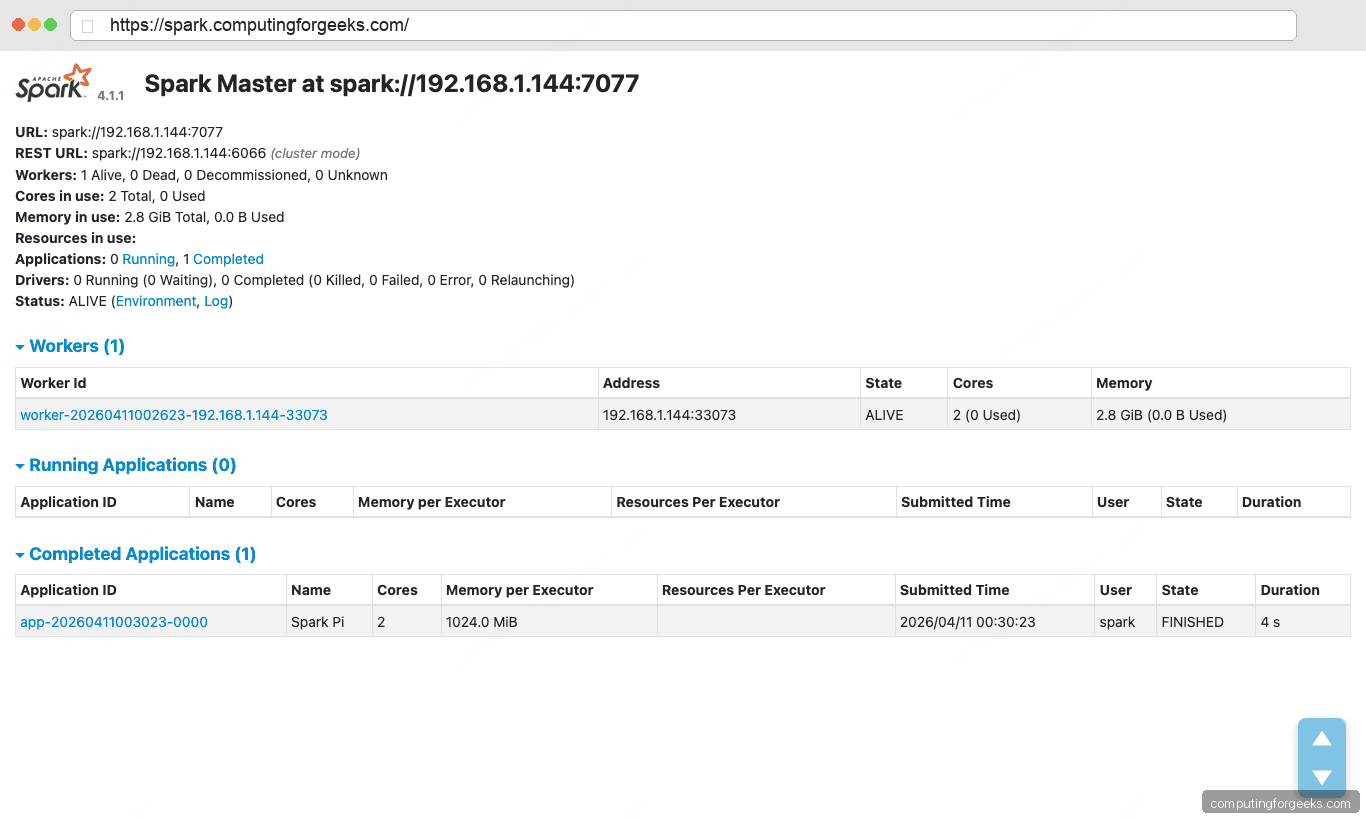
The HTTPS URL bar confirms the Nginx reverse proxy with the Let’s Encrypt certificate is in front, and the dashboard body shows the cluster state: one alive worker with two cores and 2.8 GiB of memory, plus the completed SparkPi application with status FINISHED and the duration it took to run.
Step 9: Launch the interactive Scala shell
The spark-shell command drops you into an interactive Scala REPL with a ready-to-use SparkSession bound to the cluster:
sudo -u spark /opt/spark/bin/spark-shell --master spark://10.0.1.50:7077The banner confirms the stack: Spark 4.1.1, Scala 2.13.17 on Java 21.0.10:
   /___/ .__/\_,_/_/ /_/\_\   version 4.1.1
Using Scala version 2.13.17 (OpenJDK 64-Bit Server VM, Java 21.0.10)
Spark context Web UI available at http://10.0.1.50:4040
Spark context available as 'sc' (master = spark://10.0.1.50:7077, app id = app-20260411003238-0001).
Spark session available as 'spark'.
A tiny sanity check that exercises the RDD API:
scala> sc.parallelize(1 to 100).sum
res0: Double = 5050.0
Exit with :quit. For a Python session use pyspark instead of spark-shell, with the same --master flag.
Troubleshooting
Error: “HTTP ERROR 400 reason: Bad HostPort”
This comes from the Spark master’s embedded Jetty when you proxy through Nginx without rewriting the Host header. Jetty expects the header to match the internal bind address and port exactly. Make sure your Nginx config has proxy_set_header Host <bind_ip>:8080; pointing at the Spark master’s real address, as shown in Step 6.
Error: “WARN Utils: Your hostname … resolves to a loopback address”
Spark emits this warning when /etc/hosts maps the hostname to 127.0.1.1. It’s harmless as long as you’ve set SPARK_LOCAL_IP and SPARK_MASTER_HOST in spark-env.sh, which step 4 does. If the warning bothers you, replace the 127.0.1.1 line in /etc/hosts with the server’s real IP.
Worker cannot register with master
Check that port 7077 is reachable from the worker node and that both sides use the same master URL (spark://<master_ip>:7077, not a hostname the worker can’t resolve). ss -tlnp | grep 7077 on the master confirms it’s bound to the right address.
Next steps
You now have a functional single-node Spark 4.1.1 cluster with a proper service layout, an SSL-protected web UI, and a verified job history. Natural follow-ups: add worker nodes by copying the systemd unit to more hosts and pointing them at the master, wire Spark up to a Hadoop-compatible object store, or pair it with a streaming source. Related reading on the site: Apache Hadoop and HBase on Ubuntu 24.04, Install Apache Kafka on Ubuntu 24.04, Install PostgreSQL 17 for a JDBC data source, our Nginx on Debian reference, and our picks for Kafka and Apache Spark books.
