

AWX (Ansible Web eXecutable) provides a web-based user interface, REST API, and task engine built on top of Ansible. It is the open source upstream project from which Red Hat Ansible Automation Platform is derived. This guide walks through installing Ansible AWX on Rocky Linux 10/9, RHEL 10/9, or AlmaLinux 10/9 using the AWX Operator deployed on a K3s Kubernetes cluster.
Prerequisites
Before starting, make sure you have the following ready:
- A server running Rocky Linux 10/9, RHEL 10/9, or AlmaLinux 10/9
- Minimum 8 GB RAM (RHEL 10 requires 8 GB minimum; RHEL 9 works with 4 GB)
- At least 2 vCPUs (4 vCPUs recommended)
- 30 GB free disk space
- Root or sudo access
- Ports: 6443/TCP (K8s API), 80/TCP and 443/TCP (AWX web), 30000-32767/TCP (NodePort range)
Step 1: Update System and Configure SELinux
Start by updating all packages on your server:
sudo dnf -y updatePut SELinux in permissive mode. K3s requires this for proper container networking:
sudo setenforce 0
sudo sed -i 's/^SELINUX=.*/SELINUX=permissive/g' /etc/selinux/config
Verify the change:
$ getenforce
Permissive
If a kernel update was included, reboot the server:
sudo rebootStep 2: Install K3s Kubernetes
AWX runs as a containerized application on Kubernetes. We use K3s, a lightweight Kubernetes distribution perfect for single-node AWX deployments.
Configure firewall rules for K3s before installation:
sudo firewall-cmd --permanent --add-port=6443/tcp
sudo firewall-cmd --permanent --add-port=80/tcp
sudo firewall-cmd --permanent --add-port=443/tcp
sudo firewall-cmd --permanent --add-port=30000-32767/tcp
sudo firewall-cmd --permanent --zone=trusted --add-source=10.42.0.0/16
sudo firewall-cmd --permanent --zone=trusted --add-source=10.43.0.0/16
sudo firewall-cmd --reload
Install K3s. On RHEL 10 / Rocky Linux 10, you must enable the nftables kube-proxy mode since the default iptables mode has known networking issues on RHEL 10’s nftables-only stack:
# RHEL 10 / Rocky Linux 10 / AlmaLinux 10
curl -sfL https://get.k3s.io | INSTALL_K3S_EXEC='--kube-proxy-arg=proxy-mode=nftables' sudo -E bash -

# RHEL 9 / Rocky Linux 9 / AlmaLinux 9
curl -sfL https://get.k3s.io | sudo bash -
Configure kubectl access for your user:
mkdir -p ~/.kube
sudo cp /etc/rancher/k3s/k3s.yaml ~/.kube/config
sudo chown $USER:$USER ~/.kube/config
export KUBECONFIG=~/.kube/config
echo 'export KUBECONFIG=~/.kube/config' >> ~/.bashrc
Verify K3s is running:
$ kubectl get nodes
NAME                STATUS   ROLES                  AGE   VERSION
rocky10.mylab.io   Ready    control-plane,master   60s   v1.34.5+k3s1
Confirm the K3s service status:
$ systemctl status k3s.service
● k3s.service - Lightweight Kubernetes
   Loaded: loaded (/etc/systemd/system/k3s.service; enabled; vendor preset: disabled)
   Active: active (running)
Step 3: Deploy AWX Operator on Kubernetes
The AWX Operator manages AWX instances on Kubernetes. It is installed using Kustomize, the native Kubernetes configuration management tool.
Create a project directory for the AWX deployment:
mkdir -p ~/awx-on-k3s
cd ~/awx-on-k3s
Check the latest AWX Operator release version from the AWX Operator releases page. Set it as a variable:
RELEASE_TAG=$(curl -s https://api.github.com/repos/ansible/awx-operator/releases/latest | grep tag_name | cut -d '"' -f 4)
echo "AWX Operator version: $RELEASE_TAG"
Create the Kustomize configuration file:
vi kustomization.yamlAdd the following content. Replace 2.19.1 with the version from the previous step if different:
apiVersion: kustomize.config.k8s.io/v1beta1
kind: Kustomization
resources:
  - github.com/ansible/awx-operator/config/default?ref=2.19.1

images:
  - name: quay.io/ansible/awx-operator
    newTag: 2.19.1
  - name: gcr.io/kubebuilder/kube-rbac-proxy
    newName: quay.io/brancz/kube-rbac-proxy
    newTag: v0.18.1

namespace: awx
The kube-rbac-proxy image override is required because the original gcr.io hosted image has been deprecated. The quay.io/brancz/kube-rbac-proxy is the maintained replacement.
Create the awx namespace and deploy the operator:
kubectl create namespace awx
kubectl apply -k .
Wait for the operator pod to become ready:
$ kubectl get pods -n awx
NAME                                               READY   STATUS    RESTARTS   AGE
awx-operator-controller-manager-77d6684799-n49t7   2/2     Running   0          60s
Step 4: Create AWX Instance
With the operator running, create the AWX custom resource that defines your AWX deployment.
Create the AWX instance manifest:
vi awx-instance.yamlAdd the following AWX custom resource definition:
---
apiVersion: awx.ansible.com/v1beta1
kind: AWX
metadata:
  name: awx
spec:
  service_type: nodeport
  nodeport_port: 30080
  projects_persistence: true
  projects_storage_access_mode: ReadWriteOnce
  projects_storage_size: 8Gi
Update kustomization.yaml to include the AWX instance resource:
vi kustomization.yamlAdd awx-instance.yaml to the resources list:
apiVersion: kustomize.config.k8s.io/v1beta1
kind: Kustomization
resources:
  - github.com/ansible/awx-operator/config/default?ref=2.19.1
  - awx-instance.yaml

images:
  - name: quay.io/ansible/awx-operator
    newTag: 2.19.1
  - name: gcr.io/kubebuilder/kube-rbac-proxy
    newName: quay.io/brancz/kube-rbac-proxy
    newTag: v0.18.1

namespace: awx
Apply the configuration to deploy AWX:
kubectl apply -k .Monitor the installation progress using the operator logs:
kubectl logs -f deployments/awx-operator-controller-manager -c awx-manager -n awxThe deployment takes 5-10 minutes depending on your internet speed (container images need to be pulled). Watch pod creation status in a separate terminal:
$ watch kubectl get pods -n awx
NAME                                               READY   STATUS      RESTARTS   AGE
awx-operator-controller-manager-77d6684799-n49t7   2/2     Running     0          10m
awx-postgres-15-0                                  1/1     Running     0          8m
awx-migration-24.6.1-9bnw6                         0/1     Completed   0          7m
awx-web-5f9896b7c7-j24fr                           3/3     Running     0          7m
awx-task-565c8b6cb5-9n7l7                          4/4     Running     0          7m
Verify all deployments are ready:
$ kubectl get deployments -n awx
NAME                              READY   UP-TO-DATE   AVAILABLE   AGE
awx-operator-controller-manager   1/1     1            1           10m
awx-task                          1/1     1            1           7m
awx-web                           1/1     1            1           7m
Check the Persistent Volume Claims created by AWX:
$ kubectl get pvc -n awx
NAME                         STATUS   VOLUME                                     CAPACITY   ACCESS MODES   STORAGECLASS   AGE
postgres-15-awx-postgres-15-0   Bound    pvc-xxxxx   8Gi        RWO            local-path     5m
awx-projects-claim              Bound    pvc-yyyyy   8Gi        RWO            local-path     4m
Checking AWX Container Logs
AWX runs multiple containers. View logs for each component:
# AWX web server logs
kubectl -n awx logs deploy/awx-web -c awx-web

# AWX task processor logs
kubectl -n awx logs deploy/awx-task -c awx-task

# Redis cache logs
kubectl -n awx logs deploy/awx-web -c redis

# PostgreSQL database logs
kubectl -n awx logs statefulset/awx-postgres-15 -c postgres
Access AWX Container Shell
For troubleshooting, access any container shell directly:
kubectl exec -ti deploy/awx-web -c awx-web -n awx -- /bin/bash
kubectl exec -ti deploy/awx-task -c awx-task -n awx -- /bin/bash
kubectl exec -ti statefulset/awx-postgres-15 -c postgres -n awx -- /bin/bash
Troubleshooting: PostgreSQL Permission Denied
If the PostgreSQL pod fails with mkdir: cannot create directory '/var/lib/postgresql/data': Permission denied, the local-path provisioner created the volume directory with restrictive permissions. Fix this by setting postgres_data_volume_init in the AWX spec:
vi awx-instance.yamlAdd the postgres_data_volume_init field:
---
apiVersion: awx.ansible.com/v1beta1
kind: AWX
metadata:
  name: awx
spec:
  service_type: nodeport
  nodeport_port: 30080
  projects_persistence: true
  projects_storage_access_mode: ReadWriteOnce
  projects_storage_size: 8Gi
  postgres_data_volume_init: true
Reapply the configuration:
kubectl apply -k .Step 5: Access AWX Web Interface
Get the NodePort assigned to the AWX service:
$ kubectl get service -n awx
NAME                                              TYPE        CLUSTER-IP      EXTERNAL-IP   PORT(S)        AGE
awx-operator-controller-manager-metrics-service   ClusterIP   10.43.95.23     <none>        8443/TCP       10m
awx-postgres-15                                   ClusterIP   None            <none>        5432/TCP       8m
awx-service                                       NodePort    10.43.137.183   <none>        80:30080/TCP   7m
Access AWX by opening your browser to:
http://192.168.1.10:30080Replace 192.168.1.10 with your server IP address. You should see the AWX login page.

The default login username is admin. Retrieve the password from the Kubernetes secret:
kubectl -n awx get secret awx-admin-password -o jsonpath="{.data.password}" | base64 --decode; echoLog in with admin and the decoded password. The AWX dashboard loads after successful authentication.

Configure Ingress for AWX
To access AWX using a domain name with SSL instead of the NodePort, set up an ingress controller. Check our guides on exposing AWX with Nginx Ingress or using Traefik Ingress.
Upgrading AWX
When a new AWX Operator version is released, update the RELEASE_TAG value in your kustomization.yaml and reapply with kubectl apply -k . For a detailed walkthrough, see our AWX upgrade guide.
Step 6: Configure AWX – Users, Credentials, and Projects
With AWX running, the next step is configuring it for managing your infrastructure. The key components are: Organizations, Users, Credentials, Inventories, Projects, and Job Templates.

Create Users and Teams
AWX ships with a default admin user. To create additional users, navigate to Users in the left menu and click the Add button. Fill in the user details and assign a role (Normal User, System Auditor, or System Administrator).

Click Save to create the user.

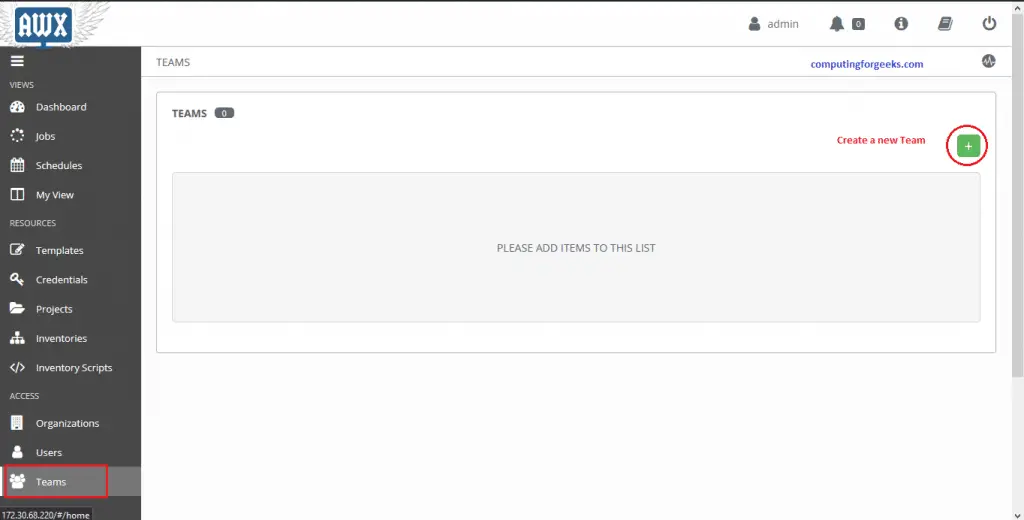
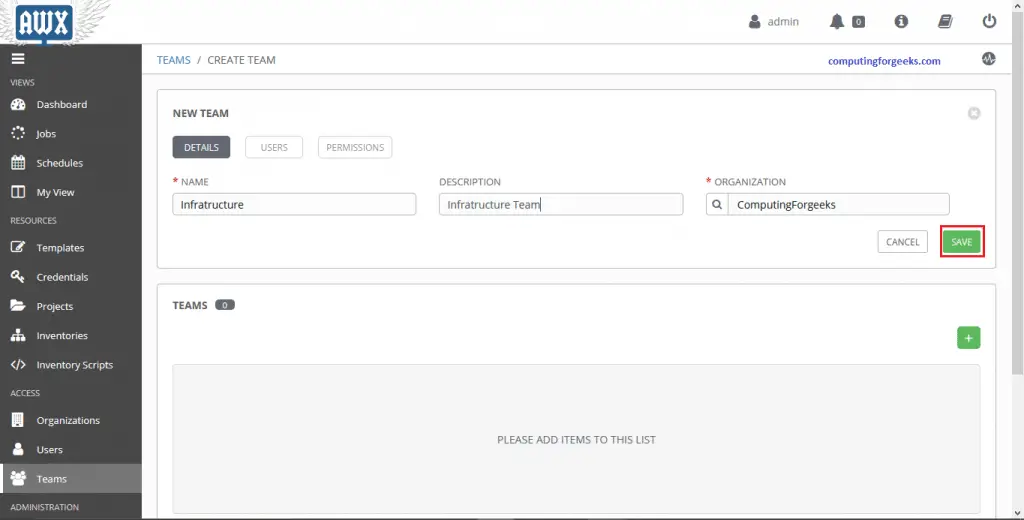
For Teams, click Teams in the left menu and create a new team. Teams group users together for role-based access control across projects and inventories.
Create an Organization
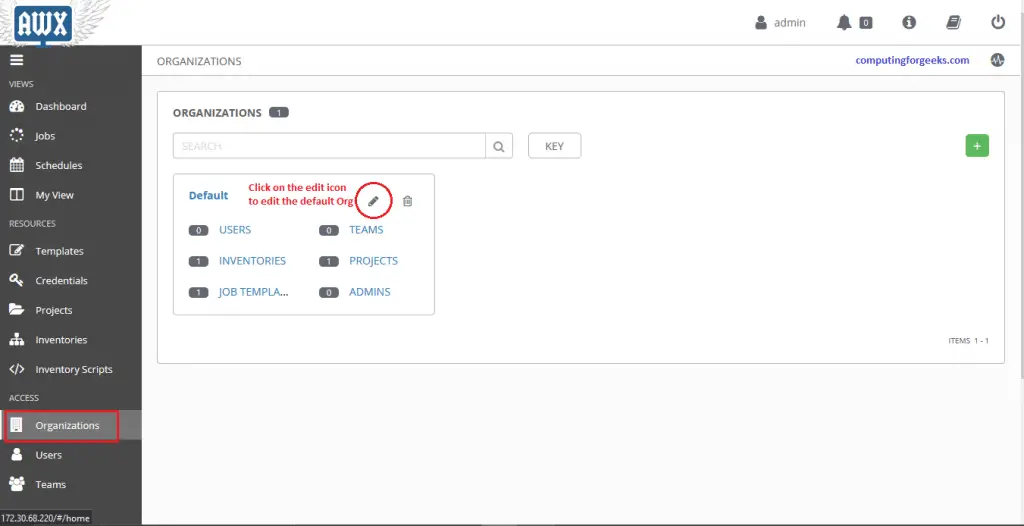
An Organization is the top-level container in AWX. It holds users, teams, projects, and inventories. A default organization is created automatically. Edit it or create a new one from Organizations in the left menu.
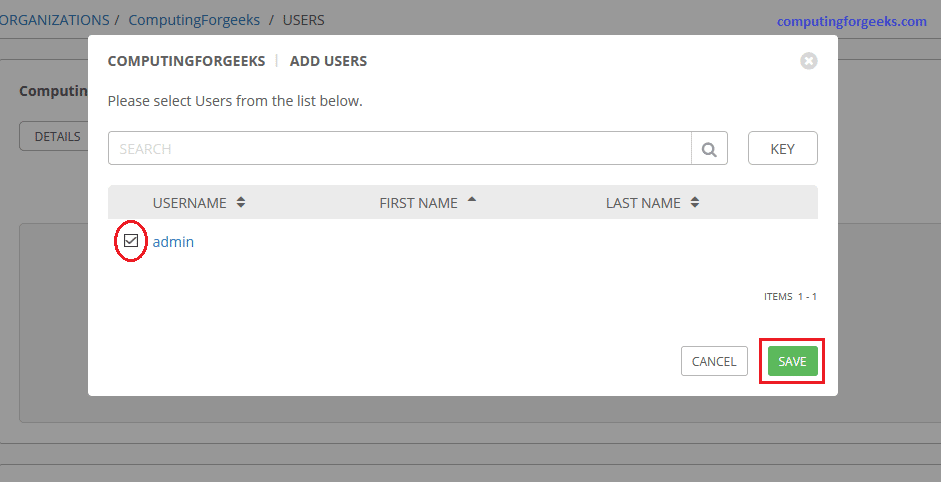
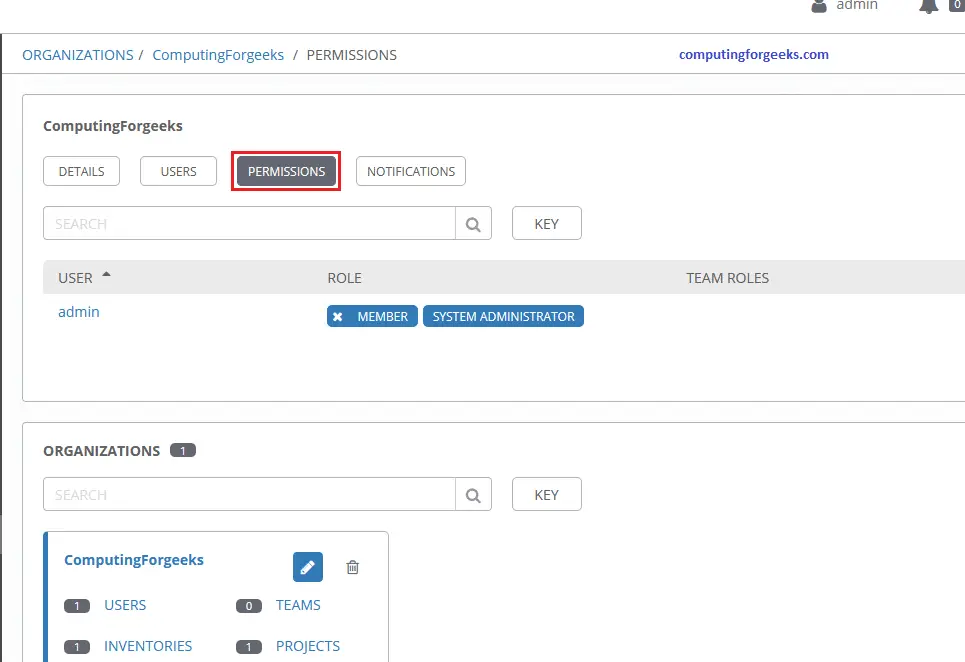
Click the organization name to edit it. Add users and set their permissions under the Users and Permissions tabs.


User roles within an organization control what actions they can perform. Assign roles under the Permissions tab:
Create Credentials
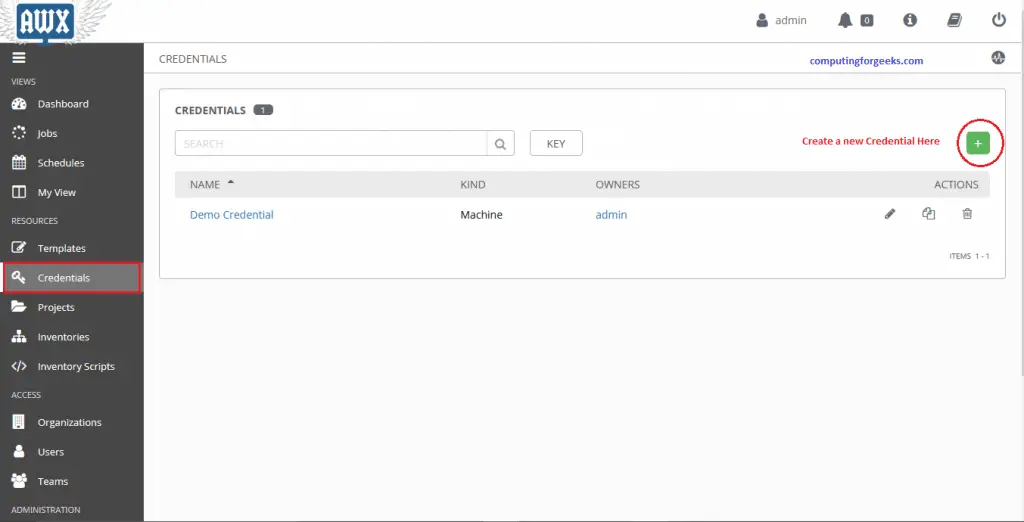
Credentials store authentication details that Ansible uses to connect to remote hosts. Navigate to Credentials in the left menu and click Add.
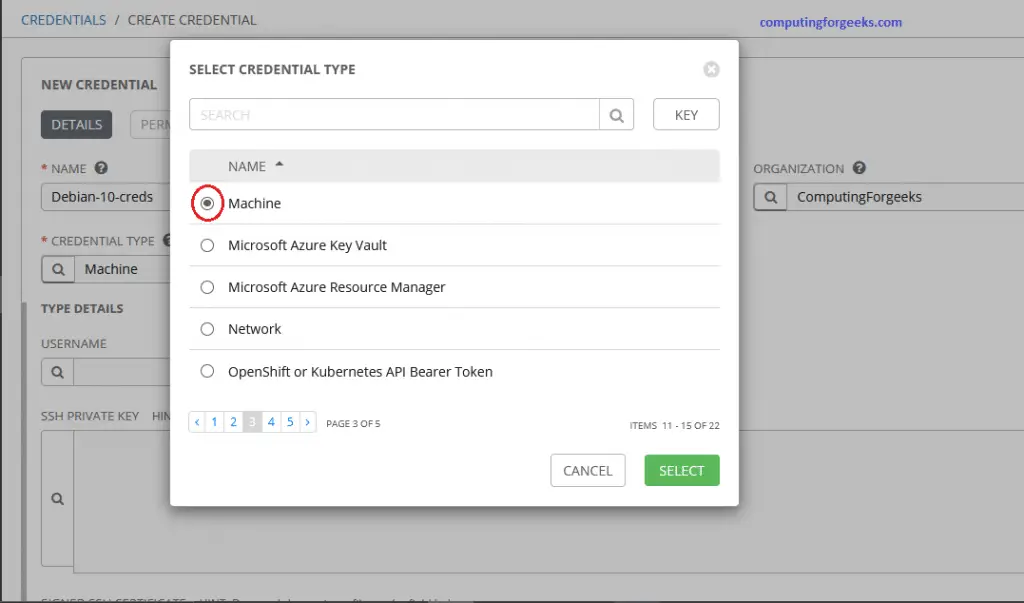
Set the credential type to Machine for SSH access to remote hosts. Enter the username, password or SSH private key, and configure privilege escalation (sudo) if needed.
Click Save to store the credential.

Create an Inventory
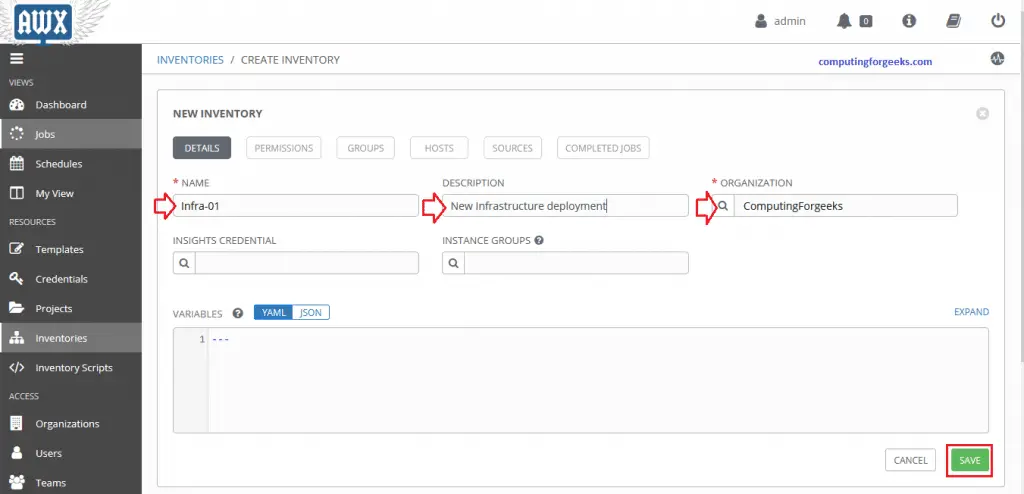
An Inventory is a collection of hosts that Ansible manages. Go to Inventories and click Add to create a new inventory.
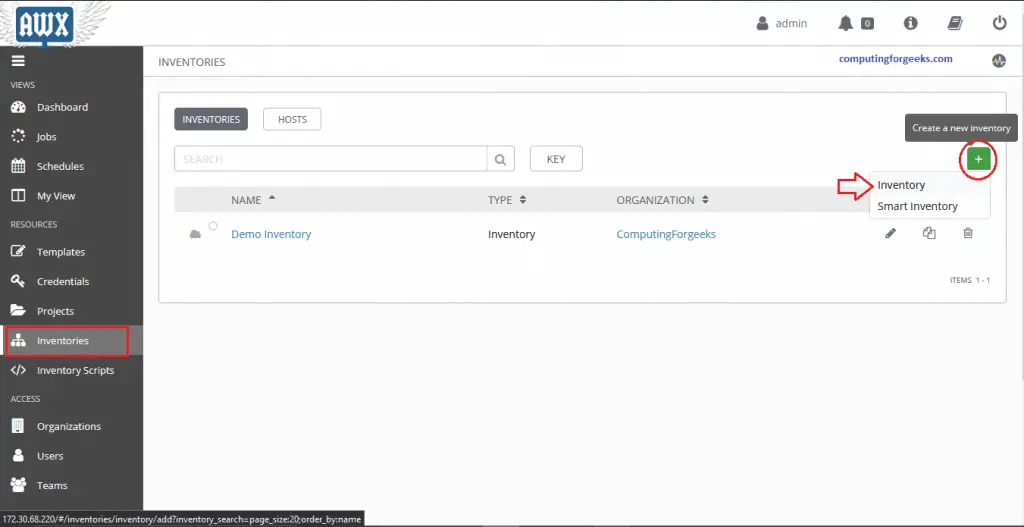
Enter a name, select the Organization, and click Save.
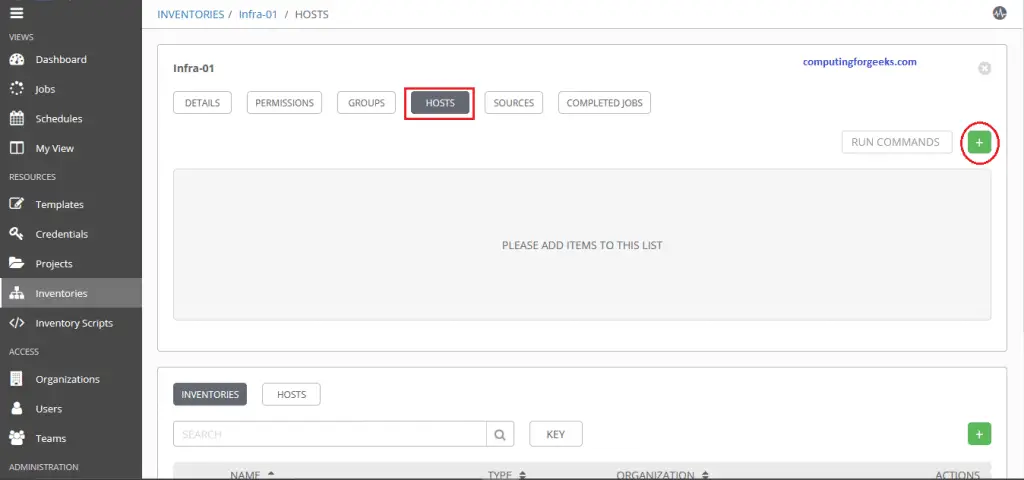
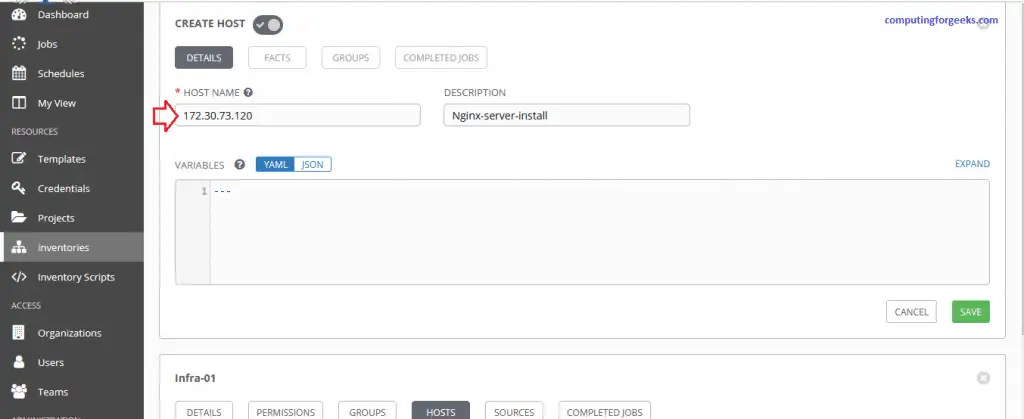
Switch to the Hosts tab and click Add to add hosts to this inventory. Enter the host IP or resolvable hostname.
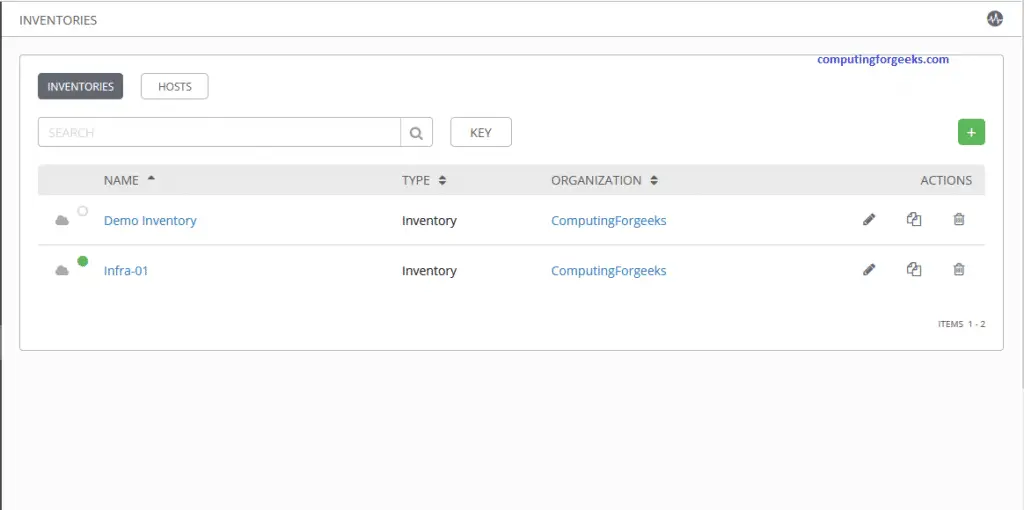
Inventories are organized into Groups and Hosts. A group represents a logical set of servers, for example “Web Servers”, “Database Servers”, or “Staging Environment”. Hosts belong to one or more groups within an inventory.
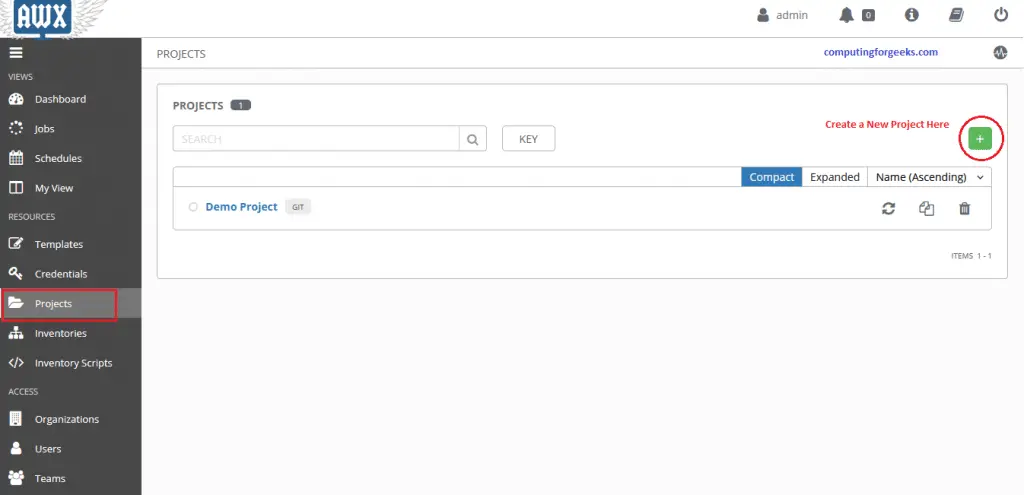
Set Up a Project
A Project in AWX is a collection of Ansible playbooks. Playbooks can be sourced from a Git repository, SVN, or stored locally on the server.
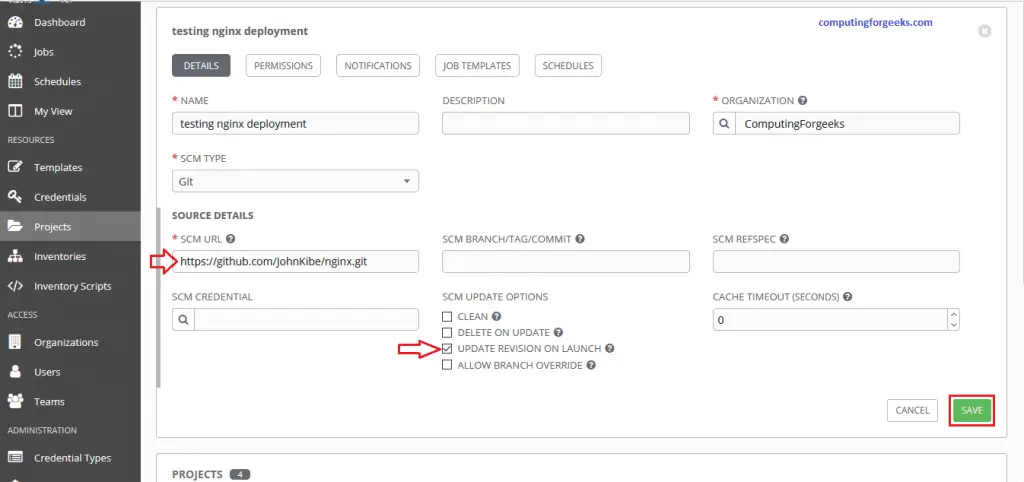
Navigate to Projects and click Add. Select your Organization, set the SCM type to Git, and enter your repository URL containing the playbooks.
Here is a sample Ansible playbook (nginx.yml) that installs Nginx on Debian-based hosts:
---
- hosts: all
  gather_facts: true
  become: true
  tasks:
    - name: Install nginx
      ansible.builtin.apt:
        name: nginx
        state: present
      when: ansible_os_family == "Debian"

    - name: Install nginx on RHEL
      ansible.builtin.dnf:
        name: nginx
        state: present
      when: ansible_os_family == "RedHat"

    - name: Start and enable nginx
      ansible.builtin.service:
        name: nginx
        state: started
        enabled: true
Create a Job Template and Run It
A Job Template ties together a Project (playbook), Inventory (target hosts), and Credential (authentication). Navigate to Templates, click Add, and select Job Template.
Select the Inventory, Project, Playbook, and Credential created in the previous steps.
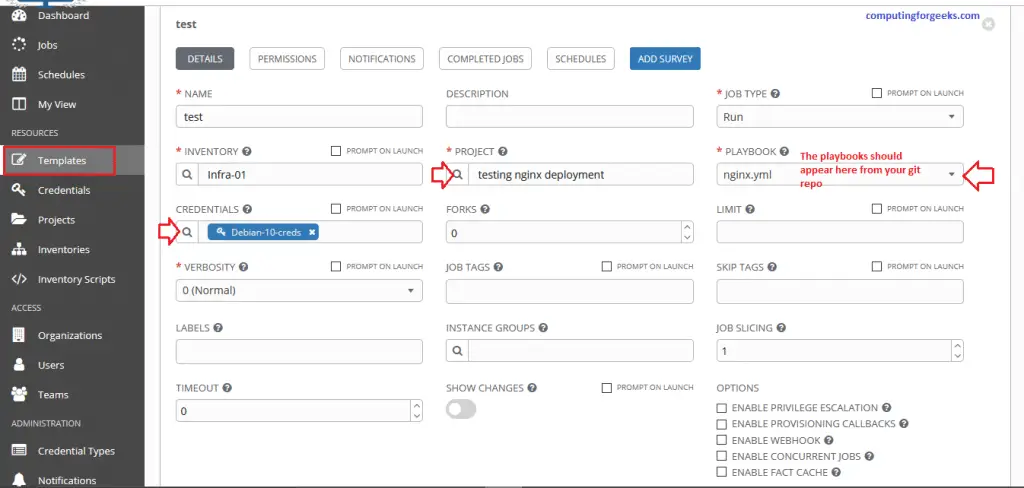
Click Save, then click the Launch button to execute the playbook. AWX redirects to the Jobs page where you can watch the execution output in real time.
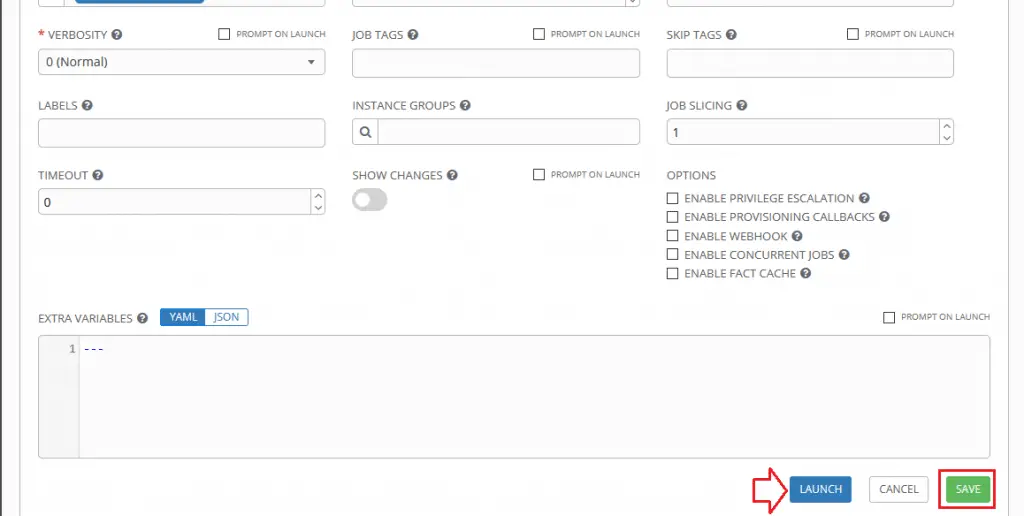

A successful run shows a green status indicator with the full Ansible output on the right side.
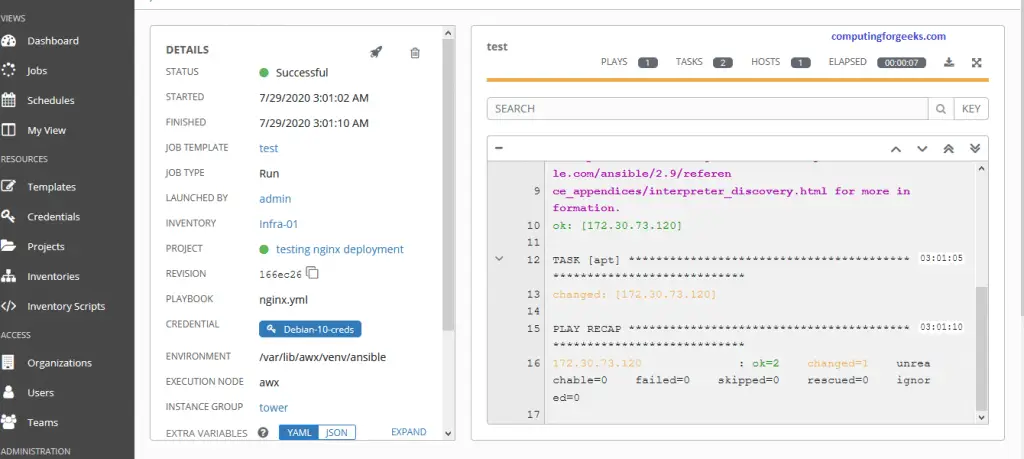
Uninstalling AWX Operator
To remove AWX and the operator completely from your cluster:
# Delete the AWX instance first
kubectl delete awx awx -n awx

# Remove the operator
kubectl delete -k .

# Delete the namespace
kubectl delete namespace awx
Conclusion
AWX is now installed and running on your Rocky Linux 10/9 server with a K3s Kubernetes backend. You have a fully functional web interface for managing Ansible playbooks, inventories, credentials, and job scheduling across your infrastructure.
For production deployments, consider enabling SSL through an ingress controller, setting up regular PostgreSQL backups, and configuring LDAP or SAML authentication for centralized user management.
Related guides:

The line to install powertools has changed:
sudo dnf config-manager –set-enabled PowerTools
Error: No matching repo to modify: PowerTools.
This works:
sudo dnf config-manager –set-enabled powertools
Thanks for the comment this has been corrected.
observations with my effort:
neither ‘dnf config-manager –set-enabled …’ worked, no repo of either name found
no ~/awx/installer/ folder found
invetory file is: ~/awx/tools/docker-compose/inventory, is this correct?
no install.yml found under ~/awx/, different location?
so, did I miss a step?
I can build everything out following your steps – pods are created, everything bound – but when I try to get to the AWX login screen I get the following page in the browser:
AWX is currently upgrading.
This page will refresh when complete.
I’ve attempted on both Rocky 8 and CentOS 8 with the same result. Tried rebooting, disabling SELinux, and opening http/80 with firewall-cmd. No change.
Any suggestions?
What are the resources assigned to the VM?
awx-75698588d6 Remains Pending
# kubectl get po
NAME READY STATUS RESTARTS AGE
awx-75698588d6-8c87s 0/4 Pending 0 33m
awx-operator-545497f7d5-svmdj 1/1 Running 1 37m
awx-postgres-0 1/1 Running 1 33m
Describe the pods and check logs to get more info on why its status is pending.
My bad Josphat. I installed it on a system with 2 cores. Upped it to 4 and everything’s good. Thanks.
Thanks for the detailed post.
I am stuck at this point after applied the deployment and the PVCs. Pods are pending due to “Normal FailedBinding 7s (x24 over 5m28s) persistentvolume-controller no persistent volumes available for this claim and no storage class is set”
kubectl get pods -l “app.kubernetes.io/managed-by=awx-operator” -w
NAME READY STATUS RESTARTS AGE
awx-75698588d6-jsmg6 0/4 Pending 0 9m11s
awx-postgres-0 0/1 Pending 0 9m22s
Any suggestions?
Postgres keeps crashing. I keep getting this:
# kubectl get pod
NAME READY STATUS RESTARTS AGE
awx-operator-545497f7d5-s4s7m 1/1 Running 0 2m45s
awx-75698588d6-26dx8 0/4 ContainerCreating 0 11s
awx-postgres-0 0/1 CrashLoopBackOff 1 20s
When you describe pod and check logs is there more info on why it is crashing?
# kubectl logs -f pods/awx-postgres-0
mkdir: cannot create directory ‘/var/lib/postgresql/data’: Permission denied
You have selinux on?
Events:
Type Reason Age From Message
—- —— —- —- ——-
Normal Scheduled 2m54s default-scheduler Successfully assigned default/awx-postgres-0 to phltans0001
Normal Pulling 2m54s kubelet Pulling image “postgres:12”
Normal Pulled 2m50s kubelet Successfully pulled image “postgres:12” in 4.247522726s
Normal Pulled 87s (x4 over 2m49s) kubelet Container image “postgres:12” already present on machine
Normal Created 87s (x5 over 2m49s) kubelet Created container postgres
Normal Started 87s (x5 over 2m49s) kubelet Started container postgres
Warning BackOff 72s (x9 over 2m48s) kubelet Back-off restarting failed container
I follow your steps, but i get this at the end:
[root@localhost ~]# kubectl get pods
NAME READY STATUS RESTARTS AGE
awx-operator-545497f7d5-fdwmz 1/1 Running 0 4m2s
awx-75698588d6-d9xw6 0/4 ContainerCreating 0 82s
awx-postgres-0 0/1 CrashLoopBackOff 3 89s
Is there any specific error message from logs/events?
Sorry, I’m Kubernet agnostic. I followed the instructions within a virtual machine and everything seemed to go well. But now I cannot open the webgui. All i see are internal IP’s and I have no idea how to make it available to the world.
Ay hints, what am I overlooking
Paul
Hello John
First of all good paper with usefull details
When I finished the install and try to login via https://myip.example.com I got :
“404 page not found”
When I try the NodePort I got blank page :
[root@vmtowerlux ~]# kubectl get service -n awx
NAME TYPE CLUSTER-IP EXTERNAL-IP PORT(S) AGE
awx-postgres ClusterIP None 5432/TCP 23h
awx-service NodePort 10.43.242.21 80:30154/TCP 23h
http://myip.example.com:30154 -> blank page
Thanks for your help
Hi John
First of all good paper
Hi
Installation completed successfully but I am not able to login to web interface
When I try : https://myip.example.com -> “404 page not found”
When I try : http://myip.example.com:30154 -> blank page
[root@vmtowerlux ~]# kubectl get svc -n awx
NAME TYPE CLUSTER-IP EXTERNAL-IP PORT(S) AGE
awx-postgres ClusterIP None 5432/TCP 23h
awx-service NodePort 10.43.242.21 80:30154/TCP 23h
Thanks for your help
Hi,
Is myip.example.com an ip address of one of the nodes?
Hi Josphat
yes it is @ip of my vm where I installed the solution awx+kubernetes
Thanks for your support
@birb I had the same thing, I fixed it by manually creating the webdir (mkdir -p /var/lib/awx/public/static/) and a reboot!
root@rocky8 ~]# kubectl get pods -l “app.kubernetes.io/managed-by=awx-operator” -n awx
NAME READY STATUS RESTARTS AGE
awx-548ccb647c-cdd69 0/4 Pending 0 7m47s
awx-postgres-0 1/1 Running 0 7m39s
there are no logs for each of the awx parts but I see this event in /var/log/messages
Aug 15 12:29:39 rocky8 k3s[5916]: I0815 12:29:39.790467 5916 event.go:291] “Event occurred” object=”awx/public-static-data-pvc” kind=”PersistentVolumeClaim” apiVersion=”v1″ type=”Normal” reason=”WaitForPodScheduled” message=”waiting for pod awx-548ccb647c-cdd69 to be scheduled”
Thanks for this great write up.
I found out that all the issues I had are related to resources; ie cpu, memory and storage.
I ended up allocating 8 GB ram, 5 vcpus and 25 GB storage.
Did everyone have the same issue ? maybe these should be included in the write up.
How can I reduce cpu and memory resources. I have run AWX 17 on docker with a lot less than these numbers, exactly 4 GB, 2 vcpu.
You can specify `postgres_resource_requirements`, `web_resource_requirements`, `task_resource_requirements` and `ee_resource_requirements` to redure `requests` value.
Kubernetes will not schedule Pods unless the node has more resources than `requests` available.
see:
https://github.com/ansible/awx-operator#managed-postgresql-service
https://github.com/ansible/awx-operator#containers-resource-requirements
AWX on RockyLinux 8.4 does not work. Cannot access WebGUI
Seems postgres database is unreachable
[root@awx02 ~]# ip a show ens192
2: ens192: mtu 1500 qdisc mq state UP group default qlen 1000
link/ether 00:50:56:a7:0a:b0 brd ff:ff:ff:ff:ff:ff
inet 172.20.152.5/24 brd 172.20.152.255 scope global noprefixroute ens192
valid_lft forever preferred_lft forever
inet6 fe80::250:56ff:fea7:ab0/64 scope link
valid_lft forever preferred_lft forever
[root@awx02 ~]# kubectl get pods -n awx
NAME READY STATUS RESTARTS AGE
awx-postgres-0 1/1 Running 0 76m
awx-548ccb647c-qv4bx 4/4 Running 10 77m
[root@awx02 ~]# kubectl get service -n awx
NAME TYPE CLUSTER-IP EXTERNAL-IP PORT(S) AGE
awx-postgres ClusterIP None 5432/TCP 76m
awx-service NodePort 10.43.233.188 80:31364/TCP 77m
[root@ansi ~]# ping -c 3 172.20.152.5
PING 172.20.152.5 (172.20.152.5) 56(84) bytes of data.
64 bytes from 172.20.152.5: icmp_seq=1 ttl=64 time=0.459 ms
64 bytes from 172.20.152.5: icmp_seq=2 ttl=64 time=1.39 ms
64 bytes from 172.20.152.5: icmp_seq=3 ttl=64 time=0.709 ms
— 172.20.152.5 ping statistics —
3 packets transmitted, 3 received, 0% packet loss, time 22ms
rtt min/avg/max/mdev = 0.459/0.852/1.390/0.394 ms
[root@ansi ~]# curl http://172.20.152.5:31364
curl: (7) Failed to connect to 172.20.152.5 port 31364: Connection refused
[root@ansi ~]# curl http://172.20.152.5
404 page not found
[root@awx02 ~]# kubectl -n awx logs awx-548ccb647c-qv4bx -c awx-web
[wait-for-migrations] Waiting for database migrations…
[wait-for-migrations] Attempt 1 of 30
[wait-for-migrations] Waiting 0.5 seconds before next attempt
[wait-for-migrations] Attempt 2 of 30
[wait-for-migrations] Waiting 1 seconds before next attempt
[wait-for-migrations] Attempt 3 of 30
[wait-for-migrations] Waiting 2 seconds before next attempt
[wait-for-migrations] Attempt 4 of 30
[wait-for-migrations] Waiting 4 seconds before next attempt
[wait-for-migrations] Attempt 5 of 30
[wait-for-migrations] Waiting 8 seconds before next attempt
[wait-for-migrations] Attempt 6 of 30
[wait-for-migrations] Waiting 16 seconds before next attempt
[wait-for-migrations] Attempt 7 of 30
[wait-for-migrations] Waiting 30 seconds before next attempt
[wait-for-migrations] Attempt 8 of 30
[wait-for-migrations] Waiting 30 seconds before next attempt
[wait-for-migrations] Attempt 9 of 30
[wait-for-migrations] Waiting 30 seconds before next attempt
[wait-for-migrations] Attempt 10 of 30
[wait-for-migrations] Waiting 30 seconds before next attempt
[wait-for-migrations] Attempt 11 of 30
[wait-for-migrations] Waiting 30 seconds before next attempt
[wait-for-migrations] Attempt 12 of 30
[wait-for-migrations] Waiting 30 seconds before next attempt
[wait-for-migrations] Attempt 13 of 30
[wait-for-migrations] Waiting 30 seconds before next attempt
[wait-for-migrations] Attempt 14 of 30
[wait-for-migrations] Waiting 30 seconds before next attempt
[wait-for-migrations] Attempt 15 of 30
[wait-for-migrations] Waiting 30 seconds before next attempt
[wait-for-migrations] Attempt 16 of 30
[wait-for-migrations] Waiting 30 seconds before next attempt
[wait-for-migrations] Attempt 17 of 30
[wait-for-migrations] Waiting 30 seconds before next attempt
[wait-for-migrations] Attempt 18 of 30
[wait-for-migrations] Waiting 30 seconds before next attempt
[wait-for-migrations] Attempt 19 of 30
[wait-for-migrations] Waiting 30 seconds before next attempt
[wait-for-migrations] Attempt 20 of 30
[wait-for-migrations] Waiting 30 seconds before next attempt
[wait-for-migrations] Attempt 21 of 30
[wait-for-migrations] Waiting 30 seconds before next attempt
[wait-for-migrations] Attempt 22 of 30
[wait-for-migrations] Waiting 30 seconds before next attempt
[wait-for-migrations] Attempt 23 of 30
[wait-for-migrations] Waiting 30 seconds before next attempt
[wait-for-migrations] Attempt 24 of 30
[wait-for-migrations] Waiting 30 seconds before next attempt
[wait-for-migrations] Attempt 25 of 30
[wait-for-migrations] Waiting 30 seconds before next attempt
[wait-for-migrations] Attempt 26 of 30
[wait-for-migrations] Waiting 30 seconds before next attempt
[wait-for-migrations] Attempt 27 of 30
[wait-for-migrations] Waiting 30 seconds before next attempt
[wait-for-migrations] Attempt 28 of 30
[wait-for-migrations] Waiting 30 seconds before next attempt
[wait-for-migrations] Attempt 29 of 30
[wait-for-migrations] Waiting 30 seconds before next attempt
[wait-for-migrations] Attempt 30 of 30
[root@awx02 ~]# kubectl -n awx logs awx-548ccb647c-qv4bx -c awx-web
[wait-for-migrations] Waiting for database migrations…
[wait-for-migrations] Attempt 1 of 30
[root@awx02 ~]# kubectl -n awx -c awx-web exec –stdin –tty awx-548ccb647c-qv4bx — /bin/bash
bash-4.4$ awx-manage
Traceback (most recent call last):
File “/var/lib/awx/venv/awx/lib64/python3.8/site-packages/django/db/backends/base/base.py”, line 217, in ensure_connection
self.connect()
File “/var/lib/awx/venv/awx/lib64/python3.8/site-packages/django/db/backends/base/base.py”, line 195, in connect
self.connection = self.get_new_connection(conn_params)
File “/var/lib/awx/venv/awx/lib64/python3.8/site-packages/django/db/backends/postgresql/base.py”, line 178, in get_new_connection
connection = Database.connect(**conn_params)
File “/var/lib/awx/venv/awx/lib64/python3.8/site-packages/psycopg2/__init__.py”, line 126, in connect
conn = _connect(dsn, connection_factory=connection_factory, **kwasync)
psycopg2.OperationalError: could not connect to server: No route to host
Is the server running on host “awx-postgres” (10.42.0.16) and accepting
TCP/IP connections on port 5432?
The above exception was the direct cause of the following exception:
Traceback (most recent call last):
File “/usr/bin/awx-manage”, line 8, in
sys.exit(manage())
File “/var/lib/awx/venv/awx/lib64/python3.8/site-packages/awx/__init__.py”, line 155, in manage
if (connection.pg_version // 10000) < 12:
File "/var/lib/awx/venv/awx/lib64/python3.8/site-packages/django/db/__init__.py", line 28, in __getattr__
return getattr(connections[DEFAULT_DB_ALIAS], item)
File "/var/lib/awx/venv/awx/lib64/python3.8/site-packages/django/utils/functional.py", line 80, in __get__
res = instance.__dict__[self.name] = self.func(instance)
File "/var/lib/awx/venv/awx/lib64/python3.8/site-packages/django/db/backends/postgresql/base.py", line 282, in pg_version
with self.temporary_connection():
File "/usr/lib64/python3.8/contextlib.py", line 113, in __enter__
return next(self.gen)
File "/var/lib/awx/venv/awx/lib64/python3.8/site-packages/django/db/backends/base/base.py", line 593, in temporary_connection
with self.cursor() as cursor:
File "/var/lib/awx/venv/awx/lib64/python3.8/site-packages/django/db/backends/base/base.py", line 256, in cursor
return self._cursor()
File "/var/lib/awx/venv/awx/lib64/python3.8/site-packages/django/db/backends/base/base.py", line 233, in _cursor
self.ensure_connection()
File "/var/lib/awx/venv/awx/lib64/python3.8/site-packages/django/db/backends/base/base.py", line 217, in ensure_connection
self.connect()
File "/var/lib/awx/venv/awx/lib64/python3.8/site-packages/django/db/utils.py", line 89, in __exit__
raise dj_exc_value.with_traceback(traceback) from exc_value
File "/var/lib/awx/venv/awx/lib64/python3.8/site-packages/django/db/backends/base/base.py", line 217, in ensure_connection
self.connect()
File "/var/lib/awx/venv/awx/lib64/python3.8/site-packages/django/db/backends/base/base.py", line 195, in connect
self.connection = self.get_new_connection(conn_params)
File "/var/lib/awx/venv/awx/lib64/python3.8/site-packages/django/db/backends/postgresql/base.py", line 178, in get_new_connection
connection = Database.connect(**conn_params)
File "/var/lib/awx/venv/awx/lib64/python3.8/site-packages/psycopg2/__init__.py", line 126, in connect
conn = _connect(dsn, connection_factory=connection_factory, **kwasync)
django.db.utils.OperationalError: could not connect to server: No route to host
Is the server running on host "awx-postgres" (10.42.0.16) and accepting
TCP/IP connections on port 5432?
bash-4.4$ ping 10.42.0.16 -c3
PING 10.42.0.16 (10.42.0.16) 56(84) bytes of data.
64 bytes from 10.42.0.16: icmp_seq=1 ttl=64 time=0.263 ms
64 bytes from 10.42.0.16: icmp_seq=2 ttl=64 time=0.206 ms
64 bytes from 10.42.0.16: icmp_seq=3 ttl=64 time=0.141 ms
— 10.42.0.16 ping statistics —
3 packets transmitted, 3 received, 0% packet loss, time 2032ms
rtt min/avg/max/mdev = 0.141/0.203/0.263/0.051 ms
bash-4.4$ cat < /dev/tcp/10.42.0.16/5432
bash: connect: No route to host
bash: /dev/tcp/10.42.0.16/5432: No route to host
bash-4.4$
Any ideas how to fix it?
And postgres logs:
[root@awx02 ~]# kubectl -n awx logs awx-postgres-0
The files belonging to this database system will be owned by user “postgres”.
This user must also own the server process.
The database cluster will be initialized with locale “en_US.utf8”.
The default database encoding has accordingly been set to “UTF8”.
The default text search configuration will be set to “english”.
Data page checksums are disabled.
fixing permissions on existing directory /var/lib/postgresql/data/pgdata … ok
creating subdirectories … ok
selecting dynamic shared memory implementation … posix
selecting default max_connections … 100
selecting default shared_buffers … 128MB
selecting default time zone … Etc/UTC
creating configuration files … ok
running bootstrap script … ok
performing post-bootstrap initialization … ok
syncing data to disk … ok
Success. You can now start the database server using:
pg_ctl -D /var/lib/postgresql/data/pgdata -l logfile start
initdb: warning: enabling “trust” authentication for local connections
You can change this by editing pg_hba.conf or using the option -A, or
–auth-local and –auth-host, the next time you run initdb.
waiting for server to start….2021-08-17 09:31:28.012 UTC [48] LOG: starting PostgreSQL 12.8 (Debian 12.8-1.pgdg100+1) on x86_64-pc-linux-gnu, compiled by gcc (Debian 8.3.0-6) 8.3.0, 64-bit
2021-08-17 09:31:28.035 UTC [48] LOG: listening on Unix socket “/var/run/postgresql/.s.PGSQL.5432”
2021-08-17 09:31:28.118 UTC [49] LOG: database system was shut down at 2021-08-17 09:31:26 UTC
2021-08-17 09:31:28.138 UTC [48] LOG: database system is ready to accept connections
done
server started
CREATE DATABASE
/usr/local/bin/docker-entrypoint.sh: ignoring /docker-entrypoint-initdb.d/*
2021-08-17 09:31:29.049 UTC [48] LOG: received fast shutdown request
waiting for server to shut down….2021-08-17 09:31:29.141 UTC [48] LOG: aborting any active transactions
2021-08-17 09:31:29.143 UTC [48] LOG: background worker “logical replication launcher” (PID 55) exited with exit code 1
2021-08-17 09:31:29.144 UTC [50] LOG: shutting down
2021-08-17 09:31:29.297 UTC [48] LOG: database system is shut down
done
server stopped
PostgreSQL init process complete; ready for start up.
2021-08-17 09:31:29.422 UTC [1] LOG: starting PostgreSQL 12.8 (Debian 12.8-1.pgdg100+1) on x86_64-pc-linux-gnu, compiled by gcc (Debian 8.3.0-6) 8.3.0, 64-bit
2021-08-17 09:31:29.422 UTC [1] LOG: listening on IPv4 address “0.0.0.0”, port 5432
2021-08-17 09:31:29.423 UTC [1] LOG: listening on IPv6 address “::”, port 5432
2021-08-17 09:31:29.515 UTC [1] LOG: listening on Unix socket “/var/run/postgresql/.s.PGSQL.5432”
2021-08-17 09:31:29.722 UTC [76] LOG: database system was shut down at 2021-08-17 09:31:29 UTC
2021-08-17 09:31:29.833 UTC [1] LOG: database system is ready to accept connections
I installed it on a VM running Rocky Linux 8.4 and it is working.
Make sure all resources are adequate: my installation would not work until I had 5vcpus, 8 GB ram, and 25GB disk space.
Make sure you follow the instructions and you will get there.
reboot vm
Hey @Josphat Mutai
Its very nice writeup i have ever read for awx with k3s.
Can you pls confirm whether these same steps will work on centos7 ?
Yes it should work on CentOS 7.
Thank you its working..meanwhile i have noticed one big difference between the UI what you have shared in this blog and what is installed in my local.
In my local i am seeing a UI with very less features like inventory scripts. scheduling job template feature is missing and its in dark mode.
And the UI which you have shown is in light mode and it has inventory scripts and even the logo is different with wings.
can you please tell me what i am doing wrong and how can i get the same UI which you have shown?
Ooh it could be.. Some screenshots were not updated. We’ll work on them soon.
oh..in that case what i need to do to get the scheduling template feature! can you please help/guide me to get the version of awx which has template scheduling feature?
@Khain, did you receive a solution to your issue? I am having the same issue too.
Disable firewalld and try again. For k3s 1.19 or later, firewalld should be turned off.
systemctl disable firewalld –now
see:
https://rancher.com/docs/k3s/latest/en/advanced/#additional-preparation-for-red-hat-centos-enterprise-linux
https://rancher.com/docs/rancher/v2.x/en/installation/resources/advanced/firewall/
I already disabled the Firewall and had tcpdump running. Requests were arriving at the newly built AWX but no responses.
I have followed the build process about 5 times now with the same result each time.
Is there any clue in the following (which stays permanently this way)?:
[root@awx02 ~]# kubectl -n awx logs awx-548ccb647c-qv4bx -c awx-web
[wait-for-migrations] Waiting for database migrations…
[wait-for-migrations] Attempt 1 of 30
[wait-for-migrations] Waiting 0.5 seconds before next attempt
[wait-for-migrations] Attempt 2 of 30
[root@awx02 ~]# kubectl -n awx logs awx-548ccb647c-qv4bx -c awx-task
[wait-for-migrations] Waiting for database migrations…
[wait-for-migrations] Attempt 1 of 30
[wait-for-migrations] Waiting 0.5 seconds before next attempt
[wait-for-migrations] Attempt 2 of 30
I have noticed one big difference between the UI what you have shared in this blog and what is installed in my local.
In my local i am seeing a UI with very less features like inventory scripts. scheduling job template feature is missing and its in dark mode.
And the UI which you have shown is in light mode and it has inventory scripts and even the logo is different with wings.
can you please tell me what i am doing wrong and how can i get the same UI which you have shown?
Can someone please help me on how to add dns server address for dns resolution?
need help please
[root@awx ~]# kubectl apply -f awx-instance-deployment.yml -n awx
awx.awx.ansible.com/awx created
[root@awx ~]# kubectl get pods -l “app.kubernetes.io/managed-by=awx-operator” -n awx
No resources found in awx namespace.
[root@awx ~]# kubectl get pods -l “app.kubernetes.io/managed-by=awx-operator” -n awx
NAME READY STATUS RESTARTS AGE
awx-postgres-0 0/1 ContainerCreating 0 9s
awx-548ccb647c-4r42n 0/4 Pending 0 2s
[root@awx ~]# kubectl get pods -l “app.kubernetes.io/managed-by=awx-operator” -n awx
NAME READY STATUS RESTARTS AGE
awx-548ccb647c-4r42n 0/4 Init:0/1 0 9s
awx-postgres-0 0/1 CrashLoopBackOff 1 16s
[root@awx ~]# kubectl get pods -l “app.kubernetes.io/managed-by=awx-operator” -n awx
NAME READY STATUS RESTARTS AGE
awx-postgres-0 0/1 CrashLoopBackOff 1 22s
awx-548ccb647c-4r42n 0/4 PodInitializing 0 15s
[root@awx ~]# kubectl get pods -l “app.kubernetes.io/managed-by=awx-operator” -n awx
NAME READY STATUS RESTARTS AGE
awx-postgres-0 0/1 CrashLoopBackOff 1 25s
awx-548ccb647c-4r42n 0/4 PodInitializing 0 18s
[root@awx ~]# kubectl get pods -l “app.kubernetes.io/managed-by=awx-operator” -n awx
NAME READY STATUS RESTARTS AGE
awx-postgres-0 0/1 CrashLoopBackOff 1 27s
awx-548ccb647c-4r42n 0/4 PodInitializing 0 20s
[root@awx ~]# kubectl get pvc
No resources found in default namespace.
I have faced this same issue when i had only 2 core cpu..May be try with 4 core cpu and 16gb ram. It resolved my issue.
Hi There,
Need some help please –> followed the above steps
I am very new to linux
1) Disabled firewall / SELINUX=permissive
2) Installed: k3s-selinux-0.3-0.el8.noarch
3) K3S service running – k3s.service – Lightweight Kubernetes
4)kubectl get nodes
NAME STATUS ROLES AGE VERSION
rh1 Ready control-plane,master 2m11s v1.21.4+k3s1
5)kubectl version –short
Client Version: v1.21.4+k3s1
Server Version: v1.21.4+k3s1
6)kubectl apply -f (7 things created)
7)kubectl get pods
NAME READY STATUS RESTARTS AGE
awx-operator-69c646c48f-2t7qq 1/1 Running 0 34s
8)kubectl create ns awx
namespace/awx created
9)kubectl get pvc -n awx
NAME STATUS VOLUME CAPACITY ACCESS MODES STORAGECLASS AGE
public-static-data-pvc Pending local-path 20s
10)kubectl apply -f awx-instance-deployment.yml -n awx
awx.awx.ansible.com/awx created
11)kubectl get pods -l “app.kubernetes.io/managed-by=awx-operator” -n awx
NAME READY STATUS RESTARTS AGE
awx-postgres-0 1/1 Running 0 4m24s
awx-548ccb647c-9szwr 4/4 Running 0 4m16s
Now when i run # kubectl get pvc
######################
No resources found in default namespace.
######################
Really appreciate your help . Thanks
Hi,
It should be kubectl get pvc -n awx
kubectl get pvc — returns No resources found in default namespace.. Seems like the pvc’s aren’t being setup. Any advice how to proceed? (The web interface is there, but I can’t seem to get a shell to setup a local source for playbooks).
Hi,
Did you deploy AWX in default namespace or awx namespace?
Hello
Kubectl get pvc retuns No Resources found in default namespace.
Thank you
hello
Great article
I would like to deploy this on RHEL on airgap server any help will be appreciated.
Thank you
sk
Same error with this link:
https://raw.githubusercontent.com/ansible/awx-operator/devel/deploy/awx-operator.yaml
# kubectl apply -f https://raw.githubusercontent.com/ansible/awx-operator/devel/deploy/awx-operator.yaml
error: unable to read URL “https://raw.githubusercontent.com/ansible/awx-operator/devel/deploy/awx-operator.yaml”, server reported 404 Not Found, status code=404
https://raw.githubusercontent.com/ansible/awx-operator/devel/deploy/awx-operator.yaml
404: Not found
Hello,
Check the updated version of the article. Operator deployment process had been updated in the upstream project documentation. We modified our article to match official doc.
Let us know if you encounter any issues.
When I try do ‘make deploy’ I have error:
Warning Failed 4m15s (x4 over 5m37s) kubelet Failed to pull image ” quay.io/ansible/awx-operator:latest”: rpc error: code = NotFound desc = failed to pull and unpack image “quay.io/ansible/awx-operator:latest”: failed to resolve reference ” quay.io/ansible/awx-operator:latest”: quay.io/ansible/awx-operator:latest: not found
Normal BackOff 34s (x21 over 5m37s) kubelet Back-off pulling image “quay.io/ansible/awx-operator:latest”
We have updated the article to include git checkout to the latest version of AWX operator.
I have a message
There are no available playbook directories in /var/lib/awx/projects. Either that directory is empty, or all of the contents are already assigned to other projects. Create a new directory there and make sure the playbook files can be read by the “awx” system user, or have AWX directly retrieve your playbooks from source control using the Source Control Type option above.
What should I do?
how do I verify if ansible is installed and the version on the container?
I was trying to launch the archive module through AWX GUI but I was getting an error, not sure if that error has something to do with the ansible version.
ERROR! couldn’t resolve module/action ‘archive’. This often indicates a misspelling, missing collection, or incorrect module path.
How to start HTTPS?
# kubectl get pvc -n awx
NAME STATUS VOLUME CAPACITY ACCESS MODES STORAGECLASS AGE
postgres-awx-postgres-0 Bound pvc-26b1a363-3948-449c-b66c-a48d9ee63acc 8Gi RWO local-path 23m
public-static-data-pvc Bound pvc-34e576a6-fb29-463b-a284-514a803a0dbe 5Gi RWO local-path 25m
awx-projects-claim Bound pvc-6984b3c1-3212-4d3c-9f13-453c5a12dba9 8Gi RWO local-path 23m
# kubectl get pods -l “app.kubernetes.io/managed-by=awx-operator” -n awx
NAME READY STATUS RESTARTS AGE
awx-postgres-0 1/1 Running 1 25m
awx-6846fd65b5-m86m6 4/4 Running 4 25m
# kubectl get service -n awx
NAME TYPE CLUSTER-IP EXTERNAL-IP PORT(S) AGE
awx-operator-controller-manager-metrics-service ClusterIP 10.43.30.166 8443/TCP 29m
awx-postgres ClusterIP None 5432/TCP 25m
awx-service NodePort 10.43.110.125 80:32493/TCP 25m
Everything appears to be working on the back end but the page still comes up as a blank white page. I’ve got 4vcpu and 8GB RAM (4668.4 free)
Hello everyone
I have a question, when I launch the command kubectl get pods the awx pod stays in pending status. What could be the problem?
NAME READY STATUS RESTARTS AGE
awx-6846fd65b5-zdbgr 0/4 Pending 0 23m
What’s the output of kubectl describe pod and kubectl logs?
We saw this behavior and had only allocated 2CPU to the VM we were running the install on–we shut the machine down and upped it to 4CPU and when we booted it it worked.
I have installed AWX in my Oracle Linux 8 but I can´t access with http://IP:30604, all my browsers fail to connect.
Can you deploy AWX using HTTPS ?
====
[sysadmin@awx ~]$ kubectl get service -n awx
NAME TYPE CLUSTER-IP EXTERNAL-IP PORT(S) AGE
awx-operator-controller-.. ClusterIP 10.43.136.88 8443/TCP 3h34m
awx-postgres ClusterIP None 5432/TCP 3h26m
awx-service NodePort 10.43.131.255 80:30604/TCP 3h26m
====
[sysadmin@awx ~]$ kubectl get pods
NAME READY STATUS RESTARTS AGE
awx-operator-controller-man… 2/2 Running 0 4h57m
awx-postgres-0 1/1 Running 0 4h49m
awx-6846fd65b5-c568d 4/4 Running 0 4h48m
Resolved blank webpage issue post installation (installed using this doc)
My system conf:
OS: CentOS 8, CPU: 4, Mem: 8GB, Hypervisor: VMware workstation 16
I installed following the steps provided in this page, but webpage was blank. In the awx-web logs I could see below error:
“/var/lib/awx/public/static/js/2.53c634ac.chunk.js” failed (2: No such file or directory), client: 127.0.0.1, server: _, request: “GET /static/js/2.53c634ac.chunk.js HTTP/1.1”, host: “10.0.40.62”, referrer: “http://10.0.40.62/”
I checked and could see /var/lib/awx folder is not there rather below is there:
/var/lib/rancher/k3s/agent/containerd/io.containerd.snapshotter.v1.overlayfs/snapshots/100/fs/var/lib/awx/public
and it had all the files.
I followed below simple steps to get the path corrected:
#export NAMESPACE=awx
#make undeploy
#kubectl create ns ${NAMESPACE}
#kubectl config set-context –current –namespace=$NAMESPACE
#make deploy
#kubectl apply -f public-static-pvc.yaml -n awx
#sed -i ‘s#/var/lib/awx/public#/var/lib/rancher/k3s/agent/containerd/io.containerd.snapshotter.v1.overlayfs/snapshots/100/fs/var/lib/awx/public#’ awx-instance-deployment.yml
#kubectl apply -f awx-instance-deployment.yml -n awx
Instance will come up again. Check for new port and that’s it!!
Hope it helps.
Hi Manash, I don’t understand the line of sed, can you explain more withouh the # please?
Cheers
Hi
What is the proper way to shutdown awx and k3s?
/Theo
Remove operator and deployment.
Very nice guide, but I also ran into the black gui page issue.
In my case I checked logs: kubectl -n awx logs awx-6dcb9cb747-jxcgb -c awx-web
2022/01/08 20:27:14 [error] 53#0: *5 open() “/var/lib/awx/public/static/js/main.7b1f208d.chunk.js” failed (2: No such file or directory), client: 10.42.0.1, server: _, request: “GET /static/js/main.7b1f208d.chunk.js HTTP/1.1”, host: “192.168.9.137:30038”, referrer: “http://192.168.9.137:30038/”
10.42.0.1 – – [08/Jan/2022:20:27:14 +0000] “GET /static/js/main.7b1f208d.chunk.js HTTP/1.1” 404 564 “http://192.168.9.137:30038/” “Mozilla/5.0 (Windows NT 10.0; Win64; x64) AppleWebKit/537.36 (KHTML, like Gecko) Chrome/97.0.4692.71 Safari/537.36 Edg/97.0.1072.55” “-”
So I did a find on “main.7b1f208d.chunk.js” and found under /var/lib/rancher/k3s/agent/containerd/io.containerd.snapshotter.v1.overlayfs/snapshots/99/fs/var/lib/awx/public
I then followed Manash Sharma’s undeploy and deploy after making the path changes.
This worked for Me !!!
As I still fully don’t understand AWX and especially not Kubernettes, so would appreciate if the author could shed some light on why this is happening.
Thanks.
The install is stuck in:
—
NAME READY STATUS RESTARTS AGE
awx-operator-controller-manager-6795f9f5f5-d5d2m 0/2 ContainerCreating 0 15h
Hello, I installed in Rocky Linux 8.5 – Vmware – 8G RAM – 4 vcpu – 30G HDD
I have the first problem when I check:
kubectl get pods -l “app.kubernetes.io/managed-by=awx-operator” -n awx
NAME READY STATUS RESTARTS AGE
awx-postgres-0 1/1 Running 1 (3m8s ago) 2d14h
-> Don’t see: awx-75698588d6-qz2gf
And the second problem:
kubectl get pvc -n awx
NAME STATUS VOLUME CAPACITY ACCESS MODES STORAGECLASS AGE
NAME STATUS VOLUME CAPACITY ACCESS MODES STORAGECLASS AGE
public-static-data-pvc Pending local-path 2d14h
postgres-awx-postgres-0 Bound pvc-606b0020-8693-4fce-8463-de30ff541b1a 8Gi RWO local-path 2d14h
awx-projects-claim Pending local-path 2d14h
-> public-static-data-pvc and awx-projects-claim IS PENDING
Please help me, thank you so much!
I am getting below error.
# kubectl get pods
NAME READY STATUS RESTARTS AGE
awx-5979c454c4-ncdfr 3/4 CrashLoopBackOff 6 (3m3s ago) 17m
awx-operator-controller-manager-7bf76b4c4c-jdjxs 2/2 Running 0 21m
awx-postgres-0 1/1 Running 0 19m
This is failed at awx-ee
Logs are as below.
kubectl logs awx-5979c454c4-ncdfr -c awx-ee
panic: qtls.ClientHelloInfo doesn’t match
goroutine 1 [running]:
github.com/marten-seemann/qtls-go1-15.init.0()
/root/go/pkg/mod/github.com/marten-seemann/[email protected]/unsafe.go:20 +0x132
I have tried with multiple version but getting same error
How do you set ansible.cfg file for parse it to your project?
mine is a bit different to that . I amanged to get it all working the uRL is up etc tec.
I am completely new to this
I am unable to create manual scm project on new project on ansible awx
Error:
Manual SCM (Source Control Credential Type) project on new Project on Ansible AWX:
There are no available playbook directories in /var/lib/awx/projects. Either that directory is empty, or all of the contents are already assigned to other projects. Create a new directory there and make sure the playbook files can be read by the “awx” system user, or have AWX directly retrieve your playbooks from source control using the Source Control Type option above.
Where do I locate this path: I am unable to locate /var/lib/awx/projects
Just cant see it anywhere
Hi all
I have the following error while creating a project and selecting “Manual Type”. i receive this error message and i cannot access to the local directory “/var/lib/awx/project”
Warning alert:WARNING:
There are no available playbook directories in /var/lib/awx/projects. Either that directory is empty, or all of the contents are already assigned to other projects. Create a new directory there and make sure the playbook files can be read by the “awx” system user, or have AWX directly retrieve your playbooks from source control using the Source Control Type option above.
have any on solved this problem ??
Using both Rocky Linux 8.5 and CentOS 8.5, I was running into a problem after installing the AWX Operator. When trying to install AWX, it would spin up the postgres container but never spin up the 4 main AWX containers/pods.
I found this issue posted in the awx-operator Github repo:
https://github.com/ansible/awx-operator/issues/814
I changed nodeport to clusterip and it did continue and spin up the AWX bits …. but I don’t know how to connect to it as no mapped port is listed in the service output. For now, I can use an SSH port forward to the K3S host to get to the K3S cluster IP.
Hi David,
I had same issue, only awx-postgres-0 pod was in running stage, without 4x AWX main pods.
1. Regarding Github issue and changed value into “loadbalancer”:
service_type: loadbalancer
2. Also used pined k3s version with this command:
curl -sfL https://get.k3s.io | INSTALL_K3S_VERSION=v1.21.3+k3s1 sh –
And now everything is working as expected (on Rocky Linux 8.5)
Doesnt work on Centos 7.9
Hi all,
how to update a running awx instance to the latest awx version?
The running instance was installed a few months ago with this article.
Thanks!
Hello. We’ve created a guide on upgrade – https://computingforgeeks.com/how-to-upgrade-ansible-awx-running-in-kubernetes/
Hi!
I have two questions:
1. In what directory should I run git clone and which user should run this command (root?)
2. After kubectl apply -f awx-instance-deployment.yml -n awx
awx.awx.ansible.com/awx created
it says:
awx-postgres-0 error image pull
I run # kubectl describe pod/awx-postgres-0
and see the following:
Normal Scheduled 117s default-scheduler Successfully assigned awx/awx-postgres-0 to ansible-awx001
Normal Pulling 117s kubelet Pulling image “quay.io/centos/centos:stream8”
Normal Pulled 106s kubelet Successfully pulled image “quay.io/centos/centos:stream8” in 11.079940612s
Normal Created 105s kubelet Created container database-check
Normal Started 105s kubelet Started container database-check
Normal BackOff 24s (x4 over 100s) kubelet Back-off pulling image “postgres:12”
Warning Failed 24s (x4 over 100s) kubelet Error: ImagePullBackOff
Normal Pulling 10s (x4 over 105s) kubelet Pulling image “postgres:12”
Warning Failed 6s (x4 over 100s) kubelet Failed to pull image “postgres:12”: rpc error: code = Unknown desc = failed to pull and unpack image “docker.io/library/postgres:12”: failed to copy: httpReadSeeker: failed open: unexpected status code https://registry-1.docker.io/v2/library/postgres/manifests/sha256:f2765d6a2a6459578274645b4d801345060322da2ba855af3d84878be28fe923: 429 Too Many Requests – Server message: toomanyrequests: You have reached your pull rate limit. You may increase the limit by authenticating and upgrading: https://www.docker.com/increase-rate-limit
Warning Failed 6s (x4 over 100s) kubelet Error: ErrImagePull
Very nice guide for a noob like me.
I having an issue logging into AWX Web GUI
user: admin
password: output of the below command
kubectl -n awx get secret awx-admin-password -o go-template='{{range $k,$v := .data}}{{printf “%s: ” $k}}{{if not $v}}{{$v}}{{else}}{{$v | base64decode}}{{end}}{{“\n”}}{{end}}’
not sure what went wrong?
What’s the issue when trying to login?. Any specific error?
Error from login page: There was a problem logging in. Please try again.
Error from Console: POST http://X.X.253.168.30080/api/login/ 403 (Forbidden)
Thank you
How to use local files – projects? I don’t want via github.
Hello All i got the following error any idea
Fatal glibc error: CPU does not support x86-64-v2
Please help me i am running AWX on the VM on ESX/VMware and got the following error.
Fatal glibc error: CPU does not support x86-64-v2
i just try more than 100 on different version of Linux but all the same
please help, get error on VM on ESX server
Fatal glibc error: CPU does not support x86-64-v2
Not sure what this issue means. Did you try CPU passthrough configuration?
Hello,
i could install AWX with your tutorial, thank you!
how can we configure SSL Certificates and is there a possibility to reach trough https instead of the specific port?
Thank you in advance for any help.
How can I install python libraries in node controller? I’m trying to start a playbook in awx and I get this message:
{
“msg”: “The ipv4 filter requires python’s netaddr be installed on the ansible controller”,
“_ansible_no_log”: false
}
Even running a pip install netaddr it installs but doesn’t recognize
Hello,
first congrats for this tutotial !
I have succed running the AWX frontend but i faced a new issue, each time i try to run a kubectl command, i have this kind of message :
Error from server: Get “https://10.128.x.x:10250/containerLogs/awx/awx-6b8f4b758-5w7jj/redis”: net/http: TLS handshake timeout
Does someone got an idea ?
BR
Do you have any Proxy server in place?
Hi josphat, yes i have a proxy. For the install process i have made a lot of change in the install script for using the proxy, but now that the aws is running i am stuck there ;-).
Hello,
Thank you for the detailed installation guide. When you do your install do you
– do all work as root?
– do all work as your user?
– do all work on a service account that you have created?
Thank you!
Hello,
I am having issue with some pods ,
my configuration is : OS: Rocky Linux 8.6, CPU: 4, Mem: 8GB, Hypervisor:KVM (host is Centos Stream 8, 8 CPU, 32GB)
root@AWX awx-operator]# kubectl get pods -n awx
NAME READY STATUS RESTARTS AGE
awx-postgres-13-0 1/1 Running 2 (4m38s ago) 30m
awx-operator-controller-manager-5c87bcdb4b-7m44b 2/2 Running 4 (4m38s ago) 33m
awx-554fbd6db9-hzv4p 0/4 Init:CrashLoopBackOff 18 (82s ago) 29m
The awx pod keeps crashing …
Please advise, thank you!
Greate write-up!
For those who are having issues running it on a VM, make sure your CPU has virtualization capability, else it will fail and you will experience CrashInitErrorLoopback or something.
I successfully run the steps, however, I don’t have listening 30080 and the IP address is different. My IP address is 10.11.x.x but `kubectl get service -n awx` I am getting 10.43.x.x.
Is there a way that I can have this listening to my eth0? (10.11.x.x)
Hello All,
Does somebody know how to add custom pip modules to the container aws-task inside the pod?
regards
jose
Hello All,
I have built my cluster with k3s using your guide and that’s a great guide honestly very great for beginning on Kubernetes as a first project.
my awx-deploy.yaml
>>>
apiVersion: awx.ansible.com/v1beta1
kind: AWX
metadata:
name: awx
spec:
service_type: nodeport
projects_persistence: true
hostname: awxsbox.example.com
projects_storage_access_mode: ReadWriteOnce
web_extra_volume_mounts: |
– name: static-data
mountPath: /var/lib/projects
extra_volumes: |
– name: static-data
persistentVolumeClaim:
claimName: static-data-pvc
<<>>
apiVersion: networking.k8s.io/v1
kind: Ingress
metadata:
namespace: awx
name: awx-ingress
annotations:
traefik.ingress.kubernetes.io/router.entrypoints: web
spec:
rules:
– host: awxsbox.example.com
http:
paths:
– path: /
pathType: Prefix
backend:
service:
name: awx-service
port:
number: 80
<< Not worked for me.
Created a new USER still the same can’t login.
This is what I see in the logs.
>>>>>>>>>>
10.42.0.8 – – [25/May/2023:15:50:01 +0000] “GET /api/login/ HTTP/1.1” 200 5710 “https://awxsbox.example.com/” “Mozilla/5.0 (Macintosh; Intel Mac OS X 10.15; rv:109.0) Gecko/20100101 Firefox/113.0” “10.42.0.1”
2023-05-25 15:50:01,483 WARNING [900725a931ed464a9415b6f5520f9169] django.security.csrf Forbidden (Origin checking failed – https://awxsbox.example.com does not match any trusted origins.): /api/login/
10.42.0.8 – – [25/May/2023:15:50:01 +0000] “POST /api/login/ HTTP/1.1” 403 1019 “https://awxsbox.example.com/” “Mozilla/5.0 (Macintosh; Intel Mac OS X 10.15; rv:109.0) Gecko/20100101 Firefox/113.0” “10.42.0.1”
[pid: 36|app: 0|req: 5/23] 10.42.0.8 () {74 vars in 1856 bytes} [Thu May 25 15:50:01 2023] POST /api/login/ => generated 1019 bytes in 46 msecs (HTTP/1.1 403) 7 headers in 276 bytes (1 switches on core 0)
<<<<<<<<<<
How can I solve this issue please I need some help here.
Thank you
Hi all,
have any of you tried to automate configuration of a Cisco routers ?
for me it is not working because of what i think is a missing ansible galaxy for cisco devices
have anyone installed these packages or automated cisoc routers with this version of AWX
thanks in adavance
Is there an easy way to set a static port?
Do you mean setting a port for the AWX service? You can use an Ingress controller and use static ports. Loadbalancer can also be an option if you wnat to use static ports decalred in the container service.
Hi All,
Can some one please let me know how to install winrm package inside the container awx-task or where can we find awx password?
error:
ERROR: Could not install packages due to an OSError: [Errno 13] Permission denied: ‘/var/lib/awx/.local/lib’
Check the permissions.
I’ve received a lot of help from you. Thank you.
One problem is left, the company proxy environment I set up during the installation process will not be removed from the container.
Which file should I modify?
Where is your proxy settings in the host?
Thanks for the guide. Successfully installed on Centos9. Able to logon to AWX gui
We are happy to learn this worked for you.
@Josphat. Can you shed some light on how we can deploy AWX with IPv6 on ubuntu?
thank you.
mfalcon01