

What is Nginx?
Before we get into installation of Nginx on Linux Mint 22, we need to first understand what Nginx is and where it is used.
So what exactly in Nginx and where can I use it?. Nginx is an open-source software that servers quite a number of purposes which include being a web server, cache, proxy and reverse proxy, load balancer and used in media streaming. The goal behind the development of nginx was to produce a high speed web server which has now facilitated the creation of highly scalable websites. Being a fast webserver nginx became suitable for situations that called for many and fast connections such as reverse proxying and load balancing since it can handle large volumes of simultaneous connections. Nginx also acts as an SSL/TLS terminator between a client and a web server, handling tasks such as SSL negotiation that might sometimes slows the web server.
What is PHP-FPM?
Having looked at what Nginx is, the next question we should be asking ourselves is ‘what is PHP-FPM?”. PHP-FPM (PHP FastCGI process manager) serves requests between PHP and the web server just like mod_php module when using Apache web server. PHP-FPM is highly enhanced in speed. In this guide we are going to look at how to install Nginx with PHP-FPM in Linux mint 22 and how to use them with WordPress.
Install Nginx & PHP-FPM on Linux Mint
Before any installation, ensure that your system is running the latest version and that your packages are up to date.
sudo apt update && sudo apt upgrade -yAfter the updates, it is highly recommended to reboot your machine to ensure that the new changes take effect.
sudo rebootInstall Nginx on Linux Mint
Having update your packages, it is time to install Nginx in your Linux Mint. Run the command as shown to install Nginx.
sudo apt install nginx -yTo verify installation, check whether Nginx is running by using the command below:
sudo systemctl status nginxSample Output:
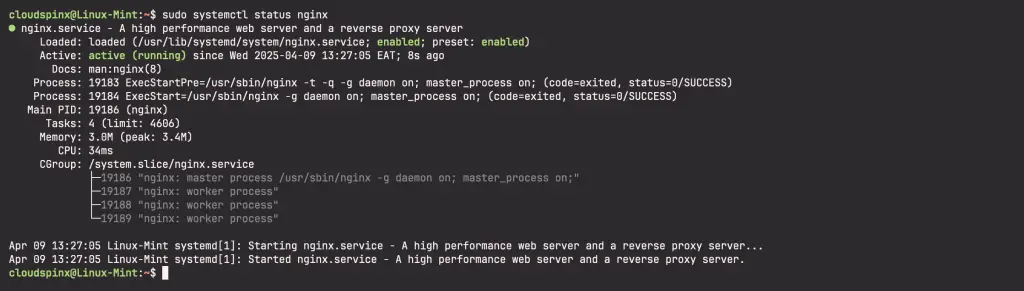
Now if you are running a firewall you need to allow Nginx ports through the firewall:
sudo ufw allow 443/tcp
sudo ufw allow 80/tcp
Install PHP-FPM on Linux Mint
Follow the steps below to install PHP-FPM on Linux Mint 22 to work with Nginx
First update your system package index.
sudo apt updateThen go ahead to install php and other extensions including php-fpm on your Linux Mint 22:
sudo apt install php php-cli php-fpm php-json php-pdo php-mysql php-zip php-gd php-mbstring php-curl php-xml php-pear php-bcmathAfter installation completes, check php version with the below command:
$ php -v
PHP 8.3.6 (cli) (built: Mar 19 2025 10:08:38) (NTS)
Copyright (c) The PHP Group
Zend Engine v4.3.6, Copyright (c) Zend Technologies
    with Zend OPcache v8.3.6, Copyright (c), by Zend Technologies
To check modules run:
php -mConfigure Nginx to use PHP-FPM
With both installed we can consider an example on usage. The sample configuration is for WordPress using Nginx and FPM:
$ sudo vim /etc/nginx/sites-available/mywebsite.conf
server {
	listen 80;
	listen [::]:80;
	server_name app.example.com www.app.example.com;
	root /var/www/html/wp_website;
	index index.php index.html index.htm;

	location / {
		try_files $uri $uri/ index.php?$args;
	}
	location ~ \.php$ {
		include snippets/fastcgi-php.conf;
		fastcgi_pass unix:/run/php/php-fpm.sock;
		fastcgi_param	SCRIPT_FILENAME $document_root$fastcgi_script_name;
	}
}
This has been a guide on how to install Nginx with PHP-FPM on Linux Mint 22 and to use with a WordPress site. Enjoy you development!.
Recommended Web Development books to read:
- Best Books to learn Web Development – PHP, HTML, CSS, JavaScript and jQuery
- Best Books To Master Web Design
- Best Books To Learn CSS & CSS3
- Best Books To Learn HTML & HTML5
- Best Apache and Nginx reference Books
Click links below for more interesting guides:
