

This guide will cover all the steps required to install the MariaDB database server on Fedora Linux. MariaDB serves is a drop-in replacement for MySQL, and it is designed to be scalable, robust, and reliable relational database management system (RDBMS). MariaDB ships with production-ready advanced features that were once exclusive to expensive proprietary databases. The software is released as free and open-source software under the GNU General Public License version 2.
Step 1: Update system
MariaDB database server packages are available in the default OS repos. Just start by updating the system.
sudo dnf -y updateYou can search for MariaDB packages by running the following command:
sudo dnf search mariadbTo show all available versions run:
sudo dnf --showduplicates list mariadb-serverIf using DNF5 run:
dnf5 list --showduplicates mariadb-serverSample output from using dnf5 in Fedora 43:
Updating and loading repositories:
Repositories loaded.
Available packages
mariadb-server.x86_64 3:10.11.13-9.fc43 fedora
Step 2: Install MariaDB Database Server
Use the following command to install MariaDB on Fedora system.
sudo dnf install mariadb-serverAgree to start installation.
Updating and loading repositories:
Repositories loaded.
Package                                                                    Arch             Version                                                                    Repository                                     Size
Installing:
 mariadb-server                                                            x86_64           3:10.11.13-9.fc43                                                          fedora                                     75.9 MiB
Installing dependencies:
 mariadb                                                                   x86_64           3:10.11.13-9.fc43                                                          fedora                                     23.2 MiB
 mariadb-common                                                            noarch           3:10.11.13-9.fc43                                                          fedora                                    301.7 KiB
 mariadb-connector-c                                                       x86_64           3.4.5-2.fc43                                                               fedora                                    512.2 KiB
 mariadb-connector-c-config                                                noarch           3.4.5-2.fc43                                                               fedora                                    497.0   B
 mariadb-errmsg                                                            noarch           3:10.11.13-9.fc43                                                          fedora                                      3.0 MiB
 mysql-selinux                                                             noarch           1.0.14-2.fc43                                                              fedora                                     49.9 KiB
 perl-DBD-MariaDB                                                          x86_64           1.24-3.fc43                                                                fedora                                    383.0 KiB
 perl-DBI                                                                  x86_64           1.647-4.fc43                                                               fedora                                      2.2 MiB
 perl-File-Copy                                                            noarch           2.41-520.fc43                                                              fedora                                     19.7 KiB
 perl-Math-BigInt                                                          noarch           1:2.0050.03-3.fc43                                                         fedora                                      1.1 MiB
 perl-Math-Complex                                                         noarch           1.63-520.fc43                                                              fedora                                     85.1 KiB
 perl-Sys-Hostname                                                         x86_64           1.25-520.fc43                                                              fedora                                     15.8 KiB
 snappy                                                                    x86_64           1.2.2-2.fc43                                                               fedora                                     71.8 KiB
Installing weak dependencies:
 mariadb-backup                                                            x86_64           3:10.11.13-9.fc43                                                          fedora                                     21.9 MiB
 mariadb-client-utils                                                      noarch           3:10.11.13-9.fc43                                                          fedora                                    189.3 KiB
 mariadb-cracklib-password-check                                           x86_64           3:10.11.13-9.fc43                                                          fedora                                     13.0 KiB
 mariadb-gssapi-server                                                     x86_64           3:10.11.13-9.fc43                                                          fedora                                     19.9 KiB
 mariadb-server-utils                                                      noarch           3:10.11.13-9.fc43                                                          fedora                                     33.9 KiB

Transaction Summary:
 Installing:        19 packages

Total size of inbound packages is 21 MiB. Need to download 21 MiB.
After this operation, 129 MiB extra will be used (install 129 MiB, remove 0 B).
Is this ok [y/N]: y
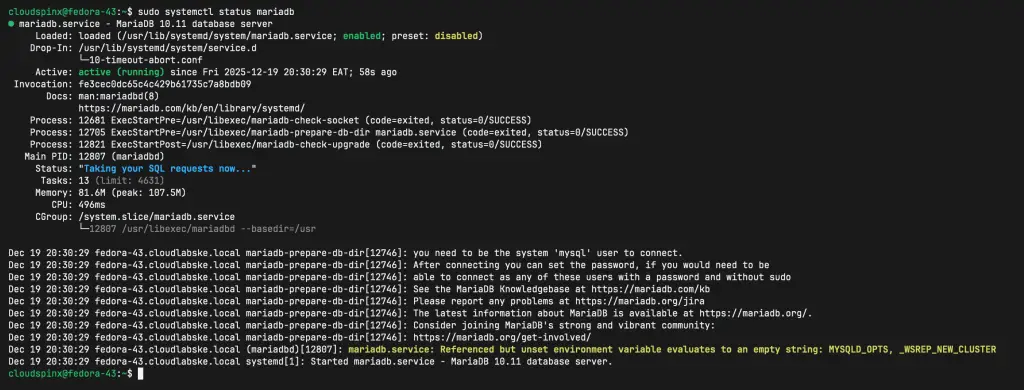
After installing MariaDB server, start the service and set it to start at boot.
sudo systemctl enale --now mariadbTo confirm service status run:
sudo systemctl status mariadbSample Output:
Step 3: Secure MariaDB Installation
After installation, MariaDB server is not hardened and can easily be accessed without authentication.
Secure your database by running the following script.
$ sudo mariadb-secure-installation

NOTE: RUNNING ALL PARTS OF THIS SCRIPT IS RECOMMENDED FOR ALL MariaDB
      SERVERS IN PRODUCTION USE!  PLEASE READ EACH STEP CAREFULLY!

In order to log into MariaDB to secure it, we'll need the current
password for the root user.  If you've just installed MariaDB, and
you haven't set the root password yet, the password will be blank,
so you should just press enter here.

Enter current password for root (enter for none):
OK, successfully used password, moving on...

Setting the root password ensures that nobody can log into the MariaDB
root user without the proper authorisation.

Set root password? [Y/n] y
New password: <ENTER NEW PASSWORD>
Re-enter new password: <CONFIRM PASSWORD>
Password updated successfully!
Reloading privilege tables..
 ... Success!


By default, a MariaDB installation has an anonymous user, allowing anyone
to log into MariaDB without having to have a user account created for
them.  This is intended only for testing, and to make the installation
go a bit smoother.  You should remove them before moving into a
production environment.

Remove anonymous users? [Y/n] y
 ... Success!

Normally, root should only be allowed to connect from 'localhost'.  This
ensures that someone cannot guess at the root password from the network.

Disallow root login remotely? [Y/n] y
 ... Success!

By default, MariaDB comes with a database named 'test' that anyone can
access.  This is also intended only for testing, and should be removed
before moving into a production environment.

Remove test database and access to it? [Y/n] y
 - Dropping test database...
 ... Success!
 - Removing privileges on test database...
 ... Success!

Reloading the privilege tables will ensure that all changes made so far
will take effect immediately.

Reload privilege tables now? [Y/n] y
 ... Success!

Cleaning up...

All done!  If you've completed all of the above steps, your MariaDB
installation should now be secure.

Thanks for using MariaDB!
Ensure you:
- Set Database root user password
- Remove anonymous users
- Disallow root user remote logins
- Remove test database and access to it
When done, test access using the root user – without a password.
$ mysql -u root
ERROR 1045 (28000): Access denied for user 'root'@'localhost' (using password: NO)
As seen, you need to authenticate to access database console as a root user.
$ mysql -u root -p
Enter password:
Welcome to the MariaDB monitor.  Commands end with ; or \g.
Your MariaDB connection id is 19
Server version: 10.11.13-MariaDB MariaDB Server
Copyright (c) 2000, 2018, Oracle, MariaDB Corporation Ab and others.
Type 'help;' or '\h' for help. Type '\c' to clear the current input statement.

MariaDB [(none)]> SELECT VERSION();
+------------------+
| VERSION()        |
+------------------+
| 10.11.11-MariaDB |
+------------------+
1 row in set (0.000 sec)
For developers who need an easier way of managing MariaDB database server, check our guide on Install and Configure phpMyAdmin on Fedora
