

HashiCorp Vault is a secrets management tool that centralizes the storage, access control, and encryption of sensitive data such as API keys, passwords, certificates, and tokens. Native Kubernetes secrets are base64-encoded (not encrypted) and lack fine-grained access policies, audit logging, and automatic rotation. Vault solves all of these problems with a single platform that integrates directly into Kubernetes workloads.
This guide walks through deploying HashiCorp Vault on Kubernetes using the official Helm chart, initializing and unsealing the cluster, enabling Kubernetes authentication, injecting secrets into pods with the Vault Agent Sidecar Injector, using the Vault CSI Provider, configuring secret engines (KV, database, PKI), setting up high availability with the Raft storage backend, configuring auto-unseal with cloud KMS, monitoring Vault, and performing backup and restore operations.
Prerequisites
Before starting, ensure you have the following in place:
- A running Kubernetes cluster (v1.26+) with at least 3 worker nodes and 4 GB RAM each. You can set one up using kubeadm on Ubuntu or any managed Kubernetes service (EKS, GKE, AKS).
kubectlinstalled and configured with cluster access- Helm v3 installed on your workstation
- A default StorageClass configured in the cluster (required for persistent volumes)
- Ports 8200 (API) and 8201 (cluster) open between Vault pods
- Root or sudo access to the machine running kubectl
Install kubectl if it is not already present on your system.
curl -LO "https://dl.k8s.io/release/$(curl -Ls https://dl.k8s.io/release/stable.txt)/bin/linux/amd64/kubectl"
chmod +x kubectl
sudo mv kubectl /usr/local/bin/
Install Helm 3.
curl -fsSL https://raw.githubusercontent.com/helm/helm/main/scripts/get-helm-3 | bashVerify both tools are working.
$ kubectl version --client
Client Version: v1.31.4

$ helm version --short
v3.16.4+gdb969a8
Step 1: Install HashiCorp Vault on Kubernetes with Helm
The official HashiCorp Vault Helm chart is the recommended way to deploy Vault on Kubernetes. It handles the StatefulSet, services, service accounts, and optional components like the Agent Injector and CSI Provider.
Add the HashiCorp Helm repository and create the vault namespace.
helm repo add hashicorp https://helm.releases.hashicorp.com
helm repo update
kubectl create namespace vault
For a basic single-server deployment, install with default values.
helm install vault hashicorp/vault \
  --namespace vault \
  --set server.dataStorage.size=10Gi
Check the pod status. The vault-0 pod will show 0/1 READY because it has not been initialized or unsealed yet.
$ kubectl get pods -n vault
NAME                                   READY   STATUS    RESTARTS   AGE
vault-0                                0/1     Running   0          45s
vault-agent-injector-6f8d4b5c9-k7xfp   1/1     Running   0          45s
Verify the services created by the Helm chart.
$ kubectl get svc -n vault
NAME                       TYPE        CLUSTER-IP      EXTERNAL-IP   PORT(S)             AGE
vault                      ClusterIP   10.96.45.120    <none>        8200/TCP,8201/TCP   50s
vault-agent-injector-svc   ClusterIP   10.96.120.88    <none>        443/TCP             50s
vault-internal             ClusterIP   None            <none>        8200/TCP,8201/TCP   50s
Step 2: Initialize and Unseal Vault
Vault starts in a sealed state and must be initialized before it can store or retrieve any secrets. Initialization generates the master key shares (Shamir’s secret sharing) and the initial root token.
Initialize Vault with 5 key shares and a threshold of 3 (any 3 of the 5 keys are required to unseal).
kubectl exec -n vault vault-0 -- vault operator init \
  -key-shares=5 \
  -key-threshold=3 \
  -format=json > vault-init.json
The output file contains unseal keys and the root token. Store this file securely. Losing these keys means permanent loss of access to Vault data.
$ cat vault-init.json | jq -r '.unseal_keys_b64[]'
vjwrDznfPk/7kHWY8L4OQL4PwXSuYFo3z45lt5SHolxj
mnBo0TJGqDI1Qld18gM4kg6b58GYjLzKMAWaSX9uVwEg
6QWSei7R7re4sFlyz7os1TNpdxoJzpFOCvmhk09xIMWD
iGZm2RiEQK3//RtUosUftb5dFU1R1YlqZmLQJJk7+I1I
cnC9fyyxb4cBgKAKUbjTXT2R+y0CmyP/Ve7AlNvKZbut
Unseal Vault by providing 3 of the 5 keys. Run this command three times, each time with a different unseal key.
UNSEAL_KEY_1=$(cat vault-init.json | jq -r '.unseal_keys_b64[0]')
UNSEAL_KEY_2=$(cat vault-init.json | jq -r '.unseal_keys_b64[1]')
UNSEAL_KEY_3=$(cat vault-init.json | jq -r '.unseal_keys_b64[2]')

kubectl exec -n vault vault-0 -- vault operator unseal $UNSEAL_KEY_1
kubectl exec -n vault vault-0 -- vault operator unseal $UNSEAL_KEY_2
kubectl exec -n vault vault-0 -- vault operator unseal $UNSEAL_KEY_3
After the third unseal operation, check the status. The Sealed field should show false.
$ kubectl exec -n vault vault-0 -- vault status
Key             Value
---             -----
Seal Type       shamir
Initialized     true
Sealed          false
Total Shares    5
Threshold       3
Version         1.18.3
Build Date      2025-01-29T13:41:09Z
Storage Type    file
Cluster Name    vault-cluster-a3b2c1d4
Cluster ID      be268c68-646d-e4bd-9acf-c20c2ace1a91
HA Enabled      false
The vault-0 pod should now show 1/1 READY.
Step 3: Enable Kubernetes Authentication
Kubernetes authentication allows pods to authenticate to Vault using their Kubernetes service account tokens. This eliminates the need to distribute Vault tokens to individual pods manually.
Export the root token and exec into the Vault pod.
ROOT_TOKEN=$(cat vault-init.json | jq -r '.root_token')
kubectl exec -n vault -it vault-0 -- /bin/sh
Inside the Vault pod, log in and enable the Kubernetes auth method.
vault login $ROOT_TOKEN
vault auth enable kubernetes
Configure the auth method to communicate with the Kubernetes API server.
vault write auth/kubernetes/config \
  token_reviewer_jwt="$(cat /var/run/secrets/kubernetes.io/serviceaccount/token)" \
  kubernetes_host="https://$KUBERNETES_PORT_443_TCP_ADDR:443" \
  kubernetes_ca_cert=@/var/run/secrets/kubernetes.io/serviceaccount/ca.crt
Vault will now validate Kubernetes service account tokens by querying the Kubernetes TokenReview API. Every pod that needs to access Vault secrets will authenticate using its bound service account.
Step 4: Configure Secret Engines
Vault supports multiple secret engines, each designed for a specific type of secret. The three most commonly used engines in Kubernetes environments are KV (key-value), Database, and PKI.
KV Secret Engine (Version 2)
The KV v2 engine stores static secrets with versioning and soft-delete support. Enable it at a custom path and store a test secret. Run these commands inside the Vault pod shell.
vault secrets enable -path=internal kv-v2Store database credentials as a KV secret.
vault kv put internal/database/config \
  username="app_db_user" \
  password="S3cureP@ss2025"
Verify the secret was stored correctly.
$ vault kv get internal/database/config
======== Secret Path ========
internal/data/database/config

======= Metadata =======
Key                Value
---                -----
created_time       2025-03-15T10:22:31.456789Z
custom_metadata    <nil>
deletion_time      n/a
destroyed          false
version            1

====== Data ======
Key         Value
---         -----
password    S3cureP@ss2025
username    app_db_user
Database Secret Engine
The database engine generates short-lived, on-demand database credentials. This is more secure than static credentials because each pod gets unique credentials that expire automatically. If you have a standalone Vault server, the same engine configuration applies.
vault secrets enable databaseConfigure a PostgreSQL connection (replace the connection URL with your actual database address).
vault write database/config/mydb \
  plugin_name=postgresql-database-plugin \
  allowed_roles="app-role" \
  connection_url="postgresql://{{username}}:{{password}}@postgres.default.svc.cluster.local:5432/appdb?sslmode=disable" \
  username="vault_admin" \
  password="VaultDBAdmin2025"
Create a role that defines what credentials Vault generates.
vault write database/roles/app-role \
  db_name=mydb \
  creation_statements="CREATE ROLE \"{{name}}\" WITH LOGIN PASSWORD '{{password}}' VALID UNTIL '{{expiration}}'; GRANT SELECT ON ALL TABLES IN SCHEMA public TO \"{{name}}\";" \
  default_ttl="1h" \
  max_ttl="24h"
Test generating dynamic credentials.
$ vault read database/creds/app-role
Key                Value
---                -----
lease_id           database/creds/app-role/abc123def456
lease_duration     1h
username           v-kube-app-role-xyz789
password           A1b2C3d4E5f6G7h8
PKI Secret Engine
The PKI engine generates X.509 certificates on demand. This is useful for mTLS between microservices and internal TLS termination.
vault secrets enable pki
vault secrets tune -max-lease-ttl=87600h pki
Generate a root CA certificate.
vault write -field=certificate pki/root/generate/internal \
  common_name="vault-ca.internal" \
  issuer_name="root-ca" \
  ttl=87600h > root_ca.crt
Configure a role for issuing certificates.
vault write pki/roles/internal-certs \
  allowed_domains="svc.cluster.local" \
  allow_subdomains=true \
  max_ttl=72h
Issue a test certificate.
$ vault write pki/issue/internal-certs \
  common_name="myapp.default.svc.cluster.local" \
  ttl=24h
The output includes the certificate, private key, and CA chain, all generated dynamically.
Step 5: Inject Secrets into Pods with Vault Agent Sidecar
The Vault Agent Injector is a Kubernetes mutating admission webhook that automatically injects a Vault Agent sidecar into pods. The sidecar authenticates to Vault and writes secrets to a shared volume that the application container can read. For a deeper walkthrough, see the guide on using Vault Agent sidecar to inject secrets into Kubernetes pods.
First, create a Vault policy and role for the application. Run these inside the Vault pod shell.
vault policy write app-policy - <<EOF
path "internal/data/database/config" {
  capabilities = ["read"]
}
EOF

vault write auth/kubernetes/role/app-role \
  bound_service_account_names=app-sa \
  bound_service_account_namespaces=default \
  policies=app-policy \
  ttl=1h
Exit the Vault pod shell.
exitCreate a service account for the application.
kubectl create serviceaccount app-sa -n defaultDeploy a sample application with the Vault Agent Injector annotations. Create the deployment manifest.
kubectl apply -n default -f - <<EOF
apiVersion: apps/v1
kind: Deployment
metadata:
  name: myapp
  labels:
    app: myapp
spec:
  replicas: 1
  selector:
    matchLabels:
      app: myapp
  template:
    metadata:
      annotations:
        vault.hashicorp.com/agent-inject: "true"
        vault.hashicorp.com/role: "app-role"
        vault.hashicorp.com/agent-inject-secret-db-creds.txt: "internal/data/database/config"
        vault.hashicorp.com/agent-inject-template-db-creds.txt: |
          {{- with secret "internal/data/database/config" -}}
          DB_USER={{ .Data.data.username }}
          DB_PASS={{ .Data.data.password }}
          {{- end }}
      labels:
        app: myapp
    spec:
      serviceAccountName: app-sa
      containers:
        - name: myapp
          image: nginx:alpine
          ports:
            - containerPort: 80
EOF
The key annotations explained:
vault.hashicorp.com/agent-inject: "true"– enables the sidecar injectorvault.hashicorp.com/role– the Vault Kubernetes auth role to authenticate withvault.hashicorp.com/agent-inject-secret-*– the secret path in Vaultvault.hashicorp.com/agent-inject-template-*– a Go template for formatting the secret file
Wait for the pod to become ready. It should show 2/2 containers (the app + the vault-agent sidecar).
$ kubectl get pods -n default -l app=myapp
NAME                     READY   STATUS    RESTARTS   AGE
myapp-7b9f4d5c6-x2m8k   2/2     Running   0          30s
Verify the secrets were injected into the pod.
$ kubectl exec myapp-7b9f4d5c6-x2m8k -c myapp -- cat /vault/secrets/db-creds.txt
DB_USER=app_db_user
DB_PASS=S3cureP@ss2025
The secrets are available as a file inside the container at /vault/secrets/. The Vault Agent sidecar handles token renewal and secret rotation automatically.
Step 6: Use the Vault CSI Provider
The Vault CSI Provider is an alternative to the Agent Injector. It uses the Kubernetes Secrets Store CSI Driver to mount Vault secrets as volumes. This approach does not require a sidecar container in each pod.
Install the Secrets Store CSI Driver first.
helm repo add secrets-store-csi-driver https://kubernetes-sigs.github.io/secrets-store-csi-driver/charts
helm install csi-secrets-store secrets-store-csi-driver/secrets-store-csi-driver \
  --namespace kube-system \
  --set syncSecret.enabled=true
Upgrade the Vault Helm release to enable the CSI provider.
helm upgrade vault hashicorp/vault \
  --namespace vault \
  --set csi.enabled=true \
  --set server.dataStorage.size=10Gi
Verify the CSI provider pod is running.
$ kubectl get pods -n vault -l app.kubernetes.io/name=vault-csi-provider
NAME                              READY   STATUS    RESTARTS   AGE
vault-csi-provider-7g5k2          2/2     Running   0          60s
Create a SecretProviderClass that tells the CSI driver where to find secrets in Vault.
kubectl apply -f - <<EOF
apiVersion: secrets-store.csi.x-k8s.io/v1
kind: SecretProviderClass
metadata:
  name: vault-db-creds
  namespace: default
spec:
  provider: vault
  parameters:
    vaultAddress: "http://vault.vault.svc.cluster.local:8200"
    roleName: "app-role"
    objects: |
      - objectName: "db-username"
        secretPath: "internal/data/database/config"
        secretKey: "username"
      - objectName: "db-password"
        secretPath: "internal/data/database/config"
        secretKey: "password"
EOF
Deploy an application using the CSI volume mount.
kubectl apply -f - <<EOF
apiVersion: apps/v1
kind: Deployment
metadata:
  name: myapp-csi
  namespace: default
spec:
  replicas: 1
  selector:
    matchLabels:
      app: myapp-csi
  template:
    metadata:
      labels:
        app: myapp-csi
    spec:
      serviceAccountName: app-sa
      containers:
        - name: myapp
          image: nginx:alpine
          volumeMounts:
            - name: secrets
              mountPath: "/mnt/secrets"
              readOnly: true
      volumes:
        - name: secrets
          csi:
            driver: secrets-store.csi.k8s.io
            readOnly: true
            volumeAttributes:
              secretProviderClass: "vault-db-creds"
EOF
Verify the secrets are mounted in the pod.
$ kubectl exec deploy/myapp-csi -- ls /mnt/secrets/
db-password
db-username

$ kubectl exec deploy/myapp-csi -- cat /mnt/secrets/db-username
app_db_user
Step 7: High Availability with Raft Storage Backend
For production workloads, a single Vault instance is not sufficient. The integrated Raft storage backend provides built-in high availability with leader election and data replication across multiple Vault nodes, with no external storage dependency like Consul required.
Create a custom values file for the HA deployment.
cat > vault-ha-values.yaml <<EOF
server:
  ha:
    enabled: true
    replicas: 3
    raft:
      enabled: true
      setNodeId: true
      config: |
        ui = true

        listener "tcp" {
          tls_disable     = 1
          address         = "[::]:8200"
          cluster_address = "[::]:8201"
        }

        storage "raft" {
          path = "/vault/data"

          retry_join {
            leader_api_addr = "http://vault-0.vault-internal:8200"
          }
          retry_join {
            leader_api_addr = "http://vault-1.vault-internal:8200"
          }
          retry_join {
            leader_api_addr = "http://vault-2.vault-internal:8200"
          }
        }

        service_registration "kubernetes" {}

  dataStorage:
    enabled: true
    size: 10Gi

ui:
  enabled: true
  serviceType: ClusterIP
EOF
Deploy the HA cluster (or upgrade an existing installation).
helm upgrade --install vault hashicorp/vault \
  --namespace vault \
  --values vault-ha-values.yaml
After deployment, initialize vault-0 as described in Step 2, then unseal it. The remaining nodes (vault-1, vault-2) automatically join the Raft cluster but each must be unsealed individually.
kubectl exec -n vault vault-1 -- vault operator unseal $UNSEAL_KEY_1
kubectl exec -n vault vault-1 -- vault operator unseal $UNSEAL_KEY_2
kubectl exec -n vault vault-1 -- vault operator unseal $UNSEAL_KEY_3

kubectl exec -n vault vault-2 -- vault operator unseal $UNSEAL_KEY_1
kubectl exec -n vault vault-2 -- vault operator unseal $UNSEAL_KEY_2
kubectl exec -n vault vault-2 -- vault operator unseal $UNSEAL_KEY_3
Verify all nodes are part of the Raft cluster.
$ kubectl exec -n vault vault-0 -- vault operator raft list-peers
Node       Address                        State       Voter
----       -------                        -----       -----
vault-0    vault-0.vault-internal:8201    leader      true
vault-1    vault-1.vault-internal:8201    follower    true
vault-2    vault-2.vault-internal:8201    follower    true
All three pods should be running and ready.
$ kubectl get pods -n vault -l app.kubernetes.io/name=vault
NAME      READY   STATUS    RESTARTS   AGE
vault-0   1/1     Running   0          5m
vault-1   1/1     Running   0          5m
vault-2   1/1     Running   0          5m
Step 8: Auto-Unseal with Cloud KMS
Manual unsealing is impractical in production. Auto-unseal delegates the unseal operation to a cloud KMS (Key Management Service) so that Vault pods can restart and unseal automatically without human intervention.
AWS KMS Auto-Unseal
Create a KMS key in AWS and note the key ID. Then update the Vault HA values to include the seal stanza.
server:
  ha:
    enabled: true
    replicas: 3
    raft:
      enabled: true
      setNodeId: true
      config: |
        ui = true

        listener "tcp" {
          tls_disable     = 1
          address         = "[::]:8200"
          cluster_address = "[::]:8201"
        }

        seal "awskms" {
          region     = "us-east-1"
          kms_key_id = "arn:aws:kms:us-east-1:123456789012:key/abcd1234-ab12-cd34-ef56-abcdef123456"
        }

        storage "raft" {
          path = "/vault/data"
        }

        service_registration "kubernetes" {}

  extraEnvironmentVars:
    AWS_ACCESS_KEY_ID: "AKIAIOSFODNN7EXAMPLE"
    AWS_SECRET_ACCESS_KEY: "wJalrXUtnFEMI/K7MDENG/bPxRfiCYEXAMPLEKEY"
For better security, use IAM Roles for Service Accounts (IRSA) on EKS instead of embedding static credentials. The same auto-unseal concept works with GCP Cloud KMS and Azure Key Vault. Just replace the seal stanza with the appropriate provider block.
GCP Cloud KMS Auto-Unseal
For GCP, the seal configuration looks like this.
seal "gcpckms" {
  project     = "my-gcp-project"
  region      = "global"
  key_ring    = "vault-keyring"
  crypto_key  = "vault-unseal-key"
}
When auto-unseal is configured, Vault initialization produces a recovery key instead of unseal keys. The recovery key is used for certain administrative operations but is not needed for day-to-day unsealing.
Step 9: Monitoring HashiCorp Vault on Kubernetes
Vault exposes Prometheus-compatible metrics at /v1/sys/metrics when telemetry is enabled. Add the following to the Vault configuration inside the Helm values.
telemetry {
  prometheus_retention_time = "30s"
  disable_hostname          = true
}
Add Prometheus scrape annotations to the Vault pods in your Helm values.
server:
  annotations:
    prometheus.io/scrape: "true"
    prometheus.io/port: "8200"
    prometheus.io/path: "/v1/sys/metrics"
    prometheus.io/param-format: "prometheus"
Create a Vault policy that allows the Prometheus service account to read metrics.
vault policy write prometheus-metrics - <<EOF
path "sys/metrics" {
  capabilities = ["read"]
}
EOF
Key metrics to monitor include:
vault.core.handle_request.count– total number of requests handledvault.core.handle_request.duration– request latencyvault.expire.num_leases– active lease countvault.runtime.alloc_bytes– memory allocationvault.raft.leader.lastContact– Raft cluster health (HA mode)vault.seal– seal status (critical for alerting)
Set up alerts for seal events, high request latency (above 500ms), and lease count spikes. A Grafana dashboard for Vault is available as dashboard ID 12904 from the Grafana community.
Vault also provides built-in audit logging. Enable the file audit device to capture all API interactions.
vault audit enable file file_path=/vault/audit/vault-audit.logIn production, stream these logs to a centralized logging system using a sidecar or DaemonSet log collector.
Step 10: Backup and Restore Vault Data
Regular backups are essential for disaster recovery. With the Raft storage backend, Vault provides built-in snapshot commands.
Create a Raft snapshot from the leader node.
kubectl exec -n vault vault-0 -- vault operator raft snapshot save /tmp/vault-snapshot.snapCopy the snapshot to your local machine.
kubectl cp vault/vault-0:/tmp/vault-snapshot.snap ./vault-snapshot-$(date +%Y%m%d).snapTo restore from a snapshot, copy it back to the Vault pod and run the restore command.
kubectl cp ./vault-snapshot-20250315.snap vault/vault-0:/tmp/vault-snapshot.snap
kubectl exec -n vault vault-0 -- vault operator raft snapshot restore /tmp/vault-snapshot.snap
Automate backups using a CronJob that runs the snapshot command on a schedule.
kubectl apply -n vault -f - <<EOF
apiVersion: batch/v1
kind: CronJob
metadata:
  name: vault-backup
spec:
  schedule: "0 2 * * *"
  jobTemplate:
    spec:
      template:
        spec:
          serviceAccountName: vault
          containers:
            - name: backup
              image: hashicorp/vault
              command:
                - /bin/sh
                - -c
                - |
                  export VAULT_ADDR=http://vault.vault.svc.cluster.local:8200
                  export VAULT_TOKEN=$(cat /var/run/secrets/vault-token/token)
                  vault operator raft snapshot save /backup/vault-$(date +%Y%m%d-%H%M%S).snap
              volumeMounts:
                - name: backup-storage
                  mountPath: /backup
          volumes:
            - name: backup-storage
              persistentVolumeClaim:
                claimName: vault-backup-pvc
          restartPolicy: OnFailure
EOF
Store snapshots in external object storage (S3, GCS, or Azure Blob) for offsite disaster recovery. Retain at least 7 daily snapshots and test restores quarterly.
Exposing the Vault UI
The Vault web UI provides a visual interface for managing secrets, policies, and auth methods. To access it outside the cluster, change the service type or use an Ingress resource.
For quick testing, use port-forwarding.
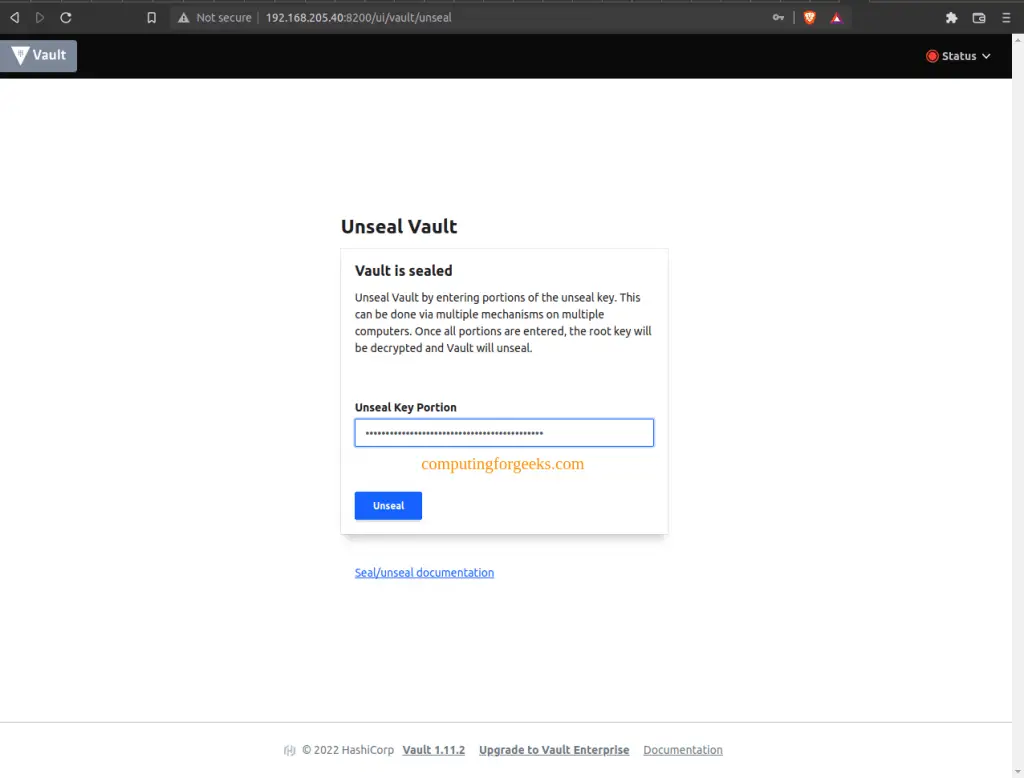
kubectl port-forward -n vault svc/vault 8200:8200Then open http://localhost:8200 in your browser. Unseal the Vault using the unseal keys, then sign in with the root token.
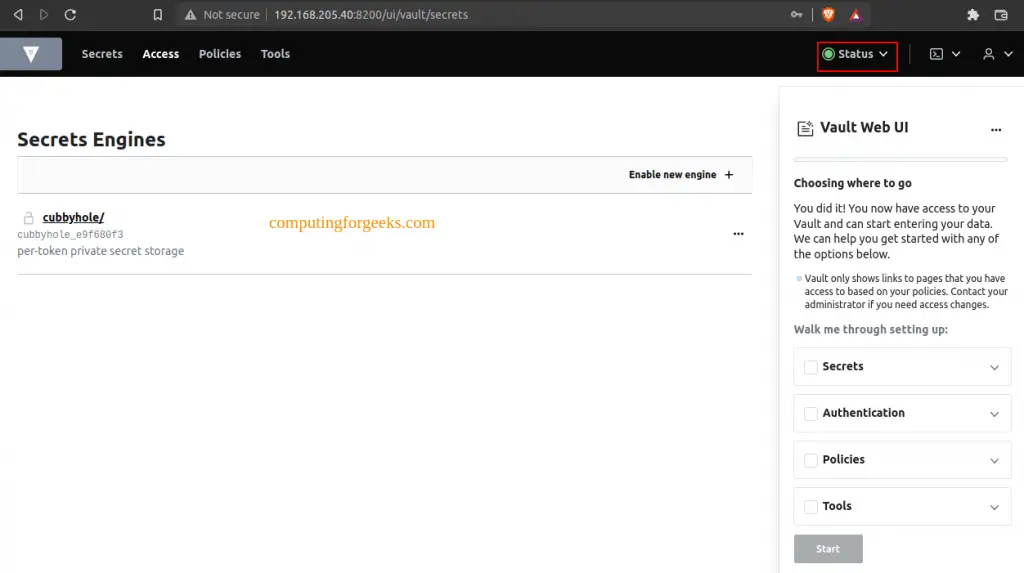
After authentication, the Vault dashboard displays all configured secret engines, authentication methods, and policies.
For production environments, expose the UI through a Kubernetes Ingress controller with TLS termination rather than NodePort or LoadBalancer.
Conclusion
We deployed HashiCorp Vault on Kubernetes with Helm, initialized and unsealed the cluster, configured Kubernetes authentication, set up KV, database, and PKI secret engines, and injected secrets into pods using both the Vault Agent Sidecar and CSI Provider. The HA Raft deployment with auto-unseal ensures Vault remains available and self-healing in production.
For production hardening, enable TLS on all Vault listeners, restrict root token usage (revoke it after initial setup and use identity-based auth), implement namespace isolation for multi-tenant clusters, and rotate encryption keys regularly. Integrate Vault audit logs with your SIEM and test backup restores on a regular schedule.
