

Misplaced drawings and outdated specs cost U.S. builders $31 billion in rework every year (Construction Executive). On a billion-dollar job, you can’t take that punch. You need a system that locks every revision, tracks every approval, and serves the right file instantly.
This guide pinpoints the essentials—scalability, granular role-based access, tamper-proof audit trails, and automated workflows—and maps them to today’s leading tools. You’ll learn where owner-centric suites like InEight Document, design hubs such as Autodesk Docs, and hybrid platforms like Egnyte excel, so you can choose with confidence.
Ready to cut rework? Let’s set the criteria.
Document control at scale: key requirements
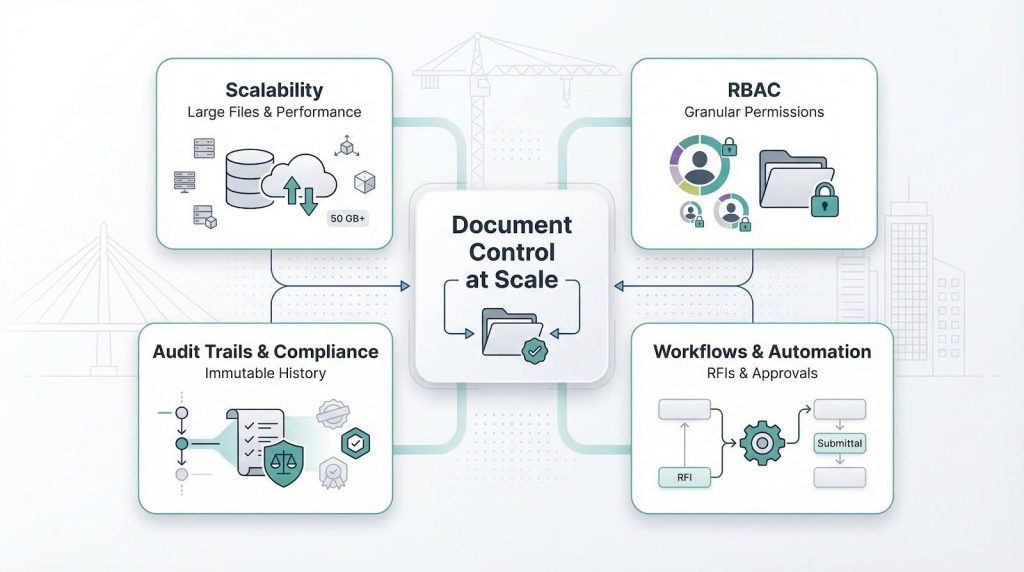
Volume and scalability
Big projects pump out data: multi-gigabyte BIM models, drone imagery, point-cloud scans, and binders of PDFs. A platform that stalls when you drop a fifty-gigabyte file fails the enterprise test.
Look for systems that stay quick even when the repository reaches terabytes. Technologies such as adaptive caching lead the charge. Egnyte’s new Adaptive Block Caching streams only the file blocks your team needs and leaves the rest in the cloud, delivering sixty-three percent faster first-time opens on CAD and media files for early adopters (Egnyte).
The lesson is simple: if a candidate cannot show similar acceleration, or at least a clear plan for edge caches and delta sync, cross it off. Slow equals costly rework.
(Next up: permissions so granular they could impress your CISO.)
Granular role-based access control
A megaproject involves a small village of stakeholders: owners, EPCs, subcontractors, regulators, and auditors. Handing everyone blanket access invites accidental leaks at best and litigation at worst.
Insist on platforms with role-based access that drills down to folders, single documents, even specific metadata fields. The gold standard lets you clone a “steel-detailer” role, restrict it to read-only drawings in one work package, and bar it from financial files in another without extra effort.
Seek permission templates, inheritance you can override, and time-boxed guest links. Anything less means late-night security fixes, and the worry that something slipped through.
(Next we lock in the paper trail: auditability you can take to court.)
End-to-end audit trails and compliance
On a long capital project, disputes are measured in years and millions. When lawyers call, you must present an indelible record that shows who viewed, edited, and approved every revision down to the minute.
That traceability is non-negotiable. A strong platform stamps each action, locks the log from tampering, and keeps it for the life of the asset. InEight Document captures every change in a single ledger, giving you complete visibility the moment a drawing leaves draft status (InEight).
The software itself also needs a clean bill of health. Certifications such as ISO 27001, SOC 2 Type II, and FedRAMP for public-sector work clear procurement hurdles and prove security posture.
Anything less is a gamble with evidence you may need years later.
(Up next: workflow automation so you never chase an approval again.)
Workflow automation and integrated processes
Every RFI, submittal, and design review should follow a defined path, not bounce around inboxes. Strong systems build those paths in, alert the next reviewer as soon as a task lands, and time-stamp the outcome for the record.
Picture an RFI raised on site. The software assigns it to the structural engineer, alerts the project manager if it sits for more than forty-eight hours, and, once answered, links the response back to the drawing revision. No spreadsheets, no guesswork.
Platforms like Oracle Aconex popularised this mail-style tracking; newer tools let you map flows with drag-and-drop editors. The test is easy: can you mirror your current paper trail in under an hour and trust the system to chase laggards? If not, keep looking.
(We have our criteria. Time to meet the contenders, starting with suites built for construction heavyweights.)
Construction and capital-programme suites
Projects measured in miles of pipeline or kilometres of rail live and die by rigorous governance. The four platforms in this group embed document control inside broader cost, schedule, and contract workflows, giving owners and tier-one contractors the single source of truth they need.
InEight Document: best for capital projects with integrated controls
Picture InEight Document as the document nerve centre of a full project controls system. Every drawing, spec, or contract sits in the same database that tracks budgets, quantities, and risk. When a change order is approved, both the paperwork and the cost line update in sync.
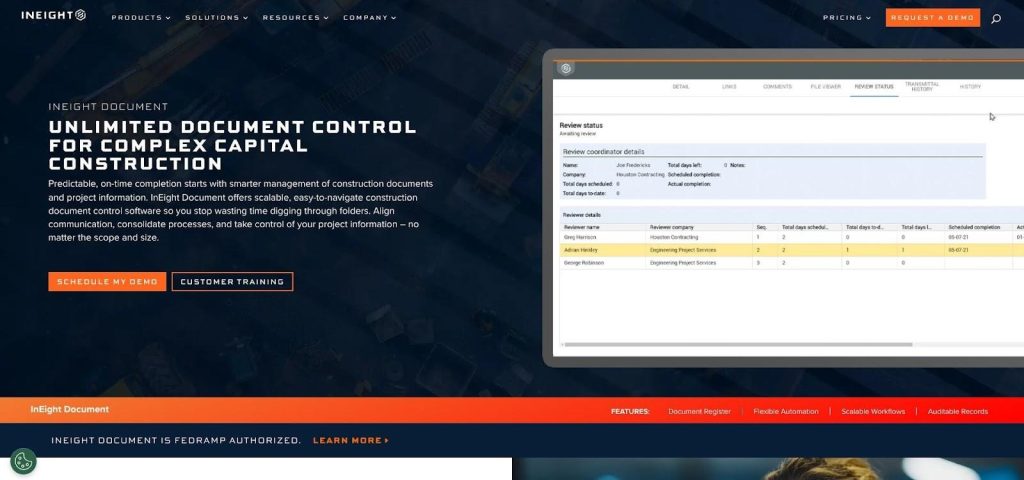
InEight Document UI for integrated capital project controls
The audit story is airtight. Every modification is time-stamped, attributed, and locked for the life of the asset (InEight).
Permissions reflect real-world roles. A subcontractor can view only the steel package, while the owner’s team receives wider rights. No coding is required; pick a template, adjust, and deploy.
Submittals, RFIs, transmittals, and digital signatures all follow configurable drag-and-drop workflows. Vendor case studies cite up to a 75 percent reduction in document search time and a 30 percent decrease in RFI processing, figures explained in the product overview; learn more about InEight Document for the full benchmarks. Miss a deadline and the system escalates; finish on time and it archives the entire trail automatically.
Deployment is flexible. Large enterprises often choose a private cloud, but hybrid or customer-hosted options serve jobs with strict data-sovereignty rules.
Pricing is by quote. The cost fits when you manage nine-figure programmes and cannot risk a missing record.
(Next contender: Oracle Aconex and its mail-style tracking countless megaprojects rely on for oversight.)
Oracle Aconex: best for mega-project accountability
If your contract binds several prime contractors and a fleet of subs, Aconex is the traffic cop that keeps communication civil and traceable. Its “mail” model wraps every document, drawing, or transmittal in a numbered envelope. Once sent, the record is immutable. No accidental edits and no vanished attachments mean a clear chain of custody for audits or arbitration.
Workflows arrive pre-built for RFIs, design reviews, and variation orders. You choose the route and deadlines, and Aconex reminds stragglers automatically. Because each company controls its own workspace, competing subs never see private folders, yet the owner sees everything.
Scalability is proven on some of the world’s largest rail, airport, and energy builds: tens of thousands of users and millions of files over many years. Cloud-only delivery means zero server upkeep, though it demands reliable site connectivity.
The learning curve is steeper than with newer tools, thanks to the mail metaphor. Teams that commit often find dispute resolution drops, because every action is sealed and time-stamped.
(Next stop: Procore and its field-first approach to drawings and RFIs.)
Procore: best for field-driven collaboration
Walk any major job site in North America and you will see tablets running Procore. Its appeal is simple: drawings, RFIs, photos, and punch lists live in one app that field crews like to use.
Upload a new sheet set and Procore slip-sheets it, auto-hyperlinks call-outs, and flags superseded pages so no one builds from stale information. Unlimited users allow every subcontractor, fabricator, and inspector to log in, yet permissions fence them into only what they need.
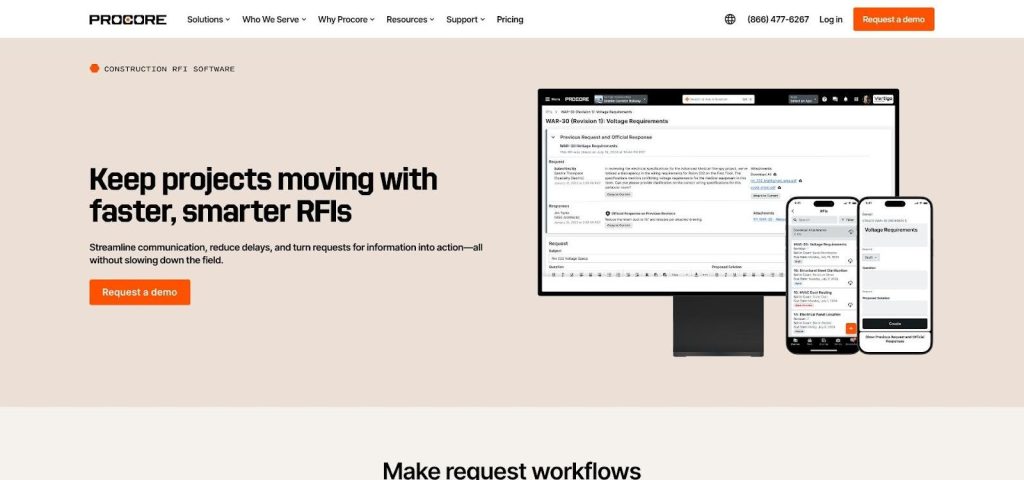
Procore field collaboration view with drawings and RFIs
RFIs, submittals, and change events move through configurable steps. The moment an engineer answers an RFI, the response pins to the exact plan location and alerts downstream trades. No copy-paste and no searching.
Integration breadth is hard to match: more than 300 apps from scheduling to ERPs connect, so data stays in sync rather than trapped in silos. That network plus a solid mobile app makes Procore the contractor’s daily cockpit.
Costs run high compared with point solutions, and setup takes real effort. For teams that live on site and value a single pane of glass, Procore delivers speed in the field and clarity in the trailer.
(Our final suite in this segment is Trimble e-Builder, designed for owner programme management.)
Trimble e-Builder: best for owner-centric programme control
When you manage a multiyear programme—think hospital networks or state DOT portfolios—documents tell only half the story. Budgets, funding approvals, and schedule milestones matter just as much. e-Builder links those threads.
Each change order, design deliverable, and pay application sits in a workflow that also updates cost and schedule dashboards. Executives see real-time budget burn next to the PDF that triggered it, a view that proves valuable during board reviews and bond audits.
Owners praise the reporting depth. With a few clicks you can reveal how many RFIs remain open across all projects, average turnaround by contractor, and the dollar impact of each delay, driving accountability without spreadsheet gymnastics.
Security meets public-sector needs. Single sign-on, detailed permission layers, and audit logs satisfy government IT rules, and Trimble offers dedicated hosting for sensitive data.
Contractors sometimes grumble about the interface, built for owners rather than field crews. Yet when the contract mandates e-Builder, teams adopt it and the project record stays complete for decades.
(Design and BIM-centric tools come next.)
Design and BIM-centric EDMS
Design coordination is its own challenge. File sizes swell, models reference other models, and one broken X-ref can halt an entire discipline. The next three tools address that complexity head-on, starting with Autodesk’s common data environment.
Autodesk Construction Cloud (Docs): best for model-rich workflows
If your daily toolkit is Revit, Civil 3D, or Navisworks, Autodesk Docs feels like home. Upload a fresh RVT and the cloud viewer spins it in seconds, with no local software and no exports. Designers, contractors, and owners can orbit the model, tag an issue on a beam clash, and assign it to the right team without leaving the browser.

Autodesk Docs model-rich document management interface
Version compare stands out. Drop two revisions of a floor plan and Docs paints additions in green and deletions in red. Field crews see exactly what changed before they step on site, cutting miscommunication.
Folder-based permissions keep sensitive work packages private, and unlimited storage means you stop counting gigabytes and return to designing. The trade-off is deployment flexibility: cloud only. For teams tied to on-prem, that is a deal-breaker. Firms already in the Autodesk world often find the smooth link to design tools and Build modules outweighs the concern.
Pricing starts per user and grows with the wider Construction Cloud suite. Factor that into your budget, especially if you plan to unlock cost, schedule, or coordination add-ons later.
(Next on deck: Bentley ProjectWise, the stalwart of engineering consultancies and infrastructure giants.)
Bentley ProjectWise: best for engineering and CAD integrity
Structural, civil, and rail engineers rely on linked models and reference files. Move one drawing outside the chain and the design falls apart. ProjectWise prevents that headache by managing relationships at the file-reference level. Rename a steel detail, and every sheet pointing to it updates automatically, so no broken links and no frantic calls.
Scalability is well documented. Case studies show environments hosting millions of documents and terabytes of data on mega rail and highway builds without choking. Distributed caching servers let designers in London and site teams in Kuala Lumpur work from the same source at local-LAN speed.
Permissions drill down to the file and attribute. Need to lock a DGN while an engineer checks it out? One click, and nobody else can edit until it returns. The platform records every check-in, version promotion, and transmittal, giving firms the traceability clients and insurers expect.
Administration is heavier than with cloud-only newcomers, and the classic Explorer client shows its age. Still, organisations whose revenue depends on pristine CAD lineage continue to choose ProjectWise.
(Last in this trio: Asite, a flexible CDE gaining ground beyond the United Kingdom.)
Asite: best for configurable common data environments
Some projects sit in a regulatory grey zone: strict BIM mandates, multi-currency contracts, and teams scattered across continents. Asite shines here by letting you tailor almost everything.
Build a folder hierarchy to mirror ISO 19650 naming, drag nodes until stakeholders agree, then add metadata rules so every upload carries the right classification. Need a five-step approval in Europe and a three-step fast track in Asia? Clone the workflow, swap reviewers, and publish. No code required.
The built-in viewer handles IFC, Revit, and point-cloud files side by side, keeping architects and contractors on the same island. Real-time dashboards flag overdue actions and hot issues, turning raw data into course-correction signals for the project lead.
Security is solid: ISO 27001 certification with EU and US data-centre options. An open API lets you feed data into Power BI or pull schedules from Primavera without messy CSV exports.
Asite’s profile is smaller in North America, so finding admins with experience may take effort. For globally governed jobs that need a flexible, standards-driven CDE, it offers rare agility.
(Design segment closed. Next we pivot to hybrid file platforms and open-source foundations.)
File platforms and open-source foundations
Sometimes you need raw speed, tight security, or full control, not a construction-specific stack. The next trio answers that brief, starting with a hybrid platform that treats fifty-gigabyte files like lightweight PDFs.
Egnyte: best for hybrid cloud and large-file performance
Think of Egnyte as a modern file server that travels with your team. A local cache appliance in the site trailer syncs to the cloud overnight, so designers open giant BIM models at LAN speed while headquarters sees the same files by breakfast.
Its strength is Adaptive Block Caching, which streams only the file slices your team touches. Early adopters report opens and saves sixty-three percent faster than with traditional sync-and-share tools. Lower latency keeps productivity high.
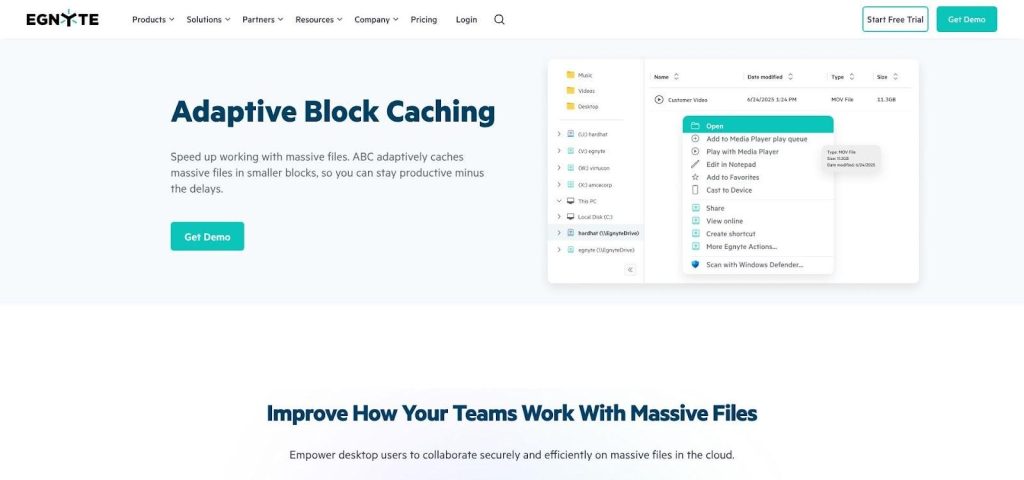
Egnyte Adaptive Block Caching for large BIM file performance
Security matches classic ECM suites: granular permissions, SOC 2 certification, and an admin console that flags wide shares before data leaks. Compliance dashboards help you prove GDPR, HIPAA, or CMMC readiness without spreadsheet gymnastics.
Egnyte stays neutral on workflows. It will not route a submittal or mark up a plan; instead, it connects to Procore, Autodesk, and many desktop apps through a simple drive letter. If your file server is gasping and you already own process tools, this is the missing engine.
Pricing starts per user with pooled storage. Budget extra for terabytes of scan data or video, and weigh that against the hardware you no longer buy and maintain.
(Next section covers Bluebeam Revu, the PDF markup workhorse every estimator trusts.)
Bluebeam Revu: best for precise PDF markup and real-time reviews
Every project still relies on PDFs: submittals, shop drawings, spec sections. Revu turns those static files into living, searchable workspaces.
Start a Studio Session and dozens of reviewers can annotate the same sheet set at once. Each markup carries a name, time, and comment, so the record stays clear. To compare two revisions, Revu finds every change in seconds and outlines differences in bright colours.
Take-offs excel as well. Calibrate scale once, then pull lengths, areas, and counts straight off the plan. Estimators feed numbers into cost sheets without retyping.
Offline use matters in remote trailers. Because Revu lives on your laptop, you keep the same tools with or without Wi-Fi, then sync back when the signal returns. For firms with strict IT rules, Studio Enterprise lets you host collaboration sessions on-prem, keeping data behind your firewall.
Remember, Revu is not a full DMS. Pair it with Procore, ProjectWise, or Egnyte for storage and permissions, and you gain reliable file control plus industry-standard markup power.
(Last in this group: Alfresco, the open-source route to complete data control.)
Alfresco: best for self-hosted control and unlimited tinkering
Some teams read “cloud only” and shake their heads. Regulatory firewalls or company policy demand that data stay on servers you own. Alfresco answers that call.
Install it on-prem or in a private cloud, point it to PostgreSQL, and you have an enterprise content repository with version history, check-in and check-out, and full-text search, all without a recurring SaaS bill. Because the codebase is open source, you can customise the UI, wire new metadata, or build tailored workflows with the built-in BPM engine. If you have Java talent, the platform bends far past what boxed SaaS allows.
Permissions mirror Active Directory groups, so user provisioning fits existing IT routines. Add the Records Management module and you gain DoD 5015.2-style retention schedules, ideal for owners archiving documents for decades.
The trade-off is responsibility. You patch servers, monitor indexes, and tune performance as your repository grows. Community forums help, but enterprise support is a paid extra. For organisations with strong DevOps culture and a mandate to keep every byte in house, Alfresco delivers sovereignty at scale.
(Next comes the side-by-side snapshot to simplify your shortlist.)
Side-by-side snapshot: which platform excels where?
We have covered a lot of ground. To simplify your shortlist, the table below lines up the ten contenders against the criteria we outlined earlier: deployment model, large-file performance, permission depth, audit-trail strength, built-in workflows, and key compliance marks. Scan it, circle your non-negotiables, and you will know which two or three tools deserve a live demo.
| Software | Deployment | Handles 50 GB+ files | RBAC depth | Audit trail | Workflow templates | Key compliance |
| InEight Document | Cloud / Private | Yes (database-backed) | Very granular | Full, immutable | RFIs, submittals, transmittals | ISO 27001, SOC 2 |
| Oracle Aconex | Cloud | Yes (case-proven) | Org-partition + role | Full, mail-based | RFIs, design review, VO | ISO 19650, SOC 2 |
| Procore | Cloud | Yes (unlimited storage) | Detailed matrix | Action log | RFIs, submittals, drawings | SOC 2 |
| Trimble e-Builder | Cloud | Large docs OK | Role + project | Full, owner view | Pay apps, change orders | FedRAMP* |
| Autodesk Docs | Cloud | Yes (unlimited) | Folder + role | Version + activity | Issues, reviews | ISO 19650, SOC 2 |
| Bentley ProjectWise | On-prem / Hybrid | Yes (caching servers) | File + attribute | Check-in/out log | Transmittals | ISO 27001 |
| Asite | Cloud | Yes | Custom roles | Full history | Visual workflow builder | ISO 27001, GDPR |
| Egnyte | Hybrid cloud | Yes (Adaptive Block Caching) | Folder + link | File events | None native | SOC 2, GDPR |
| Bluebeam Revu | Desktop / Cloud Studio | Large PDFs | Session roles | Session log | Review sessions | SOC 2 |
| Alfresco | Self-host / BYO cloud | Depends on hardware | Custom groups | Configurable | BPM-based | DoD 5015.2 (records) |
FedRAMP status refers to Trimble’s dedicated GovCloud environment; confirm level before procurement.
The trade-offs are clear. Need on-prem with CAD intelligence? ProjectWise fits. Pursuing the fastest BIM sync for dispersed teams? Egnyte’s caching leads. Seeking airtight, end-to-end auditability? InEight is the front-runner.
Pick the row that matches your risk profile, then discuss pricing and rollout details with the vendor.
(Next we reveal our scoring methodology and sources.)
How we picked the winners
We did not spin a wheel. We built a scorecard and let evidence speak.
First, we reviewed analyst reports, vendor documentation, and hundreds of user reviews to surface platforms proven on projects above $250 million or file vaults beyond ten terabytes. Anything smaller left the list.
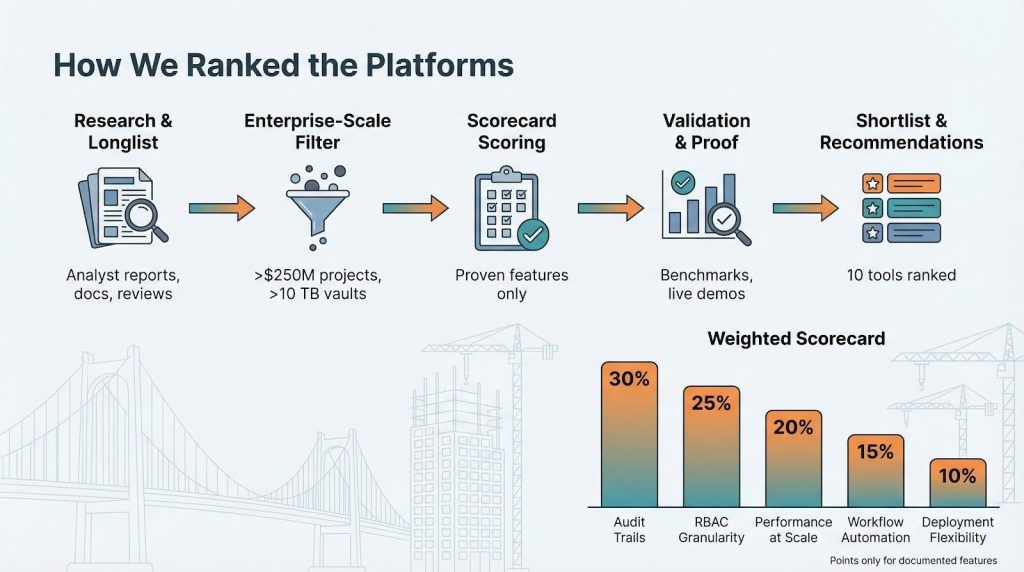
Next came five weighted pillars:
- Audit-trail depth (30 percent)
- RBAC granularity (25 percent)
- Performance at scale (20 percent)
- Workflow automation (15 percent)
- Deployment flexibility (10 percent)
Each product earned points only for features publicly documented or shown in live demos. Marketing claims without proof scored zero.
We validated speed claims where possible. Egnyte’s Adaptive Block Caching, for example, is backed by measured 60 percent faster opens.
For auditability, we looked for immutable logs such as the change ledger in InEight Document.
We then checked the shortlist against industry pain data, including the $31 billion rework figure that keeps CEOs alert.
The result is a lineup you can trust, not because we say so, but because the numbers do.
What’s next: five trends reshaping document control
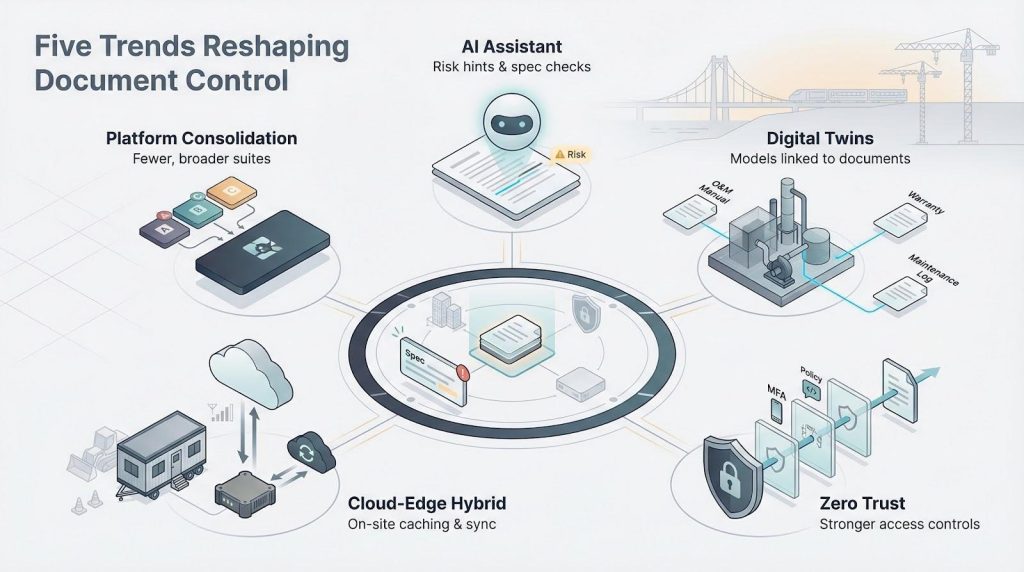
AI goes from buzzword to butler
We are moving past simple auto-tagging. The newest pilots feed machine-learning models your project’s prior RFIs, then flag clauses in fresh specs that contradict them. Expect mainstream platforms to release “risk hints” that surface conflicts before humans notice.
BIM and digital twins converge
Today, documents reference models. Soon, models will reference documents. Click a pump in a 3D twin and its O&M manual, warranty, and maintenance log appear instantly. Autodesk and Bentley already fuse these worlds; others will follow or fade.
Security bar rises to zero trust
Ransomware headlines have owners asking tougher questions. Vendors are adding conditional access, MFA by default, and FedRAMP or CMMC certifications. If your shortlist cannot prove a zero-trust roadmap, park it.
Cloud-edge hybrids become table stakes
Despite 5G marketing, many sites still wrestle with bandwidth. Caching appliances and offline-first mobile apps will shift from premium extras to baseline. Egnyte’s block caching is the early signal, and rivals are racing to match it.
Platform consolidation accelerates
Trimble purchased e-Builder and Viewpoint, while Autodesk acquired PlanGrid. The upside is tighter integrations, and the downside is fewer pricing levers. Teams that lock in multi-year terms now may protect budgets before choice narrows.
Conclusion
Stay alert to these shifts, and your next system can last a decade, not a single release cycle.