MongoDB is a cross-platform, NoSQL database server that uses JSON-like documents. Unlike relational databases, which use rows and columns, data items are stored as individual items in a collection(BSON). Now applications retrieve the stored data in JSON format. MongoDB is a project of MongoDB Inc. licensed under the Server Side Public License.
MongoDB is mainly used by people building internet and business applications where they need enormous scalability and flexibility. MongoDB is mainly used in the following areas:
- Real-time analytics and high-speed logging
- Evolving data requirements.
- Mobile and social networking sites
- configuration management
- E-commerce product catalog.
- Blogs and content management.
This guide offers an illustration of how to install and configure MongoDB 5 on openSUSE 15 / SLES 15. Before we begin, you need to ensure that your openSUSE 15 / SLES 15 server is up to date.
sudo zypper ref
sudo zypper up -y
#1. Add the MongoDB Repository on openSUSE 15 / SLES 15
For this guide, we will add the MongoDB Community Edition repositories to the system using the below commands.
First import the GPG key signing.
sudo rpm --import https://www.mongodb.org/static/pgp/server-8.0.ascAdd the MongoDB Community Edition Repository with the command:
sudo zypper addrepo --gpgcheck "https://repo.mongodb.org/zypper/suse/15/mongodb-org/8.0/x86_64/" mongodb#2. Install MongoDB 5 on openSUSE 15 / SLES 15
Once the repository has been added, we can comfortably install the MongoDB 8 packages on openSUSE 15 / SLES 15.
Refresh the package index.
sudo zypper refreshNow install MongoDB 8 on openSUSE 15 / SLES 15 using the command:
sudo zypper -n install mongodb-orgIn case you get an error for libcrypto.so.1.0.0 on SLES 15, just ignore it and proceed to install the latest version provided by libopenssl1_1
Sample Output:
cloudspinx@openSUSE:~> sudo zypper -n install mongodb-org
Loading repository data...
Reading installed packages...
Resolving package dependencies...

The following 14 NEW packages are going to be installed:
  libopenssl1_1 libpython2_7-1_0 mongodb-database-tools mongodb-mongosh mongodb-org mongodb-org-database mongodb-org-database-tools-extra mongodb-org-mongos mongodb-org-server
  mongodb-org-tools openssl openssl-3 python python-base

14 new packages to install.

Package download size:   175.0 MiB

Package install size change:
              |     756.6 MiB  required by packages that will be installed
   756.6 MiB  |  -      0 B    released by packages that will be removed

Backend:  classic_rpmtrans
Continue? [y/n/v/...? shows all options] (y): y
Retrieving: libopenssl1_1-1.1.1w-13.2.x86_64 (Main Repository (OSS))                                                                                      (1/14),   1.5 MiB
Retrieving: libopenssl1_1-1.1.1w-13.2.x86_64.rpm ..........................................................................................................[done (125.8 KiB/s)]
Retrieving: libpython2_7-1_0-2.7.18-51.2.x86_64 (Main Repository (OSS))                                                                                   (2/14), 671.0 KiB
Retrieving: libpython2_7-1_0-2.7.18-51.2.x86_64.rpm .....................................................................................................................[done]
Retrieving: openssl-3.2.3-1.1.noarch (Main Repository (OSS))                                                                                              (3/14),   9.7 KiB
Retrieving: openssl-3.2.3-1.1.noarch.rpm ................................................................................................................................[done]
Retrieving: openssl-3-3.2.3-3.2.x86_64 (Main Repository (OSS))                                                                                            (4/14),   1.4 MiB
Retrieving: openssl-3-3.2.3-3.2.x86_64.rpm .................................................................................................................[done (41.2 MiB/s)]
Retrieving: python-base-2.7.18-51.2.x86_64 (Main Repository (OSS))                                                                                        (5/14),   6.0 MiB
Retrieving: python-base-2.7.18-51.2.x86_64.rpm ..............................................................................................................[done (4.0 KiB/s)]
Retrieving: python-2.7.18-51.2.x86_64 (Main Repository (OSS))                                                                                             (6/14), 340.3 KiB
Retrieving: python-2.7.18-51.2.x86_64.rpm ...................................................................................................................[done (9.7 MiB/s)]
Retrieving: mongodb-database-tools-100.10.0-1.x86_64 (mongodb)                                                                                            (7/14),  44.4 MiB
Retrieving: mongodb-database-tools-100.10.0-1.x86_64.rpm ....................................................................................................[done (5.5 MiB/s)]
Retrieving: mongodb-mongosh-2.3.8-1.el8.x86_64 (mongodb)                                                                                                  (8/14),  56.5 MiB
Retrieving: mongodb-mongosh-2.3.8.x86_64.rpm ...............................................................................................................[done (10.9 MiB/s)]
Retrieving: mongodb-org-mongos-8.0.4-1.suse15.x86_64 (mongodb)                                                                                            (9/14),  27.4 MiB
Retrieving: mongodb-org-mongos-8.0.4-1.suse15.x86_64.rpm ....................................................................................................[done (6.6 MiB/s)]
Retrieving: mongodb-org-server-8.0.4-1.suse15.x86_64 (mongodb)                                                                                           (10/14),  36.9 MiB
Retrieving: mongodb-org-server-8.0.4-1.suse15.x86_64.rpm ....................................................................................................[done (8.3 MiB/s)]
Retrieving: mongodb-org-database-tools-extra-8.0.4-1.suse15.x86_64 (mongodb)                                                                             (11/14),  14.4 KiB
Retrieving: mongodb-org-database-tools-extra-8.0.4-1.suse15.x86_64.rpm .....................................................................................[done (14.4 KiB/s)]
Retrieving: mongodb-org-tools-8.0.4-1.suse15.x86_64 (mongodb)                                                                                            (12/14),   9.3 KiB
Retrieving: mongodb-org-tools-8.0.4-1.suse15.x86_64.rpm .....................................................................................................[done (9.3 KiB/s)]
Retrieving: mongodb-org-database-8.0.4-1.suse15.x86_64 (mongodb)                                                                                         (13/14),   9.4 KiB
Retrieving: mongodb-org-database-8.0.4-1.suse15.x86_64.rpm ..................................................................................................[done (9.4 KiB/s)]
Retrieving: mongodb-org-8.0.4-1.suse15.x86_64 (mongodb)                                                                                                  (14/14),   9.3 KiB
Retrieving: mongodb-org-8.0.4-1.suse15.x86_64.rpm ...........................................................................................................[done (9.3 KiB/s)]

Checking for file conflicts: ............................................................................................................................................[done]
( 1/14) Installing: libopenssl1_1-1.1.1w-13.2.x86_64 ....................................................................................................................[done]
( 2/14) Installing: libpython2_7-1_0-2.7.18-51.2.x86_64 .................................................................................................................[done]
( 3/14) Installing: openssl-3.2.3-1.1.noarch ............................................................................................................................[done]
( 4/14) Installing: openssl-3-3.2.3-3.2.x86_64 ..........................................................................................................................[done]
( 5/14) Installing: python-base-2.7.18-51.2.x86_64 ......................................................................................................................[done]
( 6/14) Installing: python-2.7.18-51.2.x86_64 ...........................................................................................................................[done]
( 7/14) Installing: mongodb-database-tools-100.10.0-1.x86_64 ............................................................................................................[done]
( 8/14) Installing: mongodb-mongosh-2.3.8-1.el8.x86_64 ..................................................................................................................[done]
( 9/14) Installing: mongodb-org-mongos-8.0.4-1.suse15.x86_64 ............................................................................................................[done]
Created symlink '/etc/systemd/system/multi-user.target.wants/mongod.service' -> '/usr/lib/systemd/system/mongod.service'.
(10/14) Installing: mongodb-org-server-8.0.4-1.suse15.x86_64 ............................................................................................................[done]
(11/14) Installing: mongodb-org-database-tools-extra-8.0.4-1.suse15.x86_64 ..............................................................................................[done]
(12/14) Installing: mongodb-org-tools-8.0.4-1.suse15.x86_64 .............................................................................................................[done]
(13/14) Installing: mongodb-org-database-8.0.4-1.suse15.x86_64 ..........................................................................................................[done]
(14/14) Installing: mongodb-org-8.0.4-1.suse15.x86_64 ...................................................................................................................[done]
Running post-transaction scripts ........................................................................................................................................[done]
Installing specific release
Alternatively, you can install a specific release of MongoDB by specifying the version of each component as below:
sudo zypper install mongodb-org-<VERSION> mongodb-org-database-<VERSION> mongodb-org-server-<VERSION> mongodb-org-shell-<VERSION> mongodb-org-mongos-<VERSION> mongodb-org-tools-<VERSION>After specifying the version, the server may update MongoDB to the latest version. To avoid this unintended spin, you need to add the addlockcommand as below:
sudo zypper addlock mongodb-org-<VERSION> mongodb-org-database-<VERSION> mongodb-org-server-<VERSION> mongodb-org-shell-<VERSION> mongodb-org-mongos-<VERSION> mongodb-org-tools-<VERSION>Check the installed version of MongoDB.
$ mongod --version
db version v8.0.4
Build Info: {
    "version": "8.0.4",
    "gitVersion": "bc35ab4305d9920d9d0491c1c9ef9b72383d31f9",
    "openSSLVersion": "OpenSSL 1.1.1w-fips  11 Sep 2023 SUSE release SUSE_OPENSSL_RELEASE",
    "modules": [],
    "allocator": "tcmalloc-google",
    "environment": {
        "distmod": "suse15",
        "distarch": "x86_64",
        "target_arch": "x86_64"
    }
}
#3. Configure MongoDB 8 on openSUSE 15 / SLES 15
Now we need to make a few configurations to our MongoDB 5 installation.
Start and Enable MongoDB.
Start and enable the MongoDB service on openSUSE 15 / SLES 15 by executing the below commands:
sudo systemctl enable --now mongodCheck if the service is running:
$ systemctl status mongod
● mongod.service - MongoDB Database Server
     Loaded: loaded (/usr/lib/systemd/system/mongod.service; enabled; preset: disabled)
     Active: active (running) since Sun 2025-01-19 21:52:10 EAT; 5s ago
 Invocation: 9728f4d5f4bc4c96948f7804238db6e5
       Docs: https://docs.mongodb.org/manual
   Main PID: 4509 (mongod)
        CPU: 616ms
     CGroup: /system.slice/mongod.service
             └─4509 /usr/bin/mongod -f /etc/mongod.conf
Secure MongoDB 5 instance
Once installed, MongoDB is not secure. It has no password and thus anyone can access it and manipulate the data. To secure it, open the below file for editing:
sudo vi /etc/mongod.confIn the file, find and uncomment the #Security line and add the below content:
security:
  authorization: enabled
Save the file and restart the service to apply the changes:
sudo systemctl restart mongod#4. Using MongoDB 8 on openSUSE 15 / SLES 15
The default listening port for MongoDB is 27017, allow this port through the firewall if you have an active firewalld service as below:
sudo firewall-cmd --add-port=27017/tcp --permanent
sudo firewall-cmd --reload
Access the MongoDB shell on localhost with the command:
mongoshSample Output:
cloudspinx@openSUSE:~> mongosh
mongosh mongodb://127.0.0.1:27017/?directConnection=true&serverSelectionTimeoutMS=2000Current Mongosh Log ID:	678d4a7592cb69128f544ca6
Connecting to:		mongodb://127.0.0.1:27017/?directConnection=true&serverSelectionTimeoutMS=2000&appName=mongosh+2.3.8
Using MongoDB:		8.0.4
Using Mongosh:		2.3.8

For mongosh info see: https://www.mongodb.com/docs/mongodb-shell/


To help improve our products, anonymous usage data is collected and sent to MongoDB periodically (https://www.mongodb.com/legal/privacy-policy).
You can opt-out by running the disableTelemetry() command.

test>
While in the MongoDB shell, you can perform the desired activities that include:
1. Create a User and Add Role in MongoDB
We can create an admin user(mongouser) and give them the admin roles as below:
use admin
db.createUser(
{
user: "cloudspinx",
pwd: passwordPrompt(), // or cleartext password
roles: [ { role: "userAdminAnyDatabase", db: "admin" }, "readWriteAnyDatabase" ]
}
)
Remember to set the password for the user. Exit the shell using the command:
> exit
bye
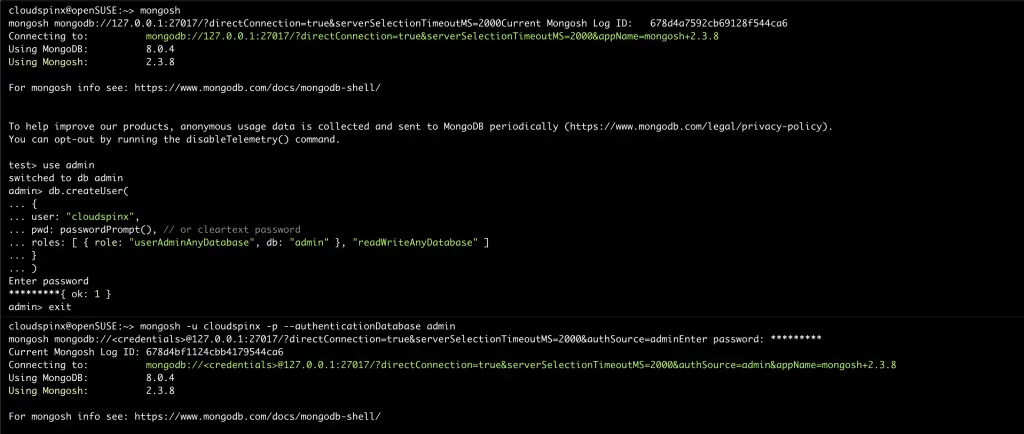
Proceed and login to the created user:
mongo -u cloudspinx -p --authenticationDatabase adminProvide the set password to log in.
2. List Databases in MongoDB
To list databases, use the command:
> show dbs
admin   0.000GB
config  0.000GB
local   0.000GB
3. Create a database in MongoDB.
Creating a new database is done by switching to a non-existing database. For example, to create a new database mongotestdb we will run:
> use mongotestdb
switched to db mongotestdb
4. Create a collection in MongoDB
A collection is similar to a Table in SQL databases. This can be created using the below command:
db.userdetails.insertOne(
   {F_Name: "fist name",
    L_NAME: "last name",
    ID_NO: "12345",
     AGE: "49",
     TEL: "+254654671"
   }
)
Once created, show the collection using the command:
> show collections
userdetails
5. Create a User with Read and Write privileges.
A user with read and write privileges to a given database(testdatabase) can be created using the syntax below:
use testdatabase
db.createUser(
   {
     user: 'testuser',
     pwd: 'PassWord',
     roles: [ { role: 'readWrite', db: 'testdatabase' } ]
   }
 );
Exit MongoDB shell:
> exit
bye
#5. Changing MongoDB default Data Path on openSUSE 15 / SLES 15
By default, MongoDB stores data in /var/lib/mongo. However, this path can be changed to another desired path as demonstrated below:
First stop the MongoDB service:
sudo systemctl stop mongod.serviceCreate a new directory to store the data.
sudo mkdir -p /data/mongoSet the correct ownership of the directory:
sudo chown -R mongod:mongod /data/mongoNow the file content of the old directory to the new directory.
sudo rsync -av /var/lib/mongo /data/mongoRename the old directory to a backup file:
sudo mv /var/lib/mongo /var/lib/mongo.bakCreate a symbolic link to the created file:
sudo ln -s /data/mongo /var/lib/mongoNow reload the system daemon and start the service:
sudo systemctl daemon-reload
sudo systemctl start mongod
Conclusion
That marks the end of this guide on how to install and configure MongoDB 5 on openSUSE 15 / SLES 15. In addition to that, we have also learned how to create users, databases, and collections on MongoDB. I hope this has been useful.
More guides: