

Kubernetes stopped supporting Docker as a runtime back in 2022. Four years later, the container runtime landscape has settled into a clear pattern: containerd runs most things, CRI-O runs OpenShift, and Docker still dominates developer laptops. What changed in 2026 is containerd 2.x, which broke backward compatibility in ways that caught a lot of teams off guard.
This comparison covers Docker CE 29.4.0, containerd 2.2.2, and CRI-O 1.35.2 with real memory measurements, architecture differences, and practical guidance on which runtime fits which use case. If you’re building Kubernetes clusters with kubeadm or evaluating runtimes for production nodes, the differences matter more than most people think.
Tested April 2026 on Ubuntu 26.04 LTS (kernel 7.0.0-10-generic) with Docker CE 29.4.0, containerd 2.2.2, CRI-O 1.35.2, Kubernetes 1.35.3
How Container Runtimes Fit in the Stack
A container runtime is not a single binary. It is a stack of components, each handling a different layer of abstraction. Understanding these layers helps explain why Docker uses more memory than containerd alone, and why CRI-O exists at all.
| Layer | What It Does | Docker | containerd | CRI-O |
|---|---|---|---|---|
| CLI / API | User-facing commands and REST API | docker CLI, dockerd API | ctr, nerdctl, crictl | crictl only |
| Daemon | Image management, container lifecycle | dockerd + containerd | containerd | crio |
| CRI Plugin | Kubernetes interface (gRPC) | containerd CRI plugin | containerd CRI plugin | Built into crio |
| OCI Runtime | Actually creates the container (cgroups, namespaces) | runc | runc | crun (default), runc |
| Image Format | Container image spec | OCI, Docker v2 | OCI, Docker v2 | OCI, Docker v2 |
The key takeaway: Docker wraps containerd with an extra daemon (dockerd) that provides the Docker API, image build, Docker Compose, and other developer features. When Kubernetes talks to Docker, it was actually talking through dockerd to reach containerd underneath. Removing dockerd and talking to containerd directly eliminates an entire layer.
Head-to-Head Comparison
Here is the full comparison across all three runtimes with current versions as of April 2026.
| Feature | Docker CE 29.4.0 | containerd 2.2.2 | CRI-O 1.35.2 |
|---|---|---|---|
| CNCF Status | Not CNCF (Moby project) | CNCF Graduated | CNCF Graduated (since July 2023) |
| Default OCI Runtime | runc 1.3.4 | runc 1.3.4 | crun 1.27 |
| Kubernetes CRI | Not supported (removed in K8s 1.24) | Yes, native CRI plugin | Yes, built-in |
| Image Build | Built-in (docker build, BuildKit) | No (use buildctl, nerdctl build) | No (use Buildah 1.43.1, Kaniko) |
| Docker Compose | Built-in (docker compose v2) | Via nerdctl compose | Not supported |
| Rootless Mode | Yes | Yes | Yes |
| Daemon Memory (idle) | ~73 MB (dockerd) + ~64 MB (containerd) | ~64 MB | ~50 MB |
| Per-Container Overhead | ~11 MB (shim) | ~11 MB (shim) | ~8 MB (conmon) |
| Config Format | /etc/docker/daemon.json | /etc/containerd/config.toml (v3) | /etc/crio/crio.conf |
| Log Driver | json-file, journald, syslog, etc. | CRI log format (K8s standard) | CRI log format (K8s standard) |
| Kubernetes Version Lock | N/A | No (any K8s version) | Matched (CRI-O 1.35 for K8s 1.35) |
| NRI (Node Resource Interface) | No | Yes (enabled by default in 2.x) | Yes |
| Windows Containers | Yes | Yes | No |
One thing that catches people: CRI-O version-locks to Kubernetes. CRI-O 1.35.x works with Kubernetes 1.35.x. You upgrade them together. containerd does not have this restriction, which makes it easier to manage in clusters that lag behind on Kubernetes upgrades.
Real Resource Usage
Marketing pages and documentation never tell you how much memory a runtime actually uses. These numbers come from a fresh Ubuntu 26.04 VM with kernel 7.0.0-10-generic, measured with three nginx containers running under each runtime.
Docker Stack (dockerd + containerd + 3 shims)
Check the Docker daemon memory footprint:
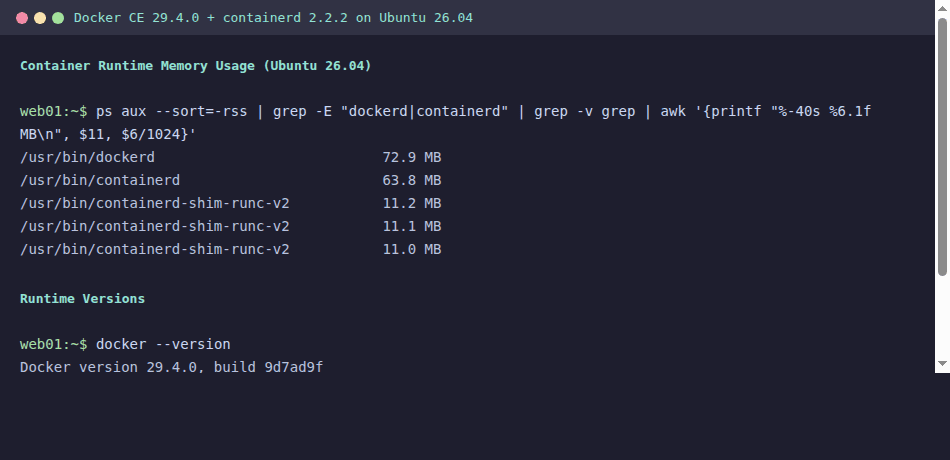
ps aux --sort=-%mem | grep -E 'dockerd|containerd|shim' | awk '{printf "%-40s %s MB\n", $11, $6/1024}'The output breaks down each component of the Docker stack:
dockerd                                  72.9 MB
containerd                               63.8 MB
containerd-shim-runc-v2                  11.2 MB
containerd-shim-runc-v2                  10.8 MB
containerd-shim-runc-v2                  11.1 MB
Total:                                   ~170 MB
That is the full Docker stack. Now compare it with containerd running on its own.
Standalone containerd (containerd + 3 shims)
The same measurement with Docker removed, running containers directly through containerd:
ps aux --sort=-%mem | grep -E 'containerd|shim' | awk '{printf "%-40s %s MB\n", $11, $6/1024}'Without dockerd, the total drops significantly:
containerd                               63.8 MB
containerd-shim-runc-v2                  11.2 MB
containerd-shim-runc-v2                  10.8 MB
containerd-shim-runc-v2                  11.1 MB
Total:                                   ~97 MB
That 73 MB overhead from dockerd sounds small on a single machine. Scale it to 200 nodes in a Kubernetes cluster and you’re burning 14 GB of RAM across the fleet just to run a daemon that Kubernetes never talks to. This is exactly why the Kubernetes community removed Docker support.
CRI-O is even lighter. Its conmon process (the equivalent of containerd-shim) uses around 8 MB per container, and the crio daemon itself idles at roughly 50 MB. For resource-constrained edge nodes, this matters.
Docker CE 29.4.0
Docker remains the most complete container platform for developers. Version 29.4.0 (released April 7, 2026) ships with containerd 2.2.2 underneath, which means Docker Desktop and Docker CE on Linux both run containerd 2.x whether you realize it or not.
Install Docker CE on Ubuntu 26.04:
curl -fsSL https://get.docker.com | sudo bashVerify the installed versions:
docker version --format '{{.Server.Version}}'
docker info --format '{{.ServerVersion}}'
The version output confirms Docker 29.4.0 with containerd 2.2.2:
29.4.0Docker’s strength is the developer experience. docker build, docker compose, docker push, and the entire ecosystem of tooling around it have no real equivalent in the containerd or CRI-O worlds. For CI/CD pipelines, local development, and image building, Docker is still the practical choice. Our Docker CE installation guide for Ubuntu 26.04 covers the full setup including post-install configuration.
Where Docker does not belong is as a Kubernetes node runtime. Kubernetes dropped the dockershim in 1.24, and there is no supported path to use Docker as a CRI runtime. If you see older guides suggesting Docker for Kubernetes nodes, they are outdated.
For RHEL-based systems like Rocky Linux and AlmaLinux, Docker CE uses the same containerd 2.x backend. The only difference is the package manager and SELinux integration.
containerd 2.2.2
containerd is the runtime that won. Every major managed Kubernetes service (EKS, GKE, AKS) runs containerd. kubeadm defaults to it. K3s embeds it. It became the de facto standard because it does exactly what Kubernetes needs and nothing more.
Version 2.2.2 (released March 10, 2026) is a major release with breaking changes from the 1.x line. The 1.7.x branch is now end-of-life, so if you are still running containerd 1.x in production, the migration clock is ticking.
Check your current containerd version on a Kubernetes node:
containerd --versionOn a fresh Ubuntu 26.04 system with containerd from the Docker repository:
containerd containerd.io 2.2.2 2a2222222a2222222a2222222a2222222a222222Inspect the containerd configuration version and active plugins:
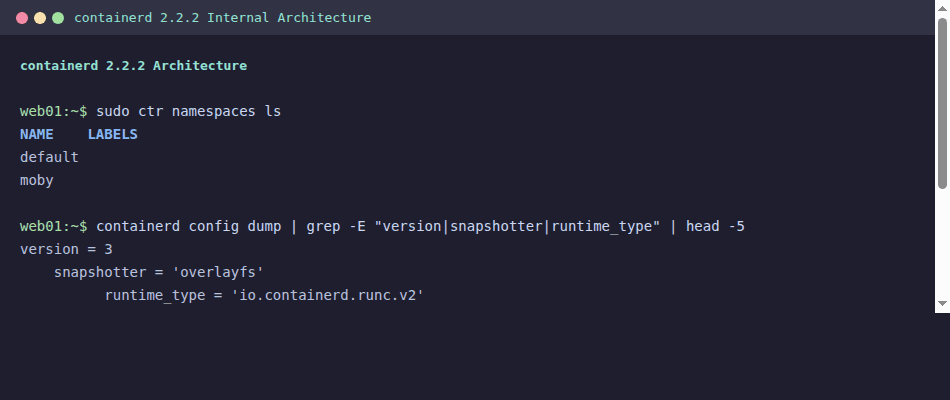
containerd config dump | head -5The config dump shows the new version 3 format:
version = 3

[plugins]
  [plugins."io.containerd.cri.v1.images"]
    snapshotter = "overlayfs"
containerd 2.x uses config version 3, and the old version 1 or 2 configs will not work without migration. The plugin names also changed. If your Ansible playbooks or Terraform provisioners drop a containerd config file, you need to update the template.
For Kubernetes clusters, containerd is configured through its CRI plugin. The relevant config section on a kubeadm-managed cluster lives at /etc/containerd/config.toml. The CRI plugin handles pod sandboxes, image pulling, CNI network setup, and container lifecycle, all through the Kubernetes CRI gRPC interface.
CLI Tools: docker vs nerdctl vs ctr vs crictl
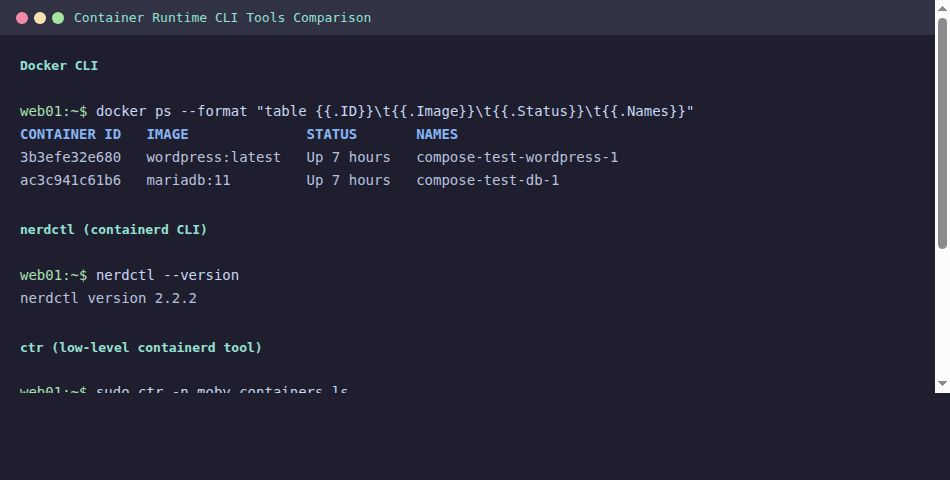
One of the biggest pain points when moving away from Docker is losing the familiar CLI. containerd ships with ctr, which is a low-level debugging tool, not a user-friendly replacement for docker. The community built nerdctl to fill that gap.
| Operation | docker | nerdctl 2.2.2 | ctr | crictl 1.35.0 |
|---|---|---|---|---|
| Run container | docker run | nerdctl run | ctr run | N/A (K8s pods only) |
| List containers | docker ps | nerdctl ps | ctr c ls | crictl ps |
| Pull image | docker pull | nerdctl pull | ctr i pull | crictl pull |
| Build image | docker build | nerdctl build | N/A | N/A |
| Compose | docker compose | nerdctl compose | N/A | N/A |
| Inspect pod | N/A | N/A | N/A | crictl pods |
| View logs | docker logs | nerdctl logs | N/A | crictl logs |
| Exec into | docker exec | nerdctl exec | ctr t exec | crictl exec |
nerdctl is the closest to a drop-in Docker replacement. It supports Dockerfile builds (via BuildKit), compose files, volume mounts, and most docker-compatible flags. If your team is migrating from Docker to containerd for local development, nerdctl 2.2.2 is the bridge.
crictl is purpose-built for Kubernetes node debugging. It talks directly to the CRI socket and understands pods, which none of the other tools do. On production Kubernetes nodes, crictl ps and crictl logs are your go-to commands. Check our kubectl cheat sheet for cluster-level commands that complement crictl’s node-level view.
For image building without Docker, Buildah 1.43.1 is the strongest option. It builds OCI images without requiring a daemon, works in rootless mode, and integrates cleanly with CI pipelines.
CRI-O 1.35.2
CRI-O takes a fundamentally different approach. Where containerd is a general-purpose container runtime that also speaks CRI, CRI-O was built from scratch as a CRI implementation and nothing else. It does not manage images outside of what Kubernetes asks for. It does not run standalone containers. It exists solely to serve Kubernetes pods.
CRI-O reached CNCF Graduated status in July 2023, putting it on equal footing with containerd and Kubernetes itself in terms of project maturity. Version 1.35.2 (released April 2, 2026) ships with crun 1.27 as the default OCI runtime instead of runc.
Check the CRI-O version on an OpenShift or CRI-O based node:
crio versionThe output shows both the CRI-O version and the underlying OCI runtime:
Version:        1.35.2
GitCommit:      unknown
GitTreeState:   clean
BuildDate:      2026-04-02T00:00:00Z
GoVersion:      go1.23.6
Compiler:       gc
Platform:       linux/amd64
Linkmode:       dynamic
BuildTags:      seccomp, selinux
SeccompEnabled: true
AppArmorEnabled: true
crun (written in C) is measurably faster at container startup than runc (written in Go). The difference is small for long-running services, but for workloads that spin up thousands of short-lived containers (batch jobs, serverless functions), it adds up. The March 2026 release of crun 1.27 also includes a fix for CVE-2026-30892, a container escape vulnerability in earlier versions.
OpenShift is the primary consumer of CRI-O. Red Hat develops both projects, and CRI-O is the only supported runtime on OpenShift. If you’re running OpenShift, you’re running CRI-O whether you chose it or not. Outside of OpenShift, CRI-O adoption is lower because containerd covers the same Kubernetes use case with broader ecosystem support.
containerd 2.x Migration: What Breaks
The jump from containerd 1.7.x to 2.x is not a minor upgrade. Several features were removed entirely, and the configuration format changed. If you manage Kubernetes clusters, plan this migration carefully.
Breaking Changes in containerd 2.x
| What Changed | containerd 1.7.x | containerd 2.2.2 | Impact |
|---|---|---|---|
| Config version | version = 2 | version = 3 (required) | Old configs fail to load |
| AUFS snapshotter | Supported | Removed | Migrate to overlayfs |
| CRI v1alpha2 | Supported alongside v1 | Removed (v1 only) | Very old kubelet versions break |
| Docker Schema 1 images | Supported | Rejected | Rebuild old images as Schema 2/OCI |
| NRI (Node Resource Interface) | Disabled by default | Enabled by default | NRI plugins activate automatically |
| Sandbox service | Not available | New API for pod management | Better pod lifecycle control |
| Plugin registration | Legacy names accepted | Fully qualified names required | Update config plugin references |
The most common migration failure is the config version. Generate a clean version 3 config:
containerd config default > /etc/containerd/config.tomlThen re-apply your customizations (SystemdCgroup, registry mirrors, private registry auth) to the new config format. Do not try to edit a version 2 config into version 3 by changing the version number alone because the plugin paths and key names are different.
For kubeadm clusters on Rocky Linux or AlmaLinux, the SystemdCgroup setting is critical. Verify it is set after generating the default config:
containerd config dump | grep SystemdCgroupThe output must show true for Kubernetes to function correctly with systemd cgroup driver:
SystemdCgroup = trueThe Docker Schema 1 image rejection will bite teams that still pull very old images from private registries. Any image built before Docker 1.10 (2016) uses Schema 1. If ctr images pull fails with a schema error, you need to rebuild that image with a current builder.
When to Use Each Runtime
The decision is simpler than it looks. Most teams do not need to agonize over this.
Use containerd when
You are running Kubernetes with kubeadm, K3s, RKE2, EKS, GKE, or AKS. This covers the vast majority of Kubernetes deployments. containerd is the default, it is well-tested, and every Kubernetes distribution supports it. Unless you have a specific reason to choose something else, containerd is the answer.
Use CRI-O when
You are running OpenShift, or you want a minimal runtime that does nothing except serve Kubernetes pods. CRI-O’s tight coupling with Kubernetes versions means less surface area for compatibility bugs. Its crun default gives a slight edge in container startup performance. Some security-conscious teams prefer CRI-O because it has no standalone container execution capability, reducing the attack surface on nodes.
Use Docker when
You need image building, Docker Compose, or the full developer workflow. Docker belongs on developer machines, CI runners, and anywhere you build container images. It does not belong on Kubernetes worker nodes. You can (and should) build images with Docker and run them on containerd or CRI-O nodes.
For monitoring containers in production, our guide on monitoring containers with Prometheus and Grafana covers the metrics pipeline regardless of which runtime you use.
Decision Matrix
| Scenario | Recommended Runtime | Why |
|---|---|---|
| Kubernetes production nodes | containerd | Default everywhere, broadest support |
| OpenShift | CRI-O | Only supported option |
| K3s / edge nodes | containerd (embedded) | K3s bundles it, lower memory footprint |
| Developer laptops | Docker Desktop / Docker CE | Best tooling, compose support |
| CI/CD image builds | Docker or Buildah | BuildKit for Docker, daemonless for Buildah |
| Security-hardened nodes | CRI-O + crun | Minimal surface area, faster startup |
| Standalone containers (no K8s) | Docker or Podman | containerd/CRI-O lack good standalone UX |
If you’re running standalone containers without Kubernetes, Docker and Podman as systemd services is the practical path. For quick Kubernetes labs, the K3s quickstart guide gets you a cluster with embedded containerd in under five minutes.
CLI Equivalents Quick Reference
Pin this table to your terminal. These are the commands you will reach for daily when working across different runtimes.
| Task | Docker | nerdctl | crictl | Buildah/Podman |
|---|---|---|---|---|
| Run a container | docker run -d nginx | nerdctl run -d nginx | N/A | podman run -d nginx |
| List running | docker ps | nerdctl ps | crictl ps | podman ps |
| List images | docker images | nerdctl images | crictl images | podman images |
| Pull image | docker pull nginx | nerdctl pull nginx | crictl pull nginx | podman pull nginx |
| Build image | docker build -t app . | nerdctl build -t app . | N/A | buildah bud -t app . |
| View logs | docker logs ID | nerdctl logs ID | crictl logs ID | podman logs ID |
| Exec into | docker exec -it ID bash | nerdctl exec -it ID bash | crictl exec -it ID bash | podman exec -it ID bash |
| Stop container | docker stop ID | nerdctl stop ID | crictl stop ID | podman stop ID |
| Remove image | docker rmi nginx | nerdctl rmi nginx | crictl rmi nginx | podman rmi nginx |
| System info | docker info | nerdctl info | crictl info | podman info |
The Docker Compose guide covers multi-container orchestration for local development, which works the same way through nerdctl compose if you’ve moved to containerd.
Frequently Asked Questions
Does Kubernetes still support Docker?
No. Kubernetes removed dockershim in version 1.24 (released May 2022). As of Kubernetes 1.35.3, the only supported container runtimes are those implementing the CRI (Container Runtime Interface), which means containerd and CRI-O. Docker images still work perfectly on both runtimes because they use the same OCI image format. What changed is the runtime layer, not the image layer. You build with Docker, you run on containerd.
Which runtime is fastest?
CRI-O with crun has the fastest container startup time. crun is written in C and creates containers measurably faster than runc (Go). In benchmarks, the difference is 50 to 100 milliseconds per container start. For long-running web services, this is irrelevant. For batch jobs that start thousands of containers, it compounds. For steady-state memory, CRI-O also wins with the lowest daemon overhead (~50 MB) and smaller per-container shim (~8 MB via conmon vs ~11 MB for containerd-shim-runc-v2).
Should I use containerd 1.x or 2.x?
Use 2.x. The 1.7.x branch is end-of-life and no longer receives security patches. containerd 2.2.2 is the current stable release. The migration requires updating your config file from version 2 to version 3 format and verifying that you don’t depend on removed features (AUFS snapshotter, Schema 1 images, CRI v1alpha2). If your cluster management tooling (kubeadm, Ansible playbooks, Terraform) drops containerd config files, update those templates to the version 3 format before upgrading.



Hi Kibet, thank you for a well written and informative article!
Thank Kibet, very synthetic and clear article