How To Install Prometheus on Debian 12 or Debian 11 or Debian 10 Linux?. Prometheus is a free and open source monitoring system that enables you to collect time-series data metrics from any target systems. Its web interface enables you to perform powerful queries, visualize collected data, and to configure alerts.
In this guide, we will cover the installation of Prometheus and node_exporter on Debian machine. Since this is a binary installation method, there is no required dependency to continue with the setup.
Step 1: Create Prometheus system user / group
We’ll create a dedicated Prometheus system user and group. The -r or –system option is used for this purpose.
sudo groupadd --system prometheus
sudo useradd -s /sbin/nologin --system -g prometheus prometheus
This creates a system user which doesn’t need /bin/bash shell, that’s why we used -s /sbin/nologin.
Step 2: Create configuration and data directories
Prometheus needs directories to store data and configuration files. Create all required directories using the commands below.
sudo mkdir /var/lib/prometheus
for i in rules rules.d files_sd; do sudo mkdir -p /etc/prometheus/${i}; done
Step 3: Download and Install Prometheus
Let’s download the latest release of Prometheus archive and extract it to get binary files. You can check releases from Prometheus releases Github page.
sudo apt-get update
sudo apt-get -y install wget curl
mkdir -p /tmp/prometheus && cd /tmp/prometheus
curl -s https://api.github.com/repos/prometheus/prometheus/releases/latest|grep browser_download_url|grep linux-amd64|cut -d '"' -f 4|wget -qi -
Extract the file.
tar xvf prometheus*.tar.gz
cd prometheus*/
Move the prometheus binary files to /usr/local/bin/
Since /usr/local/bin/ is in your PATH, let’s copy binary files to it.
sudo mv prometheus promtool /usr/local/bin/Move prometheus configuration template to /etc directory.
sudo mv prometheus.yml /etc/prometheus/prometheus.ymlAlso move consoles and console_libraries to /etc/prometheus directory:
sudo mv consoles/ console_libraries/ /etc/prometheus/
cd ~/
rm -rf /tmp/prometheus
Step 4: Create/Edit a Prometheus configuration file.
Prometheus configuration file will be located under /etc/prometheus/prometheus.yml.
cat /etc/prometheus/prometheus.ymlThe default configuration file looks similar to below.
# my global config
global:
  scrape_interval:     15s # Set the scrape interval to every 15 seconds. Default is every 1 minute.
  evaluation_interval: 15s # Evaluate rules every 15 seconds. The default is every 1 minute.
  # scrape_timeout is set to the global default (10s).

# Alertmanager configuration
alerting:
  alertmanagers:
  - static_configs:
    - targets:
      # - alertmanager:9093

# Load rules once and periodically evaluate them according to the global 'evaluation_interval'.
rule_files:
  # - "first_rules.yml"
  # - "second_rules.yml"

# A scrape configuration containing exactly one endpoint to scrape:
# Here it's Prometheus itself.
scrape_configs:
  # The job name is added as a label `job=<job_name>` to any timeseries scraped from this config.
  - job_name: 'prometheus'

    # metrics_path defaults to '/metrics'
    # scheme defaults to 'http'.

    static_configs:
    - targets: ['localhost:9090']
Step 5: Create a Prometheus systemd Service unit file
To be able to manage Prometheus service with systemd, you need to explicitly define this unit file.
sudo tee /etc/systemd/system/prometheus.service<<EOF
[Unit]
Description=Prometheus
Documentation=https://prometheus.io/docs/introduction/overview/
Wants=network-online.target
After=network-online.target

[Service]
Type=simple
User=prometheus
Group=prometheus
ExecReload=/bin/kill -HUP $MAINPID
ExecStart=/usr/local/bin/prometheus \
  --config.file=/etc/prometheus/prometheus.yml \
  --storage.tsdb.path=/var/lib/prometheus \
  --web.console.templates=/etc/prometheus/consoles \
  --web.console.libraries=/etc/prometheus/console_libraries \
  --web.listen-address=0.0.0.0:9090 \
  --web.external-url=

SyslogIdentifier=prometheus
Restart=always

[Install]
WantedBy=multi-user.target
EOF
Change directory permissions.
Change the ownership of these directories to Prometheus user and group.
for i in rules rules.d files_sd; do sudo chown -R prometheus:prometheus /etc/prometheus/${i}; done
for i in rules rules.d files_sd; do sudo chmod -R 775 /etc/prometheus/${i}; done
sudo chown -R prometheus:prometheus /var/lib/prometheus/
Reload systemd daemon and start the service.
sudo systemctl daemon-reload
sudo systemctl start prometheus
sudo systemctl enable prometheus
Confirm that the service is running.
$ systemctl status prometheus.service
* prometheus.service - Prometheus
     Loaded: loaded (/etc/systemd/system/prometheus.service; enabled; vendor preset: enabled)
     Active: active (running) since Mon 2023-05-22 23:42:43 EAT; 19s ago
       Docs: https://prometheus.io/docs/introduction/overview/
   Main PID: 5790 (prometheus)
      Tasks: 6 (limit: 9303)
     Memory: 16.5M
        CPU: 45ms
     CGroup: /system.slice/prometheus.service
             `-5790 /usr/local/bin/prometheus --config.file=/etc/prometheus/prometheus.yml --storage.tsdb.path=/var/lib/prometheus --web.console.>

May 22 23:42:43 grafana prometheus[5790]: ts=2023-05-22T20:42:43.219Z caller=tls_config.go:232 level=info component=web msg="Listening on" addres>
May 22 23:42:43 grafana prometheus[5790]: ts=2023-05-22T20:42:43.219Z caller=tls_config.go:235 level=info component=web msg="TLS is disabled." ht>
May 22 23:42:43 grafana prometheus[5790]: ts=2023-05-22T20:42:43.220Z caller=head.go:748 level=info component=tsdb msg="WAL segment loaded" segme>
May 22 23:42:43 grafana prometheus[5790]: ts=2023-05-22T20:42:43.220Z caller=head.go:785 level=info component=tsdb msg="WAL replay completed" che>
May 22 23:42:43 grafana prometheus[5790]: ts=2023-05-22T20:42:43.221Z caller=main.go:1037 level=info fs_type=EXT4_SUPER_MAGIC
May 22 23:42:43 grafana prometheus[5790]: ts=2023-05-22T20:42:43.221Z caller=main.go:1040 level=info msg="TSDB started"
May 22 23:42:43 grafana prometheus[5790]: ts=2023-05-22T20:42:43.221Z caller=main.go:1220 level=info msg="Loading configuration file" filename=/e>
May 22 23:42:43 grafana prometheus[5790]: ts=2023-05-22T20:42:43.221Z caller=main.go:1257 level=info msg="Completed loading of configuration file>
May 22 23:42:43 grafana prometheus[5790]: ts=2023-05-22T20:42:43.222Z caller=main.go:1001 level=info msg="Server is ready to receive web requests>
May 22 23:42:43 grafana prometheus[5790]: ts=2023-05-22T20:42:43.222Z caller=manager.go:995 level=info component="rule manager" msg="Starting rul>
root@grafana:~#
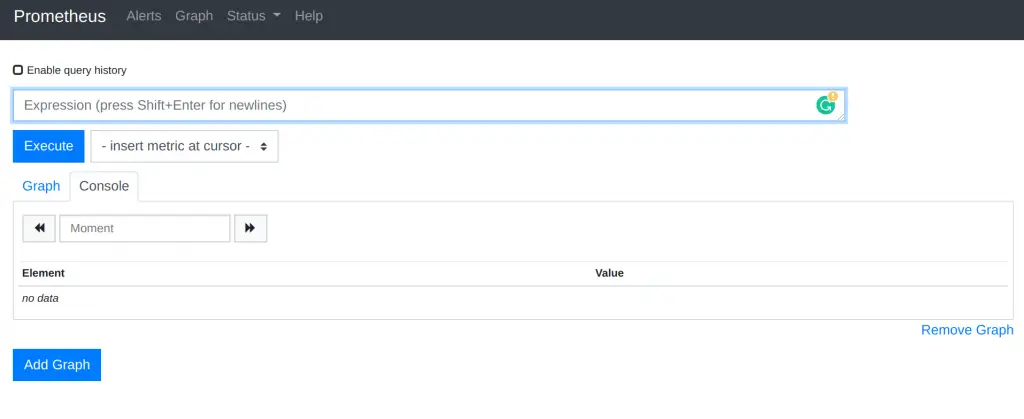
Access Prometheus web interface on URL http://[ip_hostname]:9090.
Step 6: Install node_exporter on Debian
Download node_exporter archive.
curl -s https://api.github.com/repos/prometheus/node_exporter/releases/latest| grep browser_download_url|grep linux-amd64|cut -d '"' -f 4|wget -qi -Extract downloaded file and move the binary file to /usr/local/bin.
tar -xvf node_exporter*.tar.gz
cd  node_exporter*/
sudo cp node_exporter /usr/local/bin
cd
Confirm installation.
$ node_exporter --version
node_exporter, version 1.5.0 (branch: HEAD, revision: 1b48970ffcf5630534fb00bb0687d73c66d1c959)
  build user:       root@6e7732a7b81b
  build date:       20221129-18:59:09
  go version:       go1.19.3
  platform:         linux/amd64
Create node_exporter service.
sudo tee /etc/systemd/system/node_exporter.service <<EOF
[Unit]
Description=Node Exporter
Wants=network-online.target
After=network-online.target

[Service]
User=prometheus
ExecStart=/usr/local/bin/node_exporter

[Install]
WantedBy=default.target
EOF
Reload systemd and start the service.
sudo systemctl daemon-reload
sudo systemctl start node_exporter
sudo systemctl enable node_exporter
Confirm status:
$ systemctl status node_exporter.service
* node_exporter.service - Node Exporter
     Loaded: loaded (/etc/systemd/system/node_exporter.service; enabled; vendor preset: enabled)
     Active: active (running) since Mon 2023-05-22 23:45:06 EAT; 6s ago
   Main PID: 5872 (node_exporter)
      Tasks: 5 (limit: 9303)
     Memory: 2.2M
        CPU: 5ms
     CGroup: /system.slice/node_exporter.service
             `-5872 /usr/local/bin/node_exporter

May 22 23:45:06 grafana node_exporter[5872]: ts=2023-05-22T20:45:06.996Z caller=node_exporter.go:117 level=info collector=thermal_zone
May 22 23:45:06 grafana node_exporter[5872]: ts=2023-05-22T20:45:06.996Z caller=node_exporter.go:117 level=info collector=time
May 22 23:45:06 grafana node_exporter[5872]: ts=2023-05-22T20:45:06.996Z caller=node_exporter.go:117 level=info collector=timex
May 22 23:45:06 grafana node_exporter[5872]: ts=2023-05-22T20:45:06.996Z caller=node_exporter.go:117 level=info collector=udp_queues
May 22 23:45:06 grafana node_exporter[5872]: ts=2023-05-22T20:45:06.996Z caller=node_exporter.go:117 level=info collector=uname
May 22 23:45:06 grafana node_exporter[5872]: ts=2023-05-22T20:45:06.996Z caller=node_exporter.go:117 level=info collector=vmstat
May 22 23:45:06 grafana node_exporter[5872]: ts=2023-05-22T20:45:06.996Z caller=node_exporter.go:117 level=info collector=xfs
May 22 23:45:06 grafana node_exporter[5872]: ts=2023-05-22T20:45:06.996Z caller=node_exporter.go:117 level=info collector=zfs
May 22 23:45:06 grafana node_exporter[5872]: ts=2023-05-22T20:45:06.996Z caller=tls_config.go:232 level=info msg="Listening on" address=[::]:9100
May 22 23:45:06 grafana node_exporter[5872]: ts=2023-05-22T20:45:06.996Z caller=tls_config.go:235 level=info msg="TLS is disabled." http2=false a>
Once we confirm the service to be running, let’s add the node_exporter to the Prometheus server.
sudo vim /etc/prometheus/prometheus.ymlAdd new job under scrape_config section.
scrape_configs:
  # The job name is added as a label `job=<job_name>` to any timeseries scraped from this config.
  - job_name: "prometheus"
    static_configs:
      - targets: ["localhost:9090"]
  - job_name: 'node_exporter'
    static_configs:
      - targets: ['localhost:9100']
Restart Prometheus:
sudo systemctl restart prometheusYou now have Prometheus installed on Debian Linux system. Check our Prometheus monitoring guides.
- How To Monitor Etcd Cluster with Prometheus and Grafana
- How to Monitor Redis Server with Prometheus and Grafana in 5 minutes
- How to Monitor Linux Server Performance with Prometheus and Grafana in 5 minutes
- How to Monitor Apache Web Server with Prometheus and Grafana in 5 minutes
- How to Monitor BIND DNS server with Prometheus and Grafana