When Redis changed its license to RSAL in 2024, the Linux Foundation forked it as Valkey. FreeBSD’s pkg repository carries Valkey natively, so you get a community-governed, production-ready key-value store in one command. No tarballs, no compile flags.
This guide walks through installing Valkey on FreeBSD 15.0, configuring authentication and persistence, setting up ACL users, and running real benchmarks comparing AOF-enabled versus RDB-only throughput. If you’ve been running MariaDB or PostgreSQL on FreeBSD and want a fast cache layer in front of them, Valkey slots in cleanly.
Tested April 2026 on FreeBSD 15.0-RELEASE with Valkey 9.0.3 (pkg). Installed on a 2-core, 2 GB KVM VM via Proxmox.
Prerequisites
You need a running FreeBSD 15.0 instance with:
- Root or sudo access
- pkg configured and reachable (
pkg updateshould return cleanly) - At least 512 MB free RAM (1 GB recommended for the
maxmemorycap used here)
If you’re building the VM from scratch, see the FreeBSD 15 Proxmox/KVM install guide first.
Install Valkey
Update the pkg repository index before installing:
pkg updateNow install Valkey:
pkg install -y valkeyThe pkg output confirms the version and creates the valkey system user automatically:
Fetching valkey-9.0.3: .......... done
Checking integrity... done (0 conflicting)
[1/1] Installing valkey-9.0.3...
===> Creating groups
Creating group 'valkey' with gid '537'
===> Creating users
Creating user 'valkey' with uid '537'
[1/1] Extracting valkey-9.0.3: ......... done
Enable the service and start it:
sysrc valkey_enable=YES
service valkey start
Confirm it’s running:
service valkey statusThe PID confirms it started cleanly:
valkey is running as pid 1645.Quick Smoke Test
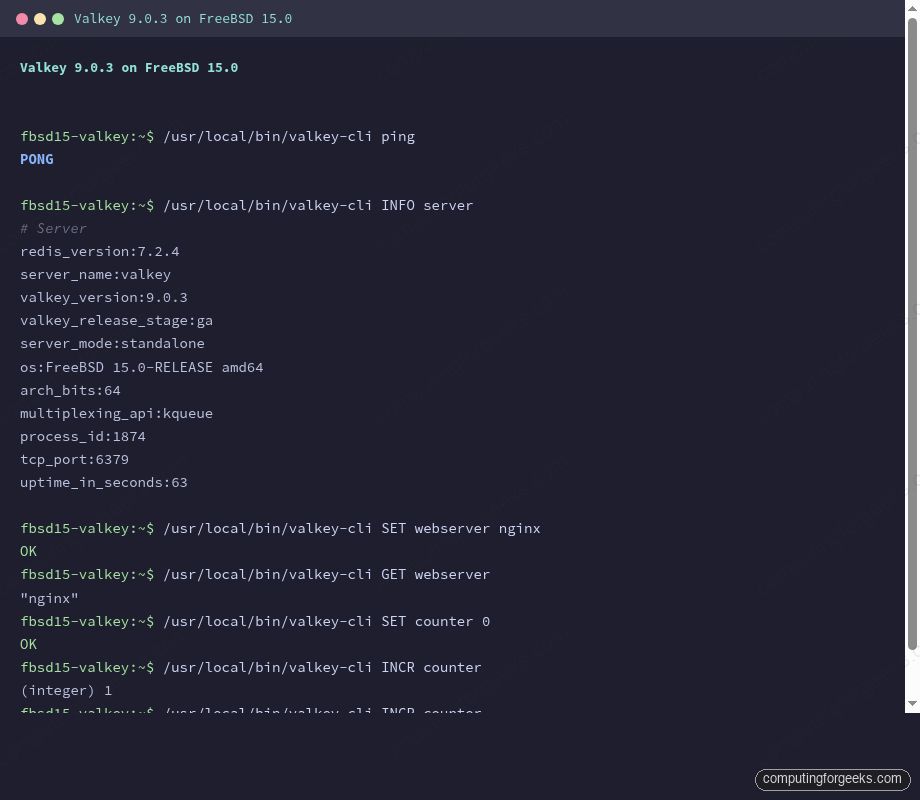
The CLI binaries land in /usr/local/bin/. A quick ping confirms the server is accepting connections:
/usr/local/bin/valkey-cli pingA clean response means the server is up and accepting connections:
PONGPull the server info to verify the exact version running on your system:
/usr/local/bin/valkey-cli INFO serverThe output shows both the Redis compatibility version and the actual Valkey release:
# Server
redis_version:7.2.4
server_name:valkey
valkey_version:9.0.3
valkey_release_stage:ga
server_mode:standalone
os:FreeBSD 15.0-RELEASE amd64
arch_bits:64
multiplexing_api:kqueue
tcp_port:6379
Two version fields appear: redis_version (protocol compatibility layer, 7.2.4) and valkey_version (the actual Valkey release, 9.0.3). The kqueue multiplexing API confirms FreeBSD’s native I/O event mechanism is in use rather than epoll.
Configure Authentication, Memory, and Persistence
By default Valkey listens on all interfaces with no password, which triggers protected-mode warnings if you’re not careful. The configuration file lives at /usr/local/etc/valkey.conf. Open it:
vi /usr/local/etc/valkey.confApply these settings (locate each directive by searching in vi with /^# requirepass and similar):
# Bind to localhost only
bind 127.0.0.1

# Require password for all connections
requirepass StrongLabPass123

# Cap memory usage at 1 GB
maxmemory 1gb

# Evict least-recently-used keys when full
maxmemory-policy allkeys-lru

# RDB snapshot: save if at least 1 key changed in 900 seconds
save 3600 1 300 100 60 10000

# Enable AOF for durability
appendonly yes

# Flush AOF buffer to disk once per second
appendfsync everysec
Restart to pick up the changes:
service valkey restartAll subsequent valkey-cli commands now require the -a flag. If you skip it, you’ll see NOAUTH Authentication required. If you try to connect from a remote address without setting bind and requirepass, Valkey returns DENIED Redis is running in protected mode. Set both directives to resolve it.
Test Data Operations
Run a few basic operations to confirm the authenticated server is working:
/usr/local/bin/valkey-cli -a StrongLabPass123 SET webserver nginx
/usr/local/bin/valkey-cli -a StrongLabPass123 GET webserver
/usr/local/bin/valkey-cli -a StrongLabPass123 EXPIRE webserver 300
/usr/local/bin/valkey-cli -a StrongLabPass123 SET counter 0
/usr/local/bin/valkey-cli -a StrongLabPass123 INCR counter
/usr/local/bin/valkey-cli -a StrongLabPass123 INCR counter
/usr/local/bin/valkey-cli -a StrongLabPass123 GET counter
All commands return expected responses. The INCR calls increment atomically, which makes Valkey suitable for counters, rate limiters, and sequence generation without locking:
OK
"nginx"
(integer) 1
OK
(integer) 1
(integer) 2
"2"
Verify Persistence
Valkey writes two types of persistence files. RDB snapshots (dump.rdb) are point-in-time backups triggered by BGSAVE or the save rules in the config. AOF logs every write command in append-only fashion. Both live under /var/db/valkey/.
Set a key, trigger a snapshot, and confirm the RDB file exists:
/usr/local/bin/valkey-cli -a StrongLabPass123 SET persist_test "I survive restarts"
/usr/local/bin/valkey-cli -a StrongLabPass123 BGSAVE
sleep 2
ls -la /var/db/valkey/
The dump.rdb file appears alongside the AOF directory:
OK
Background saving started
total 22
drwxr-xr-x  3 valkey valkey   4 Apr 15 21:37 .
drwxr-xr-x 14 root   wheel   17 Apr 15 21:35 ..
drwx------  2 valkey valkey   5 Apr 15 21:36 appendonlydir
-rw-------  1 valkey valkey 175 Apr 15 21:37 dump.rdb
Restart the service and verify the key survives:
service valkey restart
/usr/local/bin/valkey-cli -a StrongLabPass123 GET persist_test
The key is still present after the restart, loaded from the RDB snapshot:
Stopping valkey.
Waiting for PIDS: 1764.
Starting valkey.
"I survive restarts"
If you see a MISCONF Redis is configured to save RDB snapshots, but it is currently not able to persist on disk error, the valkey user lacks write permission on /var/db/valkey/. Fix it with chown -R valkey:valkey /var/db/valkey.
ACL Users
Valkey supports Redis-compatible ACLs for least-privilege access control. This matters when your application tier connects to Valkey with credentials that shouldn’t have write access to all keys.
Create a read-only user:
/usr/local/bin/valkey-cli -a StrongLabPass123 ACL SETUSER readonly on ">readpw" allkeys "+@read"Verify the ACL was created:
/usr/local/bin/valkey-cli -a StrongLabPass123 ACL LISTBoth the default admin user and the new readonly user appear in the list:
user default on nopass ~* &* +@all
user readonly on sanitize-payload #58d5ea... ~* resetchannels -@all +@read
Test that the readonly user can read but is blocked from writes:
/usr/local/bin/valkey-cli --user readonly -a readpw GET webserver
/usr/local/bin/valkey-cli --user readonly -a readpw SET blocked_write "test"
Reads succeed; writes are blocked with a permission error:
"nginx"
NOPERM User readonly has no permissions to run the 'set' command
For production, persist ACL rules by adding them to valkey.conf or an external ACL file referenced via aclfile /usr/local/etc/valkey.acl. Runtime ACL changes disappear on restart unless saved with ACL SAVE (requires aclfile configured).
Replication
Valkey replication follows the same model as Redis. The replica connects to the primary, receives a full RDB snapshot, then streams command log deltas. On a second server, add this to valkey.conf before starting the service:
replicaof 10.0.1.50 6379
masterauth StrongLabPass123
After the replica starts, check the replication state on the primary:
/usr/local/bin/valkey-cli -a StrongLabPass123 INFO replicationWith a replica connected, the primary shows lag and offset data in real time:
# Replication
role:master
connected_slaves:1
slave0:ip=10.0.1.51,port=6379,state=online,offset=2856,lag=0
master_replid:2ddf165643fa4d46ca358e24c338f605ecff36d4
master_repl_offset:2856
Replicas are read-only by default (replica-read-only yes). For high availability, pair replication with monitoring via Prometheus and Grafana on FreeBSD to alert on replication lag.
Performance Tuning and Benchmarks
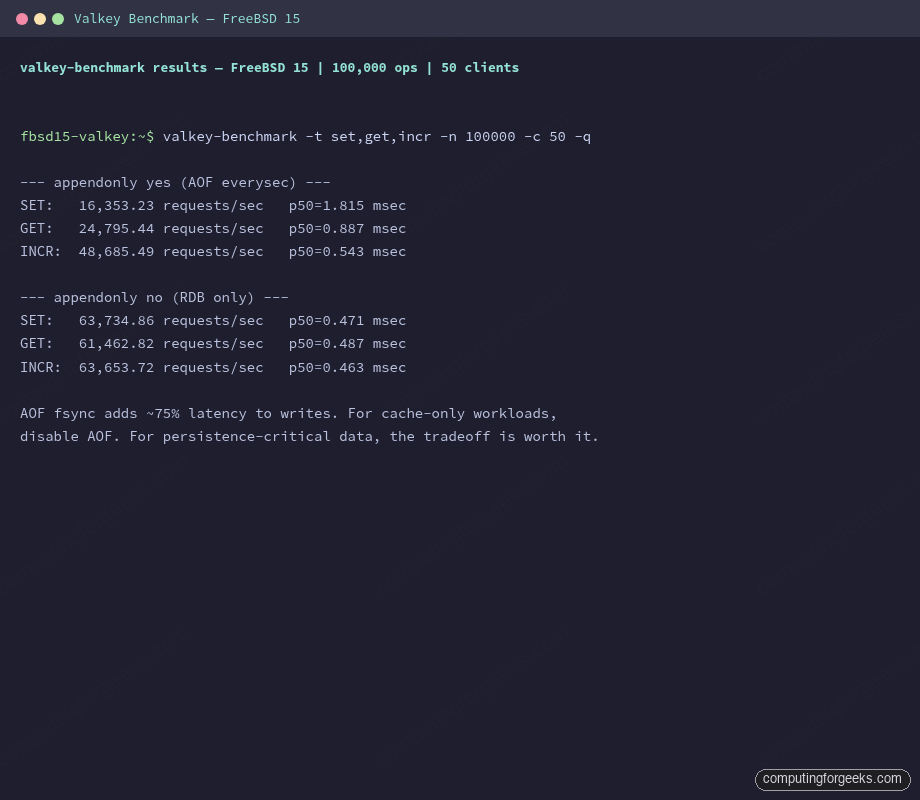
These numbers come from a 2-core, 2 GB KVM VM on FreeBSD 15.0-RELEASE, using valkey-benchmark with 50 concurrent clients and 100,000 operations per test. The comparison is between two configurations: AOF enabled with appendfsync everysec, and AOF disabled (RDB snapshots only).
valkey-benchmark -a StrongLabPass123 -t set,get,incr -n 100000 -c 50 -qResults on this VM:
| Operation | AOF everysec | RDB only | AOF overhead |
|---|---|---|---|
| SET | 16,353 req/s | 63,735 req/s | ~74% slower |
| GET | 24,795 req/s | 61,463 req/s | ~60% slower |
| INCR | 48,685 req/s | 63,654 req/s | ~23% slower |
The AOF fsync call is the bottleneck. appendfsync everysec groups writes into one-second windows, which is the compromise between full durability (always, which syncs every write) and best performance (no, which lets the OS decide). For a cache-only deployment where you can tolerate losing one second of data, disable AOF entirely.
A few other tuning levers worth knowing on FreeBSD:
vm.overcommit_memory equivalent. Linux has vm.overcommit_memory=1 to silence Valkey’s background save fork warnings. FreeBSD doesn’t have the same overcommit model, so these warnings don’t appear. No action needed.
Transparent huge pages. Linux users disable THP (echo never > /sys/kernel/mm/transparent_hugepage/enabled) to avoid latency spikes during copy-on-write page splits. FreeBSD uses superpages differently and doesn’t expose a THP toggle, so the issue simply doesn’t apply.
IO thread tuning. Valkey 8.x+ added IO threading for parallel read/write handling. Enable it in valkey.conf when your CPU count justifies it:
io-threads 4
io-threads-do-reads yes
On a 2-core VM, this makes no measurable difference and can slightly increase context switching. On 8-core or larger hosts, expect a 30-50% throughput increase on read-heavy workloads. Set io-threads to half your core count as a starting point, then benchmark to confirm.
Persistence vs cache decision. If Valkey is serving as a cache in front of PostgreSQL or MariaDB (and cache misses fall back to the database), disable both AOF and scheduled saves:
save ""
appendonly no
This recovers the full RDB-only throughput numbers shown in the table above and removes the disk I/O path from the hot write path entirely.
Platform Availability Comparison
Valkey is available across every major platform. Package versions differ slightly depending on repo cadence:
| Platform | Install method | Version (April 2026) | Notes |
|---|---|---|---|
| FreeBSD 15.0 | pkg install valkey | 9.0.3 | kqueue I/O, no THP concerns |
| Ubuntu 24.04 | apt install valkey | 7.2.x (focal) | Needs PPA for 8.x+ |
| Rocky Linux 10 | dnf install valkey | 8.0.x (AppStream) | SELinux policy included |
| Docker | docker pull valkey/valkey | 9.0.3 (latest tag) | Official LF image |
FreeBSD’s pkg ships the newest release (9.0.3), ahead of both Ubuntu’s apt and Rocky’s AppStream at the time of testing. If you need 9.x on Linux, the official Docker image or a manual build from source are currently the fastest paths.