Cert sprawl starts with DNS. If the zone you issue certs against isn’t locked down first, every cert you automate sits on a soft foundation: a rogue CA could mis-issue for your domain, a DNS hijack could let an attacker prove domain control to Let’s Encrypt, and nothing in your infrastructure would notice. This is why the first real step of the GCP certificate and DNS consolidation series is not certificates. It is Cloud DNS with DNSSEC and CAA records, provisioned in Terraform, delegated from Cloudflare, and verified end-to-end.
This guide walks through the dns-delegated-zone Terraform module used across the series, the DS record handoff at the parent zone, DNSSEC validation with dig, and CAA policy restricting which CAs can issue for your subdomain. At the end you have a DNSSEC-signed zone, a DS-anchored chain of trust all the way to the root, and a CAA policy that the whole series leans on.
Tested April 2026 on Google Cloud DNS, Cloudflare parent zone for computingforgeeks.com, Terraform 1.9.8, google provider 6.12, cloudflare provider 4.47
Why DNSSEC and CAA Come First
Certificate Manager on GCP issues public certs through Google Trust Services or Let’s Encrypt using DNS-01 challenges. The CA proves domain control by looking up a TXT record under _acme-challenge. Every link in that chain needs to be trustworthy:
- If your DNS can be hijacked, the CA happily issues a cert to the attacker.
- If any CA can issue for your domain, an employee with an API token at the wrong CA can mint a valid cert behind your back.
- If resolvers don’t validate DNSSEC, tampered answers go undetected mid-path.
DNSSEC fixes the resolver-side tampering problem by signing RRsets and anchoring the chain at the root via a DS record at the parent. CAA records (RFC 8659) fix the CA-side problem: they tell every compliant CA, only these issuers are allowed to mint certs for this name. Both are cheap to turn on and both are prerequisites for the rest of this series.
Delegation Pattern (Why a Subzone)
The base domain computingforgeeks.com lives on Cloudflare. Moving the entire zone to Google Cloud DNS just to experiment with Certificate Manager would be disruptive. The pragmatic pattern is subzone delegation: carve out cfg-lab.computingforgeeks.com as a child zone hosted on Google Cloud DNS, and leave the parent where it is.
Cloudflare keeps the base zone. Google Cloud DNS owns the delegated child. Four NS records at the parent point at Google’s nameservers. A single DS record at the parent anchors DNSSEC. Everything inside the child zone, including ACME challenge records, CAA records, and wildcard apex names, is managed by the same Terraform that provisions the certs later in the series.
This is the real-world pattern platform teams converge on when consolidating certs across dozens of GCP projects. The parent registrar stays boring and stable; the operational zone moves to where the automation lives.
Prerequisites
- A GCP project with Cloud DNS API enabled (
gcloud services enable dns.googleapis.com) - A domain at a registrar or DNS provider that accepts NS and DS records (this guide uses Cloudflare)
- Terraform 1.9+ and a backend configured for remote state
googleandcloudflareproviders wired with credentialsdigfrom BIND utilities for verification
The Terraform Module
Everything lives in modules/dns-delegated-zone/ in the series infra repo. One module handles the Cloud DNS managed zone, DNSSEC config, CAA policy, and NS delegation at Cloudflare. Reusing it for the second subzone later (the regional one) takes a single Terragrunt file.
The managed zone and DNSSEC config:
resource "google_dns_managed_zone" "this" {
  project    = var.project_id
  name       = var.zone_name
  dns_name   = var.dns_name
  visibility = "public"
  labels     = var.common_labels

  dynamic "dnssec_config" {
    for_each = var.enable_dnssec ? [1] : []
    content {
      state         = "on"
      non_existence = "nsec3"
      default_key_specs {
        algorithm  = "rsasha256"
        key_type   = "keySigning"
        key_length = 2048
      }
      default_key_specs {
        algorithm  = "rsasha256"
        key_type   = "zoneSigning"
        key_length = 1024
      }
    }
  }
}
NSEC3 is the right choice for any public zone. Plain NSEC leaks the full list of names in the zone through authenticated denial of existence. NSEC3 hashes the names, so walking the zone becomes a password-cracking problem rather than a zone transfer. The 2048-bit KSK and 1024-bit ZSK match Google’s defaults and are accepted by every resolver in use today.
CAA is a DNS record, not a TLS feature. Compliant CAs check it before issuance:
resource "google_dns_record_set" "caa" {
  project      = var.project_id
  managed_zone = google_dns_managed_zone.this.name
  name         = var.dns_name
  type         = "CAA"
  ttl          = 3600

  rrdatas = concat(
    [for ca in var.caa_issuers : "0 issue \"${ca}\""],
    [for ca in var.caa_wildcard_issuers : "0 issuewild \"${ca}\""],
    ["0 iodef \"mailto:${var.caa_iodef_email}\""],
  )
}
Three record flavours compose the policy. issue lists CAs allowed to mint any cert. issuewild lists CAs allowed to mint wildcards. iodef is the mailbox a CA notifies when it sees a violation. For this series the allowed issuers are pki.goog (Google Trust Services, used by Certificate Manager) and letsencrypt.org (for self-managed fallbacks). Wildcards are restricted to Google Trust Services only, since the consolidation plan puts every general wildcard through Certificate Manager.
Delegation at the parent uses the Cloudflare provider. Google Cloud DNS always assigns exactly four nameservers, so the count is fixed at plan time:
resource "cloudflare_record" "ns_delegation" {
  count = 4

  zone_id = var.cloudflare_parent_zone_id
  name    = var.cloudflare_ns_record_name
  type    = "NS"
  content = google_dns_managed_zone.this.name_servers[count.index]
  ttl     = 3600
  proxied = false
  comment = "Delegation to Google Cloud DNS managed by Terraform"
}
The DS record is deliberately NOT managed by this module. DNSSEC keys can be rotated by Google and the DS at the parent has to be coordinated with key activation state. Keeping DS in a separate, manual (or a second Terragrunt stack) step stops Terraform from racing key rotation.
Applying the Module
A Terragrunt call instantiates the module for the cfg-lab subzone:
inputs = {
  zone_name                 = "cfg-lab"
  dns_name                  = "cfg-lab.computingforgeeks.com."
  cloudflare_ns_record_name = "cfg-lab"
  enable_dnssec             = true
  caa_issuers               = ["pki.goog", "letsencrypt.org"]
  caa_wildcard_issuers      = ["pki.goog"]
  caa_iodef_email           = "[email protected]"
}
Apply it:
cd live/article-lab/europe-west1/dns-cfg-lab
terragrunt apply
Terraform creates the managed zone, enables DNSSEC, writes the CAA records, and then creates the four NS records at Cloudflare. Propagation to public resolvers is near-instant because Cloudflare edge refreshes its answers within a few seconds.
Extracting the DS Record
When a zone goes DNSSEC-signed, Google Cloud DNS generates a KSK. The parent zone needs the DS (Delegation Signer) digest of that KSK for the chain of trust to validate. Pull it from gcloud:
gcloud dns dns-keys list --zone=cfg-lab \
  --format="table(type,algorithm,keyLength,isActive,ds_record())"
The row with keySigning is the KSK. Its ds_record column contains four fields: key tag, algorithm, digest type, digest. For algorithm 8 (RSA/SHA-256) and digest type 2 (SHA-256), the format is:
12940 8 2 D62C5960269E637AB4AD9F471B3FA38A83EAF19CF6577A39F6404D3EC957F26AThis is the value the parent needs. The Cloudflare API accepts DS records in structured form, not concatenated:
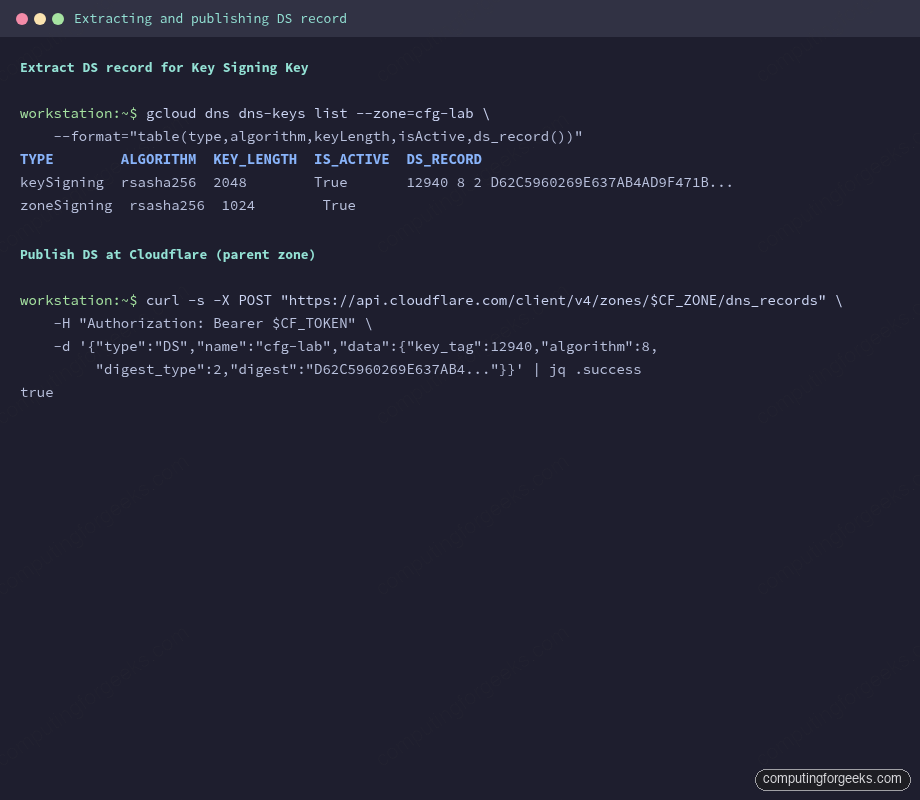
Cloudflare’s DS record form takes the same four fields: key tag, algorithm, digest type, and the hex digest. Pasting the concatenated form into a single field is a common mistake that silently fails validation.
Publishing DS at the Parent
Cloudflare accepts DS records via API or UI. The API is scriptable and easier to capture in a runbook:
CF_ZONE="5a8e1ae43e23cfecdd02bd835f919472"
curl -s -X POST "https://api.cloudflare.com/client/v4/zones/$CF_ZONE/dns_records" \
  -H "Authorization: Bearer $CF_API_TOKEN" \
  -H "Content-Type: application/json" \
  --data '{
    "type": "DS",
    "name": "cfg-lab",
    "data": {
      "key_tag": 12940,
      "algorithm": 8,
      "digest_type": 2,
      "digest": "D62C5960269E637AB4AD9F471B3FA38A83EAF19CF6577A39F6404D3EC957F26A"
    },
    "ttl": 3600,
    "comment": "DNSSEC chain-of-trust for Google Cloud DNS delegated zone"
  }'
A successful response returns the record ID and "success": true. Propagation takes a minute or two, bounded by the parent zone’s TTL on negative DS responses.
Verifying the Chain
Three things need to be true for DNSSEC to actually protect the subzone:
- The DS record is published at the parent.
- A validating resolver returns the
ad(Authenticated Data) flag. - Multiple independent resolvers agree.
Query the DS at the parent first:
dig +dnssec +multi DS cfg-lab.computingforgeeks.com @1.1.1.1 +noall +answerThe answer contains the DS RRset plus an RRSIG, signed by the parent’s ZSK. If only the DS appears with no RRSIG, the parent has the record but its own chain is broken. If nothing appears, propagation isn’t complete yet.
Now ask a validating resolver about a record inside the child zone and check the ad flag:
dig +dnssec SOA cfg-lab.computingforgeeks.com @1.1.1.1 | grep flagsLook for ad in the flags list. That letter means the resolver fetched every signature from the root down to cfg-lab and validated each one. Without ad, the chain is broken somewhere, usually because the DS digest doesn’t match the active KSK.
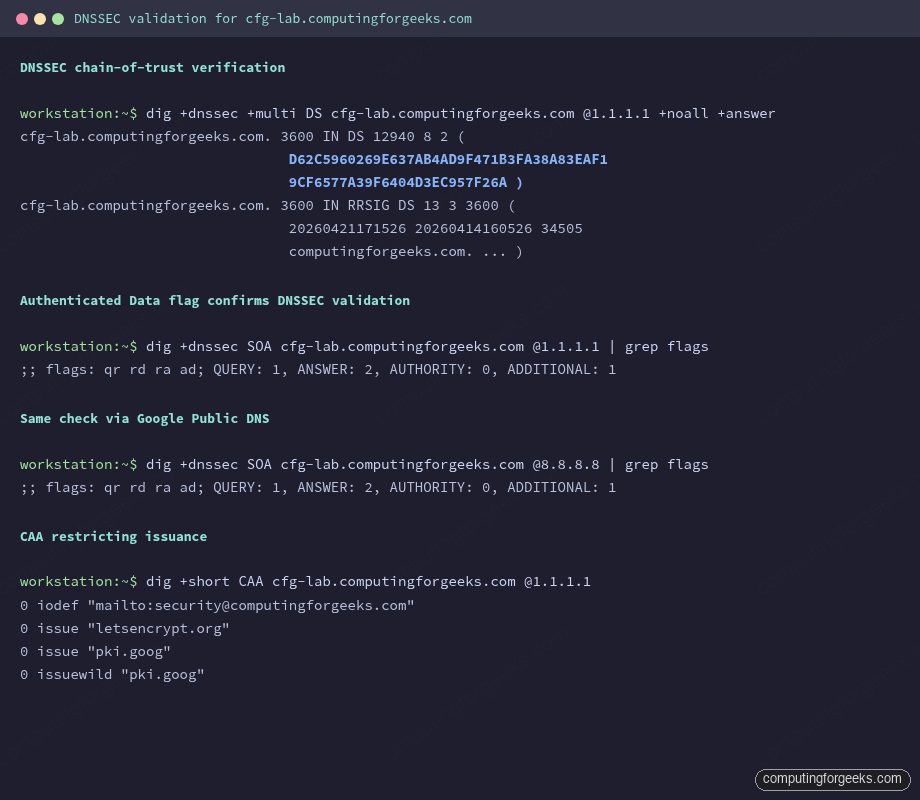
Cross-check with Google Public DNS too. Different validating codebases catch different bugs:
dig +dnssec SOA cfg-lab.computingforgeeks.com @8.8.8.8 | grep flagsBoth resolvers should return qr rd ra ad. For a visual confirmation, paste the zone into Verisign’s DNSSEC Analyzer. Every step from the root down to cfg-lab should be green.
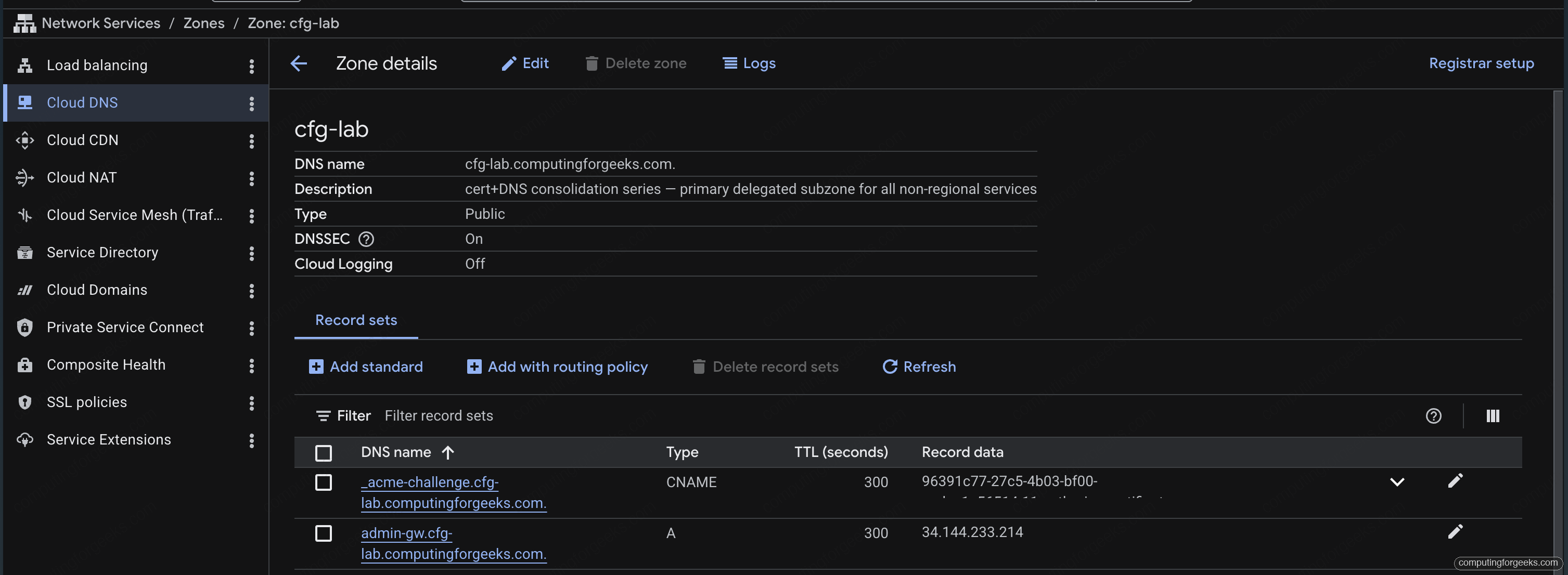
The Google Cloud console mirrors the same state for anyone who prefers clicking to typing. The zone detail page shows DNSSEC = On, the description from the Terraform label, and the four assigned nameservers:
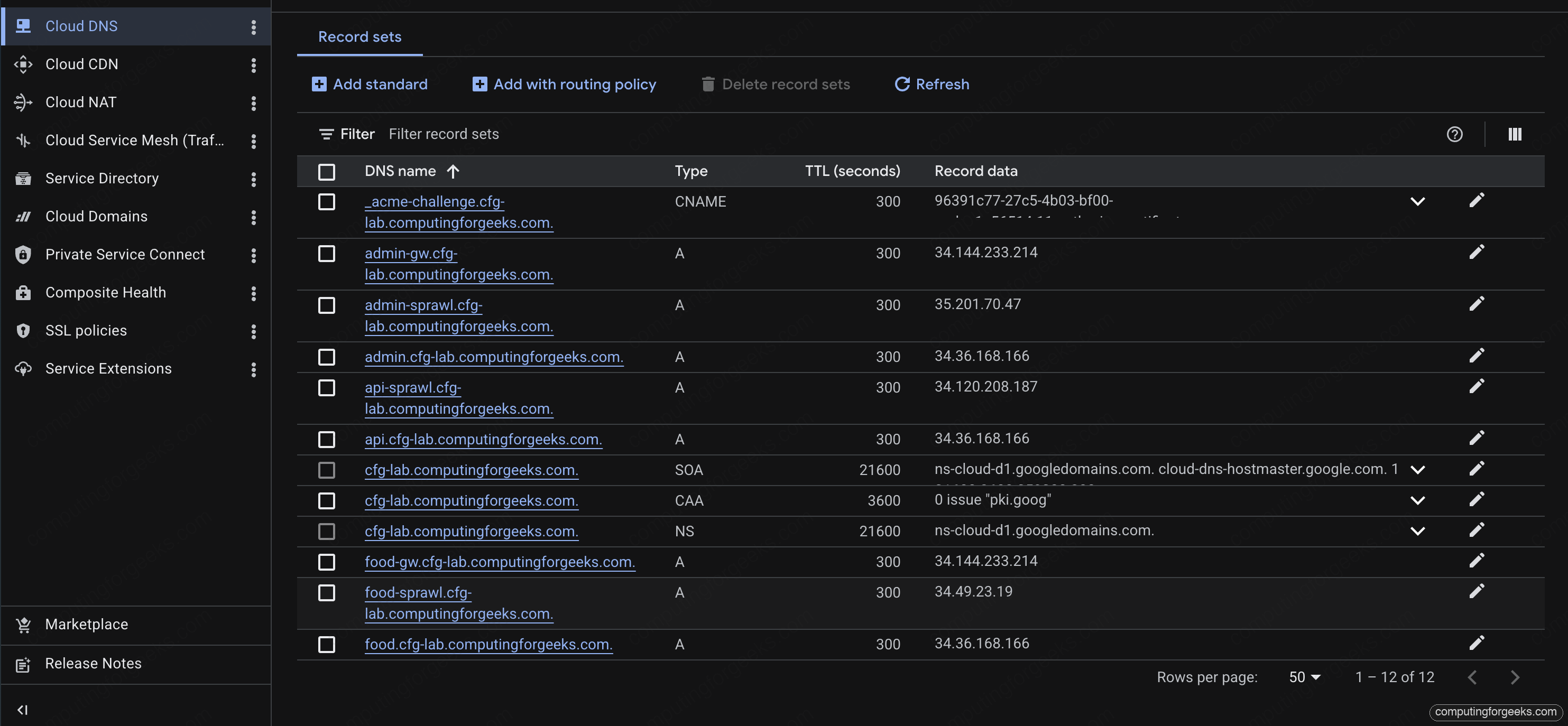
The record-sets view on the same zone lists the CAA, NS, SOA, and every A record added by later stacks in the series. This is the single-source-of-truth view operators tend to bookmark:
Verifying CAA Policy
CAA is plain DNS. Any resolver returns the full policy:
dig +short CAA cfg-lab.computingforgeeks.com @1.1.1.1The four expected lines:
0 issue "letsencrypt.org"
0 issue "pki.goog"
0 issuewild "pki.goog"
0 iodef "mailto:[email protected]"
Two independent issuers can mint non-wildcard certs. Only Google Trust Services can mint wildcards. If someone with API access at DigiCert tries to issue for this zone, the attempt fails the CAA check and the iodef mailbox gets the violation report. That’s the audit trail.
For a browser-friendly check, caatest.co.uk renders the policy and flags common mistakes (missing apex records, invalid tags, unquoted values).
A Common Pitfall: DS Digest Mismatch
Error: “DS records exist but no corresponding DNSKEY”
The most common bad state looks like this: dig DS returns a record, dig DNSKEY returns a set, but the ad flag never appears. Either the DS digest doesn’t match any current KSK, or the KSK at the child has been rotated and the parent still has the old DS.
Re-extract the DS from the child with gcloud dns dns-keys list and compare. The key tag must match one of the active keySigning keys. If it doesn’t, update the DS at the parent with the current digest and let TTL bleed through (15 minutes for TTL 3600, bounded by negative caching).
Error: “CAA record prohibits issuance”
When you try to issue a cert later in the series and the CA refuses with this error, the CAA policy is doing its job. Either the CA you’re using isn’t listed under issue, or you tried a wildcard when wildcards are restricted. Update the policy explicitly rather than dropping it; dropping CAA is the reason many cert incidents happen in the first place.
What This Unlocks
With the zone in place, DNSSEC signed, DS anchored at the parent, and CAA restricting issuance, every subsequent article in the series builds on this foundation. The next step is issuing a wildcard cert via Certificate Manager with DNS-01 authorization against this zone. The ACME CNAME record goes here, the wildcard apex goes here, and the entire cert map that consolidates dozens of per-service certs onto a single LB resolves back to this zone.
Reusing the module for the regional subzone is a 5-line Terragrunt file. The series uses cfg-regional.computingforgeeks.com as a second delegated zone specifically to demonstrate regional vs global load balancer trade-offs, and the same DNSSEC and CAA discipline applies there.
Cleanup
The delegated subzone is durable across the series; tearing it down between articles would force re-issuance of every cert. When the series is fully retired, remove the DS at the parent first, wait for the parent’s DS TTL to bleed through, then destroy the child zone with terragrunt destroy. Destroying in the other order leaves resolvers unable to validate the zone for up to the DS TTL, which is a harmless but visible glitch.
For ad-hoc testing inside the zone (ACME challenge records, temporary A records), the session cleanup script in the series repo handles the teardown: infra-gcp/scripts/session-down.sh. The zone itself survives.