

Every penetration test starts the same way: figuring out what’s actually running on the network. Before you touch an exploit framework or craft a payload, you need a map. Nmap has been the go-to tool for that reconnaissance phase for over two decades, and for good reason. It’s fast, accurate, and scriptable enough to fit into any workflow.
This guide walks through every major Nmap scan type with real output from a Kali Linux attack box pointed at a Rocky Linux 10.1 target running five common services. Each scan type includes the actual command, real terminal output, and practical notes on when to use it. Whether you’re preparing for OSCP, running an authorized pentest, or auditing your own infrastructure, this covers the full toolkit.
Tested April 2026 on Kali Linux 2026.1, Nmap 7.98, scanning a Rocky Linux 10.1 target with SSH, FTP, Nginx, MariaDB, and Postfix services
What Nmap Does and Why It Matters
Nmap (Network Mapper) sends specially crafted packets to target hosts and analyzes the responses to determine which ports are open, what services are running, what OS the target uses, and whether known vulnerabilities exist. It supports TCP, UDP, SCTP, and ICMP scanning with dozens of timing and evasion options. The built-in Nmap Scripting Engine (NSE) extends it further with over 600 scripts for vulnerability detection, brute forcing, and service enumeration. It ships pre-installed on Kali Linux and is the foundation that tools like Metasploit build on for target discovery.
Nmap Scan Type Cheat Sheet
Before jumping into examples, here’s a quick reference for every scan type covered in this guide. Bookmark this table.
| Scan Type | Flag | Description | When to Use |
|---|---|---|---|
| Ping sweep | -sn | Host discovery only, no port scan | Mapping live hosts on a subnet |
| SYN scan | -sS | Half-open TCP scan (stealthy, fast) | Default scan with root privileges |
| TCP connect | -sT | Full TCP handshake | When you don’t have root access |
| UDP scan | -sU | Sends UDP probes to detect open UDP ports | Finding DNS, SNMP, DHCP, NTP services |
| Version detection | -sV | Probes open ports to identify service and version | Identifying exact software versions for CVE lookup |
| OS detection | -O | TCP/IP fingerprinting to guess the target OS | Profiling targets before exploitation |
| Aggressive scan | -A | Combines -sV, -O, --traceroute, and default NSE scripts | Comprehensive single-target enumeration |
| NSE scripts | --script | Runs Lua scripts for vuln detection, brute force, etc. | Targeted vulnerability scanning |
Host Discovery
The first step in any engagement is figuring out which hosts are alive. The -sn flag (formerly -sP) performs a ping sweep without scanning ports. On a local network, Nmap uses ARP requests, which are faster and more reliable than ICMP.
Scan a single host:
sudo nmap -sn 10.0.1.50The ARP probe confirms the host is up and reveals its MAC address:
Starting Nmap 7.98 ( https://nmap.org ) at 2026-04-12 04:49 -0400
Nmap scan report for 10.0.1.50
Host is up (0.00035s latency).
MAC Address: BC:24:11:24:74:30 (Unknown)
Nmap done: 1 IP address (1 host up) scanned in 0.57 seconds
To sweep an entire subnet, use CIDR notation:
sudo nmap -sn 10.0.1.0/24You can also scan a range with sudo nmap -sn 10.0.1.1-100 or feed a list of targets from a file with -iL targets.txt. For large networks, this initial sweep saves significant time by narrowing down which hosts are worth scanning further.
Port Scanning
With root privileges, Nmap defaults to a SYN scan (-sS) against the top 1000 most common ports. This is the bread and butter of network reconnaissance.
sudo nmap 10.0.1.50Five open ports on the target:
PORT     STATE SERVICE
21/tcp   open  ftp
22/tcp   open  ssh
80/tcp   open  http
3306/tcp open  mysql
9090/tcp open  zeus-admin
Notice that Nmap labels port 9090 as zeus-admin based on its internal database of well-known port assignments. That doesn’t mean Zeus is actually running there. The service name in a basic scan is just a guess from /usr/share/nmap/nmap-services. You need version detection (-sV) to find out what’s actually listening.
To scan specific ports instead of the top 1000:
sudo nmap -p 22,80,443,3306,8080 10.0.1.50Or scan a range of ports:
sudo nmap -p 1-10000 10.0.1.50Service and Version Detection
Knowing a port is open is useful. Knowing the exact software and version behind it is where the real intelligence comes from. The -sV flag sends additional probes to each open port and matches the responses against Nmap’s signature database.
sudo nmap -sV 10.0.1.50Now we can see exactly what’s running:
PORT     STATE SERVICE     VERSION
21/tcp   open  ftp         vsftpd 3.0.5
22/tcp   open  ssh         OpenSSH 9.9 (protocol 2.0)
80/tcp   open  http        nginx 1.26.3
3306/tcp open  mysql       MariaDB 10.3.23 or earlier (unauthorized)
9090/tcp open  zeus-admin?
Service Info: OS: Unix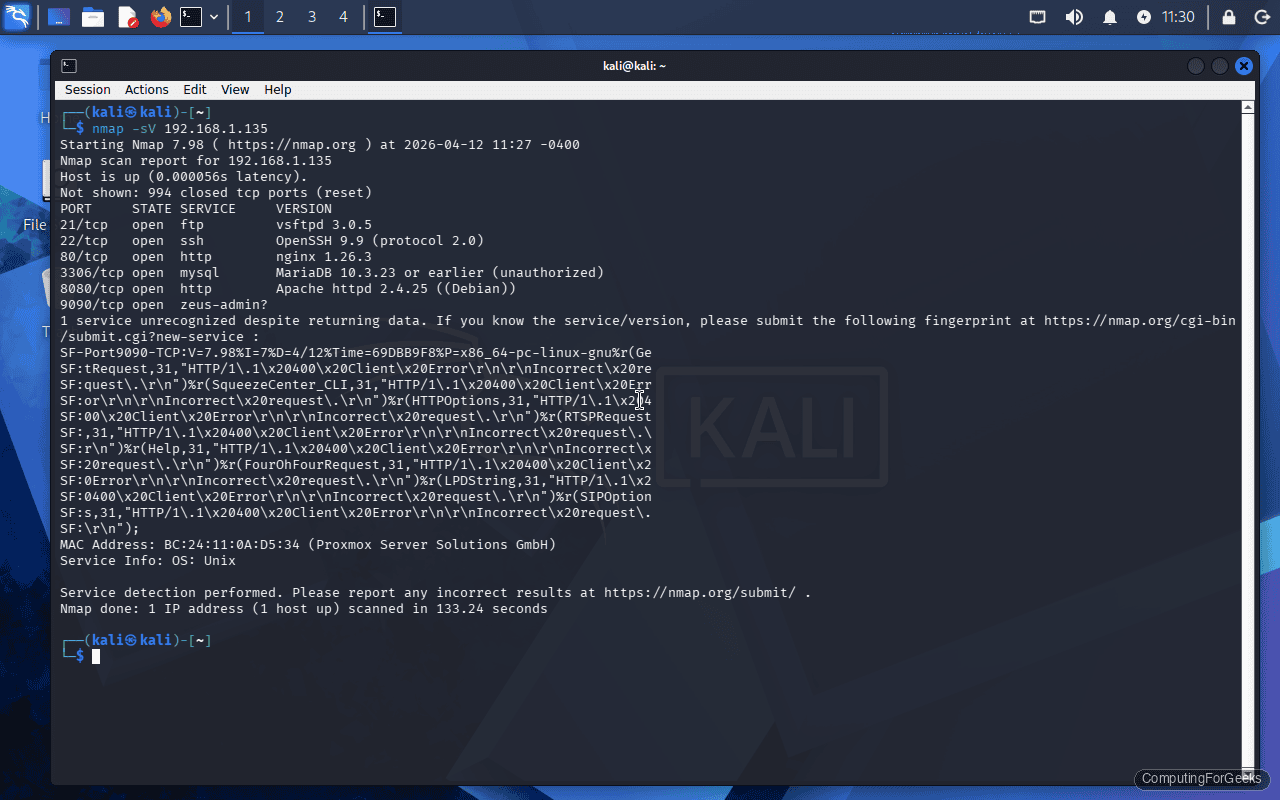
Several things jump out from this output. vsftpd 3.0.5 and OpenSSH 9.9 are both current versions. Nginx 1.26.3 is a recent stable release. MariaDB reports “unauthorized” because Nmap couldn’t authenticate to grab the exact version, but it narrowed it down based on the protocol handshake. Port 9090 still shows a question mark, meaning Nmap couldn’t confidently identify the service. That’s common with custom applications or web dashboards (Cockpit, for instance, runs on port 9090 by default on RHEL-family systems).
You can increase version detection intensity with --version-intensity 9 (default is 7), which sends more probes but takes longer.
Operating System Fingerprinting
The -O flag analyzes TCP/IP stack behavior (window sizes, TTL values, fragmentation handling) to determine the target’s operating system. It requires at least one open port and one closed port on the target for reliable results.
sudo nmap -O 10.0.1.50The fingerprinting results:
Device type: general purpose|router
Running: Linux 4.X|5.X, MikroTik RouterOS 7.X
OS details: Linux 4.15 - 5.19, OpenWrt 21.02 (Linux 5.4)
OS detection is probabilistic, not exact. The target is actually Rocky Linux 10.1 running kernel 6.12, but Nmap’s signature database grouped it into the Linux 4.x/5.x range because the TCP/IP stack behavior hasn’t changed dramatically between kernel versions. This is a known limitation. You’ll get a general “it’s Linux” answer, but pinpointing the exact distribution or kernel version requires other methods (banner grabbing via -sV, or NSE scripts like http-headers).
To make Nmap try harder, add --osscan-guess for aggressive guessing or --max-os-tries 3 to increase attempts.
The Aggressive Scan
The -A flag combines four scan types into one: version detection (-sV), OS fingerprinting (-O), traceroute (--traceroute), and default NSE scripts (-sC). It’s the kitchen sink option for thorough enumeration of a single target.
sudo nmap -A 10.0.1.50The output is significantly more detailed than a basic scan. For our target, the aggressive scan reveals:
- SSH host keys: ECDSA 256-bit and ED25519 256-bit fingerprints (useful for verifying host identity)
- HTTP server header:
nginx/1.26.3confirmed via thehttp-server-headerNSE script - HTTP title: the default page title from the
http-titlescript - Traceroute: 1 hop (confirming the target is on the same network segment)
- FTP banner: vsftpd version string plus anonymous login status
The aggressive scan is noisy by design. Every IDS on the network will flag it. Use it for authorized testing where stealth isn’t a concern, or against a single high-value target where you want maximum information in one pass. Don’t run -A against an entire /24 subnet unless you enjoy waiting.
Full Port Scan
The default top-1000 scan misses services running on non-standard ports. A full 65535-port scan ensures nothing hides. Combine the SYN scan with --min-rate to keep things fast:
sudo nmap -sS -p- --min-rate 5000 10.0.1.50All 65535 ports scanned in just over a second on a local network:
Nmap done: 1 IP address (1 host up) scanned in 1.17 secondsThe scan found the same five ports (21, 22, 80, 3306, 9090), confirming no services are hiding on unusual ports. On a local network, --min-rate 5000 is perfectly safe. For scanning across the internet, tone it down to avoid packet loss.
Nmap provides timing templates from -T0 (paranoid) to -T5 (insane):
| Template | Name | Use Case |
|---|---|---|
-T0 | Paranoid | IDS evasion, sends one probe every 5 minutes |
-T1 | Sneaky | IDS evasion, 15-second intervals |
-T2 | Polite | Reduced bandwidth usage, production networks |
-T3 | Normal | Default, balanced speed and accuracy |
-T4 | Aggressive | Fast scan on reliable networks |
-T5 | Insane | Sacrifices accuracy for speed, local networks only |
For most pentest engagements, -T4 is the sweet spot. It’s fast without being reckless.
UDP Scanning
TCP scanning gets all the attention, but plenty of critical services run over UDP: DNS (53), SNMP (161), NTP (123), DHCP (67/68), and TFTP (69). UDP scanning is slow because there’s no handshake. Nmap sends a UDP packet, waits for a response, and if nothing comes back, the port is either open or filtered.
sudo nmap -sU --top-ports 20 10.0.1.50Several UDP services detected as open or filtered:
PORT      STATE         SERVICE
68/udp    open|filtered dhcpc
123/udp   open|filtered ntp
138/udp   open|filtered netbios-dgm
139/udp   open|filtered netbios-ssn
161/udp   open|filtered snmp
162/udp   open|filtered snmptrap
514/udp   open|filtered syslog
520/udp   open|filtered route
631/udp   open|filtered ipp
4500/udp  open|filtered nat-t-ike
The open|filtered state is the curse of UDP scanning. It means Nmap got no response, so the port could be open (service silently accepted the packet) or filtered (firewall dropped it). There’s no reliable way to distinguish between the two without application-layer probes. Adding -sV alongside -sU helps because Nmap sends protocol-specific payloads that can confirm whether a service actually responds.
A full 65535-port UDP scan can take hours. Stick to --top-ports 20 or --top-ports 100 for practical engagements, and scan specific UDP ports you care about with -p U:53,161,500.
NSE Scripting Engine
The Nmap Scripting Engine (NSE) is what separates Nmap from simple port scanners. It runs Lua scripts that can detect vulnerabilities, enumerate services, brute-force credentials, and even exploit certain flaws. Scripts are organized into categories:
- auth: checks for default credentials, anonymous login, weak auth
- vuln: tests for known CVEs and misconfigurations
- exploit: attempts actual exploitation (use with extreme caution)
- discovery: enumerates directories, subdomains, SNMP communities, etc.
- brute: password brute forcing against various protocols
- safe: scripts that won’t crash services or trigger alerts
- default: the scripts that run with
-sCor-A
Run all vulnerability scripts against a target:
sudo nmap --script vuln 10.0.1.50On our test target, the vuln category scan flagged a known CVE on port 80:
PORT   STATE SERVICE
80/tcp open  http
| http-vuln-cve2011-3192:
|   VULNERABLE:
|   Apache byterange filter DoS
|     State: VULNERABLE
|     IDs:  CVE:CVE-2011-3192
|     Description:
|       The Apache web server is vulnerable to a denial of service attack when numerous
|       overlapping byte ranges are requested.
|_    References: https://cve.mitre.org/cgi-bin/cvename.cgi?name=CVE-2011-3192
This is a false positive worth noting. The target actually runs Nginx 1.26.3, not Apache. The NSE script for CVE-2011-3192 tests by sending a crafted Range header, and some non-Apache servers respond in ways that trigger a match. Always verify NSE findings manually before including them in a pentest report. False positives are common, especially with web vulnerability scripts.
Specific NSE Scripts
Instead of running an entire category, you can target individual scripts. This is faster and produces less noise.
Enumerate web directories and files with http-enum:
sudo nmap --script http-enum -p 80 10.0.1.50This script checks for common paths like /admin/, /robots.txt, /phpmyadmin/, and hundreds of others. It’s a quick way to find low-hanging fruit on web servers.
Check if FTP allows anonymous login:
sudo nmap --script ftp-anon -p 21 10.0.1.50Grab MySQL/MariaDB server information:
sudo nmap --script mysql-info -p 3306 10.0.1.50You can also combine multiple scripts in a single scan:
sudo nmap --script "ftp-anon,http-enum,mysql-info" -p 21,80,3306 10.0.1.50To see every available script on your system:
ls /usr/share/nmap/scripts/ | wc -lKali Linux 2026.1 ships with over 600 NSE scripts. Browse them by category with grep -l "categories.*vuln" /usr/share/nmap/scripts/*.nse to find vulnerability-specific scripts.
Output Formats
Scan results are only useful if you can save, parse, and share them. Nmap supports four output formats.
Normal output (human-readable text):
sudo nmap -sV 10.0.1.50 -oN scan-results.txtXML output (for parsing with tools like Metasploit, Nessus, or custom scripts):
sudo nmap -sV 10.0.1.50 -oX scan-results.xmlGrepable output (one host per line, easy to pipe through grep, awk, cut):
sudo nmap -sV 10.0.1.50 -oG scan-results.gnmapSave all three formats at once with -oA:
sudo nmap -sV 10.0.1.50 -oA full-scanThis creates full-scan.nmap, full-scan.xml, and full-scan.gnmap in one go. The XML format is particularly valuable because you can import it into Metasploit’s database with db_import full-scan.xml and have all discovered hosts and services available for exploitation.
A snippet of the XML output for reference:
<port protocol="tcp" portid="22">
  <state state="open" reason="syn-ack" reason_ttl="64"/>
  <service name="ssh" product="OpenSSH" version="9.9" extrainfo="protocol 2.0" method="probed" conf="10"/>
</port>
Timing and Performance Tuning
Beyond the -T templates, Nmap offers granular control over scan speed. These options are critical when scanning large networks or when you need to stay under IDS thresholds.
Set a minimum packet rate (useful for fast local scans):
sudo nmap -sS -p- --min-rate 10000 10.0.1.0/24Limit maximum retries for unresponsive ports (default is 10):
sudo nmap -sS --max-retries 2 10.0.1.50Set host timeout to skip slow hosts during subnet scans:
sudo nmap -sS --host-timeout 30s 10.0.1.0/24Control parallelism with --min-parallelism and --max-parallelism:
sudo nmap -sS --min-parallelism 100 --max-parallelism 256 10.0.1.0/24A practical combination for scanning a /24 quickly while keeping results accurate:
sudo nmap -sS -T4 --min-rate 5000 --max-retries 3 -p- 10.0.1.0/24 -oA network-scanFirewall Evasion Techniques
When firewalls or IDS/IPS systems block your scans, Nmap has built-in evasion options. These are for authorized penetration testing only.
Fragment packets into 8-byte chunks to evade simple packet inspection:
sudo nmap -f 10.0.1.50Use decoy addresses to obscure the real scanner IP. Nmap sends packets from both your real address and the decoys, making it harder to identify the actual source:
sudo nmap -D 10.0.1.101,10.0.1.102,10.0.1.103,ME 10.0.1.50The ME keyword inserts your real IP among the decoys. Place it randomly in the list for better obfuscation.
Spoof the source port to blend in with allowed traffic. Many firewalls allow traffic from port 53 (DNS) or port 80 (HTTP):
sudo nmap --source-port 53 10.0.1.50Spoof the source IP address (requires you to sniff responses on the network, since replies go to the spoofed address):
sudo nmap -S 10.0.1.200 -e eth0 10.0.1.50Append random data to packets to change their size and evade signature-based detection:
sudo nmap --data-length 50 10.0.1.50These techniques can be combined. A stealthy scan through a well-configured IDS might look like:
sudo nmap -sS -T2 -f --source-port 53 --data-length 25 -D 10.0.1.101,10.0.1.102,ME 10.0.1.50Nmap vs Competitors
Nmap isn’t the only scanner in the toolkit. Here’s how it stacks up against the alternatives. Each tool has its niche.
| Feature | Nmap | Masscan | RustScan | ZMap |
|---|---|---|---|---|
| Speed (full port scan) | Moderate | Extremely fast | Very fast (wraps Nmap) | Extremely fast |
| Accuracy | High | Lower (misses ports at high speed) | High (uses Nmap for accuracy) | Moderate |
| Service detection | Yes (-sV) | No (port status only) | Yes (calls Nmap) | No |
| OS detection | Yes (-O) | No | Yes (via Nmap) | No |
| Scripting engine | NSE (600+ scripts) | No | No | Probe modules |
| UDP scanning | Yes | Yes | No | Yes |
| Best for | All-around scanning | Internet-wide port surveys | Fast port discovery + Nmap depth | Single-port internet surveys |
| Typical workflow | Standalone | Masscan for ports, Nmap for details | Replaces Nmap’s port phase | Research, not pentesting |
The common professional workflow is to use Masscan or RustScan for fast initial port discovery, then feed the results into Nmap for detailed version and vulnerability scanning. RustScan automates this pipeline: it finds open ports at high speed, then hands them to Nmap for -sV and -sC probing.
Troubleshooting
All ports showing “filtered” on a target you know is up
This happens when a firewall silently drops packets instead of rejecting them. Verify the host is up with -sn first. If it responds to ping but all ports show filtered, the target’s firewall (iptables, nftables, firewalld) is blocking your scan traffic. Try a different scan type: -sA (ACK scan) can sometimes determine firewall rules, and -Pn skips host discovery in case ICMP is blocked too. On local networks, an ARP ping (-PR) bypasses IP-layer filtering entirely.
sudo nmap -Pn -sA 10.0.1.50“Note: Host seems down. If it is really up, but blocking our ping probes, try -Pn”
Nmap prints this when host discovery fails. Many servers and cloud instances disable ICMP echo replies. The fix is exactly what Nmap suggests:
sudo nmap -Pn 10.0.1.50The -Pn flag treats the host as up and goes straight to port scanning. The downside is that if the host really is down, you’ll waste time scanning nothing. When sweeping a subnet, use -Pn selectively on known targets, not the entire range.
“TCP/IP fingerprinting (for OS scan) requires at least 1 open and 1 closed port”
OS detection needs to compare how the target handles open and closed ports to build a fingerprint. If every port is either open or filtered, Nmap can’t differentiate the stack behavior. The workaround: scan a wider port range to find a closed port. Run -p 1-65535 alongside -O. If the target firewall is set to DROP everything except allowed services (no REJECT, no closed ports visible), OS detection will be unreliable regardless.
UDP scan taking extremely long
UDP scanning is inherently slow because there’s no handshake to confirm port state. Nmap waits for ICMP “port unreachable” responses to identify closed ports, and rate-limiting on most systems means you get one response per second. To speed things up, limit the port range with --top-ports 20, increase the rate with --min-rate 1000, and reduce retries:
sudo nmap -sU --top-ports 50 --min-rate 1000 --max-retries 1 10.0.1.50Combining -sU with -sV also helps because version probes can definitively confirm whether a UDP port is actually open, reducing the ambiguous open|filtered results.
