Database performance monitoring is non-negotiable in production. Slow queries, connection exhaustion, and replication lag are the top three causes of application-level outages tied to MySQL and MariaDB. The mysqld_exporter from the Prometheus project exposes over 200 MySQL metrics that Prometheus can scrape, giving you granular visibility into query throughput, InnoDB internals, connection pools, and replication health.
This guide walks through setting up mysqld_exporter on both Ubuntu/Debian and Rocky Linux/AlmaLinux, creating the monitoring user, configuring Prometheus scrape jobs and alert rules, and importing a Grafana dashboard for visualization.
Prerequisites
- A running MySQL 8.x or MariaDB 10.x/11.x server
- A running Prometheus server
- Grafana connected to your Prometheus data source
- Root or sudo access on the database server
Step 1: Create a MySQL Monitoring User
The exporter needs a dedicated MySQL user with read-only access to server status and replication information. Never use root or an application account for monitoring.
Log into MySQL or MariaDB:
sudo mysql -u rootCreate the monitoring user and grant the required privileges:
CREATE USER 'exporter'@'localhost' IDENTIFIED BY 'StrongExporterPass123!';
GRANT PROCESS, REPLICATION CLIENT, SELECT ON *.* TO 'exporter'@'localhost';
FLUSH PRIVILEGES;
EXIT;
The three grants serve specific purposes: PROCESS allows reading the process list and InnoDB status, REPLICATION CLIENT exposes replica lag metrics, and SELECT enables reading table statistics.
Step 2: Install mysqld_exporter
Create a system user for the exporter:
sudo useradd --system --no-create-home --shell /usr/sbin/nologin mysqld_exporterDownload the latest release (version 0.19.0 at the time of writing):
VER=$(curl -sI https://github.com/prometheus/mysqld_exporter/releases/latest | tr -d "\r" | grep -i ^location | grep -o "[0-9]\+\.[0-9]\+\.[0-9]\+" | tail -1)
echo "Downloading mysqld_exporter v${VER}"
curl -fSL -o /tmp/mysqld_exporter.tar.gz \
  https://github.com/prometheus/mysqld_exporter/releases/download/v${VER}/mysqld_exporter-${VER}.linux-amd64.tar.gz
Extract and install the binary:
cd /tmp
tar xzf mysqld_exporter.tar.gz
sudo mv mysqld_exporter-*/mysqld_exporter /usr/local/bin/
sudo chmod 755 /usr/local/bin/mysqld_exporter
Verify the installation:
mysqld_exporter --versionThe version output confirms a successful install:
mysqld_exporter, version 0.19.0 (branch: HEAD, revision: ...)SELinux context (Rocky/AlmaLinux only):
sudo semanage fcontext -a -t bin_t "/usr/local/bin/mysqld_exporter"
sudo restorecon -v /usr/local/bin/mysqld_exporter
Step 3: Configure the Credentials File
The exporter reads MySQL credentials from a .my.cnf style file. This is safer than passing credentials as environment variables or command-line flags, which show up in /proc.
sudo mkdir -p /etc/mysqld_exporter
sudo tee /etc/mysqld_exporter/.my.cnf > /dev/null <<'EOF'
[client]
user=exporter
password=StrongExporterPass123!
EOF
Lock down the file permissions so only the exporter user can read it:
sudo chown -R mysqld_exporter:mysqld_exporter /etc/mysqld_exporter
sudo chmod 600 /etc/mysqld_exporter/.my.cnf
Step 4: Create the Systemd Service
Create the service unit that starts the exporter with the credentials file:
sudo tee /etc/systemd/system/mysqld_exporter.service > /dev/null <<'EOF'
[Unit]
Description=MySQL/MariaDB Prometheus Exporter
Documentation=https://github.com/prometheus/mysqld_exporter
After=network-online.target mysql.service mariadb.service
Wants=network-online.target

[Service]
Type=simple
User=mysqld_exporter
Group=mysqld_exporter
ExecStart=/usr/local/bin/mysqld_exporter \
    --config.my-cnf=/etc/mysqld_exporter/.my.cnf \
    --web.listen-address=:9104
Restart=on-failure
RestartSec=5

[Install]
WantedBy=multi-user.target
EOF
Enable and start the exporter:
sudo systemctl daemon-reload
sudo systemctl enable --now mysqld_exporter
Confirm the service is active:
sudo systemctl status mysqld_exporterThe service should show active (running). Test the metrics endpoint:
curl -s http://localhost:9104/metrics | grep mysql_upA value of 1 confirms the exporter is connected to MySQL successfully:
mysql_up 1Step 5: Configure Firewall Rules
Open port 9104 for Prometheus to scrape (only needed if Prometheus is on a different host).
Ubuntu/Debian (ufw):
sudo ufw allow from 10.0.1.10/32 to any port 9104 proto tcp comment "MySQL Exporter"
sudo ufw reload
Rocky/AlmaLinux (firewalld):
sudo firewall-cmd --permanent --add-rich-rule='rule family="ipv4" source address="10.0.1.10/32" port port="9104" protocol="tcp" accept'
sudo firewall-cmd --reload
SELinux port (Rocky/AlmaLinux only):
sudo semanage port -a -t http_port_t -p tcp 9104Step 6: Add Prometheus Scrape Configuration
On your Prometheus server, add the MySQL scrape job to /etc/prometheus/prometheus.yml:
  - job_name: 'mysql'
    scrape_interval: 15s
    static_configs:
      - targets: ['10.0.1.20:9104']
        labels:
          instance: 'db-server-01'
Reload Prometheus:
sudo systemctl reload prometheusCheck the targets page at http://your-prometheus:9090/targets to confirm the mysql job is UP.
Key MySQL Metrics to Watch
| Metric | Description |
|---|---|
mysql_global_status_threads_connected | Current number of open connections |
mysql_global_status_slow_queries | Total slow queries since last restart |
mysql_global_status_questions | Total statements executed by the server |
mysql_global_status_innodb_buffer_pool_reads | Reads that had to go to disk (buffer pool miss) |
mysql_global_status_innodb_buffer_pool_read_requests | Total buffer pool read requests |
mysql_global_variables_max_connections | Configured max_connections value |
mysql_slave_status_seconds_behind_master | Replication lag in seconds (replicas only) |
PromQL Query Examples
Query rate per second (all statement types):
rate(mysql_global_status_questions[5m])Slow query rate per second:
rate(mysql_global_status_slow_queries[5m])Connection usage percentage – how close you are to max_connections:
mysql_global_status_threads_connected / mysql_global_variables_max_connections * 100InnoDB buffer pool hit ratio – values below 99% on a warmed-up server suggest the buffer pool is too small:
1 - (rate(mysql_global_status_innodb_buffer_pool_reads[5m]) / rate(mysql_global_status_innodb_buffer_pool_read_requests[5m]))Replication lag in seconds (for replica servers):
mysql_slave_status_seconds_behind_masterStep 7: Create Prometheus Alert Rules
Create alert rules that cover the most common MySQL failure modes:
sudo tee /etc/prometheus/rules/mysql_alerts.yml > /dev/null <<'EOF'
groups:
  - name: mysql_alerts
    rules:
      - alert: MySQLDown
        expr: mysql_up == 0
        for: 2m
        labels:
          severity: critical
        annotations:
          summary: "MySQL is down on {{ $labels.instance }}"
          description: "The MySQL exporter on {{ $labels.instance }} cannot connect to the database for more than 2 minutes."

      - alert: HighConnectionUsage
        expr: (mysql_global_status_threads_connected / mysql_global_variables_max_connections) * 100 > 80
        for: 5m
        labels:
          severity: warning
        annotations:
          summary: "MySQL connection usage above 80% on {{ $labels.instance }}"
          description: "{{ $value | printf \"%.1f\" }}% of max_connections are in use on {{ $labels.instance }}."

      - alert: SlowQueryRate
        expr: rate(mysql_global_status_slow_queries[5m]) > 0.1
        for: 10m
        labels:
          severity: warning
        annotations:
          summary: "Elevated slow query rate on {{ $labels.instance }}"
          description: "Slow queries are occurring at {{ $value | printf \"%.3f\" }}/s on {{ $labels.instance }}."

      - alert: ReplicationLag
        expr: mysql_slave_status_seconds_behind_master > 30
        for: 5m
        labels:
          severity: warning
        annotations:
          summary: "MySQL replication lag on {{ $labels.instance }}"
          description: "Replica on {{ $labels.instance }} is {{ $value }} seconds behind the primary."
EOF
Reload Prometheus to load the new rules:
sudo systemctl reload prometheusStep 8: Import Grafana Dashboard
The community dashboard 14031 provides an excellent overview of MySQL/MariaDB metrics. To import it:
- In Grafana, go to Dashboards > New > Import
- Enter dashboard ID 14031 and click Load
- Select your Prometheus data source
- Click Import
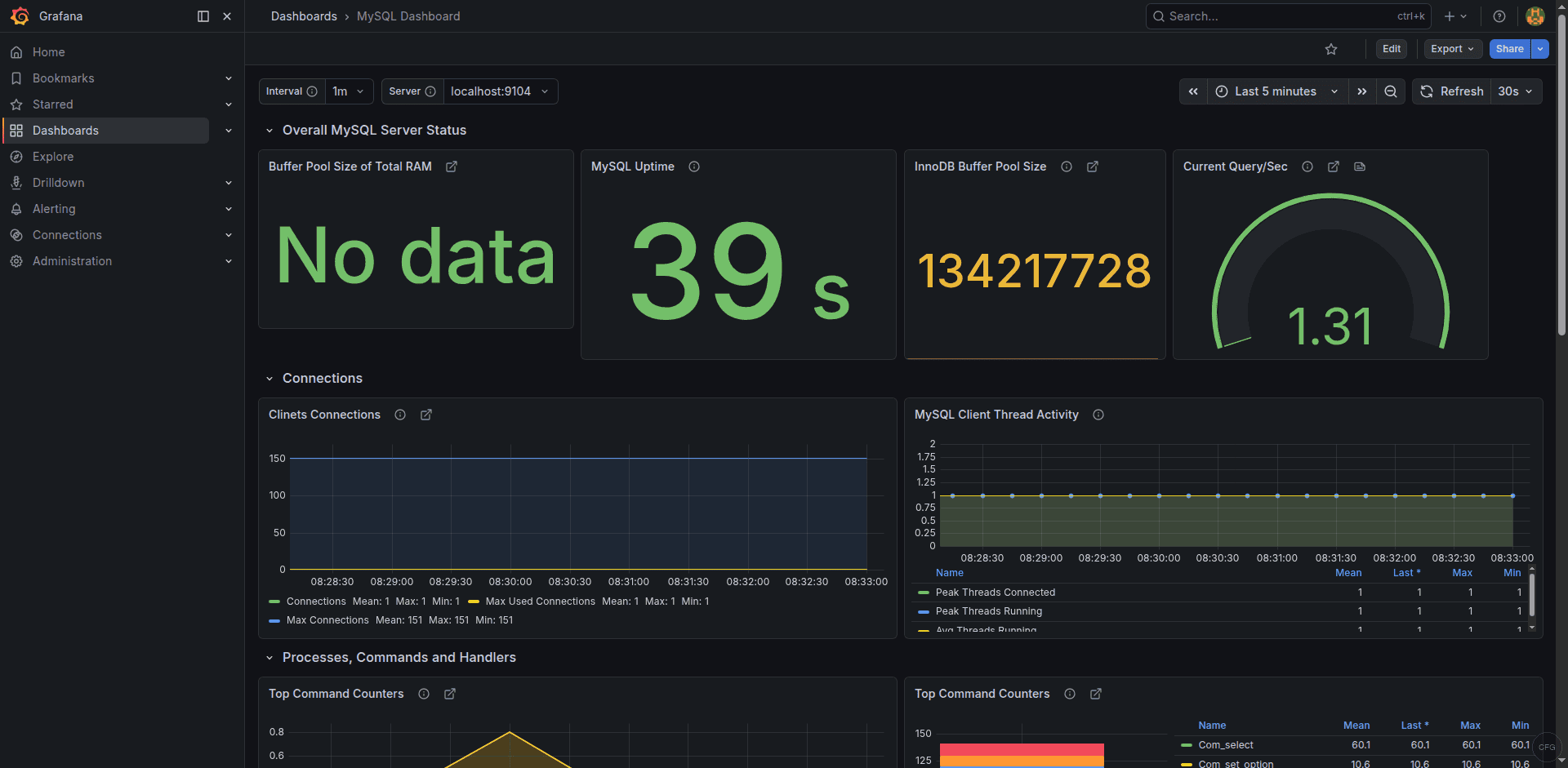
The dashboard displays query rates, connection counts, InnoDB metrics, slow queries, and replication status. You can find it on the Grafana dashboard directory.
MariaDB-Specific Notes
The mysqld_exporter works with both MySQL and MariaDB without any changes. There are a few differences to be aware of:
- The service name is
mariadbon most distros, notmysql– the systemd unit file above already accounts for both - On Rocky/AlmaLinux, MariaDB config files live in
/etc/my.cnf.d/. On Ubuntu/Debian, they’re in/etc/mysql/mariadb.conf.d/ - MariaDB uses
MASTER_USE_GTIDinstead of MySQL’s GTID-based replication, but the exporter handles both transparently - The
mysql_slave_status_seconds_behind_mastermetric name remains the same regardless of whether you use MySQL or MariaDB
Troubleshooting Common Issues
mysql_up shows 0
The exporter cannot connect to MySQL. Verify the credentials file is readable and the password is correct:
sudo -u mysqld_exporter mysql --defaults-file=/etc/mysqld_exporter/.my.cnf -e "SELECT 1"If this fails with “Access denied”, re-check the user and password in /etc/mysqld_exporter/.my.cnf.
Missing replication metrics
Replication metrics only appear on replica servers. If you’re monitoring a standalone or primary server, mysql_slave_status_seconds_behind_master will not exist – this is expected behavior.
SELinux denials on Rocky/AlmaLinux
If the exporter fails to start or connect to the MySQL socket, check for SELinux denials:
sudo ausearch -m avc -ts recentThe exporter connects to MySQL via the TCP socket (127.0.0.1:3306) by default, which usually works without additional SELinux policies. If you need it to connect via the Unix socket, you may need to add a custom SELinux policy.
The Grafana dashboard shows real-time MySQL/MariaDB metrics from the exporter:
Conclusion
With mysqld_exporter feeding metrics into Prometheus and visualized through Grafana dashboard 14031, you have real-time insight into query performance, connection utilization, InnoDB buffer pool efficiency, and replication health. The alert rules cover the most damaging failure scenarios – connection exhaustion, persistent slow queries, and replication drift. Tune the thresholds to match your workload, especially the connection usage percentage which depends heavily on your max_connections setting. Monitoring catches problems early, but you also need reliable backups. See our MariaDB and PostgreSQL backup and point-in-time recovery guide to complement your monitoring setup with a solid backup strategy. The exporter works unchanged against a highly available Galera cluster, where the wsrep status variables appear in the same metrics feed.